
Internet Explorer Compatibility View - Turn On or Off

How to Turn Internet Explorer
Compatibility View On or Off for a Website

   Information
Websites that were designed for earlier versions of Internet Explorer might not display correctly in IE8, IE9, IE10, or IE11. When you turn on Compatibility View, the webpage you're viewing, as well as any other webpages within the website's domain, will be displayed as if you were using an earlier version of Internet Explorer.

This tutorial will show you how to add (turn on) and remove (turn off) websites to be displayed in Compatibility View.

   Note
Not all website display problems are caused by browser incompatibility. Interrupted Internet connections, heavy traffic, or website bugs can also affect how a webpage is displayed.


OPTION ONE

Through the Internet Explorer Address Bar


NOTE: If Internet Explorer recognizes a webpage that is not compatible, you will see the Compatibility View icon button
1925d1230662861-internet-explorer-compatibility-view-turn-off-button.jpg
on the Address bar
.
1. To Turn On Compatibily View for a Website in Internet Explorer
A) Click/tap on the unhighlighted Compatibility View icon button. (See screenshot below)
NOTE: The webpage will now reload with Compatibility View turned on for it, and the website will be added to the list in compatibility view settings (Option Three below).

Icon_Turn_On.jpg
2. To Turn Off Compatibily View for a Website in Internet Explorer
A) Click/tap on the highlighted (blue) Compatibility View icon button. (See screenshot below)
NOTE: The webpage will now reload with Compatibility View turned off for it, and the website will be removed from the list in compatibility view settings (Option Three below).

Icon_Turn_Off.jpg


OPTION TWO

Through the Tools Menu


NOTE: This will let you turn on or off Compatibility View for the current webpage.
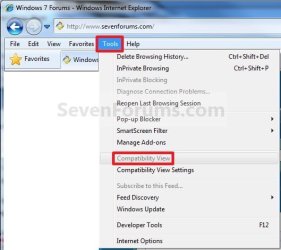
1. Click/tap on the Tools Menu Bar (ALT+T) item. (See screenshot below)
NOTE: If Compatibiliy View is grayed out, then the webpage has no compatibility issues and does not need to have Compatibility View turned on for it. You can still use METHOD THREE below to turn on Compatibility View for it though if you like.
Tool_Menu_1.jpg
A) Go to step 3.
OR

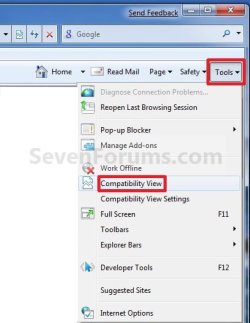
2. Click/tap on the Tools Command Bar button. (See screenshot below)
NOTE: If Compatibiliy View is grayed out, then the webpage has no compatibility issues and does not need to have Compatibility View turned on for it. You can still use METHOD THREE below to turn on Compatibility View for it though if you like.
Tools_Button-1.jpg
3. To Turn On Compatibily View for a Website in Internet Explorer
A) Click/tap on Compatibiliy View to check it. (See screenshots above)
NOTE: The webpage will now reload with Compatibility View turned on for it, and the website will be added to the list in compatibility view settings (Option Three below).
4. To Turn Off Compatibily View for a Website in Internet Explorer
A) Click/tap on Compatibiliy View to uncheck it. (See screenshots above)
NOTE: The webpage will now reload with Compatibility View turned off for it, and the website will be removed from the list in compatibility view settings (Option Three below).


OPTION THREE

Through Compatibily View Settings


NOTE: This will let you turn on or off Compatibility View for a webpage by adding or removing the webpage address from the Compatibility View list.
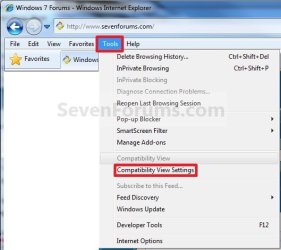
1. Click/tap on the Tools Menu Bar (ALT+T) item, and go to step 3 below. (See screenshot below)
Tool_Menu_2.jpg
OR

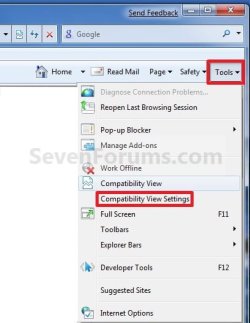
2. Click/tap on the Tools Command Bar button. (See screenshot below)
Tools_Button-2.jpg
3. Click/tap on Compatibility View Settings. (See screenshots above)

4. To Add a Website to the Compatibility View List in Internet Explorer
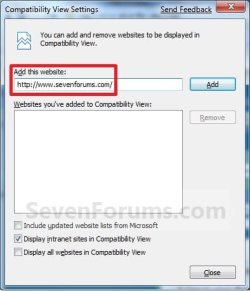
A) Type in the webpage address that you want to turn on Compatibility View for, and click/tap on the Add button. (See screenshot below)
NOTE: The current webpage address will automatically be filled in for you. Just clear it if you want to add a different address instead.
Add.jpg
B) Go to step 6.
5. To Remove a Website from the Compatibility View List in Internet Explorer
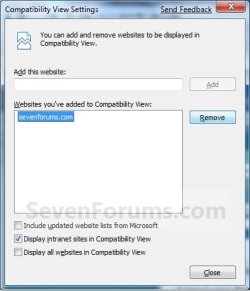
A) Select a listed webpage address that you want to turn off Compatibility View for, and click/tap on the Remove button. (See screenshot below)
Remove.jpg
6. Click/tap on the Close button. (See screenshots above)
That's it,
Shawn


Attachments

  • button.jpg
    button.jpg
    1,002 bytes · Views: 1,315,592
Last edited:
Thanks for another excellent tutorial Shawn. I ran into compatibility issues with a website I visit. At first I didn't know what it was doing, then walla, your tutorial shed light on the issue. Thanks again!
 

My Computer

Computer Manufacturer/Model Number
Dell XPS 420
OS
Windows 7 RC
CPU
Intel Q6600 Quad Core
Motherboard
Dell Proprietary
Memory
4 GB DDR 800
Graphics Card(s)
Nvidia 8800GT
Sound Card
Integrated - Sigmatel HD Audio
Monitor(s) Displays
Dual Dell 22" Wide Screen
Screen Resolution
3360x1050
Hard Drives
320 GB internal
2.5 TB external
PSU
Big Enough
Case
Dell XPS 420
Cooling
Air
Keyboard
Dell USB
Mouse
Wireless MS mouse
Internet Speed
DSL 3MB Down
Other Info
WEI 5.9 (Windows 7 RC), Not too bad for an off the shelf PC :)
You're welcome Joe.
 

My Computer

Computer type
PC/Desktop
Computer Manufacturer/Model Number
Self built custom
OS
64-bit Windows 11 Pro for Workstations
CPU
Intel i7-8700K OC'd to 5 GHz
Motherboard
ASUS ROG Maximus XI Formula Z390
Memory
64 GB (4x16GB) G.SKILL TridentZ RGB DDR4 3600 MHz
Graphics Card(s)
ASUS ROG-STRIX-GTX1080TI-O11G-GAMING
Sound Card
Integrated
Monitor(s) Displays
2 x Samsung Odyssey G7 27"
Screen Resolution
2560x1440
Hard Drives
1TB Samsung 990 PRO M.2,
4TB Samsung 990 PRO PRO M.2,
TerraMaster F8 SSD Plus NAS
PSU
Seasonic Prime Titanium 850W
Case
Thermaltake Core P3
Cooling
Corsair Hydro H115i
Keyboard
Logitech wireless K800
Mouse
Logitech MX Master 4
Internet Speed
2 Gb/s Download and 100 Mb/s Upload
Antivirus
Malwarebyte Anti-Malware Premium
Browser
Google Chrome
Other Info
Logitech Z625 speaker system,
Logitech BRIO 4K Pro webcam,
HP Color LaserJet Pro MFP M477fdn,
APC SMART-UPS RT 1000 XL - SURT1000XLI,
Galaxy S23 Plus phone
That was well worth the read Shawn, thanks again for the Tutorial

Norm
 

My Computer

Computer Manufacturer/Model Number
Self Built
OS
Vista X32. Windows 7 32bit
CPU
Intel Quad Core 6600
Motherboard
Asus P5B
Memory
4096 MB Xtreme-Dark 800mhz
Graphics Card(s)
Zotac Amp Edition 8800GT - 512MB DDR3, O/C 700mhz
Monitor(s) Displays
Samsung 206BW
Screen Resolution
1680 X 1024
Hard Drives
4 X Samsung 500GB 7200rpm Serial ATA-II HDD w. 16MB Cache .
PSU
550 w
Case
Thermaltake
Cooling
3 x octua NF-S12-1200 - 120mm 1200RPM Sound Optimised Fans
Keyboard
Microsoft
Mouse
Targus
Internet Speed
1500kbs
You're welcome Norm. Thank you.
 

My Computer

Computer type
PC/Desktop
Computer Manufacturer/Model Number
Self built custom
OS
64-bit Windows 11 Pro for Workstations
CPU
Intel i7-8700K OC'd to 5 GHz
Motherboard
ASUS ROG Maximus XI Formula Z390
Memory
64 GB (4x16GB) G.SKILL TridentZ RGB DDR4 3600 MHz
Graphics Card(s)
ASUS ROG-STRIX-GTX1080TI-O11G-GAMING
Sound Card
Integrated
Monitor(s) Displays
2 x Samsung Odyssey G7 27"
Screen Resolution
2560x1440
Hard Drives
1TB Samsung 990 PRO M.2,
4TB Samsung 990 PRO PRO M.2,
TerraMaster F8 SSD Plus NAS
PSU
Seasonic Prime Titanium 850W
Case
Thermaltake Core P3
Cooling
Corsair Hydro H115i
Keyboard
Logitech wireless K800
Mouse
Logitech MX Master 4
Internet Speed
2 Gb/s Download and 100 Mb/s Upload
Antivirus
Malwarebyte Anti-Malware Premium
Browser
Google Chrome
Other Info
Logitech Z625 speaker system,
Logitech BRIO 4K Pro webcam,
HP Color LaserJet Pro MFP M477fdn,
APC SMART-UPS RT 1000 XL - SURT1000XLI,
Galaxy S23 Plus phone
Thanks Shawn. Great job.

Gary
 

My Computer

Computer Manufacturer/Model Number
Dell XPS420
OS
Vista Ult 64 bit Seven Ult RTM x64
CPU
Intel Core2 Quad Q6600 2.40 gigahertz
Memory
Crucial Ballistix 4x2GB PC2 6400
Graphics Card(s)
NVIDIA GeForce 8600 GTS 256 MB
Sound Card
Creative SB X-Fi audio
Monitor(s) Displays
HP w2207 + HPvs15
Screen Resolution
1680x1050 + 1024x768
Hard Drives
2-WD5000AAKS-500 GB
WD5000AAV-500 GB external
Keyboard
Microsoft Comfort Curve
Mouse
MX Revolution
Other Info
Wacom Intuos 2 Graphics Tablet
Experience Index=5.5
You're welcome Gary.
 

My Computer

Computer type
PC/Desktop
Computer Manufacturer/Model Number
Self built custom
OS
64-bit Windows 11 Pro for Workstations
CPU
Intel i7-8700K OC'd to 5 GHz
Motherboard
ASUS ROG Maximus XI Formula Z390
Memory
64 GB (4x16GB) G.SKILL TridentZ RGB DDR4 3600 MHz
Graphics Card(s)
ASUS ROG-STRIX-GTX1080TI-O11G-GAMING
Sound Card
Integrated
Monitor(s) Displays
2 x Samsung Odyssey G7 27"
Screen Resolution
2560x1440
Hard Drives
1TB Samsung 990 PRO M.2,
4TB Samsung 990 PRO PRO M.2,
TerraMaster F8 SSD Plus NAS
PSU
Seasonic Prime Titanium 850W
Case
Thermaltake Core P3
Cooling
Corsair Hydro H115i
Keyboard
Logitech wireless K800
Mouse
Logitech MX Master 4
Internet Speed
2 Gb/s Download and 100 Mb/s Upload
Antivirus
Malwarebyte Anti-Malware Premium
Browser
Google Chrome
Other Info
Logitech Z625 speaker system,
Logitech BRIO 4K Pro webcam,
HP Color LaserJet Pro MFP M477fdn,
APC SMART-UPS RT 1000 XL - SURT1000XLI,
Galaxy S23 Plus phone
Hi Brink, thank for the tutor.

I wonder if I can turn on Compatibility View for all sites by default? I'm using Windows 7 x64 SP1 and I got IE 9 installed.

Thanks!
 

My Computer

Computer Manufacturer/Model Number
Intel
OS
Windows 7 Ultimate x64 SP1
CPU
Intel Core 2 Duo
Motherboard
ASUS
Memory
4 GB
Graphics Card(s)
GeForce
Sound Card
Logitek
Monitor(s) Displays
Samsung 22'
Screen Resolution
1920x1200
Hard Drives
Seagate 1 TB
PSU
Orient
Case
Orient
Cooling
Orient
Keyboard
Mitsumi
Mouse
Logitek
Internet Speed
3056 Mbps/1024 MBps

My Computer

Computer type
PC/Desktop
Computer Manufacturer/Model Number
Self built custom
OS
64-bit Windows 11 Pro for Workstations
CPU
Intel i7-8700K OC'd to 5 GHz
Motherboard
ASUS ROG Maximus XI Formula Z390
Memory
64 GB (4x16GB) G.SKILL TridentZ RGB DDR4 3600 MHz
Graphics Card(s)
ASUS ROG-STRIX-GTX1080TI-O11G-GAMING
Sound Card
Integrated
Monitor(s) Displays
2 x Samsung Odyssey G7 27"
Screen Resolution
2560x1440
Hard Drives
1TB Samsung 990 PRO M.2,
4TB Samsung 990 PRO PRO M.2,
TerraMaster F8 SSD Plus NAS
PSU
Seasonic Prime Titanium 850W
Case
Thermaltake Core P3
Cooling
Corsair Hydro H115i
Keyboard
Logitech wireless K800
Mouse
Logitech MX Master 4
Internet Speed
2 Gb/s Download and 100 Mb/s Upload
Antivirus
Malwarebyte Anti-Malware Premium
Browser
Google Chrome
Other Info
Logitech Z625 speaker system,
Logitech BRIO 4K Pro webcam,
HP Color LaserJet Pro MFP M477fdn,
APC SMART-UPS RT 1000 XL - SURT1000XLI,
Galaxy S23 Plus phone
You're most welcome Abhinav, and welcome to Seven Forums. :)
 

My Computer

Computer type
PC/Desktop
Computer Manufacturer/Model Number
Self built custom
OS
64-bit Windows 11 Pro for Workstations
CPU
Intel i7-8700K OC'd to 5 GHz
Motherboard
ASUS ROG Maximus XI Formula Z390
Memory
64 GB (4x16GB) G.SKILL TridentZ RGB DDR4 3600 MHz
Graphics Card(s)
ASUS ROG-STRIX-GTX1080TI-O11G-GAMING
Sound Card
Integrated
Monitor(s) Displays
2 x Samsung Odyssey G7 27"
Screen Resolution
2560x1440
Hard Drives
1TB Samsung 990 PRO M.2,
4TB Samsung 990 PRO PRO M.2,
TerraMaster F8 SSD Plus NAS
PSU
Seasonic Prime Titanium 850W
Case
Thermaltake Core P3
Cooling
Corsair Hydro H115i
Keyboard
Logitech wireless K800
Mouse
Logitech MX Master 4
Internet Speed
2 Gb/s Download and 100 Mb/s Upload
Antivirus
Malwarebyte Anti-Malware Premium
Browser
Google Chrome
Other Info
Logitech Z625 speaker system,
Logitech BRIO 4K Pro webcam,
HP Color LaserJet Pro MFP M477fdn,
APC SMART-UPS RT 1000 XL - SURT1000XLI,
Galaxy S23 Plus phone
Compatibility Mode Unavailable?

Is there a function that will turn off the Compatibility View option? The icon is not showing up next to the address bar, and the Compatibility View and Compatibility View Settings options are not available under the Tools menu. Is it possible to turn those off in the IE Options or the registry somewhere?

Windows XP running IE 7.

(To clarify, I'm asking if there is a way to do that so I can undo it, I need to enter compatibility mode and can't figure out how.)


Thank you.
 

My Computer

OS
Windows XP
Hello RPV11, and welcome to Seven Forums.

The Compatibility View setting in this tutorial was introduced in IE8, and is also available in IE9 and the future IE10 when released.

It is not available in your current IE7. I would recommend to install your Windows Updates to upgrade to the latest version of IE.

Hope this helps,
Shawn
 

My Computer

Computer type
PC/Desktop
Computer Manufacturer/Model Number
Self built custom
OS
64-bit Windows 11 Pro for Workstations
CPU
Intel i7-8700K OC'd to 5 GHz
Motherboard
ASUS ROG Maximus XI Formula Z390
Memory
64 GB (4x16GB) G.SKILL TridentZ RGB DDR4 3600 MHz
Graphics Card(s)
ASUS ROG-STRIX-GTX1080TI-O11G-GAMING
Sound Card
Integrated
Monitor(s) Displays
2 x Samsung Odyssey G7 27"
Screen Resolution
2560x1440
Hard Drives
1TB Samsung 990 PRO M.2,
4TB Samsung 990 PRO PRO M.2,
TerraMaster F8 SSD Plus NAS
PSU
Seasonic Prime Titanium 850W
Case
Thermaltake Core P3
Cooling
Corsair Hydro H115i
Keyboard
Logitech wireless K800
Mouse
Logitech MX Master 4
Internet Speed
2 Gb/s Download and 100 Mb/s Upload
Antivirus
Malwarebyte Anti-Malware Premium
Browser
Google Chrome
Other Info
Logitech Z625 speaker system,
Logitech BRIO 4K Pro webcam,
HP Color LaserJet Pro MFP M477fdn,
APC SMART-UPS RT 1000 XL - SURT1000XLI,
Galaxy S23 Plus phone
Compatibility View Button Disappeared

Hi.

Excellent tutorial on switching IE9 Compatibility View On/Off. However, I have a different problem, and I cannot find a way to solve it.

I think I clicked my Compatibility View button off. Now I cannot find a way to redisplay it next to the Refresh button.

Does anyone know what I have to do to turn it On again?

Kind regards,
RetiredEngineer
 
Last edited:

My Computer

Computer type
PC/Desktop
Computer Manufacturer/Model Number
HP Pavilion p6210y Desktop PC
OS
Wndows 7 Home Premium 64-bit
Hello Retired Engineer,

No worries. You didn't do anything that broke it.

The compatibility view button will only display if IE detects an issue on the webpage that compatibility view may help with.

Otherwise, you will still be able to manually add and remove a webpage to the compatibility view list using Option Two or Option Three.

Hope this helps, :)
Shawn
 

My Computer

Computer type
PC/Desktop
Computer Manufacturer/Model Number
Self built custom
OS
64-bit Windows 11 Pro for Workstations
CPU
Intel i7-8700K OC'd to 5 GHz
Motherboard
ASUS ROG Maximus XI Formula Z390
Memory
64 GB (4x16GB) G.SKILL TridentZ RGB DDR4 3600 MHz
Graphics Card(s)
ASUS ROG-STRIX-GTX1080TI-O11G-GAMING
Sound Card
Integrated
Monitor(s) Displays
2 x Samsung Odyssey G7 27"
Screen Resolution
2560x1440
Hard Drives
1TB Samsung 990 PRO M.2,
4TB Samsung 990 PRO PRO M.2,
TerraMaster F8 SSD Plus NAS
PSU
Seasonic Prime Titanium 850W
Case
Thermaltake Core P3
Cooling
Corsair Hydro H115i
Keyboard
Logitech wireless K800
Mouse
Logitech MX Master 4
Internet Speed
2 Gb/s Download and 100 Mb/s Upload
Antivirus
Malwarebyte Anti-Malware Premium
Browser
Google Chrome
Other Info
Logitech Z625 speaker system,
Logitech BRIO 4K Pro webcam,
HP Color LaserJet Pro MFP M477fdn,
APC SMART-UPS RT 1000 XL - SURT1000XLI,
Galaxy S23 Plus phone
Hi,

I was wondering if someone were to turn off the CV through the Developer Tools (F12) and change the browser mode, whether this would prevent websites on the Compatibility list from being shown in CV?

Or would the feature continue to operate as normal and override this change?

I am developing a site that needs the CV off in order for all components to work properly and am looking for the best way to instruct users to turn off CV whilst on the affected pages and how they can then continue to have the feature working after that.

Thanks in advance.
 

My Computer

Computer type
PC/Desktop
OS
Windows 7 32 bit
Hello Anpotter, and welcome to Seven Forums. :)

By default IE CV is already turned off for websites unless the site is added to the CV list.
 

My Computer

Computer type
PC/Desktop
Computer Manufacturer/Model Number
Self built custom
OS
64-bit Windows 11 Pro for Workstations
CPU
Intel i7-8700K OC'd to 5 GHz
Motherboard
ASUS ROG Maximus XI Formula Z390
Memory
64 GB (4x16GB) G.SKILL TridentZ RGB DDR4 3600 MHz
Graphics Card(s)
ASUS ROG-STRIX-GTX1080TI-O11G-GAMING
Sound Card
Integrated
Monitor(s) Displays
2 x Samsung Odyssey G7 27"
Screen Resolution
2560x1440
Hard Drives
1TB Samsung 990 PRO M.2,
4TB Samsung 990 PRO PRO M.2,
TerraMaster F8 SSD Plus NAS
PSU
Seasonic Prime Titanium 850W
Case
Thermaltake Core P3
Cooling
Corsair Hydro H115i
Keyboard
Logitech wireless K800
Mouse
Logitech MX Master 4
Internet Speed
2 Gb/s Download and 100 Mb/s Upload
Antivirus
Malwarebyte Anti-Malware Premium
Browser
Google Chrome
Other Info
Logitech Z625 speaker system,
Logitech BRIO 4K Pro webcam,
HP Color LaserJet Pro MFP M477fdn,
APC SMART-UPS RT 1000 XL - SURT1000XLI,
Galaxy S23 Plus phone
Hi Shawn,

Thanks for your reply.

Does this mean that if I go onto a website which on the list (hence viewing it in CV), and then revert to view it normal IE view, proceeding on that browser window to another website which is on the list will mean it automatically goes back to CV [if that is clear]?
 

My Computer

Computer type
PC/Desktop
OS
Windows 7 32 bit
That's correct. :)

Only the websites added to the IE CV list will automatically be viewed with CV turned on the next time you visit them.

If you turn off CV for a website using Option One or Option Two, it will also remove the website from the IE CV list.
 

My Computer

Computer type
PC/Desktop
Computer Manufacturer/Model Number
Self built custom
OS
64-bit Windows 11 Pro for Workstations
CPU
Intel i7-8700K OC'd to 5 GHz
Motherboard
ASUS ROG Maximus XI Formula Z390
Memory
64 GB (4x16GB) G.SKILL TridentZ RGB DDR4 3600 MHz
Graphics Card(s)
ASUS ROG-STRIX-GTX1080TI-O11G-GAMING
Sound Card
Integrated
Monitor(s) Displays
2 x Samsung Odyssey G7 27"
Screen Resolution
2560x1440
Hard Drives
1TB Samsung 990 PRO M.2,
4TB Samsung 990 PRO PRO M.2,
TerraMaster F8 SSD Plus NAS
PSU
Seasonic Prime Titanium 850W
Case
Thermaltake Core P3
Cooling
Corsair Hydro H115i
Keyboard
Logitech wireless K800
Mouse
Logitech MX Master 4
Internet Speed
2 Gb/s Download and 100 Mb/s Upload
Antivirus
Malwarebyte Anti-Malware Premium
Browser
Google Chrome
Other Info
Logitech Z625 speaker system,
Logitech BRIO 4K Pro webcam,
HP Color LaserJet Pro MFP M477fdn,
APC SMART-UPS RT 1000 XL - SURT1000XLI,
Galaxy S23 Plus phone
Google Plus seems to hate Compatability view.
Is there any way to disable the function altogether?
Turning it on and off does not seem to affect the fact that we get a red bar on Google Plus in some software that uses IE as the 'inbuilt' browser.
The Red Bar implies that 'You have enabled iIE Compatibility View. Google + works best when it's turned off.'
The fact is that I have never enabled it for any site. I need to disable it
Any relevant Registry Keys?
 

My Computer

OS
Windows 7 Home Premium x64
Back
Top