
Start Menu User Folder Buttons - Open to Users Instead of Libraries

How to Make Windows 7 Start Menu User Folder Buttons Open to Users Instead of Libraries Location

   Information
This will show you how to make the Windows 7 Start Menu My Documents, Pictures, Music, and Videos buttons open to the real C:\Users\(user-name) location instead of the default Libraries location for all users.

You must be logged in as an administrator to be able to do the steps in this tutorial.

   Note
Credit belongs to our member Foe for this.


EXAMPLE: Start Menu User Folder Buttons
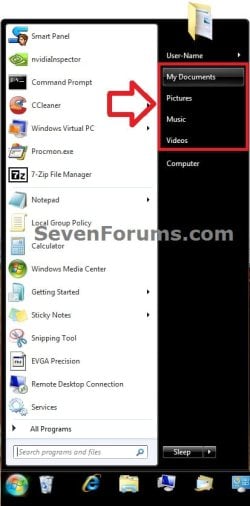
Start_Menu.jpg


OPTION ONE

Set Start Menu User Folder Buttons to Open to "Users" Location


1. Set Start Menu Documents Button to Open to Users Location
A) Click on the Download button below to download the file below.
Start_Menu_My_Documents_Open_to_Users.reg

Download


2. Set Start Menu Music Button to Open to Users Location
A) Click on the Download button below to download the file below.
Start_Menu_Music_Open_to_Users.reg

Download


3. Set Start Menu Pictures Button to Open to Users Location
A) Click on the Download button below to download the file below.
Start_Menu_Pictures_Open_to_Users.reg

Download


4. Set Start Menu Recorded TV Button to Open to Public Location
NOTE: Special thanks to Foe for this addition. :)
A) Click on the Download button below to download the file below.
Start_Menu_Recored_TV_Open_to_Public.bat

Download


5. Set Start Menu Videos Button to Open to Users Location
A) Click on the Download button below to download the file below.
Start_Menu_Videos_Open_to_Users.reg

Download


6. Save the .reg or. bat file to the desktop.

7. Double click on the downloaded .reg or .bat file.

8. Click on Run, Yes (UAC), Yes, and OK when prompted.

9. Log off and log on, or restart the computer to apply.

10. When done, you can delete the downloaded .reg file if you like.


OPTION TWO

Set Start Menu User Folder Buttons to Open to Default "Libraries" Location


1. Set Start Menu Documents Button back to Open to Default Libraries Location
A) Click on the Download button below to download the file below.
Default_Start_Menu_My_Documents_Open_to_Library.reg

Download


2. Set Start Menu Music Button back to Open to Default Libraries Location
A) Click on the Download button below to download the file below.
Default_Start_Menu_Music_Open_to_Library.reg

Download


3. Set Start Menu Pictures Button back to Open to Default Libraries Location
A) Click on the Download button below to download the file below.
Default_Start_Menu_Pictures_Open_to_Library.reg

Download


4. Set Start Menu Recorded TV Button back to Open to Default Public Libraries Location
NOTE: Special thanks to Foe for this addition. :)
A) Click on the Download button below to download the file below.
Start_Menu_Recored_TV_Open_to_Public_Library.reg

Download


5. Set Start Menu Videos Button back to Open to Default Libraries Location
A) Click on the Download button below to download the file below.
Default_Start_Menu_Videos_Open_to_Library.reg

Download


6. Save the .reg file to the desktop.

7. Double click on the downloaded .reg file.

8. Click on Run, Yes (UAC), Yes, and OK when prompted.

9. Log off and log on, or restart the computer to apply.

10. When done, you can delete the downloaded .reg file if you like.
That's it,
Shawn


Attachments

Last edited:
Can you post the regedit(s) for the Recorded TV library to Set Start Menu User Folder Buttons to Open to Users Location? This would definitely solve a lot of problems for people wishing to add another folder link to the right side of the start menu, as well as those who don't want to use libraries.

Thanks.
 

My Computer

OS
Windows 7
Hello Henstew, and welcome to Seven Forums.

The Recorded TV Library is only visible in Explorer after a user has configured a TV Tuner from within Media Center. I only have it opening to the C:\Users\Public\Libraries location by default since I do not have one. :(
 
Last edited:

My Computer

Computer type
PC/Desktop
Computer Manufacturer/Model Number
Self built custom
OS
64-bit Windows 11 Pro for Workstations
CPU
Intel i7-8700K OC'd to 5 GHz
Motherboard
ASUS ROG Maximus XI Formula Z390
Memory
64 GB (4x16GB) G.SKILL TridentZ RGB DDR4 3600 MHz
Graphics Card(s)
ASUS ROG-STRIX-GTX1080TI-O11G-GAMING
Sound Card
Integrated
Monitor(s) Displays
2 x Samsung Odyssey G7 27"
Screen Resolution
2560x1440
Hard Drives
1TB Samsung 990 PRO M.2,
4TB Samsung 990 PRO PRO M.2,
TerraMaster F8 SSD Plus NAS
PSU
Seasonic Prime Titanium 850W
Case
Thermaltake Core P3
Cooling
Corsair Hydro H115i
Keyboard
Logitech wireless K800
Mouse
Logitech MX Master 4
Internet Speed
2 Gb/s Download and 100 Mb/s Upload
Antivirus
Malwarebyte Anti-Malware Premium
Browser
Google Chrome
Other Info
Logitech Z625 speaker system,
Logitech BRIO 4K Pro webcam,
HP Color LaserJet Pro MFP M477fdn,
APC SMART-UPS RT 1000 XL - SURT1000XLI,
Galaxy S23 Plus phone
Hey guys, new here, but I've been looking for something like this ever since I got Windows 7. This is unbelievably perfect - but for some reason very hard to find!

Just wondering, how do you get those HEX values (or whatever they are) for the folder names? I actually want to redirect the buttons to different locations, for example to E:\My Documents and E:\My Documents\My Pictures etc. Do you know how I can convert those folder names to the corresponding HEX values?

Thanks in advance :)
 

My Computer

OS
Windows 7 Professional x64
CPU
Core i7 930
Motherboard
Gigabyte UD3R REV 2.0
Memory
OCZ Platinum 6GB DDR3 1800
Graphics Card(s)
GeForce GTX 460
Monitor(s) Displays
BenQ G2420HD
Hard Drives
Samsung Spinpoint F3 1TB
WD Green Power 2TB
PSU
Corsair HX-650
Case
Thermaltake Element G
Cooling
Xigmatek SD1283 Balder
I didn't even know it was possible to change all of this. Thanks though m8.

Gamer
 

My Computer

Computer type
PC/Desktop
Computer Manufacturer/Model Number
Custom
OS
Windows 8.1 Pro x64
CPU
Intel Core i5-4570 CPU @ 3.20GHz
Motherboard
Gigabyte Z87-D3HP-CF
Memory
8GB DDR3-1596 - Dual Channel
Graphics Card(s)
NVIDIA GeForce GTX 750 Ti SC
Sound Card
Onboard
Monitor(s) Displays
Samsung
Screen Resolution
1920x1080
Hard Drives
SSD - 120GB
Second - 1TB
Antivirus
MSE
Browser
Chrome
You're most welcome Gamer. :)
 

My Computer

Computer type
PC/Desktop
Computer Manufacturer/Model Number
Self built custom
OS
64-bit Windows 11 Pro for Workstations
CPU
Intel i7-8700K OC'd to 5 GHz
Motherboard
ASUS ROG Maximus XI Formula Z390
Memory
64 GB (4x16GB) G.SKILL TridentZ RGB DDR4 3600 MHz
Graphics Card(s)
ASUS ROG-STRIX-GTX1080TI-O11G-GAMING
Sound Card
Integrated
Monitor(s) Displays
2 x Samsung Odyssey G7 27"
Screen Resolution
2560x1440
Hard Drives
1TB Samsung 990 PRO M.2,
4TB Samsung 990 PRO PRO M.2,
TerraMaster F8 SSD Plus NAS
PSU
Seasonic Prime Titanium 850W
Case
Thermaltake Core P3
Cooling
Corsair Hydro H115i
Keyboard
Logitech wireless K800
Mouse
Logitech MX Master 4
Internet Speed
2 Gb/s Download and 100 Mb/s Upload
Antivirus
Malwarebyte Anti-Malware Premium
Browser
Google Chrome
Other Info
Logitech Z625 speaker system,
Logitech BRIO 4K Pro webcam,
HP Color LaserJet Pro MFP M477fdn,
APC SMART-UPS RT 1000 XL - SURT1000XLI,
Galaxy S23 Plus phone
Hey guys, new here, but I've been looking for something like this ever since I got Windows 7. This is unbelievably perfect - but for some reason very hard to find!

Just wondering, how do you get those HEX values (or whatever they are) for the folder names? I actually want to redirect the buttons to different locations, for example to E:\My Documents and E:\My Documents\My Pictures etc. Do you know how I can convert those folder names to the corresponding HEX values?

Thanks in advance :)

Hello Levymetal, and welcome to Seven Forums.

The CLSID numbers will point them to whatever default location that you have the user folders set to. This way you can just move the user folders to the new location (ex: E: drive) using the tutorial below, and they will automatically point there from the Start Menu as well.

http://www.sevenforums.com/tutorials/18629-user-folders-change-default-location.html

Hope this helps,
Shawn
 

My Computer

Computer type
PC/Desktop
Computer Manufacturer/Model Number
Self built custom
OS
64-bit Windows 11 Pro for Workstations
CPU
Intel i7-8700K OC'd to 5 GHz
Motherboard
ASUS ROG Maximus XI Formula Z390
Memory
64 GB (4x16GB) G.SKILL TridentZ RGB DDR4 3600 MHz
Graphics Card(s)
ASUS ROG-STRIX-GTX1080TI-O11G-GAMING
Sound Card
Integrated
Monitor(s) Displays
2 x Samsung Odyssey G7 27"
Screen Resolution
2560x1440
Hard Drives
1TB Samsung 990 PRO M.2,
4TB Samsung 990 PRO PRO M.2,
TerraMaster F8 SSD Plus NAS
PSU
Seasonic Prime Titanium 850W
Case
Thermaltake Core P3
Cooling
Corsair Hydro H115i
Keyboard
Logitech wireless K800
Mouse
Logitech MX Master 4
Internet Speed
2 Gb/s Download and 100 Mb/s Upload
Antivirus
Malwarebyte Anti-Malware Premium
Browser
Google Chrome
Other Info
Logitech Z625 speaker system,
Logitech BRIO 4K Pro webcam,
HP Color LaserJet Pro MFP M477fdn,
APC SMART-UPS RT 1000 XL - SURT1000XLI,
Galaxy S23 Plus phone
Ah ok, that's awesome, I didn't realise it would do that (I already have my folders set up that way). Thanks!

Just one thing though, when I now click the link from the start menu, it takes me to "Christian > My Documents". But if I open the folder from it's direct location, it takes me to "Computer > Local Disk (E:) > My Documents". The strange thing about this is that when I click on the address bar and the text changes to the physical location, in both of these cases, the text changes to "E:\My Documents", so it's the same folder. It's still much better than libraries, but Windows keeps separate view / sort types for each location (even though they are the same folder?), so say for example I open my docs through the start menu and change the view to large icons, if I open the folder manually through my E drive the view won't have changed. It's a minor thing, but I like things to be consistent :p.

Do you know if there's any way to actually force the start menu link to open "Computer > Local Disk (E:) > My Documents" instead of "Christian > My Documents"?

Thanks for the help, I really appreciate it.
 

My Computer

OS
Windows 7 Professional x64
CPU
Core i7 930
Motherboard
Gigabyte UD3R REV 2.0
Memory
OCZ Platinum 6GB DDR3 1800
Graphics Card(s)
GeForce GTX 460
Monitor(s) Displays
BenQ G2420HD
Hard Drives
Samsung Spinpoint F3 1TB
WD Green Power 2TB
PSU
Corsair HX-650
Case
Thermaltake Element G
Cooling
Xigmatek SD1283 Balder

My Computer

Computer type
PC/Desktop
Computer Manufacturer/Model Number
Self built custom
OS
64-bit Windows 11 Pro for Workstations
CPU
Intel i7-8700K OC'd to 5 GHz
Motherboard
ASUS ROG Maximus XI Formula Z390
Memory
64 GB (4x16GB) G.SKILL TridentZ RGB DDR4 3600 MHz
Graphics Card(s)
ASUS ROG-STRIX-GTX1080TI-O11G-GAMING
Sound Card
Integrated
Monitor(s) Displays
2 x Samsung Odyssey G7 27"
Screen Resolution
2560x1440
Hard Drives
1TB Samsung 990 PRO M.2,
4TB Samsung 990 PRO PRO M.2,
TerraMaster F8 SSD Plus NAS
PSU
Seasonic Prime Titanium 850W
Case
Thermaltake Core P3
Cooling
Corsair Hydro H115i
Keyboard
Logitech wireless K800
Mouse
Logitech MX Master 4
Internet Speed
2 Gb/s Download and 100 Mb/s Upload
Antivirus
Malwarebyte Anti-Malware Premium
Browser
Google Chrome
Other Info
Logitech Z625 speaker system,
Logitech BRIO 4K Pro webcam,
HP Color LaserJet Pro MFP M477fdn,
APC SMART-UPS RT 1000 XL - SURT1000XLI,
Galaxy S23 Plus phone
Yeah the folders are mapped like this:

foldermapping.png


The start menu shortcuts are opening the correct folders, but for some reason they just say "Christian > [folder]" in the address bar rather than "Computer > Local Disk (E) > [folder]", and Windows is storing different view/sort settings for each.
 

My Computer

OS
Windows 7 Professional x64
CPU
Core i7 930
Motherboard
Gigabyte UD3R REV 2.0
Memory
OCZ Platinum 6GB DDR3 1800
Graphics Card(s)
GeForce GTX 460
Monitor(s) Displays
BenQ G2420HD
Hard Drives
Samsung Spinpoint F3 1TB
WD Green Power 2TB
PSU
Corsair HX-650
Case
Thermaltake Element G
Cooling
Xigmatek SD1283 Balder
That would be normal for the Start Menu if they are mapped to the CLSID #. It acts the same as %USERPROFILE%\(user folder) instead of the full path.
 

My Computer

Computer type
PC/Desktop
Computer Manufacturer/Model Number
Self built custom
OS
64-bit Windows 11 Pro for Workstations
CPU
Intel i7-8700K OC'd to 5 GHz
Motherboard
ASUS ROG Maximus XI Formula Z390
Memory
64 GB (4x16GB) G.SKILL TridentZ RGB DDR4 3600 MHz
Graphics Card(s)
ASUS ROG-STRIX-GTX1080TI-O11G-GAMING
Sound Card
Integrated
Monitor(s) Displays
2 x Samsung Odyssey G7 27"
Screen Resolution
2560x1440
Hard Drives
1TB Samsung 990 PRO M.2,
4TB Samsung 990 PRO PRO M.2,
TerraMaster F8 SSD Plus NAS
PSU
Seasonic Prime Titanium 850W
Case
Thermaltake Core P3
Cooling
Corsair Hydro H115i
Keyboard
Logitech wireless K800
Mouse
Logitech MX Master 4
Internet Speed
2 Gb/s Download and 100 Mb/s Upload
Antivirus
Malwarebyte Anti-Malware Premium
Browser
Google Chrome
Other Info
Logitech Z625 speaker system,
Logitech BRIO 4K Pro webcam,
HP Color LaserJet Pro MFP M477fdn,
APC SMART-UPS RT 1000 XL - SURT1000XLI,
Galaxy S23 Plus phone
Great Tutorial & thanks for the .reg
Jerry
 

My Computer

Computer type
Laptop
Computer Manufacturer/Model Number
Sager NP9170
OS
Win 7 Pro x64 / Win 10 Pro
CPU
Intel(R) Core(TM) i7-3630QM CPU @ 2.40GHz
Motherboard
CLEVO P170EM
Memory
12 GB
Graphics Card(s)
(1) Intel(R) HD Graphics 4000 (2) NVIDIA GeForce GTX 675M
Sound Card
(1) Realtek High Definition Audio (2) Intel(R) Display Aud
Monitor(s) Displays
17.3
Screen Resolution
1920x1080
Hard Drives
(1) Samsung 860 EVO 500GB(OS) (1) Samsung 860 EVO 500GB(Data)
Keyboard
Backlite
Antivirus
MSE, Malwarebytes Pro
Browser
Firefox
Other Info
DESKTOP: Custom-built.
OS: Win 10 Pro x64.
CASE: Rosewill R5.
CPU: Intel I5 4670K CPU @ 3.40GHz.
CPU COOLER: Cool Master Hyper 212 EVO.
MOTHERBOARD: Asus Z87-A.
MEMORY: Kingston HyperX 2x4 GB.
GPU: Nvidia Geforce 650 TI.
PSU: Corsair TX750.
DRIVES: (1) Samsung 840 120 GB SSD (2) Western Digital blue 500 GB 7200 RPM.
You're most welcome Jerry. Thank you. :)
 

My Computer

Computer type
PC/Desktop
Computer Manufacturer/Model Number
Self built custom
OS
64-bit Windows 11 Pro for Workstations
CPU
Intel i7-8700K OC'd to 5 GHz
Motherboard
ASUS ROG Maximus XI Formula Z390
Memory
64 GB (4x16GB) G.SKILL TridentZ RGB DDR4 3600 MHz
Graphics Card(s)
ASUS ROG-STRIX-GTX1080TI-O11G-GAMING
Sound Card
Integrated
Monitor(s) Displays
2 x Samsung Odyssey G7 27"
Screen Resolution
2560x1440
Hard Drives
1TB Samsung 990 PRO M.2,
4TB Samsung 990 PRO PRO M.2,
TerraMaster F8 SSD Plus NAS
PSU
Seasonic Prime Titanium 850W
Case
Thermaltake Core P3
Cooling
Corsair Hydro H115i
Keyboard
Logitech wireless K800
Mouse
Logitech MX Master 4
Internet Speed
2 Gb/s Download and 100 Mb/s Upload
Antivirus
Malwarebyte Anti-Malware Premium
Browser
Google Chrome
Other Info
Logitech Z625 speaker system,
Logitech BRIO 4K Pro webcam,
HP Color LaserJet Pro MFP M477fdn,
APC SMART-UPS RT 1000 XL - SURT1000XLI,
Galaxy S23 Plus phone
Can you post the regedit(s) for the Recorded TV library to Set Start Menu User Folder Buttons to Open to Users Location? This would definitely solve a lot of problems for people wishing to add another folder link to the right side of the start menu, as well as those who don't want to use libraries.

Thanks.
I realise it might be a bit late... I ran XP for a while...

Hello Henstew, and welcome to Seven Forums.

The Recorded TV Library is only visible in Explorer after a user has configured a TV Tuner from within Media Center. I only have it opening to the C:\Users\Public\Libraries location by default since I do not have one. :(
But I did find someting...
Hey guys, new here, but I've been looking for something like this ever since I got Windows 7. This is unbelievably perfect - but for some reason very hard to find!

Just wondering, how do you get those HEX values (or whatever they are) for the folder names? I actually want to redirect the buttons to different locations, for example to E:\My Documents and E:\My Documents\My Pictures etc. Do you know how I can convert those folder names to the corresponding HEX values?

Thanks in advance :)
It is probably so hard to find, because i came up with it myself!

_______________

Okay, here are the betaversions of the Recorded TV equivalent...
Extract the registry files and click them...
link removed
Do realize however: this will probably affect all users...

If they work well, perhaps Brink would be so kind to add it to the tut...?
 
Last edited:

My Computer

Computer Manufacturer/Model Number
Asus X70VR
OS
Windows 7 x64
CPU
Intel dualcore P8400 @ 2.26 GHz
Motherboard
64-0100-000001-00101111-072208-Cantiga$M70VX2
Memory
4G DDR2 SDRAM
Graphics Card(s)
ATI Mobility Radeon HD 3400 Series
Sound Card
Realtek ALC663 @ Intel 82801IB ICH9
Monitor(s) Displays
LG Philips LP171WP4-TLN1 (or television using HDMI Cable)
Screen Resolution
1440x900
Hard Drives
Hard Disk Name: Momentus 5400.5 320320
Interface: SATA-II
Formatted Capacity: 320 GB
Max. Internal Data Rate: 490.4 Mbit/s
Buffer Size: 8 MB
Thank you Foe. I'll look at it more tonight when the head clears. :)
 

My Computer

Computer type
PC/Desktop
Computer Manufacturer/Model Number
Self built custom
OS
64-bit Windows 11 Pro for Workstations
CPU
Intel i7-8700K OC'd to 5 GHz
Motherboard
ASUS ROG Maximus XI Formula Z390
Memory
64 GB (4x16GB) G.SKILL TridentZ RGB DDR4 3600 MHz
Graphics Card(s)
ASUS ROG-STRIX-GTX1080TI-O11G-GAMING
Sound Card
Integrated
Monitor(s) Displays
2 x Samsung Odyssey G7 27"
Screen Resolution
2560x1440
Hard Drives
1TB Samsung 990 PRO M.2,
4TB Samsung 990 PRO PRO M.2,
TerraMaster F8 SSD Plus NAS
PSU
Seasonic Prime Titanium 850W
Case
Thermaltake Core P3
Cooling
Corsair Hydro H115i
Keyboard
Logitech wireless K800
Mouse
Logitech MX Master 4
Internet Speed
2 Gb/s Download and 100 Mb/s Upload
Antivirus
Malwarebyte Anti-Malware Premium
Browser
Google Chrome
Other Info
Logitech Z625 speaker system,
Logitech BRIO 4K Pro webcam,
HP Color LaserJet Pro MFP M477fdn,
APC SMART-UPS RT 1000 XL - SURT1000XLI,
Galaxy S23 Plus phone
Thank you again FOE. The "Recorded TV" options have been added to the tutorial. :)
 

My Computer

Computer type
PC/Desktop
Computer Manufacturer/Model Number
Self built custom
OS
64-bit Windows 11 Pro for Workstations
CPU
Intel i7-8700K OC'd to 5 GHz
Motherboard
ASUS ROG Maximus XI Formula Z390
Memory
64 GB (4x16GB) G.SKILL TridentZ RGB DDR4 3600 MHz
Graphics Card(s)
ASUS ROG-STRIX-GTX1080TI-O11G-GAMING
Sound Card
Integrated
Monitor(s) Displays
2 x Samsung Odyssey G7 27"
Screen Resolution
2560x1440
Hard Drives
1TB Samsung 990 PRO M.2,
4TB Samsung 990 PRO PRO M.2,
TerraMaster F8 SSD Plus NAS
PSU
Seasonic Prime Titanium 850W
Case
Thermaltake Core P3
Cooling
Corsair Hydro H115i
Keyboard
Logitech wireless K800
Mouse
Logitech MX Master 4
Internet Speed
2 Gb/s Download and 100 Mb/s Upload
Antivirus
Malwarebyte Anti-Malware Premium
Browser
Google Chrome
Other Info
Logitech Z625 speaker system,
Logitech BRIO 4K Pro webcam,
HP Color LaserJet Pro MFP M477fdn,
APC SMART-UPS RT 1000 XL - SURT1000XLI,
Galaxy S23 Plus phone
I just created an account to say thank you. I see the practicality for some users to utilize libraries, but personally I can't stand them. Why isn't libraries optional??
C'mon Microsoft. :(

But, thanks to you and another registry edit I found removing libraries from Windows Explorer, I can enjoy a seemingly library-free Windows. Thanks again!
 

My Computer

Computer Manufacturer/Model Number
HP/Compaq nw8440 Mobile Workstation
OS
Windows 7 Home Premium x86
CPU
Intel Core 2 T7200 2.0GHz
Memory
3GB
Monitor(s) Displays
15.4" WSXGA+ 1680x1050
Hard Drives
Fujitsu 75GB 5400RPM
You're most welcome MC, and welcome to Seven Forums. :)
 

My Computer

Computer type
PC/Desktop
Computer Manufacturer/Model Number
Self built custom
OS
64-bit Windows 11 Pro for Workstations
CPU
Intel i7-8700K OC'd to 5 GHz
Motherboard
ASUS ROG Maximus XI Formula Z390
Memory
64 GB (4x16GB) G.SKILL TridentZ RGB DDR4 3600 MHz
Graphics Card(s)
ASUS ROG-STRIX-GTX1080TI-O11G-GAMING
Sound Card
Integrated
Monitor(s) Displays
2 x Samsung Odyssey G7 27"
Screen Resolution
2560x1440
Hard Drives
1TB Samsung 990 PRO M.2,
4TB Samsung 990 PRO PRO M.2,
TerraMaster F8 SSD Plus NAS
PSU
Seasonic Prime Titanium 850W
Case
Thermaltake Core P3
Cooling
Corsair Hydro H115i
Keyboard
Logitech wireless K800
Mouse
Logitech MX Master 4
Internet Speed
2 Gb/s Download and 100 Mb/s Upload
Antivirus
Malwarebyte Anti-Malware Premium
Browser
Google Chrome
Other Info
Logitech Z625 speaker system,
Logitech BRIO 4K Pro webcam,
HP Color LaserJet Pro MFP M477fdn,
APC SMART-UPS RT 1000 XL - SURT1000XLI,
Galaxy S23 Plus phone
Thank you again FOE. The "Recorded TV" options have been added to the tutorial. :)

No, thank you for doing a great job on this forum. You are a big help! :)

Thanks for the quick reaction. I've been gone a while, running xp for half a year with no issue's. Must have been a personal record;). But I installed 7 to help out a friend running it. I forgot so mutch :shock:.

So I thought, lets have a look around here too.

Ill have a look into a batchfile that cuts of the 'my' in front of al the real 'folders' in a few days. It is the last thing bugging me, and I would like to automate it, rather than renaming it manually. Note: this wil not rename the path of the folder, just the way it is displayed...
 

My Computer

Computer Manufacturer/Model Number
Asus X70VR
OS
Windows 7 x64
CPU
Intel dualcore P8400 @ 2.26 GHz
Motherboard
64-0100-000001-00101111-072208-Cantiga$M70VX2
Memory
4G DDR2 SDRAM
Graphics Card(s)
ATI Mobility Radeon HD 3400 Series
Sound Card
Realtek ALC663 @ Intel 82801IB ICH9
Monitor(s) Displays
LG Philips LP171WP4-TLN1 (or television using HDMI Cable)
Screen Resolution
1440x900
Hard Drives
Hard Disk Name: Momentus 5400.5 320320
Interface: SATA-II
Formatted Capacity: 320 GB
Max. Internal Data Rate: 490.4 Mbit/s
Buffer Size: 8 MB
Sounds good. You chould create a tutorial for it. :)
 

My Computer

Computer type
PC/Desktop
Computer Manufacturer/Model Number
Self built custom
OS
64-bit Windows 11 Pro for Workstations
CPU
Intel i7-8700K OC'd to 5 GHz
Motherboard
ASUS ROG Maximus XI Formula Z390
Memory
64 GB (4x16GB) G.SKILL TridentZ RGB DDR4 3600 MHz
Graphics Card(s)
ASUS ROG-STRIX-GTX1080TI-O11G-GAMING
Sound Card
Integrated
Monitor(s) Displays
2 x Samsung Odyssey G7 27"
Screen Resolution
2560x1440
Hard Drives
1TB Samsung 990 PRO M.2,
4TB Samsung 990 PRO PRO M.2,
TerraMaster F8 SSD Plus NAS
PSU
Seasonic Prime Titanium 850W
Case
Thermaltake Core P3
Cooling
Corsair Hydro H115i
Keyboard
Logitech wireless K800
Mouse
Logitech MX Master 4
Internet Speed
2 Gb/s Download and 100 Mb/s Upload
Antivirus
Malwarebyte Anti-Malware Premium
Browser
Google Chrome
Other Info
Logitech Z625 speaker system,
Logitech BRIO 4K Pro webcam,
HP Color LaserJet Pro MFP M477fdn,
APC SMART-UPS RT 1000 XL - SURT1000XLI,
Galaxy S23 Plus phone
Back
Top