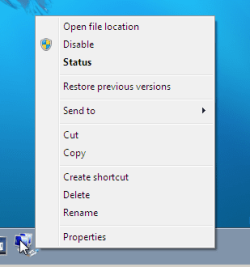
Local Area Connection [Shortcut]

catherine

New member
Local time
1:47 PM
Messages
15
Attached are two screen shots.

One firsts shows the Local Area Connection Status in Windows 7.

The other shows the shortcut i created to get to the status in Windows XP.

I used that shortcut in XP often. I click on it and then hit 'disable' and i can use
my computer while being 'offline'. When i wish to get online again in XP I simply
click that shortcut again and a dialogue box appears that says "Enabling".

Nice. A 'toggle switch' to go on and offline. I love it! But i cannot replicate that
shortcut in Win 7 for it will not allow me to 'drag' Local Area Connection to Quick Launch.

Is there anyway i can replicate that XP shortcut that I love, in Windows 7?

Thanks in advance
 

Attachments

  • LACS.jpg
    LACS.jpg
    19.7 KB · Views: 454
  • LACS-XP.jpg
    LACS-XP.jpg
    24.4 KB · Views: 445

My Computer

Computer Manufacturer/Model Number
Specs? I was unaware that computers needed glasses?
OS
Wndows 7 Build 7100
Works for me...
WindowClipping.png

Are you sure you are dragging it to Quick Launch and not the superbar or whatever it's called?
 

My Computer

Computer Manufacturer/Model Number
Haha! You peeked. Why so nosey?
OS
XP / Windows 7 Pro RTM

My Computer

Computer type
PC/Desktop
Computer Manufacturer/Model Number
Self built custom
OS
64-bit Windows 11 Pro for Workstations
CPU
Intel i7-8700K OC'd to 5 GHz
Motherboard
ASUS ROG Maximus XI Formula Z390
Memory
64 GB (4x16GB) G.SKILL TridentZ RGB DDR4 3600 MHz
Graphics Card(s)
ASUS ROG-STRIX-GTX1080TI-O11G-GAMING
Sound Card
Integrated
Monitor(s) Displays
2 x Samsung Odyssey G7 27"
Screen Resolution
2560x1440
Hard Drives
1TB Samsung 990 PRO M.2,
4TB Samsung 990 PRO PRO M.2,
TerraMaster F8 SSD Plus NAS
PSU
Seasonic Prime Titanium 850W
Case
Thermaltake Core P3
Cooling
Corsair Hydro H115i
Keyboard
Logitech wireless K800
Mouse
Logitech MX Master 4
Internet Speed
2 Gb/s Download and 100 Mb/s Upload
Antivirus
Malwarebyte Anti-Malware Premium
Browser
Google Chrome
Other Info
Logitech Z625 speaker system,
Logitech BRIO 4K Pro webcam,
HP Color LaserJet Pro MFP M477fdn,
APC SMART-UPS RT 1000 XL - SURT1000XLI,
Galaxy S23 Plus phone
Yes and No?

Works for me...
View attachment 13471

Are you sure you are dragging it to Quick Launch and not the superbar or whatever it's called?

Yes, but I was dragging an undragable thing to Quick Launch.
For the undragable thing was the thing that I had to click to get to
the Local Area Connection Status box.

It's all good now! [Read the next post] Thanks!
Catherine
 

Attachments

  • Net-Share-Center.jpg
    Net-Share-Center.jpg
    55.6 KB · Views: 1,262

My Computer

Computer Manufacturer/Model Number
Specs? I was unaware that computers needed glasses?
OS
Wndows 7 Build 7100
Tada!

Hello Cathrine,

This can help show you how to. :)

Network Connection Status Shortcut - Vista Forums

Hope this helps,
Shawn

Dear Shawn:


Yes it helped immensely.
Well it did once I found out that in Windows 7; Manage Network Connections = Change Adapter Settings;
then yes, everything went swimmingly. Clicked on that to open the 'link' to Local Area Connection and
then the shortcut 'took' when I dragged it to the QL Bar.

A perfect ending. Thank you so much!

Regards
Catherine
 

Attachments

  • Change Adapter Settings.jpg
    Change Adapter Settings.jpg
    45.1 KB · Views: 1,006
  • it-works.jpg
    it-works.jpg
    18.5 KB · Views: 408

My Computer

Computer Manufacturer/Model Number
Specs? I was unaware that computers needed glasses?
OS
Wndows 7 Build 7100
You're welcome Cathrine. :)

LOL, yeah I'm currently working on a Windows 7 version of that tutorial for those small differences. :o
 

My Computer

Computer type
PC/Desktop
Computer Manufacturer/Model Number
Self built custom
OS
64-bit Windows 11 Pro for Workstations
CPU
Intel i7-8700K OC'd to 5 GHz
Motherboard
ASUS ROG Maximus XI Formula Z390
Memory
64 GB (4x16GB) G.SKILL TridentZ RGB DDR4 3600 MHz
Graphics Card(s)
ASUS ROG-STRIX-GTX1080TI-O11G-GAMING
Sound Card
Integrated
Monitor(s) Displays
2 x Samsung Odyssey G7 27"
Screen Resolution
2560x1440
Hard Drives
1TB Samsung 990 PRO M.2,
4TB Samsung 990 PRO PRO M.2,
TerraMaster F8 SSD Plus NAS
PSU
Seasonic Prime Titanium 850W
Case
Thermaltake Core P3
Cooling
Corsair Hydro H115i
Keyboard
Logitech wireless K800
Mouse
Logitech MX Master 4
Internet Speed
2 Gb/s Download and 100 Mb/s Upload
Antivirus
Malwarebyte Anti-Malware Premium
Browser
Google Chrome
Other Info
Logitech Z625 speaker system,
Logitech BRIO 4K Pro webcam,
HP Color LaserJet Pro MFP M477fdn,
APC SMART-UPS RT 1000 XL - SURT1000XLI,
Galaxy S23 Plus phone
yea but?

You're welcome Catherine. :)

LOL, yeah I'm currently working on a Windows 7 version of that tutorial for those small differences. :o

Uh huh, I was kinda going 'yea but???' for a minute or two. Then I said,
heck I'll try this, and voila it took me to the right place.
Love a happy ending!

no reply needed :)
Catherine
 

My Computer

Computer Manufacturer/Model Number
Specs? I was unaware that computers needed glasses?
OS
Wndows 7 Build 7100
Link updated for the new Windows 7 version. :)
 

My Computer

Computer type
PC/Desktop
Computer Manufacturer/Model Number
Self built custom
OS
64-bit Windows 11 Pro for Workstations
CPU
Intel i7-8700K OC'd to 5 GHz
Motherboard
ASUS ROG Maximus XI Formula Z390
Memory
64 GB (4x16GB) G.SKILL TridentZ RGB DDR4 3600 MHz
Graphics Card(s)
ASUS ROG-STRIX-GTX1080TI-O11G-GAMING
Sound Card
Integrated
Monitor(s) Displays
2 x Samsung Odyssey G7 27"
Screen Resolution
2560x1440
Hard Drives
1TB Samsung 990 PRO M.2,
4TB Samsung 990 PRO PRO M.2,
TerraMaster F8 SSD Plus NAS
PSU
Seasonic Prime Titanium 850W
Case
Thermaltake Core P3
Cooling
Corsair Hydro H115i
Keyboard
Logitech wireless K800
Mouse
Logitech MX Master 4
Internet Speed
2 Gb/s Download and 100 Mb/s Upload
Antivirus
Malwarebyte Anti-Malware Premium
Browser
Google Chrome
Other Info
Logitech Z625 speaker system,
Logitech BRIO 4K Pro webcam,
HP Color LaserJet Pro MFP M477fdn,
APC SMART-UPS RT 1000 XL - SURT1000XLI,
Galaxy S23 Plus phone
I've found that while trying to disable/enable adapters via shortcut, its sometimes a coin flip if it actually disabled it or not. Enabling seems to work accurately 95% of the time, its just the disable is dodgy at times, needing to actually disable twice, 2nd time does it 99% of the time.
 

My Computer

Computer Manufacturer/Model Number
CUSTOM
OS
XP/win7 x86 build 7127
CPU
Athlon64 X2 DUAL 4200+ 2.21ghz
Motherboard
ASUS K8 PRO SLI
Memory
2GB Dual Chan DDR2 Corsair
Graphics Card(s)
Nvidia 6800GT
Sound Card
nvidia
Monitor(s) Displays
19' LCD
Screen Resolution
1280x1024
Hard Drives
WD 250, 2x500, 2x1TB IDE/USB
WD 250 SATA (system)
SEAGATE 120 Sata
PSU
coolermaster 450
Case
SUPERFLOWER
Cooling
1 HDD bay fan, 5x80mm Case Fans, AEROGATE II Fan/Temp
Keyboard
MS wireless
Mouse
MS Wireless
Internet Speed
fassssssssst
Back
Top