Administrative Tools - Restore Shortcuts

How to Restore the Default Windows 7 Administrative Tools


   Information
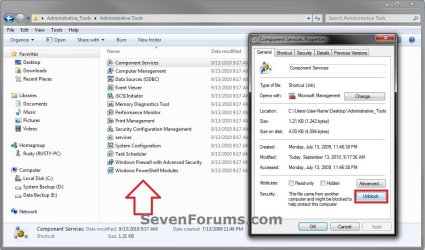
Administrative Tools is a folder in Control Panel that contains tools for system administrators and advanced users. The tools in the folder might vary depending on which edition of Windows 7 you are using. This will show you how to restore the default Administrative Tools and it's shortcuts in Windows 7.
   Tip
Administrative Tools is located at the hidden system folder below.

%ProgramData%\Microsoft\Windows\Start Menu\Programs\Administrative Tools

If the Admnistrative Tools folder is missing from this location, then you will see this Location is not available error below when you try to open Administrative Tools from any location.
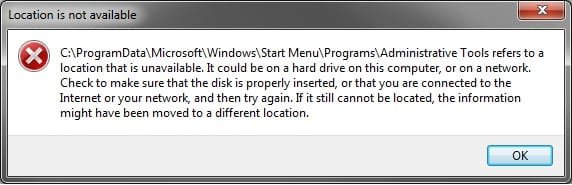
Error.jpg


Some common Administrative Tools in this folder include:

Administrative Tool | Description
Component Services|Configure and administer Component Object Model (COM) components. Component Services is designed for use by developers and administrators.
Computer Management| Manage local or remote computers by using a single, consolidated desktop tool. Using Computer Management, you can perform many tasks, such as monitoring system events, configuring hard disks, and managing system performance.
Data Sources (ODBC)| Use Open Database Connectivity (ODBC) to move data from one type of database (a data source) to another. For more information, see What is ODBC?
Event Viewer| View information about significant events, such as a program starting or stopping, or a security error, which are recorded in event logs.
iSCSI Initiator| Configure advanced connections between storage devices on a network. For more information, see What is Internet Small Computer System Interface (iSCSI)?
Local Security Policy | View and edit Group Policy security settings.
Performance Monitor| View advanced system information about the central processing unit (CPU), memory, hard disk, and network performance.
Print Management| Manage printers and print servers on a network and perform other administrative tasks.
Services | Manage the different services that run in the background on your computer.
System Configuration| Identify problems that might be preventing Windows from running correctly. For more information, see Using System Configuration.
Task Scheduler| Schedule programs or other tasks to run automatically. For more information, see Schedule a task.
Windows Firewall with Advanced Security| Configure advanced firewall settings on both this computer and remote computers on your network.
Windows Memory Diagnostic | Check your computer's memory to see if it's functioning properly.
Windows PowerShell Modules |Lets you organize your Windows PowerShell scripts and functions into independent, self-contained units.
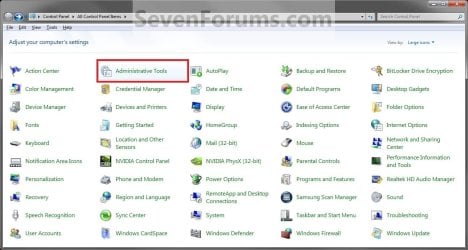
EXAMPLE: Administrative Tools in Control Panel
Control_Panel.jpg
EXAMPLE: Administrative Tools in Start Menu
NOTE: To add or remove the Administrative Tools button from the Start menu, see How to Add or Remove Administrative Tools in Windows 7 Start Menu.
Start_Menu.jpg
Here's How:
1. Click on the Download button below to download, and save the file below to your desktop.
NOTE: This is the same in both the 32-bit and 64-bit Windows 7.
Administrative_Tools.zip


Download


2. Unblock the ZIP file.

3. Open the downloaded ZIP file, and extract (drag and drop) the Administrative Tools folder to your desktop.

4. In Windows Explorer, navigate to the hidden system folder below. (see screenshot below)
NOTE: You can also open the Start Menu and right click on All Programs,click on Open All Users, and open the Programs folder to get to this location below as well.
C:\ProgramData\Microsoft\Windows\Start Menu\Programs
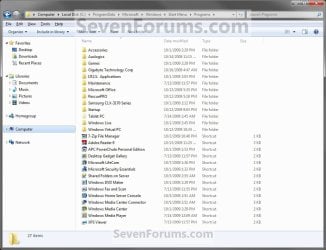
Step1.jpg
5. Drag the extracted Administrative Tools folder from step 3 above into the folder location in step 4, and drop it to an empty area in the main window (not in Navigation Pane). (see screenshot above)

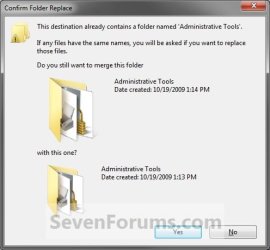
6. If Administrative Tools Folder is in the Programs folder (step 4)
NOTE: If not, then go to step 7 instead.
A) Click on Yes. (see screenshot below)
Step2A.jpg
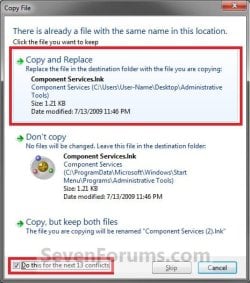
B) Check the Do this for next ## conflicts box at the bottom, and click on the Copy and Replace option. (see screenshot below)
Step2B.jpg
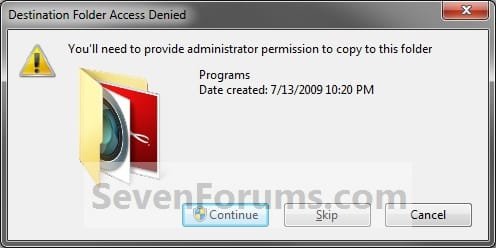
7. Click on Continue. (see screenshot below)
Step2.jpg
8. If prompted by UAC, click on Yes.

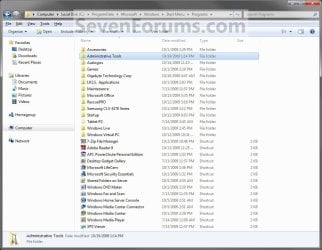
9. The Administrative Tools folder (step 2) has now been restored to the Programs folder (step 4). You should now be able to open Adminsitrative Tools from the Control Panel and Start Menu.
Step3.jpg
That's it,
Shawn


Attachments

Last edited:
What a HUGE help ... saved me alot of farting around.

Thank you Shawn and Brink!
 

My Computer

Computer Manufacturer/Model Number
Asus
OS
Windows 7 Home Premium 64-Bit
CPU
Intel E5400
Motherboard
Asus CM5571
Memory
6GB
Graphics Card(s)
Intel G45 Express Onboard
Sound Card
Realtech Onboard
Monitor(s) Displays
Asus VE205
Hard Drives
Seagate ST3750528 700GB
Case
Asus CM5571
LOL, you're most welcome OFTT, and welcome to Seven Forums.

Shawn Brink
 

My Computer

Computer type
PC/Desktop
Computer Manufacturer/Model Number
Self built custom
OS
64-bit Windows 11 Pro for Workstations
CPU
Intel i7-8700K OC'd to 5 GHz
Motherboard
ASUS ROG Maximus XI Formula Z390
Memory
64 GB (4x16GB) G.SKILL TridentZ RGB DDR4 3600 MHz
Graphics Card(s)
ASUS ROG-STRIX-GTX1080TI-O11G-GAMING
Sound Card
Integrated
Monitor(s) Displays
2 x Samsung Odyssey G7 27"
Screen Resolution
2560x1440
Hard Drives
1TB Samsung 990 PRO M.2,
4TB Samsung 990 PRO PRO M.2,
TerraMaster F8 SSD Plus NAS
PSU
Seasonic Prime Titanium 850W
Case
Thermaltake Core P3
Cooling
Corsair Hydro H115i
Keyboard
Logitech wireless K800
Mouse
Logitech MX Master 4
Internet Speed
2 Gb/s Download and 100 Mb/s Upload
Antivirus
Malwarebyte Anti-Malware Premium
Browser
Google Chrome
Other Info
Logitech Z625 speaker system,
Logitech BRIO 4K Pro webcam,
HP Color LaserJet Pro MFP M477fdn,
APC SMART-UPS RT 1000 XL - SURT1000XLI,
Galaxy S23 Plus phone
Bravo, Shawn! My Admin Tools disappeared also and this advice put them straight back. Many thanks, Alan

PS: Tried to add thanks but, being new, was told to spread it around before adding to your reputation again. I'll try to remember!
 
Last edited:

My Computer

Computer Manufacturer/Model Number
Sony Vaio NW-20SF - all following items as manufacturer installed
OS
Windows 7 Home Premium 64-bit, Version 6.1, Build 7600
Mouse
Logitech V450 Laser
Internet Speed
6 Mbps
Other Info
Samsung N150 Plus netbook (2Gb RAM upgrade) for travelling
You're most welcome Alan. I'm happy to hear that it was able to help you. :)
 

My Computer

Computer type
PC/Desktop
Computer Manufacturer/Model Number
Self built custom
OS
64-bit Windows 11 Pro for Workstations
CPU
Intel i7-8700K OC'd to 5 GHz
Motherboard
ASUS ROG Maximus XI Formula Z390
Memory
64 GB (4x16GB) G.SKILL TridentZ RGB DDR4 3600 MHz
Graphics Card(s)
ASUS ROG-STRIX-GTX1080TI-O11G-GAMING
Sound Card
Integrated
Monitor(s) Displays
2 x Samsung Odyssey G7 27"
Screen Resolution
2560x1440
Hard Drives
1TB Samsung 990 PRO M.2,
4TB Samsung 990 PRO PRO M.2,
TerraMaster F8 SSD Plus NAS
PSU
Seasonic Prime Titanium 850W
Case
Thermaltake Core P3
Cooling
Corsair Hydro H115i
Keyboard
Logitech wireless K800
Mouse
Logitech MX Master 4
Internet Speed
2 Gb/s Download and 100 Mb/s Upload
Antivirus
Malwarebyte Anti-Malware Premium
Browser
Google Chrome
Other Info
Logitech Z625 speaker system,
Logitech BRIO 4K Pro webcam,
HP Color LaserJet Pro MFP M477fdn,
APC SMART-UPS RT 1000 XL - SURT1000XLI,
Galaxy S23 Plus phone
Thank you so much

Really a great help, with all the necessary details. Thank you !
 

My Computer

OS
Windows 7 professional 32 bits
You're most welcome Organopleno, and welcome to Seven Forums. :)
 

My Computer

Computer type
PC/Desktop
Computer Manufacturer/Model Number
Self built custom
OS
64-bit Windows 11 Pro for Workstations
CPU
Intel i7-8700K OC'd to 5 GHz
Motherboard
ASUS ROG Maximus XI Formula Z390
Memory
64 GB (4x16GB) G.SKILL TridentZ RGB DDR4 3600 MHz
Graphics Card(s)
ASUS ROG-STRIX-GTX1080TI-O11G-GAMING
Sound Card
Integrated
Monitor(s) Displays
2 x Samsung Odyssey G7 27"
Screen Resolution
2560x1440
Hard Drives
1TB Samsung 990 PRO M.2,
4TB Samsung 990 PRO PRO M.2,
TerraMaster F8 SSD Plus NAS
PSU
Seasonic Prime Titanium 850W
Case
Thermaltake Core P3
Cooling
Corsair Hydro H115i
Keyboard
Logitech wireless K800
Mouse
Logitech MX Master 4
Internet Speed
2 Gb/s Download and 100 Mb/s Upload
Antivirus
Malwarebyte Anti-Malware Premium
Browser
Google Chrome
Other Info
Logitech Z625 speaker system,
Logitech BRIO 4K Pro webcam,
HP Color LaserJet Pro MFP M477fdn,
APC SMART-UPS RT 1000 XL - SURT1000XLI,
Galaxy S23 Plus phone
I am looking for a registry to add Admin tools with all the sub directories like this in right click menu:
32027d1255980516-administrative-tools-restore-shortcuts-start_menu.jpg


Please help me shawn??????????
 

My Computer

OS
Windows 7 Ultimate
Hello Niceguy,

I'll see what I can do, and will post back when I have anything for this. :)
 

My Computer

Computer type
PC/Desktop
Computer Manufacturer/Model Number
Self built custom
OS
64-bit Windows 11 Pro for Workstations
CPU
Intel i7-8700K OC'd to 5 GHz
Motherboard
ASUS ROG Maximus XI Formula Z390
Memory
64 GB (4x16GB) G.SKILL TridentZ RGB DDR4 3600 MHz
Graphics Card(s)
ASUS ROG-STRIX-GTX1080TI-O11G-GAMING
Sound Card
Integrated
Monitor(s) Displays
2 x Samsung Odyssey G7 27"
Screen Resolution
2560x1440
Hard Drives
1TB Samsung 990 PRO M.2,
4TB Samsung 990 PRO PRO M.2,
TerraMaster F8 SSD Plus NAS
PSU
Seasonic Prime Titanium 850W
Case
Thermaltake Core P3
Cooling
Corsair Hydro H115i
Keyboard
Logitech wireless K800
Mouse
Logitech MX Master 4
Internet Speed
2 Gb/s Download and 100 Mb/s Upload
Antivirus
Malwarebyte Anti-Malware Premium
Browser
Google Chrome
Other Info
Logitech Z625 speaker system,
Logitech BRIO 4K Pro webcam,
HP Color LaserJet Pro MFP M477fdn,
APC SMART-UPS RT 1000 XL - SURT1000XLI,
Galaxy S23 Plus phone

My Computer

Computer type
PC/Desktop
Computer Manufacturer/Model Number
Self built custom
OS
64-bit Windows 11 Pro for Workstations
CPU
Intel i7-8700K OC'd to 5 GHz
Motherboard
ASUS ROG Maximus XI Formula Z390
Memory
64 GB (4x16GB) G.SKILL TridentZ RGB DDR4 3600 MHz
Graphics Card(s)
ASUS ROG-STRIX-GTX1080TI-O11G-GAMING
Sound Card
Integrated
Monitor(s) Displays
2 x Samsung Odyssey G7 27"
Screen Resolution
2560x1440
Hard Drives
1TB Samsung 990 PRO M.2,
4TB Samsung 990 PRO PRO M.2,
TerraMaster F8 SSD Plus NAS
PSU
Seasonic Prime Titanium 850W
Case
Thermaltake Core P3
Cooling
Corsair Hydro H115i
Keyboard
Logitech wireless K800
Mouse
Logitech MX Master 4
Internet Speed
2 Gb/s Download and 100 Mb/s Upload
Antivirus
Malwarebyte Anti-Malware Premium
Browser
Google Chrome
Other Info
Logitech Z625 speaker system,
Logitech BRIO 4K Pro webcam,
HP Color LaserJet Pro MFP M477fdn,
APC SMART-UPS RT 1000 XL - SURT1000XLI,
Galaxy S23 Plus phone
You're welcome mate. :)
 

My Computer

Computer type
PC/Desktop
Computer Manufacturer/Model Number
Self built custom
OS
64-bit Windows 11 Pro for Workstations
CPU
Intel i7-8700K OC'd to 5 GHz
Motherboard
ASUS ROG Maximus XI Formula Z390
Memory
64 GB (4x16GB) G.SKILL TridentZ RGB DDR4 3600 MHz
Graphics Card(s)
ASUS ROG-STRIX-GTX1080TI-O11G-GAMING
Sound Card
Integrated
Monitor(s) Displays
2 x Samsung Odyssey G7 27"
Screen Resolution
2560x1440
Hard Drives
1TB Samsung 990 PRO M.2,
4TB Samsung 990 PRO PRO M.2,
TerraMaster F8 SSD Plus NAS
PSU
Seasonic Prime Titanium 850W
Case
Thermaltake Core P3
Cooling
Corsair Hydro H115i
Keyboard
Logitech wireless K800
Mouse
Logitech MX Master 4
Internet Speed
2 Gb/s Download and 100 Mb/s Upload
Antivirus
Malwarebyte Anti-Malware Premium
Browser
Google Chrome
Other Info
Logitech Z625 speaker system,
Logitech BRIO 4K Pro webcam,
HP Color LaserJet Pro MFP M477fdn,
APC SMART-UPS RT 1000 XL - SURT1000XLI,
Galaxy S23 Plus phone
Thank you

Why cannot Microsoft give such a simple, workable fix? Of course the real question is why this happens? I lost almost all links in the folders under the start|program files.
:geek:
 

My Computer

OS
Windows 7 64 home premium

My Computer

Computer type
PC/Desktop
Computer Manufacturer/Model Number
Self built custom
OS
64-bit Windows 11 Pro for Workstations
CPU
Intel i7-8700K OC'd to 5 GHz
Motherboard
ASUS ROG Maximus XI Formula Z390
Memory
64 GB (4x16GB) G.SKILL TridentZ RGB DDR4 3600 MHz
Graphics Card(s)
ASUS ROG-STRIX-GTX1080TI-O11G-GAMING
Sound Card
Integrated
Monitor(s) Displays
2 x Samsung Odyssey G7 27"
Screen Resolution
2560x1440
Hard Drives
1TB Samsung 990 PRO M.2,
4TB Samsung 990 PRO PRO M.2,
TerraMaster F8 SSD Plus NAS
PSU
Seasonic Prime Titanium 850W
Case
Thermaltake Core P3
Cooling
Corsair Hydro H115i
Keyboard
Logitech wireless K800
Mouse
Logitech MX Master 4
Internet Speed
2 Gb/s Download and 100 Mb/s Upload
Antivirus
Malwarebyte Anti-Malware Premium
Browser
Google Chrome
Other Info
Logitech Z625 speaker system,
Logitech BRIO 4K Pro webcam,
HP Color LaserJet Pro MFP M477fdn,
APC SMART-UPS RT 1000 XL - SURT1000XLI,
Galaxy S23 Plus phone
This isn't completely true. I have no folder "ProgramData\Microsoft\Windows\Start Menu\Programs\Administrative Tools\" because I purposely deleted it, but Administrative Tools is still accessible through my Control Panel.
 

My Computer

OS
Windows 7 Professional x64
Hello fjawodfc,

Sorry, but it's certainly completely true.

The ProgramData folder is a hidden system file folder. As a test, use the tutorial below to temporarily unhide your hidden system files to check to see if you still actually have this folder or not. When it's hidden, you will not see it, so you may have mistakenly thought you deleted it when you did not, and is why it still opens from the Control Panel.

http://www.sevenforums.com/tutorials/394-hidden-files-folders-show-hide.html

Hope this helps,
Shawn
 

My Computer

Computer type
PC/Desktop
Computer Manufacturer/Model Number
Self built custom
OS
64-bit Windows 11 Pro for Workstations
CPU
Intel i7-8700K OC'd to 5 GHz
Motherboard
ASUS ROG Maximus XI Formula Z390
Memory
64 GB (4x16GB) G.SKILL TridentZ RGB DDR4 3600 MHz
Graphics Card(s)
ASUS ROG-STRIX-GTX1080TI-O11G-GAMING
Sound Card
Integrated
Monitor(s) Displays
2 x Samsung Odyssey G7 27"
Screen Resolution
2560x1440
Hard Drives
1TB Samsung 990 PRO M.2,
4TB Samsung 990 PRO PRO M.2,
TerraMaster F8 SSD Plus NAS
PSU
Seasonic Prime Titanium 850W
Case
Thermaltake Core P3
Cooling
Corsair Hydro H115i
Keyboard
Logitech wireless K800
Mouse
Logitech MX Master 4
Internet Speed
2 Gb/s Download and 100 Mb/s Upload
Antivirus
Malwarebyte Anti-Malware Premium
Browser
Google Chrome
Other Info
Logitech Z625 speaker system,
Logitech BRIO 4K Pro webcam,
HP Color LaserJet Pro MFP M477fdn,
APC SMART-UPS RT 1000 XL - SURT1000XLI,
Galaxy S23 Plus phone
Thank you brink/Shawn

I had spent 3 days on this, and your solution took 10 minutes

peter
 

My Computer

OS
windows 7 x64 and XP
You're most welcome Peter, and welcome to Seven Forums. :)
 

My Computer

Computer type
PC/Desktop
Computer Manufacturer/Model Number
Self built custom
OS
64-bit Windows 11 Pro for Workstations
CPU
Intel i7-8700K OC'd to 5 GHz
Motherboard
ASUS ROG Maximus XI Formula Z390
Memory
64 GB (4x16GB) G.SKILL TridentZ RGB DDR4 3600 MHz
Graphics Card(s)
ASUS ROG-STRIX-GTX1080TI-O11G-GAMING
Sound Card
Integrated
Monitor(s) Displays
2 x Samsung Odyssey G7 27"
Screen Resolution
2560x1440
Hard Drives
1TB Samsung 990 PRO M.2,
4TB Samsung 990 PRO PRO M.2,
TerraMaster F8 SSD Plus NAS
PSU
Seasonic Prime Titanium 850W
Case
Thermaltake Core P3
Cooling
Corsair Hydro H115i
Keyboard
Logitech wireless K800
Mouse
Logitech MX Master 4
Internet Speed
2 Gb/s Download and 100 Mb/s Upload
Antivirus
Malwarebyte Anti-Malware Premium
Browser
Google Chrome
Other Info
Logitech Z625 speaker system,
Logitech BRIO 4K Pro webcam,
HP Color LaserJet Pro MFP M477fdn,
APC SMART-UPS RT 1000 XL - SURT1000XLI,
Galaxy S23 Plus phone
Recover System Admin. Tools

Had this problem. Your 'fix' saved the day- thanks very much Shawn!
 

My Computer

Computer Manufacturer/Model Number
Custom
OS
windows 7 Pro, 64 bit
CPU
Intel Core i5-750
Motherboard
Gigabyte GA-P55A-UD3P
Memory
Corsair Dominator 4GB
Graphics Card(s)
ATI Radeon HD 5750
Sound Card
On board
Monitor(s) Displays
DELL
Hard Drives
Western Digital Caviar 1TB
PSU
Corsair 750W
Case
Coolermaster Storm Sniper
Cooling
Case fans (4)
Back
Top