Context Menu - Add Copy To Folder and Move To Folder

How to Add "Copy To Folder" and "Move To Folder" to Context Menu in Windows 7 and Windows 8

   Information
This tutorial will show you how to add or remove Copy To Folder and Move to Folder to the context menu for all users in Windows 7 and Windows 8.

You must me logged in as an administrator to be able to do the steps in this tutorial.

   Note
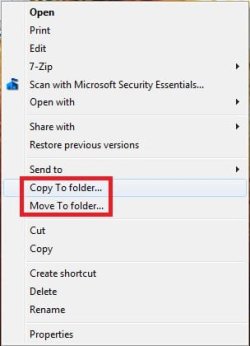
Copy To Folder allows you to right click selected file(s) and folder(s) and copy them to another location immediately.

Move to Folder allows you to right click on selected file(s) and folder(s) and move them to another location, then remove them from their current location immediately.

In Windows 7, the default location for Copy To Folder and Move To Folder is in the Edit menu bar menu in Windows Explorer.
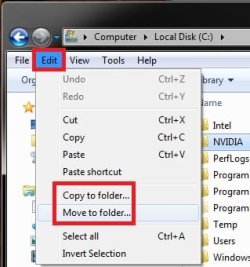
Default.jpg
In Windows 8 and 8.1, the default location for Copy To Folder and Move To Folder is in the Home tab in the ribbon of File Explorer. You would click/tap on Choose location to see the "Copy Items" or "Move Items" dialog.
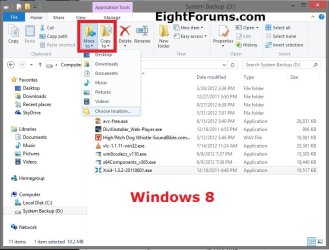
W8.jpg
   Tip
To Copy file(s) regardless of the source and target destination, hold down the CTRL key while you drag and drop the file(s).

To Move file(s) regardless of the source and target destination, hold down the SHIFT key while you drag and drop the file(s).


EXAMPLE: "Copy To Folder" and "Move To Folder" added to the Context Menu
NOTE: Right click on selected file(s) and folder(s) to see your new additions.
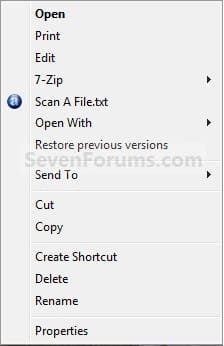
Default_Context_Menu.jpgAdded.jpg
EXAMPLE: Copy To Folder and Move To Folder windows
NOTE: You can see what happens when you click on each of these context menu items to.
578d1226688176-context-menu-add-copy-folder-move-folder-copy_to_folder.jpg
579d1226688176-context-menu-add-copy-folder-move-folder-move_to_folder.jpg


OPTION ONE

Add or Remove "Copy To Folder" from the Context Menu


1. To Add "Copy To Folder" to Context Menu
A) Click/tap on the Download button below to download the file below, and go to step 3 below.
Add_Copy_To_Folder.reg

Download


B) Go to step 3.
2. To Remove "Copy To Folder" from Context Menu
A) Click/tap on the Download button below to download the file below, and go to step 3 below.
Remove_Copy_To_Folder.reg

Download


3. Save the .reg file to the desktop.

4. Double click/tap on the downloaded .reg file to merge it.

5. When prompted, click/tap on Run, Yes (UAC), Yes, and OK to approve merging the .reg file.

6. You can now delete the downloaded .reg file if you like.


OPTION TWO

Add or Remove "Move To Folder" from the Context Menu


1. To Add "Move To Folder" to Context Menu
A) Click/tap on the Download button below to download the file below, and go to step 3 below.
Add_Move_To_Folder.reg

Download


B) Go to step 3.
2. To Remove "Move To Folder" from Context Menu
A) Click/tap on the Download button below to download the file below, and go to step 3 below.
Remove_Move_To_Folder.reg

Download


3. Save the .reg file to the desktop.

4. Double click/tap on the downloaded .reg file to merge it.

5. When prompted, click/tap on Run, Yes (UAC), Yes, and OK to approve merging the .reg file.

6. You can now delete the downloaded .reg file if you like.

That's it,
Shawn


Attachments

Last edited:
hey brink

i always enjoy your tutorials

most cover some very useful stuff

like this one

Thanks Great work

RellikZephyr
 

My Computer

Computer Manufacturer/Model Number
Custom Build
OS
Windows 7 RTM Ultimate x64
CPU
Intel Q9550 @ 3.0Ghz
Motherboard
Asus P5K
Memory
4Gb Geil PC-6400
Graphics Card(s)
ATI 4890 OC 900/4000
Sound Card
Bose Companion 5
Monitor(s) Displays
Asus 22" + LG 20"
Screen Resolution
1680 x 1050
Hard Drives
Seagate 500GB 7200rpm X 2
Seagate 1.5TB 7200rpm
PSU
Thermaltake Toughpower 850W
Case
Thermaltake Kandalf LCS
Cooling
Alphacool Liquid Cooling
Keyboard
Logitech G15
Mouse
Logitech G5
Internet Speed
1500/128
Other Info
Plantronics Gamecom 777
You're welcome RellicZephyr. Thank you. :)

Shawn
 

My Computer

Computer type
PC/Desktop
Computer Manufacturer/Model Number
Self built custom
OS
64-bit Windows 11 Pro for Workstations
CPU
Intel i7-8700K OC'd to 5 GHz
Motherboard
ASUS ROG Maximus XI Formula Z390
Memory
64 GB (4x16GB) G.SKILL TridentZ RGB DDR4 3600 MHz
Graphics Card(s)
ASUS ROG-STRIX-GTX1080TI-O11G-GAMING
Sound Card
Integrated
Monitor(s) Displays
2 x Samsung Odyssey G7 27"
Screen Resolution
2560x1440
Hard Drives
1TB Samsung 990 PRO M.2,
4TB Samsung 990 PRO PRO M.2,
TerraMaster F8 SSD Plus NAS
PSU
Seasonic Prime Titanium 850W
Case
Thermaltake Core P3
Cooling
Corsair Hydro H115i
Keyboard
Logitech wireless K800
Mouse
Logitech MX Master 4
Internet Speed
2 Gb/s Download and 100 Mb/s Upload
Antivirus
Malwarebyte Anti-Malware Premium
Browser
Google Chrome
Other Info
Logitech Z625 speaker system,
Logitech BRIO 4K Pro webcam,
HP Color LaserJet Pro MFP M477fdn,
APC SMART-UPS RT 1000 XL - SURT1000XLI,
Galaxy S23 Plus phone
Not going to use it, but it taught me heaps, didn't know to display the menu with ALT (yay, coz I like the new "action" menus), and therefore didn't know that there was send to/move to in the edit menu. That's great, I use it a lot.

Really from Explorer in XP which I never used (Xplorer2 always) to win 7 with its great functionality, quick previews, good flexibility of views etc - I've hardly ever fired up Xplorer2, and since I can get 2 explorers on one of my monitors (thus dual pane) Xplorer 2 may be on its last legs for me.

Anyway many thanx for the tutorial and the ones it links to - learnt lots again!
 

My Computer

Computer Manufacturer/Model Number
AMD Athlon 64 3200+, Lenovo G560 i3
OS
Windows 7 Ultimate, Ubuntu
Motherboard
Gigabyte K8T8000
Memory
DDR 2Gb (!)
Graphics Card(s)
6600GT
Monitor(s) Displays
MultiMonitor (2) LCD
Hard Drives
Old Seagate 75
Big Western Digital
Samsung 500Gb pulled out of an external drive and installed
Ext: Maxtor (Firewire), 1Gb Lacie (Samsung)
Mouse
Logitech MX620 Cordless
Wow this is sweet! Thanks for that!
 

My Computer

OS
Windows 7 x64 Pro
CPU
Intel 990X
Motherboard
Asus P6T Deluxe V2
Memory
CORSAIR XMS3 6GB SDRAM DDR3 1600 (7-7-7-20)
Graphics Card(s)
2 x BFG 285 GTX OCXs in SLI
Sound Card
X-fi Elite Pro
Monitor(s) Displays
HP LP 3065
Screen Resolution
2560 x 1600
Hard Drives
2 x 150 gb Velociraptors RAID 0
PSU
PC Power & Cooling 750W
Case
CM Stacker 832
Cooling
Stock cooler
Keyboard
Saitek Eclipse II
Mouse
Logitech MX Revolution
Wow this is sweet! Thanks for that!
Right! Sweet! Just used this to copy some files from thumb drive to differnt folders on a new install. Twice as fast as copy and paste for me, great little tweek! thanks Shawn :D larry
 

My Computer

Computer Manufacturer/Model Number
Gateway GT5692
OS
Windows 7 Ulti. x64
CPU
AMD Phenom 8450 triple-core 2.10 ghz
Memory
4GB
Graphics Card(s)
ATI Radion HD 3200
Monitor(s) Displays
Gateway FPD1775W
Screen Resolution
1280x720
Hard Drives
465.6613 Gibibytes
You're welcome Charles Kane, DigitalRurouni, and Larry. :)
 
Last edited:

My Computer

Computer type
PC/Desktop
Computer Manufacturer/Model Number
Self built custom
OS
64-bit Windows 11 Pro for Workstations
CPU
Intel i7-8700K OC'd to 5 GHz
Motherboard
ASUS ROG Maximus XI Formula Z390
Memory
64 GB (4x16GB) G.SKILL TridentZ RGB DDR4 3600 MHz
Graphics Card(s)
ASUS ROG-STRIX-GTX1080TI-O11G-GAMING
Sound Card
Integrated
Monitor(s) Displays
2 x Samsung Odyssey G7 27"
Screen Resolution
2560x1440
Hard Drives
1TB Samsung 990 PRO M.2,
4TB Samsung 990 PRO PRO M.2,
TerraMaster F8 SSD Plus NAS
PSU
Seasonic Prime Titanium 850W
Case
Thermaltake Core P3
Cooling
Corsair Hydro H115i
Keyboard
Logitech wireless K800
Mouse
Logitech MX Master 4
Internet Speed
2 Gb/s Download and 100 Mb/s Upload
Antivirus
Malwarebyte Anti-Malware Premium
Browser
Google Chrome
Other Info
Logitech Z625 speaker system,
Logitech BRIO 4K Pro webcam,
HP Color LaserJet Pro MFP M477fdn,
APC SMART-UPS RT 1000 XL - SURT1000XLI,
Galaxy S23 Plus phone
Hi! Great tut, as usual, do i have to dl the reg file or can i manually do it as i could in vista? Is it the same location and key?
 

My Computer

Computer Manufacturer/Model Number
Superneat Systems
OS
Windows 7 Ultimate 64-bit Build 7600
CPU
Intel Core i5 750 @ 3.6
Motherboard
Gigabyte GA-P55-UD3R
Memory
4GB Corsair XMS3 DDR3 1600
Graphics Card(s)
Sapphire HD 5770 1GB
PSU
Corsair VX 450
Case
NZXT M59
Cooling
CoolIT ECO A.L.C.
Internet Speed
10 Mbps
Hello Superneat,

No you do not have to download it if you do not like to. I just included the .reg to make it easy to do automatically. It's the same location as in Vista though. :)
 

My Computer

Computer type
PC/Desktop
Computer Manufacturer/Model Number
Self built custom
OS
64-bit Windows 11 Pro for Workstations
CPU
Intel i7-8700K OC'd to 5 GHz
Motherboard
ASUS ROG Maximus XI Formula Z390
Memory
64 GB (4x16GB) G.SKILL TridentZ RGB DDR4 3600 MHz
Graphics Card(s)
ASUS ROG-STRIX-GTX1080TI-O11G-GAMING
Sound Card
Integrated
Monitor(s) Displays
2 x Samsung Odyssey G7 27"
Screen Resolution
2560x1440
Hard Drives
1TB Samsung 990 PRO M.2,
4TB Samsung 990 PRO PRO M.2,
TerraMaster F8 SSD Plus NAS
PSU
Seasonic Prime Titanium 850W
Case
Thermaltake Core P3
Cooling
Corsair Hydro H115i
Keyboard
Logitech wireless K800
Mouse
Logitech MX Master 4
Internet Speed
2 Gb/s Download and 100 Mb/s Upload
Antivirus
Malwarebyte Anti-Malware Premium
Browser
Google Chrome
Other Info
Logitech Z625 speaker system,
Logitech BRIO 4K Pro webcam,
HP Color LaserJet Pro MFP M477fdn,
APC SMART-UPS RT 1000 XL - SURT1000XLI,
Galaxy S23 Plus phone
thanks!
 

My Computer

Computer Manufacturer/Model Number
Superneat Systems
OS
Windows 7 Ultimate 64-bit Build 7600
CPU
Intel Core i5 750 @ 3.6
Motherboard
Gigabyte GA-P55-UD3R
Memory
4GB Corsair XMS3 DDR3 1600
Graphics Card(s)
Sapphire HD 5770 1GB
PSU
Corsair VX 450
Case
NZXT M59
Cooling
CoolIT ECO A.L.C.
Internet Speed
10 Mbps
You're welcome. :)
 

My Computer

Computer type
PC/Desktop
Computer Manufacturer/Model Number
Self built custom
OS
64-bit Windows 11 Pro for Workstations
CPU
Intel i7-8700K OC'd to 5 GHz
Motherboard
ASUS ROG Maximus XI Formula Z390
Memory
64 GB (4x16GB) G.SKILL TridentZ RGB DDR4 3600 MHz
Graphics Card(s)
ASUS ROG-STRIX-GTX1080TI-O11G-GAMING
Sound Card
Integrated
Monitor(s) Displays
2 x Samsung Odyssey G7 27"
Screen Resolution
2560x1440
Hard Drives
1TB Samsung 990 PRO M.2,
4TB Samsung 990 PRO PRO M.2,
TerraMaster F8 SSD Plus NAS
PSU
Seasonic Prime Titanium 850W
Case
Thermaltake Core P3
Cooling
Corsair Hydro H115i
Keyboard
Logitech wireless K800
Mouse
Logitech MX Master 4
Internet Speed
2 Gb/s Download and 100 Mb/s Upload
Antivirus
Malwarebyte Anti-Malware Premium
Browser
Google Chrome
Other Info
Logitech Z625 speaker system,
Logitech BRIO 4K Pro webcam,
HP Color LaserJet Pro MFP M477fdn,
APC SMART-UPS RT 1000 XL - SURT1000XLI,
Galaxy S23 Plus phone
awesome tutorial / download ... love these excellent reg hacks .. thanks :)
 

My Computer

Computer Manufacturer/Model Number
Custom
OS
Windows 7 ultimate x64
CPU
AMD athlon dual core 5000+
Motherboard
Asus M2N
Memory
4gb
Graphics Card(s)
Geoforce 8600gt 512
Sound Card
Realtek (intergrated in mb)
Monitor(s) Displays
Samsung syncmaster widescreen
Screen Resolution
1920x1080
Hard Drives
1 WD- SATA II 160gb
1 WD SATA II 1000GB
1 IDE 200 gb via promise 2300 ide controller
1 WD Extern USBII 1000GB
Case
Custom
Keyboard
MS Natural Pro
Mouse
Logitech wireless
Internet Speed
100mbit Lan
You're most welcome Ken. :)
 

My Computer

Computer type
PC/Desktop
Computer Manufacturer/Model Number
Self built custom
OS
64-bit Windows 11 Pro for Workstations
CPU
Intel i7-8700K OC'd to 5 GHz
Motherboard
ASUS ROG Maximus XI Formula Z390
Memory
64 GB (4x16GB) G.SKILL TridentZ RGB DDR4 3600 MHz
Graphics Card(s)
ASUS ROG-STRIX-GTX1080TI-O11G-GAMING
Sound Card
Integrated
Monitor(s) Displays
2 x Samsung Odyssey G7 27"
Screen Resolution
2560x1440
Hard Drives
1TB Samsung 990 PRO M.2,
4TB Samsung 990 PRO PRO M.2,
TerraMaster F8 SSD Plus NAS
PSU
Seasonic Prime Titanium 850W
Case
Thermaltake Core P3
Cooling
Corsair Hydro H115i
Keyboard
Logitech wireless K800
Mouse
Logitech MX Master 4
Internet Speed
2 Gb/s Download and 100 Mb/s Upload
Antivirus
Malwarebyte Anti-Malware Premium
Browser
Google Chrome
Other Info
Logitech Z625 speaker system,
Logitech BRIO 4K Pro webcam,
HP Color LaserJet Pro MFP M477fdn,
APC SMART-UPS RT 1000 XL - SURT1000XLI,
Galaxy S23 Plus phone
hello brink
would firstly like to say what a great forum you have here brilliant for noobs like myself and also would like to thank you for this tip that helped me be able to move copy folders as i couldnt figure out why i couldnt do it myself once again thanks very much im sure i will learn a lot from this forum :D:D
 

My Computer

OS
windows 7 32 bit
You're welcome Bonkers, and welcome to Seven Forums. :)
 

My Computer

Computer type
PC/Desktop
Computer Manufacturer/Model Number
Self built custom
OS
64-bit Windows 11 Pro for Workstations
CPU
Intel i7-8700K OC'd to 5 GHz
Motherboard
ASUS ROG Maximus XI Formula Z390
Memory
64 GB (4x16GB) G.SKILL TridentZ RGB DDR4 3600 MHz
Graphics Card(s)
ASUS ROG-STRIX-GTX1080TI-O11G-GAMING
Sound Card
Integrated
Monitor(s) Displays
2 x Samsung Odyssey G7 27"
Screen Resolution
2560x1440
Hard Drives
1TB Samsung 990 PRO M.2,
4TB Samsung 990 PRO PRO M.2,
TerraMaster F8 SSD Plus NAS
PSU
Seasonic Prime Titanium 850W
Case
Thermaltake Core P3
Cooling
Corsair Hydro H115i
Keyboard
Logitech wireless K800
Mouse
Logitech MX Master 4
Internet Speed
2 Gb/s Download and 100 Mb/s Upload
Antivirus
Malwarebyte Anti-Malware Premium
Browser
Google Chrome
Other Info
Logitech Z625 speaker system,
Logitech BRIO 4K Pro webcam,
HP Color LaserJet Pro MFP M477fdn,
APC SMART-UPS RT 1000 XL - SURT1000XLI,
Galaxy S23 Plus phone
This is definitely one of my top three favorite customizations for 7.

It will prove very useful when moving music files and picture files around! :cool:
 

My Computer

Computer Manufacturer/Model Number
HP Pavilion dv6815nr Notebook
OS
7 Home Premium x86
CPU
AMD Turion 64 X2 Mobille Technology TL-60 2.0GHz
Memory
3GB
Graphics Card(s)
NVIDIA GeForce 7150M / nForce630M
Sound Card
Conexant High Definition SmartAudio 221
Screen Resolution
1280 x 800
Hard Drives
Samsung 147GB
Mouse
Synaptics TouchPad
Other Info
Norton Security Suite (360)
I have a question. Can it be customized so that you can set a default folder ? Like: Copy to folder> set1, set2, set3 (e.g. MOVIES, MUSIC, VIDEOS) I have all my movies on E:\MOVIES and I want to directly copy/move them from Downloads to E:\MOVIES
 

My Computer

Computer Manufacturer/Model Number
Toshiba A300-12K
OS
Windows 7 7600
CPU
1,73 GHz Intel Core 2 Duo T2370-processor
Memory
2x1GB SO-DIMM DDR2-667
Graphics Card(s)
Intel GMA X3100 384 shared MB
Hard Drives
250GB 5400rpm
Hello Cgelici, and welcome to Seven Forums.

No, but you can add those locations to the "Send To" context menu instead to move them there.

Hope this helps,
Shawn
 

My Computer

Computer type
PC/Desktop
Computer Manufacturer/Model Number
Self built custom
OS
64-bit Windows 11 Pro for Workstations
CPU
Intel i7-8700K OC'd to 5 GHz
Motherboard
ASUS ROG Maximus XI Formula Z390
Memory
64 GB (4x16GB) G.SKILL TridentZ RGB DDR4 3600 MHz
Graphics Card(s)
ASUS ROG-STRIX-GTX1080TI-O11G-GAMING
Sound Card
Integrated
Monitor(s) Displays
2 x Samsung Odyssey G7 27"
Screen Resolution
2560x1440
Hard Drives
1TB Samsung 990 PRO M.2,
4TB Samsung 990 PRO PRO M.2,
TerraMaster F8 SSD Plus NAS
PSU
Seasonic Prime Titanium 850W
Case
Thermaltake Core P3
Cooling
Corsair Hydro H115i
Keyboard
Logitech wireless K800
Mouse
Logitech MX Master 4
Internet Speed
2 Gb/s Download and 100 Mb/s Upload
Antivirus
Malwarebyte Anti-Malware Premium
Browser
Google Chrome
Other Info
Logitech Z625 speaker system,
Logitech BRIO 4K Pro webcam,
HP Color LaserJet Pro MFP M477fdn,
APC SMART-UPS RT 1000 XL - SURT1000XLI,
Galaxy S23 Plus phone
I have windows 7 7600build and there is no Sendto folder in appdata/roaming/microsoft....

Do you have a win7 tut ?

----****Sorry I did not look well, I see it now, Thank you.....
 

My Computer

Computer Manufacturer/Model Number
Toshiba A300-12K
OS
Windows 7 7600
CPU
1,73 GHz Intel Core 2 Duo T2370-processor
Memory
2x1GB SO-DIMM DDR2-667
Graphics Card(s)
Intel GMA X3100 384 shared MB
Hard Drives
250GB 5400rpm
Back
Top