Disk Cleanup - Add to Context Menu

How to Add "Disk Cleanup" to Context Menu of Drives in Windows

   Information
This will show you how to add Disk Cleanup to the context menu of all hard drives in the "Computer" and "This PC" window to make using Disk Cleanup easier to use on a selected hard drive for all users in Vista, Windows 7, and Windows 8.

You must me logged in as an administrator to be able to do the steps in this tutorial.


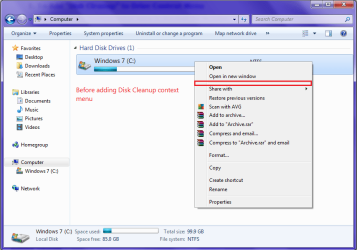
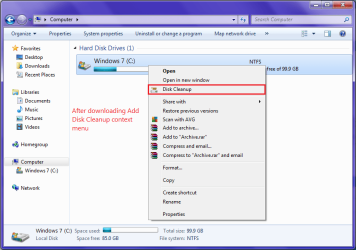
EXAMPLE: Disk Cleanup Added to Hard Drive's Context Menu Disk_Cleanup-1.jpg
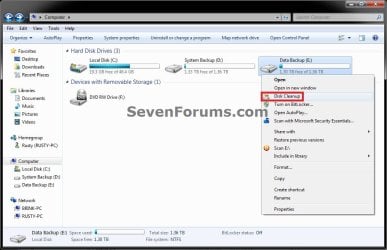
EXAMPLE: Disk Cleanup
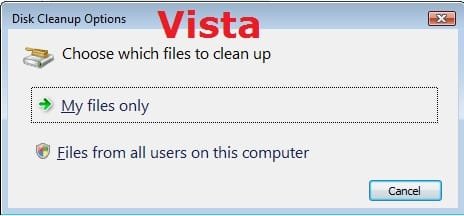
NOTE: This is what opens in Windows 7/8 (left screenshot below) and Vista (right screenshot below) when you use the Disk Cleanup context menu item. W7-8_Disk_Cleanup.jpg
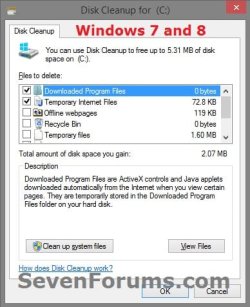
Disk_Cleanup-2B.jpg

Here's How: 1. To Add "Disk Cleanup" to Drive Context Menu A) Click/tap on the Download button below to download the file below, and go to step 3 below. Add_Disk_Cleanup_to_Drive_Context_Menu.reg

Download


2. To Remove "Disk Cleanup" from Drive Context Menu A) Click/tap on the Download button below to download the file below, and go to step 3 below. Remove_Disk_Cleanup_to_Drive_Context_Menu.reg

Download


3. Save the .reg file to your desktop.

4. Double click/tap on the downloaded .reg file to merge it.

5. When prompted, click/tap on Run, Yes (UAC-Windows 7/8) or Continue (UAC-Vista), Yes, and OK to approve merging the .reg file.

6. You can now delete the downloaded .reg file if you like.

That's it,
Shawn


Attachments

Last edited:
Thnx again for this m8 :)
 

My Computer

Computer type
PC/Desktop
Computer Manufacturer/Model Number
Custom Build
OS
Windows 7 Ultimate x64 SP1
CPU
AMD Athlon II X4 645 quad core
Memory
6gig DDR3
Graphics Card(s)
Nvidia geforce GT 630
Sound Card
On Board
Monitor(s) Displays
Samsung LED 19"
Screen Resolution
ULTRA HD 1080p 1920 x 1080
Hard Drives
5 x 2tb
ATA Devices x 2
USB x 5
PSU
850 watt something or other forgot name
Case
Custom Build
Cooling
6 fan in out system with cold air blown through the in
Keyboard
Steelseries
Mouse
GM.M6800 optical mouse 5 button model
Internet Speed
80 gig on a good day 60 to 80 on a bad
Antivirus
not disclosed
Browser
not disclosed
Other Info
My Desktop is in a custom built airflow casing over the case. I still have the power button available etc . but the rest is cool controlled cold air going through the in and theoretically hot air out of the out. But it never gets hot enough for hot air to come out :-P
Thanks!
 

My Computer

Computer type
PC/Desktop
OS
10 Home x64
CPU
Intel Core i5 4670K
Motherboard
Gigabyte GA-Z87-D3HP
Memory
Corsair XMS3 8GB DDr3 1600MHz
Graphics Card(s)
Sapphire NITRO Radeon R9 Fury
Sound Card
Asus Xonar DX
Monitor(s) Displays
Acer H236HLbmjd
Screen Resolution
1920x1080
Hard Drives
Force GS 128GB - Seagate 320GB - WD Caviar Black 1TB - WD Caviar Blue 500GB
PSU
EVGA SuperNOVA 650 P2
Case
Silverstone Raven 3 RV03B-W
Keyboard
Topre Realforce 104UG-HiPro
Mouse
Mionix Naos 7000
Internet Speed
76/4 On a good day
Antivirus
SmartScreen
Browser
Internet Explorer 11
You're most welcome guys. Thank you. :)
 

My Computer

Computer type
PC/Desktop
Computer Manufacturer/Model Number
Self built custom
OS
64-bit Windows 11 Pro for Workstations
CPU
Intel i7-8700K OC'd to 5 GHz
Motherboard
ASUS ROG Maximus XI Formula Z390
Memory
64 GB (4x16GB) G.SKILL TridentZ RGB DDR4 3600 MHz
Graphics Card(s)
ASUS ROG-STRIX-GTX1080TI-O11G-GAMING
Sound Card
Integrated
Monitor(s) Displays
2 x Samsung Odyssey G7 27"
Screen Resolution
2560x1440
Hard Drives
1TB Samsung 990 PRO M.2,
4TB Samsung 990 PRO PRO M.2,
TerraMaster F8 SSD Plus NAS
PSU
Seasonic Prime Titanium 850W
Case
Thermaltake Core P3
Cooling
Corsair Hydro H115i
Keyboard
Logitech wireless K800
Mouse
Logitech MX Master 4
Internet Speed
2 Gb/s Download and 100 Mb/s Upload
Antivirus
Malwarebyte Anti-Malware Premium
Browser
Google Chrome
Other Info
Logitech Z625 speaker system,
Logitech BRIO 4K Pro webcam,
HP Color LaserJet Pro MFP M477fdn,
APC SMART-UPS RT 1000 XL - SURT1000XLI,
Galaxy S23 Plus phone
It worked! Thank you Shawn Brink!

g.png

f.png
 
Last edited by a moderator:

My Computer

Computer Manufacturer/Model Number
Acer Aspire One 722 (AO722)
OS
Windows 7 Home Premium Service Pack 1 32-bit Build 7601
CPU
AMD C-50 Processor 1.0 Ghz
Memory
2 GB DDR3 RAM (1.73 usable in System Properties)
Graphics Card(s)
AMD Radeon HD 6200 series Graphics
Sound Card
High Definition Audio Device
Monitor(s) Displays
Generic PnP Monitor
Screen Resolution
1366 x 768 (recommended)
Hard Drives
320 GB HDD storage
298.09 GB in Disk Management (REAL)
Keyboard
Built-in on my laptop
Mouse
External mouse
Other Info
Installed Windows 7 Service Pack 1 by 9/9/2012
Back
Top