Taskbar color not changing

dwd3885

New member
Local time
12:11 AM
Messages
8
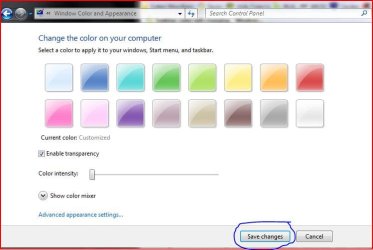
has anyone seen this one before on 7000? I change the Windows 7 theme, but the 'color' always stays at custom and no transparency and no color intensity. no matter what i do, the taskbar will stay this gray color and not change to what i change it to when i click 'save changes'
 

My Computer

Computer Manufacturer/Model Number
Dell 530
OS
7000
CPU
Intel Quad
Memory
6gb
Graphics Card(s)
ATI HD 3600 Series
Monitor(s) Displays
Dell 2007 WFP
It changes here in 6801. Btw i havnt seen the dave changes button anywhere when i change the theme. i just select it, and it changes.
 

My Computer

Computer Manufacturer/Model Number
Hp 530
OS
Windows 7 RC1
CPU
Core Duo,1.6Ghz
Motherboard
T2300
Memory
1GB
Hello dwd3885,

Welcome to the forums.

If you click on the 'My System Specs' link at the bottom left of one of your posts and fill in as much info as you can, that would help us answer questions for you without you having to tell us each time. This is usually caused by not having hardware capable of running Aero. I'm guessing that you have selected Personalize and then clicked on color and transparency is checked.

Abhimanyu, if you click on the color or desktop background buttons at the bottom there is a save changes button.

Gary
 

My Computer

Computer Manufacturer/Model Number
Dell XPS420
OS
Vista Ult 64 bit Seven Ult RTM x64
CPU
Intel Core2 Quad Q6600 2.40 gigahertz
Memory
Crucial Ballistix 4x2GB PC2 6400
Graphics Card(s)
NVIDIA GeForce 8600 GTS 256 MB
Sound Card
Creative SB X-Fi audio
Monitor(s) Displays
HP w2207 + HPvs15
Screen Resolution
1680x1050 + 1024x768
Hard Drives
2-WD5000AAKS-500 GB
WD5000AAV-500 GB external
Keyboard
Microsoft Comfort Curve
Mouse
MX Revolution
Other Info
Wacom Intuos 2 Graphics Tablet
Experience Index=5.5
Wow! Gary that is quite a reply. I wouldnt have been able to reply that professionally to any post. :)

BTW, i still dont see the button! :S When i click on Desktop Background, It gives me a button "OK" and then the "Save Theme" kindof button.

Screeny maybe? :)
 

My Computer

Computer Manufacturer/Model Number
Hp 530
OS
Windows 7 RC1
CPU
Core Duo,1.6Ghz
Motherboard
T2300
Memory
1GB
well the hardware was capable of running aero in Vista just fine. The taskbar will change at the bottom, but when I click 'save changes'.

When I click on a Windows Theme, it shows me the 1. desktop background, window color, sounds and screen saver. Not the Window Color for a moment goes to what it should be but then it changes to 'Custom' as does the theme. So no matter what theme I select, it's always custom, because the window color doesn't change
 

My Computer

Computer Manufacturer/Model Number
Dell 530
OS
7000
CPU
Intel Quad
Memory
6gb
Graphics Card(s)
ATI HD 3600 Series
Monitor(s) Displays
Dell 2007 WFP
Here's the screenshot.

color.JPG

dwd,

The only theme that gives me a grey taskbar is the second ease of access theme. All of the windows themes give me transparency. Can't imagine what the problem is. Sorry.
Maybe someone else has run into this?

Gary
 

My Computer

Computer Manufacturer/Model Number
Dell XPS420
OS
Vista Ult 64 bit Seven Ult RTM x64
CPU
Intel Core2 Quad Q6600 2.40 gigahertz
Memory
Crucial Ballistix 4x2GB PC2 6400
Graphics Card(s)
NVIDIA GeForce 8600 GTS 256 MB
Sound Card
Creative SB X-Fi audio
Monitor(s) Displays
HP w2207 + HPvs15
Screen Resolution
1680x1050 + 1024x768
Hard Drives
2-WD5000AAKS-500 GB
WD5000AAV-500 GB external
Keyboard
Microsoft Comfort Curve
Mouse
MX Revolution
Other Info
Wacom Intuos 2 Graphics Tablet
Experience Index=5.5
here are some screen shots.


the weird thing is that when i select Windows Basic theme, the taskbar changes colors correctly and sticks
 

My Computer

Computer Manufacturer/Model Number
Dell 530
OS
7000
CPU
Intel Quad
Memory
6gb
Graphics Card(s)
ATI HD 3600 Series
Monitor(s) Displays
Dell 2007 WFP
Thats Weird! :confused: I just get the " OK " Button there. Even if i select different colors.
 

Attachments

  • NoSaveChanges.jpg
    NoSaveChanges.jpg
    57.8 KB · Views: 1,020

My Computer

Computer Manufacturer/Model Number
Hp 530
OS
Windows 7 RC1
CPU
Core Duo,1.6Ghz
Motherboard
T2300
Memory
1GB
dwd,

I noticed in your second pic that the enable transparency box is not checked.

In case you don't know, you cannot use custom colors with the aero themes.

Gary
 

My Computer

Computer Manufacturer/Model Number
Dell XPS420
OS
Vista Ult 64 bit Seven Ult RTM x64
CPU
Intel Core2 Quad Q6600 2.40 gigahertz
Memory
Crucial Ballistix 4x2GB PC2 6400
Graphics Card(s)
NVIDIA GeForce 8600 GTS 256 MB
Sound Card
Creative SB X-Fi audio
Monitor(s) Displays
HP w2207 + HPvs15
Screen Resolution
1680x1050 + 1024x768
Hard Drives
2-WD5000AAKS-500 GB
WD5000AAV-500 GB external
Keyboard
Microsoft Comfort Curve
Mouse
MX Revolution
Other Info
Wacom Intuos 2 Graphics Tablet
Experience Index=5.5
dwd,

I noticed in your second pic that the enable transparency box is not checked.

Gary

right. i'm showing you what it looks like when i first click on windows color on the bottom. it disregards the theme i chose and looks like that
 

My Computer

Computer Manufacturer/Model Number
Dell 530
OS
7000
CPU
Intel Quad
Memory
6gb
Graphics Card(s)
ATI HD 3600 Series
Monitor(s) Displays
Dell 2007 WFP
Sorry, but I don't know what the problem is.

Abhimanyu,

According to your specs, you are running build 6801 and I am running build 7000. That's probably why the buttons aren't the same.

Gary
 

My Computer

Computer Manufacturer/Model Number
Dell XPS420
OS
Vista Ult 64 bit Seven Ult RTM x64
CPU
Intel Core2 Quad Q6600 2.40 gigahertz
Memory
Crucial Ballistix 4x2GB PC2 6400
Graphics Card(s)
NVIDIA GeForce 8600 GTS 256 MB
Sound Card
Creative SB X-Fi audio
Monitor(s) Displays
HP w2207 + HPvs15
Screen Resolution
1680x1050 + 1024x768
Hard Drives
2-WD5000AAKS-500 GB
WD5000AAV-500 GB external
Keyboard
Microsoft Comfort Curve
Mouse
MX Revolution
Other Info
Wacom Intuos 2 Graphics Tablet
Experience Index=5.5
In case you don't know, you cannot use custom colors with the aero themes.
Gary

Gary,
What you are saying is not right. I selected the Windows 7 theme and changed the colors.
Do we have these differences because im on 6801 ?


Well i quite like the how theme changed in 6801 then. :) All i have to do is select the theme and it changes immediately. I dont need to select any button. :)

DWD, have you activated windows? Maybe some features dont turn on till you dont activate windows?
 

My Computer

Computer Manufacturer/Model Number
Hp 530
OS
Windows 7 RC1
CPU
Core Duo,1.6Ghz
Motherboard
T2300
Memory
1GB
Gary,
What you are saying is not right. I selected the Windows 7 theme and changed the colors.
Do we have these differences because im on 6801 ?


Well i quite like the how theme changed in 6801 then. :) All i have to do is select the theme and it changes immediately. I dont need to select any button. :)

DWD, have you activated windows? Maybe some features dont turn on till you dont activate windows?

no i haven't activated it yet...maybe that's why. i guess that's the ONLY thing that it could be really
 

My Computer

Computer Manufacturer/Model Number
Dell 530
OS
7000
CPU
Intel Quad
Memory
6gb
Graphics Card(s)
ATI HD 3600 Series
Monitor(s) Displays
Dell 2007 WFP
What I meant to say is you can't use the 'advanced appearance settings' (the link below the intensity slider) with the Aero theme. This is where you can change the color of individual bits of the windows and message boxes etc. Unfortunately they don't work if you use an Aero theme. You can change the Aero color. Sorry about the confusion. When changing a theme, there is no save changes button. As you say it changes immediately and you just close the window. Just to change the individual items, such as color or background. You have an OK button and I have a save changes button.

Mine is not activated and it works fine.

Gary
 

My Computer

Computer Manufacturer/Model Number
Dell XPS420
OS
Vista Ult 64 bit Seven Ult RTM x64
CPU
Intel Core2 Quad Q6600 2.40 gigahertz
Memory
Crucial Ballistix 4x2GB PC2 6400
Graphics Card(s)
NVIDIA GeForce 8600 GTS 256 MB
Sound Card
Creative SB X-Fi audio
Monitor(s) Displays
HP w2207 + HPvs15
Screen Resolution
1680x1050 + 1024x768
Hard Drives
2-WD5000AAKS-500 GB
WD5000AAV-500 GB external
Keyboard
Microsoft Comfort Curve
Mouse
MX Revolution
Other Info
Wacom Intuos 2 Graphics Tablet
Experience Index=5.5
hmm. and i'll click on 'Window Color at the bottom, make the change, it changes, but when i click save changes it reverts back to gray. ugh!!
 

My Computer

Computer Manufacturer/Model Number
Dell 530
OS
7000
CPU
Intel Quad
Memory
6gb
Graphics Card(s)
ATI HD 3600 Series
Monitor(s) Displays
Dell 2007 WFP
Gary, Thanks for the clarification. I was getting confused myself. :)

Dwd,
Have you tried selecting the Whole Theme? I guess u have but still just try using windows 7 theme again. Also maybe restart the computer.

Also, there are unexplained bugs which happen to some and not to other. Like My gadgets dont start on startup. I have to actiavate them by right clicking and going to gadgets. Maybe just wait, get into the public beta and report the bug. :)
 

My Computer

Computer Manufacturer/Model Number
Hp 530
OS
Windows 7 RC1
CPU
Core Duo,1.6Ghz
Motherboard
T2300
Memory
1GB
Hi dwd3885

You may also want to double check the drivers 6801 used for your graphics card. Go to hardware manager and double check there. You go into their properties and check the version also try updating them there as well.
If you have a discreet card, ati nvidea, etc. You can try updating them from their website support. If it's an integrated chipset then try updating from the mobo manufacturer.
 

My Computer

OS
Windows 7 build 7000 x64
CPU
Amd Athalon 64, 2000+
Motherboard
Asus K8V Deluxe
Memory
Promise, pc2400 256mb x3, 1.5gb
Graphics Card(s)
Nvidea Geforce 6800 GTS
Sound Card
Creative Audigy 2 Platinum
Monitor(s) Displays
Westinghouse lcm22w2
Screen Resolution
1680x1050
Hard Drives
WD Caviare 250gb sata x2
Seagate Barracuda 250gb x2
PSU
Antec 500w
Case
Frankenstien in black
Cooling
when its not too dusty
Keyboard
Wolfe Claw mkII
Mouse
logitech mx100 cordless
Internet Speed
10mb p/s
unbelievable. fixed it. Listening to Windows Weekly with Paul Thurrott and he mentioned that Live Mesh doesn't work properly with 7. It breaks the glass. Uninstalled Live Mesh and the problem is fixed!

Microsoft needs to fix live mesh!! I use it all the time!
 

My Computer

Computer Manufacturer/Model Number
Dell 530
OS
7000
CPU
Intel Quad
Memory
6gb
Graphics Card(s)
ATI HD 3600 Series
Monitor(s) Displays
Dell 2007 WFP
unbelievable. fixed it. Listening to Windows Weekly with Paul Thurrott and he mentioned that Live Mesh doesn't work properly with 7. It breaks the glass. Uninstalled Live Mesh and the problem is fixed!

Microsoft needs to fix live mesh!! I use it all the time!
wow i had no idea! i was having a similar problem that when i would open windows explorer at any time the color would switch to custom and no matter how many times i switched it back explorer screwed it up again. i had live mesh installed so that makes sense now.
 

My Computer

OS
Windows 7 Ultimate Beta 7000
CPU
AMD Athlon 64 X2 5000+ Brisbane 2.6GHz Black Edition
Motherboard
ASUS M2A-VM
Memory
Kingston 2GB DDR2 667
Monitor(s) Displays
Acer AL2216Wbd 22" Widescreen
Screen Resolution
1680x1050
Hard Drives
HITACHI 500GB SATA
Other Info
Laptop: Compaq C700
Glad you got it sorted out.

Gary
 

My Computer

Computer Manufacturer/Model Number
Dell XPS420
OS
Vista Ult 64 bit Seven Ult RTM x64
CPU
Intel Core2 Quad Q6600 2.40 gigahertz
Memory
Crucial Ballistix 4x2GB PC2 6400
Graphics Card(s)
NVIDIA GeForce 8600 GTS 256 MB
Sound Card
Creative SB X-Fi audio
Monitor(s) Displays
HP w2207 + HPvs15
Screen Resolution
1680x1050 + 1024x768
Hard Drives
2-WD5000AAKS-500 GB
WD5000AAV-500 GB external
Keyboard
Microsoft Comfort Curve
Mouse
MX Revolution
Other Info
Wacom Intuos 2 Graphics Tablet
Experience Index=5.5
Back
Top