
How to Import "Windows Mail" Messages into Windows Live Mail
Information
This will show you how to export your Windows Mail messages from Vista and then import them into Windows Live Mail inside Windows 7.
Tip
You can get information on how to download the latest version of Windows Live Mail here.
Here's How:
1. Export your Windows Mail messages from inside Vista into a empty new folder (ex: Messages) on your Vista Desktop.
2. Save and copy the new Messages folder to your desktop in Windows 7.
NOTE: For example, I exported my Vista Windows Mails messages to the new Messages folder from the link in step 1, so I would save the Messages folder to my Windows 7 desktop.
3. In Windows 7, open Windows Live Mail.
4. In Windows Live Mail, click on File on the menu bar, Import, and Messages. (See left screenshot below)
NOTE: If you do not have a menu bar displayed, then press Alt+M and click on Show menu bar. (see right screenshot below)

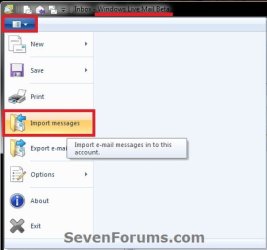
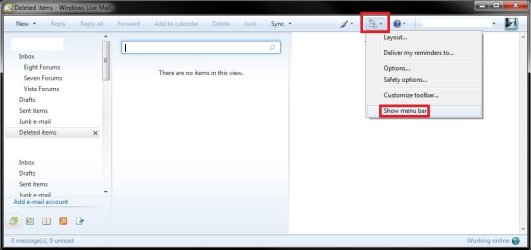
5. Select Windows Mail, and click on the Next button. (See screenshot below)
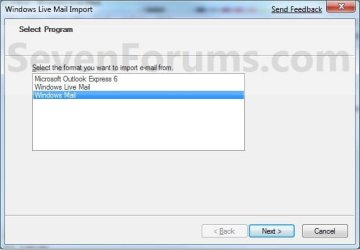
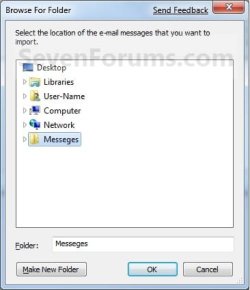
6. Click on the Browse button and navigate to the new Messages folder on your desktop (step 2), then select (highlight) it and click on OK and the Next button. (See screenshots below)
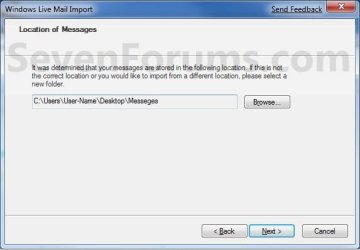
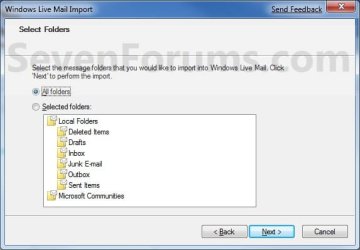
7. Select (dot) All folders, then click on the Next button. (See screenshot below)
8. Click on the Finish button. (See screenshot below)

9. Your Vista Windows Mail messages have now been imported into Windows Live Mail under Storage Folders in the Imported Folders folder in Windows 7. (See screenshot below)
NOTE: Expand the folders inside the Imported Folders to see all of your messages.
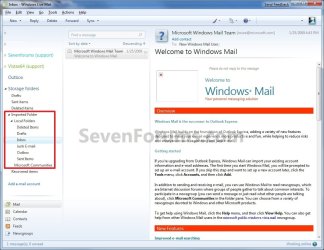
10. You can now move and copy the messages to any other email account folders that you like now. When done you can delete the Imported Folder folder if you like. (See screenshot above)
That's it,
Shawn
Related Tutorials
- How to Setup and Use Windows Live Mail as Email Client for your Messages
- How to Import Vista and Windows 7 Contacts and Contact Groups into Windows Live Mail
- How to Export and Import Contacts in Windows Live Mail
- How to Export and Import Email Accounts in Windows Live Mail
- How to Export and Import Email Messages in Windows Live Mail
- How to Hide or Show the Ribbon Toolbar in Windows Live Mail 2011
- How to Minimize Windows Live Mail to the System Tray in Windows 7
- How to See All Email in One Inbox Folder in Windows Live Mail with "Quick Views"
Last edited:


