Boot from a VHD using Windows 7

How to Boot from a VHD using Windows 7 and Windows 8

   Information
Windows 7 and Windows 8 includes support for creating, mounting and booting from VHD images but not many seem to know how to use this functionality to boot VHDs at boot time... I will detail the steps required to have another OS bootable using Windows 7...

This tutorial will show you how to setup Windows 7 or Windows 8 to boot from an existing VHD (Virtual Hard Disk).

All Vista, Windows 7, and Windows 8 (except Windows 8 RT) editions support booting from a VHD.

You must have either Windows 7 Ultimate, Windows 7 Enterprise, Windows 8 Pro, or Windows 8 Enterprise installed on the VHD to be able to boot from the VHD.


   Warning
If you do not have a good knowledge of how to reset your VirtualOS configuration like HAL type and driver configuration then your VHD will fail to boot. It must be cleaned of VirtualOS configuration correctly before Windows can boot your VHD!!


Step 1: If you have not already, create or attach an existing a VHD using the tutorial below.
http://www.sevenforums.com/tutorials/566-virtual-hard-disk-create-attach-vhd.html


Step 2: Open an elevated command prompt.


Step 3: Copy and Paste this command below and press Enter.
NOTE: Substitute VHD_Boot in the command below for what you want to be displayed as the name in Windows Boot Manager.
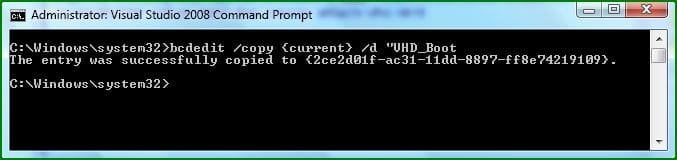
bcdedit /copy {current} /d "VHD_Boot"

If the command succeeds, BCDEdit displays a message similar to the following:


The entry was successfully copied to {CLSID_Number}
832d1227210633-boot-vhds-using-windows-7-step1.jpg

Take note of the CLSID number as you will need this during the next step ;)

Step 4: Then type this command below and press Enter.
NOTE: Substitute C with the drive letter your VHD is on, and substitute disk1 with the name of your VHD file.
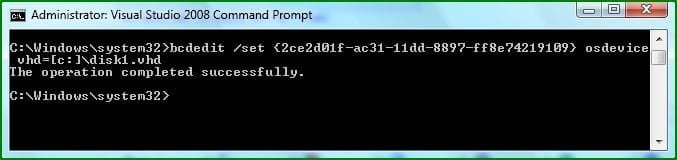
bcdedit /set {CLSID_Number} osdevice vhd=[C:]\disk1.vhd

833d1227210633-boot-vhds-using-windows-7-step2.jpg


Step 5: Thats it, You can now boot VHDs using Windows 7 :geek:
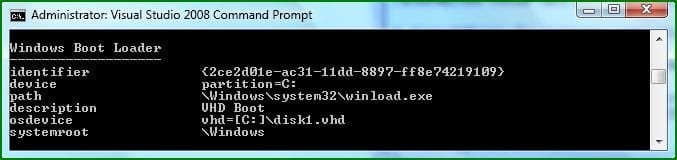
To confirm the settings simply type bcdedit
834d1227210633-boot-vhds-using-windows-7-step3.jpg

If your VHD is configured correctly You can reboot and select the extra boot-option to boot from your VHD :party:
   Warning
VirtualPC VHDs can not be used for booting with Windows because VirtualPC uses a Pentium 3 HAL and this prevents them from being used as boot media, You can however use this Tutorial: http://www.sevenforums.com/tutorials/566-virtual-hard-disk-create-attach-vhd.html and create then mount a VHD for use with VMWare Workstation....

You simply set VMWare workstation to use a Physical Disk, you can then Install a separate OS onto this mounted VHD for use with Windows.​


   Tip
You Must reset your VHD VirtualOS configuration like HAL type and driver configuration or your VHD will fail to boot!!! It must be cleaned of VirtualOS configuration correctly before windows 7 can boot your VHD!! ;)


   Note
There are still many bugs associated with VHD booting with Windows 7 at this time, I suspect Microsoft will be releasing a new Version of VirtualPC that's able to manage this entire process of creating, installing and booting separate VHDs at boot-time easily and without so many problems ;)


Attachments

  • Step1.JPG
    Step1.JPG
    22.2 KB · Views: 128,601
  • Step2.JPG
    Step2.JPG
    23.5 KB · Views: 128,208
  • Step3.JPG
    Step3.JPG
    24.9 KB · Views: 126,286
Last edited by a moderator:
Hello Steven.

I've been wondering what you were working on for the last day or so. Good Work!

Thank you!


Later ;) Ted
 

My Computer

Computer Manufacturer/Model Number
* BFK Customs *
OS
W 7 64-bit Ultimate
CPU
Intel Q9550 Yorkfield
Motherboard
ASUS P5Q Pro
Memory
8GB Dominator 8500C5D
Graphics Card(s)
ATI : XFX 5870
Sound Card
Realtek HD Audio 7-1
Monitor(s) Displays
1x 47" LCD HDMI & 3x 26" LCD HDMI
Screen Resolution
1920x1080P & 1920x1200
Hard Drives
1x 80GB Intel X25-M G2 SSD : 1x 500GB & 1x 640GB WD Caviar Black(s)
PSU
Corsair 620HX
Case
Cooler Master RC-690
Cooling
Tuniq Tower 120, 2x 140mm and 3x 120mm case fans
Keyboard
Microsoft 500
Mouse
Razer Diamondback 3G
Internet Speed
14 Mb/s
Other Info
1x Koutech 3Gb/s SATA HDD Hot Swap Rack
Very nice Steven.
 

My Computer

Computer type
PC/Desktop
Computer Manufacturer/Model Number
Self built custom
OS
64-bit Windows 11 Pro for Workstations
CPU
Intel i7-8700K OC'd to 5 GHz
Motherboard
ASUS ROG Maximus XI Formula Z390
Memory
64 GB (4x16GB) G.SKILL TridentZ RGB DDR4 3600 MHz
Graphics Card(s)
ASUS ROG-STRIX-GTX1080TI-O11G-GAMING
Sound Card
Integrated
Monitor(s) Displays
2 x Samsung Odyssey G7 27"
Screen Resolution
2560x1440
Hard Drives
1TB Samsung 990 PRO M.2,
4TB Samsung 990 PRO PRO M.2,
TerraMaster F8 SSD Plus NAS
PSU
Seasonic Prime Titanium 850W
Case
Thermaltake Core P3
Cooling
Corsair Hydro H115i
Keyboard
Logitech wireless K800
Mouse
Logitech MX Master 4
Internet Speed
2 Gb/s Download and 100 Mb/s Upload
Antivirus
Malwarebyte Anti-Malware Premium
Browser
Google Chrome
Other Info
Logitech Z625 speaker system,
Logitech BRIO 4K Pro webcam,
HP Color LaserJet Pro MFP M477fdn,
APC SMART-UPS RT 1000 XL - SURT1000XLI,
Galaxy S23 Plus phone
Good job Steven. Going to have to give that a try. Thanks.

Gary
 

My Computer

Computer Manufacturer/Model Number
Dell XPS420
OS
Vista Ult 64 bit Seven Ult RTM x64
CPU
Intel Core2 Quad Q6600 2.40 gigahertz
Memory
Crucial Ballistix 4x2GB PC2 6400
Graphics Card(s)
NVIDIA GeForce 8600 GTS 256 MB
Sound Card
Creative SB X-Fi audio
Monitor(s) Displays
HP w2207 + HPvs15
Screen Resolution
1680x1050 + 1024x768
Hard Drives
2-WD5000AAKS-500 GB
WD5000AAV-500 GB external
Keyboard
Microsoft Comfort Curve
Mouse
MX Revolution
Other Info
Wacom Intuos 2 Graphics Tablet
Experience Index=5.5
Good job Steven. Going to have to give that a try. Thanks.

Gary

Heres another way of creating a bootable VHD..

1. Boot Windows 7 DVD
2. Choose Windows Repair
3. start CMD
4. Run Diskpart
5. Create vdisk file=c:\windows7.vhd maximum=100000
6. select vdisk file=c:\windows7.vhd
7. attach vdisk
8. exit Windows Repair (without Reboot)
9. Install Windows 7 to this surfaced VHD
10. Reboots and boots Windows 7 from VHD

UPDATE

See tutorial here - http://www.sevenforums.com/tutorials/2953-virtual-hard-drive-vhd-file-create-start-boot.html
 
You *do* have a VHD that you are trying to boot from, right?
 

My Computers

System One System Two

  • Computer type
    PC/Desktop
    Computer Manufacturer/Model Number
    The Beast Model A (homebrew)
    OS
    Windows 11 21H2 Current build
    CPU
    AMD Ryzen 9 3950X
    Motherboard
    MSI MEG X570 GODLIKE
    Memory
    4 * 32 GB - Corsair Vengeance 3600 MHz
    Graphics Card(s)
    EVGA GeForce RTX 3080 Ti XC3 ULTRA GAMING (12G-P5-3955-KR)
    Sound Card
    Realtek® ALC1220 Codec
    Monitor(s) Displays
    2x Eve Spectrum ES07D03 4K Gaming Monitor (Matte) | Eve Spec
    Screen Resolution
    3x 3840 x 2160
    Hard Drives
    3x Samsung 980 Pro NVMe PCIe 4 M.2 2 TB SSD (MZ-V8P2T0B/AM) } 3x Sabrent Rocket NVMe 4.0 1 TB SSD
    PSU
    PC Power & Cooling’s Silencer Series 1050 Watt, 80 Plus Plat
    Case
    Fractal Design Define 7 XL Dark ATX Full Tower Case
    Cooling
    SteelSeries Apex Pro Wired Gaming Keyboard
    Keyboard
    SteelSeries Apex Pro
    Mouse
    Logitech MX Master 3S | MX Master 3 for business
    Internet Speed
    AT&T LightSpeed Gigabit Duplex Ftth
    Antivirus
    Windows Defender + MB 3
    Browser
    Nightly (default) + Firefox (stable),Chrome, Edge
  • Computer type
    PC/Desktop
    System Manufacturer/Model Number
    Dell Latitude E5470
    OS
    ChromeOS Flex Dev Channel (current)
    CPU
    Intel(R) Core(TM) i5-6300U CPU @ 2.40GHz, 2501 Mhz, 2 Core(s), 4 Logical Processor(s)
    Motherboard
    Dell
    Memory
    16 GB
    Graphics Card(s)
    Intel(R) HD Graphics 520
    Sound Card
    Intel(R) HD Graphics 520 + RealTek Audio
    Monitor(s) Displays
    Dell laptop display 15"
    Screen Resolution
    1920 * 1080
    Hard Drives
    Toshiba 128GB M.2 22300 drive
    INTEL Cherryville 520 Series SSDSC2CW180A 180 GB SATA III SSD
    PSU
    Dell
    Case
    Dell
    Cooling
    Dell
    Keyboard
    Dell
    Mouse
    Logitech MX Master 3S (shared w. Sys 1) | Dell TouchPad
    Internet Speed
    AT&T LightSpeed Gigabit Duplex Ftth
Tip
You Must reset your VHD VirtualOS configuration like HAL type and driver configuration or your VHD will fail to boot!!!
It must be cleaned of VirtualOS configuration correctly before windows 7 can boot your VHD!! ;)
What do you mean by that? How do I reset my VHD VirtualOS configuration?
 

My Computer

OS
Windows Server 2008 R2
What do you mean by that? How do I reset my VHD VirtualOS configuration?

You have to run Sysprep after doing a clean installation ;)


The VHD boot support for other OS like XP or Vista is crippled since the framework is missing, probably until an RTM Win7 release...For now you can only boot Win7 from a VHD while using Windows 7 :(
 
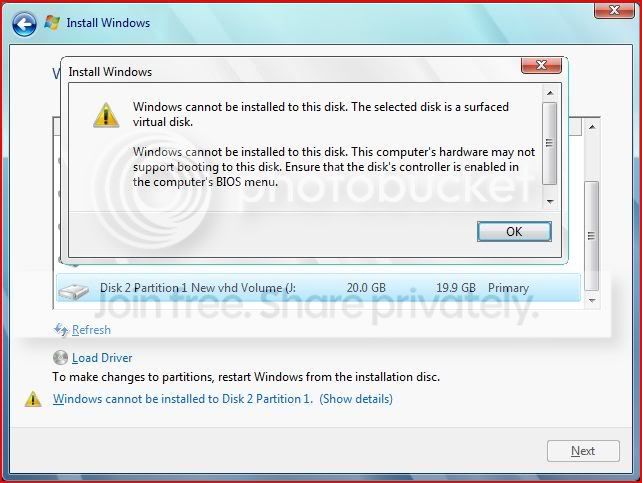
after following the tut.....i tried to install windows 7 from it's iso within the system but got this error message saying:

vhd.jpg


pls help me guys.....i wud be so thankful to u
 

My Computer

OS
windows 7
after following the tut.....i tried to install windows 7 from it's iso within the system but got this error message saying:

pls help me guys.....i wud be so thankful to u

You can only do this by booting from the DVD, you cant install to a VHD from within windows ;)
 
thanks for correcting me........i'll try dvd install...

Thaks a lot steven
 

My Computer

OS
windows 7
VHD_Boot goes to Startup Repair

I was able to get VHD_Boot on my Windows Boot Manager but is does not boot properly.. It always goes to Startup Repair.

Do I need to have OS pre-installed on the VHD before doing this?

I'm also not very familiar with VirtualOS configuration. I just followed the procedure on step 1 link and go on with this procedure after it.

Appreciate your help..
 

My Computer

OS
Win7 Beta Ultimate 32bit
Can a windows 7 booted from a VHD see my other HDD's and partitions?
 

My Computer

Computer Manufacturer/Model Number
IBM T42
OS
Windows Vista and Windows 7 Beta
CPU
Intel Pentium 3 Centrino
Memory
1.5 GB
Graphics Card(s)
ATI Radeon Mobility 7500
Do I need to have OS pre-installed on the VHD before doing this?

I would think so otherwise how would you "Boot the VHD" if its doesnt contain any bootable MBR or BootSect or OS?
 

My Computer

OS
Windows 7
if you dont have a vhd with an os, you can run windows 7 os and create a vhd using diskpart and install to that. dual boot is done automatically for you. follow the tutorial on this site.
 

My Computer

Computer Manufacturer/Model Number
IBM T42
OS
Windows Vista and Windows 7 Beta
CPU
Intel Pentium 3 Centrino
Memory
1.5 GB
Graphics Card(s)
ATI Radeon Mobility 7500
i have the vhd with me, but i run xp , can i boot of it using a vista boot disk floppy??
 

My Computer

OS
windows xp
Do I need to have OS pre-installed on the VHD before doing this?
I would think so otherwise how would you "Boot the VHD" if its doesnt contain any bootable MBR or BootSect or OS?
I don't think you need a pre-installed OS.

Have done this:
In VMWare I created a hard disk with 100 Gb. Only pre formatted with NTFS. No OS installed. Then I have booted Windows 7 installation DVD and follow the instructions to install into VHD.

After installation Windows 7 boots from VHD file. On hard disk there are only: Folder "boot" and files "bootmgr", "win7.vhd" and "pagefile.sys". Perhaps whilst installation the MBR was changed.
 

My Computer

OS
Windows XP and 7
Back
Top