Password - Require on Wakeup

How to Enable or Disable Require Password on Wakeup in Windows 7


   Information
Seems a needless extra step to have to log on every time your computer resumes from standby, suspend, or hibernate. This will show you how to resume from suspend directly to the desktop without requiring a password on wakeup.


OPTION ONE

Through Power Options


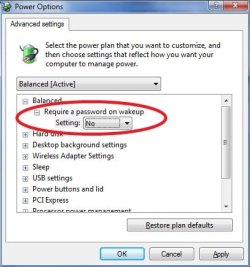
1. Open the Power Options Advanced Plan Settings.

2. Click on the Change settings that are currently unavailable link.

3. If prompted by UAC, then click on Yes.

4. To Disable Require Password on Wakeup
A) Change the Require a password on wakeup setting to NO , and click on OK.
4.jpg
5. To Enable Require Password on Wakeup
A) Change the Require a password on wakeup setting to YES , and click on OK.
6. Close the rest of the windows you have opened.


OPTION TWO

Through System Settings


NOTE: This option will change the password protection on wakeup setting in all power plans in your user account.
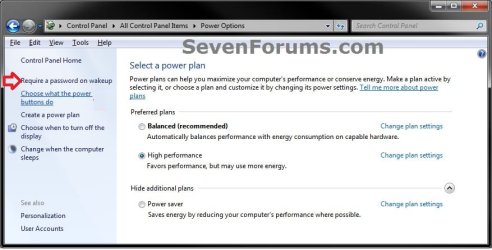
1. Open the Control Panel (Icons View), and click on the Power Options icon.

2. In the left pane, click on the Require a password on wakeup link. (see screenshot below)
System_Settings-1.jpg
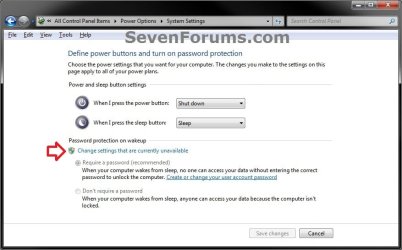
3. Click on the Change settings that are currently unavailable link. (see screenshot below)
System_Settings-2_UAC.jpg
4. If prompted by UAC, then click on Yes (if administrator) or enter administrator's password (if standard user).

5. To Disable Require Password on Wakeup
A) Select (dot) Don't Require a password. (see screenshot below step 7)

B) Go to step 7.
6. To Enable Require Password on Wakeup
A) Select (dot) Require a password. (see screenshot below step 7)
7. Click on the Save changes button. (see screenshot below)
NOTE: The Save changes button will remain grayed out until you make a change in the settings.
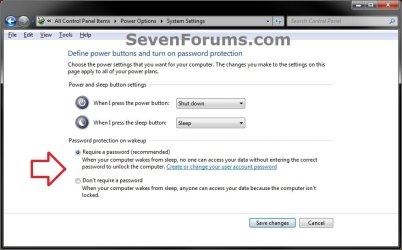
System_Settings-3.jpg
8. You can close the Power Options window when done. (see screenshot below step 2)


OPTION THREE

Through an Elevated Command Prompt


1. Open an elevated command prompt.

2. To Disable Require Password on Wakeup
WARNING: If you've created custom power profiles you'll have to get the GUID for the one you want to change from powercfg -l first and substitute it for the <profile> parameter in these commands below.
A) In the elevated command prompt type these commands below and press enter following each one.
Code:
powercfg -SETACVALUEINDEX [B][COLOR=red]<profile>[/COLOR][/B] SUB_NONE CONSOLELOCK 0
powercfg -SETDCVALUEINDEX [B][COLOR=red]<profile>[/COLOR][/B] SUB_NONE CONSOLELOCK 0
NOTE: where <profile> is SCHEME_BALANCED, SCHEME_MAX, SCHEME_MIN or a custom profile GUID from powercfg -l


Last edited by a moderator:
I'd like to disable the password on wakeup, however, the "require password on wakeup" setting is greyed out, and I cannot change it from yes to no.

Any suggestions?
 

My Computer

OS
Windows 7
Hello Swears, and welcome to Vista Forums.

You would just need to click on the Change settings that are currently unavailable link first to ungrey it.

Hope this helps,
Shawn
 

My Computer

Computer type
PC/Desktop
Computer Manufacturer/Model Number
Self built custom
OS
64-bit Windows 11 Pro for Workstations
CPU
Intel i7-8700K OC'd to 5 GHz
Motherboard
ASUS ROG Maximus XI Formula Z390
Memory
64 GB (4x16GB) G.SKILL TridentZ RGB DDR4 3600 MHz
Graphics Card(s)
ASUS ROG-STRIX-GTX1080TI-O11G-GAMING
Sound Card
Integrated
Monitor(s) Displays
2 x Samsung Odyssey G7 27"
Screen Resolution
2560x1440
Hard Drives
1TB Samsung 990 PRO M.2,
4TB Samsung 990 PRO PRO M.2,
TerraMaster F8 SSD Plus NAS
PSU
Seasonic Prime Titanium 850W
Case
Thermaltake Core P3
Cooling
Corsair Hydro H115i
Keyboard
Logitech wireless K800
Mouse
Logitech MX Master 4
Internet Speed
2 Gb/s Download and 100 Mb/s Upload
Antivirus
Malwarebyte Anti-Malware Premium
Browser
Google Chrome
Other Info
Logitech Z625 speaker system,
Logitech BRIO 4K Pro webcam,
HP Color LaserJet Pro MFP M477fdn,
APC SMART-UPS RT 1000 XL - SURT1000XLI,
Galaxy S23 Plus phone
Hello,

I am utilizing the command line for this. In Vista, you have to know the profile name or GUID before you can edit the setting.

I know that I can get that by utilizing powercfg -getactivescheme however when I do that I get returned:
Power Scheme GUID: 49ef8fc0-bb7f-488e-b6a0-f1fc77ec649b (Dell Recommended) which will be different for every computer.

All I need is the 49ef8fc0-bb7f-488e-b6a0-f1fc77ec649b
How would I capture just that in a variable?

I was thinking about the following code however it comes back as missing an operand. Any help would be much appreciated.

Code:
@echo off
For /F "Tokens=*" %%A In ('powercfg -getactivescheme^|Findstr /I /C:": "') Do Set /A _ActiveScheme=%%B
powercfg -SETACVALUEINDEX %_ActiveScheme% SUB_NONE CONSOLELOCK 0
powercfg -SETDCVALUEINDEX %_ActiveScheme% SUB_NONE CONSOLELOCK 0

Wayne Leiser, CTO
Spectacular Computer Repair
 

My Computer

Computer Manufacturer/Model Number
Dell
OS
Vista
Not to try and start a flamewar or anything of that nature, but I have to disagree with the statement "Seems a needless extra step to have to log on every time your computer resumes from standby, suspend, or hibernate". Anyone that uses a notebook that has any data on the notebook that they consider private should really consider keeping this on. Without that password someone can snatch a notebook and have full unrestricted access to the data. While a hibernate password will not keep a determined person out of your notebook, as there are multiple NT password recovery tools bootable from CDs or USB, used in conjunction with whole disk encryption (such as TrueCrypt) can keep your data almost 100% safe.

When a person encounters a screensaver or hibernate password and they want access to the system, they can normally just hard reboot the box, boot to a NT password recovery CD, reset or change the password and bam! (Just like Emeril!) they're in. With whole disk encryption when they try to reboot the box they won't be able to access the hard drive at all :)
 

My Computer

Computer Manufacturer/Model Number
ASUS N81Vg-X1
OS
Ubuntu Linux 8.10
CPU
Intel Core 2 Duo P8600 2.4GHz
Memory
4GB
Graphics Card(s)
NVidia GeForce GT 120M
Sound Card
Integrated
Monitor(s) Displays
14" Widescreen
Screen Resolution
1366x768
Hard Drives
320GB 7200RPM
Hello Betawind,

While that is true with laptops and should be used with them, the average home user with a desktop may find this a but tedious if security is not a concern for them.

I would say that if security is a concern, then using BitLocker would be a much better choice instead.
 

My Computer

Computer type
PC/Desktop
Computer Manufacturer/Model Number
Self built custom
OS
64-bit Windows 11 Pro for Workstations
CPU
Intel i7-8700K OC'd to 5 GHz
Motherboard
ASUS ROG Maximus XI Formula Z390
Memory
64 GB (4x16GB) G.SKILL TridentZ RGB DDR4 3600 MHz
Graphics Card(s)
ASUS ROG-STRIX-GTX1080TI-O11G-GAMING
Sound Card
Integrated
Monitor(s) Displays
2 x Samsung Odyssey G7 27"
Screen Resolution
2560x1440
Hard Drives
1TB Samsung 990 PRO M.2,
4TB Samsung 990 PRO PRO M.2,
TerraMaster F8 SSD Plus NAS
PSU
Seasonic Prime Titanium 850W
Case
Thermaltake Core P3
Cooling
Corsair Hydro H115i
Keyboard
Logitech wireless K800
Mouse
Logitech MX Master 4
Internet Speed
2 Gb/s Download and 100 Mb/s Upload
Antivirus
Malwarebyte Anti-Malware Premium
Browser
Google Chrome
Other Info
Logitech Z625 speaker system,
Logitech BRIO 4K Pro webcam,
HP Color LaserJet Pro MFP M477fdn,
APC SMART-UPS RT 1000 XL - SURT1000XLI,
Galaxy S23 Plus phone
Hello Brink, thanks for the reply. I don't know if I can see entering a password when resuming after hibernating being too tedious, but that's just me. Depending on how your hibernation settings are set the computer shouldn't be hibernating every 10 minutes when you walk away to check on the kids. If it is, you should rethink your hibernation settings :)

I truly believe that anyone can benefit from beefing up security on their home machines, even desktops (although since I just bought my first laptop I've gone a bit security crazy with hit, hence my last post). Things like whole disk encryption are becoming more and more of a necessity in my opinion as methods to steal data become more and more advanced. Even if you don't think there is anything on your computer of value, there is probably someone out there that does.

Just my two cents though :)

On a side note, I saw the tutorial you wrote on changing the login screen background, kudos for that :) Any chance I could get a copy of that background? I'd love to use that on my computer :)
 

My Computer

Computer Manufacturer/Model Number
ASUS N81Vg-X1
OS
Ubuntu Linux 8.10
CPU
Intel Core 2 Duo P8600 2.4GHz
Memory
4GB
Graphics Card(s)
NVidia GeForce GT 120M
Sound Card
Integrated
Monitor(s) Displays
14" Widescreen
Screen Resolution
1366x768
Hard Drives
320GB 7200RPM
I agree, people should use more security to be safer. You can download the images from my album on my profile page. :)
 

My Computer

Computer type
PC/Desktop
Computer Manufacturer/Model Number
Self built custom
OS
64-bit Windows 11 Pro for Workstations
CPU
Intel i7-8700K OC'd to 5 GHz
Motherboard
ASUS ROG Maximus XI Formula Z390
Memory
64 GB (4x16GB) G.SKILL TridentZ RGB DDR4 3600 MHz
Graphics Card(s)
ASUS ROG-STRIX-GTX1080TI-O11G-GAMING
Sound Card
Integrated
Monitor(s) Displays
2 x Samsung Odyssey G7 27"
Screen Resolution
2560x1440
Hard Drives
1TB Samsung 990 PRO M.2,
4TB Samsung 990 PRO PRO M.2,
TerraMaster F8 SSD Plus NAS
PSU
Seasonic Prime Titanium 850W
Case
Thermaltake Core P3
Cooling
Corsair Hydro H115i
Keyboard
Logitech wireless K800
Mouse
Logitech MX Master 4
Internet Speed
2 Gb/s Download and 100 Mb/s Upload
Antivirus
Malwarebyte Anti-Malware Premium
Browser
Google Chrome
Other Info
Logitech Z625 speaker system,
Logitech BRIO 4K Pro webcam,
HP Color LaserJet Pro MFP M477fdn,
APC SMART-UPS RT 1000 XL - SURT1000XLI,
Galaxy S23 Plus phone
Hey guys,

I guess nobody in here is batch programmers because my original question was never answered. I did figure it out however so it does not need to be answered.

As far as security, while you are correct in stating that people can benefit, we have to remember what the client wants and what is more user-friendly to the client. I have well over 1500 clients each year that come in and want me to turn that feature off because it is annoying to them.

I also have clients that have configurations on their computer when the computer goes into standby and it asks for a password, the password will not function properly on Vista. They have to reboot their system in order to get into their system no matter how many times they attempt to enter their correct password. The password has been changed multiple times.
They have multiple user accounts on the computers, they utilize control userpasswords2 in order to auto-logon to one user account for their network. When anything that comes up bring them to the sign on screen, whether user interacted or computer related, they cannot log back into that original account. They have to reboot the system in order to get back in. This is just another reason not to have it.

Every single person out there has different needs. Some people will not benefit from having this on only because of their particular scenario.

Now, getting into scripting which is what this post was originally about. Batch files are fantastic. I did not realize how fantastic and how much easier my life has been until I learned how to script them. I perform the same functions over and over again, day in and day out. I can script these functions and do them automatically. If you work in Computer Repair such as I do, bat file programming is a must. I am glad the original poster posted this up because this was one small piece of a puzzle that I was looking for when I was automating one of my tasks. Thanks to the original poster.

Wayne Leiser, CTO
Spectacular Computer Repair
 

My Computer

Computer Manufacturer/Model Number
Dell
OS
Vista
Hello Swears, and welcome to Vista Forums.

You would just need to click on the Change settings that are currently unavailable link first to ungrey it.

Hope this helps,
Shawn

I'll try this when I get home because mine is greyed out too. I've already gotten a BSOD over this stuff and a whole lot of hang ups on booting up. Hopefully these instruction is all that I will need to follow.
 

My Computer

OS
Windows 7
CPU
Intel Core i7-950 Bloomfield 3.06GHz
Motherboard
GIGABYTE GA-X58A-UD3R LGA 1366 Intel X58
Memory
CORSAIR XMS3 12GB (3 x 4GB) 240-Pin DDR3 SDRAM DDR3 1333
Graphics Card(s)
PNY VCQFX580-PCIE-PB Quadro FX 580 512MB 128-bit GDDR3
Sound Card
Realtek ALC889A
Hard Drives
Main: Crucial RealSSD C300 CTFDDAC064MAG-1G1CCA 2.5" 64GB SATA III MLC
Storage: 2 x Western Digital Caviar Green WD5000AADS 500GB
RAID 0: 4 x SAMSUNG Spinpoint MP4 HM500JJ 500GB 7200 RPM
Optical: LG WH10LS30 10X Blu-ray Burner
PSU
CORSAIR Professional Series Gold AX750 (CMPSU-750AX) 750W
Case
LIAN LI Lancool PC-K7B
Cooling
Thermalright Venomous X Quiet CPU Cooler
Keyboard
Logitech 920-000914 Black Ultra-thin Illuminated Keyboard
Other Info
ICY DOCK MB994SP-4S 4 x 2.5" HDD in 1 x 5.25" bay SAS / SATA Hot Swap Backplane RAID cage
Hello Jackal, and welcome to Seven Forums.

If not, just let us know. :)
 

My Computer

Computer type
PC/Desktop
Computer Manufacturer/Model Number
Self built custom
OS
64-bit Windows 11 Pro for Workstations
CPU
Intel i7-8700K OC'd to 5 GHz
Motherboard
ASUS ROG Maximus XI Formula Z390
Memory
64 GB (4x16GB) G.SKILL TridentZ RGB DDR4 3600 MHz
Graphics Card(s)
ASUS ROG-STRIX-GTX1080TI-O11G-GAMING
Sound Card
Integrated
Monitor(s) Displays
2 x Samsung Odyssey G7 27"
Screen Resolution
2560x1440
Hard Drives
1TB Samsung 990 PRO M.2,
4TB Samsung 990 PRO PRO M.2,
TerraMaster F8 SSD Plus NAS
PSU
Seasonic Prime Titanium 850W
Case
Thermaltake Core P3
Cooling
Corsair Hydro H115i
Keyboard
Logitech wireless K800
Mouse
Logitech MX Master 4
Internet Speed
2 Gb/s Download and 100 Mb/s Upload
Antivirus
Malwarebyte Anti-Malware Premium
Browser
Google Chrome
Other Info
Logitech Z625 speaker system,
Logitech BRIO 4K Pro webcam,
HP Color LaserJet Pro MFP M477fdn,
APC SMART-UPS RT 1000 XL - SURT1000XLI,
Galaxy S23 Plus phone
Is it just me of does Windows 7 have the worst Sleep/Hibernation modes?

I was able to change the Password on wake to "No", but I still have problems with both the Sleep and Hibernation modes. Neither turns the pc "off". I still hear the fans running and the light around the volume knob is still on. The TV display turned off when it was suppose to. I can't even remember which method I was trying at the time but it would not come back on. I eventually had to turn off the PSU and then reboot to get the display back.

I was able to record a TV program on the SageTV schedule but I still couldn't wake the PC from the Hibernation mode until I cycled the PSU. If I manually put the PC into Sleep, then I could wake it from the keyboard or mouse. But just letting the PC sit to go into Sleep mode wouldn't happen.

I'm using the RC 7100 build. It's the weekend so I'll have some more time to try out some more configurations when I get home this evening.
 

My Computer

OS
Windows 7
CPU
Intel Core i7-950 Bloomfield 3.06GHz
Motherboard
GIGABYTE GA-X58A-UD3R LGA 1366 Intel X58
Memory
CORSAIR XMS3 12GB (3 x 4GB) 240-Pin DDR3 SDRAM DDR3 1333
Graphics Card(s)
PNY VCQFX580-PCIE-PB Quadro FX 580 512MB 128-bit GDDR3
Sound Card
Realtek ALC889A
Hard Drives
Main: Crucial RealSSD C300 CTFDDAC064MAG-1G1CCA 2.5" 64GB SATA III MLC
Storage: 2 x Western Digital Caviar Green WD5000AADS 500GB
RAID 0: 4 x SAMSUNG Spinpoint MP4 HM500JJ 500GB 7200 RPM
Optical: LG WH10LS30 10X Blu-ray Burner
PSU
CORSAIR Professional Series Gold AX750 (CMPSU-750AX) 750W
Case
LIAN LI Lancool PC-K7B
Cooling
Thermalright Venomous X Quiet CPU Cooler
Keyboard
Logitech 920-000914 Black Ultra-thin Illuminated Keyboard
Other Info
ICY DOCK MB994SP-4S 4 x 2.5" HDD in 1 x 5.25" bay SAS / SATA Hot Swap Backplane RAID cage
I adjusted my settings to 'no',however, it still asks me for a password!
Any suggestions?
 

Attachments

  • 'no'.JPG
    'no'.JPG
    48.1 KB · Views: 3,297

My Computer

Computer type
PC/Desktop
Computer Manufacturer/Model Number
Home Built
OS
Windows 7 Ultimate SP1 64- bit
CPU
Intel Core i7-3770K @3.50ghz
Motherboard
EVGA Z77 FTW
Memory
Kingston Technology 16GB (2x 8GB) 2133MHz DDR3 Non-ECC
Graphics Card(s)
EVGA GTX 670 4gb SC
Sound Card
Nil
Monitor(s) Displays
Samsung 22"
Screen Resolution
1920 x 1080 60hz
Hard Drives
OCZ Vertex 4 SSD 128GB
SAMSUNG Spinpoint F3 HD502HJ 500GB 7200 RPM
PSU
Enermax Platinax EPM1000EWT Special OC Edition
Case
Cooler Master HAF Full Tower nVIDIA Edition
Cooling
CoolerMaster Hyper 212 Plus
Keyboard
HP Wireless Keyboard
Mouse
Corsair Vengeance M90
Internet Speed
20 Mb
Other Info
ASUS DRW-24B1ST/BLK/B/AS Black SATA 24X DVD Burner
Hello Seven,

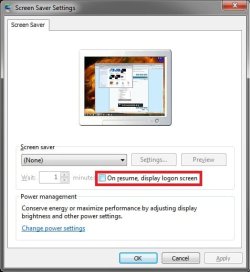
Double check your "Screen Saver" settings to make sure that the On resume, display logon screen option is unchecked as well. This can give you a log on screen as well if the computer went to sleep after the screen saver was running.
Screen_Saver.jpg
Hope this helps,
Shawn
 

My Computer

Computer type
PC/Desktop
Computer Manufacturer/Model Number
Self built custom
OS
64-bit Windows 11 Pro for Workstations
CPU
Intel i7-8700K OC'd to 5 GHz
Motherboard
ASUS ROG Maximus XI Formula Z390
Memory
64 GB (4x16GB) G.SKILL TridentZ RGB DDR4 3600 MHz
Graphics Card(s)
ASUS ROG-STRIX-GTX1080TI-O11G-GAMING
Sound Card
Integrated
Monitor(s) Displays
2 x Samsung Odyssey G7 27"
Screen Resolution
2560x1440
Hard Drives
1TB Samsung 990 PRO M.2,
4TB Samsung 990 PRO PRO M.2,
TerraMaster F8 SSD Plus NAS
PSU
Seasonic Prime Titanium 850W
Case
Thermaltake Core P3
Cooling
Corsair Hydro H115i
Keyboard
Logitech wireless K800
Mouse
Logitech MX Master 4
Internet Speed
2 Gb/s Download and 100 Mb/s Upload
Antivirus
Malwarebyte Anti-Malware Premium
Browser
Google Chrome
Other Info
Logitech Z625 speaker system,
Logitech BRIO 4K Pro webcam,
HP Color LaserJet Pro MFP M477fdn,
APC SMART-UPS RT 1000 XL - SURT1000XLI,
Galaxy S23 Plus phone
Hello Seven,

Double check your "Screen Saver" settings to make sure that the On resume, display logon screen option is unchecked as well. This can give you a log on screen as well if the computer went to sleep after the screen saver was running.View attachment 41366
Hope this helps,
Shawn
I solved this problem by selecting the 'Active' setting in the dropdown menu!
Thanks
 

Attachments

  • as.JPG
    as.JPG
    40.6 KB · Views: 3,305

My Computer

Computer type
PC/Desktop
Computer Manufacturer/Model Number
Home Built
OS
Windows 7 Ultimate SP1 64- bit
CPU
Intel Core i7-3770K @3.50ghz
Motherboard
EVGA Z77 FTW
Memory
Kingston Technology 16GB (2x 8GB) 2133MHz DDR3 Non-ECC
Graphics Card(s)
EVGA GTX 670 4gb SC
Sound Card
Nil
Monitor(s) Displays
Samsung 22"
Screen Resolution
1920 x 1080 60hz
Hard Drives
OCZ Vertex 4 SSD 128GB
SAMSUNG Spinpoint F3 HD502HJ 500GB 7200 RPM
PSU
Enermax Platinax EPM1000EWT Special OC Edition
Case
Cooler Master HAF Full Tower nVIDIA Edition
Cooling
CoolerMaster Hyper 212 Plus
Keyboard
HP Wireless Keyboard
Mouse
Corsair Vengeance M90
Internet Speed
20 Mb
Other Info
ASUS DRW-24B1ST/BLK/B/AS Black SATA 24X DVD Burner
I'm happy to hear that you got it sorted Seven. :)
 

My Computer

Computer type
PC/Desktop
Computer Manufacturer/Model Number
Self built custom
OS
64-bit Windows 11 Pro for Workstations
CPU
Intel i7-8700K OC'd to 5 GHz
Motherboard
ASUS ROG Maximus XI Formula Z390
Memory
64 GB (4x16GB) G.SKILL TridentZ RGB DDR4 3600 MHz
Graphics Card(s)
ASUS ROG-STRIX-GTX1080TI-O11G-GAMING
Sound Card
Integrated
Monitor(s) Displays
2 x Samsung Odyssey G7 27"
Screen Resolution
2560x1440
Hard Drives
1TB Samsung 990 PRO M.2,
4TB Samsung 990 PRO PRO M.2,
TerraMaster F8 SSD Plus NAS
PSU
Seasonic Prime Titanium 850W
Case
Thermaltake Core P3
Cooling
Corsair Hydro H115i
Keyboard
Logitech wireless K800
Mouse
Logitech MX Master 4
Internet Speed
2 Gb/s Download and 100 Mb/s Upload
Antivirus
Malwarebyte Anti-Malware Premium
Browser
Google Chrome
Other Info
Logitech Z625 speaker system,
Logitech BRIO 4K Pro webcam,
HP Color LaserJet Pro MFP M477fdn,
APC SMART-UPS RT 1000 XL - SURT1000XLI,
Galaxy S23 Plus phone
Just joined to post on this topic but this seems a great source of info. Whenever I've been Googling questions it seems here the answer is.... :)

Q: Is there a registry tweak to apply to achieve disabling password on resume from wakeup?

I have 4 machines at home and usually build my own unattended install disk to get them set up the way I like. A registry tweak would be nice as I can apply a pile of them in one file and fix those things I need.

Thanks guys n gals
 

My Computer

OS
W7
Hello,

I am utilizing the command line for this. In Vista, you have to know the profile name or GUID before you can edit the setting.

I know that I can get that by utilizing powercfg -getactivescheme however when I do that I get returned:
Power Scheme GUID: 49ef8fc0-bb7f-488e-b6a0-f1fc77ec649b (Dell Recommended) which will be different for every computer.

All I need is the 49ef8fc0-bb7f-488e-b6a0-f1fc77ec649b
How would I capture just that in a variable?

I was thinking about the following code however it comes back as missing an operand. Any help would be much appreciated.

Code:
@echo off
For /F "Tokens=*" %%A In ('powercfg -getactivescheme^|Findstr /I /C:": "') Do Set /A _ActiveScheme=%%B
powercfg -SETACVALUEINDEX %_ActiveScheme% SUB_NONE CONSOLELOCK 0
powercfg -SETDCVALUEINDEX %_ActiveScheme% SUB_NONE CONSOLELOCK 0
Wayne Leiser, CTO
Spectacular Computer Repair


Hi scrfix - I use the vbs function below to extract the GUID from the line of text you have. It uses VB regex to pull the GUID:

Code:
Function GetGUID(inStr)
    'Extracts the GUID from the line in which it is embedded
    Set regEx = New RegExp
    regEx.Pattern = "[0-9a-f]+\-[0-9a-f]+\-[0-9a-f]+\-[0-9a-f]+\-[0-9a-f]+"
    regEx.IgnoreCase = True
    regEx.Global = True
    Set Matches = regEx.Execute(inStr)
    For Each Match in Matches
        'msgbox("Match " & I & " " & Match.Value)
        GetGUID = Match.Value
    Next
End Function

Hopefully 9 months later you're still looking for this.
 

My Computer

OS
Windows 7
Hello, I'm wondering if W7 supports a more fine-grained configuration: have password on wakeup from sleep, but not on wakeup from hibernation. This is because I already have a password prompt from Truectrypt, so asking for the password again is just redundant.
 

My Computer

OS
Windows 7
Hello, I'm wondering if W7 supports a more fine-grained configuration: have password on wakeup from sleep, but not on wakeup from hibernation. This is because I already have a password prompt from Truectrypt, so asking for the password again is just redundant.

I'm assuming you're using truecrypt because your version of Windows does not support the superior Bitlocker?
 

My Computer

Computer type
Laptop
Computer Manufacturer/Model Number
Apple
OS
El Capitan / Windows 10
CPU
i7-4980HQ
Memory
16GB
Graphics Card(s)
Iris 5200
Back
Top