Solved Search in Start Menu broken?

peekj

New member
Local time
4:14 AM
Messages
30
Has anyone experienced this before? I'm on W7 RC and since yesterday I can no longer launch apps by typing their name in the start menu. The attached image would usually display Excel 2007 but all I get now is that weird Programs icon.

The search still works for folders, ie I can type c:\progra... and it'll bring it up. Just start menu programs seem to be affected.

Any ideas?

Untitled-1-4.png
 

My Computer

OS
Windows 7 RC
You could troubleshoot the issue.

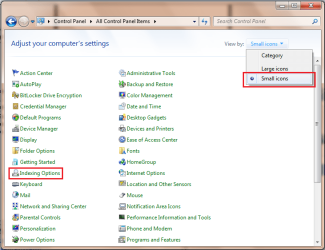
Open Control Panel & change the view to Small Icons and select Indexing Options.
Untitled.png

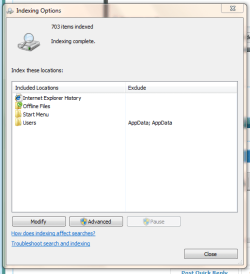
Then click 'Troubleshoot search & indexing' and follow the on-screen prompts.
Capture.PNG

Hope this helps :)


Jeff
 

My Computer

Computer Manufacturer/Model Number
Compaq Desktop
OS
Windows 7 Ultimate x64
CPU
AMD Sempron Dual Core
Memory
3GB
Graphics Card(s)
NVIDIA GeForce 6150SE nForce 430
Screen Resolution
1024x768
Hard Drives
150GB Sata
Hello Peekj,

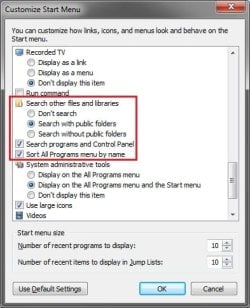
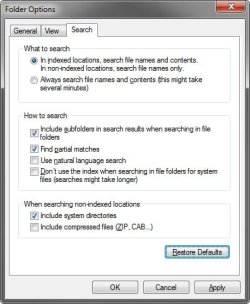
You might double check your Customize Start Menu and Search (Folder Options) settings to see if they may have been changed. These are the default settings for them.

Customize.jpgFolder_Options_Serach.jpg

Hope this helps,
Shawn
 

My Computer

Computer type
PC/Desktop
Computer Manufacturer/Model Number
Self built custom
OS
64-bit Windows 11 Pro for Workstations
CPU
Intel i7-8700K OC'd to 5 GHz
Motherboard
ASUS ROG Maximus XI Formula Z390
Memory
64 GB (4x16GB) G.SKILL TridentZ RGB DDR4 3600 MHz
Graphics Card(s)
ASUS ROG-STRIX-GTX1080TI-O11G-GAMING
Sound Card
Integrated
Monitor(s) Displays
2 x Samsung Odyssey G7 27"
Screen Resolution
2560x1440
Hard Drives
1TB Samsung 990 PRO M.2,
4TB Samsung 990 PRO PRO M.2,
TerraMaster F8 SSD Plus NAS
PSU
Seasonic Prime Titanium 850W
Case
Thermaltake Core P3
Cooling
Corsair Hydro H115i
Keyboard
Logitech wireless K800
Mouse
Logitech MX Master 4
Internet Speed
2 Gb/s Download and 100 Mb/s Upload
Antivirus
Malwarebyte Anti-Malware Premium
Browser
Google Chrome
Other Info
Logitech Z625 speaker system,
Logitech BRIO 4K Pro webcam,
HP Color LaserJet Pro MFP M477fdn,
APC SMART-UPS RT 1000 XL - SURT1000XLI,
Galaxy S23 Plus phone
i have the same isue...

the troubleshooting of the search enginge gives me something like "ntfs acl`s are incorrect" -> auto correction dont work -> i looked on a other 7 installation and ported the access rights -> same error
reinstall of 7 fixed it for me :/

if someone can fix it without reinstall, tell it
 

My Computer

OS
win 7
Hmm, troubleshooter found no problems. Rebuilding the Index also didn't seem to help.
 

My Computer

OS
Windows 7 RC
I figured out that the 3 items I do get to see (Programs, Control Panel, and Files) are usually the separators between the results.

Also tested another user profile and that one works fine. I wonder what could have gotten corrupted...
 

My Computer

OS
Windows 7 RC
Well, since it seems to work fine in the other new administrator account, you can copy the contents of your old account's C:\Users\(user-name) folders into the corresponding new account's C:\Users\(user-name) folders to keep your old account's settings. Be sure to copy over the contents of the hidden folders as well. After everything checks out, you can delete the old account from within the new account.
 
Last edited:

My Computer

Computer type
PC/Desktop
Computer Manufacturer/Model Number
Self built custom
OS
64-bit Windows 11 Pro for Workstations
CPU
Intel i7-8700K OC'd to 5 GHz
Motherboard
ASUS ROG Maximus XI Formula Z390
Memory
64 GB (4x16GB) G.SKILL TridentZ RGB DDR4 3600 MHz
Graphics Card(s)
ASUS ROG-STRIX-GTX1080TI-O11G-GAMING
Sound Card
Integrated
Monitor(s) Displays
2 x Samsung Odyssey G7 27"
Screen Resolution
2560x1440
Hard Drives
1TB Samsung 990 PRO M.2,
4TB Samsung 990 PRO PRO M.2,
TerraMaster F8 SSD Plus NAS
PSU
Seasonic Prime Titanium 850W
Case
Thermaltake Core P3
Cooling
Corsair Hydro H115i
Keyboard
Logitech wireless K800
Mouse
Logitech MX Master 4
Internet Speed
2 Gb/s Download and 100 Mb/s Upload
Antivirus
Malwarebyte Anti-Malware Premium
Browser
Google Chrome
Other Info
Logitech Z625 speaker system,
Logitech BRIO 4K Pro webcam,
HP Color LaserJet Pro MFP M477fdn,
APC SMART-UPS RT 1000 XL - SURT1000XLI,
Galaxy S23 Plus phone
Yeah, that's what I ended up doing. Some apps' settings didn't transfer over (must have been stored in the registry) but overall it solved my problem. Let's hope it doesn't happen again :)
 

My Computer

OS
Windows 7 RC
I'm happy to hear that you got it sorted. I hope it doesn't happen again for you.
 

My Computer

Computer type
PC/Desktop
Computer Manufacturer/Model Number
Self built custom
OS
64-bit Windows 11 Pro for Workstations
CPU
Intel i7-8700K OC'd to 5 GHz
Motherboard
ASUS ROG Maximus XI Formula Z390
Memory
64 GB (4x16GB) G.SKILL TridentZ RGB DDR4 3600 MHz
Graphics Card(s)
ASUS ROG-STRIX-GTX1080TI-O11G-GAMING
Sound Card
Integrated
Monitor(s) Displays
2 x Samsung Odyssey G7 27"
Screen Resolution
2560x1440
Hard Drives
1TB Samsung 990 PRO M.2,
4TB Samsung 990 PRO PRO M.2,
TerraMaster F8 SSD Plus NAS
PSU
Seasonic Prime Titanium 850W
Case
Thermaltake Core P3
Cooling
Corsair Hydro H115i
Keyboard
Logitech wireless K800
Mouse
Logitech MX Master 4
Internet Speed
2 Gb/s Download and 100 Mb/s Upload
Antivirus
Malwarebyte Anti-Malware Premium
Browser
Google Chrome
Other Info
Logitech Z625 speaker system,
Logitech BRIO 4K Pro webcam,
HP Color LaserJet Pro MFP M477fdn,
APC SMART-UPS RT 1000 XL - SURT1000XLI,
Galaxy S23 Plus phone
i know i come too late, and you already found a fix(kind of) to your problem.

i got similar problem, what i did to fix it was>
right click anywhere on the start menu > Properties > at "start menu" tab click at "Customize.." > go all the way down, look for "search other files and libraries" make sure it is checked.

that was it,
 

My Computer

OS
win7
Yeah I checked that too but all the settings were correct. Must have been an RC bug ;) Plus, I upgraded from the beta, so some kookiness was to be expected.
 

My Computer

OS
Windows 7 RC
I ran into the same problem over the past couple days with Windows 7 RC and finally dug into it some more.


1. End Task on EXPLORER.EXE from Task Manager.

2. Start the Registry Editor

3. Look for the following key:

HKEY_CURRENT_USER\Software\Microsoft\Windows\CurrentVersion\Explorer\FolderTypes\{EF87B4CB-F2CE-4785-8658-4CA6C63E38C6}\TopViews\{00000000-0000-0000-0000-000000000000}

4. Rename the key so it looks like the following:

HKEY_CURRENT_USER\Software\Microsoft\Windows\CurrentVersion\Explorer\FolderTypes\{EF87B4CB-F2CE-4785-8658-4CA6C63E38C6}\TopViews\{00000000-0000-0000-0000-000000000000}.BACKUP

5. From Task Manager click on File | New Task (Run) and type EXPLORER.EXE and hit return.

6. Now try your search from the Start Menu again.

If the above process doesn't work for you, you can always put it back the way it was by reversing the process above.

I don't understand exactly what this key is controlling, but hopefully someone else can shed some light on why this works.

https://webmail.kkl.com/owa/redir.a...e00680ad1bb&URL=mailto:[email protected]
 

My Computer

OS
Windows 7 RC Ultimate
Solved

Hi I had the same issue, tried everything.. What finally worked for me was to restore c:\users\USERNAME\*ntuser* from backup.. Now search works again. Regards, Ben
 

My Computer

OS
windows 7 RTM
Would like to report that I faced the same problem and I followed the instructions posted by TheBigGroundhog. I was very surprised that it actually worked.

I'm running Windows 7 Professional.

I ran into the same problem over the past couple days with Windows 7 RC and finally dug into it some more.


1. End Task on EXPLORER.EXE from Task Manager.

2. Start the Registry Editor

3. Look for the following key:

HKEY_CURRENT_USER\Software\Microsoft\Windows\CurrentVersion\Explorer\FolderTypes\{EF87B4CB-F2CE-4785-8658-4CA6C63E38C6}\TopViews\{00000000-0000-0000-0000-000000000000}

4. Rename the key so it looks like the following:

HKEY_CURRENT_USER\Software\Microsoft\Windows\CurrentVersion\Explorer\FolderTypes\{EF87B4CB-F2CE-4785-8658-4CA6C63E38C6}\TopViews\{00000000-0000-0000-0000-000000000000}.BACKUP

5. From Task Manager click on File | New Task (Run) and type EXPLORER.EXE and hit return.

6. Now try your search from the Start Menu again.

If the above process doesn't work for you, you can always put it back the way it was by reversing the process above.

I don't understand exactly what this key is controlling, but hopefully someone else can shed some light on why this works.

https://webmail.kkl.com/owa/redir.a...e00680ad1bb&URL=mailto:[email protected]
 

My Computer

OS
Windows 7 Professional
Yeah, that registry fix worked for me too. Don't know exactly why it worked, but I'm glad it did.
 

My Computer

OS
Windows 7
I ran into the same problem over the past couple days with Windows 7 RC and finally dug into it some more.


1. End Task on EXPLORER.EXE from Task Manager.

2. Start the Registry Editor

3. Look for the following key:

HKEY_CURRENT_USER\Software\Microsoft\Windows\CurrentVersion\Explorer\FolderTypes\{EF87B4CB-F2CE-4785-8658-4CA6C63E38C6}\TopViews\{00000000-0000-0000-0000-000000000000}

4. Rename the key so it looks like the following:

HKEY_CURRENT_USER\Software\Microsoft\Windows\CurrentVersion\Explorer\FolderTypes\{EF87B4CB-F2CE-4785-8658-4CA6C63E38C6}\TopViews\{00000000-0000-0000-0000-000000000000}.BACKUP

5. From Task Manager click on File | New Task (Run) and type EXPLORER.EXE and hit return.

6. Now try your search from the Start Menu again.

If the above process doesn't work for you, you can always put it back the way it was by reversing the process above.

I don't understand exactly what this key is controlling, but hopefully someone else can shed some light on why this works.

This works. Thanks so much, this problem was irritating me something awful :p
 

My Computer

Computer Manufacturer/Model Number
Custom Ankerrman Desktop + Asus Eee PC 1005HA
OS
Windows 7 32bit + Ubuntu (Dual Boot on both platforms)
CPU
AMD Athlon II x4 630 4x 2.80 GHz + Intel Atom N280 1.66 GHz
Memory
4GB desktop + 1 GB netbook
Graphics Card(s)
nVIDIA GEFORCE 9800GT 1GB
Monitor(s) Displays
Benq 21.5" HD TFT + 10.1" LED WSVGA 1024x600
Hard Drives
500GB desktop + 160GB netbook
1TB External
Internet Speed
Very very very slow
Hello all,

I had this problem some months ago and it was solved by this solution of renaming the registry entry.

Now I have the same problem again, but renaming the registry entry no longer works. I also tried the hotfix from microsoft to no avail.

I tried creating another user and the new user also had this issue so I deleted that.

Any tips?

Thanks all.
 

My Computer

OS
Windows 7 Ultimate x64
Hello all,

I had this problem some months ago and it was solved by this solution of renaming the registry entry.

Now I have the same problem again, but renaming the registry entry no longer works. I also tried the hotfix from microsoft to no avail.

I tried creating another user and the new user also had this issue so I deleted that.

Any tips?

Thanks all.

Hello Djlm,

You might see if doing a system restore using a restore point dated before the issue started may be able to undo and fix it for you.

Hope this helps,
Shawn
 

My Computer

Computer type
PC/Desktop
Computer Manufacturer/Model Number
Self built custom
OS
64-bit Windows 11 Pro for Workstations
CPU
Intel i7-8700K OC'd to 5 GHz
Motherboard
ASUS ROG Maximus XI Formula Z390
Memory
64 GB (4x16GB) G.SKILL TridentZ RGB DDR4 3600 MHz
Graphics Card(s)
ASUS ROG-STRIX-GTX1080TI-O11G-GAMING
Sound Card
Integrated
Monitor(s) Displays
2 x Samsung Odyssey G7 27"
Screen Resolution
2560x1440
Hard Drives
1TB Samsung 990 PRO M.2,
4TB Samsung 990 PRO PRO M.2,
TerraMaster F8 SSD Plus NAS
PSU
Seasonic Prime Titanium 850W
Case
Thermaltake Core P3
Cooling
Corsair Hydro H115i
Keyboard
Logitech wireless K800
Mouse
Logitech MX Master 4
Internet Speed
2 Gb/s Download and 100 Mb/s Upload
Antivirus
Malwarebyte Anti-Malware Premium
Browser
Google Chrome
Other Info
Logitech Z625 speaker system,
Logitech BRIO 4K Pro webcam,
HP Color LaserJet Pro MFP M477fdn,
APC SMART-UPS RT 1000 XL - SURT1000XLI,
Galaxy S23 Plus phone
Hi,

Sorry for the delay I was out of town.

I tried this, but there is only 1 restore available with today's date.

Best Regards
 

My Computer

OS
Windows 7 Ultimate x64
Back
Top