How to remove lock icon from folders?

Celeras

New member
I was messing around with WMP12, and ended up accidentally sharing all of my libraries. Oops! I unshared them all, however ever since that happened all of the folders now have the 'lock' icon over them. The only way I can seem to get rid of them, is to reshare.. which I don't want to do.

Anyone know how to remedy this? It's been bugging me :)
 

My Computer

OS
Windows 7 x64
CPU
[email protected]
Motherboard
Gigabyte P35C-DS3R
Memory
8gb Corsair
Graphics Card(s)
eVGA 640mb 8800gts
Screen Resolution
1920x1200
Hard Drives
WD Caviar 1TB
PSU
Rosewill 850W
Everything under the sun documented by now, except this! :(
 

My Computer

OS
Windows 7 x64
CPU
[email protected]
Motherboard
Gigabyte P35C-DS3R
Memory
8gb Corsair
Graphics Card(s)
eVGA 640mb 8800gts
Screen Resolution
1920x1200
Hard Drives
WD Caviar 1TB
PSU
Rosewill 850W
Everything under the sun documented by now, except this! :(

Don't worry about the locks. It only means users with lower rights than admin can't edit them.

If you want to get rid of them, search for locks in this forum.
I know it's there, because I wrote a few posts about it.

good luck
 

My Computer

OS
Win7 Build 7600 x86
CPU
Pentium II 300MHz
Motherboard
Asus
Memory
32mb EDO RAM
Graphics Card(s)
Diamond Viper
Sound Card
Soundblaster 16
Monitor(s) Displays
14" AOC CRT 16K color
Screen Resolution
800x600
Hard Drives
300mb Quantum fireball
PSU
110 Watts
Cooling
Passive
Keyboard
Trust Ergonomic
Mouse
Generic
Internet Speed
256K u 128K d
@OP:

Actually, you're mistaken.

You'll need to take ownership of those folders again - when you shared them that OS took control of the folders so it could handle the sharing and such - but when you unshared, it did not revert the ownership and control over the folder s back to you.

Check our tutorials on taking ownership.
 

My Computers

System One System Two

  • Computer type
    PC/Desktop
    Computer Manufacturer/Model Number
    The Beast Model A (homebrew)
    OS
    Windows 11 21H2 Current build
    CPU
    AMD Ryzen 9 3950X
    Motherboard
    MSI MEG X570 GODLIKE
    Memory
    4 * 32 GB - Corsair Vengeance 3600 MHz
    Graphics Card(s)
    EVGA GeForce RTX 3080 Ti XC3 ULTRA GAMING (12G-P5-3955-KR)
    Sound Card
    Realtek® ALC1220 Codec
    Monitor(s) Displays
    2x Eve Spectrum ES07D03 4K Gaming Monitor (Matte) | Eve Spec
    Screen Resolution
    3x 3840 x 2160
    Hard Drives
    3x Samsung 980 Pro NVMe PCIe 4 M.2 2 TB SSD (MZ-V8P2T0B/AM) } 3x Sabrent Rocket NVMe 4.0 1 TB SSD
    PSU
    PC Power & Cooling’s Silencer Series 1050 Watt, 80 Plus Plat
    Case
    Fractal Design Define 7 XL Dark ATX Full Tower Case
    Cooling
    SteelSeries Apex Pro Wired Gaming Keyboard
    Keyboard
    SteelSeries Apex Pro
    Mouse
    Logitech MX Master 3S | MX Master 3 for business
    Internet Speed
    AT&T LightSpeed Gigabit Duplex Ftth
    Antivirus
    Windows Defender + MB 3
    Browser
    Nightly (default) + Firefox (stable),Chrome, Edge
  • Computer type
    PC/Desktop
    System Manufacturer/Model Number
    Dell Latitude E5470
    OS
    ChromeOS Flex Dev Channel (current)
    CPU
    Intel(R) Core(TM) i5-6300U CPU @ 2.40GHz, 2501 Mhz, 2 Core(s), 4 Logical Processor(s)
    Motherboard
    Dell
    Memory
    16 GB
    Graphics Card(s)
    Intel(R) HD Graphics 520
    Sound Card
    Intel(R) HD Graphics 520 + RealTek Audio
    Monitor(s) Displays
    Dell laptop display 15"
    Screen Resolution
    1920 * 1080
    Hard Drives
    Toshiba 128GB M.2 22300 drive
    INTEL Cherryville 520 Series SSDSC2CW180A 180 GB SATA III SSD
    PSU
    Dell
    Case
    Dell
    Cooling
    Dell
    Keyboard
    Dell
    Mouse
    Logitech MX Master 3S (shared w. Sys 1) | Dell TouchPad
    Internet Speed
    AT&T LightSpeed Gigabit Duplex Ftth
Simple really ... go to the tutorial section and read Brinks tut on taking ownership and you'll be good to go...

That was easy wasn't it??
 

My Computer

Computer type
PC/Desktop
Computer Manufacturer/Model Number
LENOVO K450 @3.0GHZ
OS
64-bit Windows 8.1 Pro
CPU
Core(TM) i5 CPU 4330 Haswell @ 3.20GHz
Motherboard
LENOVO
Memory
12.00 GB
Graphics Card(s)
Intel(R) HD Graphics
Sound Card
Intel HD integtrated
Monitor(s) Displays
HP 25' ISP Monitor
Screen Resolution
1900/1020
Hard Drives
(1) ST1000DM003-1CH162 (2) Generic STORAGE DEVICE USB Device (3) Generic STORAGE DEVICE USB Device
Internet Speed
100mb down/10mb up
@OP:

Actually, you're mistaken.

You'll need to take ownership of those folders again - when you shared them that OS took control of the folders so it could handle the sharing and such - but when you unshared, it did not revert the ownership and control over the folder s back to you.

Check our tutorials on taking ownership.

LOL .. great minds DO think alike don't they John?? :roflmao:
 

My Computer

Computer type
PC/Desktop
Computer Manufacturer/Model Number
LENOVO K450 @3.0GHZ
OS
64-bit Windows 8.1 Pro
CPU
Core(TM) i5 CPU 4330 Haswell @ 3.20GHz
Motherboard
LENOVO
Memory
12.00 GB
Graphics Card(s)
Intel(R) HD Graphics
Sound Card
Intel HD integtrated
Monitor(s) Displays
HP 25' ISP Monitor
Screen Resolution
1900/1020
Hard Drives
(1) ST1000DM003-1CH162 (2) Generic STORAGE DEVICE USB Device (3) Generic STORAGE DEVICE USB Device
Internet Speed
100mb down/10mb up
:D Yup - but I imitate a great mind often, so....
 

My Computers

System One System Two

  • Computer type
    PC/Desktop
    Computer Manufacturer/Model Number
    The Beast Model A (homebrew)
    OS
    Windows 11 21H2 Current build
    CPU
    AMD Ryzen 9 3950X
    Motherboard
    MSI MEG X570 GODLIKE
    Memory
    4 * 32 GB - Corsair Vengeance 3600 MHz
    Graphics Card(s)
    EVGA GeForce RTX 3080 Ti XC3 ULTRA GAMING (12G-P5-3955-KR)
    Sound Card
    Realtek® ALC1220 Codec
    Monitor(s) Displays
    2x Eve Spectrum ES07D03 4K Gaming Monitor (Matte) | Eve Spec
    Screen Resolution
    3x 3840 x 2160
    Hard Drives
    3x Samsung 980 Pro NVMe PCIe 4 M.2 2 TB SSD (MZ-V8P2T0B/AM) } 3x Sabrent Rocket NVMe 4.0 1 TB SSD
    PSU
    PC Power & Cooling’s Silencer Series 1050 Watt, 80 Plus Plat
    Case
    Fractal Design Define 7 XL Dark ATX Full Tower Case
    Cooling
    SteelSeries Apex Pro Wired Gaming Keyboard
    Keyboard
    SteelSeries Apex Pro
    Mouse
    Logitech MX Master 3S | MX Master 3 for business
    Internet Speed
    AT&T LightSpeed Gigabit Duplex Ftth
    Antivirus
    Windows Defender + MB 3
    Browser
    Nightly (default) + Firefox (stable),Chrome, Edge
  • Computer type
    PC/Desktop
    System Manufacturer/Model Number
    Dell Latitude E5470
    OS
    ChromeOS Flex Dev Channel (current)
    CPU
    Intel(R) Core(TM) i5-6300U CPU @ 2.40GHz, 2501 Mhz, 2 Core(s), 4 Logical Processor(s)
    Motherboard
    Dell
    Memory
    16 GB
    Graphics Card(s)
    Intel(R) HD Graphics 520
    Sound Card
    Intel(R) HD Graphics 520 + RealTek Audio
    Monitor(s) Displays
    Dell laptop display 15"
    Screen Resolution
    1920 * 1080
    Hard Drives
    Toshiba 128GB M.2 22300 drive
    INTEL Cherryville 520 Series SSDSC2CW180A 180 GB SATA III SSD
    PSU
    Dell
    Case
    Dell
    Cooling
    Dell
    Keyboard
    Dell
    Mouse
    Logitech MX Master 3S (shared w. Sys 1) | Dell TouchPad
    Internet Speed
    AT&T LightSpeed Gigabit Duplex Ftth
@OP:

Actually, you're mistaken.

You'll need to take ownership of those folders again - when you shared them that OS took control of the folders so it could handle the sharing and such - but when you unshared, it did not revert the ownership and control over the folder s back to you.

Check our tutorials on taking ownership.


Sorry to contradict you.

Locks have nothing to do with ownership.

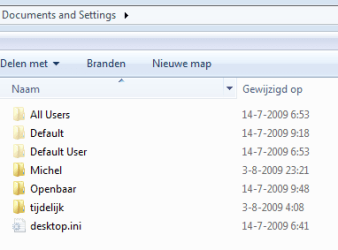
I have ownership of documents and settings and my useraccount is set to it with full permissions.
Yet I have a lock on it
lock.PNG

I have never shared it.
What I did is rip out all user accounts except mine. Not even administrators.

When I doubleclick I enter and see this
lock2.PNG

As far as I know you get these locks when you delete the everyone user from the security tab.

Greetz
 

My Computer

OS
Win7 Build 7600 x86
CPU
Pentium II 300MHz
Motherboard
Asus
Memory
32mb EDO RAM
Graphics Card(s)
Diamond Viper
Sound Card
Soundblaster 16
Monitor(s) Displays
14" AOC CRT 16K color
Screen Resolution
800x600
Hard Drives
300mb Quantum fireball
PSU
110 Watts
Cooling
Passive
Keyboard
Trust Ergonomic
Mouse
Generic
Internet Speed
256K u 128K d
I reproduced it.

I created a folder.

by default my username and everyone were in the security tab

I took ownership, disabled the distribute permissions to subcontainers, and deleted the everyone.

Now it has a lock and only my username in security. I can still enter the folder and share it.


In my oppinion the lock says, users without admin rights can't enter.
 

My Computer

OS
Win7 Build 7600 x86
CPU
Pentium II 300MHz
Motherboard
Asus
Memory
32mb EDO RAM
Graphics Card(s)
Diamond Viper
Sound Card
Soundblaster 16
Monitor(s) Displays
14" AOC CRT 16K color
Screen Resolution
800x600
Hard Drives
300mb Quantum fireball
PSU
110 Watts
Cooling
Passive
Keyboard
Trust Ergonomic
Mouse
Generic
Internet Speed
256K u 128K d
And I hate to contradict *you* - but I haven't done that and I too have a lock on the Doc an Settings folder - b/v that is not a real folder it is a virtual folder established for compatibility with older programs designed for XP, thus it allows the system to redirect the application to where it needs to go to.

In point of fact, if you check the ownership, even if you take ownership and add your permissions, they are over ridden b/c the System ownership has special permissions which you are not in effect changing , and the virtual folder and its tree are inheriting from that first and foremost.

W7 D&S lock.PNG

Remember, I have not done anything like you are describing regarding having ripped out all other users - every thing in this install is as it was when I finished installing 2 days ago.
 

My Computers

System One System Two

  • Computer type
    PC/Desktop
    Computer Manufacturer/Model Number
    The Beast Model A (homebrew)
    OS
    Windows 11 21H2 Current build
    CPU
    AMD Ryzen 9 3950X
    Motherboard
    MSI MEG X570 GODLIKE
    Memory
    4 * 32 GB - Corsair Vengeance 3600 MHz
    Graphics Card(s)
    EVGA GeForce RTX 3080 Ti XC3 ULTRA GAMING (12G-P5-3955-KR)
    Sound Card
    Realtek® ALC1220 Codec
    Monitor(s) Displays
    2x Eve Spectrum ES07D03 4K Gaming Monitor (Matte) | Eve Spec
    Screen Resolution
    3x 3840 x 2160
    Hard Drives
    3x Samsung 980 Pro NVMe PCIe 4 M.2 2 TB SSD (MZ-V8P2T0B/AM) } 3x Sabrent Rocket NVMe 4.0 1 TB SSD
    PSU
    PC Power & Cooling’s Silencer Series 1050 Watt, 80 Plus Plat
    Case
    Fractal Design Define 7 XL Dark ATX Full Tower Case
    Cooling
    SteelSeries Apex Pro Wired Gaming Keyboard
    Keyboard
    SteelSeries Apex Pro
    Mouse
    Logitech MX Master 3S | MX Master 3 for business
    Internet Speed
    AT&T LightSpeed Gigabit Duplex Ftth
    Antivirus
    Windows Defender + MB 3
    Browser
    Nightly (default) + Firefox (stable),Chrome, Edge
  • Computer type
    PC/Desktop
    System Manufacturer/Model Number
    Dell Latitude E5470
    OS
    ChromeOS Flex Dev Channel (current)
    CPU
    Intel(R) Core(TM) i5-6300U CPU @ 2.40GHz, 2501 Mhz, 2 Core(s), 4 Logical Processor(s)
    Motherboard
    Dell
    Memory
    16 GB
    Graphics Card(s)
    Intel(R) HD Graphics 520
    Sound Card
    Intel(R) HD Graphics 520 + RealTek Audio
    Monitor(s) Displays
    Dell laptop display 15"
    Screen Resolution
    1920 * 1080
    Hard Drives
    Toshiba 128GB M.2 22300 drive
    INTEL Cherryville 520 Series SSDSC2CW180A 180 GB SATA III SSD
    PSU
    Dell
    Case
    Dell
    Cooling
    Dell
    Keyboard
    Dell
    Mouse
    Logitech MX Master 3S (shared w. Sys 1) | Dell TouchPad
    Internet Speed
    AT&T LightSpeed Gigabit Duplex Ftth
Whereas I removed the lock from a file that had permissions to a user that no longer existed even though everyone was still a part of the permission family.

it is obvious that there is more to it tan either just everyone or just the logged in user name - but in his case that is more than likely what will need to be done.
 

My Computers

System One System Two

  • Computer type
    PC/Desktop
    Computer Manufacturer/Model Number
    The Beast Model A (homebrew)
    OS
    Windows 11 21H2 Current build
    CPU
    AMD Ryzen 9 3950X
    Motherboard
    MSI MEG X570 GODLIKE
    Memory
    4 * 32 GB - Corsair Vengeance 3600 MHz
    Graphics Card(s)
    EVGA GeForce RTX 3080 Ti XC3 ULTRA GAMING (12G-P5-3955-KR)
    Sound Card
    Realtek® ALC1220 Codec
    Monitor(s) Displays
    2x Eve Spectrum ES07D03 4K Gaming Monitor (Matte) | Eve Spec
    Screen Resolution
    3x 3840 x 2160
    Hard Drives
    3x Samsung 980 Pro NVMe PCIe 4 M.2 2 TB SSD (MZ-V8P2T0B/AM) } 3x Sabrent Rocket NVMe 4.0 1 TB SSD
    PSU
    PC Power & Cooling’s Silencer Series 1050 Watt, 80 Plus Plat
    Case
    Fractal Design Define 7 XL Dark ATX Full Tower Case
    Cooling
    SteelSeries Apex Pro Wired Gaming Keyboard
    Keyboard
    SteelSeries Apex Pro
    Mouse
    Logitech MX Master 3S | MX Master 3 for business
    Internet Speed
    AT&T LightSpeed Gigabit Duplex Ftth
    Antivirus
    Windows Defender + MB 3
    Browser
    Nightly (default) + Firefox (stable),Chrome, Edge
  • Computer type
    PC/Desktop
    System Manufacturer/Model Number
    Dell Latitude E5470
    OS
    ChromeOS Flex Dev Channel (current)
    CPU
    Intel(R) Core(TM) i5-6300U CPU @ 2.40GHz, 2501 Mhz, 2 Core(s), 4 Logical Processor(s)
    Motherboard
    Dell
    Memory
    16 GB
    Graphics Card(s)
    Intel(R) HD Graphics 520
    Sound Card
    Intel(R) HD Graphics 520 + RealTek Audio
    Monitor(s) Displays
    Dell laptop display 15"
    Screen Resolution
    1920 * 1080
    Hard Drives
    Toshiba 128GB M.2 22300 drive
    INTEL Cherryville 520 Series SSDSC2CW180A 180 GB SATA III SSD
    PSU
    Dell
    Case
    Dell
    Cooling
    Dell
    Keyboard
    Dell
    Mouse
    Logitech MX Master 3S (shared w. Sys 1) | Dell TouchPad
    Internet Speed
    AT&T LightSpeed Gigabit Duplex Ftth
And I hate to contradict *you* - but I haven't done that and I too have a lock on the Doc an Settings folder - b/v that is not a real folder it is a virtual folder established for compatibility with older programs designed for XP, thus it allows the system to redirect the application to where it needs to go to.

In point of fact, if you check the ownership, even if you take ownership and add your permissions, they are over ridden b/c the System ownership has special permissions which you are not in effect changing , and the virtual folder and its tree are inheriting from that first and foremost.

View attachment 22508

Remember, I have not done anything like you are describing regarding having ripped out all other users - every thing in this install is as it was when I finished installing 2 days ago.


But do any of those folder have the "everyone" user in the security?

I know about docs and sets being virtual.
that's why I posted the thing I did on my D drive.

I could easily reproduce it.
when the everyone user is absent it gets a lock.

Please see if on your system there is any folder with lock and with everyone.

I am curious now, there might be more reasons variables when this occurs.

Greetz.
 

My Computer

OS
Win7 Build 7600 x86
CPU
Pentium II 300MHz
Motherboard
Asus
Memory
32mb EDO RAM
Graphics Card(s)
Diamond Viper
Sound Card
Soundblaster 16
Monitor(s) Displays
14" AOC CRT 16K color
Screen Resolution
800x600
Hard Drives
300mb Quantum fireball
PSU
110 Watts
Cooling
Passive
Keyboard
Trust Ergonomic
Mouse
Generic
Internet Speed
256K u 128K d
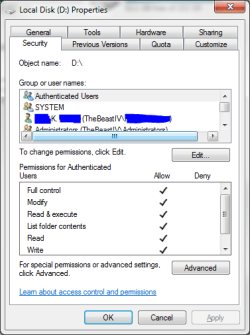
*the entire drive and every folder had everyone in it.

basically, I had taken ownership and added my username to the drive and all subcontainers 3 times after, in Feb, I had issues exactly as the OP described, after enabling, then disabling, homegroup folder sharing. Ever since then, every fresh install has forced me to take ownership of the entire dirve (the first time I did it folder by folder b/c I was worried about changing the permissions on restricted folders like Recycler and such) - and every time, even now, there is an everyone in there.

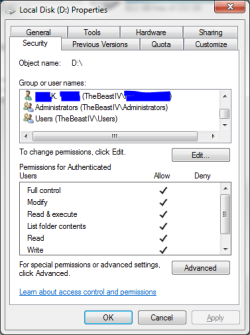
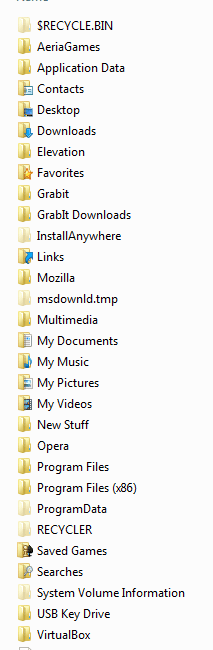
In fact, I just removed everyone from D and have no locks:

D drive no Everyone #1.PNG

D drive no Everyone #2.PNG

D drive no Everyone #3.PNG
 

My Computers

System One System Two

  • Computer type
    PC/Desktop
    Computer Manufacturer/Model Number
    The Beast Model A (homebrew)
    OS
    Windows 11 21H2 Current build
    CPU
    AMD Ryzen 9 3950X
    Motherboard
    MSI MEG X570 GODLIKE
    Memory
    4 * 32 GB - Corsair Vengeance 3600 MHz
    Graphics Card(s)
    EVGA GeForce RTX 3080 Ti XC3 ULTRA GAMING (12G-P5-3955-KR)
    Sound Card
    Realtek® ALC1220 Codec
    Monitor(s) Displays
    2x Eve Spectrum ES07D03 4K Gaming Monitor (Matte) | Eve Spec
    Screen Resolution
    3x 3840 x 2160
    Hard Drives
    3x Samsung 980 Pro NVMe PCIe 4 M.2 2 TB SSD (MZ-V8P2T0B/AM) } 3x Sabrent Rocket NVMe 4.0 1 TB SSD
    PSU
    PC Power & Cooling’s Silencer Series 1050 Watt, 80 Plus Plat
    Case
    Fractal Design Define 7 XL Dark ATX Full Tower Case
    Cooling
    SteelSeries Apex Pro Wired Gaming Keyboard
    Keyboard
    SteelSeries Apex Pro
    Mouse
    Logitech MX Master 3S | MX Master 3 for business
    Internet Speed
    AT&T LightSpeed Gigabit Duplex Ftth
    Antivirus
    Windows Defender + MB 3
    Browser
    Nightly (default) + Firefox (stable),Chrome, Edge
  • Computer type
    PC/Desktop
    System Manufacturer/Model Number
    Dell Latitude E5470
    OS
    ChromeOS Flex Dev Channel (current)
    CPU
    Intel(R) Core(TM) i5-6300U CPU @ 2.40GHz, 2501 Mhz, 2 Core(s), 4 Logical Processor(s)
    Motherboard
    Dell
    Memory
    16 GB
    Graphics Card(s)
    Intel(R) HD Graphics 520
    Sound Card
    Intel(R) HD Graphics 520 + RealTek Audio
    Monitor(s) Displays
    Dell laptop display 15"
    Screen Resolution
    1920 * 1080
    Hard Drives
    Toshiba 128GB M.2 22300 drive
    INTEL Cherryville 520 Series SSDSC2CW180A 180 GB SATA III SSD
    PSU
    Dell
    Case
    Dell
    Cooling
    Dell
    Keyboard
    Dell
    Mouse
    Logitech MX Master 3S (shared w. Sys 1) | Dell TouchPad
    Internet Speed
    AT&T LightSpeed Gigabit Duplex Ftth
*the entire drive and every folder had everyone in it.

basically, I had taken ownership and added my username to the drive and all subcontainers 3 times after, in Feb, I had issues exactly as the OP described, after enabling, then disabling, homegroup folder sharing. Ever since then, every fresh install has forced me to take ownership of the entire dirve (the first time I did it folder by folder b/c I was worried about changing the permissions on restricted folders like Recycler and such) - and every time, even now, there is an everyone in there.

In fact, I just removed everyone from D and have no locks:

View attachment 22509

View attachment 22510

View attachment 22511


Interesting. :geek:

I have just unshared some folders. No locks
Reshared them without problems.

I hate these kind of unexpected outcomes. :D

This calls for extensive investigation.

Will make it my mission for this week.

At least we both have proven that it can occur under different/several circumstances.

This will be another case of being both right and both wrong. :D:D:D

get back to you on this.

Now it's bed time

greetz and see you later.
 

My Computer

OS
Win7 Build 7600 x86
CPU
Pentium II 300MHz
Motherboard
Asus
Memory
32mb EDO RAM
Graphics Card(s)
Diamond Viper
Sound Card
Soundblaster 16
Monitor(s) Displays
14" AOC CRT 16K color
Screen Resolution
800x600
Hard Drives
300mb Quantum fireball
PSU
110 Watts
Cooling
Passive
Keyboard
Trust Ergonomic
Mouse
Generic
Internet Speed
256K u 128K d
Indeed - that is what I was beginning to suspect. I knew something was not right as this has happened to me before, and every single time I reinstall this OS my D drive gets the lock on most (but not all) of the folders there.

it is late here as well - I will be taking the GRE in just over 12 hours - so I am definitely not going to be able to investigate this for at least 24 hours....
 

My Computers

System One System Two

  • Computer type
    PC/Desktop
    Computer Manufacturer/Model Number
    The Beast Model A (homebrew)
    OS
    Windows 11 21H2 Current build
    CPU
    AMD Ryzen 9 3950X
    Motherboard
    MSI MEG X570 GODLIKE
    Memory
    4 * 32 GB - Corsair Vengeance 3600 MHz
    Graphics Card(s)
    EVGA GeForce RTX 3080 Ti XC3 ULTRA GAMING (12G-P5-3955-KR)
    Sound Card
    Realtek® ALC1220 Codec
    Monitor(s) Displays
    2x Eve Spectrum ES07D03 4K Gaming Monitor (Matte) | Eve Spec
    Screen Resolution
    3x 3840 x 2160
    Hard Drives
    3x Samsung 980 Pro NVMe PCIe 4 M.2 2 TB SSD (MZ-V8P2T0B/AM) } 3x Sabrent Rocket NVMe 4.0 1 TB SSD
    PSU
    PC Power & Cooling’s Silencer Series 1050 Watt, 80 Plus Plat
    Case
    Fractal Design Define 7 XL Dark ATX Full Tower Case
    Cooling
    SteelSeries Apex Pro Wired Gaming Keyboard
    Keyboard
    SteelSeries Apex Pro
    Mouse
    Logitech MX Master 3S | MX Master 3 for business
    Internet Speed
    AT&T LightSpeed Gigabit Duplex Ftth
    Antivirus
    Windows Defender + MB 3
    Browser
    Nightly (default) + Firefox (stable),Chrome, Edge
  • Computer type
    PC/Desktop
    System Manufacturer/Model Number
    Dell Latitude E5470
    OS
    ChromeOS Flex Dev Channel (current)
    CPU
    Intel(R) Core(TM) i5-6300U CPU @ 2.40GHz, 2501 Mhz, 2 Core(s), 4 Logical Processor(s)
    Motherboard
    Dell
    Memory
    16 GB
    Graphics Card(s)
    Intel(R) HD Graphics 520
    Sound Card
    Intel(R) HD Graphics 520 + RealTek Audio
    Monitor(s) Displays
    Dell laptop display 15"
    Screen Resolution
    1920 * 1080
    Hard Drives
    Toshiba 128GB M.2 22300 drive
    INTEL Cherryville 520 Series SSDSC2CW180A 180 GB SATA III SSD
    PSU
    Dell
    Case
    Dell
    Cooling
    Dell
    Keyboard
    Dell
    Mouse
    Logitech MX Master 3S (shared w. Sys 1) | Dell TouchPad
    Internet Speed
    AT&T LightSpeed Gigabit Duplex Ftth
The lock icon is annoying. It's sure to become a hot "Windows 7 sucks" topic because it is so inscrutable and so difficult to figure out how to remove.

I successfully removed the lock icon previsouly but tonight I can;t do it again. [Edit ] See Below...

It does have somethign to do with user permissions, but taking ownership isn't it. The method I used had something to do with resharing with everyone using the REAL share dialogs, then closing the explorer window and unsharing with everyeone and the lock dissapeared. (Not closing the window causes a "one user is connected to the share" warnings)

Alas, I can;t get rid of the lock now myself :(

Added to the annoyance is that the lock icon itself largely doesn;t seem necessary or is over informative and yet they removed the share icon overlay which was VERY imformative :(

[EDIT]

Ok, the hack way to get rid of the icon:
1) Right click offending folder, go to properties, Sharing, Share,
2) Select "Everyone" in the drop list, click Add, then in the permission level drop list set to Read/Write.
3) Click Share, then done.
4) Click Advanced Sharing.
5) Uncheck "Share this folder" then OK and CLose.

Simple eh?
GRRRR!

I don;t know if this is a common way of getting into this mess but I have "Home Sharing" turned off. I have a small Workgroup all set up and didn't want to reset everything else. Unfortuantely even with homegroups off, the "Sharing" context menus are for homegroup sharing. :( and using the "Share with nobody" to turn off sharing that you applied elsewise seems to be the way I get into this situation.

From now on, sharing and unsharing in a workgroup situation apparently all need to be done from the properties menu only (Sure wish those homegroup sharing context menus would dissapear when you turn off homegroups, or better yet, revert to the workgroup sharing like they used to be)

 

My Computer

Computer Manufacturer/Model Number
Scratch built
OS
Windows 7 x64 Ultimate
CPU
i7 960
Motherboard
Asus P6X58D
Memory
12 Gig Corsair Dominator
Graphics Card(s)
Nvidia 480
Sound Card
Maudio Delta 44 + breakout box
Monitor(s) Displays
Dell UltraSharp U2410 24in and Samsung 21 dual monitors
Screen Resolution
1920x1200 and 1280x1024
Hard Drives
Primary: Intel X-25M G2 160G SSD
Secondary: Segate baracuda 1.0 TB
HDs in AHCI mode.
PSU
Corasair TX850
Case
Cooler Master HAF
Cooling
Corsair H50
Keyboard
Logitech G15 + N52 game pad
Mouse
Logitech MX518
Internet Speed
15kbs down 4.5kbps up
Other Info
WEI 7.6
CPU & RAM 7.6
Graphics 7.9
Hard disk 7.7
[EDIT]

Ok, the hack way to get rid of the icon:
1) Right click offending folder, go to properties, Sharing, Share,
2) Select "Everyone" in the drop list, click Add, then in the permission level drop list set to Read/Write.
3) Click Share, then done.
4) Click Advanced Sharing.
5) Uncheck "Share this folder" then OK and CLose.

Simple eh?
GRRRR!

I don;t know if this is a common way of getting into this mess but I have "Home Sharing" turned off. I have a small Workgroup all set up and didn't want to reset everything else. Unfortuantely even with homegroups off, the "Sharing" context menus are for homegroup sharing. :( and using the "Share with nobody" to turn off sharing that you applied elsewise seems to be the way I get into this situation.

From now on, sharing and unsharing in a workgroup situation apparently all need to be done from the properties menu only (Sure wish those homegroup sharing context menus would dissapear when you turn off homegroups, or better yet, revert to the workgroup sharing like they used to be)

Worked for me, thank you :) I must have removed that "Everyone" permission while attempting to unshare the libraries I accidentally shared, quite smooth on my behalf ;)

Here's what I don't understand though. Other folders that I've never attempted to share DONT have the 'everyone' permission listed for them. Why don't they have locks, but the folders I tryed to once share without it do?
 

My Computer

OS
Windows 7 x64
CPU
[email protected]
Motherboard
Gigabyte P35C-DS3R
Memory
8gb Corsair
Graphics Card(s)
eVGA 640mb 8800gts
Screen Resolution
1920x1200
Hard Drives
WD Caviar 1TB
PSU
Rosewill 850W
The lock icon is annoying. It's sure to become a hot "Windows 7 sucks" topic because it is so inscrutable and so difficult to figure out how to remove.

I successfully removed the lock icon previsouly but tonight I can;t do it again. [Edit ] See Below...

It does have somethign to do with user permissions, but taking ownership isn't it. The method I used had something to do with resharing with everyone using the REAL share dialogs, then closing the explorer window and unsharing with everyeone and the lock dissapeared. (Not closing the window causes a "one user is connected to the share" warnings)

Alas, I can;t get rid of the lock now myself :(

Added to the annoyance is that the lock icon itself largely doesn;t seem necessary or is over informative and yet they removed the share icon overlay which was VERY imformative :(

[EDIT]

Ok, the hack way to get rid of the icon:
1) Right click offending folder, go to properties, Sharing, Share,
2) Select "Everyone" in the drop list, click Add, then in the permission level drop list set to Read/Write.
3) Click Share, then done.
4) Click Advanced Sharing.
5) Uncheck "Share this folder" then OK and CLose.

Simple eh?
GRRRR!

I don;t know if this is a common way of getting into this mess but I have "Home Sharing" turned off. I have a small Workgroup all set up and didn't want to reset everything else. Unfortuantely even with homegroups off, the "Sharing" context menus are for homegroup sharing. :( and using the "Share with nobody" to turn off sharing that you applied elsewise seems to be the way I get into this situation.

From now on, sharing and unsharing in a workgroup situation apparently all need to be done from the properties menu only (Sure wish those homegroup sharing context menus would dissapear when you turn off homegroups, or better yet, revert to the workgroup sharing like they used to be)


The lock appears under different circumstances and for different reasons.

A few posts back you can read what I did on my D: drive.
Never even made a share let alone undo it.
So my lock has not been invoked by anything to do with sharing.

But thanks for elaborating on what you did. It will add to my investigation.
The lock is there to tell us something, but it can be for different reasons.

I was able to reproduce your method and had the same result, a popup telling me that someone was still using the share.
Simple and advanced sharing seem to conflict.

I have this weird feeling MS screwed up on this one.
Well for me at least they did when they took the shared symbol away.

Now I have to physically click the folders to see whether they are shared or not.
That one really sux.


But hey, I remember XP before SP1, so I guess these are just minor screwups.

Will report when I now more.

Greetz
 

My Computer

OS
Win7 Build 7600 x86
CPU
Pentium II 300MHz
Motherboard
Asus
Memory
32mb EDO RAM
Graphics Card(s)
Diamond Viper
Sound Card
Soundblaster 16
Monitor(s) Displays
14" AOC CRT 16K color
Screen Resolution
800x600
Hard Drives
300mb Quantum fireball
PSU
110 Watts
Cooling
Passive
Keyboard
Trust Ergonomic
Mouse
Generic
Internet Speed
256K u 128K d
Has anyone come to a conclusion on this? I have some folders that were shared, then I stopped sharing them and they have locks. What exactly (and easily) do I need to do? They are driving me nuts and every time I mess with advanced sharing I end up doing more harm than good....


Edit: i found this and added "Authenticated Users" gave it full control and it worked fine.

1. Right click on the folder, choose Properties.
2. On Security tab, click Edit --- Add, input "Everyone" or "Authenticated Users" to the list. Give it Full Control permission and click OK.
 
Last edited:

My Computer

Computer Manufacturer/Model Number
Keeps changing - (Custom)
OS
Windows 7 Professional x64
CPU
Intel Core i7 860
Motherboard
Gigabyte GA-P55-UD4P
Memory
4GB DDR3 Mushkin 1600Mhz @ 7-8-7-20
Graphics Card(s)
MSI GTS250 1GB DDR3 Twin Frozr
Sound Card
Onboard realtek
Monitor(s) Displays
Samsung SyncMaster 24" P2450 + Samsung 20" 2033
Screen Resolution
1920 X 1080 and 1600 X 900 (#2 system 1440 X 900)
Hard Drives
Patriot Inferno 120GB SSD + 3 WD Blue 640GB drives
PSU
Corsair 750 HX Modular
Case
Lancool PC-K62
Cooling
Cooler Master TX3 CPU cooler and 4-140mm and 1-120mm case
Keyboard
Gigabyte USB keyboard
Mouse
Microsoft wireless laser mouse 5000
Internet Speed
7 Mb down 1.5 up
Other Info
System #2: AMD Phenom II X6 1055T (Freezer 7 Pro cooler) - Gigabyte 880GMA-UD2H - WD 500GB Black - 9500GT (1GB) 500W OCZ modular PSU - Antec 200 case. System #3 (LapTop) Core 2 Duo T6670 - 320GB 7200RPM HD - 4GB DDR3 RAM.
Has anyone come to a conclusion on this? I have some folders that were shared, then I stopped sharing them and they have locks. What exactly (and easily) do I need to do? They are driving me nuts and every time I mess with advanced sharing I end up doing more harm than good....


Edit: i found this and added "Authenticated Users" gave it full control and it worked fine.

1. Right click on the folder, choose Properties.
2. On Security tab, click Edit --- Add, input "Everyone" or "Authenticated Users" to the list. Give it Full Control permission and click OK.

just one thing. Don't give auth users full control, it's not good security practice.

With read and write only, the lock is gone too, so full perms isn't even necessary.

Greetings.
 

My Computer

OS
Win7 Build 7600 x86
CPU
Pentium II 300MHz
Motherboard
Asus
Memory
32mb EDO RAM
Graphics Card(s)
Diamond Viper
Sound Card
Soundblaster 16
Monitor(s) Displays
14" AOC CRT 16K color
Screen Resolution
800x600
Hard Drives
300mb Quantum fireball
PSU
110 Watts
Cooling
Passive
Keyboard
Trust Ergonomic
Mouse
Generic
Internet Speed
256K u 128K d
Back
Top