
Solved Can't Make Windows Mail Default

Ex_Brit

Older But No Wiser
I have managed to activate Windows Mail in W7 but can't seem to make it the default mail/news application.

Perhaps W7 needs alternate programs before it allows the default to be set?

I really wish Microsoft hadn't decided to ditch it as I can't stand Windows Live Mail - it's a nightmare when you have 9 email accounts like I do. Also it is great for their newsgroups.

Any comments?
 

My Computer

Computer type
PC/Desktop
Computer Manufacturer/Model Number
Alienware® ALX X58
OS
Win 7 Ult SP1/Win 10 Pro (all x64)
CPU
Intel® Core™ i7-975 Extreme O/C to 4.02 GHz, 8MB Cache
Motherboard
Asus® P6T Deluxe V2 X58 LGA1366
Memory
24GB Corsair Vengeance DDR3 SDRAM at 1600MHz - 6 x 4096MB
Graphics Card(s)
1792 MB NVIDIA® GeForce® GTX 295 Dual Core
Sound Card
Onboard Soundmax® High-Definition 7.1 Performance Audio
Monitor(s) Displays
Samsung XL2370 LED backlit 23" W/S 2ms response time
Screen Resolution
1920 X 1080
Hard Drives
2 x 500gb SATA II
1 x 1TB SATA II
1 external eSATA LaCie 3TB
(Non-RAID)
PSU
Alienware® 1200 Watt Multi-GPU
Case
Alienware® P2 ALX Chassis with AlienIce™ 3.0 Video Cooling
Cooling
Alienware® High-Perf. Liquid Cooling + Acoustic Dampening
Keyboard
Microsoft® Wireless Entertainment 8000 + Logitech® G15 Wired
Mouse
Microsoft® Wireless Laser 8000 + Logitech® G9 Wired
Internet Speed
1Gb/s
Antivirus
McAfee LiveSafe
Browser
Firefox - latest
Other Info
Using non-RAID on purpose as I find RAID to be too temperamental.
Now set to AHCI
Hello Ex_brit...

what is your current default mail client set to right now?

i'm sure we can do some tweaking...
 

My Computer

Computer Manufacturer/Model Number
ENIAC
OS
Windows 7 RC 7100 32bit/64bit
CPU
Intel Core2Duo E4500 2.20 GHz
Motherboard
ASUS P5LD2-X/1333
Memory
2x1GB Kinsgston DDR2 800MHz
Graphics Card(s)
Nvidia 8500GT
Sound Card
Onboard High Definition Audio Device
Monitor(s) Displays
Sony Bravia 42"
Case
LINKW 2222
Cooling
Standard Intel
Keyboard
Some cheap one
Mouse
Microsoft Intellimouse something
Internet Speed
24MBps ADSL
I have no idea because it isn't even listed in "Default Programs". I don't have any other email client installed right now.

I was about to try my Incredimail Premium as it worked fine in the pre-beta versions.
 

My Computer

Computer type
PC/Desktop
Computer Manufacturer/Model Number
Alienware® ALX X58
OS
Win 7 Ult SP1/Win 10 Pro (all x64)
CPU
Intel® Core™ i7-975 Extreme O/C to 4.02 GHz, 8MB Cache
Motherboard
Asus® P6T Deluxe V2 X58 LGA1366
Memory
24GB Corsair Vengeance DDR3 SDRAM at 1600MHz - 6 x 4096MB
Graphics Card(s)
1792 MB NVIDIA® GeForce® GTX 295 Dual Core
Sound Card
Onboard Soundmax® High-Definition 7.1 Performance Audio
Monitor(s) Displays
Samsung XL2370 LED backlit 23" W/S 2ms response time
Screen Resolution
1920 X 1080
Hard Drives
2 x 500gb SATA II
1 x 1TB SATA II
1 external eSATA LaCie 3TB
(Non-RAID)
PSU
Alienware® 1200 Watt Multi-GPU
Case
Alienware® P2 ALX Chassis with AlienIce™ 3.0 Video Cooling
Cooling
Alienware® High-Perf. Liquid Cooling + Acoustic Dampening
Keyboard
Microsoft® Wireless Entertainment 8000 + Logitech® G15 Wired
Mouse
Microsoft® Wireless Laser 8000 + Logitech® G9 Wired
Internet Speed
1Gb/s
Antivirus
McAfee LiveSafe
Browser
Firefox - latest
Other Info
Using non-RAID on purpose as I find RAID to be too temperamental.
Now set to AHCI
I have managed to activate Windows Mail in W7 but can't seem to make it the default mail/news application.

Perhaps W7 needs alternate programs before it allows the default to be set?

I really wish Microsoft hadn't decided to ditch it as I can't stand Windows Live Mail - it's a nightmare when you have 9 email accounts like I do. Also it is great for their newsgroups.

Any comments?

so enlighten us...how did you install it??
 

My Computer

OS
windows vista
Yes, it works fine here too, that's what I've used so far in all 7 builds.

So you could try:

1. Install Incredimail or Windows Live so that it's set as default mail client, then go to Windows Mail and select from it's options that this is the default.

or

2. create an .eml file , right click - open with, select Windows mail and set it to be the default program for opening .eml files...

Please post back the result , i'm really curious and I dont have windows mail installed to test..
 

My Computer

Computer Manufacturer/Model Number
ENIAC
OS
Windows 7 RC 7100 32bit/64bit
CPU
Intel Core2Duo E4500 2.20 GHz
Motherboard
ASUS P5LD2-X/1333
Memory
2x1GB Kinsgston DDR2 800MHz
Graphics Card(s)
Nvidia 8500GT
Sound Card
Onboard High Definition Audio Device
Monitor(s) Displays
Sony Bravia 42"
Case
LINKW 2222
Cooling
Standard Intel
Keyboard
Some cheap one
Mouse
Microsoft Intellimouse something
Internet Speed
24MBps ADSL
What version of Windows 7 are you using Peter, is it 32bit or 64bit, I am asking because I cant seem to get Mail to work at all in this build and the old tricks aren't working.
 

My Computer

Computer Manufacturer/Model Number
Home Brew
OS
Windows 7 Ultimate Vista Ultimate x64
CPU
Core 2 Duo E8500 3.16Ghz @ 3.8Ghz
Motherboard
eVGA 750i FTW
Memory
2x2Gigs Patriot PC2-6400 LL
Graphics Card(s)
Inno3D GeForce GTX260 216 SP
Monitor(s) Displays
ASUS VW222U 22" 2ms Response time
Screen Resolution
1680x1050
Hard Drives
SATA 150GB
SATA II 250GB
USB IDE 750GB Ext.
PSU
HYTEC 600W & Thermaltake 650W Toughpower Power Exp
Case
Thermaltake Armor LCS (Liquid Cooling System)
Cooling
Liquid Cooling System
Keyboard
Logitech G15 Gaming Keyboard
Mouse
Logitech G9 Gaming Mouse
OK, I've installed Incredimail Premium and it works fine and is the default client. Windows Mail now allows itself to be set as the default email client if I wish.

It is still not the default news client...probably because it is the only news client installed...same reason as WM wouldn't set itself as the default mail client until I installed another program.

.eml files open with Incredimail OK but if I try to make it open with Windows Mail for some reason Adobe Reader tries to open it....weird to say the least.

Addendum: 32-bit.
 

My Computer

Computer type
PC/Desktop
Computer Manufacturer/Model Number
Alienware® ALX X58
OS
Win 7 Ult SP1/Win 10 Pro (all x64)
CPU
Intel® Core™ i7-975 Extreme O/C to 4.02 GHz, 8MB Cache
Motherboard
Asus® P6T Deluxe V2 X58 LGA1366
Memory
24GB Corsair Vengeance DDR3 SDRAM at 1600MHz - 6 x 4096MB
Graphics Card(s)
1792 MB NVIDIA® GeForce® GTX 295 Dual Core
Sound Card
Onboard Soundmax® High-Definition 7.1 Performance Audio
Monitor(s) Displays
Samsung XL2370 LED backlit 23" W/S 2ms response time
Screen Resolution
1920 X 1080
Hard Drives
2 x 500gb SATA II
1 x 1TB SATA II
1 external eSATA LaCie 3TB
(Non-RAID)
PSU
Alienware® 1200 Watt Multi-GPU
Case
Alienware® P2 ALX Chassis with AlienIce™ 3.0 Video Cooling
Cooling
Alienware® High-Perf. Liquid Cooling + Acoustic Dampening
Keyboard
Microsoft® Wireless Entertainment 8000 + Logitech® G15 Wired
Mouse
Microsoft® Wireless Laser 8000 + Logitech® G9 Wired
Internet Speed
1Gb/s
Antivirus
McAfee LiveSafe
Browser
Firefox - latest
Other Info
Using non-RAID on purpose as I find RAID to be too temperamental.
Now set to AHCI

My Computer

Computer type
PC/Desktop
Computer Manufacturer/Model Number
Alienware® ALX X58
OS
Win 7 Ult SP1/Win 10 Pro (all x64)
CPU
Intel® Core™ i7-975 Extreme O/C to 4.02 GHz, 8MB Cache
Motherboard
Asus® P6T Deluxe V2 X58 LGA1366
Memory
24GB Corsair Vengeance DDR3 SDRAM at 1600MHz - 6 x 4096MB
Graphics Card(s)
1792 MB NVIDIA® GeForce® GTX 295 Dual Core
Sound Card
Onboard Soundmax® High-Definition 7.1 Performance Audio
Monitor(s) Displays
Samsung XL2370 LED backlit 23" W/S 2ms response time
Screen Resolution
1920 X 1080
Hard Drives
2 x 500gb SATA II
1 x 1TB SATA II
1 external eSATA LaCie 3TB
(Non-RAID)
PSU
Alienware® 1200 Watt Multi-GPU
Case
Alienware® P2 ALX Chassis with AlienIce™ 3.0 Video Cooling
Cooling
Alienware® High-Perf. Liquid Cooling + Acoustic Dampening
Keyboard
Microsoft® Wireless Entertainment 8000 + Logitech® G15 Wired
Mouse
Microsoft® Wireless Laser 8000 + Logitech® G9 Wired
Internet Speed
1Gb/s
Antivirus
McAfee LiveSafe
Browser
Firefox - latest
Other Info
Using non-RAID on purpose as I find RAID to be too temperamental.
Now set to AHCI
OK, I've installed Incredimail Premium and it works fine and is the default client. Windows Mail now allows itself to be set as the default email client if I wish.

It is still not the default news client...probably because it is the only news client installed...same reason as WM wouldn't set itself as the default mail client until I installed another program.

.eml files open with Incredimail OK but if I try to make it open with Windows Mail for some reason Adobe Reader tries to open it....weird to say the least.

Addendum: 32-bit.

This is the same problem I've had with all the 7 builds, 32 or 64 bit. Windows Mail is not listed anywhere as a possibility. I dislike Live mail and would love to continue using WM, but as it is you need to have another email client in order to open .eml files that are not in the WM folders or to open a send email button on a web page. You can click on the 'Make WM the default' button all you want. It won't change anything.

Please MS, give us Windows Mail back.

Gary
 

My Computer

Computer Manufacturer/Model Number
Dell XPS420
OS
Vista Ult 64 bit Seven Ult RTM x64
CPU
Intel Core2 Quad Q6600 2.40 gigahertz
Memory
Crucial Ballistix 4x2GB PC2 6400
Graphics Card(s)
NVIDIA GeForce 8600 GTS 256 MB
Sound Card
Creative SB X-Fi audio
Monitor(s) Displays
HP w2207 + HPvs15
Screen Resolution
1680x1050 + 1024x768
Hard Drives
2-WD5000AAKS-500 GB
WD5000AAV-500 GB external
Keyboard
Microsoft Comfort Curve
Mouse
MX Revolution
Other Info
Wacom Intuos 2 Graphics Tablet
Experience Index=5.5
Maybe if enough people keep asking, then they might include a mail program into the final release.
Although this could be that the antitrust laws have been tightened, the EU is always threatening $MS about included programs being anti compatitive.
 

My Computer

OS
Vista Home Premium & Windows 7
We can only hope. I've sent feedback.

Gary
 

My Computer

Computer Manufacturer/Model Number
Dell XPS420
OS
Vista Ult 64 bit Seven Ult RTM x64
CPU
Intel Core2 Quad Q6600 2.40 gigahertz
Memory
Crucial Ballistix 4x2GB PC2 6400
Graphics Card(s)
NVIDIA GeForce 8600 GTS 256 MB
Sound Card
Creative SB X-Fi audio
Monitor(s) Displays
HP w2207 + HPvs15
Screen Resolution
1680x1050 + 1024x768
Hard Drives
2-WD5000AAKS-500 GB
WD5000AAV-500 GB external
Keyboard
Microsoft Comfort Curve
Mouse
MX Revolution
Other Info
Wacom Intuos 2 Graphics Tablet
Experience Index=5.5
I've filed plenty of feedback re: this and the Sidebar and other things that I liked in Vista that have gone AWOL. Darned EU, I wonder if they ever ask the consumers what they want or is it all about Corporate greed.
 
Last edited:

My Computer

Computer type
PC/Desktop
Computer Manufacturer/Model Number
Alienware® ALX X58
OS
Win 7 Ult SP1/Win 10 Pro (all x64)
CPU
Intel® Core™ i7-975 Extreme O/C to 4.02 GHz, 8MB Cache
Motherboard
Asus® P6T Deluxe V2 X58 LGA1366
Memory
24GB Corsair Vengeance DDR3 SDRAM at 1600MHz - 6 x 4096MB
Graphics Card(s)
1792 MB NVIDIA® GeForce® GTX 295 Dual Core
Sound Card
Onboard Soundmax® High-Definition 7.1 Performance Audio
Monitor(s) Displays
Samsung XL2370 LED backlit 23" W/S 2ms response time
Screen Resolution
1920 X 1080
Hard Drives
2 x 500gb SATA II
1 x 1TB SATA II
1 external eSATA LaCie 3TB
(Non-RAID)
PSU
Alienware® 1200 Watt Multi-GPU
Case
Alienware® P2 ALX Chassis with AlienIce™ 3.0 Video Cooling
Cooling
Alienware® High-Perf. Liquid Cooling + Acoustic Dampening
Keyboard
Microsoft® Wireless Entertainment 8000 + Logitech® G15 Wired
Mouse
Microsoft® Wireless Laser 8000 + Logitech® G9 Wired
Internet Speed
1Gb/s
Antivirus
McAfee LiveSafe
Browser
Firefox - latest
Other Info
Using non-RAID on purpose as I find RAID to be too temperamental.
Now set to AHCI
I've got Windows Mail working perfectly, after following the info found on the forums tutorials. With a slight difference for my 64 bit installations.

Don't forget to select, in folder options to show hidden files before doing this.

I booted into my Vista x64 partition
Deleted the Windows Mail folders in Windows 7 partition from
Program Files and Program Files (x86)

Copied the Windows Mail folders from the Vista installation,
Program files AND Program Files (x86) to the same folder locations in Windows 7 partition.

Boot into Windows 7, copy a shortcut from the Windows Mail folder in the Program Files (x86) folder to desktop ( or where ever) and the program runs correctly.

You can also copy the folder containing your mail from Vista.
Users, (your name,) AppData, Local, Microsoft, Windows Mail.
To the same location in Windows 7.

This folder I always keep a backup copy in case of corruption or a
re-format needed. You can then always return your Windows Mail to what it was originally.

I guess if you have the x86 32 bit installation you would only need to copy from the Program Files in Vista to the Program Files in Windows 7.

Hope this is of some help.
David.
 
Last edited:

My Computer

Computer Manufacturer/Model Number
Self Build
OS
Windows RC 7100 x64, Vista Ultimate x64,
CPU
Intel Q6700
Motherboard
Asus P5Q3 Deluxe wi-fi
Memory
Corsair DDR3 4gb
Graphics Card(s)
ATI X1650
Monitor(s) Displays
LCD
Hard Drives
WD 1500gb 10k
WD 320gb 7.5k
WD 320gb 7.5k
Samsung 750gb 7.5k
PSU
Enermax 500w
Case
Lian-Li PC-7B Plus
Cooling
Scythe Infinity
Keyboard
Logitech cordless
Mouse
Logitech cordless
Internet Speed
20meg Cable
Yes confirmed, this works for me too.
 

My Computer

Computer Manufacturer/Model Number
Home Brew
OS
Windows 7 Ultimate Vista Ultimate x64
CPU
Core 2 Duo E8500 3.16Ghz @ 3.8Ghz
Motherboard
eVGA 750i FTW
Memory
2x2Gigs Patriot PC2-6400 LL
Graphics Card(s)
Inno3D GeForce GTX260 216 SP
Monitor(s) Displays
ASUS VW222U 22" 2ms Response time
Screen Resolution
1680x1050
Hard Drives
SATA 150GB
SATA II 250GB
USB IDE 750GB Ext.
PSU
HYTEC 600W & Thermaltake 650W Toughpower Power Exp
Case
Thermaltake Armor LCS (Liquid Cooling System)
Cooling
Liquid Cooling System
Keyboard
Logitech G15 Gaming Keyboard
Mouse
Logitech G9 Gaming Mouse
I don't have Vista x64, so can't copy the folder from there. I actually haven't tried it since the public beta. Been trying to force myself to get used to Live Mail. It works, but I still don't like it.

Gary
 

My Computer

Computer Manufacturer/Model Number
Dell XPS420
OS
Vista Ult 64 bit Seven Ult RTM x64
CPU
Intel Core2 Quad Q6600 2.40 gigahertz
Memory
Crucial Ballistix 4x2GB PC2 6400
Graphics Card(s)
NVIDIA GeForce 8600 GTS 256 MB
Sound Card
Creative SB X-Fi audio
Monitor(s) Displays
HP w2207 + HPvs15
Screen Resolution
1680x1050 + 1024x768
Hard Drives
2-WD5000AAKS-500 GB
WD5000AAV-500 GB external
Keyboard
Microsoft Comfort Curve
Mouse
MX Revolution
Other Info
Wacom Intuos 2 Graphics Tablet
Experience Index=5.5
If you have an installation of Vista 32bit copy from there, just ignore the part of the info that refers to program files (x86)
The (x86) is NOT in the 32 bit installation only the 64 bit one.
 

My Computer

Computer Manufacturer/Model Number
Self Build
OS
Windows RC 7100 x64, Vista Ultimate x64,
CPU
Intel Q6700
Motherboard
Asus P5Q3 Deluxe wi-fi
Memory
Corsair DDR3 4gb
Graphics Card(s)
ATI X1650
Monitor(s) Displays
LCD
Hard Drives
WD 1500gb 10k
WD 320gb 7.5k
WD 320gb 7.5k
Samsung 750gb 7.5k
PSU
Enermax 500w
Case
Lian-Li PC-7B Plus
Cooling
Scythe Infinity
Keyboard
Logitech cordless
Mouse
Logitech cordless
Internet Speed
20meg Cable
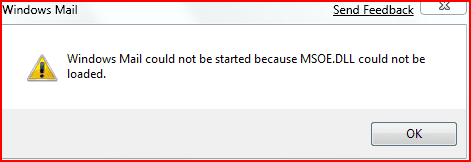
Tried it and now I get this.

mail.PNG

I have taken ownership of folders and all files (one at a time) and have also given myself Full control of all files and folders. Tried a reboot. No joy. When I get the final version of W7 I will probably also get Office 2007 and will then use Outlook as that is the one I like most.

Gary
 

My Computer

Computer Manufacturer/Model Number
Dell XPS420
OS
Vista Ult 64 bit Seven Ult RTM x64
CPU
Intel Core2 Quad Q6600 2.40 gigahertz
Memory
Crucial Ballistix 4x2GB PC2 6400
Graphics Card(s)
NVIDIA GeForce 8600 GTS 256 MB
Sound Card
Creative SB X-Fi audio
Monitor(s) Displays
HP w2207 + HPvs15
Screen Resolution
1680x1050 + 1024x768
Hard Drives
2-WD5000AAKS-500 GB
WD5000AAV-500 GB external
Keyboard
Microsoft Comfort Curve
Mouse
MX Revolution
Other Info
Wacom Intuos 2 Graphics Tablet
Experience Index=5.5
garysgold, do you have a Vista installation ?
If so the instruction in the tutorials and how I've described worked perfectly.

The reason I copied from Vista whilst booted into Vista, is that I wasn't able to give myself enough elevated permission to be able to copy from within Windows 7.

Even after having Vista from day one, I still get caught by having to give permission copying and deleting files.
I understand the reason for the added security, but I much prefered having total control myself as in XP.
 

My Computer

Computer Manufacturer/Model Number
Self Build
OS
Windows RC 7100 x64, Vista Ultimate x64,
CPU
Intel Q6700
Motherboard
Asus P5Q3 Deluxe wi-fi
Memory
Corsair DDR3 4gb
Graphics Card(s)
ATI X1650
Monitor(s) Displays
LCD
Hard Drives
WD 1500gb 10k
WD 320gb 7.5k
WD 320gb 7.5k
Samsung 750gb 7.5k
PSU
Enermax 500w
Case
Lian-Li PC-7B Plus
Cooling
Scythe Infinity
Keyboard
Logitech cordless
Mouse
Logitech cordless
Internet Speed
20meg Cable
Hi Gary, I think that was the same error I was getting the first time I copied the file from Vista but the second time I tried to copy the files across it worked, not sure why but it worked.
 

My Computer

Computer Manufacturer/Model Number
Home Brew
OS
Windows 7 Ultimate Vista Ultimate x64
CPU
Core 2 Duo E8500 3.16Ghz @ 3.8Ghz
Motherboard
eVGA 750i FTW
Memory
2x2Gigs Patriot PC2-6400 LL
Graphics Card(s)
Inno3D GeForce GTX260 216 SP
Monitor(s) Displays
ASUS VW222U 22" 2ms Response time
Screen Resolution
1680x1050
Hard Drives
SATA 150GB
SATA II 250GB
USB IDE 750GB Ext.
PSU
HYTEC 600W & Thermaltake 650W Toughpower Power Exp
Case
Thermaltake Armor LCS (Liquid Cooling System)
Cooling
Liquid Cooling System
Keyboard
Logitech G15 Gaming Keyboard
Mouse
Logitech G9 Gaming Mouse
djs,

I have done this for 3 previous builds of 7, but can't seem to get it to work in 7000 x64. I'm thinking that the problem is that Vista is x86 and 7000 is x64.

Mr. GRiM,

Have to run for now so I'll give it another try when I get back and see what happens.

Gary
 

My Computer

Computer Manufacturer/Model Number
Dell XPS420
OS
Vista Ult 64 bit Seven Ult RTM x64
CPU
Intel Core2 Quad Q6600 2.40 gigahertz
Memory
Crucial Ballistix 4x2GB PC2 6400
Graphics Card(s)
NVIDIA GeForce 8600 GTS 256 MB
Sound Card
Creative SB X-Fi audio
Monitor(s) Displays
HP w2207 + HPvs15
Screen Resolution
1680x1050 + 1024x768
Hard Drives
2-WD5000AAKS-500 GB
WD5000AAV-500 GB external
Keyboard
Microsoft Comfort Curve
Mouse
MX Revolution
Other Info
Wacom Intuos 2 Graphics Tablet
Experience Index=5.5
Back
Top