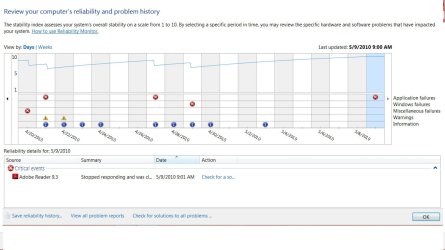
Reliability Monitor

View Reliability and Problem History with Reliability Monitor in Windows 7 and Windows 8

   Information
This tutorial will show you how to open and use Reliability Monitor to review reliability and problem history to help resolve issues in Windows 7 and Windows 8.

   Note
Reliability Monitor is an advanced tool that measures hardware and software problems and other changes to your computer. It collects 24 hours of data before it displays any results and calculates the stability index that ranges from 1 (the least stable) to 10 (the most stable). You can use the index to help evaluate the reliability of your computer by reviewing the reported application failures, Windows 7 failures, Miscellaneous failures, Warnings, and Information. Any change you make to your computer or problem that occurs on your computer affects the stability index.


EXAMPLE: Reliability Monitor
NOTE: You can tell your Index score (scales from 1 to 10, 10 is the best score) by looking at how the chart line ends in the upper right corner boxed in red below compared to the scale of 10 to 1 on the left upper corner boxed in red below.
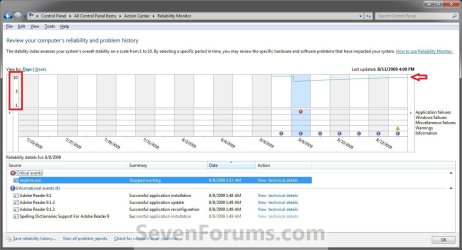
Before.jpg
Here's How:
1. Click on the Action Center icon in the notification area of the taskbar, click on Open Action Center, and go to step 3 below. (see screenshot below)
Action_Center_Icon.jpg
OR

2. Open the Control Panel (icons view) in Windows 7 or Windows 8, click/tap on the Action Center icon, and go to step 3 below.

3. Click on the Maintenance drop down arrow to expand it, then click on the View reliability history link under the Check for solutions to problem reports section. (see screenshot below)
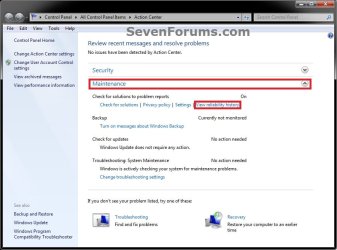
Step-1.jpg

4. In the Reliability Monitor, you can: (see screenshot below)
  • Next to View by, click on Days, Weeks, Month, or Year to view the stability index over a specific period of time that you want.
  • In the upper pane, click on any event on the graph to view its reliability details in the lower pane.
  • Under the lower Reliability details pane, you can click on an available link under the Actions column. For example, View technical details to see more details about the reported problem.
  • At the bottom, click on the View all problem reports link to view only the problems that have occurred on your computer. This view does not include the other computer events that show up in Reliability Monitor, such as events about software installation.
  • At the bottom, click on the Save reliability history link, to save this Reliablilty Monitor report as an .xml file to give to support if needed.
Step-2.jpg
5. When done, click on OK. (see screenshot above)
That's it,
Shawn


Last edited:
Not looking very reliable there Shawn lol.
 

My Computer

Computer Manufacturer/Model Number
Home Brew
OS
Windows 7 Ultimate Vista Ultimate x64
CPU
Core 2 Duo E8500 3.16Ghz @ 3.8Ghz
Motherboard
eVGA 750i FTW
Memory
2x2Gigs Patriot PC2-6400 LL
Graphics Card(s)
Inno3D GeForce GTX260 216 SP
Monitor(s) Displays
ASUS VW222U 22" 2ms Response time
Screen Resolution
1680x1050
Hard Drives
SATA 150GB
SATA II 250GB
USB IDE 750GB Ext.
PSU
HYTEC 600W & Thermaltake 650W Toughpower Power Exp
Case
Thermaltake Armor LCS (Liquid Cooling System)
Cooling
Liquid Cooling System
Keyboard
Logitech G15 Gaming Keyboard
Mouse
Logitech G9 Gaming Mouse
LOL, nope. IE8 keeps crashing on me now and then destroying my score. :(

I guess I should look into that one day. ;)
 

My Computer

Computer type
PC/Desktop
Computer Manufacturer/Model Number
Self built custom
OS
64-bit Windows 11 Pro for Workstations
CPU
Intel i7-8700K OC'd to 5 GHz
Motherboard
ASUS ROG Maximus XI Formula Z390
Memory
64 GB (4x16GB) G.SKILL TridentZ RGB DDR4 3600 MHz
Graphics Card(s)
ASUS ROG-STRIX-GTX1080TI-O11G-GAMING
Sound Card
Integrated
Monitor(s) Displays
2 x Samsung Odyssey G7 27"
Screen Resolution
2560x1440
Hard Drives
1TB Samsung 990 PRO M.2,
4TB Samsung 990 PRO PRO M.2,
TerraMaster F8 SSD Plus NAS
PSU
Seasonic Prime Titanium 850W
Case
Thermaltake Core P3
Cooling
Corsair Hydro H115i
Keyboard
Logitech wireless K800
Mouse
Logitech MX Master 4
Internet Speed
2 Gb/s Download and 100 Mb/s Upload
Antivirus
Malwarebyte Anti-Malware Premium
Browser
Google Chrome
Other Info
Logitech Z625 speaker system,
Logitech BRIO 4K Pro webcam,
HP Color LaserJet Pro MFP M477fdn,
APC SMART-UPS RT 1000 XL - SURT1000XLI,
Galaxy S23 Plus phone
Thanks, it looks great at first......lol. Mine is starting to go up now after taking off some software windows didn't like!
 

My Computer

Computer Manufacturer/Model Number
Dilithium Computers/Engineering (Myself) Star date 42.739285.5432.9
OS
Win7 Ultimate x64 on Desktop / Win7 Ultimate x86 on laptop / Win7 x86 Starter on Netbook
CPU
AMD Phenom 965 X4 3.4Ghz cpu Black Edition
Motherboard
Gigabyte 790XT
Memory
12 Gb DDR3
Graphics Card(s)
Nvidea Gforce GTX 470
Sound Card
Onboard Realtek hi-fi
Monitor(s) Displays
Lg 3D led 23"
Screen Resolution
1920x1080
Hard Drives
Loads maxstore sata 1 & 2/ loads of partitions + 1Tb Hitachi sata 2. 256Gb Crucial ssd.
PSU
OCZ 700W GameXstream
Case
Artec 10000
Cooling
On board + many case fans
Keyboard
Logitech wireless K350
Mouse
Inferno gaming mouse
Internet Speed
Talk talk. 10Mb
Other Info
My PC was hand built with matchsticks. xbox 360 controller. Printers,fax.........
You're welcome Romulinx. Hopefully you will get a perfect 10 soon.
 

My Computer

Computer type
PC/Desktop
Computer Manufacturer/Model Number
Self built custom
OS
64-bit Windows 11 Pro for Workstations
CPU
Intel i7-8700K OC'd to 5 GHz
Motherboard
ASUS ROG Maximus XI Formula Z390
Memory
64 GB (4x16GB) G.SKILL TridentZ RGB DDR4 3600 MHz
Graphics Card(s)
ASUS ROG-STRIX-GTX1080TI-O11G-GAMING
Sound Card
Integrated
Monitor(s) Displays
2 x Samsung Odyssey G7 27"
Screen Resolution
2560x1440
Hard Drives
1TB Samsung 990 PRO M.2,
4TB Samsung 990 PRO PRO M.2,
TerraMaster F8 SSD Plus NAS
PSU
Seasonic Prime Titanium 850W
Case
Thermaltake Core P3
Cooling
Corsair Hydro H115i
Keyboard
Logitech wireless K800
Mouse
Logitech MX Master 4
Internet Speed
2 Gb/s Download and 100 Mb/s Upload
Antivirus
Malwarebyte Anti-Malware Premium
Browser
Google Chrome
Other Info
Logitech Z625 speaker system,
Logitech BRIO 4K Pro webcam,
HP Color LaserJet Pro MFP M477fdn,
APC SMART-UPS RT 1000 XL - SURT1000XLI,
Galaxy S23 Plus phone
Shawn,

Great forum! You always seem to have the "best" stuff... exactly what I am interested in!

I just made the leap to W7 RTM.... foolish me ... on 4 machines!

Ok, so with your help I found the reliability monitor once again. (I thought it was MIA until I read your How To article). As you might recall, I am anal about showing a 10.0 :geek:. So, how can I reset the rating in 7 back to 10? Just delete the RAC the same way as Vista?

Thanks!

Charlie
 

My Computer

OS
7 rtm

My Computer

Computer type
PC/Desktop
Computer Manufacturer/Model Number
Self built custom
OS
64-bit Windows 11 Pro for Workstations
CPU
Intel i7-8700K OC'd to 5 GHz
Motherboard
ASUS ROG Maximus XI Formula Z390
Memory
64 GB (4x16GB) G.SKILL TridentZ RGB DDR4 3600 MHz
Graphics Card(s)
ASUS ROG-STRIX-GTX1080TI-O11G-GAMING
Sound Card
Integrated
Monitor(s) Displays
2 x Samsung Odyssey G7 27"
Screen Resolution
2560x1440
Hard Drives
1TB Samsung 990 PRO M.2,
4TB Samsung 990 PRO PRO M.2,
TerraMaster F8 SSD Plus NAS
PSU
Seasonic Prime Titanium 850W
Case
Thermaltake Core P3
Cooling
Corsair Hydro H115i
Keyboard
Logitech wireless K800
Mouse
Logitech MX Master 4
Internet Speed
2 Gb/s Download and 100 Mb/s Upload
Antivirus
Malwarebyte Anti-Malware Premium
Browser
Google Chrome
Other Info
Logitech Z625 speaker system,
Logitech BRIO 4K Pro webcam,
HP Color LaserJet Pro MFP M477fdn,
APC SMART-UPS RT 1000 XL - SURT1000XLI,
Galaxy S23 Plus phone
Thanks Shawn,

I saw that before. You delete the items in a very similar fashion to Vista. It doesn't reset the history though. In Vista you had us delete the files in sub directories under RAC. After you did that and rebooted, the Relieablity number was back to 10 as if you had just installed the operating system. I tried to delete those file in 7 but they seem to be different. The database file is locked as well. Any thoughts on how to get the reliability number back to "ground zero"... day 1. . . literally?? . . without really screwing up the system...

Thanks again Yoda! :D

Charlie
 

My Computer

OS
7 rtm

My Computer

Computer Manufacturer/Model Number
Compal JFT02 (Custom Build Laptop)
OS
Windows 7 Home Premium x64 - Mac OS X 10.6.4 x64
CPU
Intel Core 2 Duo T9300 2.5 GHz
Motherboard
JFT02
Memory
4GB Kingston DDR2-800
Graphics Card(s)
NVIDIA Geforce 8600M GT (512MB Model)
Sound Card
Realtek HD Audio
Monitor(s) Displays
WUXGA Standard Laptop Display
Screen Resolution
1680*1050
Hard Drives
Toshiba 320GB 5400RPM Laptop HD
PSU
Standard Laptop Power Supply
Case
Standard Laptop Case
Cooling
Standard Laptop Cooling
Keyboard
Standard Laptop 105 Key-Keyboard
Mouse
Synaptics Touchpad
Internet Speed
Verizion Online DSL 3360/864 kbs (dl/up)
Thanks Shawn,

I saw that before. You delete the items in a very similar fashion to Vista. It doesn't reset the history though. In Vista you had us delete the files in sub directories under RAC. After you did that and rebooted, the Relieablity number was back to 10 as if you had just installed the operating system. I tried to delete those file in 7 but they seem to be different. The database file is locked as well. Any thoughts on how to get the reliability number back to "ground zero"... day 1. . . literally?? . . without really screwing up the system...

Thanks again Yoda! :D

Charlie

Charlie,

Sorry, yes it's the exact same method as in Vista below to do so. I'll make a new tutorial on it tonight for the Windows 7 version of it though. :)

Reliability Monitor - Reset - Vista Forums
 

My Computer

Computer type
PC/Desktop
Computer Manufacturer/Model Number
Self built custom
OS
64-bit Windows 11 Pro for Workstations
CPU
Intel i7-8700K OC'd to 5 GHz
Motherboard
ASUS ROG Maximus XI Formula Z390
Memory
64 GB (4x16GB) G.SKILL TridentZ RGB DDR4 3600 MHz
Graphics Card(s)
ASUS ROG-STRIX-GTX1080TI-O11G-GAMING
Sound Card
Integrated
Monitor(s) Displays
2 x Samsung Odyssey G7 27"
Screen Resolution
2560x1440
Hard Drives
1TB Samsung 990 PRO M.2,
4TB Samsung 990 PRO PRO M.2,
TerraMaster F8 SSD Plus NAS
PSU
Seasonic Prime Titanium 850W
Case
Thermaltake Core P3
Cooling
Corsair Hydro H115i
Keyboard
Logitech wireless K800
Mouse
Logitech MX Master 4
Internet Speed
2 Gb/s Download and 100 Mb/s Upload
Antivirus
Malwarebyte Anti-Malware Premium
Browser
Google Chrome
Other Info
Logitech Z625 speaker system,
Logitech BRIO 4K Pro webcam,
HP Color LaserJet Pro MFP M477fdn,
APC SMART-UPS RT 1000 XL - SURT1000XLI,
Galaxy S23 Plus phone
Shawn,

Good luck.... I don't believe it will be as easy.... (maybe for you :cry:...) I suspect you'll need to add a few steps. I tried it it this AM and found that I couldn't move certain files. I look forward to giving your tutorial a try... Please e-mail me when it is ready and I will be glad to BETA it :-)
One other annoying thing I bet you can figure out is the inability to PIN "Windows update" to the start menu. It was a handy place to put it in Vista. This was actually removed in 7 by design according to the blogs I've read. Why, I am not sure. All the work arounds I have seen scare the heck out of me and I won't do them. I am hoping you can work some Yoda like magic and come up with a simpler fix for us . . .
 

My Computer

OS
7 rtm

My Computer

Computer type
PC/Desktop
Computer Manufacturer/Model Number
Self built custom
OS
64-bit Windows 11 Pro for Workstations
CPU
Intel i7-8700K OC'd to 5 GHz
Motherboard
ASUS ROG Maximus XI Formula Z390
Memory
64 GB (4x16GB) G.SKILL TridentZ RGB DDR4 3600 MHz
Graphics Card(s)
ASUS ROG-STRIX-GTX1080TI-O11G-GAMING
Sound Card
Integrated
Monitor(s) Displays
2 x Samsung Odyssey G7 27"
Screen Resolution
2560x1440
Hard Drives
1TB Samsung 990 PRO M.2,
4TB Samsung 990 PRO PRO M.2,
TerraMaster F8 SSD Plus NAS
PSU
Seasonic Prime Titanium 850W
Case
Thermaltake Core P3
Cooling
Corsair Hydro H115i
Keyboard
Logitech wireless K800
Mouse
Logitech MX Master 4
Internet Speed
2 Gb/s Download and 100 Mb/s Upload
Antivirus
Malwarebyte Anti-Malware Premium
Browser
Google Chrome
Other Info
Logitech Z625 speaker system,
Logitech BRIO 4K Pro webcam,
HP Color LaserJet Pro MFP M477fdn,
APC SMART-UPS RT 1000 XL - SURT1000XLI,
Galaxy S23 Plus phone

My Computer

Computer type
PC/Desktop
Computer Manufacturer/Model Number
Self built custom
OS
64-bit Windows 11 Pro for Workstations
CPU
Intel i7-8700K OC'd to 5 GHz
Motherboard
ASUS ROG Maximus XI Formula Z390
Memory
64 GB (4x16GB) G.SKILL TridentZ RGB DDR4 3600 MHz
Graphics Card(s)
ASUS ROG-STRIX-GTX1080TI-O11G-GAMING
Sound Card
Integrated
Monitor(s) Displays
2 x Samsung Odyssey G7 27"
Screen Resolution
2560x1440
Hard Drives
1TB Samsung 990 PRO M.2,
4TB Samsung 990 PRO PRO M.2,
TerraMaster F8 SSD Plus NAS
PSU
Seasonic Prime Titanium 850W
Case
Thermaltake Core P3
Cooling
Corsair Hydro H115i
Keyboard
Logitech wireless K800
Mouse
Logitech MX Master 4
Internet Speed
2 Gb/s Download and 100 Mb/s Upload
Antivirus
Malwarebyte Anti-Malware Premium
Browser
Google Chrome
Other Info
Logitech Z625 speaker system,
Logitech BRIO 4K Pro webcam,
HP Color LaserJet Pro MFP M477fdn,
APC SMART-UPS RT 1000 XL - SURT1000XLI,
Galaxy S23 Plus phone
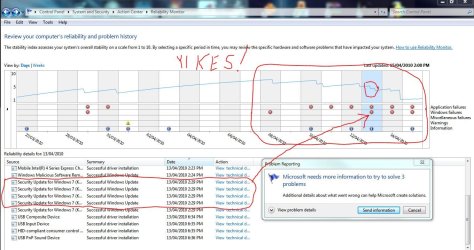
My score is 1 and under... Why is it that when I was using the RC win 7 was fantastic, Now I have the "real" thing, I have nothing but problems?
 

My Computer

Computer Manufacturer/Model Number
Me
OS
Windows 7 Pro 64bit
CPU
IntelCore 2 duo E6750 2.66GHZ 1333MHz (775) 4M Cache
Motherboard
Gigabyte GA-P35-DS3P
Memory
Corsair Twin 2X4096mb DDR2 800Mhz PC-6400 4-4-4-12
Graphics Card(s)
256m Saphire X1950pro
Hard Drives
1TBSeagate Barracuda 7200
PSU
Antec Earthwatts 500
Case
Thermaltake Soprano case w/window
Internet Speed
8000
Mine hasn't been too good the last while. Never realized how many times I have had problems.
Rel-Monitor.JPG

Maybe the Windows Updates?
 

My Computer

Computer Manufacturer/Model Number
Laptop Acer Aspire 6930
OS
Windows 7 Professional
CPU
Intel Core2 Duo CPU T6400 @ 2.00GHz
Memory
3 GB
Graphics Card(s)
lowly Intel Express Chipset WHOPPING 64 mb dedicated.LOL
Monitor(s) Displays
26" RCA and 40" Haier, and laptop 17" screen
Screen Resolution
26":1366X768 40":1920X1080 Laptop Screen: 1366X768
Hard Drives
Onboard HDD 300 GB/
Seagate 1TB External HDD/
Verbatim 500 GB External HDD/
Firelite 160 GB USB HDD
Keyboard
Microsoft Intellitype Wireless Multimedia Keyboard 1.1
Mouse
Microsoft Wireless Optical Mouse 2000
Other Info
Currently using Telus DSL. I currently have a 3.0 connection, but on wait list for 15.0 connection.
reliabilityscore.jpg

mine hiccupped a bit recently
- due to latest Java and Silverlight installation, possibly..
- I am running a "preview" ati-gfx driver, so maybe that's causing temporary problems..??

- it's on it's way back up again, though..:cool:
 

My Computer

Computer type
PC/Desktop
Computer Manufacturer/Model Number
benchtec, built to personal specs
OS
Windows10 Pro - 64Bit vs.10547
CPU
i7-965 Extreme Edition (8 Cores) at 3.3GHz (no OC)
Motherboard
BloodRageX58 (Socket1366)
Memory
12G Corsair Dominator DDR3 - tripled
Graphics Card(s)
2xAMD SapphireNITRO R9 380(4G) crossfire
Sound Card
Sonar(SB)X-Fi onboard
Monitor(s) Displays
SyncMaster P2050 20"
Screen Resolution
1600x900 (widescreen)
Hard Drives
480G\OCZSolid3SSD, 64G\OCZVertex3SSD,60G\OCZVertex2SSD, 1TB\spinpointF1SATAHDD
PSU
1200w Power Station Gold
Case
ANTEC 900/2 all blue lights, etc..
Cooling
Noctua SE1366 NH-U12P - a tight fit, but a monster cooler!!
Keyboard
Logitech G19 (wired)
Mouse
Logitech G9 Laser (wired)
Internet Speed
150mb unlimited
Browser
IE11(RP)
Other Info
Xbox One, Nokia735 Windows10 mobile, LG HD/DVD/Blu-Ray r/w, CyberlinkPowerDVD15, LogitechZ5500-SS(5.1), LogitechG35Phones-SS(7.1),MSOffice 2007,CorelDrawX7,Painter2016, Wacom Intuos Pro-SE
I think i got mine up. Is this good or bad? Adobe crashed on me earlier today when i was looking at my school ebooks. Kinda freaked me out a bit.

Relibility.jpg
 
Last edited by a moderator:

My Computer

Computer Manufacturer/Model Number
Acer Aspire 5532
OS
Windows 7 Premium
CPU
AMD Athlon 64 Processor TF-20 (1.6 GHz)
Motherboard
AMD
Memory
3 GB
Graphics Card(s)
ATi Radeon HD3200
Monitor(s) Displays
15.6" HD LCD
Hard Drives
160 GB HDD
PSU
IDK?
Case
Gun Metal grey
Cooling
Dual fans
Hello Senshi, and welcome to Seven Forums.

That looks pretty good to me. The line is just about has high as you can get. :)
 

My Computer

Computer type
PC/Desktop
Computer Manufacturer/Model Number
Self built custom
OS
64-bit Windows 11 Pro for Workstations
CPU
Intel i7-8700K OC'd to 5 GHz
Motherboard
ASUS ROG Maximus XI Formula Z390
Memory
64 GB (4x16GB) G.SKILL TridentZ RGB DDR4 3600 MHz
Graphics Card(s)
ASUS ROG-STRIX-GTX1080TI-O11G-GAMING
Sound Card
Integrated
Monitor(s) Displays
2 x Samsung Odyssey G7 27"
Screen Resolution
2560x1440
Hard Drives
1TB Samsung 990 PRO M.2,
4TB Samsung 990 PRO PRO M.2,
TerraMaster F8 SSD Plus NAS
PSU
Seasonic Prime Titanium 850W
Case
Thermaltake Core P3
Cooling
Corsair Hydro H115i
Keyboard
Logitech wireless K800
Mouse
Logitech MX Master 4
Internet Speed
2 Gb/s Download and 100 Mb/s Upload
Antivirus
Malwarebyte Anti-Malware Premium
Browser
Google Chrome
Other Info
Logitech Z625 speaker system,
Logitech BRIO 4K Pro webcam,
HP Color LaserJet Pro MFP M477fdn,
APC SMART-UPS RT 1000 XL - SURT1000XLI,
Galaxy S23 Plus phone
hey brink, thanks for the welcome :) Im glad that is good. I was hoping it would be since this machine is only a month old if that. If it was bad id have to get ahold of geek squad and figure it all out. But im going to school for this kind of thing and hopefully within a couple weeks ill know how to go about fixing them on my own and wont have to call the geeksquad. im not entirely sure I like having them root around in my laptop and going through stuff, they could be screwing my stuff up and i wouldn't even know it lol
 

My Computer

Computer Manufacturer/Model Number
Acer Aspire 5532
OS
Windows 7 Premium
CPU
AMD Athlon 64 Processor TF-20 (1.6 GHz)
Motherboard
AMD
Memory
3 GB
Graphics Card(s)
ATi Radeon HD3200
Monitor(s) Displays
15.6" HD LCD
Hard Drives
160 GB HDD
PSU
IDK?
Case
Gun Metal grey
Cooling
Dual fans
Hello

Thanks for useful info, like always. If you accept suggestions I'd like to see topics like that in a separate category like "Troubleshooting" because the specific one seems lost there. It does not sound like "maintenance" (that means i should take an action once a week or something like that...) In my opinion it describes actions that 10 users would need to do (most times only once for their pc) because they met the problem and 500 never.

Thanks again :)
 

My Computer

Computer Manufacturer/Model Number
Sony Vaio
OS
Windows 7 Home premium x64
CPU
Intel i5 520m at 2.4GHz(plus turbo mode at 2.9GHz)
Memory
4GB ddr3 1067
Graphics Card(s)
Nvidia 330m
Back
Top