My Windows 7 came with no games!

drfsupercenter

New member
Is that normal?

I open Games Explorer and it's completely blank. I've always known Microsoft operating systems to come with a few "stock" games, but it seems I was duped!

I'm using the 64-bit RTM release from MSDNAA.

What gives?
 

My Computer

Computer Manufacturer/Model Number
MSI
OS
Windows 7 Ultimate and Ubuntu 9.04
CPU
Intel Core 2 Quad
Memory
4GB DDR3 RAM
Graphics Card(s)
NVIDIA GTS 160M (1GB GPU)
Sound Card
Realtek HD Audio
Screen Resolution
1680x1050
Hard Drives
500GB SATA
I guess they figured since its for academic purposes, that you wont have time to play games...
 

My Computer

Computer type
PC/Desktop
Computer Manufacturer/Model Number
LENOVO K450 @3.0GHZ
OS
64-bit Windows 8.1 Pro
CPU
Core(TM) i5 CPU 4330 Haswell @ 3.20GHz
Motherboard
LENOVO
Memory
12.00 GB
Graphics Card(s)
Intel(R) HD Graphics
Sound Card
Intel HD integtrated
Monitor(s) Displays
HP 25' ISP Monitor
Screen Resolution
1900/1020
Hard Drives
(1) ST1000DM003-1CH162 (2) Generic STORAGE DEVICE USB Device (3) Generic STORAGE DEVICE USB Device
Internet Speed
100mb down/10mb up
People actually play those games... ?

>.>
 

My Computer

Computer type
PC/Desktop
Computer Manufacturer/Model Number
DELL VOSTRO 3650
OS
Windows 8.1 PRO
CPU
3rd Generation Intel Core i7‐3612QM CPU @ 2.10GHZ
Memory
8GB DDR3
Graphics Card(s)
NVIDIA GeForce GT 525M (128 bit), 1GB Grpahics
Screen Resolution
1920X1080
Hard Drives
750GB 5400RPM
LOL, seriously?

I thought the one MSDNAA was the same thing the manufacturers got.

And yes, those games are fun! Sure, I don't spend hours at a time playing Chess, but it's nice if I have to wait 5 minutes for a teacher or something and I'm bored...

Anyway, is there an easy way to install the Microsoft games? Or do I have to download them each separately and put them in that Games manager?
(I also read about Inkball not being included in Windows 7... but would the EXE from Vista work?)
 

My Computer

Computer Manufacturer/Model Number
MSI
OS
Windows 7 Ultimate and Ubuntu 9.04
CPU
Intel Core 2 Quad
Memory
4GB DDR3 RAM
Graphics Card(s)
NVIDIA GTS 160M (1GB GPU)
Sound Card
Realtek HD Audio
Screen Resolution
1680x1050
Hard Drives
500GB SATA
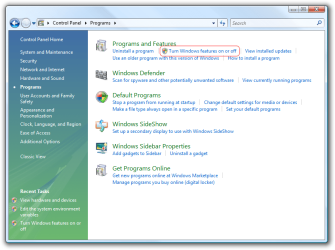
Go to Control Panel..Turn Windows Features ON/OFF.. Make sure the games are ticked off there...
 

My Computer

Computer type
PC/Desktop
Computer Manufacturer/Model Number
DELL VOSTRO 3650
OS
Windows 8.1 PRO
CPU
3rd Generation Intel Core i7‐3612QM CPU @ 2.10GHZ
Memory
8GB DDR3
Graphics Card(s)
NVIDIA GeForce GT 525M (128 bit), 1GB Grpahics
Screen Resolution
1920X1080
Hard Drives
750GB 5400RPM
I couldn't find it under Control Panel, but I did it by searching for "Windows Features" in the Start Menu.

Thanks for the tip though!
 

My Computer

Computer Manufacturer/Model Number
MSI
OS
Windows 7 Ultimate and Ubuntu 9.04
CPU
Intel Core 2 Quad
Memory
4GB DDR3 RAM
Graphics Card(s)
NVIDIA GTS 160M (1GB GPU)
Sound Card
Realtek HD Audio
Screen Resolution
1680x1050
Hard Drives
500GB SATA
Sorry.. My bad.. In control Panel, to go programs

I attached an image to help you out.

windows-features-control-panel.png
 

My Computer

Computer type
PC/Desktop
Computer Manufacturer/Model Number
DELL VOSTRO 3650
OS
Windows 8.1 PRO
CPU
3rd Generation Intel Core i7‐3612QM CPU @ 2.10GHZ
Memory
8GB DDR3
Graphics Card(s)
NVIDIA GeForce GT 525M (128 bit), 1GB Grpahics
Screen Resolution
1920X1080
Hard Drives
750GB 5400RPM
Oh, I see...

I prefer having my Control Panel with the items though, because that way it shows all the options. But typing "Windows Features" in the Start Menu works too.
 

My Computer

Computer Manufacturer/Model Number
MSI
OS
Windows 7 Ultimate and Ubuntu 9.04
CPU
Intel Core 2 Quad
Memory
4GB DDR3 RAM
Graphics Card(s)
NVIDIA GTS 160M (1GB GPU)
Sound Card
Realtek HD Audio
Screen Resolution
1680x1050
Hard Drives
500GB SATA
Oh. So were you able to tick off the games? Did that work?
 

My Computer

Computer type
PC/Desktop
Computer Manufacturer/Model Number
DELL VOSTRO 3650
OS
Windows 8.1 PRO
CPU
3rd Generation Intel Core i7‐3612QM CPU @ 2.10GHZ
Memory
8GB DDR3
Graphics Card(s)
NVIDIA GeForce GT 525M (128 bit), 1GB Grpahics
Screen Resolution
1920X1080
Hard Drives
750GB 5400RPM
I found that as well (I'm running the Pro edition). It seems that, although the games are included, they are disabled by default and you simply need to reenable them in Program Features.
 

My Computer

Computer type
PC/Desktop
Computer Manufacturer/Model Number
Dwarf Dwf/11/2012 r09/2013
OS
Windows 8.1 Pro RTM x64
CPU
Intel Core-i5-3570K 4-core @ 3.4GHz (Ivy Bridge) (OC 4.4GHz)
Motherboard
ASRock Z77 Extreme4-M
Memory
4 x 4GB DDR3-1600 Corsair Vengeance CMZ8GX3M2A1600C9B (16GB)
Graphics Card(s)
MSI GeForce GTX770 Gaming OC 2GB
Sound Card
Realtek High Definition on board solution (ALC 898)
Monitor(s) Displays
ViewSonic VA1912w Widescreen (VGA)
Screen Resolution
1440x900
Hard Drives
OCZ Agility 3 SSD 120GB SATA III x2 (RAID 0)
Samsung HD501LJ 500GB SATA II x2
Hitachi HDS721010CLA332 1TB SATA II
Iomega 1.5TB Ext USB 2.0
WD 2.0TB Ext USB 3.0
PSU
XFX Pro Series 850W Semi-Modular
Case
Gigabyte IF233
Cooling
1 x 120mm Front Inlet 1 x 120mm Rear Exhaust
Keyboard
Microsoft Comfort Curve Keyboard 3000 (USB)
Mouse
Microsoft Comfort Mouse 3000 for Business (USB)
Internet Speed
NetGear DG834Gv3 ADSL Modem/Router (Ethernet) ~4.0 Mb/s (O2)
Antivirus
Avast! 8.0.1497
Browser
IE 11
Other Info
Optical Drive: HL-DT-ST BD-RE BH10LS30 SATA Bluray
Lexmark S305 Printer/Scanner/Copier (USB)
WEI Score: 8.1/8.1/8.5/8.5/8.25
Asus Eee PC 1011PX Netbook (Windows 7 x86 Starter)
Yeah.

Strange. So has anybody tried Inkball.exe from a Vista computer on Windows 7? If it works, I'd really like to add it to mine! (I'd imagine you just copy the file(s) into the Games folder?)
 

My Computer

Computer Manufacturer/Model Number
MSI
OS
Windows 7 Ultimate and Ubuntu 9.04
CPU
Intel Core 2 Quad
Memory
4GB DDR3 RAM
Graphics Card(s)
NVIDIA GTS 160M (1GB GPU)
Sound Card
Realtek HD Audio
Screen Resolution
1680x1050
Hard Drives
500GB SATA
Great! Don't forget to rep those who've helped you :)
 

My Computer

Computer type
PC/Desktop
Computer Manufacturer/Model Number
DELL VOSTRO 3650
OS
Windows 8.1 PRO
CPU
3rd Generation Intel Core i7‐3612QM CPU @ 2.10GHZ
Memory
8GB DDR3
Graphics Card(s)
NVIDIA GeForce GT 525M (128 bit), 1GB Grpahics
Screen Resolution
1920X1080
Hard Drives
750GB 5400RPM
Sure thing... I didn't know this forum used rep, now I do :)
 

My Computer

Computer Manufacturer/Model Number
MSI
OS
Windows 7 Ultimate and Ubuntu 9.04
CPU
Intel Core 2 Quad
Memory
4GB DDR3 RAM
Graphics Card(s)
NVIDIA GTS 160M (1GB GPU)
Sound Card
Realtek HD Audio
Screen Resolution
1680x1050
Hard Drives
500GB SATA

My Computer

Computer type
PC/Desktop
Computer Manufacturer/Model Number
DELL VOSTRO 3650
OS
Windows 8.1 PRO
CPU
3rd Generation Intel Core i7‐3612QM CPU @ 2.10GHZ
Memory
8GB DDR3
Graphics Card(s)
NVIDIA GeForce GT 525M (128 bit), 1GB Grpahics
Screen Resolution
1920X1080
Hard Drives
750GB 5400RPM
Chess

Question: can I have this game in Vista x64? I liked so much,....
 

My Computer

Computer Manufacturer/Model Number
Vista Ultimate x64(I want this but not working at full capacity WIN7, 7600 16385)
OS
windows 7
CPU
Intel P4 Dual Core E8600 3.33Ghz
Motherboard
ASUS P5Q Premium
Memory
6GB
Graphics Card(s)
ASUS ATI EAH6870 512 Mb
Sound Card
ASUS XONAR D2X
Monitor(s) Displays
ASUS VW222
Hard Drives
SAMSUNG HD753LJ ATA 7200 rpm
thanks

Go to Control Panel..Turn Windows Features ON/OFF.. Make sure the games are ticked off there...


Ohh Thanks so Much. I was trying to figure it out too. I was kinda bumed when I went through the Entire Lynda.com how to sessions and not a word of it was mentioned and that was so simple thanks so much.
 

My Computer

Computer Manufacturer/Model Number
Hp Pavillion dv9000
OS
windows 7
Memory
4.0 gb
Hard Drives
Two Westen Digital 5gb internal drives
Back
Top