Start Menu Button - Change

How to Change the Start Menu Button in Windows 7

   Information
This will show you how to change the Start Menu button orb in Windows 7 32-bit and 64-bit.
   Warning
REMEMBER TO BACK UP EXPLORER.EXE!


Here's How:

For custom made start buttons, and further information, please visit this thread: http://www.sevenforums.com/customization/2002-custom-themes-icons-start-buttons-92.html

   Information
The explorer.exe you want to edit is:

C:\Windows\explorer.exe

and not C:\Windows\SysWOW64\explorer.exe (for those running x64)

And for those who use the larger DPI's i.e 125% , 150% you need to change:

6806 - 66 x 198
6807 - 81 x 243
6808 - 106 x 318


NOTE: The start orb replacement always HAS to look like this:
1 orb: Orb when not in use (when not clicked or mouseover'ed)
2 orb: mouseover
3 orb: When start orb is clicked
2u9ka5w.jpg

1. Download Restorator (Shareware) (Restorator 2007 Resource Editor - Restorator - Bome Software)

2. Take ownership of the whole Windows folder (see these links for more info: Take Ownership of file - Vista Forums and http://www.sevenforums.com/tutorials/1911-take-ownership-shortcut.html)

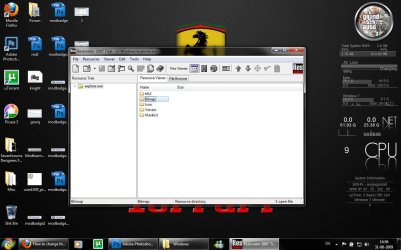
3. Open explorer.exe with restorator
1.jpg

2.jpg
4. Go to the folder called "Bitmap"
3.jpg
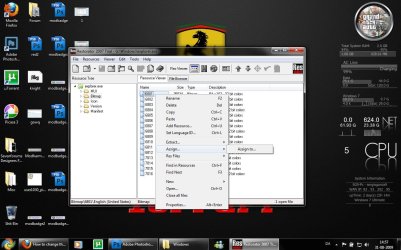
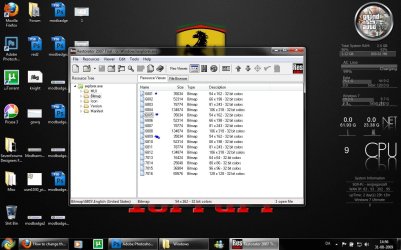
5. Replace 6801.bmp, 6805.bmp, and 6809.bmp (as seen on the picture, you will need to right click and click assign, and then click assign to, then select your file.)
4.jpg

5.jpg
6. Go to "file" and Save as explorer.exe on your desktop

7. Go to the windows folder and rename explorer.exe to explorer.exe.bak and then copy-paste the new explorer, Kill the process in task manager and start it again.
Now you have a new start button! :D

Please comment, if you have something to say :)


Last edited by a moderator:
Sweet! Awesome tutorial thanks muchly
 

My Computer

Computer Manufacturer/Model Number
Seanix Desktop PC
OS
Windows 7 Ultimate 32 bit
CPU
Intel Core 2 Duo CPU E4500 2.20 GHz
Memory
1.99 GB
Graphics Card(s)
Intel G33/G31 Express Chipset Family (256 MB)
Sound Card
Realtek ALC888/1200
Monitor(s) Displays
DELL
Screen Resolution
1280 X 1024
Hard Drives
320GB Internal
200GB External
Case
Seanix
Keyboard
Seanix USB Keyboard
Mouse
Seanix USB Keyboard
Internet Speed
Broadband
Other Info
Getting close to 3 years old.
the three bitmaps we need to replace - i assume they are normal, mouseover and clicked?

i think it would be useful if you could make this clear in the tutorial.

oh, and thanks! ;)
 

My Computer

Computer Manufacturer/Model Number
mickey megabyte 1234
OS
ultimate 64 sp1
CPU
i5 2500K [email protected]
Motherboard
MSI P67A-GD53
Memory
8 gigs GSkill Ripjaws 1600
Graphics Card(s)
amd hd6950
Sound Card
creative x-fi gamer
Monitor(s) Displays
samsung 24"
Screen Resolution
1920x1080
Hard Drives
ocz vertex 2e 60 gig, samsung f3 1tb, buffalo 2tb ext
PSU
antec 550
Case
antec three hundred
Cooling
i'm a cooling fan
Keyboard
saitek eclipse ii
Mouse
logitech g3
Internet Speed
about 4 Mbps
Other Info
i love win7
what i mean is: 6801.bmp = normal button? 6805.bmp = mouseover button? 6809.bmp=clicked?

please make it clear in the tutorial. ;)
 

My Computer

Computer Manufacturer/Model Number
mickey megabyte 1234
OS
ultimate 64 sp1
CPU
i5 2500K [email protected]
Motherboard
MSI P67A-GD53
Memory
8 gigs GSkill Ripjaws 1600
Graphics Card(s)
amd hd6950
Sound Card
creative x-fi gamer
Monitor(s) Displays
samsung 24"
Screen Resolution
1920x1080
Hard Drives
ocz vertex 2e 60 gig, samsung f3 1tb, buffalo 2tb ext
PSU
antec 550
Case
antec three hundred
Cooling
i'm a cooling fan
Keyboard
saitek eclipse ii
Mouse
logitech g3
Internet Speed
about 4 Mbps
Other Info
i love win7
what i mean is: 6801.bmp = normal button? 6805.bmp = mouseover button? 6809.bmp=clicked?

please make it clear in the tutorial. ;)
This should explain it:


Large Icons:
No matter where the Taskbar is located, you only need 6805.bmp
Small Icons:
top: 6809.bmp
left: 6805.bmp
right: 6805.bmp
bottom:6801.bmp
 
now i am really confused...:confused:

if i only need 6805.bmp then why do you say replace 6801 and 6809 in the tutorial? the tutorial mentions nothing about large or small icons, nor location of taskbar.

it is obvious that you know what you are doing, but when you write a tutorial, you have to assume idiots like me are going to read it, so you have to explain more.

i misunderstood and thought that we had to make three buttons, one for its normal state, one for mouse rollover, and another for when it is clicked. i was wrong...:(
 

My Computer

Computer Manufacturer/Model Number
mickey megabyte 1234
OS
ultimate 64 sp1
CPU
i5 2500K [email protected]
Motherboard
MSI P67A-GD53
Memory
8 gigs GSkill Ripjaws 1600
Graphics Card(s)
amd hd6950
Sound Card
creative x-fi gamer
Monitor(s) Displays
samsung 24"
Screen Resolution
1920x1080
Hard Drives
ocz vertex 2e 60 gig, samsung f3 1tb, buffalo 2tb ext
PSU
antec 550
Case
antec three hundred
Cooling
i'm a cooling fan
Keyboard
saitek eclipse ii
Mouse
logitech g3
Internet Speed
about 4 Mbps
Other Info
i love win7
now i am really confused...:confused:

if i only need 6805.bmp then why do you say replace 6801 and 6809 in the tutorial? the tutorial mentions nothing about large or small icons, nor location of taskbar.

it is obvious that you know what you are doing, but when you write a tutorial, you have to assume idiots like me are going to read it, so you have to explain more.

i misunderstood and thought that we had to make three buttons, one for its normal state, one for mouse rollover, and another for when it is clicked. i was wrong...:(
That is for the small button, you need to replace the others...But you should do it anyway.
The picture of the button should be like this:
First Orb: The start orb itself
Second Orb: start while mouseover
Third Orb: Start orb when clicked
edit: this a png, it will need to be a BMP file, with a black background.
 

Attachments

  • Untitled-1 (3).png
    Untitled-1 (3).png
    16.6 KB · Views: 392,666
ok, thank you for explaining it to this idiot.

so 6801.bmp = normal button? 6805.bmp = mouseover button? 6809.bmp=clicked?

please edit your original tutorial with this extra information.

and where do i store my new bitmaps? (or will they get saved inside explorer.exe when i assign them?)

what about transparency? can you assign a png file?

sorry for the idiot questions, but i want to help you improve your tutorial!
 

My Computer

Computer Manufacturer/Model Number
mickey megabyte 1234
OS
ultimate 64 sp1
CPU
i5 2500K [email protected]
Motherboard
MSI P67A-GD53
Memory
8 gigs GSkill Ripjaws 1600
Graphics Card(s)
amd hd6950
Sound Card
creative x-fi gamer
Monitor(s) Displays
samsung 24"
Screen Resolution
1920x1080
Hard Drives
ocz vertex 2e 60 gig, samsung f3 1tb, buffalo 2tb ext
PSU
antec 550
Case
antec three hundred
Cooling
i'm a cooling fan
Keyboard
saitek eclipse ii
Mouse
logitech g3
Internet Speed
about 4 Mbps
Other Info
i love win7
ok, thank you for explaining it to this idiot.

so 6801.bmp = normal button? 6805.bmp = mouseover button? 6809.bmp=clicked?

please edit your original tutorial with this extra information.

and where do i store my new bitmaps? (or will they get saved inside explorer.exe when i assign them?)

what about transparency? can you assign a png file?

sorry for the idiot questions, but i want to help you improve your tutorial!
I think so ;)
and No, you can't assign a PNG file...It has to be a BMP file. And yes, the newly assigned start buttons will be saved in the explorer.exe.
 
So what should i add to the tutorial? ;)

there used to be an old recipe for rabbit soup:

1 - first, you catch a rabbit.
2 - blah blah blah
3 - .......

so, for your tutorial, it may help to start with the basics, maybe:

1 - first, make three buttons for normal, rollover and clicked states, x and y dimensions.
2 - blah blah blah
3 - ......

then say to save them as bitmaps... etc. etc.

also, how can we have transparency in the buttons?
 

My Computer

Computer Manufacturer/Model Number
mickey megabyte 1234
OS
ultimate 64 sp1
CPU
i5 2500K [email protected]
Motherboard
MSI P67A-GD53
Memory
8 gigs GSkill Ripjaws 1600
Graphics Card(s)
amd hd6950
Sound Card
creative x-fi gamer
Monitor(s) Displays
samsung 24"
Screen Resolution
1920x1080
Hard Drives
ocz vertex 2e 60 gig, samsung f3 1tb, buffalo 2tb ext
PSU
antec 550
Case
antec three hundred
Cooling
i'm a cooling fan
Keyboard
saitek eclipse ii
Mouse
logitech g3
Internet Speed
about 4 Mbps
Other Info
i love win7
there used to be an old recipe for rabbit soup:


so, for your tutorial, it may help to start with the basics, maybe:


then say to save them as bitmaps... etc. etc.

also, how can we have transparency in the buttons?
As i said before, No, they have to be black, BUT you can use them on any color taskbar. and that other thing, should be a total other tutorial. That would describe on how to make them, and not on how to change them. ;)
 
ok :)
 

My Computer

Computer Manufacturer/Model Number
mickey megabyte 1234
OS
ultimate 64 sp1
CPU
i5 2500K [email protected]
Motherboard
MSI P67A-GD53
Memory
8 gigs GSkill Ripjaws 1600
Graphics Card(s)
amd hd6950
Sound Card
creative x-fi gamer
Monitor(s) Displays
samsung 24"
Screen Resolution
1920x1080
Hard Drives
ocz vertex 2e 60 gig, samsung f3 1tb, buffalo 2tb ext
PSU
antec 550
Case
antec three hundred
Cooling
i'm a cooling fan
Keyboard
saitek eclipse ii
Mouse
logitech g3
Internet Speed
about 4 Mbps
Other Info
i love win7
i think that you should make it clear that you ALSO need to create or download your own replacement buttons in this tutorial as thats not clear at the start.

just a thought ....
 

My Computer

Computer Manufacturer/Model Number
Toshiba Satelite
OS
windows 7 RTM
CPU
AMD Athlon x 2 64
Memory
4gb
Thanks a lot sergiogarcia9 i was searching this from long time...
 

My Computer

OS
windows 7
CPU
P4
Motherboard
INTEL 945
Memory
3 GB
Graphics Card(s)
Nvidia 8600
Monitor(s) Displays
Samsung
Screen Resolution
1024x768
Hard Drives
1 TB
Case
CIRCLE
Keyboard
Microsoft
Mouse
SAmsung
Internet Speed
192 KBPS
can any one make start button for this logo.
Hitman_logo.jpg
 

My Computer

OS
windows 7
CPU
P4
Motherboard
INTEL 945
Memory
3 GB
Graphics Card(s)
Nvidia 8600
Monitor(s) Displays
Samsung
Screen Resolution
1024x768
Hard Drives
1 TB
Case
CIRCLE
Keyboard
Microsoft
Mouse
SAmsung
Internet Speed
192 KBPS
and this too ...pleseeeeeeeeeeeeee....
437477987_8be9b67c3a.jpg
 

My Computer

OS
windows 7
CPU
P4
Motherboard
INTEL 945
Memory
3 GB
Graphics Card(s)
Nvidia 8600
Monitor(s) Displays
Samsung
Screen Resolution
1024x768
Hard Drives
1 TB
Case
CIRCLE
Keyboard
Microsoft
Mouse
SAmsung
Internet Speed
192 KBPS
Back
Top