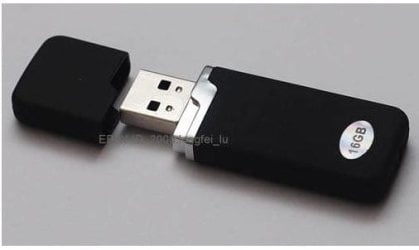
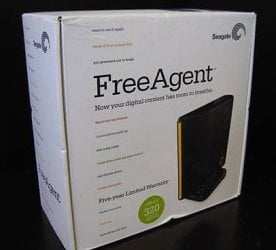
This article refers to the Hard Drives issued at PDC, but it also applies to using ANY USB hard drive as a bootable disk.
Tip: make your PDC 2008 USB hard drive a bootable Windows 7 install disk
If you’re one of eight thousand people lucky enough to attend PDC 2008 last week and receive the ultra-cool 160GB portable hard drive with “the goods” then I have some extra good news for you, your hard drive can also become a bootable Windows 7 install disk. The best part is that you don’t even have to delete any of the existing files on the drive since there’s about 90GB free of the 160GB drive.
This is especially handy if you’re trying to install Windows 7 on a device without a DVD drive or if you don’t have any blank DVDs to burn the ISO on.
Of course this guide also works if you have an existing portable USB hard drive that has enough free space to partition and a copy of a Windows 7 ISO, which I’m sure you can get *wink*.
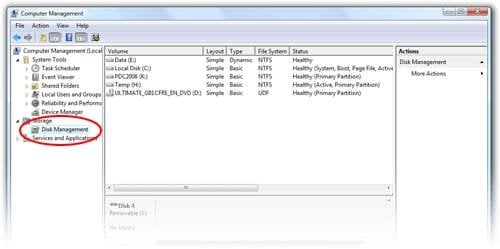 Step 1: Click open the Start Menu, right click on “Computer”, “Manage”. Open the “Disk Management” tool.
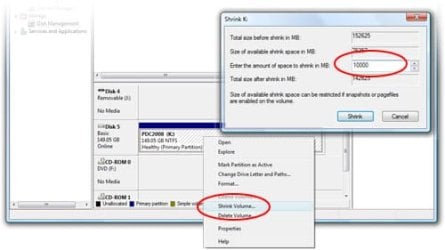 Step 2: Find the USB hard drive, should be 149.05GB. Right click on the volume and click “Shrink volume”. Shrink the volume by 10000MB.
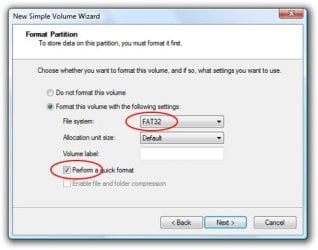 Step 3: Right click on the new unallocated volume, “New Simple Volume”, format as “FAT32″. Check “Perform quick format” unless you have time to waste.
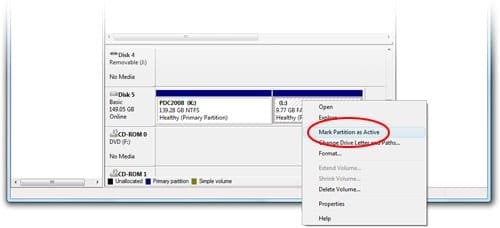 Step 4: Right click on the new volume, “Mark Partition as Active”.
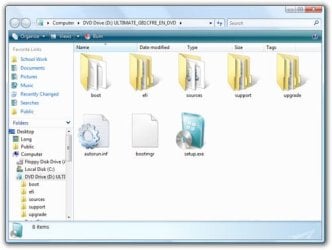 Step 5: Mount the Windows 7 ISO from the USB (\Windows7\ISO\6801.0.080913-2030_Client_en-us_ULTIMATE-ULTIMATE_GB1CFRE_EN_DVD.iso) using your favorite ISO tool (I use Daemon Tools Lite).
 Step 6: Copy the entire DVD directory into your newly created volume.
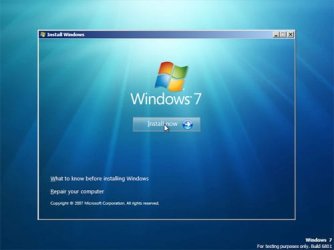 Step 7: Now take your USB drive and tell the PC to boot from USB. The Windows 7 setup should appear.
To restore your USB drive to the previous state and reclaim the 10GB of space, simply delete the new volume created and extend the original volume to consume the entire 10000MB now unallocated."
Tip: make your PDC 2008 USB hard drive a bootable Windows 7 install disk - istartedsomething
Tip: make your PDC 2008 USB hard drive a bootable Windows 7 install disk
If you’re one of eight thousand people lucky enough to attend PDC 2008 last week and receive the ultra-cool 160GB portable hard drive with “the goods” then I have some extra good news for you, your hard drive can also become a bootable Windows 7 install disk. The best part is that you don’t even have to delete any of the existing files on the drive since there’s about 90GB free of the 160GB drive.
This is especially handy if you’re trying to install Windows 7 on a device without a DVD drive or if you don’t have any blank DVDs to burn the ISO on.
Of course this guide also works if you have an existing portable USB hard drive that has enough free space to partition and a copy of a Windows 7 ISO, which I’m sure you can get *wink*.
To restore your USB drive to the previous state and reclaim the 10GB of space, simply delete the new volume created and extend the original volume to consume the entire 10000MB now unallocated."
Tip: make your PDC 2008 USB hard drive a bootable Windows 7 install disk - istartedsomething
My Computer
- Computer Manufacturer/Model Number
- Self Built
- OS
- Vista X32. Windows 7 32bit
- CPU
- Intel Quad Core 6600
- Motherboard
- Asus P5B
- Memory
- 4096 MB Xtreme-Dark 800mhz
- Graphics Card(s)
- Zotac Amp Edition 8800GT - 512MB DDR3, O/C 700mhz
- Monitor(s) Displays
- Samsung 206BW
- Screen Resolution
- 1680 X 1024
- Hard Drives
- 4 X Samsung 500GB 7200rpm Serial ATA-II HDD w. 16MB Cache .
- PSU
- 550 w
- Case
- Thermaltake
- Cooling
- 3 x octua NF-S12-1200 - 120mm 1200RPM Sound Optimised Fans
- Keyboard
- Microsoft
- Mouse
- Targus
- Internet Speed
- 1500kbs