Open each Folder in the Same or Own Separate New Window

How to Open each Folder in the Same or Own Separate New Window in Windows 7

   Information
This will show you how to have each folder or drive temporarily or always open in the same or its own separate new Windows Explorer window in Windows 7.

   Note
If you are stuck with a new window when you open a folder even after setting it to open in the same window, then:

1) Open an elevated command prompt.

2) Copy and paste the commands below one at a time in the command prompt, and press Enter after each command.
regsvr32 "%SystemRoot%\System32\actxprxy.dll"
regsvr32 "%ProgramFiles%\Internet Explorer\ieproxy.dll"
3) Restart computer to apply.


OPTION ONE

Temporarily Open Folder in the Same or Separate Window


1. Open a Windows Explorer window, and do step 2 or 3 below.

2. To Open the Folder in the Same Window
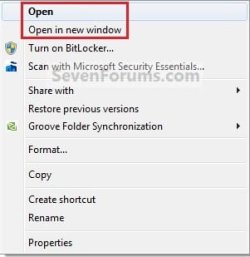
A) Right click on a folder or drive, and click on Open. (See screenshot below)
NOTE: By default, you can also just double click on the folder to open it in the same window if the setting in step 2 of OPTION TWO below is still set.
Default_Same_Window.jpg
2. To Open the Folder in its Own Separate New Window
A) Select a folder or drive, and press the CTRL + N keys.

OR

B) Right click on a folder or drive, and click on Open in new window. (See screenshot above)


OPTION TWO

Through Folder Options


1. Open Folder Options.
Folder_Options.jpg
2. To Always Open each Folder in the Same Window
NOTE: This is the default setting.
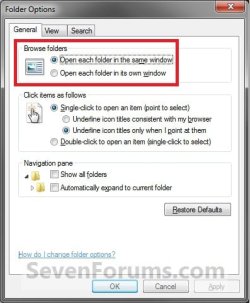
A) Select (dot) Open each folder in the same window, and click on OK. (See screenshot above)
3. To Always Open each Folder in it's Own Separate New Window
NOTE: This also sets Open in the folder or drive context menu to behave the same as the Open in new window context menu item.
A) Dot Open each folder in its own window, and click on OK.(See screenshot below step 1)


OPTION THREE

Manually Through Registry Editor


1. Open the Start Menu, then type regedit in the search box and press enter.

2. If prompted by UAC, then click on Yes (if admininstrator) or type in administrator's password (if standard user).

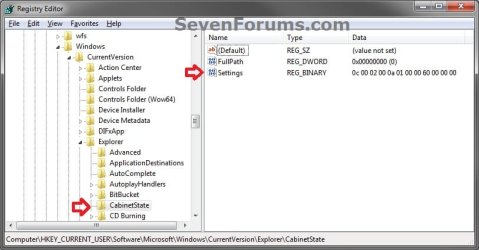
3. In Registry Editor, navigate to the location below. (see screenshot below)

Code:
HKEY_CURRENT_USER\Software\Microsoft\Windows\CurrentVersion\Explorer\CabinetState
REG-1.jpg
4. In the right pane of CabinetState, right click on Settings and click on Modify. (see screenshot above)

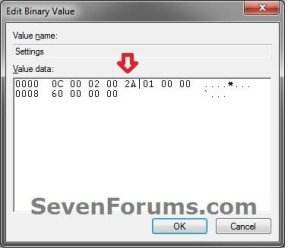
5. To Always Open each Folder in the Same Window
NOTE: This is the default setting.
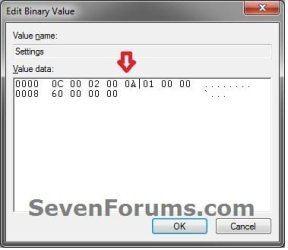
A) Using your right arrow key, move the cursor over to the right of the 5th "Value data" (2A), press the Backspace key, type in 0A (number 0), and click on OK. (see screenshots below)
Reg-3.jpgReg-2-3-B.jpg
Reg-2.jpg
B) Go to step 7.
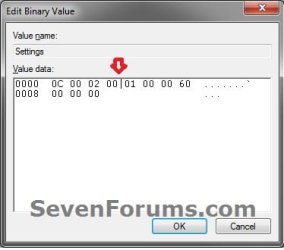
6. To Always Open each Folder in it's Own Separate New Window
NOTE: This also sets Open in the folder or drive context menu to behave the same as the Open in new window context menu item.
A) Using your right arrow key, move the cursor over to the right of the 5th "Value data" (0A), press the Backspace key, type in 2A, and click on OK. (see screenshots below)
Reg-2.jpgReg-2-3-B.jpg
Reg-3.jpg
7. Close regedit.
That's it,
Shawn


Last edited:
Windows 7 will not open each folder in the same window

This might seem small but.....
Windows 7 is opening each folder in its own window, even after following the above steps and rebooting. Any suggestions?

thank you in advance.
 
Last edited:

My Computer

Computer Manufacturer/Model Number
ASUS Motherboard PQL-VM DO
OS
Windows 7 Ultimate SP1 x64
CPU
Intel Core2 Q6800 @2.93
Motherboard
ASUS Motherboard PQL-VM DO
Memory
OCZ x 4GB , Kingston x 4GB ddr2
Graphics Card(s)
ATI Radeon HD 5700 Series
Sound Card
motherboard
Monitor(s) Displays
ViewSonic VA1912wb
Screen Resolution
1440 x 900
Hard Drives
Disk 1 - WD VelociRaptor 3.5-inch
Disk 2 - WD VelociRaptor 3.5-inch
PSU
850W CooerlMaster
Case
LanBoy2
Cooling
Cooler Master V8 + LanBoy2 case
Keyboard
Apple
Internet Speed
25 Mbps
Hello KnowOne, and welcome to Seven Forums.

Did you do a clean (format) or upgrade install of Windows 7?

You might see if doing a repair install may be able to fix this for you without losing anything.
 

My Computer

Computer type
PC/Desktop
Computer Manufacturer/Model Number
Self built custom
OS
64-bit Windows 11 Pro for Workstations
CPU
Intel i7-8700K OC'd to 5 GHz
Motherboard
ASUS ROG Maximus XI Formula Z390
Memory
64 GB (4x16GB) G.SKILL TridentZ RGB DDR4 3600 MHz
Graphics Card(s)
ASUS ROG-STRIX-GTX1080TI-O11G-GAMING
Sound Card
Integrated
Monitor(s) Displays
2 x Samsung Odyssey G7 27"
Screen Resolution
2560x1440
Hard Drives
1TB Samsung 990 PRO M.2,
4TB Samsung 990 PRO PRO M.2,
TerraMaster F8 SSD Plus NAS
PSU
Seasonic Prime Titanium 850W
Case
Thermaltake Core P3
Cooling
Corsair Hydro H115i
Keyboard
Logitech wireless K800
Mouse
Logitech MX Master 4
Internet Speed
2 Gb/s Download and 100 Mb/s Upload
Antivirus
Malwarebyte Anti-Malware Premium
Browser
Google Chrome
Other Info
Logitech Z625 speaker system,
Logitech BRIO 4K Pro webcam,
HP Color LaserJet Pro MFP M477fdn,
APC SMART-UPS RT 1000 XL - SURT1000XLI,
Galaxy S23 Plus phone
Thanks, I'll try the repair install after backup my drive.
 

My Computer

Computer Manufacturer/Model Number
ASUS Motherboard PQL-VM DO
OS
Windows 7 Ultimate SP1 x64
CPU
Intel Core2 Q6800 @2.93
Motherboard
ASUS Motherboard PQL-VM DO
Memory
OCZ x 4GB , Kingston x 4GB ddr2
Graphics Card(s)
ATI Radeon HD 5700 Series
Sound Card
motherboard
Monitor(s) Displays
ViewSonic VA1912wb
Screen Resolution
1440 x 900
Hard Drives
Disk 1 - WD VelociRaptor 3.5-inch
Disk 2 - WD VelociRaptor 3.5-inch
PSU
850W CooerlMaster
Case
LanBoy2
Cooling
Cooler Master V8 + LanBoy2 case
Keyboard
Apple
Internet Speed
25 Mbps
Just checking into say... "It worked!" harmony has been restored.

Thank you
 

My Computer

Computer Manufacturer/Model Number
ASUS Motherboard PQL-VM DO
OS
Windows 7 Ultimate SP1 x64
CPU
Intel Core2 Q6800 @2.93
Motherboard
ASUS Motherboard PQL-VM DO
Memory
OCZ x 4GB , Kingston x 4GB ddr2
Graphics Card(s)
ATI Radeon HD 5700 Series
Sound Card
motherboard
Monitor(s) Displays
ViewSonic VA1912wb
Screen Resolution
1440 x 900
Hard Drives
Disk 1 - WD VelociRaptor 3.5-inch
Disk 2 - WD VelociRaptor 3.5-inch
PSU
850W CooerlMaster
Case
LanBoy2
Cooling
Cooler Master V8 + LanBoy2 case
Keyboard
Apple
Internet Speed
25 Mbps
You're welcome KnowOne. That's great news. :)
 

My Computer

Computer type
PC/Desktop
Computer Manufacturer/Model Number
Self built custom
OS
64-bit Windows 11 Pro for Workstations
CPU
Intel i7-8700K OC'd to 5 GHz
Motherboard
ASUS ROG Maximus XI Formula Z390
Memory
64 GB (4x16GB) G.SKILL TridentZ RGB DDR4 3600 MHz
Graphics Card(s)
ASUS ROG-STRIX-GTX1080TI-O11G-GAMING
Sound Card
Integrated
Monitor(s) Displays
2 x Samsung Odyssey G7 27"
Screen Resolution
2560x1440
Hard Drives
1TB Samsung 990 PRO M.2,
4TB Samsung 990 PRO PRO M.2,
TerraMaster F8 SSD Plus NAS
PSU
Seasonic Prime Titanium 850W
Case
Thermaltake Core P3
Cooling
Corsair Hydro H115i
Keyboard
Logitech wireless K800
Mouse
Logitech MX Master 4
Internet Speed
2 Gb/s Download and 100 Mb/s Upload
Antivirus
Malwarebyte Anti-Malware Premium
Browser
Google Chrome
Other Info
Logitech Z625 speaker system,
Logitech BRIO 4K Pro webcam,
HP Color LaserJet Pro MFP M477fdn,
APC SMART-UPS RT 1000 XL - SURT1000XLI,
Galaxy S23 Plus phone
This might seem small but.....
Windows 7 is opening each folder in its own window, even after following the above steps and rebooting. Any suggestions?

thank you in advance.

All i did to correct this was unpin the Windows Explorer icon from the task bar and start menu, do a properties on the icon located in accessories and pasted "C:\WINDOWS\explorer.exe " over the top of the existing target (Essentially restoring it to default) and it worked perfectly without having to do a repair install.

Further Target/Shortcut info can be found here: http://www.sevenforums.com/tutorials/2863-windows-explorer-taskbar-icon-change-open-target.html

Hope it helps!
 
Last edited by a moderator:
Help :(

I have the same issue as described above, but I have the correct options enabled in Folder and search options, and I have the correct Registry configuration. A clean install for me is not an option, because I have too much sensitive data that must be preserved and secured at all costs. Does anyone have another idea/suggestion?

Regards,

Pieter Houwen
 

My Computer

Computer Manufacturer/Model Number
HP G62-A11SD
OS
Windows 7 Home Premium x64 (64 bit)
CPU
Intel i3
Motherboard
Standard for the notebook
Memory
4 GB Unknown DDR
Graphics Card(s)
Intel HD Graphics
Sound Card
Onboard (Unknown)
Monitor(s) Displays
Built-in 19" LED display
Hard Drives
Built-in 500 GB HDD
PSU
Standard
Case
Standard
Cooling
Standard (With extra powerful cooling gel)
Keyboard
Standard
Mouse
Built-in touchpad
Internet Speed
Depends on my location
Other Info
Hello
Hello Pieter, and welcome to Seven Forums.

You might see if running a sfc /scannow command may be able to help. :)

Hope this helps,
Shawn
 

My Computer

Computer type
PC/Desktop
Computer Manufacturer/Model Number
Self built custom
OS
64-bit Windows 11 Pro for Workstations
CPU
Intel i7-8700K OC'd to 5 GHz
Motherboard
ASUS ROG Maximus XI Formula Z390
Memory
64 GB (4x16GB) G.SKILL TridentZ RGB DDR4 3600 MHz
Graphics Card(s)
ASUS ROG-STRIX-GTX1080TI-O11G-GAMING
Sound Card
Integrated
Monitor(s) Displays
2 x Samsung Odyssey G7 27"
Screen Resolution
2560x1440
Hard Drives
1TB Samsung 990 PRO M.2,
4TB Samsung 990 PRO PRO M.2,
TerraMaster F8 SSD Plus NAS
PSU
Seasonic Prime Titanium 850W
Case
Thermaltake Core P3
Cooling
Corsair Hydro H115i
Keyboard
Logitech wireless K800
Mouse
Logitech MX Master 4
Internet Speed
2 Gb/s Download and 100 Mb/s Upload
Antivirus
Malwarebyte Anti-Malware Premium
Browser
Google Chrome
Other Info
Logitech Z625 speaker system,
Logitech BRIO 4K Pro webcam,
HP Color LaserJet Pro MFP M477fdn,
APC SMART-UPS RT 1000 XL - SURT1000XLI,
Galaxy S23 Plus phone

My Computer

Computer Manufacturer/Model Number
HP G62-A11SD
OS
Windows 7 Home Premium x64 (64 bit)
CPU
Intel i3
Motherboard
Standard for the notebook
Memory
4 GB Unknown DDR
Graphics Card(s)
Intel HD Graphics
Sound Card
Onboard (Unknown)
Monitor(s) Displays
Built-in 19" LED display
Hard Drives
Built-in 500 GB HDD
PSU
Standard
Case
Standard
Cooling
Standard (With extra powerful cooling gel)
Keyboard
Standard
Mouse
Built-in touchpad
Internet Speed
Depends on my location
Other Info
Hello
You're most welcome. I'm happy to hear that you got it sorted. :)
 

My Computer

Computer type
PC/Desktop
Computer Manufacturer/Model Number
Self built custom
OS
64-bit Windows 11 Pro for Workstations
CPU
Intel i7-8700K OC'd to 5 GHz
Motherboard
ASUS ROG Maximus XI Formula Z390
Memory
64 GB (4x16GB) G.SKILL TridentZ RGB DDR4 3600 MHz
Graphics Card(s)
ASUS ROG-STRIX-GTX1080TI-O11G-GAMING
Sound Card
Integrated
Monitor(s) Displays
2 x Samsung Odyssey G7 27"
Screen Resolution
2560x1440
Hard Drives
1TB Samsung 990 PRO M.2,
4TB Samsung 990 PRO PRO M.2,
TerraMaster F8 SSD Plus NAS
PSU
Seasonic Prime Titanium 850W
Case
Thermaltake Core P3
Cooling
Corsair Hydro H115i
Keyboard
Logitech wireless K800
Mouse
Logitech MX Master 4
Internet Speed
2 Gb/s Download and 100 Mb/s Upload
Antivirus
Malwarebyte Anti-Malware Premium
Browser
Google Chrome
Other Info
Logitech Z625 speaker system,
Logitech BRIO 4K Pro webcam,
HP Color LaserJet Pro MFP M477fdn,
APC SMART-UPS RT 1000 XL - SURT1000XLI,
Galaxy S23 Plus phone
Hey, nothing worked, I've spent the last 5 hours looking everywhere for a solution, but it's not working. regcleaner and all the like did nothing, made my computer start up slower too. so i removed them, but those blasted folders still open in new windows, please, any ideas?
 

My Computer

OS
Windows 7 Home Premium x64
Hello Fraillon, and welcome to Seven Forums.

Did they ever open in the same window? If so, you could also do a system restore using a restore point dated before this issue started.

Hope this helps for now,
Shawn
 

My Computer

Computer type
PC/Desktop
Computer Manufacturer/Model Number
Self built custom
OS
64-bit Windows 11 Pro for Workstations
CPU
Intel i7-8700K OC'd to 5 GHz
Motherboard
ASUS ROG Maximus XI Formula Z390
Memory
64 GB (4x16GB) G.SKILL TridentZ RGB DDR4 3600 MHz
Graphics Card(s)
ASUS ROG-STRIX-GTX1080TI-O11G-GAMING
Sound Card
Integrated
Monitor(s) Displays
2 x Samsung Odyssey G7 27"
Screen Resolution
2560x1440
Hard Drives
1TB Samsung 990 PRO M.2,
4TB Samsung 990 PRO PRO M.2,
TerraMaster F8 SSD Plus NAS
PSU
Seasonic Prime Titanium 850W
Case
Thermaltake Core P3
Cooling
Corsair Hydro H115i
Keyboard
Logitech wireless K800
Mouse
Logitech MX Master 4
Internet Speed
2 Gb/s Download and 100 Mb/s Upload
Antivirus
Malwarebyte Anti-Malware Premium
Browser
Google Chrome
Other Info
Logitech Z625 speaker system,
Logitech BRIO 4K Pro webcam,
HP Color LaserJet Pro MFP M477fdn,
APC SMART-UPS RT 1000 XL - SURT1000XLI,
Galaxy S23 Plus phone
I went to the start menu and right clicked on IE to Run as Administrator. I then went to Internet options to the advanced tab clicked on restore advance settings and then clicked the reset button to reset the settings back to the default.

I don't know if the run as administrator was necessary, but that is the way I did it and now explorer doesn't open up a new window when I double click on a folder.
 

My Computer

OS
Windows 7 Ultimate x64
Hello Slickhead, and welcome to Seven Forums.

Nope, run as administrator was not needed. That will only reset Internet Explorer and would have nothing to do how Windows Explorer opens folders.

Do you have OPTION TWO in the tutorial on the first page of this thread set to step 3?
 

My Computer

Computer type
PC/Desktop
Computer Manufacturer/Model Number
Self built custom
OS
64-bit Windows 11 Pro for Workstations
CPU
Intel i7-8700K OC'd to 5 GHz
Motherboard
ASUS ROG Maximus XI Formula Z390
Memory
64 GB (4x16GB) G.SKILL TridentZ RGB DDR4 3600 MHz
Graphics Card(s)
ASUS ROG-STRIX-GTX1080TI-O11G-GAMING
Sound Card
Integrated
Monitor(s) Displays
2 x Samsung Odyssey G7 27"
Screen Resolution
2560x1440
Hard Drives
1TB Samsung 990 PRO M.2,
4TB Samsung 990 PRO PRO M.2,
TerraMaster F8 SSD Plus NAS
PSU
Seasonic Prime Titanium 850W
Case
Thermaltake Core P3
Cooling
Corsair Hydro H115i
Keyboard
Logitech wireless K800
Mouse
Logitech MX Master 4
Internet Speed
2 Gb/s Download and 100 Mb/s Upload
Antivirus
Malwarebyte Anti-Malware Premium
Browser
Google Chrome
Other Info
Logitech Z625 speaker system,
Logitech BRIO 4K Pro webcam,
HP Color LaserJet Pro MFP M477fdn,
APC SMART-UPS RT 1000 XL - SURT1000XLI,
Galaxy S23 Plus phone
The first thing I tried was setting it to open in the same window and then changing it and changing it back. I have already tried all that stuff. I tried the regserv stuff and everything else that I could try. The sfc /scannow didn't fix it either. I read some where about open IE up as administrator and tried that. It was talking of IE8, but I have IE9, but I was ready to try anything.

I installed IE9 not to long ago. I don't remember the problem before I installed it, but I work out of town, so I really can't remember when it started. I just know when I reset IE settings and closed IE and all explorer windows, that the problem went away. I now can double click on a folder and it opens in the same window.
 

My Computer

OS
Windows 7 Ultimate x64

Attachments

My Computer

Computer type
PC/Desktop
Computer Manufacturer/Model Number
Self built custom
OS
64-bit Windows 11 Pro for Workstations
CPU
Intel i7-8700K OC'd to 5 GHz
Motherboard
ASUS ROG Maximus XI Formula Z390
Memory
64 GB (4x16GB) G.SKILL TridentZ RGB DDR4 3600 MHz
Graphics Card(s)
ASUS ROG-STRIX-GTX1080TI-O11G-GAMING
Sound Card
Integrated
Monitor(s) Displays
2 x Samsung Odyssey G7 27"
Screen Resolution
2560x1440
Hard Drives
1TB Samsung 990 PRO M.2,
4TB Samsung 990 PRO PRO M.2,
TerraMaster F8 SSD Plus NAS
PSU
Seasonic Prime Titanium 850W
Case
Thermaltake Core P3
Cooling
Corsair Hydro H115i
Keyboard
Logitech wireless K800
Mouse
Logitech MX Master 4
Internet Speed
2 Gb/s Download and 100 Mb/s Upload
Antivirus
Malwarebyte Anti-Malware Premium
Browser
Google Chrome
Other Info
Logitech Z625 speaker system,
Logitech BRIO 4K Pro webcam,
HP Color LaserJet Pro MFP M477fdn,
APC SMART-UPS RT 1000 XL - SURT1000XLI,
Galaxy S23 Plus phone
Hello...its nearly 2017 and this download of the elevated command prompt still worked brilliantly. Thank you for saving me more hours of frustration.
 

My Computer

Computer type
PC/Desktop
Computer Manufacturer/Model Number
custom
OS
7 professional 32 bit
I'm glad it could help Rory, and welcome to Seven Forums. :)
 

My Computer

Computer type
PC/Desktop
Computer Manufacturer/Model Number
Self built custom
OS
64-bit Windows 11 Pro for Workstations
CPU
Intel i7-8700K OC'd to 5 GHz
Motherboard
ASUS ROG Maximus XI Formula Z390
Memory
64 GB (4x16GB) G.SKILL TridentZ RGB DDR4 3600 MHz
Graphics Card(s)
ASUS ROG-STRIX-GTX1080TI-O11G-GAMING
Sound Card
Integrated
Monitor(s) Displays
2 x Samsung Odyssey G7 27"
Screen Resolution
2560x1440
Hard Drives
1TB Samsung 990 PRO M.2,
4TB Samsung 990 PRO PRO M.2,
TerraMaster F8 SSD Plus NAS
PSU
Seasonic Prime Titanium 850W
Case
Thermaltake Core P3
Cooling
Corsair Hydro H115i
Keyboard
Logitech wireless K800
Mouse
Logitech MX Master 4
Internet Speed
2 Gb/s Download and 100 Mb/s Upload
Antivirus
Malwarebyte Anti-Malware Premium
Browser
Google Chrome
Other Info
Logitech Z625 speaker system,
Logitech BRIO 4K Pro webcam,
HP Color LaserJet Pro MFP M477fdn,
APC SMART-UPS RT 1000 XL - SURT1000XLI,
Galaxy S23 Plus phone
Back
Top