Zip Folders - Enable or Disable Windows Explorer View

Disable Explorer Folder View of Cab and Zip Files in Vista, Windows 7, and Windows 8

   Information
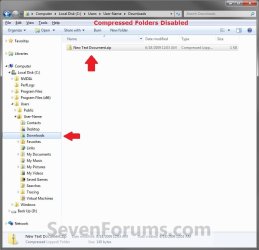
By default, Windows handles ZIP files just like folders. ZIP files will show in the navigation pane of Windows Explorer, and if selected in the navigation pane, you will see the ZIP file's contents in Windows Explorer just like a folder.

If you have a 3rd party ZIP program (ex: 7-Zip, etc.) installed, then this can be an annoyance to you and you may want to turn this feature off so ZIP files will only open in the program instead of Windows Explorer.

This tutorial will show you how to enable or disable ZIP folders (compressed and cab folders) from having their contents expand and show in Windows Explorer like folders for all users.

   Note
Compressed (ZIP) folders and Cab folders are enabled by default to have their content expand and display in Windows Explorer folder view like normal folders.

If disabled, you will only be able to open ZIP and CAB files and extract/view their contents with a 3rd party program (ex: 7-Zip, etc.). You will only see the ZIP and CAB files in Windows Explorer.

   Warning
This can only be done while logged on to an administrator account.


EXAMPLE: Zip Folders (compressed and cab folders) Enabled and Disabled
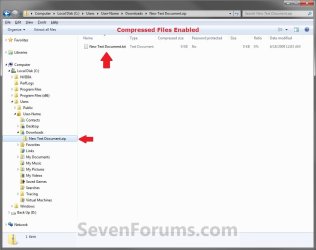
Enabled.jpg

Disabled.jpg

Here's How:

1. Do step 2 and/or 3 or step 4 and/or 5 below for what you would like to do.

2. To Enable ZIP Compressed Folders
NOTE: This is the default setting.
A) Click/tap on the Download button below to download the file below, and go to step 6 below.
Enable_ZIP_Compressed_Folders.reg


Download


3. To Enable CAB Folders
NOTE: This is the default setting.
A) Click/tap on the Download button below to download the file below, and go to step 6 below.
Enable_CAB_Files.reg

Download


4. To Disable ZIP Compressed Folders
A) Click/tap on the Download button below to download the file below, and go to step 6 below.
Disable_ZIP_Compressed_Folders.reg


Download


5. To Disable CAB Folders
A) Click/tap on the Download button below to download the file below, and go to step 6 below.
Disable_CAB_Files.reg

Download


6. Save the .reg file to your desktop.

7. Double click/tap on the downloaded .reg file to merge it.

8. If prompted, click on Run, Yes (UAC Windows 7/8) or Continue (UAC Vista), Yes, and OK when prompted.

9. Log out and in, or restart the PC to apply.


That's it,
Shawn


Attachments

Last edited:
Shawn this is great I asked for this solution very early on and I can see why it took some working out!
As we could'nt find a solution I found a new work practise I access all my zip and rar file folders via a Favorites shortcut which takes out the explorer view giving me access to single archives without the elongation.

best

barney
 

My Computer

OS
Wndows 7
Nice work Shawn, ...one less thing now on the "to do" list for you, one more thing for me. ;)
 

My Computer

Computer Manufacturer/Model Number
POS
OS
OS3.5
CPU
celery
Motherboard
Good Question ...Unknown
Memory
memory never forgets
Graphics Card(s)
OB
Sound Card
OB
Monitor(s) Displays
HUGE
Screen Resolution
168000000x105000000
Hard Drives
full
PSU
OEM 65watt
Case
N/A
Cooling
OB
Keyboard
OB
Mouse
mouse
Internet Speed
1 Trillion MBps
Other Info
Still An Awesome Forum!
LOL, you're welcome Barnet and OEM.

I was sitting there scratching my head as to why it would work in Vista and not in Windows 7 when they were the same registry entries when I noticed that the owner was now TrustedInstalled in Windows 7. It turned out to be nothing more than a permissions issue that taking ownership of the registry key first fixed.
 

My Computer

Computer type
PC/Desktop
Computer Manufacturer/Model Number
Self built custom
OS
64-bit Windows 11 Pro for Workstations
CPU
Intel i7-8700K OC'd to 5 GHz
Motherboard
ASUS ROG Maximus XI Formula Z390
Memory
64 GB (4x16GB) G.SKILL TridentZ RGB DDR4 3600 MHz
Graphics Card(s)
ASUS ROG-STRIX-GTX1080TI-O11G-GAMING
Sound Card
Integrated
Monitor(s) Displays
2 x Samsung Odyssey G7 27"
Screen Resolution
2560x1440
Hard Drives
1TB Samsung 990 PRO M.2,
4TB Samsung 990 PRO PRO M.2,
TerraMaster F8 SSD Plus NAS
PSU
Seasonic Prime Titanium 850W
Case
Thermaltake Core P3
Cooling
Corsair Hydro H115i
Keyboard
Logitech wireless K800
Mouse
Logitech MX Master 4
Internet Speed
2 Gb/s Download and 100 Mb/s Upload
Antivirus
Malwarebyte Anti-Malware Premium
Browser
Google Chrome
Other Info
Logitech Z625 speaker system,
Logitech BRIO 4K Pro webcam,
HP Color LaserJet Pro MFP M477fdn,
APC SMART-UPS RT 1000 XL - SURT1000XLI,
Galaxy S23 Plus phone
Well, it worked after I went through the entire registry and deleted every instance of {0CD7A5C0-9F37-11CE-AE65-08002B2E1262} after taking ownership of the cab and zip things.

Now if I could just get rid of that anoying task bar popup with all the windows for each program that is open in it with the X to close any of them. I hate that thing.
 

My Computer

Computer Manufacturer/Model Number
Acer 5720z laptop
OS
win7 home premium 64bit
Last edited:

My Computer

Computer type
PC/Desktop
Computer Manufacturer/Model Number
Self built custom
OS
64-bit Windows 11 Pro for Workstations
CPU
Intel i7-8700K OC'd to 5 GHz
Motherboard
ASUS ROG Maximus XI Formula Z390
Memory
64 GB (4x16GB) G.SKILL TridentZ RGB DDR4 3600 MHz
Graphics Card(s)
ASUS ROG-STRIX-GTX1080TI-O11G-GAMING
Sound Card
Integrated
Monitor(s) Displays
2 x Samsung Odyssey G7 27"
Screen Resolution
2560x1440
Hard Drives
1TB Samsung 990 PRO M.2,
4TB Samsung 990 PRO PRO M.2,
TerraMaster F8 SSD Plus NAS
PSU
Seasonic Prime Titanium 850W
Case
Thermaltake Core P3
Cooling
Corsair Hydro H115i
Keyboard
Logitech wireless K800
Mouse
Logitech MX Master 4
Internet Speed
2 Gb/s Download and 100 Mb/s Upload
Antivirus
Malwarebyte Anti-Malware Premium
Browser
Google Chrome
Other Info
Logitech Z625 speaker system,
Logitech BRIO 4K Pro webcam,
HP Color LaserJet Pro MFP M477fdn,
APC SMART-UPS RT 1000 XL - SURT1000XLI,
Galaxy S23 Plus phone
Windows 7 64-bit?

Does this process need to be modified at all for 64-bit?

I'm pretty sure I followed the instructions correctly but it didn't work for me. I also looked for all occurrences of

{0CD7A5C0-9F37-11CE-AE65-08002B2E1262}

And deleted those as well.
 

My Computer

OS
Windows 7 RTM
Hello Cskevint, and welcome to Seven Forums.

Yes, this is the same for both the 32-bit and 64-bit Windows 7. Did you also delete the {E88DCCE0-B7B3-11d1-A9F0-00AA0060FA31} key?

If you have, log off and log on to see if it works afterwards.
 

My Computer

Computer type
PC/Desktop
Computer Manufacturer/Model Number
Self built custom
OS
64-bit Windows 11 Pro for Workstations
CPU
Intel i7-8700K OC'd to 5 GHz
Motherboard
ASUS ROG Maximus XI Formula Z390
Memory
64 GB (4x16GB) G.SKILL TridentZ RGB DDR4 3600 MHz
Graphics Card(s)
ASUS ROG-STRIX-GTX1080TI-O11G-GAMING
Sound Card
Integrated
Monitor(s) Displays
2 x Samsung Odyssey G7 27"
Screen Resolution
2560x1440
Hard Drives
1TB Samsung 990 PRO M.2,
4TB Samsung 990 PRO PRO M.2,
TerraMaster F8 SSD Plus NAS
PSU
Seasonic Prime Titanium 850W
Case
Thermaltake Core P3
Cooling
Corsair Hydro H115i
Keyboard
Logitech wireless K800
Mouse
Logitech MX Master 4
Internet Speed
2 Gb/s Download and 100 Mb/s Upload
Antivirus
Malwarebyte Anti-Malware Premium
Browser
Google Chrome
Other Info
Logitech Z625 speaker system,
Logitech BRIO 4K Pro webcam,
HP Color LaserJet Pro MFP M477fdn,
APC SMART-UPS RT 1000 XL - SURT1000XLI,
Galaxy S23 Plus phone
Thanks Brink. That's exactly what the issue was. I wasn't deleting {E88DCCE0-B7B3-11d1-A9F0-00AA0060FA31}. For some reason it wasn't clear to me that I needed to delete that one as well. Thanks for the help.
 

My Computer

OS
Windows 7 RTM
You're welcome Cskevint. I added a note to help avoid that. :)
 

My Computer

Computer type
PC/Desktop
Computer Manufacturer/Model Number
Self built custom
OS
64-bit Windows 11 Pro for Workstations
CPU
Intel i7-8700K OC'd to 5 GHz
Motherboard
ASUS ROG Maximus XI Formula Z390
Memory
64 GB (4x16GB) G.SKILL TridentZ RGB DDR4 3600 MHz
Graphics Card(s)
ASUS ROG-STRIX-GTX1080TI-O11G-GAMING
Sound Card
Integrated
Monitor(s) Displays
2 x Samsung Odyssey G7 27"
Screen Resolution
2560x1440
Hard Drives
1TB Samsung 990 PRO M.2,
4TB Samsung 990 PRO PRO M.2,
TerraMaster F8 SSD Plus NAS
PSU
Seasonic Prime Titanium 850W
Case
Thermaltake Core P3
Cooling
Corsair Hydro H115i
Keyboard
Logitech wireless K800
Mouse
Logitech MX Master 4
Internet Speed
2 Gb/s Download and 100 Mb/s Upload
Antivirus
Malwarebyte Anti-Malware Premium
Browser
Google Chrome
Other Info
Logitech Z625 speaker system,
Logitech BRIO 4K Pro webcam,
HP Color LaserJet Pro MFP M477fdn,
APC SMART-UPS RT 1000 XL - SURT1000XLI,
Galaxy S23 Plus phone
Has this changed for the official release (Win 7 Pro)? I get an error when trying to delete {0CD7A5C0-9F37-11CE-AE65-08002B2E1262}. I have double checked the steps but still no go.
 

My Computer

OS
Win 7 / Vista
Hello BZee, and welcome to Seven Forums.

What error are you getting?

Did you take ownership and give yourself "Full Control" of the registry key before trying to delete it? Are you doing this from within a administrator account?
 

My Computer

Computer type
PC/Desktop
Computer Manufacturer/Model Number
Self built custom
OS
64-bit Windows 11 Pro for Workstations
CPU
Intel i7-8700K OC'd to 5 GHz
Motherboard
ASUS ROG Maximus XI Formula Z390
Memory
64 GB (4x16GB) G.SKILL TridentZ RGB DDR4 3600 MHz
Graphics Card(s)
ASUS ROG-STRIX-GTX1080TI-O11G-GAMING
Sound Card
Integrated
Monitor(s) Displays
2 x Samsung Odyssey G7 27"
Screen Resolution
2560x1440
Hard Drives
1TB Samsung 990 PRO M.2,
4TB Samsung 990 PRO PRO M.2,
TerraMaster F8 SSD Plus NAS
PSU
Seasonic Prime Titanium 850W
Case
Thermaltake Core P3
Cooling
Corsair Hydro H115i
Keyboard
Logitech wireless K800
Mouse
Logitech MX Master 4
Internet Speed
2 Gb/s Download and 100 Mb/s Upload
Antivirus
Malwarebyte Anti-Malware Premium
Browser
Google Chrome
Other Info
Logitech Z625 speaker system,
Logitech BRIO 4K Pro webcam,
HP Color LaserJet Pro MFP M477fdn,
APC SMART-UPS RT 1000 XL - SURT1000XLI,
Galaxy S23 Plus phone
I just got it. :)

8. In the left pane of regedit, right click on {0CD7A5C0-9F37-11CE-AE65-08002B2E1262} and click on Delete. (See screenshot below step 4A)

What step 8 didn't say was that I needed to take owership and set full control for that key before deleting it.
 

My Computer

OS
Win 7 / Vista
BZee,

That's great news.

Steps 3B or 4B to step 7 did though. ;)
 

My Computer

Computer type
PC/Desktop
Computer Manufacturer/Model Number
Self built custom
OS
64-bit Windows 11 Pro for Workstations
CPU
Intel i7-8700K OC'd to 5 GHz
Motherboard
ASUS ROG Maximus XI Formula Z390
Memory
64 GB (4x16GB) G.SKILL TridentZ RGB DDR4 3600 MHz
Graphics Card(s)
ASUS ROG-STRIX-GTX1080TI-O11G-GAMING
Sound Card
Integrated
Monitor(s) Displays
2 x Samsung Odyssey G7 27"
Screen Resolution
2560x1440
Hard Drives
1TB Samsung 990 PRO M.2,
4TB Samsung 990 PRO PRO M.2,
TerraMaster F8 SSD Plus NAS
PSU
Seasonic Prime Titanium 850W
Case
Thermaltake Core P3
Cooling
Corsair Hydro H115i
Keyboard
Logitech wireless K800
Mouse
Logitech MX Master 4
Internet Speed
2 Gb/s Download and 100 Mb/s Upload
Antivirus
Malwarebyte Anti-Malware Premium
Browser
Google Chrome
Other Info
Logitech Z625 speaker system,
Logitech BRIO 4K Pro webcam,
HP Color LaserJet Pro MFP M477fdn,
APC SMART-UPS RT 1000 XL - SURT1000XLI,
Galaxy S23 Plus phone
[Steps 3 A) ... B) ... c) Go to step 5; Step 5 ... Step 6 ... Step 7 ...]:
This sequence sets full control for {E88DCCE0-B7B3-11d1-A9F0-00AA0060FA31} and Step 8 says to delete {0CD7A5C0-9F37-11CE-AE65-08002B2E1262} but I was getting "Error Deleting Key".

[4. To Disable CAB Folders -]:
This (with steps 5 thru 7) sets full control for {0CD7A5C0-9F37-11CE-AE65-08002B2E1262}; but since step 4c sent me to step 5 and I wasn't concerned with disabling CAB folders, I never went to step 4 in my first several attempts.

Because Step 3 says "To Disable ZIP Compressed Folders -" while Step 4 says "To Disable CAB Folders -
NOTE: You will also need to step 3 as well to disable CAB folders"
I assumed Zip and CAB folders could be disabled separately and Step 4 was not needed to disable Zip folders. :o
 

My Computer

OS
Win 7 / Vista
Ah, got you BZee. Tutorial updated to make it easier to follow. :o

Thank you,
Shawn
 

My Computer

Computer type
PC/Desktop
Computer Manufacturer/Model Number
Self built custom
OS
64-bit Windows 11 Pro for Workstations
CPU
Intel i7-8700K OC'd to 5 GHz
Motherboard
ASUS ROG Maximus XI Formula Z390
Memory
64 GB (4x16GB) G.SKILL TridentZ RGB DDR4 3600 MHz
Graphics Card(s)
ASUS ROG-STRIX-GTX1080TI-O11G-GAMING
Sound Card
Integrated
Monitor(s) Displays
2 x Samsung Odyssey G7 27"
Screen Resolution
2560x1440
Hard Drives
1TB Samsung 990 PRO M.2,
4TB Samsung 990 PRO PRO M.2,
TerraMaster F8 SSD Plus NAS
PSU
Seasonic Prime Titanium 850W
Case
Thermaltake Core P3
Cooling
Corsair Hydro H115i
Keyboard
Logitech wireless K800
Mouse
Logitech MX Master 4
Internet Speed
2 Gb/s Download and 100 Mb/s Upload
Antivirus
Malwarebyte Anti-Malware Premium
Browser
Google Chrome
Other Info
Logitech Z625 speaker system,
Logitech BRIO 4K Pro webcam,
HP Color LaserJet Pro MFP M477fdn,
APC SMART-UPS RT 1000 XL - SURT1000XLI,
Galaxy S23 Plus phone
Brink,

I followed your instructions to the letter (checked twice), including deleting both keys but the zip folders are still there! Tried logging off and back on and even restarting Windows but with no luck. Using Windows 7 Home Premium x64. Any more suggestions?
 

My Computer

Computer Manufacturer/Model Number
Self-build
OS
win 7 x64
CPU
i7-920
Motherboard
Asrock X58 Extreme
Memory
6gb
Graphics Card(s)
Palit GTX275
Hello Vortex,

Just to be sure we are on the same page, the ZIP folders are not what are removed when you use the disable option in the tutorial. It's the ability to view the contents of the ZIP folder in Windows Explorer automatically that is disabled instead. Are you still seeing the contents of the ZIP folder in Windows Explorer after disabling this option without manually opening the ZIP folder?
 

My Computer

Computer type
PC/Desktop
Computer Manufacturer/Model Number
Self built custom
OS
64-bit Windows 11 Pro for Workstations
CPU
Intel i7-8700K OC'd to 5 GHz
Motherboard
ASUS ROG Maximus XI Formula Z390
Memory
64 GB (4x16GB) G.SKILL TridentZ RGB DDR4 3600 MHz
Graphics Card(s)
ASUS ROG-STRIX-GTX1080TI-O11G-GAMING
Sound Card
Integrated
Monitor(s) Displays
2 x Samsung Odyssey G7 27"
Screen Resolution
2560x1440
Hard Drives
1TB Samsung 990 PRO M.2,
4TB Samsung 990 PRO PRO M.2,
TerraMaster F8 SSD Plus NAS
PSU
Seasonic Prime Titanium 850W
Case
Thermaltake Core P3
Cooling
Corsair Hydro H115i
Keyboard
Logitech wireless K800
Mouse
Logitech MX Master 4
Internet Speed
2 Gb/s Download and 100 Mb/s Upload
Antivirus
Malwarebyte Anti-Malware Premium
Browser
Google Chrome
Other Info
Logitech Z625 speaker system,
Logitech BRIO 4K Pro webcam,
HP Color LaserJet Pro MFP M477fdn,
APC SMART-UPS RT 1000 XL - SURT1000XLI,
Galaxy S23 Plus phone
It worked!

Would like to say thank you! It worked for me on Windows 7.
 

My Computer

OS
Windows 7, XP
CPU
Intel QuadCore 2.4MHz
Motherboard
G31
Memory
2GB
Graphics Card(s)
NVidia 86 256MB
Sound Card
Onboard
Monitor(s) Displays
benQ 22"
Hard Drives
500Gb
PSU
400W
Case
Just a standard no whistles box
Cooling
Fax - nothing to be excited about. LOL
You're welcome Ozcan, and welcome to Seven Forums. :)
 

My Computer

Computer type
PC/Desktop
Computer Manufacturer/Model Number
Self built custom
OS
64-bit Windows 11 Pro for Workstations
CPU
Intel i7-8700K OC'd to 5 GHz
Motherboard
ASUS ROG Maximus XI Formula Z390
Memory
64 GB (4x16GB) G.SKILL TridentZ RGB DDR4 3600 MHz
Graphics Card(s)
ASUS ROG-STRIX-GTX1080TI-O11G-GAMING
Sound Card
Integrated
Monitor(s) Displays
2 x Samsung Odyssey G7 27"
Screen Resolution
2560x1440
Hard Drives
1TB Samsung 990 PRO M.2,
4TB Samsung 990 PRO PRO M.2,
TerraMaster F8 SSD Plus NAS
PSU
Seasonic Prime Titanium 850W
Case
Thermaltake Core P3
Cooling
Corsair Hydro H115i
Keyboard
Logitech wireless K800
Mouse
Logitech MX Master 4
Internet Speed
2 Gb/s Download and 100 Mb/s Upload
Antivirus
Malwarebyte Anti-Malware Premium
Browser
Google Chrome
Other Info
Logitech Z625 speaker system,
Logitech BRIO 4K Pro webcam,
HP Color LaserJet Pro MFP M477fdn,
APC SMART-UPS RT 1000 XL - SURT1000XLI,
Galaxy S23 Plus phone
Back
Top