K karimla131 New member Feb 4, 2009 #1 how can i put msn in the tray icon not on taskbar thank you very much kareem My Computer OSWindows 7
Mark AKA Mr GRiM Feb 4, 2009 #2 Close Msn, go to "C:\Program Files (x86)\Windows Live\Messenger\msnmsgr.exe" and change it to Vista compatibility mode. My Computer Computer Manufacturer/Model NumberHome BrewOSWindows 7 Ultimate Vista Ultimate x64CPUCore 2 Duo E8500 3.16Ghz @ 3.8GhzMotherboardeVGA 750i FTWMemory2x2Gigs Patriot PC2-6400 LLGraphics Card(s)Inno3D GeForce GTX260 216 SPMonitor(s) DisplaysASUS VW222U 22" 2ms Response timeScreen Resolution1680x1050Hard DrivesSATA 150GB SATA II 250GB USB IDE 750GB Ext.PSUHYTEC 600W & Thermaltake 650W Toughpower Power ExpCaseThermaltake Armor LCS (Liquid Cooling System)CoolingLiquid Cooling SystemKeyboardLogitech G15 Gaming KeyboardMouseLogitech G9 Gaming Mouse
Close Msn, go to "C:\Program Files (x86)\Windows Live\Messenger\msnmsgr.exe" and change it to Vista compatibility mode.
K karimla131 New member Feb 4, 2009 #3 ho can i change it to Vista compatibility mode. My Computer OSWindows 7
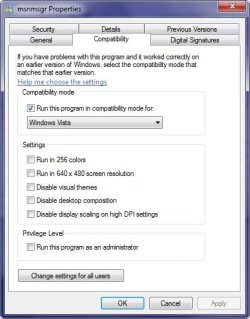
Mark AKA Mr GRiM Feb 4, 2009 #5 Right click go to properties and select the compatibility Tab and change it to Vista as seen here. My Computer Computer Manufacturer/Model NumberHome BrewOSWindows 7 Ultimate Vista Ultimate x64CPUCore 2 Duo E8500 3.16Ghz @ 3.8GhzMotherboardeVGA 750i FTWMemory2x2Gigs Patriot PC2-6400 LLGraphics Card(s)Inno3D GeForce GTX260 216 SPMonitor(s) DisplaysASUS VW222U 22" 2ms Response timeScreen Resolution1680x1050Hard DrivesSATA 150GB SATA II 250GB USB IDE 750GB Ext.PSUHYTEC 600W & Thermaltake 650W Toughpower Power ExpCaseThermaltake Armor LCS (Liquid Cooling System)CoolingLiquid Cooling SystemKeyboardLogitech G15 Gaming KeyboardMouseLogitech G9 Gaming Mouse
Mark AKA Mr GRiM Feb 4, 2009 #6 Ok no worries and welcome to the forum karimla131 My Computer Computer Manufacturer/Model NumberHome BrewOSWindows 7 Ultimate Vista Ultimate x64CPUCore 2 Duo E8500 3.16Ghz @ 3.8GhzMotherboardeVGA 750i FTWMemory2x2Gigs Patriot PC2-6400 LLGraphics Card(s)Inno3D GeForce GTX260 216 SPMonitor(s) DisplaysASUS VW222U 22" 2ms Response timeScreen Resolution1680x1050Hard DrivesSATA 150GB SATA II 250GB USB IDE 750GB Ext.PSUHYTEC 600W & Thermaltake 650W Toughpower Power ExpCaseThermaltake Armor LCS (Liquid Cooling System)CoolingLiquid Cooling SystemKeyboardLogitech G15 Gaming KeyboardMouseLogitech G9 Gaming Mouse