
Make bootable iso from student d/l

How to Create a Bootable ISO from a Student Windows 7 Download


If you get the student d/l and have 3 files :


Here's how:

1. Rt click each file, Properties > Unblock>Apply>OK.
NOTE: Make sure read only boxes are clear.

2. Rt click and run as admin on the .exe. You will get a folder called expandedsetup on your dektop with these inside:
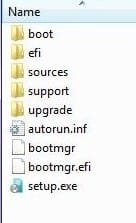
EXPANDEDSETUPCONTENTS-2009-10-22_061340.jpg
   Note

If you receive this error:

We are unable to create or save new files in the folder in which this application was downloaded. Please check the folder properties to make sure that you have security permission on the folder to write files and that the folder is not read-only.

Continue.


3. D/L this zip, extract it and copy/move oscdimg.exe into C:\Windows\system32.
View attachment oscdimg.zip
4. Assuming expandedsetup is on your Desktop:

Vista/7 users open an elevated command prompt ( rt click cmd and run as admin) and type :

Code:
Oscdimg.exe –u2 –b"C:\Users\your_username\Desktop\expandedSetup\boot\etfsboot.com" –h "C:\Users\your_username\Desktop\expandedSetup" C:\7.iso


XP users commands are:

Code:
cd /d C:\windows\system32


Code:
oscdimg -u2 -b"C:\Documents and Settings\USER\Desktop\expandedSetup\boot\etfsboot.com" -h "C:\Documents and Settings\USER\Desktop\expandedSetup" C:\7.iso


5. You can copy and paste the above into elevated cmd.

Vista/7 users- replace your_username with your actual username.

XP users - replace USER with your actual username

6. Then press enter. Xp users press enter after each of their two commands.

7. If the expandedsetup folder is not on your desktop, replace with appropriate paths.

   Tip
You may wish to copy the expandedsetup folder directly onto the root of C:

The paths will be shorter and the command will be:

Code:
Oscdimg.exe –u2 –bC:\expandedSetup\boot\etfsboot.com –h C:\expandedSetup C:\7.iso

If your folder is elsewhere, to get the paths easily, press shift and rt click on etfsboot.com - select copy as path ( paste into notepad )

Shift and rt click on expanded setup - select copy as path - paste into notepad ) Use those instead of the above.

The spacing needs to be exact.
   Warning
When the .iso is created you will get this message:

WARNING: This image contains UDF file system structures.

That is normal as you are creating the udf filesystem.


8. A) You can burn the .iso to dvd as an image with an isoburner.
View attachment isoburner.zip
OR

B) You can use the Microsoft DVD/USB tool to burn the .iso to dvd or to use the .iso to make a bootable flash drive. Download the tool:
View attachment Windows7-USB-DVD-tool.exe
   Tip
To make a copy of your Windows 7 ISO file:

1. Click the Start button, and click Windows 7 USB/DVD Download tool in the All Programs list to open the USB/DVD Download tool.
2. Click Browse and select the file in the Open dialog box.
3. Select USB to create a copy on a USB flash drive or DVD to create a copy on a DVD disk, then click Next.
4. If you are copying the file to a USB flash drive, select your USB device in the dropdown list and click Begin copying. If you are copying the file up to a DVD, click Begin burning.

Microsoft Store: Download Manager Help

   Note

Microsoft’s ISO Image for Windows 7 Now Available

There is additional information regarding the Windows 7 64-bit download process. For those customers of the Student Offer, who wish to install the 64-bit version of Windows 7, but are currently running a 32-bit Operating System, there is now an optional downloadable ISO file of Windows 7 64-bit to allow for install.

- If you have already purchased the 64-bit version of Windows 7 from the Windows 7 Student Offer Online Store, please contact Digital River at the following link: http://windows7.digitalriver.com/servlet/PromoServlet/promoID.46354000
· In the Web form select the Download Option in the drop down menu and include "64-bit Windows 7 Solution" in the first line of your problem description.


Have fun.


Last edited by a moderator:
Quick question I am in Vista, I right clicked on all of the files downloaded and selected properties. In the new window there is no unblock, also all of the read-only checkboxes are already unchecked.
 

My Computer

OS
OS X
That's fine , go ahead and rt click and run as admin on the.exe
 

My Computers

System One System Two

  • Computer type
    PC/Desktop
    OS
    7 X64
    CPU
    i5 8400
    Motherboard
    gigabyte b365m ds3h
    Memory
    2x8gb 3200mhz
    Hard Drives
    various
    PSU
    pure power 11 400w cm
    Case
    Coolermaster
    Cooling
    cryorig m9i
  • Computer type
    PC/Desktop
    OS
    7x64
    CPU
    g5400
    Motherboard
    ga b365m ds3h
    Memory
    8gb ddr4 2400
    PSU
    xfx pro 450w
Hi, I right clicked and went to run as admin, on Win XP. It asks for a password, my main user account is the administrator and the password doesnt work for the admin account.
 

My Computer

OS
XP
I don't think you need to do that on XP - try just running the .exe and see.
 

My Computers

System One System Two

  • Computer type
    PC/Desktop
    OS
    7 X64
    CPU
    i5 8400
    Motherboard
    gigabyte b365m ds3h
    Memory
    2x8gb 3200mhz
    Hard Drives
    various
    PSU
    pure power 11 400w cm
    Case
    Coolermaster
    Cooling
    cryorig m9i
  • Computer type
    PC/Desktop
    OS
    7x64
    CPU
    g5400
    Motherboard
    ga b365m ds3h
    Memory
    8gb ddr4 2400
    PSU
    xfx pro 450w
I'm currently getting an error. I've corrected the mistakes in the above code lines

Should be Oscdimg.exe –u2 –b C:\Users\your_username\Desktop\expandedSetup\boot\etfsboot.com –h C:\Users\your_username\Desktop\expandedSetup C:\7.iso

There wasn't a space between -bC:\Users.. and there was a space in etfsboot.com

But afterwards I get the error
Scanning Source tree
ERROR: Failure enumerating files in directory "C:\USERS\*MYUSERNAME*\uU2\" (On the lower case u there is a ^ above it)
Error 3: The system cannot find the path specified.
 

My Computer

Computer Manufacturer/Model Number
Custom built
OS
Windows 7 Professional x64
CPU
Intel i7 920
Motherboard
EVGA X58 SLI
Memory
6GB 1600mhz
Graphics Card(s)
SLI'd GTX 280
Sound Card
EVGA X58 SLI
Monitor(s) Displays
LG W2753 27"
Screen Resolution
1920x1080
Hard Drives
4x 1TB Seagate's
PSU
Corsaird 1000W
Case
CM HAF 932
Cooling
Apogee GTZ
Keyboard
G15
Mouse
G5 v2
Short Preface: I have tried to "unpackage to both my M: drive and my desktop

Ok so i Rt clicked on the folder and ran it as admin - I get the Unloading Box Progress bar:

When it reaches the end of the progress bar I haer a error bell and this prompt appears on the screen:

We are unable to create or save new files in the folder in which this application was downloaded. Please check the folder properties to make sure that you have security permission on the folder to write files and that the folder is not read-only.

Is that normal?
 

My Computer

OS
OS X
I'm currently getting an error. I've corrected the mistakes in the above code lines

Should be Oscdimg.exe –u2 –b C:\Users\your_username\Desktop\expandedSetup\boot\etfsboot.com –h C:\Users\your_username\Desktop\expandedSetup C:\7.iso

There wasn't a space between -bC:\Users.. and there was a space in etfsboot.com

But afterwards I get the error
Scanning Source tree
ERROR: Failure enumerating files in directory "C:\USERS\*MYUSERNAME*\uU2\" (On the lower case u there is a ^ above it)
Error 3: The system cannot find the path specified.


I was getting the same error when I ran it as well
 

My Computer

OS
OS X
So after the cmd prompt, I can save it to a dvd-r as an .iso? Thanks and sorry for not being so tech-savvy. :(
 
My mistake there is suppose to be no space between -bC:\User

Just there is suppose to be no space in etfsboot.com

I end up making my own line to use

oscdimg -bC:\Users\USERNAME\Desktop\expandedSetup\boot\etfsboot.com -h -u2 -m -lWIN_EN_DVD C:\Users\USERNAME\Desktop\expandedSetup\ C:\7.iso

That worked for me
 

My Computer

Computer Manufacturer/Model Number
Custom built
OS
Windows 7 Professional x64
CPU
Intel i7 920
Motherboard
EVGA X58 SLI
Memory
6GB 1600mhz
Graphics Card(s)
SLI'd GTX 280
Sound Card
EVGA X58 SLI
Monitor(s) Displays
LG W2753 27"
Screen Resolution
1920x1080
Hard Drives
4x 1TB Seagate's
PSU
Corsaird 1000W
Case
CM HAF 932
Cooling
Apogee GTZ
Keyboard
G15
Mouse
G5 v2
So has anyone managed to do this successfully? Going to give it a go when mine finishes.
 

My Computer

OS
Vista -> 7
Isn't there an easier way to make a bootable disc with a program like MagicIso? I'm pretty sure I made one once a long time ago, but I can't remember what settings I had to play around with.
 

My Computer

Computer Manufacturer/Model Number
Sager Midern Computer, Inc.
OS
Windows Vista 32 bit
CPU
Intel Core 2 Duo T9300 @2.5GHz
Memory
4.00 GB
Graphics Card(s)
NVIDIA GeForce 8800M GTX
Sound Card
Realtek High Definition Audio
Nope - you have to use cdimage.exe - which is MS own app. , or oscdimg.exe - which they give out.They are both command line utllities.

Etfsboot.com does not confrom to the ISO standard .

Burning suites cannot do it. Nor can MagicIso etc.

Vlite can - nice and easy gui there- you need v1.1.6
 
Last edited:

My Computers

System One System Two

  • Computer type
    PC/Desktop
    OS
    7 X64
    CPU
    i5 8400
    Motherboard
    gigabyte b365m ds3h
    Memory
    2x8gb 3200mhz
    Hard Drives
    various
    PSU
    pure power 11 400w cm
    Case
    Coolermaster
    Cooling
    cryorig m9i
  • Computer type
    PC/Desktop
    OS
    7x64
    CPU
    g5400
    Motherboard
    ga b365m ds3h
    Memory
    8gb ddr4 2400
    PSU
    xfx pro 450w
Can you please post the correct syntax?

oscdimg -bC:\Users\USERNAME\Desktop\expandedSetup\boot\etfsboot.com -h -u2 -m -lWIN_EN_DVD C:\Users\USERNAME\Desktop\expandedSetup\ C:\7.iso

The bolded parts are what you change. WIN_ED_DVD is just the label name I wanted. USERNAME you obviously change for your correct username.

Let me know how it works out for you.
 

My Computer

Computer Manufacturer/Model Number
Custom built
OS
Windows 7 Professional x64
CPU
Intel i7 920
Motherboard
EVGA X58 SLI
Memory
6GB 1600mhz
Graphics Card(s)
SLI'd GTX 280
Sound Card
EVGA X58 SLI
Monitor(s) Displays
LG W2753 27"
Screen Resolution
1920x1080
Hard Drives
4x 1TB Seagate's
PSU
Corsaird 1000W
Case
CM HAF 932
Cooling
Apogee GTZ
Keyboard
G15
Mouse
G5 v2
Seems to work now - What I did is went back and turned UAC back on, not sure why but I think it was giving me problems that it was off...

WIllany iso burner b ok? after following all the above instructions?
 

My Computer

OS
OS X
It's fine in the first post now - must have been the word wrap on the page.


You can add label and time and date if you like –l<Disc_Label> -t<MM/DD/YYYY:HH:MM>

Or check this out - piece of cake with that:

vLite 1.1.6 - Applications - Downloads - Atomic MPC
 
Last edited:

My Computers

System One System Two

  • Computer type
    PC/Desktop
    OS
    7 X64
    CPU
    i5 8400
    Motherboard
    gigabyte b365m ds3h
    Memory
    2x8gb 3200mhz
    Hard Drives
    various
    PSU
    pure power 11 400w cm
    Case
    Coolermaster
    Cooling
    cryorig m9i
  • Computer type
    PC/Desktop
    OS
    7x64
    CPU
    g5400
    Motherboard
    ga b365m ds3h
    Memory
    8gb ddr4 2400
    PSU
    xfx pro 450w
Seems to work now - What I did is went back and turned UAC back on, not sure why but I think it was giving me problems that it was off...

WIllany iso burner b ok? after following all the above instructions?


Yes as long as it is burned as an image - not as data.
 

My Computers

System One System Two

  • Computer type
    PC/Desktop
    OS
    7 X64
    CPU
    i5 8400
    Motherboard
    gigabyte b365m ds3h
    Memory
    2x8gb 3200mhz
    Hard Drives
    various
    PSU
    pure power 11 400w cm
    Case
    Coolermaster
    Cooling
    cryorig m9i
  • Computer type
    PC/Desktop
    OS
    7x64
    CPU
    g5400
    Motherboard
    ga b365m ds3h
    Memory
    8gb ddr4 2400
    PSU
    xfx pro 450w
Any of you booted the .iso yet?

You can do a straight clean install - no messing about with "upgrade"
 

My Computers

System One System Two

  • Computer type
    PC/Desktop
    OS
    7 X64
    CPU
    i5 8400
    Motherboard
    gigabyte b365m ds3h
    Memory
    2x8gb 3200mhz
    Hard Drives
    various
    PSU
    pure power 11 400w cm
    Case
    Coolermaster
    Cooling
    cryorig m9i
  • Computer type
    PC/Desktop
    OS
    7x64
    CPU
    g5400
    Motherboard
    ga b365m ds3h
    Memory
    8gb ddr4 2400
    PSU
    xfx pro 450w
I've tried the process with oscdimg above and the bootable DVD *did not* work. When my computer started it read the DVD and seemed to hang there. I'm going to redo the process just to comfirm, but so far the process described does not work. I'll update if this changes.

PS I did order the 'backup' disk but it may not come for weeks and there's no guarantee (seeing the issues we are all) that it will even be bootable. The only way I can see of doing a clean install with this crap download would be to put windows on a different drive than the computer is booted off. The 'custom' option does allow this, but will not let you wipe the current drive and settings.
 

My Computer

OS
Windows
Back
Top