
Bootable ISO - Create from Installation Files

How to Create a Bootable ISO from Windows 7 Installation Files


   Information
How to EASILY make a bootable .iso file from Windows 7 or Vista Installation files with the FREE vlite.

Vlite can be installed on 32 and 64 bit versions of XP, Vista and Windows 7.

Homepage and Information:
   Tip
If you got the student d/l and have 3 files :

* Windows 7-HP-Retail-en-us-x64.exe
* setup1.box * setup2.box

1. Rt click each file, Properties > Unblock>Apply>OK. NOTE: Make sure read only boxes are clear

2. Rt click and run as admin on the .exe. You will get a folder called expandedSetup on your dektop.

If you receive this error:
We are unable to create or save new files in the folder in which this application was downloaded. Please check the folder properties to make sure that you have security permission on the folder to write files and that the folder is not read-only.

Continue with the tutorial to make the .iso


Here's How:

1. Download and Install vlite.

   Note
vlite v1.1.6 is self contained and needs no additional applications.

vlite v1.2 requires the large WAIK download from MS.

It is possible to install v1.2 over the top of v1.1.6 if you wish

2. Rt click vlite shortcut and Run as Admin. Click Install Wimfilter.

3. Click Browse and browse to Windows Installation Files folder:
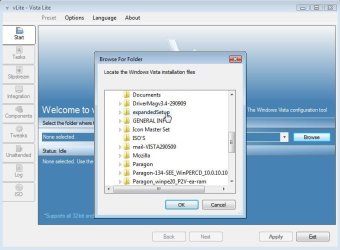
1-BROWSE-2009-10-26_064124.jpg
4. Select your Edition:
2-EDITION-2009-10-26_064516.jpg
It takes a few seconds to load the files - then click Next.

5. Tick Bootable .iso and click Next:
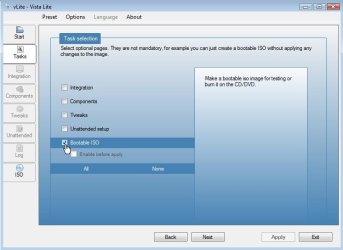
3-Bootable.iso-2009-10-26_064643.jpg
6. Make sure it says Create Image - and type a label if you wish. Then Click Make .iso:
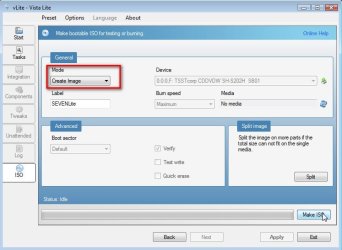
4-CREATE-IMAGE-2009-10-26_065018.jpg
7. Select where to Save the .iso
5-SAVE-ISO-2009-10-26_065105.jpg
After you click the Save button, vlite starts making the .iso
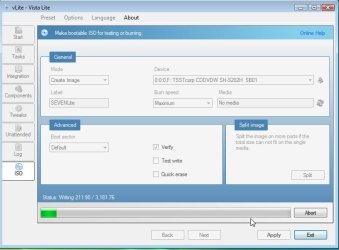
6-CREATEISO-2009-10-26_065140.jpg
When done, click Next

8. EITHER - TO MAKE A BOOTABLE DVD - put an unformatted recordable dvd inthe drive and select Burn Image.
7-BURN-IMAGE-2009-10-26_065614.jpg
OR-TO MAKE A BOOTABLE FLASH DRIVE- click Exit and confirm - the .iso will be in the location you selected in Step 7.
8-CLOSE-VLITE-2009-10-26_065817.jpg


Last edited by a moderator:
SIW2:

Another great tutorial! Im gonna give vlite a try... its been a few years!

I do have one suggestion to avoid confusion; I'd cut and paste the section on how to extract the expandedSetup files from the student DL again at the beginning for noobs!

I just DL and went to install... you may want to add this image...

vLite_1.JPG

And would you also add a link to my tutorial on burning a DVD or creating a bootable USB with the MS tool... http://www.sevenforums.com/tutorials/31541-windows-7-usb-dvd-download-tool.html

Thanks!
 

My Computer

Computer Manufacturer/Model Number
Homebrew PC - "Alpha_Dawg"
OS
Windows 7 Ultimate 64 bit Steve Ballmer Signature Edition
CPU
Intel Core 2 Quad - Q9550 - 2.83GHz stock - OC'd to 3.6GHz
Motherboard
Gigabyte EP45-UD3P
Memory
4GB DDR2 800MHz (PC6400) OCZ Reaper
Graphics Card(s)
Nvidia GE Force 8800 GTS
Sound Card
Asus Xonar DX
Monitor(s) Displays
Samsung SyncMaster 2333HD
Screen Resolution
1920 x 1080
Hard Drives
WD Caviar Black 750GB - 7200RPM - 32MB cache
WD Caviar Green 1.5TB - 5400RPM - 64MB cache
WD Caviar Green 2.0TB - 5400RPM - 64MB cache
PSU
PC Power & Cooling Silencer 750
Case
Gigabyte 3D Aurora
Cooling
Case is Air - 5ea. 120mm fans (mix of Arctic and Xigmatec)
Keyboard
MS Natural Wireless KB
Mouse
MS Wireless Mouse
Internet Speed
50 mbps down/5 mbps up
Other Info
AVerMedia - AVerTVHD G2 Dual Tuner Card
I think they mostly will be doing the massive .iso download.

Not a bad idea - just in case - will have a look at adding a note about expandedSetup folder.
 

My Computers

System One System Two

  • Computer type
    PC/Desktop
    OS
    7 X64
    CPU
    i5 8400
    Motherboard
    gigabyte b365m ds3h
    Memory
    2x8gb 3200mhz
    Hard Drives
    various
    PSU
    pure power 11 400w cm
    Case
    Coolermaster
    Cooling
    cryorig m9i
  • Computer type
    PC/Desktop
    OS
    7x64
    CPU
    g5400
    Motherboard
    ga b365m ds3h
    Memory
    8gb ddr4 2400
    PSU
    xfx pro 450w
Every body seems to find this very easy - lots of views and no questions.

Great:D
 

My Computers

System One System Two

  • Computer type
    PC/Desktop
    OS
    7 X64
    CPU
    i5 8400
    Motherboard
    gigabyte b365m ds3h
    Memory
    2x8gb 3200mhz
    Hard Drives
    various
    PSU
    pure power 11 400w cm
    Case
    Coolermaster
    Cooling
    cryorig m9i
  • Computer type
    PC/Desktop
    OS
    7x64
    CPU
    g5400
    Motherboard
    ga b365m ds3h
    Memory
    8gb ddr4 2400
    PSU
    xfx pro 450w
Every body seems to find this very easy - lots of views and no questions.

Great:D
I would have begged to differ the first few days of the tutorials regarding this and the student download files...

It seemed like the posts were coming non-stop
 

My Computer

Computer Manufacturer/Model Number
Compal JFT02 (Custom Build Laptop)
OS
Windows 7 Home Premium x64 - Mac OS X 10.6.4 x64
CPU
Intel Core 2 Duo T9300 2.5 GHz
Motherboard
JFT02
Memory
4GB Kingston DDR2-800
Graphics Card(s)
NVIDIA Geforce 8600M GT (512MB Model)
Sound Card
Realtek HD Audio
Monitor(s) Displays
WUXGA Standard Laptop Display
Screen Resolution
1680*1050
Hard Drives
Toshiba 320GB 5400RPM Laptop HD
PSU
Standard Laptop Power Supply
Case
Standard Laptop Case
Cooling
Standard Laptop Cooling
Keyboard
Standard Laptop 105 Key-Keyboard
Mouse
Synaptics Touchpad
Internet Speed
Verizion Online DSL 3360/864 kbs (dl/up)
Hi Zi,

Yes, there is still a lot of interest in it.
 

My Computers

System One System Two

  • Computer type
    PC/Desktop
    OS
    7 X64
    CPU
    i5 8400
    Motherboard
    gigabyte b365m ds3h
    Memory
    2x8gb 3200mhz
    Hard Drives
    various
    PSU
    pure power 11 400w cm
    Case
    Coolermaster
    Cooling
    cryorig m9i
  • Computer type
    PC/Desktop
    OS
    7x64
    CPU
    g5400
    Motherboard
    ga b365m ds3h
    Memory
    8gb ddr4 2400
    PSU
    xfx pro 450w
Nice guide SIW2,

Unfortunately I get an unknown error shown below:


Vlite cant burn the ISO on the dvd for some strange reason.
Maybe it is formatted?:sarc:
Since I dont have a flash drive (4gb+) here I have to use the 1st option.
 

My Computer

OS
None
CPU
Intel E8400
Motherboard
Asus P5k
Memory
4Gb DDR2
Graphics Card(s)
ATI Sapphire 4890
Monitor(s) Displays
Acer 24''
Screen Resolution
1900x1200
Hard Drives
2x Samsung Spinpoint F1 [750GB]
PSU
OCZ Modxstream
Case
Antec Threehundred
Cooling
Scythe Mugen II
Keyboard
Logitech G15 V2
Mouse
Logitech Black Hyper scroll
Internet Speed
Down: 1.1Mb/s
Nice guide SIW2,

Unfortunately I get an unknown error shown below:


Vlite cant burn the ISO on the dvd for some strange reason.
Maybe it is formatted?:sarc:
Since I dont have a flash drive (4gb+) here I have to use the 1st option.

Hello Welcome to SevenForums, Have you tried a differnt DVD- R disc. Looks like the one you are using is not recognized. Good luck to you with this problem. :D
 

My Computer

Computer Manufacturer/Model Number
Gateway GT5692
OS
Windows 7 Ulti. x64
CPU
AMD Phenom 8450 triple-core 2.10 ghz
Memory
4GB
Graphics Card(s)
ATI Radion HD 3200
Monitor(s) Displays
Gateway FPD1775W
Screen Resolution
1280x720
Hard Drives
465.6613 Gibibytes
What one should I take then?
I only got DVD +RW. Maybe I can install xp with a flash drive en then use te data dvd to install windows 7
 

My Computer

OS
None
CPU
Intel E8400
Motherboard
Asus P5k
Memory
4Gb DDR2
Graphics Card(s)
ATI Sapphire 4890
Monitor(s) Displays
Acer 24''
Screen Resolution
1900x1200
Hard Drives
2x Samsung Spinpoint F1 [750GB]
PSU
OCZ Modxstream
Case
Antec Threehundred
Cooling
Scythe Mugen II
Keyboard
Logitech G15 V2
Mouse
Logitech Black Hyper scroll
Internet Speed
Down: 1.1Mb/s
What one should I take then?
I only got DVD +RW. Maybe I can install xp with a flash drive en then use te data dvd to install windows 7
Not sure. I used vlite to convert my Digital River dl to ISO. However I saved the image that vlite made to my harddrive. Then I used my burning software to make a dvd of the iso. I used a dvd-r disc. Not clear as to what you are trying to do with xp there? I think you mean to install xp on a partition, then copy the iso to another partition and expand it then run setup while in xp. this sounds like it will work for you. Just do the clean install as per tutorials on this site. Good luck to you.
 

My Computer

Computer Manufacturer/Model Number
Gateway GT5692
OS
Windows 7 Ulti. x64
CPU
AMD Phenom 8450 triple-core 2.10 ghz
Memory
4GB
Graphics Card(s)
ATI Radion HD 3200
Monitor(s) Displays
Gateway FPD1775W
Screen Resolution
1280x720
Hard Drives
465.6613 Gibibytes
Can you please specify on where the Installation folders are located? Thank you and I read a few of your tutorials and you make them very easy to understand :cool:
 

My Computer

Computer Manufacturer/Model Number
Hewlett-Packard
OS
Microsoft Windows 7 Home Premium build 7600
CPU
Intel Core 2 Duo CPU T6600 @ 2.20GHZ
Memory
4.00 GB

My Computers

System One System Two

  • Computer type
    PC/Desktop
    OS
    7 X64
    CPU
    i5 8400
    Motherboard
    gigabyte b365m ds3h
    Memory
    2x8gb 3200mhz
    Hard Drives
    various
    PSU
    pure power 11 400w cm
    Case
    Coolermaster
    Cooling
    cryorig m9i
  • Computer type
    PC/Desktop
    OS
    7x64
    CPU
    g5400
    Motherboard
    ga b365m ds3h
    Memory
    8gb ddr4 2400
    PSU
    xfx pro 450w
Hi,

I downloaded windows xp first, and burned that on a casual CD, installed it en then ran the setup from the vista non bootable dvd. Worked quite well for me.

Now Im running windows 7 and I came up with 2 other questions.

My documents, my pictures ect are located in the windows partion at 'user'.
Is there a possible way to change those to another partion?

And I put my old HD in my pc but it says it has to format before I can use it....
The problem is that all my data is on that backup disk...:confused:
Can I access it in any way?
 

My Computer

OS
None
CPU
Intel E8400
Motherboard
Asus P5k
Memory
4Gb DDR2
Graphics Card(s)
ATI Sapphire 4890
Monitor(s) Displays
Acer 24''
Screen Resolution
1900x1200
Hard Drives
2x Samsung Spinpoint F1 [750GB]
PSU
OCZ Modxstream
Case
Antec Threehundred
Cooling
Scythe Mugen II
Keyboard
Logitech G15 V2
Mouse
Logitech Black Hyper scroll
Internet Speed
Down: 1.1Mb/s
3. Click Browse and browse to Windows Installation Files folder:

Thanks for the great tutorial. Hope this is not a silly question but if one does not have the Windows 7 dvd, is this folder on the hard drive? And where exactly? Thanks.
 

My Computer

OS
Windows XP - Now Windows 7 Home Premium (64-bit).
Hi manhunter,

No , I'm afraid it isn't included in the installation on your HD.

You would need to get the files from a download, or copy them from a dvd.

If you already had an installation dvd - or could borrow one - you could simply copy the dvd. There would be no need to make an .iso if you could do that.

If you have a pre installed version of windows , e.g. on a laptop - it is likely the necessary files can be found in the recovery partition , or in the .iso the manufacturer may have already placed on the drive somewhere so you can run off "recovery discs".

See this thread
 

My Computers

System One System Two

  • Computer type
    PC/Desktop
    OS
    7 X64
    CPU
    i5 8400
    Motherboard
    gigabyte b365m ds3h
    Memory
    2x8gb 3200mhz
    Hard Drives
    various
    PSU
    pure power 11 400w cm
    Case
    Coolermaster
    Cooling
    cryorig m9i
  • Computer type
    PC/Desktop
    OS
    7x64
    CPU
    g5400
    Motherboard
    ga b365m ds3h
    Memory
    8gb ddr4 2400
    PSU
    xfx pro 450w
If you already had an installation dvd - or could borrow one - you could simply copy the dvd. There would be no need to make an .iso if you could do that.

Thanks SI for your feedback. You see, this is where I am getting confused (in a loop!); if by necessity one needs the DVD to make the .iso then of what benefit is the .iso. :confused: (Also, is the download of a W7 .iso from that link you suggested 'illegal'?)/ Thanks.
 

My Computer

OS
Windows XP - Now Windows 7 Home Premium (64-bit).
You don't need a dvd to make an.iso. The tutorial is how to make an iso from the installation files . Many people have them on the pc in the recovery partition , or from a download.

I can't speak for Gizmodo - but from the title, "Microsoft Fixes Windows 7 Student Edition Upgrade Problems", it appears to be something MS have done as a result of the botch up over the student download files.
 

My Computers

System One System Two

  • Computer type
    PC/Desktop
    OS
    7 X64
    CPU
    i5 8400
    Motherboard
    gigabyte b365m ds3h
    Memory
    2x8gb 3200mhz
    Hard Drives
    various
    PSU
    pure power 11 400w cm
    Case
    Coolermaster
    Cooling
    cryorig m9i
  • Computer type
    PC/Desktop
    OS
    7x64
    CPU
    g5400
    Motherboard
    ga b365m ds3h
    Memory
    8gb ddr4 2400
    PSU
    xfx pro 450w
The tutorial is how to make an iso from the installation files . Many people have them on the pc in the recovery partition , or from a download.

Got you now; thanks for your patience:) Rep given.
 

My Computer

OS
Windows XP - Now Windows 7 Home Premium (64-bit).
is it possible to do this with an OEM version of win home permium?i have an acer laptop, that no longer works. i picked it up by grabbing it by the monitor and put my thumb through it. i dont know what i was thinking. anyway i grabbed the hard drive out of it..is there anyway i can use the win 7 home premium OS on the laptop and install it on another one of my laptops or desktops? i do have the windows key that came with the laptop.
 

My Computer

Computer Manufacturer/Model Number
Manufacturer ASUSTeK Computer INC. Model M3N78-VM Version System Version Chipset Vendor NVIDIA Chips
OS
windows vista and 7 ultimate
CPU
amd athlon 7750 dual core black edition 2700
Motherboard
asus m3n78-vm
Memory
Memory Type DDR2 Size 8192 MBytes Channels # Dual DRAM F
Graphics Card(s)
geforce9800gt/ NVIDIA GeForce GT 220 GeForce 9800 GT GPU G
Sound Card
on board
Monitor(s) Displays
envision
Screen Resolution
Current Resolution 1440x900 pixels
Hard Drives
Manufacturer Western Digital
Form Factor TB/3.5-inch (new format)
Business Unit/Brand Desktop/WD Caviar®
RPM/Buffer Size or Attribute 7200 RPM with 32 MB cache
Interface/Connector SATA 3 Gb/s with 22-pin SATA connector/SATA 1.5 Gb/s with 22-
Keyboard
razar
Mouse
razar deathadder
Back
Top