Windows 7 USB/DVD Download Tool

How to Get and Use the Windows 7 USB/DVD Download Tool


Introduction
   Information
If you would like to burn your downloaded or converted .iso image to a DVD or create a bootable USB flash drive, this free Microsoft utility is for you.

In very little time this can be accomplished by even a novice, and in this tutorial I'm gonna show you how. I have seperated this tutorial into 2 sections: Part 1 covers how to burn a bootable DVD and Part 2 is on creating a bootable flash drive.

This is primarily going to be useful to XP and Vista users who do not have .iso burning software installed on their current HDD and wish to perform a clean install.
   Note
The Windows 7 USB/DVD Download Tool does not support using Windows XP .iso files.

If you do not have a Windows 7 with SP1 ISO, then you can download the latest official Windows 7 with SP1 ISO file here:

:ar: Microsoft Software Recovery

:ar: Microsoft: Windows 7 Direct Download Links


   Warning
The Windows 7 USB/DVD Download Tool does not work with UEFI.

To create a 64-bit Windows 7 or Windows 8 UEFI USB flash drive, see:

How to Create a Bootable UEFI USB Flash Drive for Installing Windows 7 and Windows 8


Here's How:

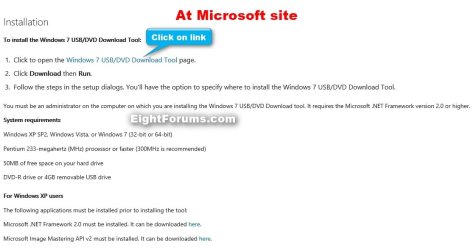
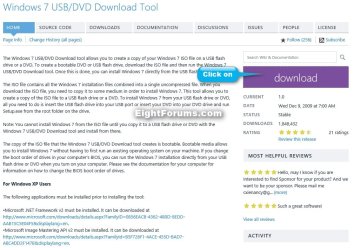
First visit the MS Store Website to download and install the Windows 7 USB/DVD download tool.

   Note
If the download links are broken at the sites below, then you can click on the blue Download button below to directly download an official copy of the Windows7-USB-DVD-tool.exe file below from here instead.


Download


USB-DVD_Download_Tool_Site.jpg

USB-DVD_Download_Tool_Site-2.jpg
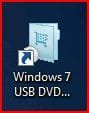
After you have successfully downloaded and installed the Windows 7 USB/DVD Download Tool, you should see its icon on your desktop. Double click to start the program.USB icon.JPG
PART 1 - How to Burn a bootable Windows 7 DVD

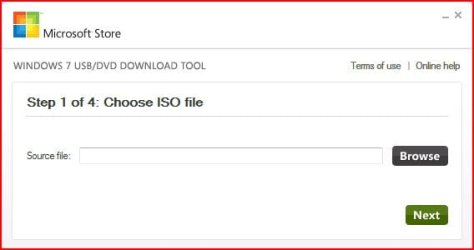
1) After you run the Windows 7 USB/DVD download tool, you will see the Step 1 of 4 dialog box. Here you will navigate to the location of your .iso file by clicking the Browse button. Once you have successfully located your iso file click Next to continue to step 2.USB DVD DL TOOL_1.JPG
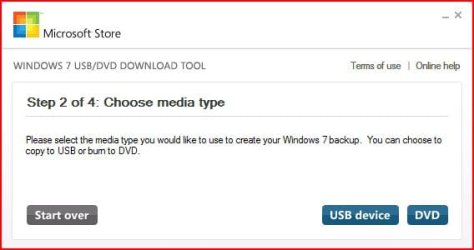
2) In step 2 of 4 you are given the choice of making a bootable DVD or a bootable USB flash. In this first section of my tutorial I show you how to burn a bootable DVD. So click DVD if that is what you want.USB DVD DL TOOL_2.JPG
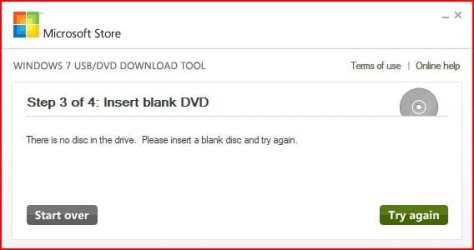
3) Make sure you have a blank DVD in your optical drive, or you may see this message.USB DVD DL TOOL_3.JPG
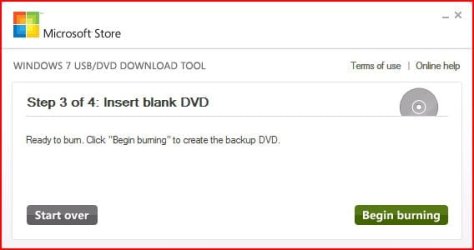
4) Once you have inserted a blank DVD you will see the folowing screen, click Begin burning to continue.USB DVD DL TOOL_4.JPG
5) Once the burn starts, you should see the progress bar here at Step 4 of 4. Remember the amount of time it takes to complete the burn depends on many factors... be patient.USB DVD DL TOOL_5.JPG
6) If all you wanted was a bootable DVD, you are finished when you see the image below, close the program or start over if you wish to make a 2nd copy.USB DVD DL TOOL_6.JPG
PART 2 - How to create a bootable Windows 7 USB Flash Drive


   Warning
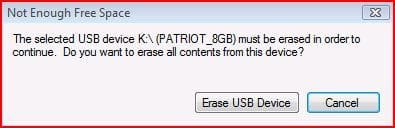
You need a USB flash drive with at least 4GB of free space, and the flash drive will be formattted to NTFS! So backup your data before creating this bootable USB, or you will lose all your data!


Follow the instructions in the Introduction at the beginning of tutorial and download and install the tool. The installation will add the program shortcut to your desktop, just double click to start.

1) After you launch the app, you will see the Step 1 of 4 dialog box. Here you will navigate to the location of your .iso file by clicking the Browse button. Once you have successfully located your iso file click Next to continue to step 2.USB DVD DL TOOL_1.JPG
2) In step 2 of 4 you are given the choice of making a bootable DVD or a bootable USB flash. Here in Part 2 of my tutorial I show you how to create a bootable USB Flash Drive. So click USB device if that is what you want.USB DVD DL TOOL_2.JPG
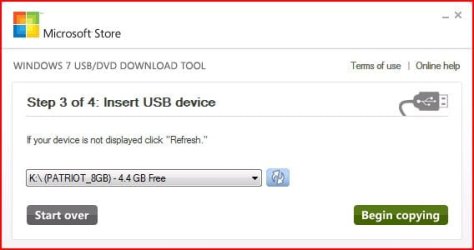
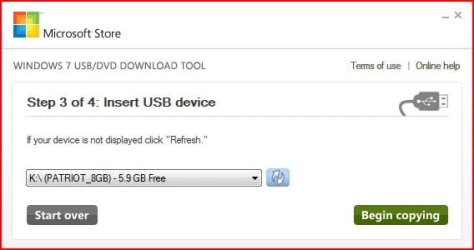
3) Here in step 3 of 4 you will select the USB flash drive of your choice by using the drop down list arrow. Once you have chosen the correct Drive, click the Begin copying button.USB DVD DL TOOL_USB1.JPG

USB DVD DL TOOL_USB4a.JPG
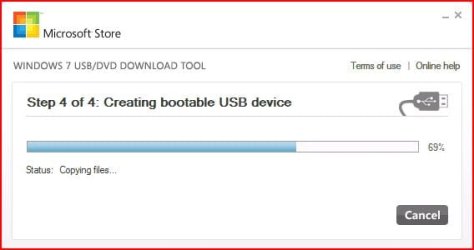
4) Here in step 4 of 4: Creating bootable USB device, you should see the progress bar move across the screen. As always your speed depends on many factors, have patience!USB DVD DL TOOL_USB4.JPG
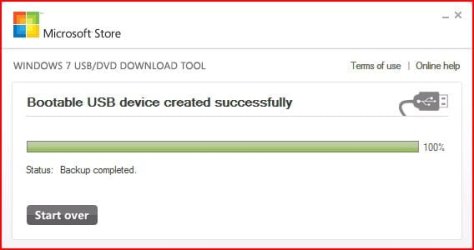
5) Once completed you should see the following dialog box.USB DVD DL TOOL_USB5.JPG
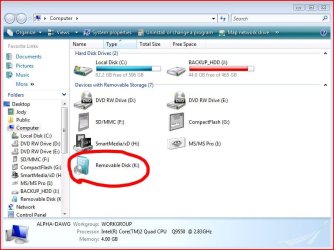
I found it interesting that the USB device icon in "Computer" now looks identical to that of the DVD!USB DVD DL TOOL_USB6.JPG
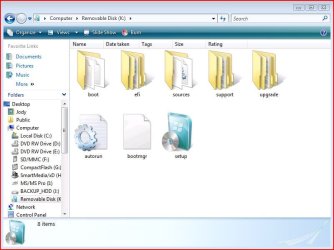
Here are the contents of the USB device after completion...USB DVD DL TOOL_USB_Contents.JPG
I hope this helps out some of you who are "stuck" when it comes to burning an iso to DVD or creating a bootable USB device.

Thanks!


Attachments

  • USB DVD DL TOOL_USB3.JPG
    USB DVD DL TOOL_USB3.JPG
    31.6 KB · Views: 123
  • USB DVD DL TOOL_USB2.JPG
    USB DVD DL TOOL_USB2.JPG
    20.1 KB · Views: 134
  • Windows7-USB-DVD-tool.zip
    Windows7-USB-DVD-tool.zip
    2.5 MB · Views: 61,475
Last edited by a moderator:
Nice that there's a tool now. I made a bootable USB the other day with a combination of diskpart and using the boot tool in the boot folder of the install
 

My Computer

Computer Manufacturer/Model Number
HP DV9033CL
OS
Windows 7 Professional 32 Bit
Memory
2 GB
Graphics Card(s)
nVidia GeForce Go 7600
Sound Card
Conexant HD Audio Board
Screen Resolution
1440x900
Internet Speed
aDSL 1.5Mbps / 256 Kbps
Thanks BFG... its so easy to use, just like everything I've done with Win7!
 

My Computer

Computer Manufacturer/Model Number
Homebrew PC - "Alpha_Dawg"
OS
Windows 7 Ultimate 64 bit Steve Ballmer Signature Edition
CPU
Intel Core 2 Quad - Q9550 - 2.83GHz stock - OC'd to 3.6GHz
Motherboard
Gigabyte EP45-UD3P
Memory
4GB DDR2 800MHz (PC6400) OCZ Reaper
Graphics Card(s)
Nvidia GE Force 8800 GTS
Sound Card
Asus Xonar DX
Monitor(s) Displays
Samsung SyncMaster 2333HD
Screen Resolution
1920 x 1080
Hard Drives
WD Caviar Black 750GB - 7200RPM - 32MB cache
WD Caviar Green 1.5TB - 5400RPM - 64MB cache
WD Caviar Green 2.0TB - 5400RPM - 64MB cache
PSU
PC Power & Cooling Silencer 750
Case
Gigabyte 3D Aurora
Cooling
Case is Air - 5ea. 120mm fans (mix of Arctic and Xigmatec)
Keyboard
MS Natural Wireless KB
Mouse
MS Wireless Mouse
Internet Speed
50 mbps down/5 mbps up
Other Info
AVerMedia - AVerTVHD G2 Dual Tuner Card
question. what if you dont have an ISO file, either like me you have the Files expanded onto your hard disk, or burned onto a Boot DVD?

is it possible to rebuild the ISO from either a Boot DVD or from the Expanded files on my hard drive?

thanks in advance

Edit: answered my own question lol. did a search on this lovely forum and found just what i was looking for .... VLite does the trick ;)

double edit: after compiling the ISO using Vlite i ran the MS USB/DVD tool and it tells me that "The Selected file not a valid ISO file". I opened the ISO in UltraISO and it tells me that its Boot CD/DVD so i cant understand why its not a valid ISO, unless MS have fixed it so that i only recognises FULL and Complete ISO's with nothing Added or taken out?

anybody else have a problem with this?
 
Last edited:

My Computer

Computer Manufacturer/Model Number
Toshiba Satelite
OS
windows 7 RTM
CPU
AMD Athlon x 2 64
Memory
4gb
question. what if you dont have an ISO file, either like me you have the Files expanded onto your hard disk, or burned onto a Boot DVD?

is it possible to rebuild the ISO from either a Boot DVD or from the Expanded files on my hard drive?

thanks in advance

Edit: answered my own question lol. did a search on this lovely forum and found just what i was looking for .... VLite does the trick ;)

double edit: after compiling the ISO using Vlite i ran the MS USB/DVD tool and it tells me that "The Selected file not a valid ISO file". I opened the ISO in UltraISO and it tells me that its Boot CD/DVD so i cant understand why its not a valid ISO, unless MS have fixed it so that i only recognises FULL and Complete ISO's with nothing Added or taken out?

anybody else have a problem with this?

Bluemoon:

I am assuming you have the student DL from Digital River? If yes, try these instructions here: http://www.sevenforums.com/tutorials/30470-make-bootable-iso-student-d-l.html They worked like a champ for me! ...and dont forget to rep SIW2 if it works for you!
 

My Computer

Computer Manufacturer/Model Number
Homebrew PC - "Alpha_Dawg"
OS
Windows 7 Ultimate 64 bit Steve Ballmer Signature Edition
CPU
Intel Core 2 Quad - Q9550 - 2.83GHz stock - OC'd to 3.6GHz
Motherboard
Gigabyte EP45-UD3P
Memory
4GB DDR2 800MHz (PC6400) OCZ Reaper
Graphics Card(s)
Nvidia GE Force 8800 GTS
Sound Card
Asus Xonar DX
Monitor(s) Displays
Samsung SyncMaster 2333HD
Screen Resolution
1920 x 1080
Hard Drives
WD Caviar Black 750GB - 7200RPM - 32MB cache
WD Caviar Green 1.5TB - 5400RPM - 64MB cache
WD Caviar Green 2.0TB - 5400RPM - 64MB cache
PSU
PC Power & Cooling Silencer 750
Case
Gigabyte 3D Aurora
Cooling
Case is Air - 5ea. 120mm fans (mix of Arctic and Xigmatec)
Keyboard
MS Natural Wireless KB
Mouse
MS Wireless Mouse
Internet Speed
50 mbps down/5 mbps up
Other Info
AVerMedia - AVerTVHD G2 Dual Tuner Card
nope not using a student release .. using windows RTM
 

My Computer

Computer Manufacturer/Model Number
Toshiba Satelite
OS
windows 7 RTM
CPU
AMD Athlon x 2 64
Memory
4gb

My Computer

Computer type
PC/Desktop
Computer Manufacturer/Model Number
76~2.0
OS
Windows 7 Ult x64 - SP1/ Windows 8 Pro x64
CPU
Intel Core i5-3570K 4.6GHz
Motherboard
Gigabyte GA-Z77X UD3H, f18
Memory
8GB (2X4GB) DDR3 1600 Corsair Vengeance CL8 1.5v
Graphics Card(s)
Sapphire HD 7770 Vapor-X OC 1GB DDR5
Sound Card
Onboard VIA VT2021
Monitor(s) Displays
22" LCD Dell
Screen Resolution
1680x1050
Hard Drives
Samsung 840Pro 128GB SSD,
Seagate Barracuda 500GB SATA2 7200rpm 32MB cache, Seagate Barracuda 1TB SATA2 7200rpm 32MB cache,
PSU
Corsair HX650W
Case
Cooler Master Storm Scout
Cooling
Corsair H80 2x12cm Noctua NF P12 , 2x14cm case fans
Keyboard
Logitech Wave
Mouse
CM Sentinel
Internet Speed
Dismal
Antivirus
Avast
Browser
Opera Next
Other Info
Haswell laptop: HP Envy 17t-j, i7-4700MQ, GeForce 740M 2GB DDR3, 17.3" Full HD 1920x1080, 16GB RAM, Samsung 840 Pro 128GB, 1TB Hitachi 7200 HDD,
Desktop: eSATA ports,
External eSATA Seagate 500GB SATA2 7200rpm,
External WD USB 500GB
nope not using a student release .. using windows RTM

Bluemoon:

Good beer btw! I'm sorry I misread/misunderstood your first post... so you have DVD and you want to make a backup iso of it.

There are many CD/DVD burning apps that will let you like Nero, but it is not easiest app to figure out... so many use ISO Recorder or MagicIso to do that.

Hope that helps!
 

My Computer

Computer Manufacturer/Model Number
Homebrew PC - "Alpha_Dawg"
OS
Windows 7 Ultimate 64 bit Steve Ballmer Signature Edition
CPU
Intel Core 2 Quad - Q9550 - 2.83GHz stock - OC'd to 3.6GHz
Motherboard
Gigabyte EP45-UD3P
Memory
4GB DDR2 800MHz (PC6400) OCZ Reaper
Graphics Card(s)
Nvidia GE Force 8800 GTS
Sound Card
Asus Xonar DX
Monitor(s) Displays
Samsung SyncMaster 2333HD
Screen Resolution
1920 x 1080
Hard Drives
WD Caviar Black 750GB - 7200RPM - 32MB cache
WD Caviar Green 1.5TB - 5400RPM - 64MB cache
WD Caviar Green 2.0TB - 5400RPM - 64MB cache
PSU
PC Power & Cooling Silencer 750
Case
Gigabyte 3D Aurora
Cooling
Case is Air - 5ea. 120mm fans (mix of Arctic and Xigmatec)
Keyboard
MS Natural Wireless KB
Mouse
MS Wireless Mouse
Internet Speed
50 mbps down/5 mbps up
Other Info
AVerMedia - AVerTVHD G2 Dual Tuner Card
nope not using a student release .. using windows RTM

Bluemoon:

Good beer btw! I'm sorry I misread/misunderstood your first post... so you have DVD and you want to make a backup iso of it.

There are many CD/DVD burning apps that will let you like Nero, but it is not easiest app to figure out... so many use ISO Recorder or MagicIso to do that.

Hope that helps!

lol i know how to make a DVD, its that i fancied making an ISO so that i could use the Microsoft program on this thread to make a USB boot WIndows 7 installation disk. Its not a big deal as i already have the dvd and files on hard disk. Just wondered why it didnt work for me that all.
 

My Computer

Computer Manufacturer/Model Number
Toshiba Satelite
OS
windows 7 RTM
CPU
AMD Athlon x 2 64
Memory
4gb
nope not using a student release .. using windows RTM

Bluemoon:

Good beer btw! I'm sorry I misread/misunderstood your first post... so you have DVD and you want to make a backup iso of it.

There are many CD/DVD burning apps that will let you like Nero, but it is not easiest app to figure out... so many use ISO Recorder or MagicIso to do that.

Hope that helps!


lol i know how to make a DVD, its that i fancied making an ISO so that i could use the Microsoft program on this thread to make a USB boot WIndows 7 installation disk. Its not a big deal as i already have the dvd and files on hard disk. Just wondered why it didnt work for me that all.

Blue:

Please re-read my post... The 2 apps I linked to are for creating an iso from the CD or DVD!
 

My Computer

Computer Manufacturer/Model Number
Homebrew PC - "Alpha_Dawg"
OS
Windows 7 Ultimate 64 bit Steve Ballmer Signature Edition
CPU
Intel Core 2 Quad - Q9550 - 2.83GHz stock - OC'd to 3.6GHz
Motherboard
Gigabyte EP45-UD3P
Memory
4GB DDR2 800MHz (PC6400) OCZ Reaper
Graphics Card(s)
Nvidia GE Force 8800 GTS
Sound Card
Asus Xonar DX
Monitor(s) Displays
Samsung SyncMaster 2333HD
Screen Resolution
1920 x 1080
Hard Drives
WD Caviar Black 750GB - 7200RPM - 32MB cache
WD Caviar Green 1.5TB - 5400RPM - 64MB cache
WD Caviar Green 2.0TB - 5400RPM - 64MB cache
PSU
PC Power & Cooling Silencer 750
Case
Gigabyte 3D Aurora
Cooling
Case is Air - 5ea. 120mm fans (mix of Arctic and Xigmatec)
Keyboard
MS Natural Wireless KB
Mouse
MS Wireless Mouse
Internet Speed
50 mbps down/5 mbps up
Other Info
AVerMedia - AVerTVHD G2 Dual Tuner Card
Excellent tutorial Darryl,

Used a brand new Toshiba 8gb USB flash drive right out of the package.

Followed the steps, using my TechNet All-In-One .iso,

Bingo faster than Microwave popcorn :geek:

Thanks for becoming a progressive new member ;)
 

Attachments

  • All_In_One_Win_7_DVD_Options.jpg
    All_In_One_Win_7_DVD_Options.jpg
    165.5 KB · Views: 7,033

My Computer

Computer type
PC/Desktop
Computer Manufacturer/Model Number
Built them myself, Science Experiments !
OS
Win7 Enterprise, Win7 x86 (Ult 7600), Win7 x64 Ult 7600, TechNet RTM on AMD x64 (2.8Ghz)
CPU
AMD fx8350 4ghz, AMD-32 2400mhz, AMD-64 3200mhz, AMDx64 2.8G
Motherboard
SIS 755, ECS-K8M890M-M (Ult 7600), GigaByte & others
Memory
2gb, 4gb on the Ult 7600, 4gb on Technet RTM, 32gb on FX8350
Graphics Card(s)
Draw my own Graphics, several nVidia cards
Sound Card
on motherboard
Monitor(s) Displays
19" flat scr, 28" I-Inc widescr,22" Emprex Widescr, 23" Acer
Screen Resolution
1280 x 1024, 1440 x 900, 1920 x 1080
Hard Drives
6 pata Ide HD's & 2 Sata HD's
added 80gb external on Ult 7600 computer,
numerous extra 1tb, 2TB, 3Tb SATA HD's
A collection of ext HD Docks w/ HDs
PSU
430w, 550w, 600w, 700, 800, etc
Case
All Generic Full Towers
Cooling
Open Air & a few fans, some w/ colored LEDs
Keyboard
Compaq & Dell recycled from GoodWill
Mouse
Made in China Optical Wired Mouse
Internet Speed
Fast Cable InterNet
Antivirus
AVG Free on 24 different Desktops, NO Problems!
Browser
IE 8 is preferred, but use FireFox sometimes
Other Info
Linksys Routers, switches, & Hubs
Too Many USB Flash Drives to count, Biggest is 64GB !
Eight computers in my home network.
Sixteen computers at my business network.
Linked via TeamViewer !
Lots of old used spare computer parts everywhere!
Why Thank you Doc!

I hope I can be a contributing force here! I hope I can keep it up... problem is everytime I come up with another idea for a tutorial, someone has already created it! But I may pull a rabbit outta the hat now and then! LOL! Take care! :thumbsup:
 

My Computer

Computer Manufacturer/Model Number
Homebrew PC - "Alpha_Dawg"
OS
Windows 7 Ultimate 64 bit Steve Ballmer Signature Edition
CPU
Intel Core 2 Quad - Q9550 - 2.83GHz stock - OC'd to 3.6GHz
Motherboard
Gigabyte EP45-UD3P
Memory
4GB DDR2 800MHz (PC6400) OCZ Reaper
Graphics Card(s)
Nvidia GE Force 8800 GTS
Sound Card
Asus Xonar DX
Monitor(s) Displays
Samsung SyncMaster 2333HD
Screen Resolution
1920 x 1080
Hard Drives
WD Caviar Black 750GB - 7200RPM - 32MB cache
WD Caviar Green 1.5TB - 5400RPM - 64MB cache
WD Caviar Green 2.0TB - 5400RPM - 64MB cache
PSU
PC Power & Cooling Silencer 750
Case
Gigabyte 3D Aurora
Cooling
Case is Air - 5ea. 120mm fans (mix of Arctic and Xigmatec)
Keyboard
MS Natural Wireless KB
Mouse
MS Wireless Mouse
Internet Speed
50 mbps down/5 mbps up
Other Info
AVerMedia - AVerTVHD G2 Dual Tuner Card
16gb USB Flash drives on ebay $11 to 12.52, I managed to bid & win 5 of them :D


Won 2 of the first pic the black one. ;)
 

My Computer

Computer type
PC/Desktop
Computer Manufacturer/Model Number
Built them myself, Science Experiments !
OS
Win7 Enterprise, Win7 x86 (Ult 7600), Win7 x64 Ult 7600, TechNet RTM on AMD x64 (2.8Ghz)
CPU
AMD fx8350 4ghz, AMD-32 2400mhz, AMD-64 3200mhz, AMDx64 2.8G
Motherboard
SIS 755, ECS-K8M890M-M (Ult 7600), GigaByte & others
Memory
2gb, 4gb on the Ult 7600, 4gb on Technet RTM, 32gb on FX8350
Graphics Card(s)
Draw my own Graphics, several nVidia cards
Sound Card
on motherboard
Monitor(s) Displays
19" flat scr, 28" I-Inc widescr,22" Emprex Widescr, 23" Acer
Screen Resolution
1280 x 1024, 1440 x 900, 1920 x 1080
Hard Drives
6 pata Ide HD's & 2 Sata HD's
added 80gb external on Ult 7600 computer,
numerous extra 1tb, 2TB, 3Tb SATA HD's
A collection of ext HD Docks w/ HDs
PSU
430w, 550w, 600w, 700, 800, etc
Case
All Generic Full Towers
Cooling
Open Air & a few fans, some w/ colored LEDs
Keyboard
Compaq & Dell recycled from GoodWill
Mouse
Made in China Optical Wired Mouse
Internet Speed
Fast Cable InterNet
Antivirus
AVG Free on 24 different Desktops, NO Problems!
Browser
IE 8 is preferred, but use FireFox sometimes
Other Info
Linksys Routers, switches, & Hubs
Too Many USB Flash Drives to count, Biggest is 64GB !
Eight computers in my home network.
Sixteen computers at my business network.
Linked via TeamViewer !
Lots of old used spare computer parts everywhere!
Bluemoon:

Good beer btw! I'm sorry I misread/misunderstood your first post... so you have DVD and you want to make a backup iso of it.

There are many CD/DVD burning apps that will let you like Nero, but it is not easiest app to figure out... so many use ISO Recorder or MagicIso to do that.

Hope that helps!


lol i know how to make a DVD, its that i fancied making an ISO so that i could use the Microsoft program on this thread to make a USB boot WIndows 7 installation disk. Its not a big deal as i already have the dvd and files on hard disk. Just wondered why it didnt work for me that all.

Blue:

Please re-read my post... The 2 apps I linked to are for creating an iso from the CD or DVD!

when i say i know how to make a DVD i mean an ISO of the DVD, bit for some reason the MS USB creator doesnt like my ISO's ... no worries though
 

My Computer

Computer Manufacturer/Model Number
Toshiba Satelite
OS
windows 7 RTM
CPU
AMD Athlon x 2 64
Memory
4gb
when i say i know how to make a DVD i mean an ISO of the DVD, bit for some reason the MS USB creator doesnt like my ISO's ... no worries though

I ran into the same thing with some old .iso's created with nlite; the tool said they weren't valid. I created one from a Win 7 Pro x64 upgrade disc using ISO Recorder v3 (64bit version) and it worked like a charm. You might want to try ISO Recorder to create the image.

http://isorecorder.alexfeinman.com/W7.htm
 

My Computer

Computer Manufacturer/Model Number
Home Built
OS
Windows 7 Professional x64, Windows 7 Home Premium x64, WinXP Pro, Mac OS/X 10.5.6
CPU
Core2Duo 2.8Ghz
Motherboard
Gigabyte EP45-UD3R
Memory
4GB G.Skill PC2-8500
Graphics Card(s)
ATI Radeon 4830
Sound Card
Integrated 5.1
Monitor(s) Displays
Samsung SyncMaster 206BW and 740N
Screen Resolution
1680x1050 - 1280x1024
Hard Drives
Samsung 320GB
WD 320GB
PSU
PC Power and Cooling Silencer 750W
Case
Thermaltake Viking
Cooling
CPU: Thermalright XP-90 VGA: Thermalright V2
Keyboard
ZBoard
Mouse
MS Comfort Optical Mouse 3000
Internet Speed
18/2
Nero does it too... never had a single issue with any iso Ive created and I do all mine with Nero.
 

My Computer

Computer Manufacturer/Model Number
Homebrew PC - "Alpha_Dawg"
OS
Windows 7 Ultimate 64 bit Steve Ballmer Signature Edition
CPU
Intel Core 2 Quad - Q9550 - 2.83GHz stock - OC'd to 3.6GHz
Motherboard
Gigabyte EP45-UD3P
Memory
4GB DDR2 800MHz (PC6400) OCZ Reaper
Graphics Card(s)
Nvidia GE Force 8800 GTS
Sound Card
Asus Xonar DX
Monitor(s) Displays
Samsung SyncMaster 2333HD
Screen Resolution
1920 x 1080
Hard Drives
WD Caviar Black 750GB - 7200RPM - 32MB cache
WD Caviar Green 1.5TB - 5400RPM - 64MB cache
WD Caviar Green 2.0TB - 5400RPM - 64MB cache
PSU
PC Power & Cooling Silencer 750
Case
Gigabyte 3D Aurora
Cooling
Case is Air - 5ea. 120mm fans (mix of Arctic and Xigmatec)
Keyboard
MS Natural Wireless KB
Mouse
MS Wireless Mouse
Internet Speed
50 mbps down/5 mbps up
Other Info
AVerMedia - AVerTVHD G2 Dual Tuner Card

My Computer

Computer Manufacturer/Model Number
Custom
OS
Windows 7 RC 64bit
CPU
AMD Athlon 7750 Dual-Core Processor 2.70Ghz
Motherboard
Gigabyte GA-MA78GPM-UD2H
Memory
4GB
Graphics Card(s)
On-board Graphics ATI Radeon HD 3200
Sound Card
On-board Sound Realtek ALC889A
Monitor(s) Displays
42" Westinghouse 1080P Monitor (LVM-42w2)
Screen Resolution
1920x1080

My Computer

Computer Manufacturer/Model Number
Homebrew PC - "Alpha_Dawg"
OS
Windows 7 Ultimate 64 bit Steve Ballmer Signature Edition
CPU
Intel Core 2 Quad - Q9550 - 2.83GHz stock - OC'd to 3.6GHz
Motherboard
Gigabyte EP45-UD3P
Memory
4GB DDR2 800MHz (PC6400) OCZ Reaper
Graphics Card(s)
Nvidia GE Force 8800 GTS
Sound Card
Asus Xonar DX
Monitor(s) Displays
Samsung SyncMaster 2333HD
Screen Resolution
1920 x 1080
Hard Drives
WD Caviar Black 750GB - 7200RPM - 32MB cache
WD Caviar Green 1.5TB - 5400RPM - 64MB cache
WD Caviar Green 2.0TB - 5400RPM - 64MB cache
PSU
PC Power & Cooling Silencer 750
Case
Gigabyte 3D Aurora
Cooling
Case is Air - 5ea. 120mm fans (mix of Arctic and Xigmatec)
Keyboard
MS Natural Wireless KB
Mouse
MS Wireless Mouse
Internet Speed
50 mbps down/5 mbps up
Other Info
AVerMedia - AVerTVHD G2 Dual Tuner Card
Looks like MS got rid of this tool?

I was looking for it to mount the ISO into a bootable flash drive, but it looks like they took it down... :(

The tool link was taken down because of this:

Microsoft Pulls Windows 7 Download Tool - Reviews by PC Magazine

Microsoft has pulled a tool that is designed to help users with existing Windows XP installations on their netbooks. The Windows USB/DVD Tool was pulled "because there were several concerns brought to Microsoft's attention," a Microsoft spokesman said in an email. "They took it down to investigate the claims."
As the name suggests, the tool allows a downloaded version of Windows 7 from Microsoft's online store or its MSDN subscription service to be copied onto either a USB key or DVD. The former option is especially useful for those users that lack a DVD drive.
Blogger Rafael Rivera Jr. had provided comparisons between the Microsoft tool and the CodePlex ImageMaster tool.
"While poking through the UDF-related internals of the Windows 7 USB/DVD Download Tool, I had a weird feeling there was just wayyyyyyyyy too much code in there for such a simple tool" Rivera wrote. "A simple search of some method names and properties, gleaned from Reflector's output, revealed the source code was obviously lifted from the CodePlex-hosted (yikes) GPLv2-licensed ImageMaster project."
The Microsoft spokesman did not confirm or deny that code had been used from the CodePlex tool, which was hosted under a GPLv2 license. That license allows the source code to be distributed as an executable, either with the source code attached or an offer to provide it, if asked.
However, they should be reposting the download link as well as the source code:

Update on the Windows 7 USB/DVD Tool - Port 25: The Open Source Community at Microsoft

Update on the Windows 7 USB/DVD Tool by Peter Galli on November 13, 2009 11:24AM

As you've likely read and as was originally reported here, we've been investigating a report that the Windows 7 USB/DVD Download Tool, might contain GPLv2 code. The WUDT is a free tool that was offered by the Microsoft Store and which enabled customers to create bootable USB drives or DVD backup media from the electronic software (ESD) edition of Windows 7 that comes in an ISO format.
After looking at the code in question, we are now able to confirm this was indeed the case, although it was not intentional on our part. While we had contracted with a third party to create the tool, we share responsibility as we did not catch it as part of our code review process. We have furthermore conducted a review of other code provided through the Microsoft Store and this was the only incident of this sort we could find.
When it comes to our attention that a Microsoft component contains third party code, our aim is to be respectful of the terms under which that code is being shared. As a result, we will be making the source code as well as binaries for this tool available next week under the terms of the General Public License v2 as described here, and are also taking measures to apply what we have learned from this experience for future code reviews we perform.
We apologize to our customers for any inconvenience this has caused.


My Computer

Computer Manufacturer/Model Number
Home Built
OS
Windows 7 Professional x64, Windows 7 Home Premium x64, WinXP Pro, Mac OS/X 10.5.6
CPU
Core2Duo 2.8Ghz
Motherboard
Gigabyte EP45-UD3R
Memory
4GB G.Skill PC2-8500
Graphics Card(s)
ATI Radeon 4830
Sound Card
Integrated 5.1
Monitor(s) Displays
Samsung SyncMaster 206BW and 740N
Screen Resolution
1680x1050 - 1280x1024
Hard Drives
Samsung 320GB
WD 320GB
PSU
PC Power and Cooling Silencer 750W
Case
Thermaltake Viking
Cooling
CPU: Thermalright XP-90 VGA: Thermalright V2
Keyboard
ZBoard
Mouse
MS Comfort Optical Mouse 3000
Internet Speed
18/2
Looks like MS got rid of this tool?

I was looking for it to mount the ISO into a bootable flash drive, but it looks like they took it down... :(

The tool link was taken down because of this:

Microsoft Pulls Windows 7 Download Tool - Reviews by PC Magazine

Microsoft has pulled a tool that is designed to help users with existing Windows XP installations on their netbooks. The Windows USB/DVD Tool was pulled "because there were several concerns brought to Microsoft's attention," a Microsoft spokesman said in an email. "They took it down to investigate the claims."
As the name suggests, the tool allows a downloaded version of Windows 7 from Microsoft's online store or its MSDN subscription service to be copied onto either a USB key or DVD. The former option is especially useful for those users that lack a DVD drive.
Blogger Rafael Rivera Jr. had provided comparisons between the Microsoft tool and the CodePlex ImageMaster tool.
"While poking through the UDF-related internals of the Windows 7 USB/DVD Download Tool, I had a weird feeling there was just wayyyyyyyyy too much code in there for such a simple tool" Rivera wrote. "A simple search of some method names and properties, gleaned from Reflector's output, revealed the source code was obviously lifted from the CodePlex-hosted (yikes) GPLv2-licensed ImageMaster project."
The Microsoft spokesman did not confirm or deny that code had been used from the CodePlex tool, which was hosted under a GPLv2 license. That license allows the source code to be distributed as an executable, either with the source code attached or an offer to provide it, if asked.
However, they should be reposting the download link as well as the source code:

Update on the Windows 7 USB/DVD Tool - Port 25: The Open Source Community at Microsoft

Update on the Windows 7 USB/DVD Tool by Peter Galli on November 13, 2009 11:24AM

As you've likely read and as was originally reported here, we've been investigating a report that the Windows 7 USB/DVD Download Tool, might contain GPLv2 code. The WUDT is a free tool that was offered by the Microsoft Store and which enabled customers to create bootable USB drives or DVD backup media from the electronic software (ESD) edition of Windows 7 that comes in an ISO format.
After looking at the code in question, we are now able to confirm this was indeed the case, although it was not intentional on our part. While we had contracted with a third party to create the tool, we share responsibility as we did not catch it as part of our code review process. We have furthermore conducted a review of other code provided through the Microsoft Store and this was the only incident of this sort we could find.
When it comes to our attention that a Microsoft component contains third party code, our aim is to be respectful of the terms under which that code is being shared. As a result, we will be making the source code as well as binaries for this tool available next week under the terms of the General Public License v2 as described here, and are also taking measures to apply what we have learned from this experience for future code reviews we perform.
We apologize to our customers for any inconvenience this has caused.


This is not the only thing Rafael has caught MS on along with Paul Thurott...

Rafael is becoming a thorn in their side
 

My Computer

Computer Manufacturer/Model Number
Compal JFT02 (Custom Build Laptop)
OS
Windows 7 Home Premium x64 - Mac OS X 10.6.4 x64
CPU
Intel Core 2 Duo T9300 2.5 GHz
Motherboard
JFT02
Memory
4GB Kingston DDR2-800
Graphics Card(s)
NVIDIA Geforce 8600M GT (512MB Model)
Sound Card
Realtek HD Audio
Monitor(s) Displays
WUXGA Standard Laptop Display
Screen Resolution
1680*1050
Hard Drives
Toshiba 320GB 5400RPM Laptop HD
PSU
Standard Laptop Power Supply
Case
Standard Laptop Case
Cooling
Standard Laptop Cooling
Keyboard
Standard Laptop 105 Key-Keyboard
Mouse
Synaptics Touchpad
Internet Speed
Verizion Online DSL 3360/864 kbs (dl/up)
Back
Top