
Desktop Icons - Change or Restore Default Icon

How to Change or Restore Default Windows 7 Desktop Icons


   Information
The Recycle Bin provides a safety net when deleting files or folders. When you delete any of these items from your hard disk, Windows places it in the Recycle Bin and the Recycle Bin icon changes from empty to full.

This will show you how to restore or change the default icon for the Computer, User's Files (user-name Folder), Network, and Recycle Bin desktop icons and all other locations in Windows 7.

   Note
Removable drives do not use or have a Recycyle Bin. Files deleted from removable drives are permanently deleted instead.


Here's How:
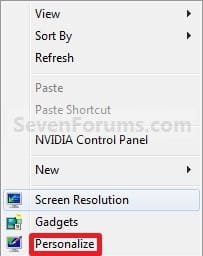
1. Right click on a empty area of the desktop and click on Personalize. (See screenshot below)
Right_Click.jpg
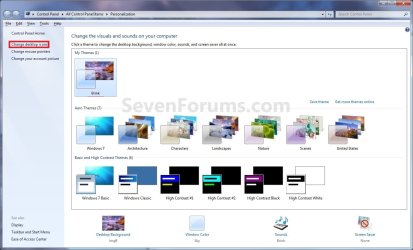
2. Click on the Change desktop icons link at the upper left corner. (See screenshot below)
Personalization.jpg
3. To Change the Icon for a Desktop Icon
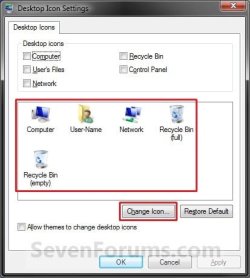
A) In the middle pane, select (click on) a desktop icon that you want to change the icon for, and click on the Change Icon button. (See screenshot below)
Change.jpg
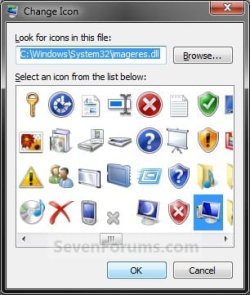
B) Select a icon that you want to use instead, or click on the Browse button and navigate to the location of the icon you want to use.
NOTE: Any icon of your own you want to use instead needs to be a 256x256 pixel .ico Vista style icon file to properly display at larger view settings.
Change_Icon.jpg
C) Go to step 5.
4. To Restore the Default Icon for a Desktop Icon
A) In the middle pane, select (click on) a desktop icon that you want to restore the default icon for, and click on the Restore Default button. (See screenshot below)
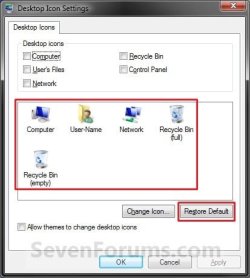
Restore.jpg
5. Click on OK to apply. (See screenshot above or below step 3A)

6. Close the Personalization window. (See screenshot below step 2)
That's it,
Shawn


Last edited:
Hello!
I changed the icons of my computer,network and user folder with success. After i restarted my PC when i go to Desktop Icon Settings
window there are no icons! Its just blank white!

any ideas what going on?
thanks
 

My Computer

OS
windows 7
Hello Zentachi, and welcome to Seven Forums.

That's strange. I have never seen that before. Do the desktop icons still display properly?

See if it may just be a glitch by restarting the computer again to see if they are there afterwards. If not, click on the Change Icon button and change the icon to the same icon again to see if that may help. If not, try the Restore Defaults button.

Hope this helps for now,
Shawn
 

My Computer

Computer type
PC/Desktop
Computer Manufacturer/Model Number
Self built custom
OS
64-bit Windows 11 Pro for Workstations
CPU
Intel i7-8700K OC'd to 5 GHz
Motherboard
ASUS ROG Maximus XI Formula Z390
Memory
64 GB (4x16GB) G.SKILL TridentZ RGB DDR4 3600 MHz
Graphics Card(s)
ASUS ROG-STRIX-GTX1080TI-O11G-GAMING
Sound Card
Integrated
Monitor(s) Displays
2 x Samsung Odyssey G7 27"
Screen Resolution
2560x1440
Hard Drives
1TB Samsung 990 PRO M.2,
4TB Samsung 990 PRO PRO M.2,
TerraMaster F8 SSD Plus NAS
PSU
Seasonic Prime Titanium 850W
Case
Thermaltake Core P3
Cooling
Corsair Hydro H115i
Keyboard
Logitech wireless K800
Mouse
Logitech MX Master 4
Internet Speed
2 Gb/s Download and 100 Mb/s Upload
Antivirus
Malwarebyte Anti-Malware Premium
Browser
Google Chrome
Other Info
Logitech Z625 speaker system,
Logitech BRIO 4K Pro webcam,
HP Color LaserJet Pro MFP M477fdn,
APC SMART-UPS RT 1000 XL - SURT1000XLI,
Galaxy S23 Plus phone
Hey Shawn
glad to find seven forums!
I have tried what you said but without any luck! Yes the icons were displayed perfectly on desktop or explorer and i could charge them through registry!

One or maybe both of the below did the trick:
after a refresh problem with the recycle bin icon i download a registry fix of it.
I'm kinda sure I checked the Desktop icon settings window and still had the problem. I went to sleep shutdown the pc for 6 hours (tried before with restart and shutdown but nothing worked) and today everything was fine!

later i will upload my desktop in the related thread:D

thanks for responding

Zen
 

My Computer

OS
windows 7
Zen,

I'm happy to hear that you have got it sorted out. Thank you for posting back your results. :)
 

My Computer

Computer type
PC/Desktop
Computer Manufacturer/Model Number
Self built custom
OS
64-bit Windows 11 Pro for Workstations
CPU
Intel i7-8700K OC'd to 5 GHz
Motherboard
ASUS ROG Maximus XI Formula Z390
Memory
64 GB (4x16GB) G.SKILL TridentZ RGB DDR4 3600 MHz
Graphics Card(s)
ASUS ROG-STRIX-GTX1080TI-O11G-GAMING
Sound Card
Integrated
Monitor(s) Displays
2 x Samsung Odyssey G7 27"
Screen Resolution
2560x1440
Hard Drives
1TB Samsung 990 PRO M.2,
4TB Samsung 990 PRO PRO M.2,
TerraMaster F8 SSD Plus NAS
PSU
Seasonic Prime Titanium 850W
Case
Thermaltake Core P3
Cooling
Corsair Hydro H115i
Keyboard
Logitech wireless K800
Mouse
Logitech MX Master 4
Internet Speed
2 Gb/s Download and 100 Mb/s Upload
Antivirus
Malwarebyte Anti-Malware Premium
Browser
Google Chrome
Other Info
Logitech Z625 speaker system,
Logitech BRIO 4K Pro webcam,
HP Color LaserJet Pro MFP M477fdn,
APC SMART-UPS RT 1000 XL - SURT1000XLI,
Galaxy S23 Plus phone
For some reason win7 likes to hide icons. Right click on desktop, choose view, then select to show icons on desktop.
 

My Computer

OS
Windows 7 Ultimate x64 Retail RTM, Ubuntu 9.10
control panel icon

the one icon i want to change i cannot seem to get access to. i have tried every resource i can think of to get access to change the control panel icon with no luck.
 

My Computer

Computer Manufacturer/Model Number
Internet-Junkie
OS
Windows 7 RC Build 7100 x86 / Windows Vista SP2
CPU
Intel Core2Duo E8400
Motherboard
Asus Rampage Formula
Memory
3 Gigs DDR2 6400
Graphics Card(s)
Asus NVIDIA GeForce 9500 GT 512MB
Sound Card
Sound Blaster FX Extreme Audio PCI-E
Monitor(s) Displays
Sceptre X22WG Gamer 22" 1080p Widescreen LCD
Screen Resolution
1680 x 1050 32bit
Hard Drives
OCZ 64gig SSD Western Digital 300gig VelociRaptor 10,000RPM
Two Seagate Barracuda 320gig 7200RPM
PSU
700 Watt
Case
U2-UFO Black Powder Coat - Solid Top www.mountainmods.com
Cooling
Ultra ChillTech Thermo Electric Cooler/7 120mm 2500RMP Fans
Keyboard
Logitech diNOVO Edge
Mouse
Logitech LX 8 Cordless Laser Mouse
Internet Speed
7 MBPS Down / 784KBPS Up
Other Info
Hauppauge WinTV HVR-1800 Dual Tuner

My Computer

Computer type
PC/Desktop
Computer Manufacturer/Model Number
Self built custom
OS
64-bit Windows 11 Pro for Workstations
CPU
Intel i7-8700K OC'd to 5 GHz
Motherboard
ASUS ROG Maximus XI Formula Z390
Memory
64 GB (4x16GB) G.SKILL TridentZ RGB DDR4 3600 MHz
Graphics Card(s)
ASUS ROG-STRIX-GTX1080TI-O11G-GAMING
Sound Card
Integrated
Monitor(s) Displays
2 x Samsung Odyssey G7 27"
Screen Resolution
2560x1440
Hard Drives
1TB Samsung 990 PRO M.2,
4TB Samsung 990 PRO PRO M.2,
TerraMaster F8 SSD Plus NAS
PSU
Seasonic Prime Titanium 850W
Case
Thermaltake Core P3
Cooling
Corsair Hydro H115i
Keyboard
Logitech wireless K800
Mouse
Logitech MX Master 4
Internet Speed
2 Gb/s Download and 100 Mb/s Upload
Antivirus
Malwarebyte Anti-Malware Premium
Browser
Google Chrome
Other Info
Logitech Z625 speaker system,
Logitech BRIO 4K Pro webcam,
HP Color LaserJet Pro MFP M477fdn,
APC SMART-UPS RT 1000 XL - SURT1000XLI,
Galaxy S23 Plus phone
Last edited:

My Computer

Computer Manufacturer/Model Number
Gateway, Toshiba Laptop, and Home Brew
OS
Windows 7 x64 HP, Windows 7 HP, Windows 7 Ult
CPU
Intel I3, Cerelon, Pentium 4 @ 3Ghz
Motherboard
Intel, Intel, Asus
Memory
8G, 3G, 3G
Graphics Card(s)
On-board Intel, On-board nVidia, nVIDIA card
Sound Card
on-board, on-board, SoundBlaster
Monitor(s) Displays
Hannspree HF237, Toshiba, SyncMaster 931B
Screen Resolution
default (all)
Hard Drives
1T internal, 320G internal, 160G internal, 1T networked
PSU
300w, unk, 650w
Case
black, black, grey
Cooling
air (all)
Keyboard
standard wired (all)
Mouse
standard wired (all)
Internet Speed
6M down, 768K up
Other Info
Home LAN through Linksys hub to 4 port and wireless switch/router. Networked HP 2600n. Wife's computer running Windows 7, and spare laptop running Ubuntu "Karmic Kola" (9.10).
Back
Top