
How to Change or Restore Default Windows 7 Desktop Icons
Information
The Recycle Bin provides a safety net when deleting files or folders. When you delete any of these items from your hard disk, Windows places it in the Recycle Bin and the Recycle Bin icon changes from empty to full.
This will show you how to restore or change the default icon for the Computer, User's Files (user-name Folder), Network, and Recycle Bin desktop icons and all other locations in Windows 7.
This will show you how to restore or change the default icon for the Computer, User's Files (user-name Folder), Network, and Recycle Bin desktop icons and all other locations in Windows 7.
Note
Removable drives do not use or have a Recycyle Bin. Files deleted from removable drives are permanently deleted instead.
Here's How:
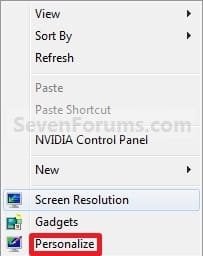
1. Right click on a empty area of the desktop and click on Personalize. (See screenshot below)
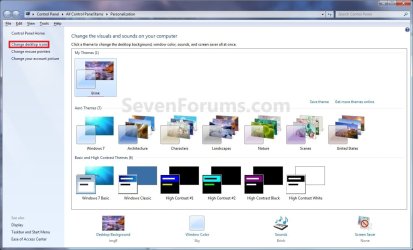
2. Click on the Change desktop icons link at the upper left corner. (See screenshot below)
3. To Change the Icon for a Desktop Icon
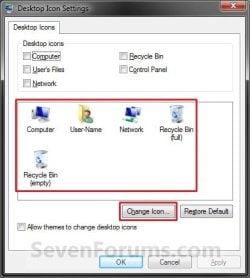
A) In the middle pane, select (click on) a desktop icon that you want to change the icon for, and click on the Change Icon button. (See screenshot below)
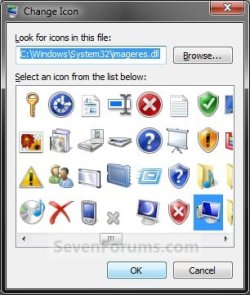
B) Select a icon that you want to use instead, or click on the Browse button and navigate to the location of the icon you want to use.
NOTE: Any icon of your own you want to use instead needs to be a 256x256 pixel .ico Vista style icon file to properly display at larger view settings.
C) Go to step 5.
4. To Restore the Default Icon for a Desktop Icon
A) In the middle pane, select (click on) a desktop icon that you want to restore the default icon for, and click on the Restore Default button. (See screenshot below)

5. Click on OK to apply. (See screenshot above or below step 3A)
6. Close the Personalization window. (See screenshot below step 2)
That's it,
Shawn
Related Tutorials
- How to Make your own Windows 7 Theme Pack
- How to Change or Save a Windows 7 Theme
- How to Add or Remove a Default Desktop Icon in Windows 7
- How to Prevent or Allow Themes to Change Windows 7 Desktop Icons
- How to Add or Remove the Libraries Desktop Icon in Windows 7
- How to Allow or Prevent the Windows 7 Recycle Bin Icon to Display
- How to Hide or Show Desktop Icons and Gadgets in Windows 7
- How to Easily Change the Windows Desktop Icons Size
- How to Change the Default Libraries Icon in Windows 7
- How to Add or Remove the HomeGroup Desktop Icon in Windows 7
- How to Rebuild the Icon Cache in Windows 7
- How to Change Default Icon of Favorites in Navigation Pane in Windows 7 and Windows 8
- How to Change the Default Libraries Icon in Windows 7
- How to Change the Default HomeGroup Icon in Windows 7
- How to Change the Default Icon for Favorites in Windows 7
- How to Enable or Disable Changing Default Desktop Icons in Windows 7
- How to Change the Default Control Panel Icon in Windows 7
- How to Change the Recycle Bin Storage Size in Vista and Windows 7
- How to Turn Drop Shadows On or Off for Desktop Icons
- How to Create a "Desktop Icon Settings" Shortcut in Vista and Windows 7
- How to Hide or Show the Text of Desktop Icons in Windows 7
Last edited:


