
Disk Cleanup - Open and Use

How to Open and Use Disk Cleanup in Windows 7 and Windows 8


   Information
You can use Disk Cleanup to reduce the number of unnecessary files on your drives, which can help your PC run faster. It can delete temporary files and system files, empty the Recycle Bin, and remove a variety of other items that you might no longer need.

This tutorial will show you how to open and use Disk Cleanup in Windows 7 and Windows 8.

   Note
The Disk Cleanup exe file is located at C:\Windows\System32\cleanmgr.exe.

   Warning
Checking the Hibernation File Cleaner option to be deleted will also disable hibernate.


Here's How:
1. Press the Windows+R keys to open the Run dialog, type cleanmgr, and press Enter.

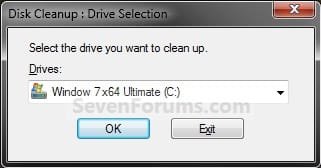
2. Select the drive that you want to use Disk Cleanup on, and click/tap on OK. (see screenshot below)
NOTE: You will not see this window unless you have more than one drive or partition on your computer.
Step1.jpg
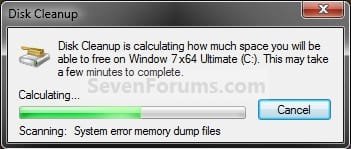
3. You will now see this screenshot below for a moment. Afterwards, do step 4, 5, 6, or 7 below for what you would like to delete using Disk Cleanup.
Step2.jpg
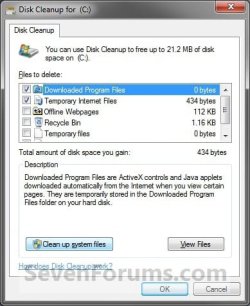
4. To Delete Unnecessary Non-System Files
A) Check the type of files box that you want to delete, and click/tap on OK. (see screenshot below)
SystemA.jpg
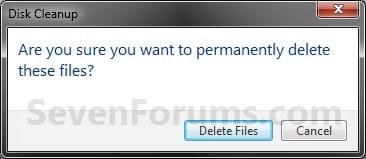
B) Click/tap on the Delete Files button. (see screenshot below)
Step5.jpg
C) The files will be deleted and Disk Cleanup will close.
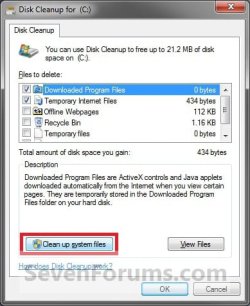
5. To Delete Unnecessary System Files
A) Click/tap on the Clean up system files button. (see screenshot below)
NOTE: If you just did a upgrade install or repair install recently, then you will also see the Files discarded by Windows upgrade option. This would be for the C:\$INPLACE.~TR and C:\$WINDOWS.~Q folders. If you just did a custom install recently, then you will also see the Previous Windows installations option. This would be for the C:\Windows.old folder.
System.jpg
B) If prompted by UAC, then click/tap on Yes.

C) Repeat steps 2 to 4.
6. To Open Programs and Features
NOTE: This will open the Programs and Features window where you can uninstall programs. Normally you could also do this by opening Programs and Features in the Control Panel.
A) Click/tap on the Clean up system files button, and repeat steps 2 and 3. (see screenshot below step 5A)

B) If prompted by UAC, then click/tap on Yes.

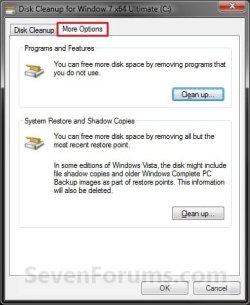
C) Click/tap on the More Options tab. (see screenshot below)
Step4.jpg
D) Click/tap on the Clean up button under the top Programs and Features section. (see screenshot above)

E) Click/tap on OK. (see screenshot below step 6C)

F) In Programs and Features, select any program that you want uninstall.

7. To Delete All but the Most Recent System Restore Point
NOTE: In Windows 7, this will also include deleting shadow copies (Previous Versions) that were created with the deleted restore point.
A) Click/tap on the Clean up system files button, and repeat steps 2 and 3. (see screenshot below step 5A)

B) If prompted by UAC, then click/tap on Yes.

C) Click/tap on the More Options tab. (see screenshot below step 6C)

D) Click/tap on the Clean up button under the bottom System Restore and Shadow Copies section. (see screenshot below step 6C)

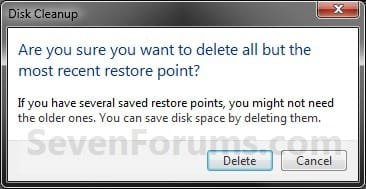
E) Click/tap on the Delete button to confirm the deletion. (see screenshot below)
Restore_Points.jpg
F) Click/tap on OK. (See screenshot below step 6C)

G) Click/tap on the Delete Files button. (see screenshot below)
Step5.jpg
H) The files will be deleted and Disk Cleanup will close.
That's it,
Shawn


Attachments

  • Step3.jpg
    Step3.jpg
    122.3 KB · Views: 58
Last edited:
wow 1,5 GB was cleaned up :D
Ty very much :D
 

My Computer

OS
Windows 7 Ultimate X64 NL
CPU
AMD PhenomII X4 940 Processor, 3000 MHz, 4 core('s)
Motherboard
BIOSTAR TA790GX3 A2+
Memory
Kingston HyperX DDR2 4 GB
Graphics Card(s)
ATI Radeon HD 4870 X2 1GB
Sound Card
None, onboard
Monitor(s) Displays
IIYama ProLite E1900WS
Screen Resolution
1440 x 900
Hard Drives
WD sata 320 GB, WD sata 250 GB and WD sata 150 GB
Internet Speed
20 Mb
My system does not show Clean Up System Files Button

In step number 6, my computer does not show the Clean Up System Files button. I even ran it as Administrator and it still did not show that button.

Any suggestions here?

Angi
 

My Computer

Computer Manufacturer/Model Number
Dell Inspiron 530
OS
Windows 7 Home Premium
CPU
*see other info below
Memory
3070MB RAM
Sound Card
Speakers (Realtek High Definition Audio)
Monitor(s) Displays
Dell E228WFP
Hard Drives
WDC WD5000AAKS-75A7B2 ATA Device
Other Info
OS Version: Microsoft Windows 7 Home Premium , 32 bit
Processor: Intel(R) Core(TM)2 Quad CPU Q6600 @ 2.40GHz, x64 Family 6 Model

15 Stepping 11
Processor Count: 4
RAM: 3061 Mb
Graphics Card: Intel(R) G33/G31 Express Chipset Family, 256 Mb
Hard Drives: C: Total - 476929 MB, Free - 379476 MB; I: Total - 476937 MB,

Free - 296125 MB;
Motherboard: Dell Inc., 0FM586, , ..CN736048B8
Hello Angi, and welcome to Seven Forums.

Using "Run as administrator" would be why the Clean up system files button is not there since Disk Cleanup is running elevated. Run Disk Cleanup normally without "Run as administrator" to have it back since it not running elevated. After you click on the Clean up system files button, it will be gone afterwards as well. Clicking on the Clean up system files button is the same as using "Run as administrator" on Disk Cleanup.

Hope this helps,
Shawn
 
Last edited:

My Computer

Computer type
PC/Desktop
Computer Manufacturer/Model Number
Self built custom
OS
64-bit Windows 11 Pro for Workstations
CPU
Intel i7-8700K OC'd to 5 GHz
Motherboard
ASUS ROG Maximus XI Formula Z390
Memory
64 GB (4x16GB) G.SKILL TridentZ RGB DDR4 3600 MHz
Graphics Card(s)
ASUS ROG-STRIX-GTX1080TI-O11G-GAMING
Sound Card
Integrated
Monitor(s) Displays
2 x Samsung Odyssey G7 27"
Screen Resolution
2560x1440
Hard Drives
1TB Samsung 990 PRO M.2,
4TB Samsung 990 PRO PRO M.2,
TerraMaster F8 SSD Plus NAS
PSU
Seasonic Prime Titanium 850W
Case
Thermaltake Core P3
Cooling
Corsair Hydro H115i
Keyboard
Logitech wireless K800
Mouse
Logitech MX Master 4
Internet Speed
2 Gb/s Download and 100 Mb/s Upload
Antivirus
Malwarebyte Anti-Malware Premium
Browser
Google Chrome
Other Info
Logitech Z625 speaker system,
Logitech BRIO 4K Pro webcam,
HP Color LaserJet Pro MFP M477fdn,
APC SMART-UPS RT 1000 XL - SURT1000XLI,
Galaxy S23 Plus phone
setup logfiles?

@ Brink: hey man i been your fan since the early days of vista, I just have a quick concern about the setup logfiles on disk cleanup are they safe to delete or is recommended to leave em un check?:sarc:
 

My Computer

OS
windows 7 ultimate
Hello Pcfan, thank you and welcome to Seven Forums.

Yes, they are safe to delete since they are just log files of how the installation went. :)
 

My Computer

Computer type
PC/Desktop
Computer Manufacturer/Model Number
Self built custom
OS
64-bit Windows 11 Pro for Workstations
CPU
Intel i7-8700K OC'd to 5 GHz
Motherboard
ASUS ROG Maximus XI Formula Z390
Memory
64 GB (4x16GB) G.SKILL TridentZ RGB DDR4 3600 MHz
Graphics Card(s)
ASUS ROG-STRIX-GTX1080TI-O11G-GAMING
Sound Card
Integrated
Monitor(s) Displays
2 x Samsung Odyssey G7 27"
Screen Resolution
2560x1440
Hard Drives
1TB Samsung 990 PRO M.2,
4TB Samsung 990 PRO PRO M.2,
TerraMaster F8 SSD Plus NAS
PSU
Seasonic Prime Titanium 850W
Case
Thermaltake Core P3
Cooling
Corsair Hydro H115i
Keyboard
Logitech wireless K800
Mouse
Logitech MX Master 4
Internet Speed
2 Gb/s Download and 100 Mb/s Upload
Antivirus
Malwarebyte Anti-Malware Premium
Browser
Google Chrome
Other Info
Logitech Z625 speaker system,
Logitech BRIO 4K Pro webcam,
HP Color LaserJet Pro MFP M477fdn,
APC SMART-UPS RT 1000 XL - SURT1000XLI,
Galaxy S23 Plus phone
You're welcome PCfan. :)
 

My Computer

Computer type
PC/Desktop
Computer Manufacturer/Model Number
Self built custom
OS
64-bit Windows 11 Pro for Workstations
CPU
Intel i7-8700K OC'd to 5 GHz
Motherboard
ASUS ROG Maximus XI Formula Z390
Memory
64 GB (4x16GB) G.SKILL TridentZ RGB DDR4 3600 MHz
Graphics Card(s)
ASUS ROG-STRIX-GTX1080TI-O11G-GAMING
Sound Card
Integrated
Monitor(s) Displays
2 x Samsung Odyssey G7 27"
Screen Resolution
2560x1440
Hard Drives
1TB Samsung 990 PRO M.2,
4TB Samsung 990 PRO PRO M.2,
TerraMaster F8 SSD Plus NAS
PSU
Seasonic Prime Titanium 850W
Case
Thermaltake Core P3
Cooling
Corsair Hydro H115i
Keyboard
Logitech wireless K800
Mouse
Logitech MX Master 4
Internet Speed
2 Gb/s Download and 100 Mb/s Upload
Antivirus
Malwarebyte Anti-Malware Premium
Browser
Google Chrome
Other Info
Logitech Z625 speaker system,
Logitech BRIO 4K Pro webcam,
HP Color LaserJet Pro MFP M477fdn,
APC SMART-UPS RT 1000 XL - SURT1000XLI,
Galaxy S23 Plus phone
This is Awsome, The first time I know about this tool.

deleted the windows.old without any problem :)
 

My Computer

Computer Manufacturer/Model Number
Toshiba Satelitte P205 - S8810
OS
Windows 7 - Ultimate
CPU
Intel core 2 Duo 1.66GHz
Memory
2GB
Sound Card
HD Audio Device
Monitor(s) Displays
1440 * 900
Hard Drives
251GB
Internet Speed
Don't ask :P
You're welcome Iceman. :)
 

My Computer

Computer type
PC/Desktop
Computer Manufacturer/Model Number
Self built custom
OS
64-bit Windows 11 Pro for Workstations
CPU
Intel i7-8700K OC'd to 5 GHz
Motherboard
ASUS ROG Maximus XI Formula Z390
Memory
64 GB (4x16GB) G.SKILL TridentZ RGB DDR4 3600 MHz
Graphics Card(s)
ASUS ROG-STRIX-GTX1080TI-O11G-GAMING
Sound Card
Integrated
Monitor(s) Displays
2 x Samsung Odyssey G7 27"
Screen Resolution
2560x1440
Hard Drives
1TB Samsung 990 PRO M.2,
4TB Samsung 990 PRO PRO M.2,
TerraMaster F8 SSD Plus NAS
PSU
Seasonic Prime Titanium 850W
Case
Thermaltake Core P3
Cooling
Corsair Hydro H115i
Keyboard
Logitech wireless K800
Mouse
Logitech MX Master 4
Internet Speed
2 Gb/s Download and 100 Mb/s Upload
Antivirus
Malwarebyte Anti-Malware Premium
Browser
Google Chrome
Other Info
Logitech Z625 speaker system,
Logitech BRIO 4K Pro webcam,
HP Color LaserJet Pro MFP M477fdn,
APC SMART-UPS RT 1000 XL - SURT1000XLI,
Galaxy S23 Plus phone
Hi Bring,

When I start Disc Cleanup utility a strange volume appereing and I have no idea about this volume. What about you?

34i38k4.png


And disk management console;

rbk0lg.png
 

My Computer

Computer Manufacturer/Model Number
asus f3sv240dr
OS
vista
CPU
t7700
Memory
2 gb
Graphics Card(s)
8600M
Hard Drives
250 GB
Hello Nonpasaran,

I'm not sure either.

Does it give you a size for that volume that matches any of the partitions in Disk Management?
 

My Computer

Computer type
PC/Desktop
Computer Manufacturer/Model Number
Self built custom
OS
64-bit Windows 11 Pro for Workstations
CPU
Intel i7-8700K OC'd to 5 GHz
Motherboard
ASUS ROG Maximus XI Formula Z390
Memory
64 GB (4x16GB) G.SKILL TridentZ RGB DDR4 3600 MHz
Graphics Card(s)
ASUS ROG-STRIX-GTX1080TI-O11G-GAMING
Sound Card
Integrated
Monitor(s) Displays
2 x Samsung Odyssey G7 27"
Screen Resolution
2560x1440
Hard Drives
1TB Samsung 990 PRO M.2,
4TB Samsung 990 PRO PRO M.2,
TerraMaster F8 SSD Plus NAS
PSU
Seasonic Prime Titanium 850W
Case
Thermaltake Core P3
Cooling
Corsair Hydro H115i
Keyboard
Logitech wireless K800
Mouse
Logitech MX Master 4
Internet Speed
2 Gb/s Download and 100 Mb/s Upload
Antivirus
Malwarebyte Anti-Malware Premium
Browser
Google Chrome
Other Info
Logitech Z625 speaker system,
Logitech BRIO 4K Pro webcam,
HP Color LaserJet Pro MFP M477fdn,
APC SMART-UPS RT 1000 XL - SURT1000XLI,
Galaxy S23 Plus phone
Sorry Bring I had posted wrong SS. :(
it also apperaing when I use Disc Fragmenter Utility. First SS from Disc Fragmenter Utility and this one from Disc cleanup;

zvofmd.png


And No, I have no idea about size. Therefore I don't know if it's match any other partition which apperaing in disc management console. Sorry
 

My Computer

Computer Manufacturer/Model Number
asus f3sv240dr
OS
vista
CPU
t7700
Memory
2 gb
Graphics Card(s)
8600M
Hard Drives
250 GB
Nonpasaran,

What do you have showing in the Computer window?

Do you have a virtual drive, network drive, memory card reader, attached camera, or some other device connected to the computer that this could be from?
 

My Computer

Computer type
PC/Desktop
Computer Manufacturer/Model Number
Self built custom
OS
64-bit Windows 11 Pro for Workstations
CPU
Intel i7-8700K OC'd to 5 GHz
Motherboard
ASUS ROG Maximus XI Formula Z390
Memory
64 GB (4x16GB) G.SKILL TridentZ RGB DDR4 3600 MHz
Graphics Card(s)
ASUS ROG-STRIX-GTX1080TI-O11G-GAMING
Sound Card
Integrated
Monitor(s) Displays
2 x Samsung Odyssey G7 27"
Screen Resolution
2560x1440
Hard Drives
1TB Samsung 990 PRO M.2,
4TB Samsung 990 PRO PRO M.2,
TerraMaster F8 SSD Plus NAS
PSU
Seasonic Prime Titanium 850W
Case
Thermaltake Core P3
Cooling
Corsair Hydro H115i
Keyboard
Logitech wireless K800
Mouse
Logitech MX Master 4
Internet Speed
2 Gb/s Download and 100 Mb/s Upload
Antivirus
Malwarebyte Anti-Malware Premium
Browser
Google Chrome
Other Info
Logitech Z625 speaker system,
Logitech BRIO 4K Pro webcam,
HP Color LaserJet Pro MFP M477fdn,
APC SMART-UPS RT 1000 XL - SURT1000XLI,
Galaxy S23 Plus phone
Sorry for late replay Brink,

My computer windows like this; (Tıklat-Calistir is meaning: Click and work or start) (Korunmus is meaning: Protected)


396792011112221743.png


Before I said; "strange volume is apperaing when start disc cleanup utility" but it was my mistake, Q partition belong to Microsoft Office. Sorry for confuse you :(

But the strange volume still appearing when I start disc fragmented utility. (First post-first image) Maybe it (\\?Volume{ebc.....) same partition with Q. I don't know :(
 

My Computer

Computer Manufacturer/Model Number
asus f3sv240dr
OS
vista
CPU
t7700
Memory
2 gb
Graphics Card(s)
8600M
Hard Drives
250 GB
(\\?Volume{ebc.....) would most likely be the Q drive as well.
 

My Computer

Computer type
PC/Desktop
Computer Manufacturer/Model Number
Self built custom
OS
64-bit Windows 11 Pro for Workstations
CPU
Intel i7-8700K OC'd to 5 GHz
Motherboard
ASUS ROG Maximus XI Formula Z390
Memory
64 GB (4x16GB) G.SKILL TridentZ RGB DDR4 3600 MHz
Graphics Card(s)
ASUS ROG-STRIX-GTX1080TI-O11G-GAMING
Sound Card
Integrated
Monitor(s) Displays
2 x Samsung Odyssey G7 27"
Screen Resolution
2560x1440
Hard Drives
1TB Samsung 990 PRO M.2,
4TB Samsung 990 PRO PRO M.2,
TerraMaster F8 SSD Plus NAS
PSU
Seasonic Prime Titanium 850W
Case
Thermaltake Core P3
Cooling
Corsair Hydro H115i
Keyboard
Logitech wireless K800
Mouse
Logitech MX Master 4
Internet Speed
2 Gb/s Download and 100 Mb/s Upload
Antivirus
Malwarebyte Anti-Malware Premium
Browser
Google Chrome
Other Info
Logitech Z625 speaker system,
Logitech BRIO 4K Pro webcam,
HP Color LaserJet Pro MFP M477fdn,
APC SMART-UPS RT 1000 XL - SURT1000XLI,
Galaxy S23 Plus phone
I suppose so.
Thanks for help Shawn, you're always kind :)
 

My Computer

Computer Manufacturer/Model Number
asus f3sv240dr
OS
vista
CPU
t7700
Memory
2 gb
Graphics Card(s)
8600M
Hard Drives
250 GB
will u tell me how to determine which files need to be deleted when u run Disk Cleanup?
 

My Computer

Computer Manufacturer/Model Number
MP Mini Netbook 110
OS
Win7 Starter 32 bits

My Computer

Computer type
Laptop
Computer Manufacturer/Model Number
Sony Vaio VPCEB47GM Laptop
OS
Win 7 Pro 64-bit
CPU
Intel i5 2.4 Ghz
Memory
8GB DDR3
Graphics Card(s)
Intel HD 3000
Sound Card
IDT High Definition
Monitor(s) Displays
15.6 WGXA Anti-Glare LED
Screen Resolution
1280x800
Hard Drives
640Gb 7200rpm
Antivirus
MSE
Browser
Opera (primary) with IE9 backup
@ Brink: hey man i been your fan since the early days of vista, I just have a quick concern about the setup logfiles on disk cleanup are they safe to delete or is recommended to leave em un check?:sarc:

hey,,, i too had d same doubt,,is it safe to delete the files after software s installed... i cant able to do so... is dre any way to delete the files..
 

My Computer

OS
windows 7 home basic 32 bit
Back
Top