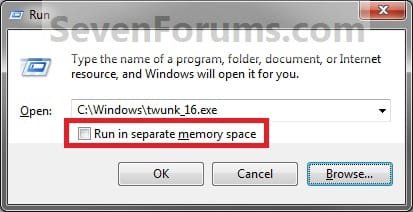
Run Command - Add "Run in Separate Memory Space"

Add "Run in Separate Memory Space" to Windows 7 Run Command

   Information
All DOS and 16-bit programs run on Windows 7 in the Windows Virtual DOS Machine (VDM) program. VDM simulates a 16-bit environment, complete with the DLLs required by 16-bit programs.

By default 16-bit programs run in a single VDM with a shared memory space. They share the memory space allocated to the vdm process and therefore, they cannot run simultaneously.

This will show you how to add the Run in Separate Memory Space check box to the Windows 7 Run command dialog box. When Run in Separate Memory Space is checked, a 16-bit program runs in a dedicated (not shared) (VDM) process with a separate memory space.
   Warning
If added, the Run in Separate Memory Space check box option will be grayed out until a user enters a 16-bit program in the Run command dialog box.

EXAMPLE: Run Command with and without "Run in Separate Memory Space" Grayed Out
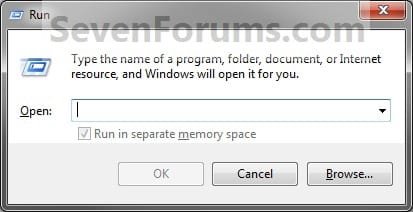
Run_Grayed_out.jpgRun_Enabled.jpg


OPTION ONE

Using a REG File Download


1. To Add "Run in Separate Memory Space"
A) Click on the Download button below to download the file below.
Add_Run_Memory_Check_Box.zip

Download


B) Go to step 3.
2. To Remove "Run in Separate Memory Space"
A) Click on the Download button below to download the file below.
Remove_Run_Memory_Check_Box.zip

Download


3. Click on Save, and save the .zip file to the desktop.

4. Open the downloaded .zip file and extract the .reg file to the desktop.

5. Right click on the extracted .reg file and click on Merge.

6. Click on Run, Yes, Yes, and OK when prompted.

7. Log off and log on, or restart the computer to apply.

8. When done, you can delete the downloaded .reg and .zip files if you like.


OPTION TWO

Using Local Group Policy Editor


1. Open the all users, specific users or groups, or all users except administrators Local Group Policy Editor for how you want this policy applied.

2. In the left pane, click on the arrow to expand User Configuration, Administrative Templates, then click on Start Menu and Taskbar. (See screenshot below)
Group_Policy.jpg
3. In the right pane, right click on Add "Run in Separate Memory Space" check box to Run dialog box and click on Edit. (See screenshot above)

4. To Remove "Run in Separate Memory Space"
A) Select (dot) Not Configured or Disabled. (See screenshot below step 6)

B) Go to step 6.
5. To Add "Run in Separate Memory Space"
A) Select (dot) Enabled. (See screenshot below step 6)
6. Click on OK. (See screenshot below)
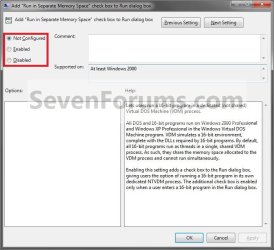
Properties.jpg
7. Close the Local Group Policy Editor. (See screenshot below step 2)
That's it,
Shawn


Attachments

Last edited:
Does the "Run in separate memory space" method of running 16 Bit programs work with all the 32 Bit Versions of Windows 7 ?

This is a pre-purchase request; I will stick with Vista and XP if I cannot run a particular 16 Bit accounting program.
 

My Computer

Computer Manufacturer/Model Number
Dell and HP
OS
XP, VISTA and Windows 7
Hello Jmortingoff, and welcome to Seven Forums.

Yes, it is available in all editions of Windows 7.

However, that does not guarantee that the 16-bit program will work in Windows 7. You might check with the Windows Compatibility Center, and post a question if anyone else has the program running in Windows 7 in the Software forum to help make sure it does.

Hope this helps,
Shawn
 

My Computer

Computer type
PC/Desktop
Computer Manufacturer/Model Number
Self built custom
OS
64-bit Windows 11 Pro for Workstations
CPU
Intel i7-8700K OC'd to 5 GHz
Motherboard
ASUS ROG Maximus XI Formula Z390
Memory
64 GB (4x16GB) G.SKILL TridentZ RGB DDR4 3600 MHz
Graphics Card(s)
ASUS ROG-STRIX-GTX1080TI-O11G-GAMING
Sound Card
Integrated
Monitor(s) Displays
2 x Samsung Odyssey G7 27"
Screen Resolution
2560x1440
Hard Drives
1TB Samsung 990 PRO M.2,
4TB Samsung 990 PRO PRO M.2,
TerraMaster F8 SSD Plus NAS
PSU
Seasonic Prime Titanium 850W
Case
Thermaltake Core P3
Cooling
Corsair Hydro H115i
Keyboard
Logitech wireless K800
Mouse
Logitech MX Master 4
Internet Speed
2 Gb/s Download and 100 Mb/s Upload
Antivirus
Malwarebyte Anti-Malware Premium
Browser
Google Chrome
Other Info
Logitech Z625 speaker system,
Logitech BRIO 4K Pro webcam,
HP Color LaserJet Pro MFP M477fdn,
APC SMART-UPS RT 1000 XL - SURT1000XLI,
Galaxy S23 Plus phone
Thanks, Shawn, for your prompt reply.

I think I shall now install Windows 7 Home Premium on a Vista Notebook in a separate partition of 30Gb.

I see there are instructions for doing this in Issue 306 of Computer Active magazine (12 Nov 09).

That way I can do some tests with the 16 Bit programs; I will report progress.

Best Regards

John
 

My Computer

Computer Manufacturer/Model Number
Dell and HP
OS
XP, VISTA and Windows 7
Ok John. I look forward to hearing how it turns out. :)
 

My Computer

Computer type
PC/Desktop
Computer Manufacturer/Model Number
Self built custom
OS
64-bit Windows 11 Pro for Workstations
CPU
Intel i7-8700K OC'd to 5 GHz
Motherboard
ASUS ROG Maximus XI Formula Z390
Memory
64 GB (4x16GB) G.SKILL TridentZ RGB DDR4 3600 MHz
Graphics Card(s)
ASUS ROG-STRIX-GTX1080TI-O11G-GAMING
Sound Card
Integrated
Monitor(s) Displays
2 x Samsung Odyssey G7 27"
Screen Resolution
2560x1440
Hard Drives
1TB Samsung 990 PRO M.2,
4TB Samsung 990 PRO PRO M.2,
TerraMaster F8 SSD Plus NAS
PSU
Seasonic Prime Titanium 850W
Case
Thermaltake Core P3
Cooling
Corsair Hydro H115i
Keyboard
Logitech wireless K800
Mouse
Logitech MX Master 4
Internet Speed
2 Gb/s Download and 100 Mb/s Upload
Antivirus
Malwarebyte Anti-Malware Premium
Browser
Google Chrome
Other Info
Logitech Z625 speaker system,
Logitech BRIO 4K Pro webcam,
HP Color LaserJet Pro MFP M477fdn,
APC SMART-UPS RT 1000 XL - SURT1000XLI,
Galaxy S23 Plus phone
Can I run 16 Bit software with Windows 7

Hello Shawn

Well, I made the separate partition on the Dell 6400 Notebook as promised. Then I installed Windows 7 Home Premium to the new partition. No problems!

I then installed our 16 Bit PCC Payroll software. Much to my surprise it ran immediately with no adjustments needed such as "Run in Separate Memory Space".

I checked that some of the DOS system files normally required, such as config.nt and autoexec.nt, existed in the WINDOWS\SYSTEM32 folder; they were there.

So have Microsoft made it like Vista: 32 Bit versions will run 16 Bit programs?

Regards

John
 

My Computer

Computer Manufacturer/Model Number
Dell and HP
OS
XP, VISTA and Windows 7
That's great news John. I do not have these files, so maybe the program may have added them during it's installation. :confused:
 

My Computer

Computer type
PC/Desktop
Computer Manufacturer/Model Number
Self built custom
OS
64-bit Windows 11 Pro for Workstations
CPU
Intel i7-8700K OC'd to 5 GHz
Motherboard
ASUS ROG Maximus XI Formula Z390
Memory
64 GB (4x16GB) G.SKILL TridentZ RGB DDR4 3600 MHz
Graphics Card(s)
ASUS ROG-STRIX-GTX1080TI-O11G-GAMING
Sound Card
Integrated
Monitor(s) Displays
2 x Samsung Odyssey G7 27"
Screen Resolution
2560x1440
Hard Drives
1TB Samsung 990 PRO M.2,
4TB Samsung 990 PRO PRO M.2,
TerraMaster F8 SSD Plus NAS
PSU
Seasonic Prime Titanium 850W
Case
Thermaltake Core P3
Cooling
Corsair Hydro H115i
Keyboard
Logitech wireless K800
Mouse
Logitech MX Master 4
Internet Speed
2 Gb/s Download and 100 Mb/s Upload
Antivirus
Malwarebyte Anti-Malware Premium
Browser
Google Chrome
Other Info
Logitech Z625 speaker system,
Logitech BRIO 4K Pro webcam,
HP Color LaserJet Pro MFP M477fdn,
APC SMART-UPS RT 1000 XL - SURT1000XLI,
Galaxy S23 Plus phone
So have Microsoft made it like Vista: 32 Bit versions will run 16 Bit programs?

Hello Shawn

Just to confirm I bought a boxed, retail version of Windows 7 Home Premium; maybe OEM or earlier versions did not have the 16 Bit system files? Perhaps the automatic Windows Update added the files during installation.

What version(s) are you using and what is their origin?

Best Regards

John :D
 

My Computer

Computer Manufacturer/Model Number
Dell and HP
OS
XP, VISTA and Windows 7
I do not have any 16-bit programs running, so I do not have these files. I'm still leaning towards the system files being placed there when the program was installed though.
 

My Computer

Computer type
PC/Desktop
Computer Manufacturer/Model Number
Self built custom
OS
64-bit Windows 11 Pro for Workstations
CPU
Intel i7-8700K OC'd to 5 GHz
Motherboard
ASUS ROG Maximus XI Formula Z390
Memory
64 GB (4x16GB) G.SKILL TridentZ RGB DDR4 3600 MHz
Graphics Card(s)
ASUS ROG-STRIX-GTX1080TI-O11G-GAMING
Sound Card
Integrated
Monitor(s) Displays
2 x Samsung Odyssey G7 27"
Screen Resolution
2560x1440
Hard Drives
1TB Samsung 990 PRO M.2,
4TB Samsung 990 PRO PRO M.2,
TerraMaster F8 SSD Plus NAS
PSU
Seasonic Prime Titanium 850W
Case
Thermaltake Core P3
Cooling
Corsair Hydro H115i
Keyboard
Logitech wireless K800
Mouse
Logitech MX Master 4
Internet Speed
2 Gb/s Download and 100 Mb/s Upload
Antivirus
Malwarebyte Anti-Malware Premium
Browser
Google Chrome
Other Info
Logitech Z625 speaker system,
Logitech BRIO 4K Pro webcam,
HP Color LaserJet Pro MFP M477fdn,
APC SMART-UPS RT 1000 XL - SURT1000XLI,
Galaxy S23 Plus phone
Windows 7 32 Bit and 16 Bit Programs

I do not have any 16-bit programs running, so I do not have these files. I'm still leaning towards the system files being placed there when the program was installed though.

The question in my previous post was 'What version(s) of Windows 7 are you running?'.


To sum up:
  • We agree that 64 Bit Windows 7 will not run 16 Bit programs.
  • Our company, PC Challenge, have produced 16 Bit Payroll and Cash Book programs for many years which definitely do not include any 16 Bit system files in their Install programs. Hence, I confirm that it was our Windows 7 Home Premium 32 Bit installation that included the 16 Bit system files.
  • The dates on the 16 Bit system files are as follows:
    COMMAND.COM 13/07/2009
    CONFIG.NT 10/6/2009
    AUTOEXEC.NT 10/06/2009
    Most files in the System32 folder are dated 14/07/2009. About Windows gives Version 6.1 (Build 7600).
  • Other posts on the WEB have confirmed that the 32 Bit version of Windows 7 can run 16 Bit programs.
Hope that helps​


John​
 

My Computer

Computer Manufacturer/Model Number
Dell and HP
OS
XP, VISTA and Windows 7
I'm running a full retail 64-bit Windows 7 Ultimate version.
 

My Computer

Computer type
PC/Desktop
Computer Manufacturer/Model Number
Self built custom
OS
64-bit Windows 11 Pro for Workstations
CPU
Intel i7-8700K OC'd to 5 GHz
Motherboard
ASUS ROG Maximus XI Formula Z390
Memory
64 GB (4x16GB) G.SKILL TridentZ RGB DDR4 3600 MHz
Graphics Card(s)
ASUS ROG-STRIX-GTX1080TI-O11G-GAMING
Sound Card
Integrated
Monitor(s) Displays
2 x Samsung Odyssey G7 27"
Screen Resolution
2560x1440
Hard Drives
1TB Samsung 990 PRO M.2,
4TB Samsung 990 PRO PRO M.2,
TerraMaster F8 SSD Plus NAS
PSU
Seasonic Prime Titanium 850W
Case
Thermaltake Core P3
Cooling
Corsair Hydro H115i
Keyboard
Logitech wireless K800
Mouse
Logitech MX Master 4
Internet Speed
2 Gb/s Download and 100 Mb/s Upload
Antivirus
Malwarebyte Anti-Malware Premium
Browser
Google Chrome
Other Info
Logitech Z625 speaker system,
Logitech BRIO 4K Pro webcam,
HP Color LaserJet Pro MFP M477fdn,
APC SMART-UPS RT 1000 XL - SURT1000XLI,
Galaxy S23 Plus phone
Back
Top