
Elevated Command Prompt Shortcut

How to Create an "Elevated Command Prompt" Shortcut in Windows 7 and Windows 8

   Information
This tutorial will show you how to create a shortcut that will open an elevated command prompt with administrator rights in Windows 7 and Windows 8.

   Note
When you use the elevated command prompt shortcut, you may be prompted to click/tap on Yes or enter the administrator account's password depending on your UAC settings in Windows 7 or Windows 8.

   Warning
You must be logged in as an administrator to be able to use this shortcut.


EXAMPLE: Elevated Command Prompt
NOTE: Notice how the elevated command prompt opens to C:\Windows\System32 and not C:\Users\(user name) as the default command prompt without administrator rights.
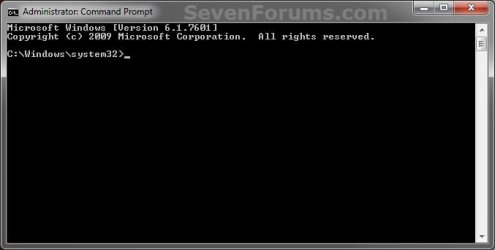
Elevated_Command_Prompt.jpg


OPTION ONE

To Download an "Elevated Command Prompt" Shortcut


1. Click/tap on the Download button below to download the file below.
Elevated_Command_Prompt.zip

Download


2. Save the ZIP file to your desktop.

3. Open the zip file, and extract (drag and drop) the Elevated Command Prompt shortcut to your desktop.

4. Unblock the Elevated Command Prompt shortcut.
NOTE: If there is not a Unblock button there, then the shortcut is already unblocked. Continue on to step 7.

5. In Windows 7, you can now Pin to Taskbar or Pin to Start Menu, add to Quick Launch, assign a keyboard shortcut to it, or move this shortcut to where you like for easy use.

6. In Windows 8 and 8.1, you can Pin to Taskbar on desktop, Pin to Start screen, add to Quick Launch, assign a keyboard shortcut to it, or move this shortcut to where you like for easy use.

7. When finished, you can delete the downloaded zip file if you like.


OPTION TWO

To Manually Create an "Elevated Command Prompt" Shortcut


1. Right click or press and hold on an empty space on your desktop, and click/tap on New and Shortcut.

2. Copy and paste either location below into the location area, and click/tap on Next. (see screenshot below)
%ComSpec%

OR

%windir%\System32\cmd.exe
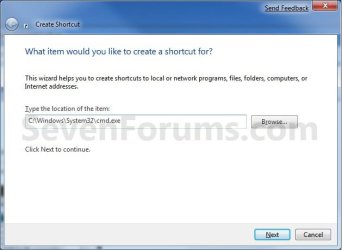

Step1.jpg

3. Type in the name Elevated Command Prompt, and click/tap on Finish. (see screenshot below)
NOTE: You can type in any name that you would like to use for the shortcut though.
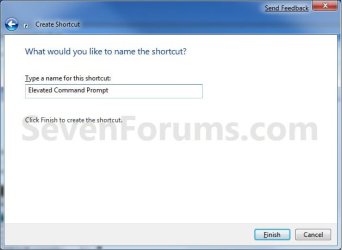
Step2.jpg
4. Right click or press and hold on the Elevated Command Prompt shortcut, and click/tap on Properties.

5. Click/tap on the Shortcut tab, and click/tap on the Advanced button. (see screenshot below).
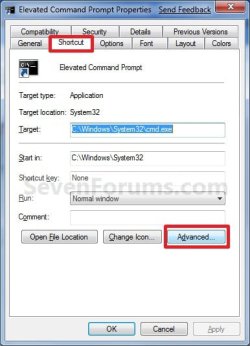
Properties.jpg
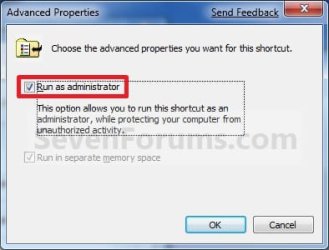
6. Check the Run as administrator box, and click/tap on OK. (See screenshot below)
Advanced.jpg
7. Click/tap on OK. (see screenshot below step 5)

8. In Windows 7, you can now Pin to Taskbar or Pin to Start Menu, add to Quick Launch, assign a keyboard shortcut to it, or move this shortcut to where you like for easy use.

9. In Windows 8 and 8.1, you can Pin to Taskbar on desktop, Pin to Start screen, add to Quick Launch, assign a keyboard shortcut to it, or move this shortcut to where you like for easy use.
That's it,
Shawn


Attachments

Last edited:
There is an easier way: I copied cmd.exe to the same folder (System32) as cmd2.exe. In the "Compatibility" tab, I set it to run as Administrator for all users. Then I created a desktop shortcut for it and that was all.
 

My Computer

Computer Manufacturer/Model Number
self-built
OS
Windows 8.1 Pro Update 1 x64
CPU
AMD Phenom II X6 1090T @stock speed (3.2 GHz)
Motherboard
Gigabyte GA-970A-DS3P
Memory
16 GB DDR3-1866 (4 x 4 GB Corsair Vengeance)
Graphics Card(s)
Zotac GeForce GTX650Ti 2 GB
Sound Card
on-board Realtek ALC887
Monitor(s) Displays
LG IPS236V, 23" IPS LED + Samsung T200M, 20" LCD
Screen Resolution
1920 x 1080 (LG), 1680 x 1050 (Samsung)
Hard Drives
OCZ Vertex 3 SSD, 120 GB; Western Digital Black WD-1502FAEX (1.5 TB, SATA III, 7200 rpm)
PSU
XFX 750W Black Edition
Case
Cooler Master CM 690
Cooling
several fans, Akasa Nero 2 for CPU
Keyboard
Logitech MK270 Wireless
Mouse
Logitech M185 (MK270) Wireless
Internet Speed
10 Mbps fiber optic
Antivirus
Kaspersky Antivirus 2015
Other Info
Microsoft LX-1000 headset, Logitech C270 HD webcam
Hello Goyta,

I'm not sure if that would be easier or not. Plus, that file would not be updated by Windows Update if one became available for it. I'm happy that it works for you though. :)
 

My Computer

Computer type
PC/Desktop
Computer Manufacturer/Model Number
Self built custom
OS
64-bit Windows 11 Pro for Workstations
CPU
Intel i7-8700K OC'd to 5 GHz
Motherboard
ASUS ROG Maximus XI Formula Z390
Memory
64 GB (4x16GB) G.SKILL TridentZ RGB DDR4 3600 MHz
Graphics Card(s)
ASUS ROG-STRIX-GTX1080TI-O11G-GAMING
Sound Card
Integrated
Monitor(s) Displays
2 x Samsung Odyssey G7 27"
Screen Resolution
2560x1440
Hard Drives
1TB Samsung 990 PRO M.2,
4TB Samsung 990 PRO PRO M.2,
TerraMaster F8 SSD Plus NAS
PSU
Seasonic Prime Titanium 850W
Case
Thermaltake Core P3
Cooling
Corsair Hydro H115i
Keyboard
Logitech wireless K800
Mouse
Logitech MX Master 4
Internet Speed
2 Gb/s Download and 100 Mb/s Upload
Antivirus
Malwarebyte Anti-Malware Premium
Browser
Google Chrome
Other Info
Logitech Z625 speaker system,
Logitech BRIO 4K Pro webcam,
HP Color LaserJet Pro MFP M477fdn,
APC SMART-UPS RT 1000 XL - SURT1000XLI,
Galaxy S23 Plus phone
Hello Goyta,

I'm not sure if that would be easier or not. Plus, that file would not be updated by Windows Update if one became available for it. I'm happy that it works for you though. :)


It was just the idea that occurred to me at the time, and it certainly works. But you are right about the Windows Update issue, and I will resort to the method suggested here. Thanks for posting it! :)
 

My Computer

Computer Manufacturer/Model Number
self-built
OS
Windows 8.1 Pro Update 1 x64
CPU
AMD Phenom II X6 1090T @stock speed (3.2 GHz)
Motherboard
Gigabyte GA-970A-DS3P
Memory
16 GB DDR3-1866 (4 x 4 GB Corsair Vengeance)
Graphics Card(s)
Zotac GeForce GTX650Ti 2 GB
Sound Card
on-board Realtek ALC887
Monitor(s) Displays
LG IPS236V, 23" IPS LED + Samsung T200M, 20" LCD
Screen Resolution
1920 x 1080 (LG), 1680 x 1050 (Samsung)
Hard Drives
OCZ Vertex 3 SSD, 120 GB; Western Digital Black WD-1502FAEX (1.5 TB, SATA III, 7200 rpm)
PSU
XFX 750W Black Edition
Case
Cooler Master CM 690
Cooling
several fans, Akasa Nero 2 for CPU
Keyboard
Logitech MK270 Wireless
Mouse
Logitech M185 (MK270) Wireless
Internet Speed
10 Mbps fiber optic
Antivirus
Kaspersky Antivirus 2015
Other Info
Microsoft LX-1000 headset, Logitech C270 HD webcam
You're most welcome Goyta. :)
 

My Computer

Computer type
PC/Desktop
Computer Manufacturer/Model Number
Self built custom
OS
64-bit Windows 11 Pro for Workstations
CPU
Intel i7-8700K OC'd to 5 GHz
Motherboard
ASUS ROG Maximus XI Formula Z390
Memory
64 GB (4x16GB) G.SKILL TridentZ RGB DDR4 3600 MHz
Graphics Card(s)
ASUS ROG-STRIX-GTX1080TI-O11G-GAMING
Sound Card
Integrated
Monitor(s) Displays
2 x Samsung Odyssey G7 27"
Screen Resolution
2560x1440
Hard Drives
1TB Samsung 990 PRO M.2,
4TB Samsung 990 PRO PRO M.2,
TerraMaster F8 SSD Plus NAS
PSU
Seasonic Prime Titanium 850W
Case
Thermaltake Core P3
Cooling
Corsair Hydro H115i
Keyboard
Logitech wireless K800
Mouse
Logitech MX Master 4
Internet Speed
2 Gb/s Download and 100 Mb/s Upload
Antivirus
Malwarebyte Anti-Malware Premium
Browser
Google Chrome
Other Info
Logitech Z625 speaker system,
Logitech BRIO 4K Pro webcam,
HP Color LaserJet Pro MFP M477fdn,
APC SMART-UPS RT 1000 XL - SURT1000XLI,
Galaxy S23 Plus phone
Hello All,
I tried this and it worked but now it gives the message "Access is denied"
A little help needed please.
Nelly
 

My Computer

OS
Windows 7 Home Premium
Hello Nelly,

Are you logged in as an administrator when using this shortcut?
 

My Computer

Computer type
PC/Desktop
Computer Manufacturer/Model Number
Self built custom
OS
64-bit Windows 11 Pro for Workstations
CPU
Intel i7-8700K OC'd to 5 GHz
Motherboard
ASUS ROG Maximus XI Formula Z390
Memory
64 GB (4x16GB) G.SKILL TridentZ RGB DDR4 3600 MHz
Graphics Card(s)
ASUS ROG-STRIX-GTX1080TI-O11G-GAMING
Sound Card
Integrated
Monitor(s) Displays
2 x Samsung Odyssey G7 27"
Screen Resolution
2560x1440
Hard Drives
1TB Samsung 990 PRO M.2,
4TB Samsung 990 PRO PRO M.2,
TerraMaster F8 SSD Plus NAS
PSU
Seasonic Prime Titanium 850W
Case
Thermaltake Core P3
Cooling
Corsair Hydro H115i
Keyboard
Logitech wireless K800
Mouse
Logitech MX Master 4
Internet Speed
2 Gb/s Download and 100 Mb/s Upload
Antivirus
Malwarebyte Anti-Malware Premium
Browser
Google Chrome
Other Info
Logitech Z625 speaker system,
Logitech BRIO 4K Pro webcam,
HP Color LaserJet Pro MFP M477fdn,
APC SMART-UPS RT 1000 XL - SURT1000XLI,
Galaxy S23 Plus phone
Hello Brink,
Yes I believe so. I checked my user account and it has "Administrator" underneath my user name.
Thanks for the quick reply.
 

My Computer

OS
Windows 7 Home Premium
What is giving you a "access denied" message? For example, when you open the shortcut, or after typing some command and pressing enter.

If it's when you open the shortcut, what happens when you right click on a normal command prompt shortcut and click on "Run as administrator"?

If it's a command, then what is it and what are you trying to do?
 

My Computer

Computer type
PC/Desktop
Computer Manufacturer/Model Number
Self built custom
OS
64-bit Windows 11 Pro for Workstations
CPU
Intel i7-8700K OC'd to 5 GHz
Motherboard
ASUS ROG Maximus XI Formula Z390
Memory
64 GB (4x16GB) G.SKILL TridentZ RGB DDR4 3600 MHz
Graphics Card(s)
ASUS ROG-STRIX-GTX1080TI-O11G-GAMING
Sound Card
Integrated
Monitor(s) Displays
2 x Samsung Odyssey G7 27"
Screen Resolution
2560x1440
Hard Drives
1TB Samsung 990 PRO M.2,
4TB Samsung 990 PRO PRO M.2,
TerraMaster F8 SSD Plus NAS
PSU
Seasonic Prime Titanium 850W
Case
Thermaltake Core P3
Cooling
Corsair Hydro H115i
Keyboard
Logitech wireless K800
Mouse
Logitech MX Master 4
Internet Speed
2 Gb/s Download and 100 Mb/s Upload
Antivirus
Malwarebyte Anti-Malware Premium
Browser
Google Chrome
Other Info
Logitech Z625 speaker system,
Logitech BRIO 4K Pro webcam,
HP Color LaserJet Pro MFP M477fdn,
APC SMART-UPS RT 1000 XL - SURT1000XLI,
Galaxy S23 Plus phone
I receive the message when I type a command using the Elevated Command Prompt shortcut.
I added the Elevated Command Prompt shortcut using the tutorial.
Any command I type e.g. ipconfig, defrag, etc produces the message "access denied"
:confused:
 

My Computer

OS
Windows 7 Home Premium
What happens when you use a non-elevated (standard) command prompt? Try ipconfig.
 

My Computer

Computer type
PC/Desktop
Computer Manufacturer/Model Number
Dwarf Dwf/11/2012 r09/2013
OS
Windows 8.1 Pro RTM x64
CPU
Intel Core-i5-3570K 4-core @ 3.4GHz (Ivy Bridge) (OC 4.4GHz)
Motherboard
ASRock Z77 Extreme4-M
Memory
4 x 4GB DDR3-1600 Corsair Vengeance CMZ8GX3M2A1600C9B (16GB)
Graphics Card(s)
MSI GeForce GTX770 Gaming OC 2GB
Sound Card
Realtek High Definition on board solution (ALC 898)
Monitor(s) Displays
ViewSonic VA1912w Widescreen (VGA)
Screen Resolution
1440x900
Hard Drives
OCZ Agility 3 SSD 120GB SATA III x2 (RAID 0)
Samsung HD501LJ 500GB SATA II x2
Hitachi HDS721010CLA332 1TB SATA II
Iomega 1.5TB Ext USB 2.0
WD 2.0TB Ext USB 3.0
PSU
XFX Pro Series 850W Semi-Modular
Case
Gigabyte IF233
Cooling
1 x 120mm Front Inlet 1 x 120mm Rear Exhaust
Keyboard
Microsoft Comfort Curve Keyboard 3000 (USB)
Mouse
Microsoft Comfort Mouse 3000 for Business (USB)
Internet Speed
NetGear DG834Gv3 ADSL Modem/Router (Ethernet) ~4.0 Mb/s (O2)
Antivirus
Avast! 8.0.1497
Browser
IE 11
Other Info
Optical Drive: HL-DT-ST BD-RE BH10LS30 SATA Bluray
Lexmark S305 Printer/Scanner/Copier (USB)
WEI Score: 8.1/8.1/8.5/8.5/8.25
Asus Eee PC 1011PX Netbook (Windows 7 x86 Starter)
Nelly,

Could you post the command that you are typing in to see if something may be wrong with it?

As a test, create a new administrator account to see if it works properly while logged into it instead.

If it does, then you can just copy your files from your old account's C:\Users\(user-name) folders into your new account's C:\Users\(user-name) folders. After everything checks out ok, you can delete the old account from within the new one.
 

My Computer

Computer type
PC/Desktop
Computer Manufacturer/Model Number
Self built custom
OS
64-bit Windows 11 Pro for Workstations
CPU
Intel i7-8700K OC'd to 5 GHz
Motherboard
ASUS ROG Maximus XI Formula Z390
Memory
64 GB (4x16GB) G.SKILL TridentZ RGB DDR4 3600 MHz
Graphics Card(s)
ASUS ROG-STRIX-GTX1080TI-O11G-GAMING
Sound Card
Integrated
Monitor(s) Displays
2 x Samsung Odyssey G7 27"
Screen Resolution
2560x1440
Hard Drives
1TB Samsung 990 PRO M.2,
4TB Samsung 990 PRO PRO M.2,
TerraMaster F8 SSD Plus NAS
PSU
Seasonic Prime Titanium 850W
Case
Thermaltake Core P3
Cooling
Corsair Hydro H115i
Keyboard
Logitech wireless K800
Mouse
Logitech MX Master 4
Internet Speed
2 Gb/s Download and 100 Mb/s Upload
Antivirus
Malwarebyte Anti-Malware Premium
Browser
Google Chrome
Other Info
Logitech Z625 speaker system,
Logitech BRIO 4K Pro webcam,
HP Color LaserJet Pro MFP M477fdn,
APC SMART-UPS RT 1000 XL - SURT1000XLI,
Galaxy S23 Plus phone
Do the prompts open correctly? Do you only get the errors when trying to execute a command at the prompt? Try the command help.
 

My Computer

Computer type
PC/Desktop
Computer Manufacturer/Model Number
Dwarf Dwf/11/2012 r09/2013
OS
Windows 8.1 Pro RTM x64
CPU
Intel Core-i5-3570K 4-core @ 3.4GHz (Ivy Bridge) (OC 4.4GHz)
Motherboard
ASRock Z77 Extreme4-M
Memory
4 x 4GB DDR3-1600 Corsair Vengeance CMZ8GX3M2A1600C9B (16GB)
Graphics Card(s)
MSI GeForce GTX770 Gaming OC 2GB
Sound Card
Realtek High Definition on board solution (ALC 898)
Monitor(s) Displays
ViewSonic VA1912w Widescreen (VGA)
Screen Resolution
1440x900
Hard Drives
OCZ Agility 3 SSD 120GB SATA III x2 (RAID 0)
Samsung HD501LJ 500GB SATA II x2
Hitachi HDS721010CLA332 1TB SATA II
Iomega 1.5TB Ext USB 2.0
WD 2.0TB Ext USB 3.0
PSU
XFX Pro Series 850W Semi-Modular
Case
Gigabyte IF233
Cooling
1 x 120mm Front Inlet 1 x 120mm Rear Exhaust
Keyboard
Microsoft Comfort Curve Keyboard 3000 (USB)
Mouse
Microsoft Comfort Mouse 3000 for Business (USB)
Internet Speed
NetGear DG834Gv3 ADSL Modem/Router (Ethernet) ~4.0 Mb/s (O2)
Antivirus
Avast! 8.0.1497
Browser
IE 11
Other Info
Optical Drive: HL-DT-ST BD-RE BH10LS30 SATA Bluray
Lexmark S305 Printer/Scanner/Copier (USB)
WEI Score: 8.1/8.1/8.5/8.5/8.25
Asus Eee PC 1011PX Netbook (Windows 7 x86 Starter)
Hello again,
The commands I am typing are ipconfig /flushdns , ipconfig /all, defrag C: -f , ping 127.0.0.1 etc.
Also "help" produced the "Access is denied" message.
However, and baffling, I found that "date" and "exit" work.

I created a new administrator account and received the same "Access is denied" message.
 

My Computer

OS
Windows 7 Home Premium
Nelly,

Since these are all ipconfig commands, how do you have your network setup? Are you part of a domain?

If through a router, test it connected directly to your modem instead to see if it may be a IP address set the same as another device on the network issue in the router.
 

My Computer

Computer type
PC/Desktop
Computer Manufacturer/Model Number
Self built custom
OS
64-bit Windows 11 Pro for Workstations
CPU
Intel i7-8700K OC'd to 5 GHz
Motherboard
ASUS ROG Maximus XI Formula Z390
Memory
64 GB (4x16GB) G.SKILL TridentZ RGB DDR4 3600 MHz
Graphics Card(s)
ASUS ROG-STRIX-GTX1080TI-O11G-GAMING
Sound Card
Integrated
Monitor(s) Displays
2 x Samsung Odyssey G7 27"
Screen Resolution
2560x1440
Hard Drives
1TB Samsung 990 PRO M.2,
4TB Samsung 990 PRO PRO M.2,
TerraMaster F8 SSD Plus NAS
PSU
Seasonic Prime Titanium 850W
Case
Thermaltake Core P3
Cooling
Corsair Hydro H115i
Keyboard
Logitech wireless K800
Mouse
Logitech MX Master 4
Internet Speed
2 Gb/s Download and 100 Mb/s Upload
Antivirus
Malwarebyte Anti-Malware Premium
Browser
Google Chrome
Other Info
Logitech Z625 speaker system,
Logitech BRIO 4K Pro webcam,
HP Color LaserJet Pro MFP M477fdn,
APC SMART-UPS RT 1000 XL - SURT1000XLI,
Galaxy S23 Plus phone
Thanks a lot for another great tutorial!.
 

My Computer

OS
Windows 7 Ultimate 32bit
CPU
AMD Phenom II x4 965 3.4GHz
Motherboard
Gigabyte GA-890FXA-UD5 rev2.0
Memory
G.SKILL F3-16000CL8D-4GBPIS (2GBx2)
Graphics Card(s)
Inno3d GTX480 1.5GB GDDR5
Monitor(s) Displays
LG FLATRON W2486L
Screen Resolution
1920x1080@60Hz
Hard Drives
Western Digital Caviar Black WD1002FAEX 1TB 64MB 7200RPM Sata III x3
PSU
Enermax MODU82+ 625W
Case
Thermaltake Element G Middle Tower
You're most welcome mate. :)
 

My Computer

Computer type
PC/Desktop
Computer Manufacturer/Model Number
Self built custom
OS
64-bit Windows 11 Pro for Workstations
CPU
Intel i7-8700K OC'd to 5 GHz
Motherboard
ASUS ROG Maximus XI Formula Z390
Memory
64 GB (4x16GB) G.SKILL TridentZ RGB DDR4 3600 MHz
Graphics Card(s)
ASUS ROG-STRIX-GTX1080TI-O11G-GAMING
Sound Card
Integrated
Monitor(s) Displays
2 x Samsung Odyssey G7 27"
Screen Resolution
2560x1440
Hard Drives
1TB Samsung 990 PRO M.2,
4TB Samsung 990 PRO PRO M.2,
TerraMaster F8 SSD Plus NAS
PSU
Seasonic Prime Titanium 850W
Case
Thermaltake Core P3
Cooling
Corsair Hydro H115i
Keyboard
Logitech wireless K800
Mouse
Logitech MX Master 4
Internet Speed
2 Gb/s Download and 100 Mb/s Upload
Antivirus
Malwarebyte Anti-Malware Premium
Browser
Google Chrome
Other Info
Logitech Z625 speaker system,
Logitech BRIO 4K Pro webcam,
HP Color LaserJet Pro MFP M477fdn,
APC SMART-UPS RT 1000 XL - SURT1000XLI,
Galaxy S23 Plus phone
This might be a silly Question but is there a way to add it to context menu on desktop ?
 

My Computer

Computer type
PC/Desktop
Computer Manufacturer/Model Number
Custom Build
OS
Windows 7 Ultimate x64 SP1
CPU
AMD Athlon II X4 645 quad core
Memory
6gig DDR3
Graphics Card(s)
Nvidia geforce GT 630
Sound Card
On Board
Monitor(s) Displays
Samsung LED 19"
Screen Resolution
ULTRA HD 1080p 1920 x 1080
Hard Drives
5 x 2tb
ATA Devices x 2
USB x 5
PSU
850 watt something or other forgot name
Case
Custom Build
Cooling
6 fan in out system with cold air blown through the in
Keyboard
Steelseries
Mouse
GM.M6800 optical mouse 5 button model
Internet Speed
80 gig on a good day 60 to 80 on a bad
Antivirus
not disclosed
Browser
not disclosed
Other Info
My Desktop is in a custom built airflow casing over the case. I still have the power button available etc . but the rest is cool controlled cold air going through the in and theoretically hot air out of the out. But it never gets hot enough for hot air to come out :-P

My Computer

Computer type
PC/Desktop
Computer Manufacturer/Model Number
Self built custom
OS
64-bit Windows 11 Pro for Workstations
CPU
Intel i7-8700K OC'd to 5 GHz
Motherboard
ASUS ROG Maximus XI Formula Z390
Memory
64 GB (4x16GB) G.SKILL TridentZ RGB DDR4 3600 MHz
Graphics Card(s)
ASUS ROG-STRIX-GTX1080TI-O11G-GAMING
Sound Card
Integrated
Monitor(s) Displays
2 x Samsung Odyssey G7 27"
Screen Resolution
2560x1440
Hard Drives
1TB Samsung 990 PRO M.2,
4TB Samsung 990 PRO PRO M.2,
TerraMaster F8 SSD Plus NAS
PSU
Seasonic Prime Titanium 850W
Case
Thermaltake Core P3
Cooling
Corsair Hydro H115i
Keyboard
Logitech wireless K800
Mouse
Logitech MX Master 4
Internet Speed
2 Gb/s Download and 100 Mb/s Upload
Antivirus
Malwarebyte Anti-Malware Premium
Browser
Google Chrome
Other Info
Logitech Z625 speaker system,
Logitech BRIO 4K Pro webcam,
HP Color LaserJet Pro MFP M477fdn,
APC SMART-UPS RT 1000 XL - SURT1000XLI,
Galaxy S23 Plus phone
Back
Top