Fonts - Install

How to Install a Font in Windows 7 and Windows 8


   Information
This tutorial will show you how to install a font that you have downloaded in Windows 7 and Windows 8.

For a list of all default fonts that come supplied with Windows 7, see: Fonts supplied with Windows 7

For a list of all default fonts that come supplied with Windows 8, see: Fonts supplied with Windows 8

   Note
Windows comes with TrueType fonts and OpenType fonts. They work with a variety of computers, printers, and programs.

  • TrueType fonts (.ttf/.ttc) can be scaled to any size and are clear and readable in all sizes. They can be sent to any printer or other output device supported by Windows.
  • OpenType fonts (.otf) are related to TrueType fonts, but typically incorporate a greater extension of the basic character set, such as small capitalization, old-style numerals, and more detailed shapes, such as glyph and ligatures. OpenType fonts are also clear and readable in all sizes and can be sent to any printer or other output device supported by Windows.
  • PostScript fonts are fonts created by Adobe Systems that are smooth, detailed, and of high quality. They are often used for printing, especially professional-quality printing, such as books or magazines.
   Tip
If you need a default Windows font, then please just post a request for it here, and I'll be happy to post a clean copy of it for you. :)

   Warning
If you install a TrueType font with exactly the same name as a PostScript font on the same computer, Windows won't know which one to access, which could result in a font type being altered. To avoid this, don't install different types of fonts with the same name.


Here's How:
1. Download the font that you want to install.
NOTE: You can download fonts from a software program, the Internet, or your organization's network. You can get free fonts from the links at Microsoft Typography - Font foundries.
WARNING: Before you download a font, make sure you trust the source.

2. Unblock the font.

3. Do step 4, 5, or 6 below for how you would like to install the font.

4. Install Font Option One
A) Right click or press and hold on the downloaded font, click/tap on Install, and go to step 7 below.
5. Install Font Option Two
A) Double click/tap on the downloaded font, click/tap on the Install button, and go to step 7 below. (See screeenshot below)
Font_Preview.jpg
6. Install Font Option Three
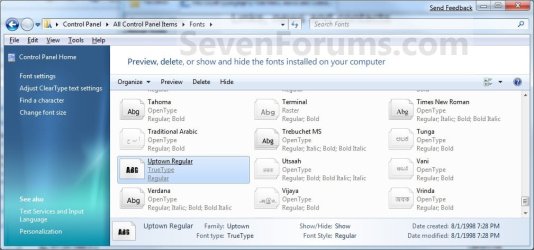
A) Drag and drop the downloaded font into the Fonts Control Panel page location, and go to step 7 below. (See screenshot below)
NOTE: You can either navigate to C:\Windows\Fonts in Windows Explorer or open the Control Panel (icons view) and click/tap on the Fonts icon to open the Fonts Control Panel page.
Location-2.jpg
7. You can verify that the font is installed by seeing if it is listed in the Fonts Control Panel page.
NOTE: You can either navigate to C:\Windows\Fonts in Windows Explorer or open the Control Panel (icons view) and click on the Fonts icon to open the Fonts Control Panel page.
That's it,
Shawn


Last edited:
It looks pretty easy to install a font in Windows 7. Thanks for the tutorial Shawn!
 

My Computer

Computer Manufacturer/Model Number
HP Pavilion Slimline S3023W
OS
Windows 7 Beta 1
CPU
AMD Athlon 64 Processor 3800+ 2.4 GHz
Memory
1 GB RAM (2 x 512)
Graphics Card(s)
NVIDIA GeForce 6150 LE
Sound Card
Realtek HD Audio
Monitor(s) Displays
HP vp17
Screen Resolution
1152 x 864
Hard Drives
Seagate - Barracuda 7200.10 SATA 3.0Gb/s 250-GB Hard Drive
You're welcome Windows 7. It did turn out pretty easy.

Shawn
 

My Computer

Computer type
PC/Desktop
Computer Manufacturer/Model Number
Self built custom
OS
64-bit Windows 11 Pro for Workstations
CPU
Intel i7-8700K OC'd to 5 GHz
Motherboard
ASUS ROG Maximus XI Formula Z390
Memory
64 GB (4x16GB) G.SKILL TridentZ RGB DDR4 3600 MHz
Graphics Card(s)
ASUS ROG-STRIX-GTX1080TI-O11G-GAMING
Sound Card
Integrated
Monitor(s) Displays
2 x Samsung Odyssey G7 27"
Screen Resolution
2560x1440
Hard Drives
1TB Samsung 990 PRO M.2,
4TB Samsung 990 PRO PRO M.2,
TerraMaster F8 SSD Plus NAS
PSU
Seasonic Prime Titanium 850W
Case
Thermaltake Core P3
Cooling
Corsair Hydro H115i
Keyboard
Logitech wireless K800
Mouse
Logitech MX Master 4
Internet Speed
2 Gb/s Download and 100 Mb/s Upload
Antivirus
Malwarebyte Anti-Malware Premium
Browser
Google Chrome
Other Info
Logitech Z625 speaker system,
Logitech BRIO 4K Pro webcam,
HP Color LaserJet Pro MFP M477fdn,
APC SMART-UPS RT 1000 XL - SURT1000XLI,
Galaxy S23 Plus phone
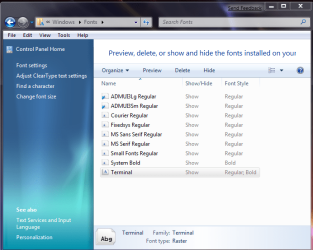
For some reason, after installing the fonts that I have. It does not show the Fonts Control Panel page...

Anyone else having this problem?
 

My Computer

OS
Windows XP Pro SP3 / Windows 7RC 7100
CPU
Intel Q6600 Quad Core @ 2.80
Motherboard
Gigabyte P35-DS3P
Memory
2 Gb Corsair
Graphics Card(s)
Leadtek 8800GT
Sound Card
Creative X-Fi XtreamGamer
Monitor(s) Displays
Chimei 22"
Case
LianLi A70
Hello SnapCount,

Did you mean that the font is not listed or displayed in the Fonts Page instead? ;)

If so, then you may have a bad font, or it's not compatible with Windows 7. Do you have any problems with installing any fonts from here?
 

My Computer

Computer type
PC/Desktop
Computer Manufacturer/Model Number
Self built custom
OS
64-bit Windows 11 Pro for Workstations
CPU
Intel i7-8700K OC'd to 5 GHz
Motherboard
ASUS ROG Maximus XI Formula Z390
Memory
64 GB (4x16GB) G.SKILL TridentZ RGB DDR4 3600 MHz
Graphics Card(s)
ASUS ROG-STRIX-GTX1080TI-O11G-GAMING
Sound Card
Integrated
Monitor(s) Displays
2 x Samsung Odyssey G7 27"
Screen Resolution
2560x1440
Hard Drives
1TB Samsung 990 PRO M.2,
4TB Samsung 990 PRO PRO M.2,
TerraMaster F8 SSD Plus NAS
PSU
Seasonic Prime Titanium 850W
Case
Thermaltake Core P3
Cooling
Corsair Hydro H115i
Keyboard
Logitech wireless K800
Mouse
Logitech MX Master 4
Internet Speed
2 Gb/s Download and 100 Mb/s Upload
Antivirus
Malwarebyte Anti-Malware Premium
Browser
Google Chrome
Other Info
Logitech Z625 speaker system,
Logitech BRIO 4K Pro webcam,
HP Color LaserJet Pro MFP M477fdn,
APC SMART-UPS RT 1000 XL - SURT1000XLI,
Galaxy S23 Plus phone
Hi Brink,

Was looking at your reply from my laptop which i installed Win7 and saw that I had more fonts displaying on my laptop than on my desktop pc - which only shows 9 fonts installed. But when you click and drag new fonts on my desktop setup is says that its already there and do you want to replace it. But it never shows. Looks like something has gone weird with my Win7 install and most of the default fonts are not displaying :( CRAP!
 

My Computer

OS
Windows XP Pro SP3 / Windows 7RC 7100
CPU
Intel Q6600 Quad Core @ 2.80
Motherboard
Gigabyte P35-DS3P
Memory
2 Gb Corsair
Graphics Card(s)
Leadtek 8800GT
Sound Card
Creative X-Fi XtreamGamer
Monitor(s) Displays
Chimei 22"
Case
LianLi A70

My Computer

Computer type
PC/Desktop
Computer Manufacturer/Model Number
Self built custom
OS
64-bit Windows 11 Pro for Workstations
CPU
Intel i7-8700K OC'd to 5 GHz
Motherboard
ASUS ROG Maximus XI Formula Z390
Memory
64 GB (4x16GB) G.SKILL TridentZ RGB DDR4 3600 MHz
Graphics Card(s)
ASUS ROG-STRIX-GTX1080TI-O11G-GAMING
Sound Card
Integrated
Monitor(s) Displays
2 x Samsung Odyssey G7 27"
Screen Resolution
2560x1440
Hard Drives
1TB Samsung 990 PRO M.2,
4TB Samsung 990 PRO PRO M.2,
TerraMaster F8 SSD Plus NAS
PSU
Seasonic Prime Titanium 850W
Case
Thermaltake Core P3
Cooling
Corsair Hydro H115i
Keyboard
Logitech wireless K800
Mouse
Logitech MX Master 4
Internet Speed
2 Gb/s Download and 100 Mb/s Upload
Antivirus
Malwarebyte Anti-Malware Premium
Browser
Google Chrome
Other Info
Logitech Z625 speaker system,
Logitech BRIO 4K Pro webcam,
HP Color LaserJet Pro MFP M477fdn,
APC SMART-UPS RT 1000 XL - SURT1000XLI,
Galaxy S23 Plus phone
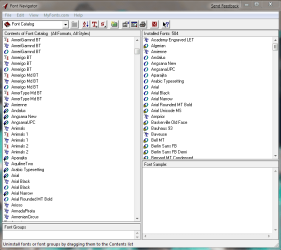
Seems I have the same prob. in x64. Checked in x86 and all is well. Thought it might be caused by font nav. which I've used to keep track of fonts for years. It's not installed on 7 x86.

fontscp.PNG fontprop.PNG


fontnav.PNG

Gary
 

My Computer

Computer Manufacturer/Model Number
Dell XPS420
OS
Vista Ult 64 bit Seven Ult RTM x64
CPU
Intel Core2 Quad Q6600 2.40 gigahertz
Memory
Crucial Ballistix 4x2GB PC2 6400
Graphics Card(s)
NVIDIA GeForce 8600 GTS 256 MB
Sound Card
Creative SB X-Fi audio
Monitor(s) Displays
HP w2207 + HPvs15
Screen Resolution
1680x1050 + 1024x768
Hard Drives
2-WD5000AAKS-500 GB
WD5000AAV-500 GB external
Keyboard
Microsoft Comfort Curve
Mouse
MX Revolution
Other Info
Wacom Intuos 2 Graphics Tablet
Experience Index=5.5
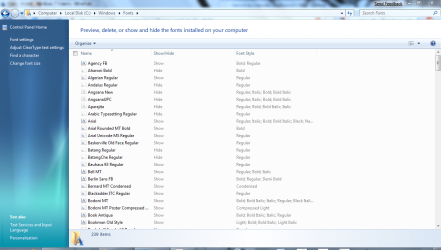
did you enable to show hidden files and folders?
since this is what i have...
wierd.PNG
 

My Computer

Computer Manufacturer/Model Number
Tx2500z Tablet Pc/Homemade Server
OS
Windows 7 Ult x64(x2), HomePrem x32(x4), Server 08 (+VM), 08 R2 (VM) , SuSe 11.2 (VM), XP 32 (VM)
CPU
Turion X2 ultra (oh well came with laptop)/P4 @3.2 (yes P4)
Motherboard
IDK HP Motherboard / Intel DG965SS
Memory
OCZ Dual Channel 4GB kit/ 1gb Dual Channel
Graphics Card(s)
HD 3200 graphics /GMA x3100 (yay for intergrated!!)
Sound Card
Realtek HD Audio(mic working, well sort of)/Siig IC-70012
Monitor(s) Displays
built-in Hp 12" laptop screen/ Acer 19"
Screen Resolution
1280x800 /1440x900
Cooling
All Air Cooled
Mouse
Logi MX Rev. /MS Wheel Optical 1.1A /Logitech Optical Mouse
Internet Speed
College baby but its still routed through vpn to 1536k...
Other Info
love my wacom pen and pressure sensitivity...
wished it worked in 7, SUSE for that matter though
Hi DA.

I did enable show all in the font settings and I have show hidden files and folders checked in explorer. In 7 32bit I have lots of fonts on the list. In 64 bit only those few. As you can see from font navigator, there are 504 fonts installed. In font folder properties there are 719 files.
 

My Computer

Computer Manufacturer/Model Number
Dell XPS420
OS
Vista Ult 64 bit Seven Ult RTM x64
CPU
Intel Core2 Quad Q6600 2.40 gigahertz
Memory
Crucial Ballistix 4x2GB PC2 6400
Graphics Card(s)
NVIDIA GeForce 8600 GTS 256 MB
Sound Card
Creative SB X-Fi audio
Monitor(s) Displays
HP w2207 + HPvs15
Screen Resolution
1680x1050 + 1024x768
Hard Drives
2-WD5000AAKS-500 GB
WD5000AAV-500 GB external
Keyboard
Microsoft Comfort Curve
Mouse
MX Revolution
Other Info
Wacom Intuos 2 Graphics Tablet
Experience Index=5.5
weird as i have x64 on and it show it like i showed in the screenshot....
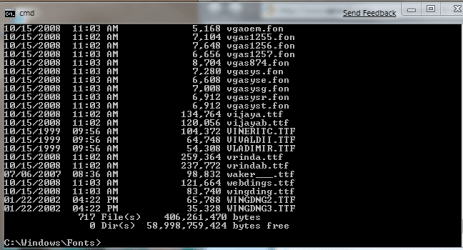
can you open cmd
cd into the directory "cd %WinDir%\fonts" where
and type "dir"
idk but the thing is that are font groups as you can see in my there are arial bold, italic ect and that is why there are alot more than is shown....
its wierd though as i did not do any config changes other than the ones that i said...
another would be "hide protected system files" have it unchecked and check again...
this will output every file in the fonts folder...
 

My Computer

Computer Manufacturer/Model Number
Tx2500z Tablet Pc/Homemade Server
OS
Windows 7 Ult x64(x2), HomePrem x32(x4), Server 08 (+VM), 08 R2 (VM) , SuSe 11.2 (VM), XP 32 (VM)
CPU
Turion X2 ultra (oh well came with laptop)/P4 @3.2 (yes P4)
Motherboard
IDK HP Motherboard / Intel DG965SS
Memory
OCZ Dual Channel 4GB kit/ 1gb Dual Channel
Graphics Card(s)
HD 3200 graphics /GMA x3100 (yay for intergrated!!)
Sound Card
Realtek HD Audio(mic working, well sort of)/Siig IC-70012
Monitor(s) Displays
built-in Hp 12" laptop screen/ Acer 19"
Screen Resolution
1280x800 /1440x900
Cooling
All Air Cooled
Mouse
Logi MX Rev. /MS Wheel Optical 1.1A /Logitech Optical Mouse
Internet Speed
College baby but its still routed through vpn to 1536k...
Other Info
love my wacom pen and pressure sensitivity...
wished it worked in 7, SUSE for that matter though
That is weird. I have this many with x64. I have show hidden files and I checked show hidden protected OS system files on and off and logged off and back on. Made no difference..

fontys.JPG
 

My Computer

Computer type
PC/Desktop
Computer Manufacturer/Model Number
Airbot 2.0
OS
Windows 7 Ultimate x64 SP1
CPU
Core i7 920 (D0) @ 4Ghz, *26c idle *65c full load on air
Motherboard
Asus P6X58D Premium - Sata 6Gb/s - USB 3.0
Memory
12GB DDR3 Corsair Dominator -CMD12GX3M6A1600C8 at 1600MHz
Graphics Card(s)
Zotac Geforce GTX 770
Sound Card
ASUS Xonar D2X
Monitor(s) Displays
1 LG 24" Flatron W2453V-PF 1 Samsung 24" P2450H both 2ms RT
Screen Resolution
1920x1080@60hz
Hard Drives
1 Samsung 250GB 840 Evo SSD
1 OCZ Vertex2 180GB SSD
1 TB Samsung Spinpoint F1 7200RPM 32MB cache
2 500GB WD Caviar Blacks 7200RPM 32MB cache (WD5001AALS)

Pioneer DVD Burner DVR-S18M
PSU
Corsair HX1000W
Case
Cooler Master HAF 932
Cooling
Case Fans *3 230mm, *1 140mm/CPU - *Tuniq Tower 120 Extreme
Keyboard
Logitech Wireless MK700
Mouse
Logitech Wireless MK700
Internet Speed
DL 15 Mbps UL 0.98 Mbps
Antivirus
None
Browser
Firefox Nightly
Other Info
Processor-7.7 *RAM- 7.9 *Graphics-7.9 *Gaming Graphics- 7.9 *SSD- 7.8 W.E.I final score= 7.7
*Phone- LG Nexus 5
You're welcome Windows 7. It did turn out pretty easy.

Shawn
Easy enough to not need to read a tutorial on how to do it. ;)
 

My Computer

Computer Manufacturer/Model Number
LG R500
OS
Windows 7 Ultimate 64x
CPU
Intel Core 2 Duo Mobile T5750 @ 2000 MHz
Motherboard
LG Electronics COLUMBIA
Memory
3072 MB
Graphics Card(s)
NVIDIA GeForce 8600M GS
Sound Card
Speakers (Realtek High Definition Audio)
Monitor(s) Displays
15.4" WXGA with Fine Bright Technology
Screen Resolution
12800 x 800
Hard Drives
Internal: 250 GB
External: 250 GB
Mouse
Logitech G5 Laser Gaming Mouse
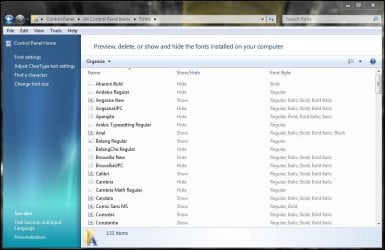
I have made sure that the fonts are not hidden. And after looking at garysgold screen shot, I have exactly the same icons appearing.
 

Attachments

  • Font problem.jpg
    Font problem.jpg
    109.4 KB · Views: 600

My Computer

OS
Windows XP Pro SP3 / Windows 7RC 7100
CPU
Intel Q6600 Quad Core @ 2.80
Motherboard
Gigabyte P35-DS3P
Memory
2 Gb Corsair
Graphics Card(s)
Leadtek 8800GT
Sound Card
Creative X-Fi XtreamGamer
Monitor(s) Displays
Chimei 22"
Case
LianLi A70
can you open cmd
cd into the directory "cd %WinDir%\fonts" where
and type "dir"

The fonts are there, I can use them in all my programs. Just can't hide or unhide what I can't see.

fontsdir.PNG

Hi SnapCount,

Do you have any font handling software installed?

Gary
 

My Computer

Computer Manufacturer/Model Number
Dell XPS420
OS
Vista Ult 64 bit Seven Ult RTM x64
CPU
Intel Core2 Quad Q6600 2.40 gigahertz
Memory
Crucial Ballistix 4x2GB PC2 6400
Graphics Card(s)
NVIDIA GeForce 8600 GTS 256 MB
Sound Card
Creative SB X-Fi audio
Monitor(s) Displays
HP w2207 + HPvs15
Screen Resolution
1680x1050 + 1024x768
Hard Drives
2-WD5000AAKS-500 GB
WD5000AAV-500 GB external
Keyboard
Microsoft Comfort Curve
Mouse
MX Revolution
Other Info
Wacom Intuos 2 Graphics Tablet
Experience Index=5.5
Crap.... I dont believe this... Just installed the RC on my desktop and low and behold... 10 fonts show up.... Go to my laptop and installed RC from the same DVD and guess what.... 201 fonts show up :cry::cry: WTF!

Hi garysgold,

No, i dont have any font handling software. It seems to me like its for some strange reason - its hardware related. CRAPNESS:mad2:
 

My Computer

OS
Windows XP Pro SP3 / Windows 7RC 7100
CPU
Intel Q6600 Quad Core @ 2.80
Motherboard
Gigabyte P35-DS3P
Memory
2 Gb Corsair
Graphics Card(s)
Leadtek 8800GT
Sound Card
Creative X-Fi XtreamGamer
Monitor(s) Displays
Chimei 22"
Case
LianLi A70
That is weird. I have this many with x64. I have show hidden files and I checked show hidden protected OS system files on and off and logged off and back on. Made no difference..

View attachment 5233

I have 134 fonts listed.
 

My Computer

Computer Manufacturer/Model Number
self built
OS
Windows 7 Professional 64-bit
CPU
Intel E8400 3GHz
Motherboard
Intel DX48BT2
Memory
Kingston PC3-10700H 4Gb
Graphics Card(s)
XFX Radeon HD 5850 BlackEd.
Sound Card
Asus Xonar DG
Monitor(s) Displays
2x Samsung SM-T220HD 22"
Screen Resolution
1680x1050 on two monitors
Hard Drives
OCZ Vertex 2 120gb 3.5" (OS)
Seagate Momentus XT 500gb
Samsung F3 1Tb (games)
2x Samsung F1 1Tb
PSU
Thermaltake ToughPower 850w
Case
Thermaltake Armor
Cooling
Scythe Mugen II
Keyboard
Microsoft Comfort Curve USB
Mouse
Razer Diamondback 3G
Internet Speed
8128/443
You can also right click and go "Install." I did that in version 7100, so I can't verify if it works in previous builds.
 

My Computer

OS
Windows 7 (Build 7068)
You're welcome Chessian. :)
 

My Computer

Computer type
PC/Desktop
Computer Manufacturer/Model Number
Self built custom
OS
64-bit Windows 11 Pro for Workstations
CPU
Intel i7-8700K OC'd to 5 GHz
Motherboard
ASUS ROG Maximus XI Formula Z390
Memory
64 GB (4x16GB) G.SKILL TridentZ RGB DDR4 3600 MHz
Graphics Card(s)
ASUS ROG-STRIX-GTX1080TI-O11G-GAMING
Sound Card
Integrated
Monitor(s) Displays
2 x Samsung Odyssey G7 27"
Screen Resolution
2560x1440
Hard Drives
1TB Samsung 990 PRO M.2,
4TB Samsung 990 PRO PRO M.2,
TerraMaster F8 SSD Plus NAS
PSU
Seasonic Prime Titanium 850W
Case
Thermaltake Core P3
Cooling
Corsair Hydro H115i
Keyboard
Logitech wireless K800
Mouse
Logitech MX Master 4
Internet Speed
2 Gb/s Download and 100 Mb/s Upload
Antivirus
Malwarebyte Anti-Malware Premium
Browser
Google Chrome
Other Info
Logitech Z625 speaker system,
Logitech BRIO 4K Pro webcam,
HP Color LaserJet Pro MFP M477fdn,
APC SMART-UPS RT 1000 XL - SURT1000XLI,
Galaxy S23 Plus phone
Back
Top