HomeGroup Desktop Icon - Add or Remove

How to Add or Remove the HomeGroup Desktop Icon in Windows 7

   Information
A homegroup is a group of PCs on a home network that can share devices (such as printers), and libraries (such as your Documents, Pictures, Music, and Video libraries). Using a homegroup makes sharing easier. Your homegroup is protected with a password, which you can change at any time.

This will show you how to add or remove the default HomeGroup desktop icon in Windows 7. This is not like a standard shortcut.

   Note
If the HomeGroup desktop icon just mysteriously appeared on you, then sometimes a simple refresh (F5) of the desktop will remove it.


EXAMPLE: HomeGroup desktop icon
34433d1257114847-homegroup-desktop-icon-add-remove-homegroup_desktop_icon.jpg

Here's How:
1. To Add the HomeGroup Desktop Icon
A) Click on the Download button below to download the file below.
Add_HomeGroup_Desktop_Icon.reg

Download


B) Go to step 3.
2. To Remove the HomeGroup Desktop Icon
A) Click on the Download button below to download the file below.
Remove_HomeGroup_Desktop_Icon.reg


Download


3. Save the .reg file to the desktop.

4. Right click on the downloaded .reg file, and click on Merge.

5. If prompted, click on Run, Yes, Yes, and OK.

6. Log off and log on, or restart the computer to apply.

7. When finished, you can delete the downloaded .reg file if you like.
That's it,
Shawn


Attachments

Last edited:
didn't work

I tried both of these to remove Homegroup and Libraries from my desktop. I downloaded them, ran the .reg file and all I got was a notepad with the registry entries. How do I run them?
 

My Computer

Computer Manufacturer/Model Number
Toshiba S300 S2504
OS
Windows 7 Professional
Hello Lynda, and welcome to Seven Forums.

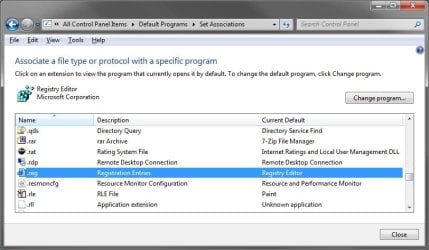
Your .reg file extension type is not associated to the correct program to be opened by. This is why it's not working for you. Check in Default Programs to "Change program" for the .reg file extension so that it has it's "Current Default" program as "Registry Editor" (C:\Windows\regedit.exe). Afterwards, you should be able to run the .reg files without Notepad opening instead. :)

Hope this helps,
Shawn
 

My Computer

Computer type
PC/Desktop
Computer Manufacturer/Model Number
Self built custom
OS
64-bit Windows 11 Pro for Workstations
CPU
Intel i7-8700K OC'd to 5 GHz
Motherboard
ASUS ROG Maximus XI Formula Z390
Memory
64 GB (4x16GB) G.SKILL TridentZ RGB DDR4 3600 MHz
Graphics Card(s)
ASUS ROG-STRIX-GTX1080TI-O11G-GAMING
Sound Card
Integrated
Monitor(s) Displays
2 x Samsung Odyssey G7 27"
Screen Resolution
2560x1440
Hard Drives
1TB Samsung 990 PRO M.2,
4TB Samsung 990 PRO PRO M.2,
TerraMaster F8 SSD Plus NAS
PSU
Seasonic Prime Titanium 850W
Case
Thermaltake Core P3
Cooling
Corsair Hydro H115i
Keyboard
Logitech wireless K800
Mouse
Logitech MX Master 4
Internet Speed
2 Gb/s Download and 100 Mb/s Upload
Antivirus
Malwarebyte Anti-Malware Premium
Browser
Google Chrome
Other Info
Logitech Z625 speaker system,
Logitech BRIO 4K Pro webcam,
HP Color LaserJet Pro MFP M477fdn,
APC SMART-UPS RT 1000 XL - SURT1000XLI,
Galaxy S23 Plus phone
removing Homegroup and Libraries from the desktop

I have backed up my registry...changed the default program '.reg' to open with regedit. I have downloaded both programs to remove the icons (although they were listed as 'zipped' files, they were not zipped. However, I now have them both on my desktop. When I right click, there is no option to 'merge' and no option to 'run'...now what do I do?
 

My Computer

Computer Manufacturer/Model Number
Toshiba S300 S2504
OS
Windows 7 Professional
Lynda,

Oh my. It seems that your ZIP file associations may not be correct either. You can download and install the ZIP option in the tutorial below to restore the default ZIP file associations. Afterwards you should be able to extract and merge the .reg files for the Homegroup and Libraries desktop icon.

http://www.sevenforums.com/tutorials/19449-default-file-type-associations-restore.html

In addition, you might consider running a full scan with your antivirus and anti-malware program to be safe in case your computer may have been infected with some form of malware.
 

My Computer

Computer type
PC/Desktop
Computer Manufacturer/Model Number
Self built custom
OS
64-bit Windows 11 Pro for Workstations
CPU
Intel i7-8700K OC'd to 5 GHz
Motherboard
ASUS ROG Maximus XI Formula Z390
Memory
64 GB (4x16GB) G.SKILL TridentZ RGB DDR4 3600 MHz
Graphics Card(s)
ASUS ROG-STRIX-GTX1080TI-O11G-GAMING
Sound Card
Integrated
Monitor(s) Displays
2 x Samsung Odyssey G7 27"
Screen Resolution
2560x1440
Hard Drives
1TB Samsung 990 PRO M.2,
4TB Samsung 990 PRO PRO M.2,
TerraMaster F8 SSD Plus NAS
PSU
Seasonic Prime Titanium 850W
Case
Thermaltake Core P3
Cooling
Corsair Hydro H115i
Keyboard
Logitech wireless K800
Mouse
Logitech MX Master 4
Internet Speed
2 Gb/s Download and 100 Mb/s Upload
Antivirus
Malwarebyte Anti-Malware Premium
Browser
Google Chrome
Other Info
Logitech Z625 speaker system,
Logitech BRIO 4K Pro webcam,
HP Color LaserJet Pro MFP M477fdn,
APC SMART-UPS RT 1000 XL - SURT1000XLI,
Galaxy S23 Plus phone
OK..I have now restored my .reg to 'regedit' and my .zip to 'winzip'. The files do unzip and are on my desktop, however, there is no 'merge' option listed when I right click the unzipped program. I did run 'Spybot', 'Windows Defender' and 'Windows Malicious Software Removal Tool'....none of the programs found anything. So now where is that 'Merge' option?
 

My Computer

Computer Manufacturer/Model Number
Toshiba S300 S2504
OS
Windows 7 Professional
Lynda,

Did you extract the .reg file from the ZIP file before right clicking on it, and not just open the ZIP file and right click on the .reg file? Here's the reg file itself instead of it being in a ZIP file.
 
Last edited:

My Computer

Computer type
PC/Desktop
Computer Manufacturer/Model Number
Self built custom
OS
64-bit Windows 11 Pro for Workstations
CPU
Intel i7-8700K OC'd to 5 GHz
Motherboard
ASUS ROG Maximus XI Formula Z390
Memory
64 GB (4x16GB) G.SKILL TridentZ RGB DDR4 3600 MHz
Graphics Card(s)
ASUS ROG-STRIX-GTX1080TI-O11G-GAMING
Sound Card
Integrated
Monitor(s) Displays
2 x Samsung Odyssey G7 27"
Screen Resolution
2560x1440
Hard Drives
1TB Samsung 990 PRO M.2,
4TB Samsung 990 PRO PRO M.2,
TerraMaster F8 SSD Plus NAS
PSU
Seasonic Prime Titanium 850W
Case
Thermaltake Core P3
Cooling
Corsair Hydro H115i
Keyboard
Logitech wireless K800
Mouse
Logitech MX Master 4
Internet Speed
2 Gb/s Download and 100 Mb/s Upload
Antivirus
Malwarebyte Anti-Malware Premium
Browser
Google Chrome
Other Info
Logitech Z625 speaker system,
Logitech BRIO 4K Pro webcam,
HP Color LaserJet Pro MFP M477fdn,
APC SMART-UPS RT 1000 XL - SURT1000XLI,
Galaxy S23 Plus phone
yes. I unzipped it to my desktop...right clicked it and there is no 'merge' option. I remember earlier when it was opening in notepad, it did have a 'merge' option.
 

My Computer

Computer Manufacturer/Model Number
Toshiba S300 S2504
OS
Windows 7 Professional
Sorry Lynda, but I had to ask just to make sure. Did the .reg file I attached above have a merge option for it when you right clicked on it?
 

My Computer

Computer type
PC/Desktop
Computer Manufacturer/Model Number
Self built custom
OS
64-bit Windows 11 Pro for Workstations
CPU
Intel i7-8700K OC'd to 5 GHz
Motherboard
ASUS ROG Maximus XI Formula Z390
Memory
64 GB (4x16GB) G.SKILL TridentZ RGB DDR4 3600 MHz
Graphics Card(s)
ASUS ROG-STRIX-GTX1080TI-O11G-GAMING
Sound Card
Integrated
Monitor(s) Displays
2 x Samsung Odyssey G7 27"
Screen Resolution
2560x1440
Hard Drives
1TB Samsung 990 PRO M.2,
4TB Samsung 990 PRO PRO M.2,
TerraMaster F8 SSD Plus NAS
PSU
Seasonic Prime Titanium 850W
Case
Thermaltake Core P3
Cooling
Corsair Hydro H115i
Keyboard
Logitech wireless K800
Mouse
Logitech MX Master 4
Internet Speed
2 Gb/s Download and 100 Mb/s Upload
Antivirus
Malwarebyte Anti-Malware Premium
Browser
Google Chrome
Other Info
Logitech Z625 speaker system,
Logitech BRIO 4K Pro webcam,
HP Color LaserJet Pro MFP M477fdn,
APC SMART-UPS RT 1000 XL - SURT1000XLI,
Galaxy S23 Plus phone
no. It did not
 

My Computer

Computer Manufacturer/Model Number
Toshiba S300 S2504
OS
Windows 7 Professional
It sounds like the .reg file extension still does not have "Registry Editor" set as the default program for it.

Default_Programs.jpg
 

My Computer

Computer type
PC/Desktop
Computer Manufacturer/Model Number
Self built custom
OS
64-bit Windows 11 Pro for Workstations
CPU
Intel i7-8700K OC'd to 5 GHz
Motherboard
ASUS ROG Maximus XI Formula Z390
Memory
64 GB (4x16GB) G.SKILL TridentZ RGB DDR4 3600 MHz
Graphics Card(s)
ASUS ROG-STRIX-GTX1080TI-O11G-GAMING
Sound Card
Integrated
Monitor(s) Displays
2 x Samsung Odyssey G7 27"
Screen Resolution
2560x1440
Hard Drives
1TB Samsung 990 PRO M.2,
4TB Samsung 990 PRO PRO M.2,
TerraMaster F8 SSD Plus NAS
PSU
Seasonic Prime Titanium 850W
Case
Thermaltake Core P3
Cooling
Corsair Hydro H115i
Keyboard
Logitech wireless K800
Mouse
Logitech MX Master 4
Internet Speed
2 Gb/s Download and 100 Mb/s Upload
Antivirus
Malwarebyte Anti-Malware Premium
Browser
Google Chrome
Other Info
Logitech Z625 speaker system,
Logitech BRIO 4K Pro webcam,
HP Color LaserJet Pro MFP M477fdn,
APC SMART-UPS RT 1000 XL - SURT1000XLI,
Galaxy S23 Plus phone
I just noticed a page 2 where you said..."It sounds like the .reg file extension still does not have "Registry Editor" set as the default program for it" I don't know if that was directed to me, but I just checked and the .reg file extension has the "Registry Editor" as the default program. If I double click on the unzipped file I can run it, but there is no 'Merge' option.

when I right click the unzipped files and click on 'open with' they choices are either 'Notepad' or 'Winzip' when I try to change the program to open with 'Registry Editor' or 'regedit' or 'regedit.exe' it can not find any of those programs...despite the fact that 'Registry Editor' is listed in my 'default programs' for .reg and I can run regedit from the start menu and get to the registry.
 
Last edited by a moderator:

My Computer

Computer Manufacturer/Model Number
Toshiba S300 S2504
OS
Windows 7 Professional
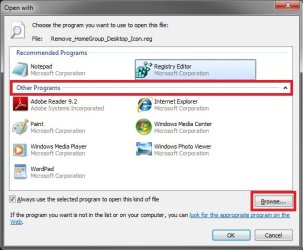
Strange. When you click on "Open with", be sure to expand the "Other Programs" drop down menu to see if "Registry Editor" is there. If not, are you able to click on the "Browse" button and manually select the ""C:\Windows\regedit.exe" file instead?

Open_with.jpg
 

My Computer

Computer type
PC/Desktop
Computer Manufacturer/Model Number
Self built custom
OS
64-bit Windows 11 Pro for Workstations
CPU
Intel i7-8700K OC'd to 5 GHz
Motherboard
ASUS ROG Maximus XI Formula Z390
Memory
64 GB (4x16GB) G.SKILL TridentZ RGB DDR4 3600 MHz
Graphics Card(s)
ASUS ROG-STRIX-GTX1080TI-O11G-GAMING
Sound Card
Integrated
Monitor(s) Displays
2 x Samsung Odyssey G7 27"
Screen Resolution
2560x1440
Hard Drives
1TB Samsung 990 PRO M.2,
4TB Samsung 990 PRO PRO M.2,
TerraMaster F8 SSD Plus NAS
PSU
Seasonic Prime Titanium 850W
Case
Thermaltake Core P3
Cooling
Corsair Hydro H115i
Keyboard
Logitech wireless K800
Mouse
Logitech MX Master 4
Internet Speed
2 Gb/s Download and 100 Mb/s Upload
Antivirus
Malwarebyte Anti-Malware Premium
Browser
Google Chrome
Other Info
Logitech Z625 speaker system,
Logitech BRIO 4K Pro webcam,
HP Color LaserJet Pro MFP M477fdn,
APC SMART-UPS RT 1000 XL - SURT1000XLI,
Galaxy S23 Plus phone
oops. I just did that. I clicked on open with....browsed to C:\Windows\regedit and said yes...it added it to the registry

The one I tried it on was the Default Zip...When I checked the Default Programs .zip was missing so I restored my registry using a backup I made earlier. It seems that 'Merge' option is really needed.

Since it originally had the 'Merge' option when it was opening in Notepad, I'm afraid that one of my registry cleanup's might have deleted it. I use Registry Mechanic and System Mechanic. (Probably overkill). But now I need to know how to get it back before I can run the .reg files.
 
Last edited by a moderator:

My Computer

Computer Manufacturer/Model Number
Toshiba S300 S2504
OS
Windows 7 Professional
Are you able to right click on a .reg file and click on Merge now?

If so, you can use the ZIP download from my post above to restore the default ZIP associations back. I would recommend to stay away from registry cleaning programs. They tend to do more harm than good if the wrong item is allowed to be deleted from the registry.
 

My Computer

Computer type
PC/Desktop
Computer Manufacturer/Model Number
Self built custom
OS
64-bit Windows 11 Pro for Workstations
CPU
Intel i7-8700K OC'd to 5 GHz
Motherboard
ASUS ROG Maximus XI Formula Z390
Memory
64 GB (4x16GB) G.SKILL TridentZ RGB DDR4 3600 MHz
Graphics Card(s)
ASUS ROG-STRIX-GTX1080TI-O11G-GAMING
Sound Card
Integrated
Monitor(s) Displays
2 x Samsung Odyssey G7 27"
Screen Resolution
2560x1440
Hard Drives
1TB Samsung 990 PRO M.2,
4TB Samsung 990 PRO PRO M.2,
TerraMaster F8 SSD Plus NAS
PSU
Seasonic Prime Titanium 850W
Case
Thermaltake Core P3
Cooling
Corsair Hydro H115i
Keyboard
Logitech wireless K800
Mouse
Logitech MX Master 4
Internet Speed
2 Gb/s Download and 100 Mb/s Upload
Antivirus
Malwarebyte Anti-Malware Premium
Browser
Google Chrome
Other Info
Logitech Z625 speaker system,
Logitech BRIO 4K Pro webcam,
HP Color LaserJet Pro MFP M477fdn,
APC SMART-UPS RT 1000 XL - SURT1000XLI,
Galaxy S23 Plus phone
No, still no Merge option. I restored my registry instead. I've been browsing through the restore options in both 'Registry Mechanic' and 'System Mechanic', but I'm not sure what I'm looking for. I don't know what the registry key is for that Merge command.
 

My Computer

Computer Manufacturer/Model Number
Toshiba S300 S2504
OS
Windows 7 Professional
Lynda,

You might consider doing a repair install. It should fix it for you without losing anything.
 

My Computer

Computer type
PC/Desktop
Computer Manufacturer/Model Number
Self built custom
OS
64-bit Windows 11 Pro for Workstations
CPU
Intel i7-8700K OC'd to 5 GHz
Motherboard
ASUS ROG Maximus XI Formula Z390
Memory
64 GB (4x16GB) G.SKILL TridentZ RGB DDR4 3600 MHz
Graphics Card(s)
ASUS ROG-STRIX-GTX1080TI-O11G-GAMING
Sound Card
Integrated
Monitor(s) Displays
2 x Samsung Odyssey G7 27"
Screen Resolution
2560x1440
Hard Drives
1TB Samsung 990 PRO M.2,
4TB Samsung 990 PRO PRO M.2,
TerraMaster F8 SSD Plus NAS
PSU
Seasonic Prime Titanium 850W
Case
Thermaltake Core P3
Cooling
Corsair Hydro H115i
Keyboard
Logitech wireless K800
Mouse
Logitech MX Master 4
Internet Speed
2 Gb/s Download and 100 Mb/s Upload
Antivirus
Malwarebyte Anti-Malware Premium
Browser
Google Chrome
Other Info
Logitech Z625 speaker system,
Logitech BRIO 4K Pro webcam,
HP Color LaserJet Pro MFP M477fdn,
APC SMART-UPS RT 1000 XL - SURT1000XLI,
Galaxy S23 Plus phone
I don't know about that. I have an upgrade disk from Toshiba and when I tried to run it, I got some different screens that what you displayed in your tutorial on repair install. I might just go back to Vista and do the whole upgrade process again.
 

My Computer

Computer Manufacturer/Model Number
Toshiba S300 S2504
OS
Windows 7 Professional
Brink, Thank you very much. I located the Win7 32-bit folder on my Toshiba upgrade disk and ran the 'setup'. All went well...no data was missing and I was able to delete both Homegroup and Libraries from my desktop. I have removed both Registry Mechanic and System Mechanic from my pc, although I don't know if either one was the cause. Can you recommend a good registry cleaner for Windows 7?....In any case, I appreciate all your help.
 

My Computer

Computer Manufacturer/Model Number
Toshiba S300 S2504
OS
Windows 7 Professional
You're welcome Lynda. Actually I would recommend to not use a registry cleaner. They tend to do more harm than good when accidentally allowed to delete a registry entry that it should not have.
 

My Computer

Computer type
PC/Desktop
Computer Manufacturer/Model Number
Self built custom
OS
64-bit Windows 11 Pro for Workstations
CPU
Intel i7-8700K OC'd to 5 GHz
Motherboard
ASUS ROG Maximus XI Formula Z390
Memory
64 GB (4x16GB) G.SKILL TridentZ RGB DDR4 3600 MHz
Graphics Card(s)
ASUS ROG-STRIX-GTX1080TI-O11G-GAMING
Sound Card
Integrated
Monitor(s) Displays
2 x Samsung Odyssey G7 27"
Screen Resolution
2560x1440
Hard Drives
1TB Samsung 990 PRO M.2,
4TB Samsung 990 PRO PRO M.2,
TerraMaster F8 SSD Plus NAS
PSU
Seasonic Prime Titanium 850W
Case
Thermaltake Core P3
Cooling
Corsair Hydro H115i
Keyboard
Logitech wireless K800
Mouse
Logitech MX Master 4
Internet Speed
2 Gb/s Download and 100 Mb/s Upload
Antivirus
Malwarebyte Anti-Malware Premium
Browser
Google Chrome
Other Info
Logitech Z625 speaker system,
Logitech BRIO 4K Pro webcam,
HP Color LaserJet Pro MFP M477fdn,
APC SMART-UPS RT 1000 XL - SURT1000XLI,
Galaxy S23 Plus phone
Back
Top