Advanced Boot Options

How to Boot to the Advanced Boot Options in Windows 7

   Information
This will show you how to boot into the Advanced Boot Options screen to select options to start Windows 7 in advanced troubleshooting modes.

   Note
Some options, such as safe mode, start Windows in a limited state, where only the bare essentials are started. If a problem does not reappear when you start in safe mode, you can eliminate the default settings and basic device drivers as possible causes. Other options start Windows with advanced features intended for use by system administrators and IT professionals.


Here's How:1. Turn on or restart the computer.

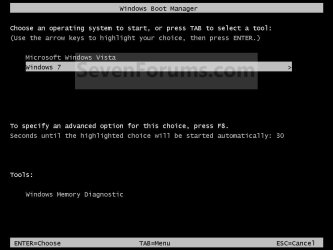
2. If you Multi Boot with more than One Operating System A) At the Windows Boot Manager screen, select the OS you want to use the Advanced Boot Options for, then press F8. (see screenshot below)
NOTE: On some systems, pressing F5 may also work.Boot_Manager.jpg


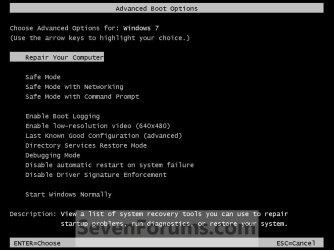
3. If you Only Boot with One Operating System (ex: Windows 7)A) Press and keep tapping the F8 key about every second until you see the screenshot below.
NOTE: If the Windows startup logo appears, you will need to repeat steps 1 and 3 again. If you dual boot, then you will need to select the OS you want to use the Advanced Boot Option for and then press F8. On some systems, tapping F5 may also work.Advanced_Boot_Options.jpg


4. Use the arrow keys to select an advanced option to start Windows 7 into and press Enter. (See screenshot above)
NOTE: See the table below for a description of each option.

Advanced OptionDescription
Repair Your Computer
Shows a list of system recovery options that you can use to repair startup problems, run diagnostics, or restore your system. If Repair your computer isn't listed as an option, then your computer doesn't include preinstalled recovery options, or your network administrator has turned them off. You could also boot from a retail Windows 7 installation disc to see the System Recovery Options.
Safe Mode
This starts Windows 7 with a minimal set of drivers and services.
Safe Mode with Networking
This starts Windows 7 in safe mode and includes the network drivers and services needed to access the Internet or other computers on your network.
Safe Mode with Command Prompt
This starts Windows 7 in safe mode with a command prompt window instead of the usual Windows interface. To exit from here, press Ctrl+Alt+Delete or type Exit and press Enter.
Enable Boot Logging
Creates a file named ntbtlog.txt, that lists all the drivers that are installed during startup and that might be useful for advanced troubleshooting.
Enable Low Resolution Video (640 X 480)
Starts Windows 7 using your current video driver and using low resolution and refresh rate settings. You can use this mode to reset your display settings, or to use a television monitor with your computer if needed.
Last Know Good Configuration (advanced)
Starts Windows 7 with the most recent registry and driver configurations that worked successfully. Every time you turn your computer off and Windows 7 shuts down successfully, important system settings are saved in the registry. You can use those settings to start your computer if a problem occurs. For example, if a new driver for your video card is causing problems, or an incorrect registry setting is preventing Windows 7 from starting correctly, you can restart your computer using Last Known Good Configuration.
Directory Services Restore Mode
Starts Windows 7 domain controller running Active Directory so that the directory service can be restored. This option is intended for IT professionals and administrators.
Debugging Mode
Starts Windows 7 in an advanced troubleshooting mode intended for IT professionals and system administrators.
Disable Automatic Restart on System Failure
Prevents Windows 7 from automatically restarting if an error causes Windows 7 to fail. Choose this option only if Windows 7 is stuck in a loop where Windows 7 fails, attempts to restart, and fails again repeatedly.
Disable Driver Signature Enforcement
Allows drivers containing improper signatures to be temporarily installed.
Start Windows Normally
Starts Windows 7 in its normal mode to the logon screen or user desktop. This can be helpful after a improper shutdown.


That's it,
Shawn Brink


Last edited:
I'm familiar with F8 option to get into Advanced Boot Options. My previous laptop was running XP Pro 32-bit and I used ABO often. Purchased new laptop running Win 7 Pro 32-bit but F8 option doesn't seem to work. When clicking F8 a black screen quickly flashes and comp continues to welcome screen. The black screen has nothing to do with ABOs. It seems to have info regarding kernels and other obscure (to me) system info. Unable to get screen shot or even take picture with digital camera. Screen flashes by much too fast. :-( Does this sound like an OS problem or a computer problem?
 

My Computer

Computer type
Laptop
Computer Manufacturer/Model Number
Sony Vaio VPCEB47GM Laptop
OS
Win 7 Pro 64-bit
CPU
Intel i5 2.4 Ghz
Memory
8GB DDR3
Graphics Card(s)
Intel HD 3000
Sound Card
IDT High Definition
Monitor(s) Displays
15.6 WGXA Anti-Glare LED
Screen Resolution
1280x800
Hard Drives
640Gb 7200rpm
Antivirus
MSE
Browser
Opera (primary) with IE9 backup
Hello Marsmimar, and welcome to Seven Forums.

Not sure why you are not seeing it. According to the "STEP 3" section in the link below at Dell, you should be able to keep tapping F8 during boot to enter the ABO screen.

Dell - Technical Support
 

My Computer

Computer type
PC/Desktop
Computer Manufacturer/Model Number
Self built custom
OS
64-bit Windows 11 Pro for Workstations
CPU
Intel i7-8700K OC'd to 5 GHz
Motherboard
ASUS ROG Maximus XI Formula Z390
Memory
64 GB (4x16GB) G.SKILL TridentZ RGB DDR4 3600 MHz
Graphics Card(s)
ASUS ROG-STRIX-GTX1080TI-O11G-GAMING
Sound Card
Integrated
Monitor(s) Displays
2 x Samsung Odyssey G7 27"
Screen Resolution
2560x1440
Hard Drives
1TB Samsung 990 PRO M.2,
4TB Samsung 990 PRO PRO M.2,
TerraMaster F8 SSD Plus NAS
PSU
Seasonic Prime Titanium 850W
Case
Thermaltake Core P3
Cooling
Corsair Hydro H115i
Keyboard
Logitech wireless K800
Mouse
Logitech MX Master 4
Internet Speed
2 Gb/s Download and 100 Mb/s Upload
Antivirus
Malwarebyte Anti-Malware Premium
Browser
Google Chrome
Other Info
Logitech Z625 speaker system,
Logitech BRIO 4K Pro webcam,
HP Color LaserJet Pro MFP M477fdn,
APC SMART-UPS RT 1000 XL - SURT1000XLI,
Galaxy S23 Plus phone
Thank you for the quick reply. I feel a little foolish. :o

Accessing the Advanced Boot Options in Windows 7 is slightly different than what I was used to in XP. On my old machine all I had to do was click F8 once and the ABO menu would eventually appear. The secret to accessing ABO with Win 7 (at least on my new machine) is to continue clicking F8 until the clicking produces a beeping sound. Each beep seems to equal about one second that the mysterious black screen will remain visible. When that black screen disappears the ABO menu appears.

I also found out through trial and error (mostly error) that clicking the F5 key during startup also allows access to the ABO as well as a couple of other options.

Thanks for all the great info on this site!
 

My Computer

Computer type
Laptop
Computer Manufacturer/Model Number
Sony Vaio VPCEB47GM Laptop
OS
Win 7 Pro 64-bit
CPU
Intel i5 2.4 Ghz
Memory
8GB DDR3
Graphics Card(s)
Intel HD 3000
Sound Card
IDT High Definition
Monitor(s) Displays
15.6 WGXA Anti-Glare LED
Screen Resolution
1280x800
Hard Drives
640Gb 7200rpm
Antivirus
MSE
Browser
Opera (primary) with IE9 backup
You're welcome Marsmimar. I'm happy to hear that you got it sorted out. Thanks for the F5 tip. :)
 

My Computer

Computer type
PC/Desktop
Computer Manufacturer/Model Number
Self built custom
OS
64-bit Windows 11 Pro for Workstations
CPU
Intel i7-8700K OC'd to 5 GHz
Motherboard
ASUS ROG Maximus XI Formula Z390
Memory
64 GB (4x16GB) G.SKILL TridentZ RGB DDR4 3600 MHz
Graphics Card(s)
ASUS ROG-STRIX-GTX1080TI-O11G-GAMING
Sound Card
Integrated
Monitor(s) Displays
2 x Samsung Odyssey G7 27"
Screen Resolution
2560x1440
Hard Drives
1TB Samsung 990 PRO M.2,
4TB Samsung 990 PRO PRO M.2,
TerraMaster F8 SSD Plus NAS
PSU
Seasonic Prime Titanium 850W
Case
Thermaltake Core P3
Cooling
Corsair Hydro H115i
Keyboard
Logitech wireless K800
Mouse
Logitech MX Master 4
Internet Speed
2 Gb/s Download and 100 Mb/s Upload
Antivirus
Malwarebyte Anti-Malware Premium
Browser
Google Chrome
Other Info
Logitech Z625 speaker system,
Logitech BRIO 4K Pro webcam,
HP Color LaserJet Pro MFP M477fdn,
APC SMART-UPS RT 1000 XL - SURT1000XLI,
Galaxy S23 Plus phone
How come this guide references Vista instead of 7 a lot

Try searching in your browser (ctrl+f) and type vista to see what Im talking about

Great Guide though!!
 

My Computer

Computer Manufacturer/Model Number
Toshiba
OS
Windows 7 Home Premium x64
CPU
AMD
Memory
4 GB
Graphics Card(s)
ATI Radeon Intergrated Graphics
Sound Card
Realtek
Screen Resolution
1366 X 768
Hard Drives
223 GB HDD
Hello RJ,

Whatever do you mean? :o;)
 

My Computer

Computer type
PC/Desktop
Computer Manufacturer/Model Number
Self built custom
OS
64-bit Windows 11 Pro for Workstations
CPU
Intel i7-8700K OC'd to 5 GHz
Motherboard
ASUS ROG Maximus XI Formula Z390
Memory
64 GB (4x16GB) G.SKILL TridentZ RGB DDR4 3600 MHz
Graphics Card(s)
ASUS ROG-STRIX-GTX1080TI-O11G-GAMING
Sound Card
Integrated
Monitor(s) Displays
2 x Samsung Odyssey G7 27"
Screen Resolution
2560x1440
Hard Drives
1TB Samsung 990 PRO M.2,
4TB Samsung 990 PRO PRO M.2,
TerraMaster F8 SSD Plus NAS
PSU
Seasonic Prime Titanium 850W
Case
Thermaltake Core P3
Cooling
Corsair Hydro H115i
Keyboard
Logitech wireless K800
Mouse
Logitech MX Master 4
Internet Speed
2 Gb/s Download and 100 Mb/s Upload
Antivirus
Malwarebyte Anti-Malware Premium
Browser
Google Chrome
Other Info
Logitech Z625 speaker system,
Logitech BRIO 4K Pro webcam,
HP Color LaserJet Pro MFP M477fdn,
APC SMART-UPS RT 1000 XL - SURT1000XLI,
Galaxy S23 Plus phone
I think I saw misprints. Maybe it was my brain thinking that vista should have these but here is one thats real

3. Use the arrow keys to select an advanced option to start Vista into and press Enter.
 

My Computer

Computer Manufacturer/Model Number
Toshiba
OS
Windows 7 Home Premium x64
CPU
AMD
Memory
4 GB
Graphics Card(s)
ATI Radeon Intergrated Graphics
Sound Card
Realtek
Screen Resolution
1366 X 768
Hard Drives
223 GB HDD
LOL, no you weren't imaging things. It was copied over from our Vista Forums and updated for Windows 7, but I missed a few Vistas in there. Thank you for letting me know about them. :)
 

My Computer

Computer type
PC/Desktop
Computer Manufacturer/Model Number
Self built custom
OS
64-bit Windows 11 Pro for Workstations
CPU
Intel i7-8700K OC'd to 5 GHz
Motherboard
ASUS ROG Maximus XI Formula Z390
Memory
64 GB (4x16GB) G.SKILL TridentZ RGB DDR4 3600 MHz
Graphics Card(s)
ASUS ROG-STRIX-GTX1080TI-O11G-GAMING
Sound Card
Integrated
Monitor(s) Displays
2 x Samsung Odyssey G7 27"
Screen Resolution
2560x1440
Hard Drives
1TB Samsung 990 PRO M.2,
4TB Samsung 990 PRO PRO M.2,
TerraMaster F8 SSD Plus NAS
PSU
Seasonic Prime Titanium 850W
Case
Thermaltake Core P3
Cooling
Corsair Hydro H115i
Keyboard
Logitech wireless K800
Mouse
Logitech MX Master 4
Internet Speed
2 Gb/s Download and 100 Mb/s Upload
Antivirus
Malwarebyte Anti-Malware Premium
Browser
Google Chrome
Other Info
Logitech Z625 speaker system,
Logitech BRIO 4K Pro webcam,
HP Color LaserJet Pro MFP M477fdn,
APC SMART-UPS RT 1000 XL - SURT1000XLI,
Galaxy S23 Plus phone
Hi no matter what option i choose, it will not boot or progress to anything, the 'repair your computer' goes to a blank screen and does nothing. safe mode starts loading files, stops then restarts, so i am now back to square 1. what can i possibly do to get it to boot. it is really new and i dont have any files on it so i wouldnt mind if i lost them. can i somehow re-install windows 7? it didnt come with the installation CD though and it was pre-installed.
 

My Computer

Computer Manufacturer/Model Number
Toshiba Sattelite
OS
Microsoft Windows
Hello Crump,

Double check with your computer's manual to be sure of the correct key to press at boot, but scroll down to the section below at the link below. It will help show you how to do a factory recovery from your recovery partition at boot for a Toshiba computer.

Using Toshiba HDD Recovery Utility from the recovery partition


How to use the Toshiba HDD Recovery Utility

Hope this helps,
Shawn
 

My Computer

Computer type
PC/Desktop
Computer Manufacturer/Model Number
Self built custom
OS
64-bit Windows 11 Pro for Workstations
CPU
Intel i7-8700K OC'd to 5 GHz
Motherboard
ASUS ROG Maximus XI Formula Z390
Memory
64 GB (4x16GB) G.SKILL TridentZ RGB DDR4 3600 MHz
Graphics Card(s)
ASUS ROG-STRIX-GTX1080TI-O11G-GAMING
Sound Card
Integrated
Monitor(s) Displays
2 x Samsung Odyssey G7 27"
Screen Resolution
2560x1440
Hard Drives
1TB Samsung 990 PRO M.2,
4TB Samsung 990 PRO PRO M.2,
TerraMaster F8 SSD Plus NAS
PSU
Seasonic Prime Titanium 850W
Case
Thermaltake Core P3
Cooling
Corsair Hydro H115i
Keyboard
Logitech wireless K800
Mouse
Logitech MX Master 4
Internet Speed
2 Gb/s Download and 100 Mb/s Upload
Antivirus
Malwarebyte Anti-Malware Premium
Browser
Google Chrome
Other Info
Logitech Z625 speaker system,
Logitech BRIO 4K Pro webcam,
HP Color LaserJet Pro MFP M477fdn,
APC SMART-UPS RT 1000 XL - SURT1000XLI,
Galaxy S23 Plus phone
Thankyou, that help alot
Unfortuantly, it hasnt fixed my problem. it is now saying no bootable device--insert boot disk and press any key.
i did not make a recovery cd yet. it is possible to somehow boot into the computer, then access the system restore etc?
 

My Computer

Computer Manufacturer/Model Number
Toshiba Sattelite
OS
Microsoft Windows
Crump,

You can create a system repair disc (Option Two at this link), then boot from it to try and do a system restore with a restore point dated before you had this issue to hopfully fix this for you.
 

My Computer

Computer type
PC/Desktop
Computer Manufacturer/Model Number
Self built custom
OS
64-bit Windows 11 Pro for Workstations
CPU
Intel i7-8700K OC'd to 5 GHz
Motherboard
ASUS ROG Maximus XI Formula Z390
Memory
64 GB (4x16GB) G.SKILL TridentZ RGB DDR4 3600 MHz
Graphics Card(s)
ASUS ROG-STRIX-GTX1080TI-O11G-GAMING
Sound Card
Integrated
Monitor(s) Displays
2 x Samsung Odyssey G7 27"
Screen Resolution
2560x1440
Hard Drives
1TB Samsung 990 PRO M.2,
4TB Samsung 990 PRO PRO M.2,
TerraMaster F8 SSD Plus NAS
PSU
Seasonic Prime Titanium 850W
Case
Thermaltake Core P3
Cooling
Corsair Hydro H115i
Keyboard
Logitech wireless K800
Mouse
Logitech MX Master 4
Internet Speed
2 Gb/s Download and 100 Mb/s Upload
Antivirus
Malwarebyte Anti-Malware Premium
Browser
Google Chrome
Other Info
Logitech Z625 speaker system,
Logitech BRIO 4K Pro webcam,
HP Color LaserJet Pro MFP M477fdn,
APC SMART-UPS RT 1000 XL - SURT1000XLI,
Galaxy S23 Plus phone
Thankyou i have downloaded it, burned it onto a CD, then tried booting it. it still just turns to a blank screen, with an active mouse icon. i tried the advanced boot options going into safe mode, but while it loads the drivers it stops, then goes back to a blank screen. in other words, it will not let me get to the point
 

My Computer

Computer Manufacturer/Model Number
Toshiba Sattelite
OS
Microsoft Windows
Hi Crump -

If I'm understanding things thus far, you're comp is fairly new without too many files on it; you're not able to boot your computer; safe mode isn't working right; but you were able to access the Toshiba HDD Recovery Utility.

Rather than try to make a recovery cd at this time, are you able to restore your computer to the original factory default state? (Second item listed in the Recovery Utility.) If you can get things back to "like new" condition that should let you to make the recovery cd, reinstall programs, etc.

If this fails, is your machine still under warranty?

Toshiba | Customer Support
 

My Computer

Computer type
Laptop
Computer Manufacturer/Model Number
Sony Vaio VPCEB47GM Laptop
OS
Win 7 Pro 64-bit
CPU
Intel i5 2.4 Ghz
Memory
8GB DDR3
Graphics Card(s)
Intel HD 3000
Sound Card
IDT High Definition
Monitor(s) Displays
15.6 WGXA Anti-Glare LED
Screen Resolution
1280x800
Hard Drives
640Gb 7200rpm
Antivirus
MSE
Browser
Opera (primary) with IE9 backup
Hello marsmimar
unfortuantly i cannot acces the HDD recovery utility or partition. i cannot access anything. i have only had it for 2 weeks and yes it is under warrenty. i suppose my best bet is to take it back for them to try and fix it or give it to an IT professional?
 

My Computer

Computer Manufacturer/Model Number
Toshiba Sattelite
OS
Microsoft Windows
ok, with the run last known successful thing, is it possible to always start windows this way without having to press F8 or does it do this automatically?
 

My Computer

OS
windows 7 home premium 64 bit
CPU
AMD PHENOM II BLACK EDITION
Motherboard
GIGABYTE MA78LMT-US2H
Memory
2*2GB
Monitor(s) Displays
LG FLATRON W1934S
Hard Drives
500GB SAMSUNG HD502HJ F3 SATA
PSU
STORM ICE 500W
Case
XCLIO GODSPEED ONE ADVANCED
Hello Tindam,

Unless you had some sort of issue that triggered the run "Last Know Good Configuration (advanced)" automatically, you would have to press F8 to get to run it manually. :(
 

My Computer

Computer type
PC/Desktop
Computer Manufacturer/Model Number
Self built custom
OS
64-bit Windows 11 Pro for Workstations
CPU
Intel i7-8700K OC'd to 5 GHz
Motherboard
ASUS ROG Maximus XI Formula Z390
Memory
64 GB (4x16GB) G.SKILL TridentZ RGB DDR4 3600 MHz
Graphics Card(s)
ASUS ROG-STRIX-GTX1080TI-O11G-GAMING
Sound Card
Integrated
Monitor(s) Displays
2 x Samsung Odyssey G7 27"
Screen Resolution
2560x1440
Hard Drives
1TB Samsung 990 PRO M.2,
4TB Samsung 990 PRO PRO M.2,
TerraMaster F8 SSD Plus NAS
PSU
Seasonic Prime Titanium 850W
Case
Thermaltake Core P3
Cooling
Corsair Hydro H115i
Keyboard
Logitech wireless K800
Mouse
Logitech MX Master 4
Internet Speed
2 Gb/s Download and 100 Mb/s Upload
Antivirus
Malwarebyte Anti-Malware Premium
Browser
Google Chrome
Other Info
Logitech Z625 speaker system,
Logitech BRIO 4K Pro webcam,
HP Color LaserJet Pro MFP M477fdn,
APC SMART-UPS RT 1000 XL - SURT1000XLI,
Galaxy S23 Plus phone
when i press f8 i see all advanced option exept Repair Your Computer option
 

My Computer

OS
window 7 64 bits
Hello Raveous, and welcome to Seven Forums.

This option is only available if you have the 100 MB System Reserved partition created during the installation of Windows 7, or if you have a OEM factory recovery partition instead of a retail Windows 7 installation disc.

Hope this helps,
Shawn
 

My Computer

Computer type
PC/Desktop
Computer Manufacturer/Model Number
Self built custom
OS
64-bit Windows 11 Pro for Workstations
CPU
Intel i7-8700K OC'd to 5 GHz
Motherboard
ASUS ROG Maximus XI Formula Z390
Memory
64 GB (4x16GB) G.SKILL TridentZ RGB DDR4 3600 MHz
Graphics Card(s)
ASUS ROG-STRIX-GTX1080TI-O11G-GAMING
Sound Card
Integrated
Monitor(s) Displays
2 x Samsung Odyssey G7 27"
Screen Resolution
2560x1440
Hard Drives
1TB Samsung 990 PRO M.2,
4TB Samsung 990 PRO PRO M.2,
TerraMaster F8 SSD Plus NAS
PSU
Seasonic Prime Titanium 850W
Case
Thermaltake Core P3
Cooling
Corsair Hydro H115i
Keyboard
Logitech wireless K800
Mouse
Logitech MX Master 4
Internet Speed
2 Gb/s Download and 100 Mb/s Upload
Antivirus
Malwarebyte Anti-Malware Premium
Browser
Google Chrome
Other Info
Logitech Z625 speaker system,
Logitech BRIO 4K Pro webcam,
HP Color LaserJet Pro MFP M477fdn,
APC SMART-UPS RT 1000 XL - SURT1000XLI,
Galaxy S23 Plus phone
Back
Top