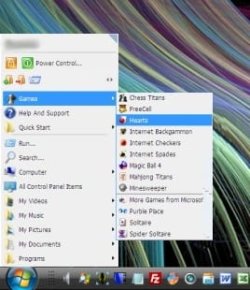
Classic Start Menu - My Solution

thomasw234

New member
Hi,

CSMenu is a classic start menu for Windows 7. It is now located at http://www.csmenu.com

Thanks,

Thomas
 

Attachments

  • 930d1244050193-windows-7-classic-start-menu-screenshot1.jpg
    930d1244050193-windows-7-classic-start-menu-screenshot1.jpg
    186.2 KB · Views: 2,152
  • 931d1244050310-windows-7-classic-start-menu-screenshot2.jpg
    931d1244050310-windows-7-classic-start-menu-screenshot2.jpg
    36.5 KB · Views: 641
Last edited:

My Computer

OS
Windows XP SP3, Windows 7 64bit
  • Like
Reactions: whs
I would prefer the start menu as it is now but well done anyway. Did you know you can kind of get the classic look if you right click task bar, toolbars and then activate desktop. Then near the system tray you will see desktop, go check it out, just like the old classic.
 

My Computer

Computer Manufacturer/Model Number
Custom Build.
OS
Windows 7 Ultimate x64.
CPU
i5 760 @ 4.2Ghz. 1.18v
Motherboard
Gigabyte - H55M-USB3
Memory
4g Corsair xms3 ddr3, 1600Mhz.
Graphics Card(s)
Gigabyte GTX-560Ti soc edition
Sound Card
Asus Xonar Dx - Logitech Z5500.
Monitor(s) Displays
Acer 22" LCD Wide screen 1680-1050 -Samsung 42" Plasma....
Screen Resolution
1680/1050 -----1920/1080p.
Hard Drives
2x 2TB Seagate Go Flex,
1x 1TB Seagate,
1x 640WD Black,
x16 Gig sandisc flash drive,
1x8Gig sandisc flash drive.
PSU
XigmaTek 80plus NRP-PC702 - 700w dual 30a.
Case
Venus Gamers Midi Tower Case with LED Display
Cooling
Arctic Freezer 7 Pro Rev 2... x2 Arctic F8 case fans........
Keyboard
Logitech G15-v2 Gaming.
Mouse
Microsoft Sidewinder X8.
Internet Speed
Virgin Media - 50mb down- 8mb up.
Other Info
x2 Xbox 360 wireless controllers...

Dual layer optical disc drive...

Chrome 79million

A.V = MSE
Yeah I was aware, thanks. I like the Aero theme, I just don't like the start menu which Windows 7 has :p The program is for my own personal use, I just thought I'd post it online incase anyone else wanted to use it :)
 

My Computer

OS
Windows XP SP3, Windows 7 64bit
That's great thomas234. I can't stand the normal vista/7 start menu, it's way to big. My solution is to use 'shortpopup' from my dock:
 

Attachments

  • menu.png
    menu.png
    343.9 KB · Views: 794

My Computer

Computer Manufacturer/Model Number
Generic
OS
Clients: XP/Win7/ubuntu
CPU
E8400
Motherboard
Gigabyte EP35-DS3R
Memory
4Gb HyperX
Graphics Card(s)
ATI 4850
Sound Card
Onboard
Monitor(s) Displays
Samsung P970
Screen Resolution
1280 by 1024
Hard Drives
Samsung SATA-II 500Gb x 3
PSU
Corsair HX520
Case
chieftec
Cooling
Zalman
Keyboard
Logitech
Mouse
Logitech
Internet Speed
512kb
Tried CS Menu, but found that I could not add my folders to it.

I'd like my Document folders to be in the classic menu, so they can expand to be opened.

Any way to do this?


Thanks


PS I f*(*! hate the design of 7, so many restrictions!
 

My Computer

OS
7
What folders do you want to add to the classic start menu and where?

And do you mean the "Documents" folder to be expanded (which is actually a link to the Recent Items folder), or the "Documents -> Documents", which is a link to the user's My Documents folder? Confusing, I know :)
 

My Computer

Computer Manufacturer/Model Number
Me :) I build all my PCs
OS
Windows 7 Home 64, Vista Ultimate 64
I'd like all my folders to expand in this menu, as they did in Vista.

I used to be able to drag any folders in there, and have them expand.


thanks
 

My Computer

OS
7
@ thomasw234

I tried this programme and I absolutely could not get it to look like the screenshot, My Power buttons were at the top, underneath them were links to other stuff, nothing I could do made it look as wonderful as yours. Mine looked pretty much like this except I couldn't even get the colour to change from the charcoal colour it was set to as standard.

Image1.jpg

Please could you tell me what version you used, free or pro, and what settings? Did I need to choose a non aero theme perhaps?

Thanks
 

My Computer

Computer type
PC/Desktop
Computer Manufacturer/Model Number
Custom Built
OS
Windows 7 Professional 64 bit
CPU
Intel Core i7 3820 @ 3.60GHz
Motherboard
ASUSTeK Computer INC. SABERTOOTH X79 (LGA2011)
Memory
32GB Kingston (KHX1600C9D3/4GB x 4) DDR3-1600 CL9 SDRAM
Graphics Card(s)
G247HYL (1920x1080@60Hz) 3071MB NVIDIA GeForce GTX 780 (NVID
Sound Card
Sound Blaster X-Fi Xtreme
Monitor(s) Displays
ACER S236HL LED
Screen Resolution
1920x1080@60Hz
Hard Drives
C Drive (OS) - 120GB Samsung SSD 850 EVO 120GB (SATA SSD)
D Drive (Internal Storage) - 2GB Western Digital WDC WD20EARX-00PASB0 (SATA )
E Drive (Internal Media) - 6GB Seagate ST6000DM003 (SATA )
Z Drive (External Backup/sync & Media) - 6GB Seagate
PSU
Corsair GS700 (80+ Bronze)
Case
Fractal Design Focus -G
Cooling
Corsair Hydro Series H80
Keyboard
Mocrosoft Soft Touch Standard
Mouse
Technet Basic 3-button
Internet Speed
52.2MB/s Down (no superfast in this area)
Antivirus
ESET Internet Security
Browser
Chrome/Waterfox
Some months ago the CSMenu website was taken over by the developer of another product - Classic Start Menu, and now offers his product. That's what you see here. I am unaware of any place where you can get the original CSMenu any more. I wouldn't recommend it anyway, because even the latest version has bugs (serious ones, like crashes) and there hasn't been any development on the project since February.

Please give Classic Shell a chance. It is now in its version 2.8.3, and is very stable and customizable. It has a variety of skins to choose from: Classic Shell: Gallery. You can even make your own skins.
 

My Computer

Computer Manufacturer/Model Number
Me :) I build all my PCs
OS
Windows 7 Home 64, Vista Ultimate 64
Thanks for the info Ivo, Classic Shell looks like a nice option, I am going to slap in Windows 7 here and try it.
 

My Computer

Computer type
PC/Desktop
Computer Manufacturer/Model Number
Custom Built
OS
Windows 7 Professional 64 bit
CPU
Intel Core i7 3820 @ 3.60GHz
Motherboard
ASUSTeK Computer INC. SABERTOOTH X79 (LGA2011)
Memory
32GB Kingston (KHX1600C9D3/4GB x 4) DDR3-1600 CL9 SDRAM
Graphics Card(s)
G247HYL (1920x1080@60Hz) 3071MB NVIDIA GeForce GTX 780 (NVID
Sound Card
Sound Blaster X-Fi Xtreme
Monitor(s) Displays
ACER S236HL LED
Screen Resolution
1920x1080@60Hz
Hard Drives
C Drive (OS) - 120GB Samsung SSD 850 EVO 120GB (SATA SSD)
D Drive (Internal Storage) - 2GB Western Digital WDC WD20EARX-00PASB0 (SATA )
E Drive (Internal Media) - 6GB Seagate ST6000DM003 (SATA )
Z Drive (External Backup/sync & Media) - 6GB Seagate
PSU
Corsair GS700 (80+ Bronze)
Case
Fractal Design Focus -G
Cooling
Corsair Hydro Series H80
Keyboard
Mocrosoft Soft Touch Standard
Mouse
Technet Basic 3-button
Internet Speed
52.2MB/s Down (no superfast in this area)
Antivirus
ESET Internet Security
Browser
Chrome/Waterfox
Thanks Ivo, I installed Windows 7 and tried this, what a beauty of a programme. I have to make it clear here I own an unopened retail of W7 Ultimate, but would not open it in case I didn't like it and had to sell it on.

Unfortunately the OS copy I installed was just that, a copy of a real one but unbeknown to me it was a pre-cracked one so when I finally configured W7 to look and act like I wanted, installed and configured all my software I could not register it like I could have done had it been a genuine copy and not hacked. I will now not install W7 all over again as it takes too long toget everything right, so I am selling my legit copy and have restored my PC with an Acronis Vista image made before the Win 7 Escapade:cry:.

The point is that the programme that you pointed out to me was indeed superb and free, and anyone who,like I did, wanted the classic Start Menu (with the added bonus of skins) should try this software. Thanks for telling me about it.
 

My Computer

Computer type
PC/Desktop
Computer Manufacturer/Model Number
Custom Built
OS
Windows 7 Professional 64 bit
CPU
Intel Core i7 3820 @ 3.60GHz
Motherboard
ASUSTeK Computer INC. SABERTOOTH X79 (LGA2011)
Memory
32GB Kingston (KHX1600C9D3/4GB x 4) DDR3-1600 CL9 SDRAM
Graphics Card(s)
G247HYL (1920x1080@60Hz) 3071MB NVIDIA GeForce GTX 780 (NVID
Sound Card
Sound Blaster X-Fi Xtreme
Monitor(s) Displays
ACER S236HL LED
Screen Resolution
1920x1080@60Hz
Hard Drives
C Drive (OS) - 120GB Samsung SSD 850 EVO 120GB (SATA SSD)
D Drive (Internal Storage) - 2GB Western Digital WDC WD20EARX-00PASB0 (SATA )
E Drive (Internal Media) - 6GB Seagate ST6000DM003 (SATA )
Z Drive (External Backup/sync & Media) - 6GB Seagate
PSU
Corsair GS700 (80+ Bronze)
Case
Fractal Design Focus -G
Cooling
Corsair Hydro Series H80
Keyboard
Mocrosoft Soft Touch Standard
Mouse
Technet Basic 3-button
Internet Speed
52.2MB/s Down (no superfast in this area)
Antivirus
ESET Internet Security
Browser
Chrome/Waterfox
Looks like the version you installed was not "cracked", but somebody else simply used that same key already. Without any cracks you can install Windows 7 and use it for 30 days without registering.

If you have a legit key you can simply go to the Computer properties and enter it. There is no need to reinstall anything.

But from the sound of it, it may be too late for you since you reimaged your system...
 

My Computer

Computer Manufacturer/Model Number
Me :) I build all my PCs
OS
Windows 7 Home 64, Vista Ultimate 64
Reinstalled from my bought retail DVD, and this Classic Shell and the clrSharp and clrSharp2 skins by John Edward make things perfect.
 

My Computer

Computer type
PC/Desktop
Computer Manufacturer/Model Number
Custom Built
OS
Windows 7 Professional 64 bit
CPU
Intel Core i7 3820 @ 3.60GHz
Motherboard
ASUSTeK Computer INC. SABERTOOTH X79 (LGA2011)
Memory
32GB Kingston (KHX1600C9D3/4GB x 4) DDR3-1600 CL9 SDRAM
Graphics Card(s)
G247HYL (1920x1080@60Hz) 3071MB NVIDIA GeForce GTX 780 (NVID
Sound Card
Sound Blaster X-Fi Xtreme
Monitor(s) Displays
ACER S236HL LED
Screen Resolution
1920x1080@60Hz
Hard Drives
C Drive (OS) - 120GB Samsung SSD 850 EVO 120GB (SATA SSD)
D Drive (Internal Storage) - 2GB Western Digital WDC WD20EARX-00PASB0 (SATA )
E Drive (Internal Media) - 6GB Seagate ST6000DM003 (SATA )
Z Drive (External Backup/sync & Media) - 6GB Seagate
PSU
Corsair GS700 (80+ Bronze)
Case
Fractal Design Focus -G
Cooling
Corsair Hydro Series H80
Keyboard
Mocrosoft Soft Touch Standard
Mouse
Technet Basic 3-button
Internet Speed
52.2MB/s Down (no superfast in this area)
Antivirus
ESET Internet Security
Browser
Chrome/Waterfox
classic shell is amazing. highly recommended for those who want the classic feel in windows 7.
 

My Computer

OS
Windows Xp, Windows 7, Ubuntu
+1 vote classic shell is angel. better than CSMEnu or similar brand.

unawave.de
 

My Computer

OS
windows 7
Classic Start Menu is Awesome!

I to was disappointed in the features of both the start menu and the file explorer in Windows 7. However, the program "Classic Shell" Welcome to Classic Shell allowed me to tweak it just like I want it! What a great program! Thanks very much for the developer!
 

My Computer

Computer Manufacturer/Model Number
Toshiba Qosmio F55-502
OS
Windows 7 Ultimate 32 bit
CPU
Intel Cord 2 Duo P7350
Motherboard
Toshiba
Memory
3Gb DDR2 400Mhz
Graphics Card(s)
nVidia GeForce 9700M GTS 512Mb
Sound Card
Realtek
Monitor(s) Displays
Toshiba 15.4"
Hard Drives
Hitachi SATA-300 5400rpm 320Gb
PSU
Toshiba
Case
Toshiba
Cooling
Toshiba
If you have a legit key you can simply go to the Computer properties and enter it. There is no need to reinstall anything.

But from the sound of it, it may be too late for you since you reimaged your system...

@ Ivo. I know it's been a long time but thank you, the new version of Classic Shell works beautifully in Windows 7 which I installed in a new PC yesterday, and registered it.... :D:D
 

My Computer

Computer type
PC/Desktop
Computer Manufacturer/Model Number
Custom Built
OS
Windows 7 Professional 64 bit
CPU
Intel Core i7 3820 @ 3.60GHz
Motherboard
ASUSTeK Computer INC. SABERTOOTH X79 (LGA2011)
Memory
32GB Kingston (KHX1600C9D3/4GB x 4) DDR3-1600 CL9 SDRAM
Graphics Card(s)
G247HYL (1920x1080@60Hz) 3071MB NVIDIA GeForce GTX 780 (NVID
Sound Card
Sound Blaster X-Fi Xtreme
Monitor(s) Displays
ACER S236HL LED
Screen Resolution
1920x1080@60Hz
Hard Drives
C Drive (OS) - 120GB Samsung SSD 850 EVO 120GB (SATA SSD)
D Drive (Internal Storage) - 2GB Western Digital WDC WD20EARX-00PASB0 (SATA )
E Drive (Internal Media) - 6GB Seagate ST6000DM003 (SATA )
Z Drive (External Backup/sync & Media) - 6GB Seagate
PSU
Corsair GS700 (80+ Bronze)
Case
Fractal Design Focus -G
Cooling
Corsair Hydro Series H80
Keyboard
Mocrosoft Soft Touch Standard
Mouse
Technet Basic 3-button
Internet Speed
52.2MB/s Down (no superfast in this area)
Antivirus
ESET Internet Security
Browser
Chrome/Waterfox
I have my Start Menu in Windows 7 just perfect now. The colour of the skin even matches pretty accurately my favourite colour for Windows. I never use glass so it looks really good. Another bonus is that I got rid of the stuff I don't need from it as well as the awful rollover tooltips that used to be there as well.

Mine looks like this and thanks again for pointing me to this superb little app.
 

Attachments

  • Image1.jpg
    Image1.jpg
    94.2 KB · Views: 12

My Computer

Computer type
PC/Desktop
Computer Manufacturer/Model Number
Custom Built
OS
Windows 7 Professional 64 bit
CPU
Intel Core i7 3820 @ 3.60GHz
Motherboard
ASUSTeK Computer INC. SABERTOOTH X79 (LGA2011)
Memory
32GB Kingston (KHX1600C9D3/4GB x 4) DDR3-1600 CL9 SDRAM
Graphics Card(s)
G247HYL (1920x1080@60Hz) 3071MB NVIDIA GeForce GTX 780 (NVID
Sound Card
Sound Blaster X-Fi Xtreme
Monitor(s) Displays
ACER S236HL LED
Screen Resolution
1920x1080@60Hz
Hard Drives
C Drive (OS) - 120GB Samsung SSD 850 EVO 120GB (SATA SSD)
D Drive (Internal Storage) - 2GB Western Digital WDC WD20EARX-00PASB0 (SATA )
E Drive (Internal Media) - 6GB Seagate ST6000DM003 (SATA )
Z Drive (External Backup/sync & Media) - 6GB Seagate
PSU
Corsair GS700 (80+ Bronze)
Case
Fractal Design Focus -G
Cooling
Corsair Hydro Series H80
Keyboard
Mocrosoft Soft Touch Standard
Mouse
Technet Basic 3-button
Internet Speed
52.2MB/s Down (no superfast in this area)
Antivirus
ESET Internet Security
Browser
Chrome/Waterfox
Back
Top