
You are using an out of date browser. It may not display this or other websites correctly.
You should upgrade or use an alternative browser.
You should upgrade or use an alternative browser.
Cannot create a new txt file in explorer - please help
- Thread starter anykey
- Start date

Dwarf
The Contemplator, (1963-2013)
Hi anykey,
This option is still available on my system. The following image shows the right click menu from the folder Libraries > Documents.
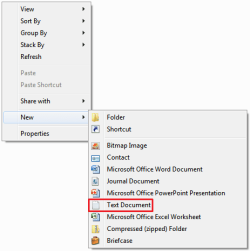
What do you get from the same location on yours?
This option is still available on my system. The following image shows the right click menu from the folder Libraries > Documents.
What do you get from the same location on yours?
My Computer
- Computer type
- PC/Desktop
- Computer Manufacturer/Model Number
- Dwarf Dwf/11/2012 r09/2013
- OS
- Windows 8.1 Pro RTM x64
- CPU
- Intel Core-i5-3570K 4-core @ 3.4GHz (Ivy Bridge) (OC 4.4GHz)
- Motherboard
- ASRock Z77 Extreme4-M
- Memory
- 4 x 4GB DDR3-1600 Corsair Vengeance CMZ8GX3M2A1600C9B (16GB)
- Graphics Card(s)
- MSI GeForce GTX770 Gaming OC 2GB
- Sound Card
- Realtek High Definition on board solution (ALC 898)
- Monitor(s) Displays
- ViewSonic VA1912w Widescreen (VGA)
- Screen Resolution
- 1440x900
- Hard Drives
- OCZ Agility 3 SSD 120GB SATA III x2 (RAID 0)
Samsung HD501LJ 500GB SATA II x2
Hitachi HDS721010CLA332 1TB SATA II
Iomega 1.5TB Ext USB 2.0
WD 2.0TB Ext USB 3.0
- PSU
- XFX Pro Series 850W Semi-Modular
- Case
- Gigabyte IF233
- Cooling
- 1 x 120mm Front Inlet 1 x 120mm Rear Exhaust
- Keyboard
- Microsoft Comfort Curve Keyboard 3000 (USB)
- Mouse
- Microsoft Comfort Mouse 3000 for Business (USB)
- Internet Speed
- NetGear DG834Gv3 ADSL Modem/Router (Ethernet) ~4.0 Mb/s (O2)
- Antivirus
- Avast! 8.0.1497
- Browser
- IE 11
- Other Info
- Optical Drive: HL-DT-ST BD-RE BH10LS30 SATA Bluray
Lexmark S305 Printer/Scanner/Copier (USB)
WEI Score: 8.1/8.1/8.5/8.5/8.25
Asus Eee PC 1011PX Netbook (Windows 7 x86 Starter)

anykey
New member
Hello Dwarf, righto I have done as requested and gone to the same location Libraries > Documents. (I am using build 7000)
Everything is the same as your image, with the exception of the menu item Text Document.
Instead I have the item Rich Text Document.
Which means that a MSWord Rich Text Document is created, whereas I require a straightforward Text Document like in your menu.
Any ideas please...
Everything is the same as your image, with the exception of the menu item Text Document.
Instead I have the item Rich Text Document.
Which means that a MSWord Rich Text Document is created, whereas I require a straightforward Text Document like in your menu.
Any ideas please...
My Computer
- OS
- Dual boot XP Pro and Seven/7127

limneos
MIA
Perhaps the default program for .txt extensions has been changed on your system.
Try creating any document, renaming it to .txt
(go to Organize - Folder Options and View , uncheck Hide Extensions for known file types )
, then right-click it , select Open With - Choose Default Program and select Notepad.
Then see if its fixed
Try creating any document, renaming it to .txt
(go to Organize - Folder Options and View , uncheck Hide Extensions for known file types )
, then right-click it , select Open With - Choose Default Program and select Notepad.
Then see if its fixed
My Computer
- Computer Manufacturer/Model Number
- ENIAC
- OS
- Windows 7 RC 7100 32bit/64bit
- CPU
- Intel Core2Duo E4500 2.20 GHz
- Motherboard
- ASUS P5LD2-X/1333
- Memory
- 2x1GB Kinsgston DDR2 800MHz
- Graphics Card(s)
- Nvidia 8500GT
- Sound Card
- Onboard High Definition Audio Device
- Monitor(s) Displays
- Sony Bravia 42"
- Case
- LINKW 2222
- Cooling
- Standard Intel
- Keyboard
- Some cheap one
- Mouse
- Microsoft Intellimouse something
- Internet Speed
- 24MBps ADSL

myzr7
MIA
Last edited:
My Computer
- Computer Manufacturer/Model Number
- Gateway GT5692
- OS
- Windows 7 Ulti. x64
- CPU
- AMD Phenom 8450 triple-core 2.10 ghz
- Memory
- 4GB
- Graphics Card(s)
- ATI Radion HD 3200
- Monitor(s) Displays
- Gateway FPD1775W
- Screen Resolution
- 1280x720
- Hard Drives
- 465.6613 Gibibytes
anykey
New member
Yes. I use Notepad++. I have done for a long time. I prefer it to MSNotepad.Perhaps the default program for .txt extensions has been changed on your system.
Thanks limneos.Try creating any document, renaming it to .txt
(go to Organize - Folder Options and View , uncheck Hide Extensions for known file types )
, then right-click it , select Open With - Choose Default Program and select Notepad.
Then see if its fixed
Righto, I have done what you said and re assigned the association to MSNotepad.
To test it. I clicked on a txt file and it opened in Notepad. (yuk
 )
)Howvever, on the right click context menu, I still have no option to create new txt doc.
Poo.
I have changed my associate back to Notepad++.
Is that it then. Am I stuck without this option

My Computer
- OS
- Dual boot XP Pro and Seven/7127
limneos
MIA
My Computer
- Computer Manufacturer/Model Number
- ENIAC
- OS
- Windows 7 RC 7100 32bit/64bit
- CPU
- Intel Core2Duo E4500 2.20 GHz
- Motherboard
- ASUS P5LD2-X/1333
- Memory
- 2x1GB Kinsgston DDR2 800MHz
- Graphics Card(s)
- Nvidia 8500GT
- Sound Card
- Onboard High Definition Audio Device
- Monitor(s) Displays
- Sony Bravia 42"
- Case
- LINKW 2222
- Cooling
- Standard Intel
- Keyboard
- Some cheap one
- Mouse
- Microsoft Intellimouse something
- Internet Speed
- 24MBps ADSL

limneos
MIA
My Computer
- Computer Manufacturer/Model Number
- ENIAC
- OS
- Windows 7 RC 7100 32bit/64bit
- CPU
- Intel Core2Duo E4500 2.20 GHz
- Motherboard
- ASUS P5LD2-X/1333
- Memory
- 2x1GB Kinsgston DDR2 800MHz
- Graphics Card(s)
- Nvidia 8500GT
- Sound Card
- Onboard High Definition Audio Device
- Monitor(s) Displays
- Sony Bravia 42"
- Case
- LINKW 2222
- Cooling
- Standard Intel
- Keyboard
- Some cheap one
- Mouse
- Microsoft Intellimouse something
- Internet Speed
- 24MBps ADSL
anykey
New member
Hooray hooray hooray.
I think you may has guessed that this time it worked, ha ha.
I ran the reg file and did a right click. I could not see any change.
No, I thought.
Right clicked again and the text document option is there.
Dunno if it was there first time and I missed it. I hardly think so.
Prolly getting too excited.
Umm, now something has happened.
I have WinPatrol running - you may know the Scotty Watchdog.
Now here's a funny thing.
WinPatrol is telling me that it has detected a change in file type associations.
And get this: from Notepad++ to MSNotepad.
Would your reg file have caused that...
I think you may has guessed that this time it worked, ha ha.
I ran the reg file and did a right click. I could not see any change.
No, I thought.
Right clicked again and the text document option is there.
Dunno if it was there first time and I missed it. I hardly think so.
Prolly getting too excited.
Umm, now something has happened.
I have WinPatrol running - you may know the Scotty Watchdog.
Now here's a funny thing.
WinPatrol is telling me that it has detected a change in file type associations.
And get this: from Notepad++ to MSNotepad.
Would your reg file have caused that...
My Computer
- OS
- Dual boot XP Pro and Seven/7127
Curious... What's a journal document? It's in my context menu, but when I clicked to create a new one and made it and then clicked on it asked me what program to open it with so apparently it has no default program to be opened with.
My Computer
- Computer Manufacturer/Model Number
- ASUS G73JH
- OS
- Windows 7 Ultimate x64
- CPU
- 1.6 GHZ i7-720QM
- Memory
- 12 GB @ 1333 mhz
- Graphics Card(s)
- AMD Radeon HD 5870M
- Screen Resolution
- 1600x900
- Hard Drives
- 120 GB SATA II SSD
500 GB HDD @ 7200 RPM
- Mouse
- Razer Death Adder
- Internet Speed
- 15 mb down, 1 mb up

limneos
MIA
Hooray hooray hooray.
I think you may has guessed that this time it worked, ha ha.
I ran the reg file and did a right click. I could not see any change.
No, I thought.
Right clicked again and the text document option is there.
Dunno if it was there first time and I missed it. I hardly think so.
Prolly getting too excited.
Umm, now something has happened.
I have WinPatrol running - you may know the Scotty Watchdog.
Now here's a funny thing.
WinPatrol is telling me that it has detected a change in file type associations.
And get this: from Notepad++ to MSNotepad.
Would your reg file have caused that...
Well the reg file only adds the ShellNew property to the registry.
Try changing back the assosiation to Notepad++, and if you lose the context menu again, there, you found the culprit.
Perhaps it's an incompatibility with Notepad++ and Win7 context menus. If changing to Notepad++ disables the New Text Document, let me know of the Path where notepad++.exe resides, and i will make you a reg file to use that instead.
My Computer
- Computer Manufacturer/Model Number
- ENIAC
- OS
- Windows 7 RC 7100 32bit/64bit
- CPU
- Intel Core2Duo E4500 2.20 GHz
- Motherboard
- ASUS P5LD2-X/1333
- Memory
- 2x1GB Kinsgston DDR2 800MHz
- Graphics Card(s)
- Nvidia 8500GT
- Sound Card
- Onboard High Definition Audio Device
- Monitor(s) Displays
- Sony Bravia 42"
- Case
- LINKW 2222
- Cooling
- Standard Intel
- Keyboard
- Some cheap one
- Mouse
- Microsoft Intellimouse something
- Internet Speed
- 24MBps ADSL
Dwarf
The Contemplator, (1963-2013)
Hi Fizban,Curious... What's a journal document? It's in my context menu, but when I clicked to create a new one and made it and then clicked on it asked me what program to open it with so apparently it has no default program to be opened with.
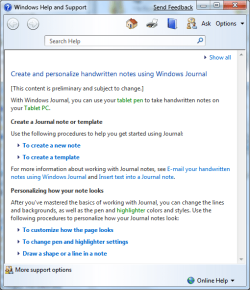
The following images should explain what this is. Basically, it is a tool that allows you to make hand written notes with a tablet pen on a tablet PC.
This is how these files appear.

When you select one of these, the following appears. Note that the first time you run it, you will be asked to install a printer driver, for which you will require administrative credentials.
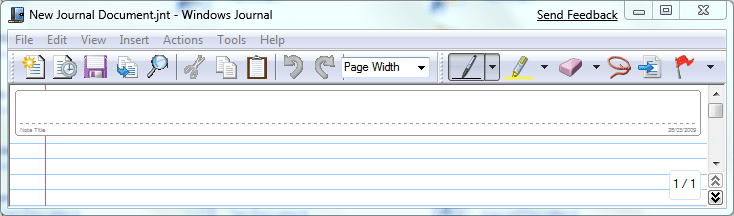
For more information, see Help.
My Computer
- Computer type
- PC/Desktop
- Computer Manufacturer/Model Number
- Dwarf Dwf/11/2012 r09/2013
- OS
- Windows 8.1 Pro RTM x64
- CPU
- Intel Core-i5-3570K 4-core @ 3.4GHz (Ivy Bridge) (OC 4.4GHz)
- Motherboard
- ASRock Z77 Extreme4-M
- Memory
- 4 x 4GB DDR3-1600 Corsair Vengeance CMZ8GX3M2A1600C9B (16GB)
- Graphics Card(s)
- MSI GeForce GTX770 Gaming OC 2GB
- Sound Card
- Realtek High Definition on board solution (ALC 898)
- Monitor(s) Displays
- ViewSonic VA1912w Widescreen (VGA)
- Screen Resolution
- 1440x900
- Hard Drives
- OCZ Agility 3 SSD 120GB SATA III x2 (RAID 0)
Samsung HD501LJ 500GB SATA II x2
Hitachi HDS721010CLA332 1TB SATA II
Iomega 1.5TB Ext USB 2.0
WD 2.0TB Ext USB 3.0
- PSU
- XFX Pro Series 850W Semi-Modular
- Case
- Gigabyte IF233
- Cooling
- 1 x 120mm Front Inlet 1 x 120mm Rear Exhaust
- Keyboard
- Microsoft Comfort Curve Keyboard 3000 (USB)
- Mouse
- Microsoft Comfort Mouse 3000 for Business (USB)
- Internet Speed
- NetGear DG834Gv3 ADSL Modem/Router (Ethernet) ~4.0 Mb/s (O2)
- Antivirus
- Avast! 8.0.1497
- Browser
- IE 11
- Other Info
- Optical Drive: HL-DT-ST BD-RE BH10LS30 SATA Bluray
Lexmark S305 Printer/Scanner/Copier (USB)
WEI Score: 8.1/8.1/8.5/8.5/8.25
Asus Eee PC 1011PX Netbook (Windows 7 x86 Starter)
anykey
New member
Hello limneos, umm, well it all seems to be working well this morningTry changing back the association to Notepad++, and if you lose the context menu again, there, you found the culprit.
Perhaps it's an incompatibility with Notepad++ and Win7 context menus. If changing to Notepad++ disables the New Text Document, let me know of the Path where notepad++.exe resides, and i will make you a reg file to use that instead.

I cannot understand why.
Yesterday, When Winpatrol asked permission to change the association (from Notepad++ to MSNotepad) I agreed, and I could then create a new txt file per your reg file.
I tried again now and I can still create a new txt file. Hooray.
Clicking to open it, it opens in Notepad++. Hooray.
I checked the association using Set Associations, and it says Notepad++.
Nevermind, I think Winpatrol has got it's knickers in a twist.
So, at the time of writing all is well.
Maybe you can show me the path in the registry that you corrected.
btw the Program Files path is:
E:\Program Files\Notepad++
but I don't think you need that now.
Thanks again for all your help,
anykey
My Computer
- OS
- Dual boot XP Pro and Seven/7127
Hi Fizban,
The following images should explain what this is. Basically, it is a tool that allows you to make hand written notes with a tablet pen on a tablet PC.
This is how these files appear.
View attachment 6499
When you select one of these, the following appears. Note that the first time you run it, you will be asked to install a printer driver, for which you will require administrative credentials.
View attachment 6500
For more information, see Help.
View attachment 6501
Ahh, that explains why I'd never used them, never owned a tablet PC.
My Computer
- Computer Manufacturer/Model Number
- ASUS G73JH
- OS
- Windows 7 Ultimate x64
- CPU
- 1.6 GHZ i7-720QM
- Memory
- 12 GB @ 1333 mhz
- Graphics Card(s)
- AMD Radeon HD 5870M
- Screen Resolution
- 1600x900
- Hard Drives
- 120 GB SATA II SSD
500 GB HDD @ 7200 RPM
- Mouse
- Razer Death Adder
- Internet Speed
- 15 mb down, 1 mb up
Dwarf
The Contemplator, (1963-2013)
Hi Fizban,
You don't have to have a tablet PC. The program works perfectly well with the mouse, and I suspect that it will work just as well with a USB tablet pad and pen (although I haven't tried this).
You don't have to have a tablet PC. The program works perfectly well with the mouse, and I suspect that it will work just as well with a USB tablet pad and pen (although I haven't tried this).
My Computer
- Computer type
- PC/Desktop
- Computer Manufacturer/Model Number
- Dwarf Dwf/11/2012 r09/2013
- OS
- Windows 8.1 Pro RTM x64
- CPU
- Intel Core-i5-3570K 4-core @ 3.4GHz (Ivy Bridge) (OC 4.4GHz)
- Motherboard
- ASRock Z77 Extreme4-M
- Memory
- 4 x 4GB DDR3-1600 Corsair Vengeance CMZ8GX3M2A1600C9B (16GB)
- Graphics Card(s)
- MSI GeForce GTX770 Gaming OC 2GB
- Sound Card
- Realtek High Definition on board solution (ALC 898)
- Monitor(s) Displays
- ViewSonic VA1912w Widescreen (VGA)
- Screen Resolution
- 1440x900
- Hard Drives
- OCZ Agility 3 SSD 120GB SATA III x2 (RAID 0)
Samsung HD501LJ 500GB SATA II x2
Hitachi HDS721010CLA332 1TB SATA II
Iomega 1.5TB Ext USB 2.0
WD 2.0TB Ext USB 3.0
- PSU
- XFX Pro Series 850W Semi-Modular
- Case
- Gigabyte IF233
- Cooling
- 1 x 120mm Front Inlet 1 x 120mm Rear Exhaust
- Keyboard
- Microsoft Comfort Curve Keyboard 3000 (USB)
- Mouse
- Microsoft Comfort Mouse 3000 for Business (USB)
- Internet Speed
- NetGear DG834Gv3 ADSL Modem/Router (Ethernet) ~4.0 Mb/s (O2)
- Antivirus
- Avast! 8.0.1497
- Browser
- IE 11
- Other Info
- Optical Drive: HL-DT-ST BD-RE BH10LS30 SATA Bluray
Lexmark S305 Printer/Scanner/Copier (USB)
WEI Score: 8.1/8.1/8.5/8.5/8.25
Asus Eee PC 1011PX Netbook (Windows 7 x86 Starter)

garysgold
MIA
Works fine with my wacom USB tablet and pen.
Gary
Gary
My Computer
- Computer Manufacturer/Model Number
- Dell XPS420
- OS
- Vista Ult 64 bit Seven Ult RTM x64
- CPU
- Intel Core2 Quad Q6600 2.40 gigahertz
- Memory
- Crucial Ballistix 4x2GB PC2 6400
- Graphics Card(s)
- NVIDIA GeForce 8600 GTS 256 MB
- Sound Card
- Creative SB X-Fi audio
- Monitor(s) Displays
- HP w2207 + HPvs15
- Screen Resolution
- 1680x1050 + 1024x768
- Hard Drives
- 2-WD5000AAKS-500 GB
WD5000AAV-500 GB external
- Keyboard
- Microsoft Comfort Curve
- Mouse
- MX Revolution
- Other Info
- Wacom Intuos 2 Graphics Tablet
Experience Index=5.5
princerouge
New member
Reg fix file number 1 worked for me. I see it just puts in a registry entry for .txt that I saw somewhere on another forum but the other forum confused me.
I think the guilty culprit for me was Ccleaner. I love that program but will have to look more carefully when running the reg cleaner after an update. I've gotten so used to trusting it because it always works perfectly and keeps my registry clean of crap so I blindly clicked on fix problems without saving a backup. duh, not to brite on my part.
This must be something that several AV and reg cleaning programs have falsely called a bad registry entry because I saw the same problem in many places while searching for this.
Oh well, good to have a fix now.
Thanks
I think the guilty culprit for me was Ccleaner. I love that program but will have to look more carefully when running the reg cleaner after an update. I've gotten so used to trusting it because it always works perfectly and keeps my registry clean of crap so I blindly clicked on fix problems without saving a backup. duh, not to brite on my part.
This must be something that several AV and reg cleaning programs have falsely called a bad registry entry because I saw the same problem in many places while searching for this.
Oh well, good to have a fix now.
Thanks
My Computer
- OS
- XP, Vista, 7