Open With - Change Default Program

How to Change the Default Program a File Type Opens With in Windows 7

   Information
A default program is the program that Windows 7 uses when you open a particular type of file extension. This will show you how to change a file type to open with a different default program for just this one time or always using the context menu in Windows 7.

These Default Programs association settings are a per user setting and not applied to all users.


Here's How:
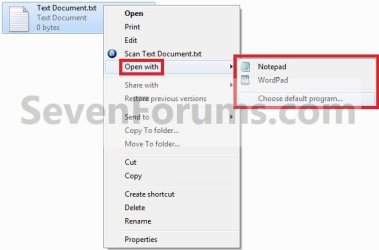
1. Right click on the file type (ex: .txt file) that you want to change the default program for, then click on Open with. (see screenshot below)
Step1.jpg

   Note
If you do not have Open with in the context menu, then this means this file does not have a program associated to open it with.
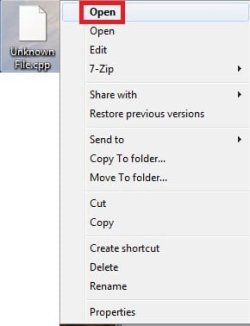
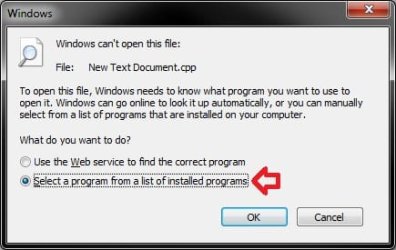
  • Instead, click on Open.
Open-1.jpg
  • Select (dot) Select a program from a list of installed programs, and click on OK.
  • Go to step 3.
Open.jpg


2. To Select a Program that is Already Listed in Context Menu
NOTE: This option will only open the file type with this program for just this one time and not everytime by default.
A) After you have expanded Open with, select a listed program (ex: Notepad or Wordpad) that you want to open the file with for just this one time. (see screenshot below)
Step1.jpg
B) Go to step 4.
3. To Select a Program that is Not Listed in Context Menu
NOTE: This option will allow you to be able to select to have the file type to always open with the selected program by default if you like.
A) After you have expanded Open with, select Choose default program. (see screenshot below step 1)

B) Under Other Programs, click on the drop down arrow to the far right to exapnd it and see more programs to select from. (See screenshot below)
Step2.jpg
C) Select the program that you want to open the file with. (See screenshot above)
NOTE: If the program you wanted to select is still not listed, then click on the Browse button and navigate to the program's exe file. Select it, and click on the Open button to add it to be able to select it.


D) To Always Open this File Type with the Selected Program by Default
  • Check the Always use the selected program to open this kind of file box. (See screenshot below step 3B)
  • Go to step 3F.
E) To Only Open this File Type with the Selected Program for Just this One Time
  • Uncheck the Always use the selected program to open this kind of file box. (See screenshot below step 3B)
F) Click on OK. (See screenshot below step 3B)
4. The file will now be opened by the selected program.
That's it,
Shawn


Last edited:

My Computer

Computer type
PC/Desktop
Computer Manufacturer/Model Number
Self built custom
OS
64-bit Windows 11 Pro for Workstations
CPU
Intel i7-8700K OC'd to 5 GHz
Motherboard
ASUS ROG Maximus XI Formula Z390
Memory
64 GB (4x16GB) G.SKILL TridentZ RGB DDR4 3600 MHz
Graphics Card(s)
ASUS ROG-STRIX-GTX1080TI-O11G-GAMING
Sound Card
Integrated
Monitor(s) Displays
2 x Samsung Odyssey G7 27"
Screen Resolution
2560x1440
Hard Drives
1TB Samsung 990 PRO M.2,
4TB Samsung 990 PRO PRO M.2,
TerraMaster F8 SSD Plus NAS
PSU
Seasonic Prime Titanium 850W
Case
Thermaltake Core P3
Cooling
Corsair Hydro H115i
Keyboard
Logitech wireless K800
Mouse
Logitech MX Master 4
Internet Speed
2 Gb/s Download and 100 Mb/s Upload
Antivirus
Malwarebyte Anti-Malware Premium
Browser
Google Chrome
Other Info
Logitech Z625 speaker system,
Logitech BRIO 4K Pro webcam,
HP Color LaserJet Pro MFP M477fdn,
APC SMART-UPS RT 1000 XL - SURT1000XLI,
Galaxy S23 Plus phone
Worked perfectly,leaving no trace of that pesky program that was trying to constantly associate itself with the .ISO!
 

My Computer

OS
xp
That's great news Dosucol. :)
 

My Computer

Computer type
PC/Desktop
Computer Manufacturer/Model Number
Self built custom
OS
64-bit Windows 11 Pro for Workstations
CPU
Intel i7-8700K OC'd to 5 GHz
Motherboard
ASUS ROG Maximus XI Formula Z390
Memory
64 GB (4x16GB) G.SKILL TridentZ RGB DDR4 3600 MHz
Graphics Card(s)
ASUS ROG-STRIX-GTX1080TI-O11G-GAMING
Sound Card
Integrated
Monitor(s) Displays
2 x Samsung Odyssey G7 27"
Screen Resolution
2560x1440
Hard Drives
1TB Samsung 990 PRO M.2,
4TB Samsung 990 PRO PRO M.2,
TerraMaster F8 SSD Plus NAS
PSU
Seasonic Prime Titanium 850W
Case
Thermaltake Core P3
Cooling
Corsair Hydro H115i
Keyboard
Logitech wireless K800
Mouse
Logitech MX Master 4
Internet Speed
2 Gb/s Download and 100 Mb/s Upload
Antivirus
Malwarebyte Anti-Malware Premium
Browser
Google Chrome
Other Info
Logitech Z625 speaker system,
Logitech BRIO 4K Pro webcam,
HP Color LaserJet Pro MFP M477fdn,
APC SMART-UPS RT 1000 XL - SURT1000XLI,
Galaxy S23 Plus phone
Hello there. I wonder if any of you guys might be able to help me with a slight issue I'm having in Win7 regarding opening files with a different program.

I want to open video files in mediaplayerclassic as opposed to Windows Media Player. When I first installed the OS, I just right clicked the files I wanted to open, such as .avi and .wmv, and changed the default to MPC which worked a treat.

For some reason, now when I double click a file, Windows asks me what I want to use to open the file and MPC is not in the list of options. Even when I navigate to either the shortcut or the .exe file itself and select that to open it, the file does not open in MPC and the icon does not appear in the 'choose default programme' dialogue box. It's very strange!

If I open MPC and then drag a video file into it there is no problem, but it does not want to do it by default!

Any suggestions? Thanks for reading.
 

My Computer

OS
Windows 7 Professional
Hello JP, and welcome to Seven Forums.

Have you already tried to see if you selecting the program's exe file for the file extension in Default Programs may work instead?

Hope this helps,
Shawn
 

My Computer

Computer type
PC/Desktop
Computer Manufacturer/Model Number
Self built custom
OS
64-bit Windows 11 Pro for Workstations
CPU
Intel i7-8700K OC'd to 5 GHz
Motherboard
ASUS ROG Maximus XI Formula Z390
Memory
64 GB (4x16GB) G.SKILL TridentZ RGB DDR4 3600 MHz
Graphics Card(s)
ASUS ROG-STRIX-GTX1080TI-O11G-GAMING
Sound Card
Integrated
Monitor(s) Displays
2 x Samsung Odyssey G7 27"
Screen Resolution
2560x1440
Hard Drives
1TB Samsung 990 PRO M.2,
4TB Samsung 990 PRO PRO M.2,
TerraMaster F8 SSD Plus NAS
PSU
Seasonic Prime Titanium 850W
Case
Thermaltake Core P3
Cooling
Corsair Hydro H115i
Keyboard
Logitech wireless K800
Mouse
Logitech MX Master 4
Internet Speed
2 Gb/s Download and 100 Mb/s Upload
Antivirus
Malwarebyte Anti-Malware Premium
Browser
Google Chrome
Other Info
Logitech Z625 speaker system,
Logitech BRIO 4K Pro webcam,
HP Color LaserJet Pro MFP M477fdn,
APC SMART-UPS RT 1000 XL - SURT1000XLI,
Galaxy S23 Plus phone
Hey Shawn,

Thanks for such a quick response.

I wasn't aware of that menu option in control panel. I've gone in there and tried to change the default program again to MPC with no luck.

I go to the file extension, for example avi, then click 'change program', which brings up the same dialogue box as when you right click a file -> open with -> choose default program. MPC is a standalone .exe file which does not require installation, so I just created a folder for it in my program files subdirectory. The exe sits in there so I navigate to that and click 'select' but it returns me to the choose default program dialogue box and MPC is not there. Same thing happens if I create a shortcut to MPC.exe.

Strangely, MPC is listed as the default program for other files, so it's not like it's completely gone off the radar!

I'm bamboozled! What do you reckon?
 

My Computer

OS
Windows 7 Professional

My Computer

Computer type
PC/Desktop
Computer Manufacturer/Model Number
Self built custom
OS
64-bit Windows 11 Pro for Workstations
CPU
Intel i7-8700K OC'd to 5 GHz
Motherboard
ASUS ROG Maximus XI Formula Z390
Memory
64 GB (4x16GB) G.SKILL TridentZ RGB DDR4 3600 MHz
Graphics Card(s)
ASUS ROG-STRIX-GTX1080TI-O11G-GAMING
Sound Card
Integrated
Monitor(s) Displays
2 x Samsung Odyssey G7 27"
Screen Resolution
2560x1440
Hard Drives
1TB Samsung 990 PRO M.2,
4TB Samsung 990 PRO PRO M.2,
TerraMaster F8 SSD Plus NAS
PSU
Seasonic Prime Titanium 850W
Case
Thermaltake Core P3
Cooling
Corsair Hydro H115i
Keyboard
Logitech wireless K800
Mouse
Logitech MX Master 4
Internet Speed
2 Gb/s Download and 100 Mb/s Upload
Antivirus
Malwarebyte Anti-Malware Premium
Browser
Google Chrome
Other Info
Logitech Z625 speaker system,
Logitech BRIO 4K Pro webcam,
HP Color LaserJet Pro MFP M477fdn,
APC SMART-UPS RT 1000 XL - SURT1000XLI,
Galaxy S23 Plus phone
Hi there Brink

Sorry for the delayed response to your post.

I have reset all of the file types that seem to have 'lost' their association to MPC. Unfortunately when I try and change the default opening program with them, I get the same issue. I can navigate to either the MPC shortcut or executable, but when I select it it does not appear in the list of available programs in the dialogue box.

Perhaps I will just have to learn to love WMP instead! Unless you can think of anything else I might be able to try?

Thanks again,

James
 

My Computer

OS
Windows 7 Professional
Hello James,

It may be since it's a standalone EXE file. I'm not sure if you will be able to with it. :(
 

My Computer

Computer type
PC/Desktop
Computer Manufacturer/Model Number
Self built custom
OS
64-bit Windows 11 Pro for Workstations
CPU
Intel i7-8700K OC'd to 5 GHz
Motherboard
ASUS ROG Maximus XI Formula Z390
Memory
64 GB (4x16GB) G.SKILL TridentZ RGB DDR4 3600 MHz
Graphics Card(s)
ASUS ROG-STRIX-GTX1080TI-O11G-GAMING
Sound Card
Integrated
Monitor(s) Displays
2 x Samsung Odyssey G7 27"
Screen Resolution
2560x1440
Hard Drives
1TB Samsung 990 PRO M.2,
4TB Samsung 990 PRO PRO M.2,
TerraMaster F8 SSD Plus NAS
PSU
Seasonic Prime Titanium 850W
Case
Thermaltake Core P3
Cooling
Corsair Hydro H115i
Keyboard
Logitech wireless K800
Mouse
Logitech MX Master 4
Internet Speed
2 Gb/s Download and 100 Mb/s Upload
Antivirus
Malwarebyte Anti-Malware Premium
Browser
Google Chrome
Other Info
Logitech Z625 speaker system,
Logitech BRIO 4K Pro webcam,
HP Color LaserJet Pro MFP M477fdn,
APC SMART-UPS RT 1000 XL - SURT1000XLI,
Galaxy S23 Plus phone
lnk associated with notepad

I am having the same unresolved problem steephen had back on pages 1 and 2. The problem is this, I accidentally set Notepad as the default program for opening .lnk shortcuts. So now all my shortcuts and my start menu just open the .lnk file in notepad.

Can some one go to 'Set Associations' and tell me what Windows' factory setting is for the .lnk association? (I think it had the word 'shell' in it.) Hopefully I can manually set it back to what it was.
 

My Computer

OS
Windows 7 Home Premium
I am having the same unresolved problem steephen had back on pages 1 and 2. The problem is this, I accidentally set Notepad as the default program for opening .lnk shortcuts. So now all my shortcuts and my start menu just open the .lnk file in notepad.

Can some one go to 'Set Associations' and tell me what Windows' factory setting is for the .lnk association? (I think it had the word 'shell' in it.) Hopefully I can manually set it back to what it was.

Hello Welcome to SF,

This Tutorial should help http://www.sevenforums.com/tutorials/19449-default-file-type-associations-restore.html there download the .lnk (LNK) file http://www.sevenforums.com/attachme...sociations-restore-default_lnk_-shortcut-.zip

Hope this helps,
Captain
 
Last edited by a moderator:

My Computer

Computer Manufacturer/Model Number
Samsung NP550P5C-S02IN
OS
Windows 7 Ultimate - 64-bit | Windows 8 Pro - 64-bit
CPU
Intel® Core™ i7 Processor 3,610QM (2.30Hz, 6MB L3 Cach
Memory
8 GB
Graphics Card(s)
NVIDIA® GeForce® GT 650M 2GB Graphics, Optimus™ techno
Sound Card
SoundAlive™ JBL 3 Speakers (With sub-Woofer)
Monitor(s) Displays
39.62cm (15.6) SuperBright 300nit HD+ LED Display
Screen Resolution
1,600 x 900, Anti-Reflective
Hard Drives
1TB S-ATA II Hard Drive (5,400RPM)
Yes, that did it.

I was thinking I might have to do a complete re-install. Thank you!
 

My Computer

OS
Windows 7 Home Premium

My Computer

Computer Manufacturer/Model Number
Samsung NP550P5C-S02IN
OS
Windows 7 Ultimate - 64-bit | Windows 8 Pro - 64-bit
CPU
Intel® Core™ i7 Processor 3,610QM (2.30Hz, 6MB L3 Cach
Memory
8 GB
Graphics Card(s)
NVIDIA® GeForce® GT 650M 2GB Graphics, Optimus™ techno
Sound Card
SoundAlive™ JBL 3 Speakers (With sub-Woofer)
Monitor(s) Displays
39.62cm (15.6) SuperBright 300nit HD+ LED Display
Screen Resolution
1,600 x 900, Anti-Reflective
Hard Drives
1TB S-ATA II Hard Drive (5,400RPM)
How to select a PROTOCOL that is not listed?

The Browse button in step 3 only appears for file types, not for protocols such as mailto:
My mail program is not listed in the defaults when I click "change program" for this protocol, and that screen does not have a Browse button.
How can I add a program to that selection list, so that I can make it my default?
 

My Computer

OS
windows 7
The Browse button in step 3 only appears for file types, not for protocols such as mailto:
My mail program is not listed in the defaults when I click "change program" for this protocol, and that screen does not have a Browse button.
How can I add a program to that selection list, so that I can make it my default?

Mail program is....?
 

My Computer

Computer Manufacturer/Model Number
Self
OS
W7, Xp Pro
CPU
AMD Sempron 2600+
Motherboard
K8V-MX
Memory
1GB
Graphics Card(s)
Radeon HD3650
Sound Card
Soundmax
Monitor(s) Displays
17" HP CRT
Screen Resolution
1024x768
Hard Drives
1x WDC WD800BB
1x HDS728080
PSU
? 460W
Case
Coolermaster
Cooling
enough
Keyboard
M$S
Mouse
Optical
Internet Speed
1500kbs
Other Info
OLD!!! does the job i need.
I've gone in there and tried to change the default program again to MPC with no luck.

I go to the file extension, for example avi, then click 'change program', which brings up the same dialogue box as when you right click a file -> open with -> choose default program. MPC is a standalone .exe file which does not require installation, so I just created a folder for it in my program files subdirectory. The exe sits in there so I navigate to that and click 'select' but it returns me to the choose default program dialogue box and MPC is not there. Same thing happens if I create a shortcut to MPC.exe.
I've had the same issue with MPC, been trying to restore the file associations for days but no success :(
 

My Computer

Computer Manufacturer/Model Number
Self-built
OS
Win7 Pro; Linux Mint 7
CPU
E8500 @ 3.8GHz
Motherboard
Asus P5QL PRO
Memory
Corsair XMS2 2GB @800MHz
Graphics Card(s)
Nvidia 9800GT
Sound Card
onboard
Hard Drives
Western Digital Caviar 500GB x2
Hi, thanks for the guide, really saves one a lot of time explaining to clients how to do this. Just ping them this link and done.

I've one tiny remark. Should the step 2B really say "Go to step 3D/3E". Or, better yet, how about moving steps 3D and 3E under step 4?

Cheers!
 

My Computer

OS
Windows 7 Ultimate 64bit, Windows 7 Professional 32bit, MacOS X Snow Leopard
You're most welcome Janci, and welcome to Seven Forums.

I can see where that may get a little confusing. I reworded it a bit to help. Please let me know if you think that it may need more.

Thank you. :)
 

My Computer

Computer type
PC/Desktop
Computer Manufacturer/Model Number
Self built custom
OS
64-bit Windows 11 Pro for Workstations
CPU
Intel i7-8700K OC'd to 5 GHz
Motherboard
ASUS ROG Maximus XI Formula Z390
Memory
64 GB (4x16GB) G.SKILL TridentZ RGB DDR4 3600 MHz
Graphics Card(s)
ASUS ROG-STRIX-GTX1080TI-O11G-GAMING
Sound Card
Integrated
Monitor(s) Displays
2 x Samsung Odyssey G7 27"
Screen Resolution
2560x1440
Hard Drives
1TB Samsung 990 PRO M.2,
4TB Samsung 990 PRO PRO M.2,
TerraMaster F8 SSD Plus NAS
PSU
Seasonic Prime Titanium 850W
Case
Thermaltake Core P3
Cooling
Corsair Hydro H115i
Keyboard
Logitech wireless K800
Mouse
Logitech MX Master 4
Internet Speed
2 Gb/s Download and 100 Mb/s Upload
Antivirus
Malwarebyte Anti-Malware Premium
Browser
Google Chrome
Other Info
Logitech Z625 speaker system,
Logitech BRIO 4K Pro webcam,
HP Color LaserJet Pro MFP M477fdn,
APC SMART-UPS RT 1000 XL - SURT1000XLI,
Galaxy S23 Plus phone
Re: 4. The file will now be opened by the selected program.

No, it won't be opened by the selected program. Not always, anyway. ;-)

Seems I'm having the same problem as JPComben and Codify.

I copied a simple little '.exe' onto my laptop (in Program Files) to produce '.lob' files (which are basically html pages that be turned into web pages), and it works just fine. I can create '.lobs' with no problem

However, when I want to open a '.lob' I've created (using 'Open with'), although I can select the program, it won't appear in the box. :sarc:

I tried the 'compatibility' troubleshooter and was told the program is not compatible. But like I said, when I access it directly, it works just fine.

It's not a big issue - it's just annoying to have to open the '.exe' every time I want to work on a '.lob'.

Is there any way of 'forcing' Windows to recognise the existence of a program?

Cheers,
David
 
Last edited:

My Computer

OS
Windows 7 Home Premium 64bit
Back
Top