
Navigation Pane - Show All Folders

How to Show or Not "Show All Folders" in the Windows 7 Navigation Pane

   Information
This will show you how to set the Windows 7 Navigation pane to Show or Not Show all folders in the Folder Tree automatically. You can still manually expand the folders not shown to see them though.

   Tip
If you check the Show All Folders option, it will also add your user profile folder, Control Panel, and Recycle Bin in the Windows Explorer Navigation Pane.

   Warning
If you have "Show all folders" checked, then the Show in Navigation Pane option for libraries will be grayed out.

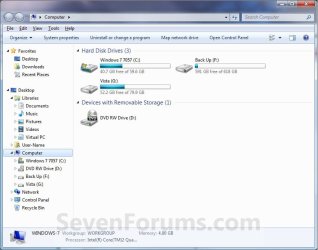
EXAMPLE: Not Show All Folders in the Navigation Pane
NOTE: This is the default setting in Windows 7.
t_Show_All_Folders.jpg
EXAMPLE: Show All Folders in the Navigation Pane Example_Show_all_folders.jpg


OPTION ONE

To Turn "Show all folders" On or Off from Navigation Pane

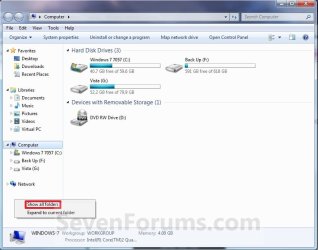
1. Right click on a empty space in the Navigation Pane.

2. To Not Show All Folders in Navigation Pane A) Click on Show all folders to uncheck it. (See screenshot below)
NOTE: This is the default setting.
Show_all_folders.jpg
3. To Show All Folders in Navigation Pane A) Click on Show all folders to check it. (See screenshot above)


OPTION TWO

To Turn "Show all folders" On or Off from Folder Options
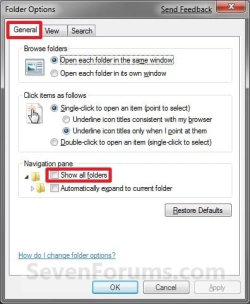
1. Open Folder Options, and click on the General tab. (See screenshot below) Folder_Options.jpg
2. To Not Show All Folders in Navigation Pane A) Uncheck the Show all folders box. (See screenshot above)
NOTE: This is the default setting.

B) Go to step 4.
3. To Show All Folders in Navigation Pane A) Check the Show all folders box. (See screenshot below step 1)
4. Click on OK. (See screenshot below step 1)


OPTION THREE

To Turn "Show all folders" On or Off using a REG File Download

1. To Show All Folders in Navigation Pane A) Click on the Download button below to download the file below. Show_All_Folders_Navigation_Pane.reg

Download


B) Go to step 3.
2. To Not Show All Folders in Navigation Pane A) Click on the Download button below to download the file below.
NOTE: This is the default setting. Not_Show_All_Folders_Navigation_Pane.reg

Download


3. Save the .reg file to the desktop.

4. Right click on the downloaded .reg file, and click on Merge.

5. Click on Run, Yes, Yes, and OK when prompted.

6. If open, close and reopen Windows Explorer to see the changes.
NOTE: If you do not see a change, then log off and log on, or restart the computer to apply.

7. When done, you can delete the downloaded .reg file if you like.


OPTION FOUR

To Turn "Show all folders" On or Off Manually in Registry Editor

1. Open the Start Menu, then type regedit in the search box and press Enter.

2. If prompted by UAC, then click on Yes.

3. In regedit, navigate to the location below. (see screenshot below)

Code:
HKEY_CURRENT_USER\Software\Microsoft\Windows\CurrentVersion\Explorer\Advanced
REG-1.jpg
4. In the right pane of Advanced, right click on NavPaneShowAllFolders and click on Modify. (see screenshot above)

5. To Not Show All Folders in Navigation Pane A) Type 0 (number zero), and click on OK. (see screenshot below)
NOTE: This is the default setting. REG-2.jpg
B) Go to step 7.
6. To Show All Folders in Navigation Pane A) Type 1, and click on OK. (see screenshot above)
7. Close regedit.

8. If open, close and reopen Windows Explorer to see the changes.
NOTE: If you do not see a change, then log off and log on, or restart the computer to apply.
That's it,
Shawn


Attachments

Last edited:
So, if you uncheck in Show all folders box, you can click on arrow, and all folder will appear, see screenshot below:

EasyCapture1-26.jpg


EasyCapture2-22.jpg
 

My Computer

Computer Manufacturer/Model Number
Lenovo 3000 G400
OS
Windows 7
CPU
Intel Penium Dual Core
Motherboard
Lenovo
Memory
2GB
Graphics Card(s)
256MB onboard
Monitor(s) Displays
14'1 Inch, TFT
Screen Resolution
1280 x 1024
Hard Drives
120BG
Hello Quốc Hùng UIT-VN,

Yes, you can still open and expand the folders. This tutorial just shows you how to just have them show or not show automatically. :geek:
 

My Computer

Computer type
PC/Desktop
Computer Manufacturer/Model Number
Self built custom
OS
64-bit Windows 11 Pro for Workstations
CPU
Intel i7-8700K OC'd to 5 GHz
Motherboard
ASUS ROG Maximus XI Formula Z390
Memory
64 GB (4x16GB) G.SKILL TridentZ RGB DDR4 3600 MHz
Graphics Card(s)
ASUS ROG-STRIX-GTX1080TI-O11G-GAMING
Sound Card
Integrated
Monitor(s) Displays
2 x Samsung Odyssey G7 27"
Screen Resolution
2560x1440
Hard Drives
1TB Samsung 990 PRO M.2,
4TB Samsung 990 PRO PRO M.2,
TerraMaster F8 SSD Plus NAS
PSU
Seasonic Prime Titanium 850W
Case
Thermaltake Core P3
Cooling
Corsair Hydro H115i
Keyboard
Logitech wireless K800
Mouse
Logitech MX Master 4
Internet Speed
2 Gb/s Download and 100 Mb/s Upload
Antivirus
Malwarebyte Anti-Malware Premium
Browser
Google Chrome
Other Info
Logitech Z625 speaker system,
Logitech BRIO 4K Pro webcam,
HP Color LaserJet Pro MFP M477fdn,
APC SMART-UPS RT 1000 XL - SURT1000XLI,
Galaxy S23 Plus phone
Thanks Shawn, that's how I like it!
 

My Computer

Computer Manufacturer/Model Number
Home Brew
OS
Windows 7 Ultimate Vista Ultimate x64
CPU
Core 2 Duo E8500 3.16Ghz @ 3.8Ghz
Motherboard
eVGA 750i FTW
Memory
2x2Gigs Patriot PC2-6400 LL
Graphics Card(s)
Inno3D GeForce GTX260 216 SP
Monitor(s) Displays
ASUS VW222U 22" 2ms Response time
Screen Resolution
1680x1050
Hard Drives
SATA 150GB
SATA II 250GB
USB IDE 750GB Ext.
PSU
HYTEC 600W & Thermaltake 650W Toughpower Power Exp
Case
Thermaltake Armor LCS (Liquid Cooling System)
Cooling
Liquid Cooling System
Keyboard
Logitech G15 Gaming Keyboard
Mouse
Logitech G9 Gaming Mouse
You're welcome Mr. GRiM.

Glad MS added this option.

Shawn
 

My Computer

Computer type
PC/Desktop
Computer Manufacturer/Model Number
Self built custom
OS
64-bit Windows 11 Pro for Workstations
CPU
Intel i7-8700K OC'd to 5 GHz
Motherboard
ASUS ROG Maximus XI Formula Z390
Memory
64 GB (4x16GB) G.SKILL TridentZ RGB DDR4 3600 MHz
Graphics Card(s)
ASUS ROG-STRIX-GTX1080TI-O11G-GAMING
Sound Card
Integrated
Monitor(s) Displays
2 x Samsung Odyssey G7 27"
Screen Resolution
2560x1440
Hard Drives
1TB Samsung 990 PRO M.2,
4TB Samsung 990 PRO PRO M.2,
TerraMaster F8 SSD Plus NAS
PSU
Seasonic Prime Titanium 850W
Case
Thermaltake Core P3
Cooling
Corsair Hydro H115i
Keyboard
Logitech wireless K800
Mouse
Logitech MX Master 4
Internet Speed
2 Gb/s Download and 100 Mb/s Upload
Antivirus
Malwarebyte Anti-Malware Premium
Browser
Google Chrome
Other Info
Logitech Z625 speaker system,
Logitech BRIO 4K Pro webcam,
HP Color LaserJet Pro MFP M477fdn,
APC SMART-UPS RT 1000 XL - SURT1000XLI,
Galaxy S23 Plus phone
Hello Brink, I know your tutorial just show everybody how to just have them show or not show automatically. so I just add a secondary way :D
Thanks for good tutorial. You are professional computer specialist.
 

My Computer

Computer Manufacturer/Model Number
Lenovo 3000 G400
OS
Windows 7
CPU
Intel Penium Dual Core
Motherboard
Lenovo
Memory
2GB
Graphics Card(s)
256MB onboard
Monitor(s) Displays
14'1 Inch, TFT
Screen Resolution
1280 x 1024
Hard Drives
120BG
Thank you for your contribution. They are always welcome here. :geek:
 

My Computer

Computer type
PC/Desktop
Computer Manufacturer/Model Number
Self built custom
OS
64-bit Windows 11 Pro for Workstations
CPU
Intel i7-8700K OC'd to 5 GHz
Motherboard
ASUS ROG Maximus XI Formula Z390
Memory
64 GB (4x16GB) G.SKILL TridentZ RGB DDR4 3600 MHz
Graphics Card(s)
ASUS ROG-STRIX-GTX1080TI-O11G-GAMING
Sound Card
Integrated
Monitor(s) Displays
2 x Samsung Odyssey G7 27"
Screen Resolution
2560x1440
Hard Drives
1TB Samsung 990 PRO M.2,
4TB Samsung 990 PRO PRO M.2,
TerraMaster F8 SSD Plus NAS
PSU
Seasonic Prime Titanium 850W
Case
Thermaltake Core P3
Cooling
Corsair Hydro H115i
Keyboard
Logitech wireless K800
Mouse
Logitech MX Master 4
Internet Speed
2 Gb/s Download and 100 Mb/s Upload
Antivirus
Malwarebyte Anti-Malware Premium
Browser
Google Chrome
Other Info
Logitech Z625 speaker system,
Logitech BRIO 4K Pro webcam,
HP Color LaserJet Pro MFP M477fdn,
APC SMART-UPS RT 1000 XL - SURT1000XLI,
Galaxy S23 Plus phone
Shawn


Outstanding. Thank you so much for sharing your knowledge about customizing the start menu. I had many of these tweaks set up in XP. I just got a new laptop with Win 7 and I could not customize as in XP until I discovered this forum. I have registered with this forum and I intend to visit often. This forum allows those of us who wish to dig a little deeper into the operating system a good resource. I am currently having difficulty getting my XP and Win 7 seven computers to see each other on a wireless network. They can both use the network to access the net but cannot access each other. The XP box sees the Win 7 but cannot access files because of a permissions issue. The Win 7 box only sees the wireless router connected to the XP box but not the files on the XP box or the printer. I have explored the networking section of this forum and have tried some of the suggested solutions but to no avail. I will continue with my Win 7 education and hopefully my networking issues will be resolve. You efforts have already significantly improved my Win 7 experience.


Thanks again.
Wade Williams
 

My Computer

Computer Manufacturer/Model Number
Toshiba / Quosimo X505-Q830 Laptop
OS
Windows 7 Home Premium (64-bit)
CPU
Intel® Core™ i7-720QM processor - w/Turbo Boost 6mb L3 cache
Motherboard
Unknown / Mobile Intel® PM55 Express Chipset
Memory
4GB DDR3 1066MHz memory
Graphics Card(s)
NVIDIA® GeForce® GTS 250M w/1GB GDDR5 discrete graphics memo
Sound Card
Integrated sound
Monitor(s) Displays
18.4” diagonal widescrn TruBrite® TFT LCD at 1680x945 native
Hard Drives
320GB (7200 RPM) Serial ATA hard disk drive
PSU
AC 120W (19V x 6.32A) Auto-sensing, 100-240V / 50-60Hz input
Case
Laptop
Cooling
No addtional cooling
You're most welcome Wade, and welcome to Seven Forums.

You might post your wireless network issue in the Network & Sharing forum to see if someone may be able to help you out with that though.
 

My Computer

Computer type
PC/Desktop
Computer Manufacturer/Model Number
Self built custom
OS
64-bit Windows 11 Pro for Workstations
CPU
Intel i7-8700K OC'd to 5 GHz
Motherboard
ASUS ROG Maximus XI Formula Z390
Memory
64 GB (4x16GB) G.SKILL TridentZ RGB DDR4 3600 MHz
Graphics Card(s)
ASUS ROG-STRIX-GTX1080TI-O11G-GAMING
Sound Card
Integrated
Monitor(s) Displays
2 x Samsung Odyssey G7 27"
Screen Resolution
2560x1440
Hard Drives
1TB Samsung 990 PRO M.2,
4TB Samsung 990 PRO PRO M.2,
TerraMaster F8 SSD Plus NAS
PSU
Seasonic Prime Titanium 850W
Case
Thermaltake Core P3
Cooling
Corsair Hydro H115i
Keyboard
Logitech wireless K800
Mouse
Logitech MX Master 4
Internet Speed
2 Gb/s Download and 100 Mb/s Upload
Antivirus
Malwarebyte Anti-Malware Premium
Browser
Google Chrome
Other Info
Logitech Z625 speaker system,
Logitech BRIO 4K Pro webcam,
HP Color LaserJet Pro MFP M477fdn,
APC SMART-UPS RT 1000 XL - SURT1000XLI,
Galaxy S23 Plus phone
Back
Top