Mouse Hover Time - Change

How to Change Mouse Hover Time before Pop-up Displays in Windows 7 and Windows 8

   Information
This will show you how to change the delay time, in milliseconds, that the mouse pointer has to stay hovered on a item before tooltip popups display in Windows 7 and Windows 8.

Special thanks to Aaron (Airbot) for pointing this out here.

   Warning

  • This may also override your MenuShowDelay setting.
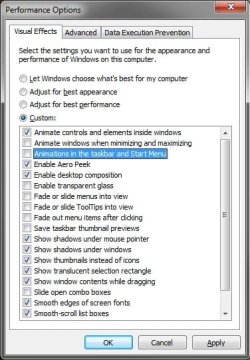
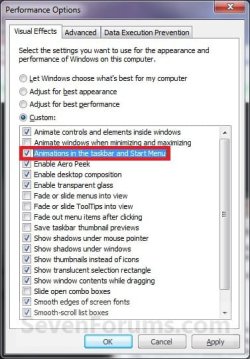
  • If you have the Animations in the taskbar and Start Menu option checked in Visual Effects, then you may not see much or any difference. You should uncheck this option first before doing the tutorial below for the maximum effect.
Visual_Effects.jpg


OPTION ONE

Change Mouse Hover Time using a REG File Download


1. To Have a Fast Mouse Hover Time
NOTE: This changes the mouse hover delay time to 30 milliseconds.
A) Click on the download button below to download the file below.
30ms_Mouse_Hover_Time.zip


Download


B) Go to step 3.
2. To Restore the Default Mouse Hover Time
NOTE: This changes the mouse hover delay time back to 400 milliseconds.
A) Click on the download button below to download the file below.
Default_Mouse_Hover_Time.zip

Download


3. Click on Save, and save the .zip file to the Desktop.

4. Open the downloaded .zip file and extract the .reg file to the Desktop.

5. Right click the extracted .reg file and click on Merge.

6. Click on Run, Yes, Yes, and OK when prompted.

7. Log off and log on, or restart the computer to apply the changes.

8. When done, you can delete the .zip and .reg files if you like.


OPTION TWO

Change Mouse Hover Time Manually Through Registry Editor


1. Open the Start Menu, then type regedit in the search box and press Enter.

2. If prompted by UAC, then click on Yes.

3. In regedit, navigate to the location below:
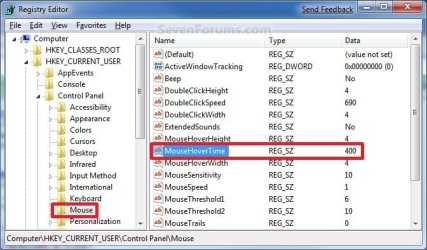
HKEY_CURRENT_USER\Control Panel\Mouse
4. In the right pane, right click MouseHoverTime and click on Modify. (See screenshot below)
Reg1.jpg
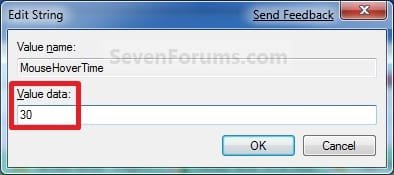
5. Type in a number between 0 to 4000 (400 is default, I use 30) for how many milliseconds, and click on OK. (See screenshot below)
NOTE: The lower the number, the faster the response time. If you use an entry of 0, there is no delay before the tooltip opens.
Modify.jpg
6. Close regedit.

7. Log off and log on, or restart the computer to apply the changes.
NOTE: As a test, hover the mouse pointer over a tooltip or Start Menu All Programs and see how much faster it opens.
That's it,
Shawn


Attachments

Last edited:
Thanks Shawn!
 

My Computer

Computer Manufacturer/Model Number
Home Brew
OS
Windows 7 Ultimate Vista Ultimate x64
CPU
Core 2 Duo E8500 3.16Ghz @ 3.8Ghz
Motherboard
eVGA 750i FTW
Memory
2x2Gigs Patriot PC2-6400 LL
Graphics Card(s)
Inno3D GeForce GTX260 216 SP
Monitor(s) Displays
ASUS VW222U 22" 2ms Response time
Screen Resolution
1680x1050
Hard Drives
SATA 150GB
SATA II 250GB
USB IDE 750GB Ext.
PSU
HYTEC 600W & Thermaltake 650W Toughpower Power Exp
Case
Thermaltake Armor LCS (Liquid Cooling System)
Cooling
Liquid Cooling System
Keyboard
Logitech G15 Gaming Keyboard
Mouse
Logitech G9 Gaming Mouse
You're welcome Mr GRiM.
 

My Computer

Computer type
PC/Desktop
Computer Manufacturer/Model Number
Self built custom
OS
64-bit Windows 11 Pro for Workstations
CPU
Intel i7-8700K OC'd to 5 GHz
Motherboard
ASUS ROG Maximus XI Formula Z390
Memory
64 GB (4x16GB) G.SKILL TridentZ RGB DDR4 3600 MHz
Graphics Card(s)
ASUS ROG-STRIX-GTX1080TI-O11G-GAMING
Sound Card
Integrated
Monitor(s) Displays
2 x Samsung Odyssey G7 27"
Screen Resolution
2560x1440
Hard Drives
1TB Samsung 990 PRO M.2,
4TB Samsung 990 PRO PRO M.2,
TerraMaster F8 SSD Plus NAS
PSU
Seasonic Prime Titanium 850W
Case
Thermaltake Core P3
Cooling
Corsair Hydro H115i
Keyboard
Logitech wireless K800
Mouse
Logitech MX Master 4
Internet Speed
2 Gb/s Download and 100 Mb/s Upload
Antivirus
Malwarebyte Anti-Malware Premium
Browser
Google Chrome
Other Info
Logitech Z625 speaker system,
Logitech BRIO 4K Pro webcam,
HP Color LaserJet Pro MFP M477fdn,
APC SMART-UPS RT 1000 XL - SURT1000XLI,
Galaxy S23 Plus phone
You made me wonder: what happens if I set it to 0? :p
 

My Computer

Computer Manufacturer/Model Number
Dell Vostro 1510
OS
Windows 7 Build 7100 32-bit, Windows Vista 32-bit
CPU
Intel Core Duo T8100 2,1GHz
Memory
3GB
Graphics Card(s)
NVIDIA GeForce 8400M GS
Screen Resolution
1440x900
Hard Drives
250GB
LOL, hello Hethoofd.

You will get smoke. ;)

If you use 0, then you will have no delay time for when the thumbnail pop-ups. However, it may be so fast that navigating through them may prove difficult to do with them flashing so quickly. :)
 

My Computer

Computer type
PC/Desktop
Computer Manufacturer/Model Number
Self built custom
OS
64-bit Windows 11 Pro for Workstations
CPU
Intel i7-8700K OC'd to 5 GHz
Motherboard
ASUS ROG Maximus XI Formula Z390
Memory
64 GB (4x16GB) G.SKILL TridentZ RGB DDR4 3600 MHz
Graphics Card(s)
ASUS ROG-STRIX-GTX1080TI-O11G-GAMING
Sound Card
Integrated
Monitor(s) Displays
2 x Samsung Odyssey G7 27"
Screen Resolution
2560x1440
Hard Drives
1TB Samsung 990 PRO M.2,
4TB Samsung 990 PRO PRO M.2,
TerraMaster F8 SSD Plus NAS
PSU
Seasonic Prime Titanium 850W
Case
Thermaltake Core P3
Cooling
Corsair Hydro H115i
Keyboard
Logitech wireless K800
Mouse
Logitech MX Master 4
Internet Speed
2 Gb/s Download and 100 Mb/s Upload
Antivirus
Malwarebyte Anti-Malware Premium
Browser
Google Chrome
Other Info
Logitech Z625 speaker system,
Logitech BRIO 4K Pro webcam,
HP Color LaserJet Pro MFP M477fdn,
APC SMART-UPS RT 1000 XL - SURT1000XLI,
Galaxy S23 Plus phone
So I can make the thumbnail popup faster by doing this, now, the annoying part is, how do I make it fadeaway faster when I move my mouse away.
 

My Computer

OS
7

My Computer

Computer type
PC/Desktop
Computer Manufacturer/Model Number
Self built custom
OS
64-bit Windows 11 Pro for Workstations
CPU
Intel i7-8700K OC'd to 5 GHz
Motherboard
ASUS ROG Maximus XI Formula Z390
Memory
64 GB (4x16GB) G.SKILL TridentZ RGB DDR4 3600 MHz
Graphics Card(s)
ASUS ROG-STRIX-GTX1080TI-O11G-GAMING
Sound Card
Integrated
Monitor(s) Displays
2 x Samsung Odyssey G7 27"
Screen Resolution
2560x1440
Hard Drives
1TB Samsung 990 PRO M.2,
4TB Samsung 990 PRO PRO M.2,
TerraMaster F8 SSD Plus NAS
PSU
Seasonic Prime Titanium 850W
Case
Thermaltake Core P3
Cooling
Corsair Hydro H115i
Keyboard
Logitech wireless K800
Mouse
Logitech MX Master 4
Internet Speed
2 Gb/s Download and 100 Mb/s Upload
Antivirus
Malwarebyte Anti-Malware Premium
Browser
Google Chrome
Other Info
Logitech Z625 speaker system,
Logitech BRIO 4K Pro webcam,
HP Color LaserJet Pro MFP M477fdn,
APC SMART-UPS RT 1000 XL - SURT1000XLI,
Galaxy S23 Plus phone
Thanks for introducing that setting to me, will talk more about it in the correct topic. So what does this setting ACTUALLY do? I've set it to 30ms, and when i move my mouse over desktop icons, taskbar items, system tray icons, the tooltip seem to appear 1000-2000ms to appear. OK, actually after just testing it, it's not at all about the tooltip, but what it seems to affect is the start menu "All Programs" hover. Please enlighten if it affects anything else

Update: MouseHoverTime includes ExtendedUIHoverTime. Only if there's ExtendedUIHoverTime in the registry it overrides mousehovertime for thumbnail preview delay.
 
Last edited:

My Computer

OS
7
That's the main one that it affects, but it should affect the other hover items as well. It also depends on what you have set in Visual Effects as well.
 

My Computer

Computer type
PC/Desktop
Computer Manufacturer/Model Number
Self built custom
OS
64-bit Windows 11 Pro for Workstations
CPU
Intel i7-8700K OC'd to 5 GHz
Motherboard
ASUS ROG Maximus XI Formula Z390
Memory
64 GB (4x16GB) G.SKILL TridentZ RGB DDR4 3600 MHz
Graphics Card(s)
ASUS ROG-STRIX-GTX1080TI-O11G-GAMING
Sound Card
Integrated
Monitor(s) Displays
2 x Samsung Odyssey G7 27"
Screen Resolution
2560x1440
Hard Drives
1TB Samsung 990 PRO M.2,
4TB Samsung 990 PRO PRO M.2,
TerraMaster F8 SSD Plus NAS
PSU
Seasonic Prime Titanium 850W
Case
Thermaltake Core P3
Cooling
Corsair Hydro H115i
Keyboard
Logitech wireless K800
Mouse
Logitech MX Master 4
Internet Speed
2 Gb/s Download and 100 Mb/s Upload
Antivirus
Malwarebyte Anti-Malware Premium
Browser
Google Chrome
Other Info
Logitech Z625 speaker system,
Logitech BRIO 4K Pro webcam,
HP Color LaserJet Pro MFP M477fdn,
APC SMART-UPS RT 1000 XL - SURT1000XLI,
Galaxy S23 Plus phone
Great tutorials and love affording user comments. One thing I notice about tooltip notices, popups, whatever one should call them (for desktop icons, systems tray icons, and of course, start menu items, is that by default (even though I've unticked/deselected "Animations in the taskbar and Start Menu" and have yet to tweak the hover timing), I've noticed a difference in hover time for my desktop icons, etc., (about a full second) and the sys tray icons (which instantly display the tooltip 'pop-ups'). Maybe users might appreciate knowing why there are differences in hovered icon timings (between sys tray icons and all other hovered Windows items) eg; I suspect sys tray icons can't have their timing changed.
 

My Computer

Computer Manufacturer/Model Number
HP DV4-1030ee
OS
Windows 7 Pro
CPU
[email protected], 2 Core Logical Processors
Motherboard
Compal 30F8 99.74
Memory
Total Physical Memory 2.00 GB
Graphics Card(s)
NVIDIA GeForce9200M GS
Sound Card
NVIDIA HDMI Audio with IDT High Definition Audio CODEC
Monitor(s) Displays
Generic PnP Monitor (14.0"vis)
Screen Resolution
1200 X 800 recommended, but set to 1074 X 768
Hard Drives
FUJITSU MHY2160BH 160.04 GB drive 0
PSU
High Performance
Case
Stock
Cooling
Stock
Keyboard
Stock
Mouse
Logitech M-UV96
Internet Speed
down 2.89 Mb/s & up 0.73 Mb/s
Other Info
Acer Aspire One, XPH SP3, x86, 'Windows NT', 2.0 Ghz CPU, 2 Gb RAM, Mobile Intel 945 Express Chipset Family graphics
'card', RealtekHD Audio Driver v5.10.0.5628 audio 'card', and USB 2.0.
system's tray 'WLAN disconnected' pop-up

About got W7 Pro tamed but for two remaining annnoyances. 'Safe Disconnect' and 'WLAN disconnected'. Both like to stay until clicking desktop of their incessantly seen notifications. Hope this tutorial and comments will lead me to resolving those two remaining nuisances.

Hoping the workarounds for these are set icon for 'alway show and notify' for safe disco and 'always hide' for WLAN disco.
 

My Computer

Computer Manufacturer/Model Number
HP DV4-1030ee
OS
Windows 7 Pro
CPU
[email protected], 2 Core Logical Processors
Motherboard
Compal 30F8 99.74
Memory
Total Physical Memory 2.00 GB
Graphics Card(s)
NVIDIA GeForce9200M GS
Sound Card
NVIDIA HDMI Audio with IDT High Definition Audio CODEC
Monitor(s) Displays
Generic PnP Monitor (14.0"vis)
Screen Resolution
1200 X 800 recommended, but set to 1074 X 768
Hard Drives
FUJITSU MHY2160BH 160.04 GB drive 0
PSU
High Performance
Case
Stock
Cooling
Stock
Keyboard
Stock
Mouse
Logitech M-UV96
Internet Speed
down 2.89 Mb/s & up 0.73 Mb/s
Other Info
Acer Aspire One, XPH SP3, x86, 'Windows NT', 2.0 Ghz CPU, 2 Gb RAM, Mobile Intel 945 Express Chipset Family graphics
'card', RealtekHD Audio Driver v5.10.0.5628 audio 'card', and USB 2.0.
Hi, I want change taskbar title tooltip display time. But, MouseHoverTime not works. It seems work only for Start menu.

taskbartooltip.png
 

My Computer

OS
Windows 7
Hello Hungsimol, and welcome to Seven Forums.

Try unchecking the Animations in the taskbar and Start Menu option in Visual Effects to see if it may make any difference for you.

Hope this helps,
Shawn
 

My Computer

Computer type
PC/Desktop
Computer Manufacturer/Model Number
Self built custom
OS
64-bit Windows 11 Pro for Workstations
CPU
Intel i7-8700K OC'd to 5 GHz
Motherboard
ASUS ROG Maximus XI Formula Z390
Memory
64 GB (4x16GB) G.SKILL TridentZ RGB DDR4 3600 MHz
Graphics Card(s)
ASUS ROG-STRIX-GTX1080TI-O11G-GAMING
Sound Card
Integrated
Monitor(s) Displays
2 x Samsung Odyssey G7 27"
Screen Resolution
2560x1440
Hard Drives
1TB Samsung 990 PRO M.2,
4TB Samsung 990 PRO PRO M.2,
TerraMaster F8 SSD Plus NAS
PSU
Seasonic Prime Titanium 850W
Case
Thermaltake Core P3
Cooling
Corsair Hydro H115i
Keyboard
Logitech wireless K800
Mouse
Logitech MX Master 4
Internet Speed
2 Gb/s Download and 100 Mb/s Upload
Antivirus
Malwarebyte Anti-Malware Premium
Browser
Google Chrome
Other Info
Logitech Z625 speaker system,
Logitech BRIO 4K Pro webcam,
HP Color LaserJet Pro MFP M477fdn,
APC SMART-UPS RT 1000 XL - SURT1000XLI,
Galaxy S23 Plus phone
Before post, "Animations in the taskbar and Start Menu" unchecked. I want display "Computer" tooltip faster. Current, about 2 seconds.
 

My Computer

OS
Windows 7

My Computer

Computer type
PC/Desktop
Computer Manufacturer/Model Number
Self built custom
OS
64-bit Windows 11 Pro for Workstations
CPU
Intel i7-8700K OC'd to 5 GHz
Motherboard
ASUS ROG Maximus XI Formula Z390
Memory
64 GB (4x16GB) G.SKILL TridentZ RGB DDR4 3600 MHz
Graphics Card(s)
ASUS ROG-STRIX-GTX1080TI-O11G-GAMING
Sound Card
Integrated
Monitor(s) Displays
2 x Samsung Odyssey G7 27"
Screen Resolution
2560x1440
Hard Drives
1TB Samsung 990 PRO M.2,
4TB Samsung 990 PRO PRO M.2,
TerraMaster F8 SSD Plus NAS
PSU
Seasonic Prime Titanium 850W
Case
Thermaltake Core P3
Cooling
Corsair Hydro H115i
Keyboard
Logitech wireless K800
Mouse
Logitech MX Master 4
Internet Speed
2 Gb/s Download and 100 Mb/s Upload
Antivirus
Malwarebyte Anti-Malware Premium
Browser
Google Chrome
Other Info
Logitech Z625 speaker system,
Logitech BRIO 4K Pro webcam,
HP Color LaserJet Pro MFP M477fdn,
APC SMART-UPS RT 1000 XL - SURT1000XLI,
Galaxy S23 Plus phone
But, I changed ExtendedUIHoverTime = 30000 before because I don't like taskbar thumbnail. It works. But after 2 seconds, tooltip display!

I don't like taskbar thumbnail, need only title of windows and speed up tooltip display. Microsoft! Perhaps they've forgotten.
 

My Computer

OS
Windows 7
Hungsimol,

I'll keep hunting for you, but so far I can't find the setting that affects the taskbar icon thumbnail title display delay time.
 

My Computer

Computer type
PC/Desktop
Computer Manufacturer/Model Number
Self built custom
OS
64-bit Windows 11 Pro for Workstations
CPU
Intel i7-8700K OC'd to 5 GHz
Motherboard
ASUS ROG Maximus XI Formula Z390
Memory
64 GB (4x16GB) G.SKILL TridentZ RGB DDR4 3600 MHz
Graphics Card(s)
ASUS ROG-STRIX-GTX1080TI-O11G-GAMING
Sound Card
Integrated
Monitor(s) Displays
2 x Samsung Odyssey G7 27"
Screen Resolution
2560x1440
Hard Drives
1TB Samsung 990 PRO M.2,
4TB Samsung 990 PRO PRO M.2,
TerraMaster F8 SSD Plus NAS
PSU
Seasonic Prime Titanium 850W
Case
Thermaltake Core P3
Cooling
Corsair Hydro H115i
Keyboard
Logitech wireless K800
Mouse
Logitech MX Master 4
Internet Speed
2 Gb/s Download and 100 Mb/s Upload
Antivirus
Malwarebyte Anti-Malware Premium
Browser
Google Chrome
Other Info
Logitech Z625 speaker system,
Logitech BRIO 4K Pro webcam,
HP Color LaserJet Pro MFP M477fdn,
APC SMART-UPS RT 1000 XL - SURT1000XLI,
Galaxy S23 Plus phone
Get rid of task bar popups completely

Is there any way of getting rid of the annoying popups completely.
I have enough information without these irritating things.
Thank you,
 

My Computer

Computer Manufacturer/Model Number
not applicable
OS
Windows 7
CPU
Intel core duo
Motherboard
Asus
Memory
3.0g
Graphics Card(s)
inbed
Sound Card
inbed
Monitor(s) Displays
37" Toshiba LCD tv
Hard Drives
250
PSU
450
Case
***
Cooling
***
Hello Morrowmm,

You could set the delay time to a high amount of time to not have them pop-up for basically the same affect as disabling them.

Hope this helps,
Shawn
 

My Computer

Computer type
PC/Desktop
Computer Manufacturer/Model Number
Self built custom
OS
64-bit Windows 11 Pro for Workstations
CPU
Intel i7-8700K OC'd to 5 GHz
Motherboard
ASUS ROG Maximus XI Formula Z390
Memory
64 GB (4x16GB) G.SKILL TridentZ RGB DDR4 3600 MHz
Graphics Card(s)
ASUS ROG-STRIX-GTX1080TI-O11G-GAMING
Sound Card
Integrated
Monitor(s) Displays
2 x Samsung Odyssey G7 27"
Screen Resolution
2560x1440
Hard Drives
1TB Samsung 990 PRO M.2,
4TB Samsung 990 PRO PRO M.2,
TerraMaster F8 SSD Plus NAS
PSU
Seasonic Prime Titanium 850W
Case
Thermaltake Core P3
Cooling
Corsair Hydro H115i
Keyboard
Logitech wireless K800
Mouse
Logitech MX Master 4
Internet Speed
2 Gb/s Download and 100 Mb/s Upload
Antivirus
Malwarebyte Anti-Malware Premium
Browser
Google Chrome
Other Info
Logitech Z625 speaker system,
Logitech BRIO 4K Pro webcam,
HP Color LaserJet Pro MFP M477fdn,
APC SMART-UPS RT 1000 XL - SURT1000XLI,
Galaxy S23 Plus phone
A word of warning about this value, it seems to overide MenuShowDelay and others also.

If eg. this is left on the default 400 and you have MenuShowDelay at 100 then the menu delay will be 400 not 100.
 

My Computer

Computer type
PC/Desktop
Computer Manufacturer/Model Number
home built
OS
windows 8.1 Pro x64
CPU
intel i5 4670k @ 4.3ghz
Motherboard
asus z87-plus
Memory
16 gig ram ddr3 @ 1600 corsair vengeance
Graphics Card(s)
evga 970 GTX 4 GIG FTW ACX 2.0
Sound Card
asus xonar D2X
Monitor(s) Displays
benq gw2765ht
Screen Resolution
2560x1440
Hard Drives
Samsung 850 pro SSD 512gig - boot device wooosh
WD black cavalier 640gig WD6401AALS
Seagate 500gig ST3500630AS
WD 2TB Green WDC20EARS
2 x WD Red 3TB WD30EFRX
Samsung 750gig HD753LG - on asmedia controller
PSU
coolermaster silent pro 600watt modular
Case
fractal define R4
Cooling
artic freezer i30, 3 case fans
Keyboard
microsoft business ps2 keyboard
Mouse
microsoft optical black mouse
Internet Speed
80/20 FTTC SkyBB
Antivirus
Nod32 AV v8, HitmanProAlert, SRP, System Hardening
Browser
Chrome x64
Other Info
Intel controller is in AHCI mode currently using IaSTOR 12.8.0.1016 drivers
Back
Top