Search from Internet Explorer 8 Address Bar

How to Enable or Disable Search from Internet Explorer 8 Address Bar

   Information
This will show you how to enable or disable displaying the search results in the main Internet Explorer 8 window when you search from the Internet Explorer 8 address bar. Searching from the address bar is enabled by default in Internet Explorer 8.
   Note
When enabled, Internet Exporer 8 will use your default search provider (ex: Google or Bing).
   Tip
You can type ? search item in the address bar and press enter to display search results in the main Internet Explorer window no matter if Search from the Address bar has been enabled or disabled. You would subsititute search item with whatever you wanted to search for. For example, type ? sevenforums in the address bar and press enter to see:

Question_Mark.jpg

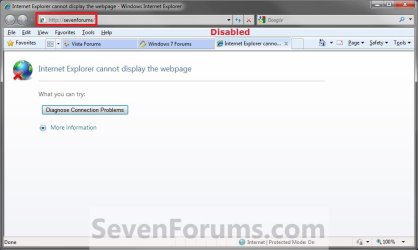
EXAMPLE: Search from Address Bar Enable and Disabled
NOTE: These are the search results you will get displayed in the main Internet Explorer 8 address window when this is set as enabled and disabled.
Enabled.jpgDisabled.jpg


Here's How:
1. Open Internet Explorer, and click on the Tools Menu Bar item and on Internet Options.
A) Go to step 4.
OR

2. Open Internet Explorer, and click on the Tools Command Bar button and on Internet Options.
A) Go to step 4.
OR

3. Open the Control Panel (icons view), and click on the Internet Options icon.

4. Click on the Advanced tab, and under the Settings section, scroll down to the Search from the Address bar section. (See screenshot below)
Internet_Options.jpg
5. To Enable Search from the Address bar
A) Select (dot) Just display the results in the main window option, and click on OK. (See screenshot above)
6. To Disable Search from the Address bar
A) Select (dot) Do not submit unknown addresses to your auto-search provider option, and click on OK. (See screenshot above)
That's it,
Shawn


Last edited:
Hi.

I have just tryed this on my xp machine, now using explorer 8 , i thought this would work, its fine if you just type complete addresses, but as for "Keywords" or sevenforums even , i get a "address is not valid"

Even though the setting " Just display the results in the main window" is enabled.

But the description of " just display the results in the main window" tells me that i should be able to type anything in the address bar, even "sevenforums" and still get some results..

Windows xp pro sp3
 

My Computer My Computer

Computer Manufacturer/Model Number
Toshiba Satelllite L550-1CW
OS
windows vista home premium
CPU
Intel celeron M T3100 @ 1.90 ghz penryn 45 nm technology
Motherboard
Toshiba KTWAA (U2E1)
Memory
3.0 GB Dual Channel DDR3 @ 399 MHz 6.6.6.15
Graphics Card(s)
Mobile Intel(R) 4 series express chipset familiy
Sound Card
Realtek High definition audio
Monitor(s) Displays
Monitor- generic PnP monitor on mobile intel 4 series ex/ M
Screen Resolution
current resolution 1600 x 900 /work resolution 1600 x 872
Hard Drives
Toshiba MK2555GSX
Keyboard
standard ps/2
After you made the changes in IE8, did you close and reopen it to apply?

Who do you have as your search provider? You might try Google to see if it works better for you.
 

My Computer My Computer

Computer type
PC/Desktop
Computer Manufacturer/Model Number
Self built custom
OS
64-bit Windows 11 Pro for Workstations
CPU
Intel i7-8700K OC'd to 5 GHz
Motherboard
ASUS ROG Maximus XI Formula Z390
Memory
64 GB (4x16GB) G.SKILL TridentZ RGB DDR4 3600 MHz
Graphics Card(s)
ASUS ROG-STRIX-GTX1080TI-O11G-GAMING
Sound Card
Integrated
Monitor(s) Displays
2 x Samsung Odyssey G7 27"
Screen Resolution
2560x1440
Hard Drives
1TB Samsung 990 PRO M.2,
4TB Samsung 990 PRO PRO M.2,
TerraMaster F8 SSD Plus NAS
PSU
Seasonic Prime Titanium 850W
Case
Thermaltake Core P3
Cooling
Corsair Hydro H115i
Keyboard
Logitech wireless K800
Mouse
Logitech MX Master 4
Internet Speed
2 Gb/s Download and 100 Mb/s Upload
Antivirus
Malwarebyte Anti-Malware Premium
Browser
Google Chrome
Other Info
Logitech Z625 speaker system,
Logitech BRIO 4K Pro webcam,
HP Color LaserJet Pro MFP M477fdn,
APC SMART-UPS RT 1000 XL - SURT1000XLI,
Galaxy S23 Plus phone
After you made the changes in IE8, did you close and reopen it to apply?

Who do you have as your search provider? You might try Google to see if it works better for you.

Sorry Brink, some how i missed this, though the text was very small and i did not have my glasses on...
You have to press the shift key + enter, where i was only pressing the enter key.

Thanks for replying shawn
 

My Computer My Computer

Computer Manufacturer/Model Number
Toshiba Satelllite L550-1CW
OS
windows vista home premium
CPU
Intel celeron M T3100 @ 1.90 ghz penryn 45 nm technology
Motherboard
Toshiba KTWAA (U2E1)
Memory
3.0 GB Dual Channel DDR3 @ 399 MHz 6.6.6.15
Graphics Card(s)
Mobile Intel(R) 4 series express chipset familiy
Sound Card
Realtek High definition audio
Monitor(s) Displays
Monitor- generic PnP monitor on mobile intel 4 series ex/ M
Screen Resolution
current resolution 1600 x 900 /work resolution 1600 x 872
Hard Drives
Toshiba MK2555GSX
Keyboard
standard ps/2
You're welcome Carl, and welcome to Seven Forums. I'm happy to hear that you got it sorted. :)
 

My Computer My Computer

Computer type
PC/Desktop
Computer Manufacturer/Model Number
Self built custom
OS
64-bit Windows 11 Pro for Workstations
CPU
Intel i7-8700K OC'd to 5 GHz
Motherboard
ASUS ROG Maximus XI Formula Z390
Memory
64 GB (4x16GB) G.SKILL TridentZ RGB DDR4 3600 MHz
Graphics Card(s)
ASUS ROG-STRIX-GTX1080TI-O11G-GAMING
Sound Card
Integrated
Monitor(s) Displays
2 x Samsung Odyssey G7 27"
Screen Resolution
2560x1440
Hard Drives
1TB Samsung 990 PRO M.2,
4TB Samsung 990 PRO PRO M.2,
TerraMaster F8 SSD Plus NAS
PSU
Seasonic Prime Titanium 850W
Case
Thermaltake Core P3
Cooling
Corsair Hydro H115i
Keyboard
Logitech wireless K800
Mouse
Logitech MX Master 4
Internet Speed
2 Gb/s Download and 100 Mb/s Upload
Antivirus
Malwarebyte Anti-Malware Premium
Browser
Google Chrome
Other Info
Logitech Z625 speaker system,
Logitech BRIO 4K Pro webcam,
HP Color LaserJet Pro MFP M477fdn,
APC SMART-UPS RT 1000 XL - SURT1000XLI,
Galaxy S23 Plus phone
Hi, I also tried this after my computer decided it wanted to stop searching suddenly. The option was already on but even after turning it off and on again, no luck in searching from the address bar. Any ideas?

I am using Windows Vista, Internet explorer 8.

Thank you!

Jennie
 

My Computer My Computer

OS
Windows
Hello Jennie, and welcome to Seven Forums.

You might see if completely resetting IE8 may allow you to be able to afterwards.

Hope this helps,
Shawn
 

My Computer My Computer

Computer type
PC/Desktop
Computer Manufacturer/Model Number
Self built custom
OS
64-bit Windows 11 Pro for Workstations
CPU
Intel i7-8700K OC'd to 5 GHz
Motherboard
ASUS ROG Maximus XI Formula Z390
Memory
64 GB (4x16GB) G.SKILL TridentZ RGB DDR4 3600 MHz
Graphics Card(s)
ASUS ROG-STRIX-GTX1080TI-O11G-GAMING
Sound Card
Integrated
Monitor(s) Displays
2 x Samsung Odyssey G7 27"
Screen Resolution
2560x1440
Hard Drives
1TB Samsung 990 PRO M.2,
4TB Samsung 990 PRO PRO M.2,
TerraMaster F8 SSD Plus NAS
PSU
Seasonic Prime Titanium 850W
Case
Thermaltake Core P3
Cooling
Corsair Hydro H115i
Keyboard
Logitech wireless K800
Mouse
Logitech MX Master 4
Internet Speed
2 Gb/s Download and 100 Mb/s Upload
Antivirus
Malwarebyte Anti-Malware Premium
Browser
Google Chrome
Other Info
Logitech Z625 speaker system,
Logitech BRIO 4K Pro webcam,
HP Color LaserJet Pro MFP M477fdn,
APC SMART-UPS RT 1000 XL - SURT1000XLI,
Galaxy S23 Plus phone
Back
Top