Memory - Set Maximum Amount Used by Windows

How to Set Maximum Memory to be Used by Windows 7 and Windows 8


   Information
This will show you how to specify the maximum amount of physical memory (RAM) to be used by Windows to simulate a low memory configuration by using less RAM, or to make sure that you are using all of your installed RAM.

Windows uses all of your installed RAM memory by default.

You must be logged in as an administrator to be able to do this tutorial.

   Note
32-bit (x86) Windows 7/8 Maximum RAM Limit
  • All editions: 4GB
64-bit (x64) Windows 7 Maximum RAM Limit per Edition
  • Home Basic: 8GB
  • Home Premium: 16GB
  • Professional: 192GB
  • Enterprise: 192GB
  • Ultimate: 192GB
64-bit (x64) Windows 8 and 8.1 Maximum RAM Limit per Edition

  • (core): 128GB
  • Pro: 512GB
  • Enterprise: 512GB
   Warning

  • If you have a integrated/onboard graphics chip on your motherboard and are using a graphics card instead, then double check your BIOS settings to make sure that you do not have any memory allocated to the integrated/onboard graphics chip (ex:hardware reserved) so that it will be used by Windows instead.
  • If you are using a integrated/onboard graphics chip on your motherboard to display your monitor from, then part of your memory (RAM) will be allocated to it as set in the BIOS.
  • Double check to see if you have a memory mapping option in your BIOS settings. If you do, enable it.

CONTENTS:

  • Option One: Set Maximum Memory for Windows in System Configuration (msconfig)
  • Option Two: Set Maximum Memory for Windows in Command Prompt in Windows
  • Option Three: Set Maximum Memory for Windows in Command Prompt at Boot


OPTION ONE

Set Maximum Memory for Windows in System Configuration (msconfig)

1. Press the Windows + R keys to open the Run dialog, type msconfig, and click/tap on OK.

2. If prompted by UAC, then click/tap on Yes.

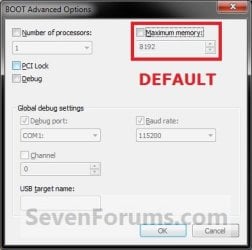
3. Under the Boot tab in System Configuration, click/tap on the Advanced options button, and do step 4 or step 5 below for what you would like to do. (see screenshot below)Step1.jpg4. To Have Windows Use All Installed Memory
NOTE: This is the default setting.A) Uncheck the Maximum memory box, click/tap on OK, and go to step 6 below. (see screenshot below)
NOTE: If the box is not checked, then it does not matter what the selected number is since Windows will use all available RAM by default and ignore whatever value is in the box underneath.Default.jpg5. To Have Windows Use a Specified Maximum Amount of Memory
NOTE: Only when the box is checked, can you specify how much installed RAM you want to allow Windows to be able to use in the drop down box. A) Check the Maximum memory box, then type in how many MB of your installed Memory that you want Windows to only be able to use up to, click/tap on OK, and go to step 6 below. (see screenshot below)
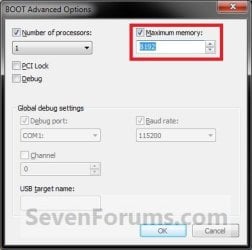
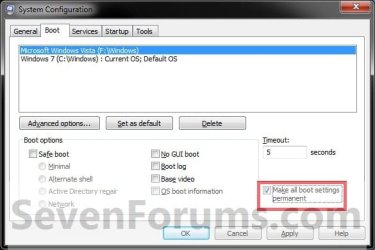
Set_Max_Memory.jpg6. Check the Make all boot settings permanent box, and click/tap on OK. (see screenshot below)
NOTE: You will still be able to come back and make changes again if you like.Step3.jpg
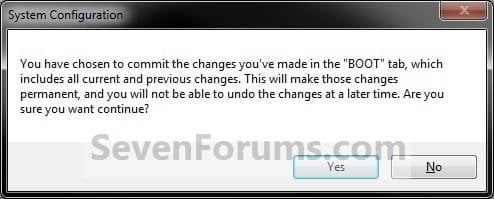
7. Click/tap on Yes. (see screenshot below)
NOTE: You will still be able to come back and make changes again if you like.Step4.jpg
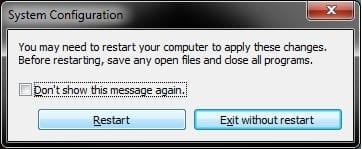
8. Click/tap on the Restart button. (see screenshot below)
WARNING: This will restart the computer immediately. Make sure you save and close anything open that you do not want to lose first.

   Tip
If you checked the Don't show this message again box and would like to restore this Restart box to display again, then see: How to Restore the System Configuration Restart Prompt in Vista or Windows 7
Step5.jpg
9. When Windows is finished restarting, it will now be using only the maximum amount of memory that you specified.
NOTE: You can look in Task Manager (CTRL+SHIFT+ESC) to confirm this amount of memory.Task_Manager.jpg


OPTION TWO

Set Maximum Memory for Windows in Command Prompt in Windows


1. Open an elevated command prompt in Windows 7 or Windows 8.

2. Do step 3 or step 4 below for what you would like to do.

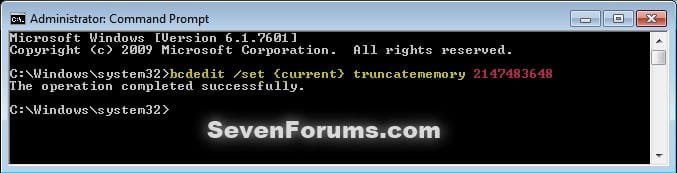
3. To Have Windows Use a Specified Maximum Amount of MemoryA) In the elevated command prompt, type the command below, press Enter, and go to step 5 below. (see screenshot below) bcdedit /set {current} truncatememory bytes
   Note
Substitute bytes in the command above with how many actual bytes of maximum memory you want Windows to be able to use.

1073741824 bytes = 1 GB

(1073741824 x GB = bytes you type in command)


For example: If I wanted to set Windows to use 2 GB of maximum memory, then 1073741824 bytes x 2 GB = 2147483648. I would type this command below exactly.

bcdedit /set {current} truncatememory 2147483648


bcedit_truncatememory.jpg4. To Have Windows Use All Installed Memory
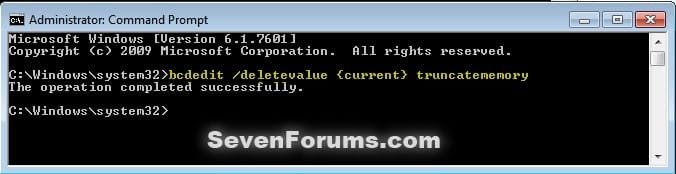
NOTE: This is the default setting.A) In the elevated command prompt, copy and paste the command below, press Enter, and go to step 5 below. (see screenshot below)

bcdedit /deletevalue {current} truncatememory


bcedit_deletevalue_truncatememory.jpg5. Restart the computer to apply.


OPTION THREE

Set Maximum Memory for Windows in Command Prompt at Boot


1. Open a command prompt at boot for Windows 7 or Windows 8.

2. Do step 3 or step 4 below for what you would like to do.

3. To Have Windows Use a Specified Maximum Amount of MemoryA) In the command prompt, type the command below, press Enter, and go to step 5 below. (see screenshot below)

bcdedit /set {default} truncatememory bytes


   Note
Substitute bytes in the command above with how many actual bytes of maximum memory you want Windows to be able to use.

1073741824 bytes = 1 GB

(1073741824 x GB = bytes you type in command)


For example: If I wanted to set Windows to use 2 GB of maximum memory, then 1073741824 bytes x 2 GB = 2147483648. I would type this command below exactly.

bcdedit /set {default} truncatememory 2147483648


boot_bcedit_truncatememory.jpg
4. To Have Windows Use All Installed Memory
NOTE: This is the default setting.A) In the command prompt, type the command below, press Enter, and go to step 5 below. (see screenshot below)

bcdedit /deletevalue {default} truncatememory


boot_bcedit_deletevalue_truncatememory.jpg
5. Restart the computer to apply.


That's it,
Shawn


Last edited:
great tutorial.
 

My Computer

Computer Manufacturer/Model Number
Custom
OS
Windows 7 Ultimate Signature Edition
CPU
Intel Core i7 Extreme 3.33GHz
Motherboard
EVGA X-58 SLI Classified
Memory
12GB DDR3
Graphics Card(s)
2x EVGA 285 2GB in SLI
Sound Card
Creative Labs X-Fi ExtremeGamer
Monitor(s) Displays
30" Viewsonic
Hard Drives
2x1TB Western Digital 7200RPM in RAID 0/1TB WD My Book External HDD
PSU
Thermaltake 1000w supporting quad SLI
Case
Thermaltake Armor Full Tower
Cooling
Thermaltake V1 CPU+DIY Liquid cooling
Thank you Valton. I'm happy that you like it. :)
 

My Computer

Computer type
PC/Desktop
Computer Manufacturer/Model Number
Self built custom
OS
64-bit Windows 11 Pro for Workstations
CPU
Intel i7-8700K OC'd to 5 GHz
Motherboard
ASUS ROG Maximus XI Formula Z390
Memory
64 GB (4x16GB) G.SKILL TridentZ RGB DDR4 3600 MHz
Graphics Card(s)
ASUS ROG-STRIX-GTX1080TI-O11G-GAMING
Sound Card
Integrated
Monitor(s) Displays
2 x Samsung Odyssey G7 27"
Screen Resolution
2560x1440
Hard Drives
1TB Samsung 990 PRO M.2,
4TB Samsung 990 PRO PRO M.2,
TerraMaster F8 SSD Plus NAS
PSU
Seasonic Prime Titanium 850W
Case
Thermaltake Core P3
Cooling
Corsair Hydro H115i
Keyboard
Logitech wireless K800
Mouse
Logitech MX Master 4
Internet Speed
2 Gb/s Download and 100 Mb/s Upload
Antivirus
Malwarebyte Anti-Malware Premium
Browser
Google Chrome
Other Info
Logitech Z625 speaker system,
Logitech BRIO 4K Pro webcam,
HP Color LaserJet Pro MFP M477fdn,
APC SMART-UPS RT 1000 XL - SURT1000XLI,
Galaxy S23 Plus phone
Hi Brink. Have you done any benchmarking after changing this setting? The reason I ask is because some RAM is allotted to your GFX card by default. For instance, I have 4Gigs of OCZ dual channel RAM installed, but my NVIDIA GeForce GFX card is a 512MB crad. So the available memory is around 3.5Gigs by default, because the GFX card is alotted the 512MB. Now I'm not posative, but changing that setting might mess with your GFX card...say if your doing something that is both data, and GFX intensive. You might want to do some benchmarking if you haven't already to see if this is a safe setting. In the meantime, I'll do a little research myself.

Max
 

My Computer

Computer Manufacturer/Model Number
NVIDIA
OS
Windows 7 Enterprise x64
CPU
AMD Athlon 64X2 Dual Core 3800+
Motherboard
GeForce 6100-M9
Memory
OCZ Platinum Dual Channel - 4x1Gb
Graphics Card(s)
NVIDIA GeForce 8800 GT PCI Express x16
Sound Card
Creative Audigy Sound Blaster Extreme PCI
Monitor(s) Displays
Compaq 7500
Screen Resolution
1024x768
Hard Drives
C: Seagate ST3250318AS SataII - 250Gb

D: Seagate ST3500418AS SataII - 500Gb
PSU
OCZ 600w Dual 12v Rails
Case
Thermaltake
Cooling
OCZ Heatsinks, Fans, and Thermal Paste on CPU & Chipsets
Keyboard
Logitech
Mouse
Radio Shack PS2
Internet Speed
Cable
Other Info
Dual Pioneer DVD/RW optical drives. LG CD/RW optical drive.
Hello Max,

Any RAM allocated towards a onboard graphics chip would be handled by the BIOS. The setting in this tutorial is only for how much RAM is available at the OS (Windows 7) level instead. If any memory is allocated by the OS for graphics, then this will affect that.

I have not done any benchmarking for exact figures on how much performance is affected though.
 

My Computer

Computer type
PC/Desktop
Computer Manufacturer/Model Number
Self built custom
OS
64-bit Windows 11 Pro for Workstations
CPU
Intel i7-8700K OC'd to 5 GHz
Motherboard
ASUS ROG Maximus XI Formula Z390
Memory
64 GB (4x16GB) G.SKILL TridentZ RGB DDR4 3600 MHz
Graphics Card(s)
ASUS ROG-STRIX-GTX1080TI-O11G-GAMING
Sound Card
Integrated
Monitor(s) Displays
2 x Samsung Odyssey G7 27"
Screen Resolution
2560x1440
Hard Drives
1TB Samsung 990 PRO M.2,
4TB Samsung 990 PRO PRO M.2,
TerraMaster F8 SSD Plus NAS
PSU
Seasonic Prime Titanium 850W
Case
Thermaltake Core P3
Cooling
Corsair Hydro H115i
Keyboard
Logitech wireless K800
Mouse
Logitech MX Master 4
Internet Speed
2 Gb/s Download and 100 Mb/s Upload
Antivirus
Malwarebyte Anti-Malware Premium
Browser
Google Chrome
Other Info
Logitech Z625 speaker system,
Logitech BRIO 4K Pro webcam,
HP Color LaserJet Pro MFP M477fdn,
APC SMART-UPS RT 1000 XL - SURT1000XLI,
Galaxy S23 Plus phone
Hi Brink. Have you done any benchmarking after changing this setting? The reason I ask is because some RAM is allotted to your GFX card by default. For instance, I have 4Gigs of OCZ dual channel RAM installed, but my NVIDIA GeForce GFX card is a 512MB crad. So the available memory is around 3.5Gigs by default, because the GFX card is alotted the 512MB. Now I'm not posative, but changing that setting might mess with your GFX card...say if your doing something that is both data, and GFX intensive. You might want to do some benchmarking if you haven't already to see if this is a safe setting. In the meantime, I'll do a little research myself.

Max

I assume you are working with a 32bit system. So the 512MBs for the graphics is not really "memory=RAM" but "address space" that is used for the graphcs card. If that was an on-board graphics with "shared memory", it would be real RAM though.
 

My Computer

Computer Manufacturer/Model Number
HP, Dell, Gateway, Toshiba - 4 laptops and 2 desktops
OS
Vista, Windows7, Mint Mate, Zorin, Windows 8
CPU
from 1.6GHz Duo to i7
Monitor(s) Displays
2x HP w2207
Hard Drives
5x HDD, 7x SSD, 12x Externals
Keyboard
with trackball - no mices
Mouse
Trackball mice
Internet Speed
DSL 6000
I assume you are working with a 32bit system. So the 512MBs for the graphics is not really "memory=RAM" but "address space" that is used for the graphcs card. If that was an on-board graphics with "shared memory", it would be real RAM though.
Nope, I have an NVIDIA GeForce 8800 GT GFX card. Every time I install an OS [currently 7 Ultimate x64], it alots half a Gig to the GFX card by default. You mean changing this setting isn't going to rob my GFX card of memeory in the event it really needs it? That's not what I've read about it.

Also, I already have 4Gigs of dual channel RAM installed. Will this make any difference in performance?
 

My Computer

Computer Manufacturer/Model Number
NVIDIA
OS
Windows 7 Enterprise x64
CPU
AMD Athlon 64X2 Dual Core 3800+
Motherboard
GeForce 6100-M9
Memory
OCZ Platinum Dual Channel - 4x1Gb
Graphics Card(s)
NVIDIA GeForce 8800 GT PCI Express x16
Sound Card
Creative Audigy Sound Blaster Extreme PCI
Monitor(s) Displays
Compaq 7500
Screen Resolution
1024x768
Hard Drives
C: Seagate ST3250318AS SataII - 250Gb

D: Seagate ST3500418AS SataII - 500Gb
PSU
OCZ 600w Dual 12v Rails
Case
Thermaltake
Cooling
OCZ Heatsinks, Fans, and Thermal Paste on CPU & Chipsets
Keyboard
Logitech
Mouse
Radio Shack PS2
Internet Speed
Cable
Other Info
Dual Pioneer DVD/RW optical drives. LG CD/RW optical drive.
Max,

Since you have a graphics card instead of a onboard graphics chip, it has it's own memory on the graphics card it uses instead of system RAM. Now with that said, this setting will affect any memory that Windows 7 and the CPU decides to use to process anything for graphics that the graphics card does not handle itself.

4GB of RAM is about the sweet spot. Unless you run memory intensive apps, you normally would need more than 4GB, but more is always better to a point before it's just not being used. The better the MHz speed of the RAM, the better performance you will get.
 

My Computer

Computer type
PC/Desktop
Computer Manufacturer/Model Number
Self built custom
OS
64-bit Windows 11 Pro for Workstations
CPU
Intel i7-8700K OC'd to 5 GHz
Motherboard
ASUS ROG Maximus XI Formula Z390
Memory
64 GB (4x16GB) G.SKILL TridentZ RGB DDR4 3600 MHz
Graphics Card(s)
ASUS ROG-STRIX-GTX1080TI-O11G-GAMING
Sound Card
Integrated
Monitor(s) Displays
2 x Samsung Odyssey G7 27"
Screen Resolution
2560x1440
Hard Drives
1TB Samsung 990 PRO M.2,
4TB Samsung 990 PRO PRO M.2,
TerraMaster F8 SSD Plus NAS
PSU
Seasonic Prime Titanium 850W
Case
Thermaltake Core P3
Cooling
Corsair Hydro H115i
Keyboard
Logitech wireless K800
Mouse
Logitech MX Master 4
Internet Speed
2 Gb/s Download and 100 Mb/s Upload
Antivirus
Malwarebyte Anti-Malware Premium
Browser
Google Chrome
Other Info
Logitech Z625 speaker system,
Logitech BRIO 4K Pro webcam,
HP Color LaserJet Pro MFP M477fdn,
APC SMART-UPS RT 1000 XL - SURT1000XLI,
Galaxy S23 Plus phone
Now with that said, this setting will affect any memory that Windows 7 and the CPU decides to use to process anything for graphics that the graphics card does not handle itself.
That's what I thought. I'll just leave it be. I'm not complaining about performance anyway, this rig FLIES!

By the way, I added you as a friend. I'm not sure if it sent an invitation back to you when I accepted yours or not. I'm not used to this forum's software at all. I usually join ProBoard style forums, or VBulletin.

I just joined here a few days ago, and so far I'm loving it. I'm having a hard time logging out...LOL


Max
 

My Computer

Computer Manufacturer/Model Number
NVIDIA
OS
Windows 7 Enterprise x64
CPU
AMD Athlon 64X2 Dual Core 3800+
Motherboard
GeForce 6100-M9
Memory
OCZ Platinum Dual Channel - 4x1Gb
Graphics Card(s)
NVIDIA GeForce 8800 GT PCI Express x16
Sound Card
Creative Audigy Sound Blaster Extreme PCI
Monitor(s) Displays
Compaq 7500
Screen Resolution
1024x768
Hard Drives
C: Seagate ST3250318AS SataII - 250Gb

D: Seagate ST3500418AS SataII - 500Gb
PSU
OCZ 600w Dual 12v Rails
Case
Thermaltake
Cooling
OCZ Heatsinks, Fans, and Thermal Paste on CPU & Chipsets
Keyboard
Logitech
Mouse
Radio Shack PS2
Internet Speed
Cable
Other Info
Dual Pioneer DVD/RW optical drives. LG CD/RW optical drive.
LOL, yep you have been added. :)
 

My Computer

Computer type
PC/Desktop
Computer Manufacturer/Model Number
Self built custom
OS
64-bit Windows 11 Pro for Workstations
CPU
Intel i7-8700K OC'd to 5 GHz
Motherboard
ASUS ROG Maximus XI Formula Z390
Memory
64 GB (4x16GB) G.SKILL TridentZ RGB DDR4 3600 MHz
Graphics Card(s)
ASUS ROG-STRIX-GTX1080TI-O11G-GAMING
Sound Card
Integrated
Monitor(s) Displays
2 x Samsung Odyssey G7 27"
Screen Resolution
2560x1440
Hard Drives
1TB Samsung 990 PRO M.2,
4TB Samsung 990 PRO PRO M.2,
TerraMaster F8 SSD Plus NAS
PSU
Seasonic Prime Titanium 850W
Case
Thermaltake Core P3
Cooling
Corsair Hydro H115i
Keyboard
Logitech wireless K800
Mouse
Logitech MX Master 4
Internet Speed
2 Gb/s Download and 100 Mb/s Upload
Antivirus
Malwarebyte Anti-Malware Premium
Browser
Google Chrome
Other Info
Logitech Z625 speaker system,
Logitech BRIO 4K Pro webcam,
HP Color LaserJet Pro MFP M477fdn,
APC SMART-UPS RT 1000 XL - SURT1000XLI,
Galaxy S23 Plus phone
I tried this but after the reboot it still says that I have 4gig installed but 2.00 GB is usable. I think maybe I should try to install and run 64bit?? Not sure. But thank you for your help thus far. Nice to find a place where people do give you some answers to questions...

Great post

Billy
 

My Computer

Computer Manufacturer/Model Number
Home Custom Build
OS
windows 7
CPU
intel quad 6600 over clocked to 3.0
Motherboard
evga
Memory
4 gig
Graphics Card(s)
SLI (2) 8800 GTS 640meg
Sound Card
onboard
Monitor(s) Displays
dual sonys 22inch screens
Screen Resolution
1680X1050
Hard Drives
windows operating system (Western digital 500gig)
Storage drive (Western digital 1tg
Case
antex 1200
Cooling
Air (cool master V8)
Keyboard
logitec
Mouse
logitec
Internet Speed
Cable
I tried this but after the reboot it still says that I have 4gig installed but 2.00 GB is usable. I think maybe I should try to install and run 64bit?? Not sure. But thank you for your help thus far. Nice to find a place where people do give you some answers to questions...

Great post

Billy
Go into Resource Monitor > Memory tab and look at the colored bar. What does it say all the way to the left (the gray portion).
 
Last edited by a moderator:

My Computer

Computer Manufacturer/Model Number
HP, Dell, Gateway, Toshiba - 4 laptops and 2 desktops
OS
Vista, Windows7, Mint Mate, Zorin, Windows 8
CPU
from 1.6GHz Duo to i7
Monitor(s) Displays
2x HP w2207
Hard Drives
5x HDD, 7x SSD, 12x Externals
Keyboard
with trackball - no mices
Mouse
Trackball mice
Internet Speed
DSL 6000
whs,
I like it. I'll need to remember to tell people to get the "pictorial" view. I'd always used MSINFO32 but consider your approach better for memory overview.
 

My Computer

Computer Manufacturer/Model Number
Toshiba Satellite S875D-S7239 laptop
OS
MS Windows 7 Ultimate SP1 64-bit
CPU
AMD A10-4600M
Motherboard
AMD Pumori (Socket FT1)
Memory
6.00 GB Dual-Channel DDR3 @ 798MHz (11-11-12-28)
Graphics Card(s)
AMD Radeon HD 7660G
Sound Card
High Definition Audio Device
Monitor(s) Displays
Generic PnP Monitor (1600x900@60Hz)
Screen Resolution
1600x900@60Hz
Hard Drives
SSD 119GB Corsair CSSD-V128GB2 ATA Device
Keyboard
Standard PS/2 Keyboard
Mouse
HP Wireless Optical Mobile Mouse Model FHA-3410
Internet Speed
What the local pub, local coffee shop offers.
Other Info
Optical Drive:MATSHITA BD-CMB UJ160B ATA Device


Also have an Asus ha1002xp netbook with Win 7 Ultimate installed.
@Karl, Yeah, with MSINFO32 (or SYSTEM) you get too much other info. May be confusing.

@Brink, thanks for the link.
 

My Computer

Computer Manufacturer/Model Number
HP, Dell, Gateway, Toshiba - 4 laptops and 2 desktops
OS
Vista, Windows7, Mint Mate, Zorin, Windows 8
CPU
from 1.6GHz Duo to i7
Monitor(s) Displays
2x HP w2207
Hard Drives
5x HDD, 7x SSD, 12x Externals
Keyboard
with trackball - no mices
Mouse
Trackball mice
Internet Speed
DSL 6000
whs,
True
 

My Computer

Computer Manufacturer/Model Number
Toshiba Satellite S875D-S7239 laptop
OS
MS Windows 7 Ultimate SP1 64-bit
CPU
AMD A10-4600M
Motherboard
AMD Pumori (Socket FT1)
Memory
6.00 GB Dual-Channel DDR3 @ 798MHz (11-11-12-28)
Graphics Card(s)
AMD Radeon HD 7660G
Sound Card
High Definition Audio Device
Monitor(s) Displays
Generic PnP Monitor (1600x900@60Hz)
Screen Resolution
1600x900@60Hz
Hard Drives
SSD 119GB Corsair CSSD-V128GB2 ATA Device
Keyboard
Standard PS/2 Keyboard
Mouse
HP Wireless Optical Mobile Mouse Model FHA-3410
Internet Speed
What the local pub, local coffee shop offers.
Other Info
Optical Drive:MATSHITA BD-CMB UJ160B ATA Device


Also have an Asus ha1002xp netbook with Win 7 Ultimate installed.
Hey Brink. Very nice tutorial.

When I open up Ms config and select advanced boot. The default ram is 0. Is this normal or am I miss reading something?

Thanks Simon
 

Attachments

  • msconfig boot.PNG
    msconfig boot.PNG
    14 KB · Views: 2,307

My Computer

Computer Manufacturer/Model Number
Self-built on 31/1/11
OS
Windows 7 Ultimate 64 bit
CPU
Intel i5 2400 @ 3.80 GHz
Motherboard
Ashrock P67 Extreme 4
Memory
Mushkin Silverline 996768 4GB
Graphics Card(s)
MSI GTX 460 760MB Cyclone Overclocked
Sound Card
Integrated
Monitor(s) Displays
Asus VH202T 20" Widescreen
Screen Resolution
1600x900
Hard Drives
SSD: OCZ Vertex 2 60GB
HDD: Hitachi Deskstar 7K1000.C 500GB
PSU
Silverstone Strider 500W
Case
Zalman Z9 Plus
Cooling
Cooler Master Hyper 212 Plus
Keyboard
Logitech Wireless Keyboard MK520
Mouse
Logitech M310
Internet Speed
3 Mbps
Other Info
UEFI: Ashrock P67/
Network Card :TP-Link WN350GD/
WEI: 7.4/
ODD: Lite-On IHAS324
Hey Brink. Very nice tutorial.

When I open up Ms config and select advanced boot. The default ram is 0. Is this normal or am I miss reading something?

Thanks Simon
That's the way it is supposed to be.
 

My Computer

Computer Manufacturer/Model Number
HP, Dell, Gateway, Toshiba - 4 laptops and 2 desktops
OS
Vista, Windows7, Mint Mate, Zorin, Windows 8
CPU
from 1.6GHz Duo to i7
Monitor(s) Displays
2x HP w2207
Hard Drives
5x HDD, 7x SSD, 12x Externals
Keyboard
with trackball - no mices
Mouse
Trackball mice
Internet Speed
DSL 6000
Hey Brink. Very nice tutorial.

When I open up Ms config and select advanced boot. The default ram is 0. Is this normal or am I miss reading something?

Thanks Simon

Hello Simon,

Yes, that's the default setting as WHS posted above. When the Maximum Memory "box" is unchecked, then Windows 7 will use all available installed RAM by default. It's only when you check this box and select how many GB of RAM you want Windows 7 to use instead of the default. :)
 

My Computer

Computer type
PC/Desktop
Computer Manufacturer/Model Number
Self built custom
OS
64-bit Windows 11 Pro for Workstations
CPU
Intel i7-8700K OC'd to 5 GHz
Motherboard
ASUS ROG Maximus XI Formula Z390
Memory
64 GB (4x16GB) G.SKILL TridentZ RGB DDR4 3600 MHz
Graphics Card(s)
ASUS ROG-STRIX-GTX1080TI-O11G-GAMING
Sound Card
Integrated
Monitor(s) Displays
2 x Samsung Odyssey G7 27"
Screen Resolution
2560x1440
Hard Drives
1TB Samsung 990 PRO M.2,
4TB Samsung 990 PRO PRO M.2,
TerraMaster F8 SSD Plus NAS
PSU
Seasonic Prime Titanium 850W
Case
Thermaltake Core P3
Cooling
Corsair Hydro H115i
Keyboard
Logitech wireless K800
Mouse
Logitech MX Master 4
Internet Speed
2 Gb/s Download and 100 Mb/s Upload
Antivirus
Malwarebyte Anti-Malware Premium
Browser
Google Chrome
Other Info
Logitech Z625 speaker system,
Logitech BRIO 4K Pro webcam,
HP Color LaserJet Pro MFP M477fdn,
APC SMART-UPS RT 1000 XL - SURT1000XLI,
Galaxy S23 Plus phone
Hi Brink,

I noticed the warning, that you will not be able to change settings back.

This is a permanent setting, or did I misunderstand.


Experimenting is probably not advised then?
 

My Computer

Computer Manufacturer/Model Number
Laptop Acer Aspire 6930
OS
Windows 7 Professional
CPU
Intel Core2 Duo CPU T6400 @ 2.00GHz
Memory
3 GB
Graphics Card(s)
lowly Intel Express Chipset WHOPPING 64 mb dedicated.LOL
Monitor(s) Displays
26" RCA and 40" Haier, and laptop 17" screen
Screen Resolution
26":1366X768 40":1920X1080 Laptop Screen: 1366X768
Hard Drives
Onboard HDD 300 GB/
Seagate 1TB External HDD/
Verbatim 500 GB External HDD/
Firelite 160 GB USB HDD
Keyboard
Microsoft Intellitype Wireless Multimedia Keyboard 1.1
Mouse
Microsoft Wireless Optical Mouse 2000
Other Info
Currently using Telus DSL. I currently have a 3.0 connection, but on wait list for 15.0 connection.
Hello J.P.,

You will still be able to go back and make changes again if you like. It's a sort of misleading warning that it gives you. It would be better if it read that it saves your setting changes so that they are not temporary after a restart or log off instead.
 

My Computer

Computer type
PC/Desktop
Computer Manufacturer/Model Number
Self built custom
OS
64-bit Windows 11 Pro for Workstations
CPU
Intel i7-8700K OC'd to 5 GHz
Motherboard
ASUS ROG Maximus XI Formula Z390
Memory
64 GB (4x16GB) G.SKILL TridentZ RGB DDR4 3600 MHz
Graphics Card(s)
ASUS ROG-STRIX-GTX1080TI-O11G-GAMING
Sound Card
Integrated
Monitor(s) Displays
2 x Samsung Odyssey G7 27"
Screen Resolution
2560x1440
Hard Drives
1TB Samsung 990 PRO M.2,
4TB Samsung 990 PRO PRO M.2,
TerraMaster F8 SSD Plus NAS
PSU
Seasonic Prime Titanium 850W
Case
Thermaltake Core P3
Cooling
Corsair Hydro H115i
Keyboard
Logitech wireless K800
Mouse
Logitech MX Master 4
Internet Speed
2 Gb/s Download and 100 Mb/s Upload
Antivirus
Malwarebyte Anti-Malware Premium
Browser
Google Chrome
Other Info
Logitech Z625 speaker system,
Logitech BRIO 4K Pro webcam,
HP Color LaserJet Pro MFP M477fdn,
APC SMART-UPS RT 1000 XL - SURT1000XLI,
Galaxy S23 Plus phone
Back
Top