
Navigation Pane - Automatically expand to current folder

How to Turn On or Off Expand to Current Folder in Navigation Pane in Windows 7


   Information
This will show you how to have automatically expand to current folder turned on or off in the Windows 7 Navigation Pane folder tree while you are navigating in the main Windows Explorer pane.

   Note
If you open a user folder directly to it's C:\Users\(user-name) location from say a shortcut or from the Start Menu, and did not manually navigate to it in Windows Explorer, then a separate (user-name) folder group will display in the navigation pane of Windows Explorer whenever you have the Expand to current folder option checked.
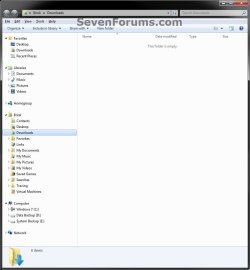
User-name_Group.jpg

   Tip
You can also quickly expand the navigation pane to the current location you are navigated to by pressing Ctrl+Shift+E keys.


EXAMPLE: "Automatically expand to current folder" Turned Off
NOTE: This is the default setting in Windows 7.
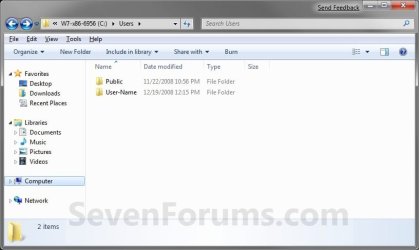
Disabled.jpg
EXAMPLE: "Automatically expand to current folder" Turned On
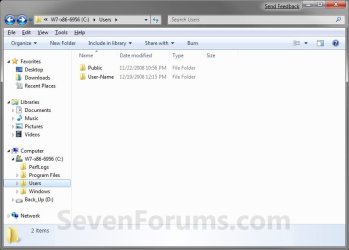
Enabled.jpg


OPTION ONE

Through Navigation Pane


1. Right click on an empty space in the Navigation Pane.

2. To Turn On Automatically Expand to Current Folder
A) Click on Expand to current folder to check it. (see screenshot below)
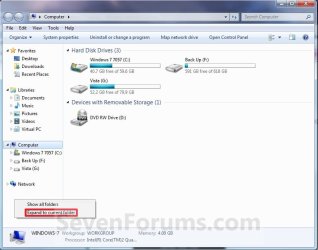
Expand_Current_folder.jpg
3. To Turn Off Automatically Expand to Current Folder
A) Click on Expand to current folder to uncheck it. (see screenshot above)
NOTE: This is the default setting.


OPTION TWO

Through Folder Options


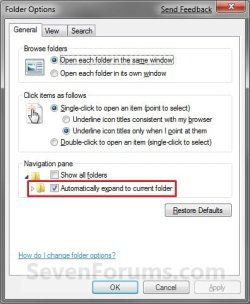
1. Open Folder Options, and click on the General tab. (See screenshot below)
Folder_Options.jpg
2. To Turn On Automatically Expand to Current Folder
A) Check the Automatically expand to current folder box. (see screenshot above)

B) Go to step 4.
3. To Turn Off Automatically Expand to Current Folder
A) Uncheck the Automatically expand to current folder box. (see screenshot below step 2)
NOTE: This is the default setting.
4. Click on OK. (see screenshot below step 2)


OPTION THREE

Through a REG file Download


1. To Turn On Automatically Expand to Current Folder
A) Click on the Download button below to download the file below.
Expand_to_Current_Folder_Navigation_Pane.reg

Download


B) Go to step 3.
2. To Turn Off Automatically Expand to Current Folder
A) Click on the Download button below to download the file below.
NOTE: This is the default setting.
Not_Expand_to_Current_Folder_Navigation_Pane.reg

Download


3. Click on Save, and save the .reg file to the desktop.

4. Right click on the downloaded .reg file and click on Merge.

5. Click on Run, Yes, Yes, and OK when prompted.

6. If open, close and reopen Windows Explorer to see the changes.
NOTE: If you do not see a change, then log off and log on, or restart the computer to apply.

7. When done, you can delete the downloaded .reg file if you like.


OPTION FOUR

Manually Through Registry Editor


1. Open the Start Menu, then type regedit in the search box and press Enter.

2. If prompted by UAC, then click on Yes.

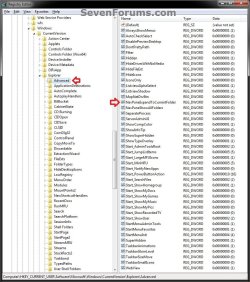
3. In regedit, navigate to the location below. (see screenshot below)

Code:
HKEY_CURRENT_USER\Software\Microsoft\Windows\CurrentVersion\Explorer\Advanced
REG-1.jpg
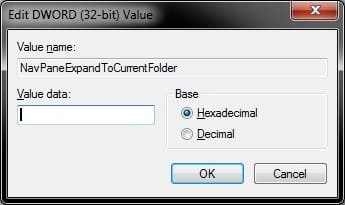
4. In the right pane of Advanced, right click on NavPaneExpandToCurrentFolder and click on Modify. (see screenshot above)

5. To Turn Off Automatically Expand to Current Folder
A) Type 0 (number zero), and click on OK. (see screenshot below)
NOTE: This is the default setting.
REG-2.jpg
B) Go to step 7.
6. To Turn On Automatically Expand to Current Folder
A) Type 1, and click on OK. (see screenshot above)
7. Close regedit.

8. If open, close and reopen Windows Explorer to see the changes.
NOTE: If you do not see a change, then log off and log on, or restart the computer to apply.
That's it,
Shawn


Attachments

Last edited:

My Computer

Computer type
PC/Desktop
Computer Manufacturer/Model Number
Alienware Aurora ALX R4
OS
Windows 10 Pro (x64)
CPU
Intel Core i7-3930K (3.2GHz - 4.5GHz)
Motherboard
Alienware Aurora-R4 x79
Memory
4x Samsung 4GB PC3-12800 DDR3 (16GB 1600MHz)
Graphics Card(s)
Nvidia Geforce GTX 690
Sound Card
SteelSeries Siberia Elite
Monitor(s) Displays
Dell UltraSharp U3011
Screen Resolution
2560x1600
Hard Drives
Samsung 850 Pro 256 GB, Seagate 1TB Desktop Hybrid HDD, 2x Western Digital 4TB Green HDD
PSU
875W Some Dell PSU <.<
Case
Alienware Aurora ALX
Cooling
Custom Liquid Cooling (EK CPU & GPU blocks) dual EK 480RAD
Keyboard
Logitech G710+ Mechanical
Mouse
Logitech G700s
Internet Speed
Verizon Fios (50 mbps average)
Other Info
Server: Intel NUC D54250WYK: i5-4250U, 16GB, 256 GB mSATA, Windows Server 2012 R2
Hello Lavecoi,

In the Navigation Pane, try clicking on the arrow to the left of the folder, or double clicking on the folder instead to see how that allows it to expand for you.

If you have Expand to current folder checked and click on a folder in the main Windows Explorer window and it does not expand to it in the Navigation Pane, then close and reopen Windows Explorer to see if does afterwards.


Hope this helps,
Shawn
 

My Computer

Computer type
PC/Desktop
Computer Manufacturer/Model Number
Self built custom
OS
64-bit Windows 11 Pro for Workstations
CPU
Intel i7-8700K OC'd to 5 GHz
Motherboard
ASUS ROG Maximus XI Formula Z390
Memory
64 GB (4x16GB) G.SKILL TridentZ RGB DDR4 3600 MHz
Graphics Card(s)
ASUS ROG-STRIX-GTX1080TI-O11G-GAMING
Sound Card
Integrated
Monitor(s) Displays
2 x Samsung Odyssey G7 27"
Screen Resolution
2560x1440
Hard Drives
1TB Samsung 990 PRO M.2,
4TB Samsung 990 PRO PRO M.2,
TerraMaster F8 SSD Plus NAS
PSU
Seasonic Prime Titanium 850W
Case
Thermaltake Core P3
Cooling
Corsair Hydro H115i
Keyboard
Logitech wireless K800
Mouse
Logitech MX Master 4
Internet Speed
2 Gb/s Download and 100 Mb/s Upload
Antivirus
Malwarebyte Anti-Malware Premium
Browser
Google Chrome
Other Info
Logitech Z625 speaker system,
Logitech BRIO 4K Pro webcam,
HP Color LaserJet Pro MFP M477fdn,
APC SMART-UPS RT 1000 XL - SURT1000XLI,
Galaxy S23 Plus phone
Orsumness! :D

Been meanin' to sort this for ages and it only took a few click's, search "explorer expand navigate", hit the top result and a scroll down Brink's post.

Thanks.
 

My Computer

Computer Manufacturer/Model Number
Mostly in-house builds
OS
Win7Pro & XPpro
I'm struggling to get this to work. Folder Options and the registry edit made no difference.

I use the mouse as seldom as possible so I want to be able to use Windows Explorer as I used to in XP, i.e. with keyboard arrows and tab/shift-tab to navigate around. The requirement is:

1. to be able to pass down to a folder in the Navigation Pane (using up/down arrows and right/left arrows to expand/contract to folder of interest) and to have the folder's contents displayed automatically in the right hand pane. As it stands this only works by hitting Enter when you get to the desired folder. This is annoying as (1) it is one more key stroke than XP and (2) I have to repeat the whole business if the selected folder doesn't have the file I want and I want to navigate to another folder.

2. to be able to navigate the right hand pane and to hit Enter on a particular folder, it expands in the right hand pane and the folder appears in the left hand pane. This works fine.

For the record, the regedits from separate posts for killing Libraries, Homegroup and Favorites worked straight away (thank you).

Thanks.
 

My Computer

Computer Manufacturer/Model Number
HP Pavilion DV6-3122SA
OS
Windows 7 Home Premium 64-bit
CPU
AMD Turion II 540 Dual Core
Motherboard
1441 67 22
Memory
4Gb
Graphics Card(s)
AMD M880G
Sound Card
ATI
Hard Drives
Hitachi 465.75Gb
Hello Horse Sands, and welcome to Seven Forums.

Yes, that can be annoying, but this tutorial is for only while you are navigating in the main Windows Explorer pane instead of navigating in the navigation pane. :(
 

My Computer

Computer type
PC/Desktop
Computer Manufacturer/Model Number
Self built custom
OS
64-bit Windows 11 Pro for Workstations
CPU
Intel i7-8700K OC'd to 5 GHz
Motherboard
ASUS ROG Maximus XI Formula Z390
Memory
64 GB (4x16GB) G.SKILL TridentZ RGB DDR4 3600 MHz
Graphics Card(s)
ASUS ROG-STRIX-GTX1080TI-O11G-GAMING
Sound Card
Integrated
Monitor(s) Displays
2 x Samsung Odyssey G7 27"
Screen Resolution
2560x1440
Hard Drives
1TB Samsung 990 PRO M.2,
4TB Samsung 990 PRO PRO M.2,
TerraMaster F8 SSD Plus NAS
PSU
Seasonic Prime Titanium 850W
Case
Thermaltake Core P3
Cooling
Corsair Hydro H115i
Keyboard
Logitech wireless K800
Mouse
Logitech MX Master 4
Internet Speed
2 Gb/s Download and 100 Mb/s Upload
Antivirus
Malwarebyte Anti-Malware Premium
Browser
Google Chrome
Other Info
Logitech Z625 speaker system,
Logitech BRIO 4K Pro webcam,
HP Color LaserJet Pro MFP M477fdn,
APC SMART-UPS RT 1000 XL - SURT1000XLI,
Galaxy S23 Plus phone
Ah-ha. Is there a fix to this elsewhere in the forum, per chance? No matter where I search I cannot see how to fix this.

Thanks.
 

My Computer

Computer Manufacturer/Model Number
HP Pavilion DV6-3122SA
OS
Windows 7 Home Premium 64-bit
CPU
AMD Turion II 540 Dual Core
Motherboard
1441 67 22
Memory
4Gb
Graphics Card(s)
AMD M880G
Sound Card
ATI
Hard Drives
Hitachi 465.75Gb
Unfortunately, I'm not aware of any way around it so far. :(
 

My Computer

Computer type
PC/Desktop
Computer Manufacturer/Model Number
Self built custom
OS
64-bit Windows 11 Pro for Workstations
CPU
Intel i7-8700K OC'd to 5 GHz
Motherboard
ASUS ROG Maximus XI Formula Z390
Memory
64 GB (4x16GB) G.SKILL TridentZ RGB DDR4 3600 MHz
Graphics Card(s)
ASUS ROG-STRIX-GTX1080TI-O11G-GAMING
Sound Card
Integrated
Monitor(s) Displays
2 x Samsung Odyssey G7 27"
Screen Resolution
2560x1440
Hard Drives
1TB Samsung 990 PRO M.2,
4TB Samsung 990 PRO PRO M.2,
TerraMaster F8 SSD Plus NAS
PSU
Seasonic Prime Titanium 850W
Case
Thermaltake Core P3
Cooling
Corsair Hydro H115i
Keyboard
Logitech wireless K800
Mouse
Logitech MX Master 4
Internet Speed
2 Gb/s Download and 100 Mb/s Upload
Antivirus
Malwarebyte Anti-Malware Premium
Browser
Google Chrome
Other Info
Logitech Z625 speaker system,
Logitech BRIO 4K Pro webcam,
HP Color LaserJet Pro MFP M477fdn,
APC SMART-UPS RT 1000 XL - SURT1000XLI,
Galaxy S23 Plus phone
Hi all, and especially Horse Sands. I realize this thread has been open for a while, and hope you're going to get this. But, I've been beating my head against a brick wall with this, because for those of us that actually used the navigation pane in the XP style (I completely skipped Vista because of it's result in a complete decrease in productivity, due to issues such as this) this can become very annoying very quickly.

I've followed multiple threads, from several forums including several MS forums. The result? Brink's statement "Unfortunately, I'm not aware of any way around it so far. :(" is still completely true. Unless you consider 3rd party applications. When I finally decided that it was time to examine alternative file managers to Explorer, I tried several, but to be honest, that was about a year ago, and I can't remember them all.. The result though was choosing to use Q-Dir, found here: Q-Dir the Quad Explorer for Windows - Q-Dir

It was my main choice because of the options and features, as well as the multiple panes (which can be changed to show 1-4) I think if you were to give it a try you will find that it will work specifically how you are wanting it to.

In addition though, this is a persistent problem through Win8 now that it's released. There are a few of the issues that were supposedly fixed in Win8 with the final release, but can't actually say whether they are or not as I will be skipping it completely like Vista... (I absolutely hate the Metro interface, and even after 3 months of trying to get used to it and the charms menu, could not do so..) But on several of the threads from the MS forums, there were posts from supposed employees stating that the Win7 Explorer isn't going to be updated to reflect those changes... Again, not sure if that's just spreading rumor or not, but the point is that Q-Dir may very well provide the solution you are looking for.

I agree with you though, and provide my thanks for sevenforums for the regedit tweaks for the cleaning of the navigation pane! :D
 

My Computer

OS
Win 7 Professional 64 bit
hi brink

how did you make your username appear on the navigation pane?? can i make it appear in windows 8 ??

thanks
 

My Computer

OS
Windows 7 Home Premium x64
CPU
Intel Core i7 3770

My Computer

Computer type
PC/Desktop
Computer Manufacturer/Model Number
Self built custom
OS
64-bit Windows 11 Pro for Workstations
CPU
Intel i7-8700K OC'd to 5 GHz
Motherboard
ASUS ROG Maximus XI Formula Z390
Memory
64 GB (4x16GB) G.SKILL TridentZ RGB DDR4 3600 MHz
Graphics Card(s)
ASUS ROG-STRIX-GTX1080TI-O11G-GAMING
Sound Card
Integrated
Monitor(s) Displays
2 x Samsung Odyssey G7 27"
Screen Resolution
2560x1440
Hard Drives
1TB Samsung 990 PRO M.2,
4TB Samsung 990 PRO PRO M.2,
TerraMaster F8 SSD Plus NAS
PSU
Seasonic Prime Titanium 850W
Case
Thermaltake Core P3
Cooling
Corsair Hydro H115i
Keyboard
Logitech wireless K800
Mouse
Logitech MX Master 4
Internet Speed
2 Gb/s Download and 100 Mb/s Upload
Antivirus
Malwarebyte Anti-Malware Premium
Browser
Google Chrome
Other Info
Logitech Z625 speaker system,
Logitech BRIO 4K Pro webcam,
HP Color LaserJet Pro MFP M477fdn,
APC SMART-UPS RT 1000 XL - SURT1000XLI,
Galaxy S23 Plus phone
Anytime. :)
 

My Computer

Computer type
PC/Desktop
Computer Manufacturer/Model Number
Self built custom
OS
64-bit Windows 11 Pro for Workstations
CPU
Intel i7-8700K OC'd to 5 GHz
Motherboard
ASUS ROG Maximus XI Formula Z390
Memory
64 GB (4x16GB) G.SKILL TridentZ RGB DDR4 3600 MHz
Graphics Card(s)
ASUS ROG-STRIX-GTX1080TI-O11G-GAMING
Sound Card
Integrated
Monitor(s) Displays
2 x Samsung Odyssey G7 27"
Screen Resolution
2560x1440
Hard Drives
1TB Samsung 990 PRO M.2,
4TB Samsung 990 PRO PRO M.2,
TerraMaster F8 SSD Plus NAS
PSU
Seasonic Prime Titanium 850W
Case
Thermaltake Core P3
Cooling
Corsair Hydro H115i
Keyboard
Logitech wireless K800
Mouse
Logitech MX Master 4
Internet Speed
2 Gb/s Download and 100 Mb/s Upload
Antivirus
Malwarebyte Anti-Malware Premium
Browser
Google Chrome
Other Info
Logitech Z625 speaker system,
Logitech BRIO 4K Pro webcam,
HP Color LaserJet Pro MFP M477fdn,
APC SMART-UPS RT 1000 XL - SURT1000XLI,
Galaxy S23 Plus phone
I just found out today that if you want to leave the Automatically expand current folder unchecked, but occasionally want to have it expand to the current folder on an as-needed basis, you can press Ctrl-Shift-E. This is documented here: Working with the Navigation pane
 

My Computer

Computer type
PC/Desktop
OS
Windows 7 Professional 64 bit
Back
Top