
Windows Key Shortcuts - Enable or Disable

How to Enable or Disable Windows Key Shortcuts in Vista, Windows 7, and Windows 8

   Information
This tutorial will allow you to enable or disable all Windows Key + key shortcut hotkeys for all or specific users in Vista, Windows 7, Windows 8, and Windows 8.1.

You must be logged in as an administrator to be able to do the steps in this tutorial.

   Note
Pressing the Windows Key by itself will still open the Start menu even when Windows key shortcut hotkeys are set to disabled.


OPTION ONE

Enable or Disable Windows Key Hotkeys using a REG File

1. Do step 2 or 3 below for what you would like to do.

2. To Enable Windows Key Hotkeys for All Users
NOTE: This is the default setting. A) Click/tap on the Download button below to download the file below, and go to step 4 below. Enable_Windows_Key_Hotkeys.zip

Download


3. To Disable Windows Key Hotkeys for All Users A) Click/tap on the Download button below to download the file below, and go to step 4 below. Disable_Windows_Key_Hotkeys.zip

Download


4. Save the .reg file to your desktop.

5.Double click/tap on the downloaded .reg file to merge it.

6. Click/tap on Run, Yes (UAC - Windows 7/8) or Continue (UAC- Vista), Yes, and OK when prompted.

7. When done, you can delete the downloaded .reg and .zip files if you like.

8. Log off and log on, or restart the computer to apply.


OPTION TWO

Enable or Disable Windows Key Hotkeys in Group Policy

1. Open the all users, specific users or groups, or all users except administrators Local Group Policy Editor for how you want this policy applied.

2. In the left pane, click/tap on to expand User Configuration, Administrative Templates, Windows Components, and Windows Explorer (Vista/Windows 7) or File Explorer (Windows 8). (see screenshot below) Group_Policy.jpg
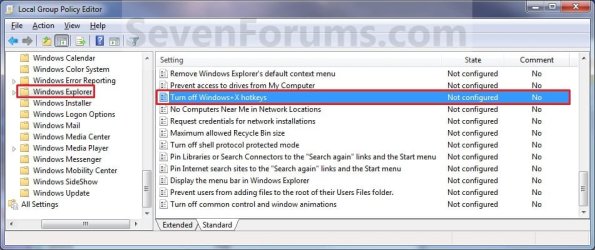
3. In the right pane, double click/tap on Turn off Windows + X hotkeys to edit it. (see screenshot above)

4. Do step 5 or 6 below for what you would like to do.


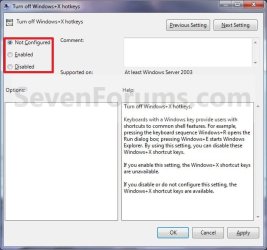
5. To Enable Windows Key Hotkeys A) Select (dot) either Not Configured or Disabled, and go to step 7 below. (see screenshot below step 7)
NOTE: Not Configured is the default setting.
6. To Disable Windows Key Hotkeys A) Select (dot) Enabled, and go to step 7 below. (see screenshot below step 7)
7. Click/tap on OK. (See screenshot below) Properties.jpg
8. Close the Local Group Policy Editor window.

9. Log off and log on, or restart the computer to apply.
That's it,
Shawn


Attachments

Last edited:
doesnt work for me

Hi I have an alienware laptop with windows 7 home premium 64. Neither of these options work for me.

Any ideas?
 

My Computer

OS
Windows 7
Hello b0dhi, and welcome to Seven Forums.

If Alienware has some proprietary program that comes preinstalled on their systems that uses the Windows Key, then it may not work with on that program since it may override this.

This doesn't disable the Windows Key completely, only the Windows Key + key keyboard shortcuts used by Windows 7.

Hope this helps,
Shawn
 

My Computer

Computer type
PC/Desktop
Computer Manufacturer/Model Number
Self built custom
OS
64-bit Windows 11 Pro for Workstations
CPU
Intel i7-8700K OC'd to 5 GHz
Motherboard
ASUS ROG Maximus XI Formula Z390
Memory
64 GB (4x16GB) G.SKILL TridentZ RGB DDR4 3600 MHz
Graphics Card(s)
ASUS ROG-STRIX-GTX1080TI-O11G-GAMING
Sound Card
Integrated
Monitor(s) Displays
2 x Samsung Odyssey G7 27"
Screen Resolution
2560x1440
Hard Drives
1TB Samsung 990 PRO M.2,
4TB Samsung 990 PRO PRO M.2,
TerraMaster F8 SSD Plus NAS
PSU
Seasonic Prime Titanium 850W
Case
Thermaltake Core P3
Cooling
Corsair Hydro H115i
Keyboard
Logitech wireless K800
Mouse
Logitech MX Master 4
Internet Speed
2 Gb/s Download and 100 Mb/s Upload
Antivirus
Malwarebyte Anti-Malware Premium
Browser
Google Chrome
Other Info
Logitech Z625 speaker system,
Logitech BRIO 4K Pro webcam,
HP Color LaserJet Pro MFP M477fdn,
APC SMART-UPS RT 1000 XL - SURT1000XLI,
Galaxy S23 Plus phone
Wish there was a way to disable the windows key itself from popping up the start menu.
 

My Computer

Computer Manufacturer/Model Number
Gigabyte Technology
OS
Windows 7
CPU
Intel Core i7 950
Motherboard
X58A-UD7
Graphics Card(s)
NVIDIA GeForce GTX 980 Ti

My Computer

Computer type
PC/Desktop
Computer Manufacturer/Model Number
Self built custom
OS
64-bit Windows 11 Pro for Workstations
CPU
Intel i7-8700K OC'd to 5 GHz
Motherboard
ASUS ROG Maximus XI Formula Z390
Memory
64 GB (4x16GB) G.SKILL TridentZ RGB DDR4 3600 MHz
Graphics Card(s)
ASUS ROG-STRIX-GTX1080TI-O11G-GAMING
Sound Card
Integrated
Monitor(s) Displays
2 x Samsung Odyssey G7 27"
Screen Resolution
2560x1440
Hard Drives
1TB Samsung 990 PRO M.2,
4TB Samsung 990 PRO PRO M.2,
TerraMaster F8 SSD Plus NAS
PSU
Seasonic Prime Titanium 850W
Case
Thermaltake Core P3
Cooling
Corsair Hydro H115i
Keyboard
Logitech wireless K800
Mouse
Logitech MX Master 4
Internet Speed
2 Gb/s Download and 100 Mb/s Upload
Antivirus
Malwarebyte Anti-Malware Premium
Browser
Google Chrome
Other Info
Logitech Z625 speaker system,
Logitech BRIO 4K Pro webcam,
HP Color LaserJet Pro MFP M477fdn,
APC SMART-UPS RT 1000 XL - SURT1000XLI,
Galaxy S23 Plus phone
Thanks Shawn.

That's exactly what I'm looking for. How ever the link for the Disable_Windows_Key.reg file is broken.
 

My Computer

Computer Manufacturer/Model Number
Gigabyte Technology
OS
Windows 7
CPU
Intel Core i7 950
Motherboard
X58A-UD7
Graphics Card(s)
NVIDIA GeForce GTX 980 Ti
Umm, strange. It's fixed now. :)
 

My Computer

Computer type
PC/Desktop
Computer Manufacturer/Model Number
Self built custom
OS
64-bit Windows 11 Pro for Workstations
CPU
Intel i7-8700K OC'd to 5 GHz
Motherboard
ASUS ROG Maximus XI Formula Z390
Memory
64 GB (4x16GB) G.SKILL TridentZ RGB DDR4 3600 MHz
Graphics Card(s)
ASUS ROG-STRIX-GTX1080TI-O11G-GAMING
Sound Card
Integrated
Monitor(s) Displays
2 x Samsung Odyssey G7 27"
Screen Resolution
2560x1440
Hard Drives
1TB Samsung 990 PRO M.2,
4TB Samsung 990 PRO PRO M.2,
TerraMaster F8 SSD Plus NAS
PSU
Seasonic Prime Titanium 850W
Case
Thermaltake Core P3
Cooling
Corsair Hydro H115i
Keyboard
Logitech wireless K800
Mouse
Logitech MX Master 4
Internet Speed
2 Gb/s Download and 100 Mb/s Upload
Antivirus
Malwarebyte Anti-Malware Premium
Browser
Google Chrome
Other Info
Logitech Z625 speaker system,
Logitech BRIO 4K Pro webcam,
HP Color LaserJet Pro MFP M477fdn,
APC SMART-UPS RT 1000 XL - SURT1000XLI,
Galaxy S23 Plus phone
Thanks again. Working as intended. :)
 

My Computer

Computer Manufacturer/Model Number
Gigabyte Technology
OS
Windows 7
CPU
Intel Core i7 950
Motherboard
X58A-UD7
Graphics Card(s)
NVIDIA GeForce GTX 980 Ti
You're welcome Azure. :)
 

My Computer

Computer type
PC/Desktop
Computer Manufacturer/Model Number
Self built custom
OS
64-bit Windows 11 Pro for Workstations
CPU
Intel i7-8700K OC'd to 5 GHz
Motherboard
ASUS ROG Maximus XI Formula Z390
Memory
64 GB (4x16GB) G.SKILL TridentZ RGB DDR4 3600 MHz
Graphics Card(s)
ASUS ROG-STRIX-GTX1080TI-O11G-GAMING
Sound Card
Integrated
Monitor(s) Displays
2 x Samsung Odyssey G7 27"
Screen Resolution
2560x1440
Hard Drives
1TB Samsung 990 PRO M.2,
4TB Samsung 990 PRO PRO M.2,
TerraMaster F8 SSD Plus NAS
PSU
Seasonic Prime Titanium 850W
Case
Thermaltake Core P3
Cooling
Corsair Hydro H115i
Keyboard
Logitech wireless K800
Mouse
Logitech MX Master 4
Internet Speed
2 Gb/s Download and 100 Mb/s Upload
Antivirus
Malwarebyte Anti-Malware Premium
Browser
Google Chrome
Other Info
Logitech Z625 speaker system,
Logitech BRIO 4K Pro webcam,
HP Color LaserJet Pro MFP M477fdn,
APC SMART-UPS RT 1000 XL - SURT1000XLI,
Galaxy S23 Plus phone
Psssst

Hey Brink, I'm here for the same reason as everyone else, and I'd love to use your method. However, the link for Disable_Windows_Hotkey is broken. Enable_ works though.

Can you fix it, or send the file to my account's associated email address? I keep alt-tabbing out of games and its awfullll.

Edit: Also, I would simply use your Method#2, but I unfortunately listened to the computer shop guys and bought Home Premium, so I don't have the gpedit.msc function.
 

My Computer

Computer Manufacturer/Model Number
Home Built
OS
7
CPU
Intel i7 930
Motherboard
Gigabyte Ultra Durable 3
Memory
3x 2GB DDR3 G-skill 1600mhz
Graphics Card(s)
ATI Radeon HD 5850
Monitor(s) Displays
24" LG Widescreen LCD
Screen Resolution
1920x1080
Hard Drives
1x 64GB Mushkin SSD
1x 1TB Western Digital 7200rpm
PSU
700W Rosewill Green Series
Case
Rosewill Smart One ATX
Cooling
3x Fans, came with Tower Case
Keyboard
Logitech
Mouse
Logitech
Internet Speed
Cable
Other Info
I PWN TEH NO0B
Hello Alexandra, and welcome to Seven Forums.

Strange, it downloads for me. Here's the REG file in that download to see if you may be able to download it from here instead.

Hope this helps,
Shawn
 

Attachments

My Computer

Computer type
PC/Desktop
Computer Manufacturer/Model Number
Self built custom
OS
64-bit Windows 11 Pro for Workstations
CPU
Intel i7-8700K OC'd to 5 GHz
Motherboard
ASUS ROG Maximus XI Formula Z390
Memory
64 GB (4x16GB) G.SKILL TridentZ RGB DDR4 3600 MHz
Graphics Card(s)
ASUS ROG-STRIX-GTX1080TI-O11G-GAMING
Sound Card
Integrated
Monitor(s) Displays
2 x Samsung Odyssey G7 27"
Screen Resolution
2560x1440
Hard Drives
1TB Samsung 990 PRO M.2,
4TB Samsung 990 PRO PRO M.2,
TerraMaster F8 SSD Plus NAS
PSU
Seasonic Prime Titanium 850W
Case
Thermaltake Core P3
Cooling
Corsair Hydro H115i
Keyboard
Logitech wireless K800
Mouse
Logitech MX Master 4
Internet Speed
2 Gb/s Download and 100 Mb/s Upload
Antivirus
Malwarebyte Anti-Malware Premium
Browser
Google Chrome
Other Info
Logitech Z625 speaker system,
Logitech BRIO 4K Pro webcam,
HP Color LaserJet Pro MFP M477fdn,
APC SMART-UPS RT 1000 XL - SURT1000XLI,
Galaxy S23 Plus phone
TY!!

Thank you so much! I really, really appreciate the prompt response! I'll try to get it working now :)

Results: Something still wrong with the file :P It downloads as a .download file extension, not a .zip or .reg like you mentioned. Windows doesn't know how to handle the file. :(
 
Last edited:

My Computer

Computer Manufacturer/Model Number
Home Built
OS
7
CPU
Intel i7 930
Motherboard
Gigabyte Ultra Durable 3
Memory
3x 2GB DDR3 G-skill 1600mhz
Graphics Card(s)
ATI Radeon HD 5850
Monitor(s) Displays
24" LG Widescreen LCD
Screen Resolution
1920x1080
Hard Drives
1x 64GB Mushkin SSD
1x 1TB Western Digital 7200rpm
PSU
700W Rosewill Green Series
Case
Rosewill Smart One ATX
Cooling
3x Fans, came with Tower Case
Keyboard
Logitech
Mouse
Logitech
Internet Speed
Cable
Other Info
I PWN TEH NO0B
You're welcome. Please let us know how it went. :)
 

My Computer

Computer type
PC/Desktop
Computer Manufacturer/Model Number
Self built custom
OS
64-bit Windows 11 Pro for Workstations
CPU
Intel i7-8700K OC'd to 5 GHz
Motherboard
ASUS ROG Maximus XI Formula Z390
Memory
64 GB (4x16GB) G.SKILL TridentZ RGB DDR4 3600 MHz
Graphics Card(s)
ASUS ROG-STRIX-GTX1080TI-O11G-GAMING
Sound Card
Integrated
Monitor(s) Displays
2 x Samsung Odyssey G7 27"
Screen Resolution
2560x1440
Hard Drives
1TB Samsung 990 PRO M.2,
4TB Samsung 990 PRO PRO M.2,
TerraMaster F8 SSD Plus NAS
PSU
Seasonic Prime Titanium 850W
Case
Thermaltake Core P3
Cooling
Corsair Hydro H115i
Keyboard
Logitech wireless K800
Mouse
Logitech MX Master 4
Internet Speed
2 Gb/s Download and 100 Mb/s Upload
Antivirus
Malwarebyte Anti-Malware Premium
Browser
Google Chrome
Other Info
Logitech Z625 speaker system,
Logitech BRIO 4K Pro webcam,
HP Color LaserJet Pro MFP M477fdn,
APC SMART-UPS RT 1000 XL - SURT1000XLI,
Galaxy S23 Plus phone
Still problem with the new download link. :( It downloads as a .download file extension... windows doesn't know how to handle the file. A google search says it's only openable by browsers, but neither IE nor chrome can handle it.

Out of interest, here is the restricted-access error I get when trying to DL from the 1st page:

alexandra, you do not have permission to access this page. This could be due to one of several reasons:

Your user account may not have sufficient privileges to access this page. Are you trying to edit someone else's post, access administrative features or some other privileged system?
If you are trying to post, the administrator may have disabled your account, or it may be awaiting activation.
 

My Computer

Computer Manufacturer/Model Number
Home Built
OS
7
CPU
Intel i7 930
Motherboard
Gigabyte Ultra Durable 3
Memory
3x 2GB DDR3 G-skill 1600mhz
Graphics Card(s)
ATI Radeon HD 5850
Monitor(s) Displays
24" LG Widescreen LCD
Screen Resolution
1920x1080
Hard Drives
1x 64GB Mushkin SSD
1x 1TB Western Digital 7200rpm
PSU
700W Rosewill Green Series
Case
Rosewill Smart One ATX
Cooling
3x Fans, came with Tower Case
Keyboard
Logitech
Mouse
Logitech
Internet Speed
Cable
Other Info
I PWN TEH NO0B
Ah, ok. It sounds like you have some sort of securtiy program that changes the name of the download's file extension.

After downloading the .reg file, right click on the .reg file and click on Rename. Use you arrow keys to move over and rename Disable_Windows_Key_Hotkeys.download back to Disable_Windows_Key_Hotkeys.reg. Afterwards, you should be able to merge it.
 

My Computer

Computer type
PC/Desktop
Computer Manufacturer/Model Number
Self built custom
OS
64-bit Windows 11 Pro for Workstations
CPU
Intel i7-8700K OC'd to 5 GHz
Motherboard
ASUS ROG Maximus XI Formula Z390
Memory
64 GB (4x16GB) G.SKILL TridentZ RGB DDR4 3600 MHz
Graphics Card(s)
ASUS ROG-STRIX-GTX1080TI-O11G-GAMING
Sound Card
Integrated
Monitor(s) Displays
2 x Samsung Odyssey G7 27"
Screen Resolution
2560x1440
Hard Drives
1TB Samsung 990 PRO M.2,
4TB Samsung 990 PRO PRO M.2,
TerraMaster F8 SSD Plus NAS
PSU
Seasonic Prime Titanium 850W
Case
Thermaltake Core P3
Cooling
Corsair Hydro H115i
Keyboard
Logitech wireless K800
Mouse
Logitech MX Master 4
Internet Speed
2 Gb/s Download and 100 Mb/s Upload
Antivirus
Malwarebyte Anti-Malware Premium
Browser
Google Chrome
Other Info
Logitech Z625 speaker system,
Logitech BRIO 4K Pro webcam,
HP Color LaserJet Pro MFP M477fdn,
APC SMART-UPS RT 1000 XL - SURT1000XLI,
Galaxy S23 Plus phone
Although renaming it to .reg didn't work, I found the cause of the file extension problem. I was using Chrome, which I think tried to have fancy security and didn't complete the file download.

.download is the file extension of stopped or incomplete downloads for Chrome. I used IE and got the correct file.

Then, I completed the steps as described, allowing the file to change the registry and receiving a dialogue box that confirmed it has been entered into the registry... however after a full Shutdown / Boot, the Alt-Tab function is still plaguing me (meaning it's functional :P ).

Any ideas? I don't wanna waste too much of your time, sorry.

Edit: I should add that my Windows install is completely fresh. I don't have any anti-virus or anti-spy programs that could be reverting my registry or preventing the update. All that's on this comp is Windows 7, 2 games and Winrar.
 
Last edited:

My Computer

Computer Manufacturer/Model Number
Home Built
OS
7
CPU
Intel i7 930
Motherboard
Gigabyte Ultra Durable 3
Memory
3x 2GB DDR3 G-skill 1600mhz
Graphics Card(s)
ATI Radeon HD 5850
Monitor(s) Displays
24" LG Widescreen LCD
Screen Resolution
1920x1080
Hard Drives
1x 64GB Mushkin SSD
1x 1TB Western Digital 7200rpm
PSU
700W Rosewill Green Series
Case
Rosewill Smart One ATX
Cooling
3x Fans, came with Tower Case
Keyboard
Logitech
Mouse
Logitech
Internet Speed
Cable
Other Info
I PWN TEH NO0B
Hey Brink,

I found a solution! It's on this thread.
It requires a download of a miniscule third-party program. After following the instructions there, my Alt-Tab is not functional and no longer boots me out of fullscreen games.

Although the registry modification didn't work, thanks very much! Maybe you can refer others to that thread who have this problem in the future.
 

My Computer

Computer Manufacturer/Model Number
Home Built
OS
7
CPU
Intel i7 930
Motherboard
Gigabyte Ultra Durable 3
Memory
3x 2GB DDR3 G-skill 1600mhz
Graphics Card(s)
ATI Radeon HD 5850
Monitor(s) Displays
24" LG Widescreen LCD
Screen Resolution
1920x1080
Hard Drives
1x 64GB Mushkin SSD
1x 1TB Western Digital 7200rpm
PSU
700W Rosewill Green Series
Case
Rosewill Smart One ATX
Cooling
3x Fans, came with Tower Case
Keyboard
Logitech
Mouse
Logitech
Internet Speed
Cable
Other Info
I PWN TEH NO0B
That's great news Alexandra. Thank you for posting back with your solution. :)
 

My Computer

Computer type
PC/Desktop
Computer Manufacturer/Model Number
Self built custom
OS
64-bit Windows 11 Pro for Workstations
CPU
Intel i7-8700K OC'd to 5 GHz
Motherboard
ASUS ROG Maximus XI Formula Z390
Memory
64 GB (4x16GB) G.SKILL TridentZ RGB DDR4 3600 MHz
Graphics Card(s)
ASUS ROG-STRIX-GTX1080TI-O11G-GAMING
Sound Card
Integrated
Monitor(s) Displays
2 x Samsung Odyssey G7 27"
Screen Resolution
2560x1440
Hard Drives
1TB Samsung 990 PRO M.2,
4TB Samsung 990 PRO PRO M.2,
TerraMaster F8 SSD Plus NAS
PSU
Seasonic Prime Titanium 850W
Case
Thermaltake Core P3
Cooling
Corsair Hydro H115i
Keyboard
Logitech wireless K800
Mouse
Logitech MX Master 4
Internet Speed
2 Gb/s Download and 100 Mb/s Upload
Antivirus
Malwarebyte Anti-Malware Premium
Browser
Google Chrome
Other Info
Logitech Z625 speaker system,
Logitech BRIO 4K Pro webcam,
HP Color LaserJet Pro MFP M477fdn,
APC SMART-UPS RT 1000 XL - SURT1000XLI,
Galaxy S23 Plus phone
Alt+tab not working in Windows 7

Hi Brink I am using Windows 7 Home Ultimate 32 Bit Version, I am having the same problem posted here that Alt tab is not working. However I am confused which of the above two options to use, as I don't want to corrupt my OS in doing So. Can you please explain the work instruction in details, where I need to disable Window's Key or enable Window's key. I have downloaded both... Moreover where to find this Local Group Policy Editor which is mentioned in Option 2. I can only find Local Security Policy. Please guide me.Thanks.
 

My Computer

Computer type
PC/Desktop
Computer Manufacturer/Model Number
custom build
OS
Windows 7
CPU
Core 2 Duo
Memory
3 GB
Hello Traum, and welcome to Seven Forums.

Unfortunately, this tutorial is only for the Windows :orb: key shortcuts, and does not apply to the Alt+Tab shortcut.

If this happened recently, then you could do a system restore using a restore point (if available) dated before it stopped working to hopefully fix it.

Hope this helps, :)
Shawn
 

My Computer

Computer type
PC/Desktop
Computer Manufacturer/Model Number
Self built custom
OS
64-bit Windows 11 Pro for Workstations
CPU
Intel i7-8700K OC'd to 5 GHz
Motherboard
ASUS ROG Maximus XI Formula Z390
Memory
64 GB (4x16GB) G.SKILL TridentZ RGB DDR4 3600 MHz
Graphics Card(s)
ASUS ROG-STRIX-GTX1080TI-O11G-GAMING
Sound Card
Integrated
Monitor(s) Displays
2 x Samsung Odyssey G7 27"
Screen Resolution
2560x1440
Hard Drives
1TB Samsung 990 PRO M.2,
4TB Samsung 990 PRO PRO M.2,
TerraMaster F8 SSD Plus NAS
PSU
Seasonic Prime Titanium 850W
Case
Thermaltake Core P3
Cooling
Corsair Hydro H115i
Keyboard
Logitech wireless K800
Mouse
Logitech MX Master 4
Internet Speed
2 Gb/s Download and 100 Mb/s Upload
Antivirus
Malwarebyte Anti-Malware Premium
Browser
Google Chrome
Other Info
Logitech Z625 speaker system,
Logitech BRIO 4K Pro webcam,
HP Color LaserJet Pro MFP M477fdn,
APC SMART-UPS RT 1000 XL - SURT1000XLI,
Galaxy S23 Plus phone
Back
Top