BitLocker Drive Encryption - BitLocker To Go - Turn On or Off

How to Turn Windows 7 BitLocker To Go On or Off for Removable Drives


   Information
BitLocker To Go is used to encrypt and password protect any removable external hard drives and USB flash drives. The drives must be formatted using either the exFAT, FAT16, FAT32, or NTFS file system and must be at least 128 MB. This will show you how to turn on or off BitLocker To Go to encrypt or decrypt a entire external or USB Flash drive in Windows 7.
   Note
External hard drives or flash drives encrypted by BitLocker Drive Encryption - BitLocker To Go can be used on any computer you connect them to by unlocking the encrypted drive with a password or a smart card.

You can use the BitLocker To Go Reader application to provide users read-only access to BitLocker-protected FAT-formatted drives on computers running Windows XP or Windows Vista. When you plug a removable drive encrypted with BitLocker in to a computer running Windows XP or Windows Vista, AutoPlay might open and give you the option to install or run BitLocker To Go Reader. If you click this option, you’ll be prompted to unlock the drive with it's password. Once the drive is unlocked, you’ll have read-only access to the files. To open the files on the drive, you'll need to copy them to your computer. You can copy the files by dragging them to the desktop or to a folder.

   Warning
BitLocker is only available in the Windows 7 Ultimate and Enterprise editions.

When you add new files to a external hard drive or flash drive that is encrypted with BitLocker, BitLocker encrypts them automatically. Files remain encrypted only while they are stored in the encrypted drive. Files that are copied to another drive or computer are decrypted.

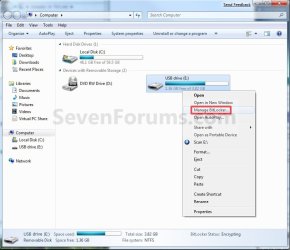
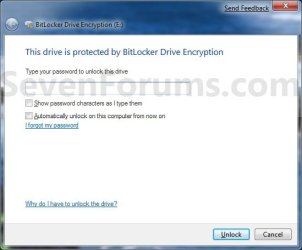
EXAMPLE: A USB Flash with BitLocker To Go turned on for it
NOTE: This is what you will see when you connect the encrypted removable USB flash drive or external hard drive to any computer. You will then need to select the option you want to use to unlock the drive to gain access.
Example.jpg


OPTION ONE

Turn On BitLocker to Encrypt Removable Drive


1. Decide if you want 128-bit or 256-bit encryption.
NOTE: By default, Windows 7 will use AES encryption with 128-bit encryption keys and Diffuser unless changed already by you previously.

2. Connect the removable hard drive or USB flash drive.
NOTE: I will be using a USB flash drive in this tutorial as an example. If AutoPlay opens a pop-up window, then just close it.

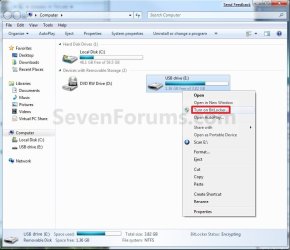
3. Open the Start menu and click on the Computer button, then right click on the drive letter for the removable hard drive or USB flash drive and click on Turn on BitLocker. (See screenshot below)
Computer-1.jpg

A) Go to step 5.
OR

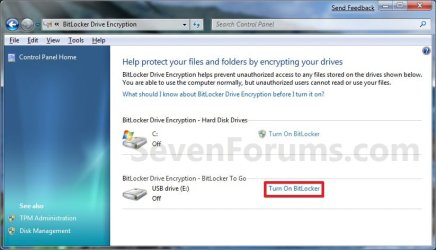
4. Open the Control Panel (All Items view), and click on the BitLocker Drive Encryption icon.
A) Click on Turn On BitLocker for the drive letter for the removable hard drive or USB flash drive that you want to encrypt. (See screenshot below)
Control_Panel_2.jpg
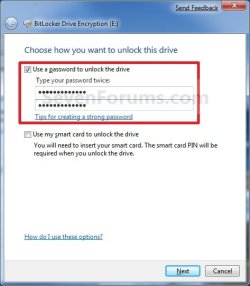
5. Select (check) Use a password to unlock the drive, then type in a password you want to use to unlock the drive with twice and click on the Next button. (See screenshot below)
NOTE: You can select the smart card option if you have this and want to use that instead. I just used the password option as an example in this tutorial.
WARNING: Be sure to write down this password and keep it somewhere safe. The password you enter here will be required to be entered to unlock the drive to gain access to it.
Step2.jpg
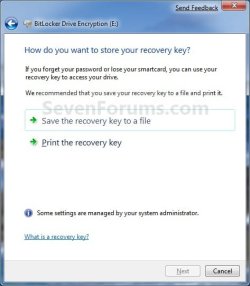
6. Click on Save the recovery key to file option. (See screenshot below)
Step3.jpg

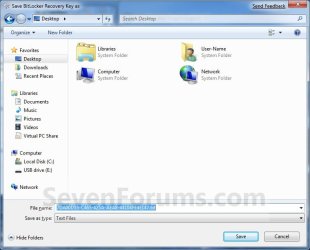
A) Select where you want to save this file at, and click on the Save button. (See screenshot below)
Step4.jpg
B) It is highly recommended that you save this file somewhere safe, and not on the encrypted drive. You will need the recovery key number to gain access to you encrypted drive if you should forget the password, lose the smart card, or BitLocker locks the drive.
File.jpg
C) It is also recommended that you click on the Print the recovery key option as well to have a printed hard copy of the file to be extra safe. (See screenshot below step 6)

D) When done, click on the Next button. (See screenshot below step 6)
7. Click on the Start Encrypting button. (See screenshot below)
Step5.jpg
8. BitLocker will now start encrypting the drive. (See screenshot below)
NOTE: This may take a while to finish.
Step6.jpg
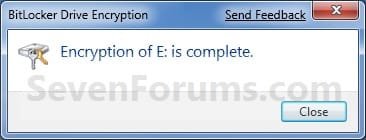
9. When finished, click on the Close button. (See screenshot below)
Step9.jpg
10. You will now have a Manage BitLocker option in the Control Panel and Computer for the encrypted drive. (See screenshots below)
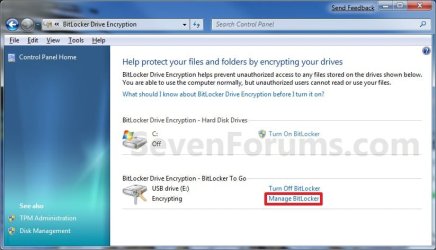
Step7.jpg

Computer-2.jpg
11. If you click on Manage BitLocker, these will be the options that you will have below. (See screenshot below)
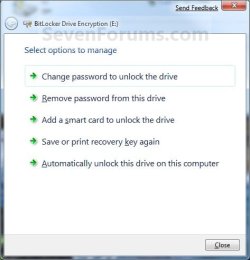
Step8.jpg
12. You're done. The drive is now encrypted with BitLocker To Go turned on.


OPTION TWO

Turn Off BitLocker to Decrypt Removable Drive


1. Connect the removable hard drive or USB flash drive.

2. Type in your password, and click on the Unlock button. (See screenshot below)
NOTE: If you selected to use a Smart Card instead in OPTION ONE (step 5), then you will have that option instead here. If AutoPlay opens a pop-up window, then just close it.
Example.jpg
3. Open the Control Panel (icons view), and click on the BitLocker Drive Encryption icon.

4. Click on Turn Off BitLocker for the drive letter for the removable hard drive or USB flash drive that you want to decrypt. (See screenshot below)
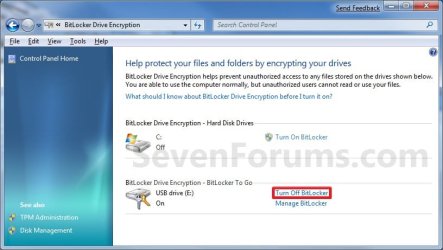
Decrypt_Step1.jpg
5. Click on the Decrypt Drive button. (See screenshot below)
Decrypt_Step2.jpg
6. BitLocker will now start decrypting the drive. (See screenshot below)
NOTE: This may take a while to finish.
Decrypt_Step3.jpg
7. When finished, click on the Close button. (See screenshot below)
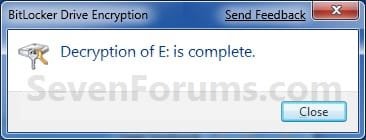
Decrypt_Step4.jpg
8. The Control Panel and Computer will now have the Turn On BitLocker option again.
Control_Panel_2.jpg

Computer-1.jpg
9. You're done. The drive is now decrypted with BitLocker To Go turned off.
That's it,
Shawn


Last edited:
  • Like
Reactions: Joe
Will a encrypted drive work on XP, max OSX and Linux ?
 

My Computer

Computer Manufacturer/Model Number
Clevo m860tu
OS
Windows 7 x64 RC1
CPU
P8400 @ 2.24ghz
Memory
2go ddr3
Graphics Card(s)
9800m gt
Monitor(s) Displays
15.4" and 22"
Screen Resolution
Both wsxga+
Hard Drives
320go@5400rpm
Keyboard
Apple Aluminium keyboard
Mouse
Logitech VX Revolution
Internet Speed
8mbit/s
Hello Caddish,

I have not tested this on those operating systems, but in theory it should since the recovery key and everything that is needed to encrypt and unencrpt the removable drive is stored on the removable drive itself.
 

My Computer

Computer type
PC/Desktop
Computer Manufacturer/Model Number
Self built custom
OS
64-bit Windows 11 Pro for Workstations
CPU
Intel i7-8700K OC'd to 5 GHz
Motherboard
ASUS ROG Maximus XI Formula Z390
Memory
64 GB (4x16GB) G.SKILL TridentZ RGB DDR4 3600 MHz
Graphics Card(s)
ASUS ROG-STRIX-GTX1080TI-O11G-GAMING
Sound Card
Integrated
Monitor(s) Displays
2 x Samsung Odyssey G7 27"
Screen Resolution
2560x1440
Hard Drives
1TB Samsung 990 PRO M.2,
4TB Samsung 990 PRO PRO M.2,
TerraMaster F8 SSD Plus NAS
PSU
Seasonic Prime Titanium 850W
Case
Thermaltake Core P3
Cooling
Corsair Hydro H115i
Keyboard
Logitech wireless K800
Mouse
Logitech MX Master 4
Internet Speed
2 Gb/s Download and 100 Mb/s Upload
Antivirus
Malwarebyte Anti-Malware Premium
Browser
Google Chrome
Other Info
Logitech Z625 speaker system,
Logitech BRIO 4K Pro webcam,
HP Color LaserJet Pro MFP M477fdn,
APC SMART-UPS RT 1000 XL - SURT1000XLI,
Galaxy S23 Plus phone
I tried it on XP and it shows as a thumbdrive with a locker on it and inside there is a bitlocker reader.exe and a internet link. The bitlocker reader ask for the password then there is a small utility which allow to copy file on the PC but writing on the thumb is not allowed although I forgot to check if it is possible to copy file where there is the internet shortcut and .exe
 

My Computer

Computer Manufacturer/Model Number
Clevo m860tu
OS
Windows 7 x64 RC1
CPU
P8400 @ 2.24ghz
Memory
2go ddr3
Graphics Card(s)
9800m gt
Monitor(s) Displays
15.4" and 22"
Screen Resolution
Both wsxga+
Hard Drives
320go@5400rpm
Keyboard
Apple Aluminium keyboard
Mouse
Logitech VX Revolution
Internet Speed
8mbit/s
When I click on the Drive it just opens it up, it does not ask me for a password.
 

My Computer

OS
Windows 7 x64
CPU
Intel E6750 O.Ced to 3.22GHz
Motherboard
ASUS P5N-E
Memory
CORSAIR XMS2 2GB (2 x 1GB)
Graphics Card(s)
EVGA GTS 250 1GB
Sound Card
Onboard
Monitor(s) Displays
2(17inch)
Hard Drives
WD WD3200YS
PSU
Corsair 750w
Case
Antec 900
Cooling
Stock HSF.... Antec has (4) 120mm Fans and (1) 200mm fan
Keyboard
G15
Mouse
Deathadder
Hello Warfare,

Just a few questions. ;)

Is this for Windows 7, did you turn on Bitlocker to go for the drive, and did you select the "Automatically unlock this drive on this computer" option (step 11) or have a copy of the recovery key save on the computer?
 

My Computer

Computer type
PC/Desktop
Computer Manufacturer/Model Number
Self built custom
OS
64-bit Windows 11 Pro for Workstations
CPU
Intel i7-8700K OC'd to 5 GHz
Motherboard
ASUS ROG Maximus XI Formula Z390
Memory
64 GB (4x16GB) G.SKILL TridentZ RGB DDR4 3600 MHz
Graphics Card(s)
ASUS ROG-STRIX-GTX1080TI-O11G-GAMING
Sound Card
Integrated
Monitor(s) Displays
2 x Samsung Odyssey G7 27"
Screen Resolution
2560x1440
Hard Drives
1TB Samsung 990 PRO M.2,
4TB Samsung 990 PRO PRO M.2,
TerraMaster F8 SSD Plus NAS
PSU
Seasonic Prime Titanium 850W
Case
Thermaltake Core P3
Cooling
Corsair Hydro H115i
Keyboard
Logitech wireless K800
Mouse
Logitech MX Master 4
Internet Speed
2 Gb/s Download and 100 Mb/s Upload
Antivirus
Malwarebyte Anti-Malware Premium
Browser
Google Chrome
Other Info
Logitech Z625 speaker system,
Logitech BRIO 4K Pro webcam,
HP Color LaserJet Pro MFP M477fdn,
APC SMART-UPS RT 1000 XL - SURT1000XLI,
Galaxy S23 Plus phone
I tried it on XP and it shows as a thumbdrive with a locker on it and inside there is a bitlocker reader.exe and a internet link. The bitlocker reader ask for the password then there is a small utility which allow to copy file on the PC but writing on the thumb is not allowed although I forgot to check if it is possible to copy file where there is the internet shortcut and .exe

You might check the internet shortcut to see what it gives you.
 

My Computer

Computer type
PC/Desktop
Computer Manufacturer/Model Number
Self built custom
OS
64-bit Windows 11 Pro for Workstations
CPU
Intel i7-8700K OC'd to 5 GHz
Motherboard
ASUS ROG Maximus XI Formula Z390
Memory
64 GB (4x16GB) G.SKILL TridentZ RGB DDR4 3600 MHz
Graphics Card(s)
ASUS ROG-STRIX-GTX1080TI-O11G-GAMING
Sound Card
Integrated
Monitor(s) Displays
2 x Samsung Odyssey G7 27"
Screen Resolution
2560x1440
Hard Drives
1TB Samsung 990 PRO M.2,
4TB Samsung 990 PRO PRO M.2,
TerraMaster F8 SSD Plus NAS
PSU
Seasonic Prime Titanium 850W
Case
Thermaltake Core P3
Cooling
Corsair Hydro H115i
Keyboard
Logitech wireless K800
Mouse
Logitech MX Master 4
Internet Speed
2 Gb/s Download and 100 Mb/s Upload
Antivirus
Malwarebyte Anti-Malware Premium
Browser
Google Chrome
Other Info
Logitech Z625 speaker system,
Logitech BRIO 4K Pro webcam,
HP Color LaserJet Pro MFP M477fdn,
APC SMART-UPS RT 1000 XL - SURT1000XLI,
Galaxy S23 Plus phone
It links to Microsoft Bitlocker to go help file on their site with all the Microsoft tutorial. But it's nice to be able to use file on xp without having to install any kind of software
 

My Computer

Computer Manufacturer/Model Number
Clevo m860tu
OS
Windows 7 x64 RC1
CPU
P8400 @ 2.24ghz
Memory
2go ddr3
Graphics Card(s)
9800m gt
Monitor(s) Displays
15.4" and 22"
Screen Resolution
Both wsxga+
Hard Drives
320go@5400rpm
Keyboard
Apple Aluminium keyboard
Mouse
Logitech VX Revolution
Internet Speed
8mbit/s
Caddish,

Yeah, you will only have read-only access to the removable drive when it is used on XP or Vista after copying that file over to it. However, you should have no problems with other Windows 7 computers. I'm not sure it will work with any other non Windows OS though.
 

My Computer

Computer type
PC/Desktop
Computer Manufacturer/Model Number
Self built custom
OS
64-bit Windows 11 Pro for Workstations
CPU
Intel i7-8700K OC'd to 5 GHz
Motherboard
ASUS ROG Maximus XI Formula Z390
Memory
64 GB (4x16GB) G.SKILL TridentZ RGB DDR4 3600 MHz
Graphics Card(s)
ASUS ROG-STRIX-GTX1080TI-O11G-GAMING
Sound Card
Integrated
Monitor(s) Displays
2 x Samsung Odyssey G7 27"
Screen Resolution
2560x1440
Hard Drives
1TB Samsung 990 PRO M.2,
4TB Samsung 990 PRO PRO M.2,
TerraMaster F8 SSD Plus NAS
PSU
Seasonic Prime Titanium 850W
Case
Thermaltake Core P3
Cooling
Corsair Hydro H115i
Keyboard
Logitech wireless K800
Mouse
Logitech MX Master 4
Internet Speed
2 Gb/s Download and 100 Mb/s Upload
Antivirus
Malwarebyte Anti-Malware Premium
Browser
Google Chrome
Other Info
Logitech Z625 speaker system,
Logitech BRIO 4K Pro webcam,
HP Color LaserJet Pro MFP M477fdn,
APC SMART-UPS RT 1000 XL - SURT1000XLI,
Galaxy S23 Plus phone
Hello Warfare,

Just a few questions. ;)

Is this for Windows 7, did you turn on Bitlocker to go for the drive, and did you select the "Automatically unlock this drive on this computer" option (step 11) or have a copy of the recovery key save on the computer?
I have a recovery key saved to my computer.. But I found it out... All i needed to do was unplug it and plug it back in.
Thanks!
 

My Computer

OS
Windows 7 x64
CPU
Intel E6750 O.Ced to 3.22GHz
Motherboard
ASUS P5N-E
Memory
CORSAIR XMS2 2GB (2 x 1GB)
Graphics Card(s)
EVGA GTS 250 1GB
Sound Card
Onboard
Monitor(s) Displays
2(17inch)
Hard Drives
WD WD3200YS
PSU
Corsair 750w
Case
Antec 900
Cooling
Stock HSF.... Antec has (4) 120mm Fans and (1) 200mm fan
Keyboard
G15
Mouse
Deathadder
Ok. Thank you for sharing your results Warfare. :)
 

My Computer

Computer type
PC/Desktop
Computer Manufacturer/Model Number
Self built custom
OS
64-bit Windows 11 Pro for Workstations
CPU
Intel i7-8700K OC'd to 5 GHz
Motherboard
ASUS ROG Maximus XI Formula Z390
Memory
64 GB (4x16GB) G.SKILL TridentZ RGB DDR4 3600 MHz
Graphics Card(s)
ASUS ROG-STRIX-GTX1080TI-O11G-GAMING
Sound Card
Integrated
Monitor(s) Displays
2 x Samsung Odyssey G7 27"
Screen Resolution
2560x1440
Hard Drives
1TB Samsung 990 PRO M.2,
4TB Samsung 990 PRO PRO M.2,
TerraMaster F8 SSD Plus NAS
PSU
Seasonic Prime Titanium 850W
Case
Thermaltake Core P3
Cooling
Corsair Hydro H115i
Keyboard
Logitech wireless K800
Mouse
Logitech MX Master 4
Internet Speed
2 Gb/s Download and 100 Mb/s Upload
Antivirus
Malwarebyte Anti-Malware Premium
Browser
Google Chrome
Other Info
Logitech Z625 speaker system,
Logitech BRIO 4K Pro webcam,
HP Color LaserJet Pro MFP M477fdn,
APC SMART-UPS RT 1000 XL - SURT1000XLI,
Galaxy S23 Plus phone
sorry... maybe this is a dumb question, ermm... can we re-lock the encrypted drive in on-the-fly without system restart/logoff? if can, can someone show it off?
 

My Computer

OS
Windows 7
sorry... maybe this is a dumb question, ermm... can we re-lock the encrypted drive in on-the-fly without system restart/logoff? if can, can someone show it off?

Not a dumb question. I seem to recall MS themselves elsewhere recently expressing surprise there wasn't an explicit command, and indicating they looked to add it. It's a security risk that you can't readily re-lock a drive as easily as you can perform other functions.

In the meantime, you can do the following via an elevated command prompt. You can also make it a .bat file that you simply run as an administrator.

The command to lock drive d: on-the-fly would be:

manage-bde -lock d:

There's a space after "manage-bde" and after "-lock".

More similar Bitlocker command line things are at the following should there be need:

http://technet.microsoft.com/en-us/library/dd875513(WS.10).aspx
 

My Computer

OS
Windows7
woahhh! there is actually eh... many thanx poin2!...
this is wud i'm looking for ;), if there got something like just a button to lock/unlock the drive it would be just nice M$... =)
 
Last edited:

My Computer

OS
Windows 7
another question for bitLocker, can we somehow encrypt just any folder in any hdd in our computer with BitLocker?
 

My Computer

OS
Windows 7
Hello DeadGoat,

You cannot do so with bitlocker since that is only for storage drives. However you can encrypt a file or folder just like Vista in Windows 7 though.

Hope this helps,
Shawn
 

My Computer

Computer type
PC/Desktop
Computer Manufacturer/Model Number
Self built custom
OS
64-bit Windows 11 Pro for Workstations
CPU
Intel i7-8700K OC'd to 5 GHz
Motherboard
ASUS ROG Maximus XI Formula Z390
Memory
64 GB (4x16GB) G.SKILL TridentZ RGB DDR4 3600 MHz
Graphics Card(s)
ASUS ROG-STRIX-GTX1080TI-O11G-GAMING
Sound Card
Integrated
Monitor(s) Displays
2 x Samsung Odyssey G7 27"
Screen Resolution
2560x1440
Hard Drives
1TB Samsung 990 PRO M.2,
4TB Samsung 990 PRO PRO M.2,
TerraMaster F8 SSD Plus NAS
PSU
Seasonic Prime Titanium 850W
Case
Thermaltake Core P3
Cooling
Corsair Hydro H115i
Keyboard
Logitech wireless K800
Mouse
Logitech MX Master 4
Internet Speed
2 Gb/s Download and 100 Mb/s Upload
Antivirus
Malwarebyte Anti-Malware Premium
Browser
Google Chrome
Other Info
Logitech Z625 speaker system,
Logitech BRIO 4K Pro webcam,
HP Color LaserJet Pro MFP M477fdn,
APC SMART-UPS RT 1000 XL - SURT1000XLI,
Galaxy S23 Plus phone
thanx Brink... tried that before, its just i'm not feels the "secure sensation" with this method... maybe bcoz its doesnt have lock/unlock feature to open the file or folder that we encrypted
 

My Computer

OS
Windows 7
Yeah, I would prefer to use BitLocker on a drive or BitLocker to Go on a USB key instead.
 

My Computer

Computer type
PC/Desktop
Computer Manufacturer/Model Number
Self built custom
OS
64-bit Windows 11 Pro for Workstations
CPU
Intel i7-8700K OC'd to 5 GHz
Motherboard
ASUS ROG Maximus XI Formula Z390
Memory
64 GB (4x16GB) G.SKILL TridentZ RGB DDR4 3600 MHz
Graphics Card(s)
ASUS ROG-STRIX-GTX1080TI-O11G-GAMING
Sound Card
Integrated
Monitor(s) Displays
2 x Samsung Odyssey G7 27"
Screen Resolution
2560x1440
Hard Drives
1TB Samsung 990 PRO M.2,
4TB Samsung 990 PRO PRO M.2,
TerraMaster F8 SSD Plus NAS
PSU
Seasonic Prime Titanium 850W
Case
Thermaltake Core P3
Cooling
Corsair Hydro H115i
Keyboard
Logitech wireless K800
Mouse
Logitech MX Master 4
Internet Speed
2 Gb/s Download and 100 Mb/s Upload
Antivirus
Malwarebyte Anti-Malware Premium
Browser
Google Chrome
Other Info
Logitech Z625 speaker system,
Logitech BRIO 4K Pro webcam,
HP Color LaserJet Pro MFP M477fdn,
APC SMART-UPS RT 1000 XL - SURT1000XLI,
Galaxy S23 Plus phone
You're welcome Hacker, and welcome to SevenForums. :)
 

My Computer

Computer type
PC/Desktop
Computer Manufacturer/Model Number
Self built custom
OS
64-bit Windows 11 Pro for Workstations
CPU
Intel i7-8700K OC'd to 5 GHz
Motherboard
ASUS ROG Maximus XI Formula Z390
Memory
64 GB (4x16GB) G.SKILL TridentZ RGB DDR4 3600 MHz
Graphics Card(s)
ASUS ROG-STRIX-GTX1080TI-O11G-GAMING
Sound Card
Integrated
Monitor(s) Displays
2 x Samsung Odyssey G7 27"
Screen Resolution
2560x1440
Hard Drives
1TB Samsung 990 PRO M.2,
4TB Samsung 990 PRO PRO M.2,
TerraMaster F8 SSD Plus NAS
PSU
Seasonic Prime Titanium 850W
Case
Thermaltake Core P3
Cooling
Corsair Hydro H115i
Keyboard
Logitech wireless K800
Mouse
Logitech MX Master 4
Internet Speed
2 Gb/s Download and 100 Mb/s Upload
Antivirus
Malwarebyte Anti-Malware Premium
Browser
Google Chrome
Other Info
Logitech Z625 speaker system,
Logitech BRIO 4K Pro webcam,
HP Color LaserJet Pro MFP M477fdn,
APC SMART-UPS RT 1000 XL - SURT1000XLI,
Galaxy S23 Plus phone
Back
Top