User Account Control - UAC - Change Notification Settings

How to Change UAC Notification Settings in Windows 7


   Information
When turned on, User Account Control helps prevent potentially harmful programs from making changes to your computer in Windows 7 by notifying and asking you for permission before letting the program run or install.

This will show you how to change the User Account Control (UAC) for when to be notified about changes to your computer.

You must be logged in as an administrator to be able to do the steps in this tutorial.


   Note
For more detailed information about UAC, see:
Standard Account:
A standard user account lets a person use most of the capabilities of the computer, but permission from an administrator is required if you want to make changes that affect other users or the security of the computer.
When you use a standard account, you can use most programs that are installed on the computer, but you can't install or uninstall software and hardware, delete files that are required for the computer to work, or change settings on the computer that affect other users. If you're using a standard account, some programs might require you to provide an administrator password before you can perform certain tasks.
Administrator Account:
An administrator account is a user account that lets you make changes that will affect other users. Administrators can change security settings, install software and hardware, and access all files on the computer. Administrators can also make changes to other user accounts.
When you set up Windows, you'll be required to create a user account. This account is an administrator account that allows you to set up your computer and install any programs that you would like to use.
To help make the computer more secure, this administrator account may be asked with a UAC prompt to provide their password or confirmation before allowed to make changes that affect other users, or when running anything elevated (Run as Administrator) since running elevated will allow it to have access to the entire computer.
   Warning
Turning off UAC by setting it to the lowest bottom level of "Never notify" will also disable Protected Mode in Internet Explorer.

This means that you will not be able to have 64-bit IE10 unless you leave UAC turned on.

   Tip
If you set UAC to "Never notify" to be disabled, then you could rebuild the icon cache afterwards to remove the UAC shield overlay icon on applications and shortcuts that required elevation to run.


OPTION ONE

Change UAC Setting through User Accounts


1. Open the Control Panel (icons view).

2. Click on the User Accounts icon.

3. Click on the Change User Account Control settings link. (See screenshot below)
User_Accounts.jpg
4. If prompted by UAC, click on Yes to approve.

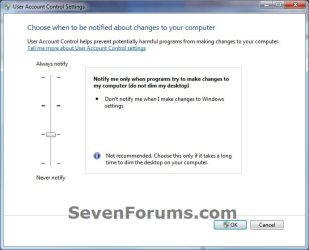
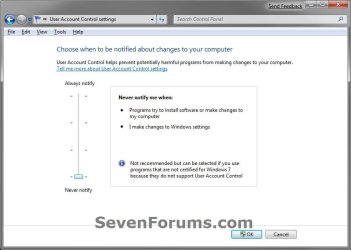
5. Adjust the slider to the level of protection of how much you want to be notified from UAC. (See screenshots below)

6. Click on OK when done.
UAC_Level-1_Always_Notify.jpg
UAC_Level-2_Default.jpg
UAC_Level-3_No_Dim.jpg
UAC_Level-4_Never_Notify.jpg
7. If prompted by UAC, click on Yes to approve.

8. If you have just turned UAC off, then you will need to click on restart the computer, or manually restart the computer, to apply the changes. (See screenshot below)
NOTE: Simply turning on UAC or changing the UAC level without turning it off will not require a restart.

Turn_Off.jpg


OPTION TWO

Change UAC Settings Using a REG File Download


1. To Have UAC Always Notify You
NOTE: This is level 1. See the first screenshot under step 6 in METHOD ONE. This will notify you of all changes made by programs to your computer, and changes you make to Windows 7 settings.
A) Click on the Download button below to download the file below.
UAC_Level-1.reg


Download


B) Go to step 5.
2. To Have the Default UAC Notification
NOTE: This is level 2. See the second screenshot under step 6 in METHOD ONE. This will only notify you when programs try to make changes to your computer, and not when you make changes to Windows 7 settings.
A) Click on the Download button below to download the file below.
UAC_Level-2_Default.reg

Download


B) Go to step 5.
3. To Have UAC Notify without Dimming Desktop
NOTE: This is level 3. See the third screenshot under step 6 in METHOD ONE. This will only notify you when programs try to make changes to your computer without dimming the desktop, and not when you make changes to Windows 7 settings.
A) Click on the Download button below to download the file below.
UAC_Level-3_No_Dim.reg

Download


B) Go to step 5.
4. To Turn Off UAC Notifications Completely to "Never notify"
NOTE: This is level 4. See the fourth screenshot under step 6 in METHOD ONE. This will disable (turn off) UAC completely. You will not be notified of any changes made by programs to your computer, or that you make to Windows 7 settings.
A) Click on the Download button below to download the file below.
UAC_Level-4.reg

Download


5. Save the .reg file to your desktop.

6. Right click on the downloaded .reg file, and click on Merge.

7. If prompted, click on Run, Yes (UAC), Yes, and OK when prompted.

8. Restart the computer to apply the changes to UAC.

9. When done, you can delete the downloaded .reg file if you like.

That's it,
Shawn


Attachments

Last edited:
Good to know .. thanks.

(if i ever get Windows 7 public beta!)
 

My Computer

Computer Manufacturer/Model Number
Built myself
OS
Windows 7 (7000) public beta
CPU
E2180 2 GHz over clocked to 3 Ghz
Motherboard
Asus P5KPL-CM (crash free BIOS) (Stable over clocker)
Memory
4 GB Hynix 2Gb 800MHz DDR2
Graphics Card(s)
Asus EAH3450-HTP-512 RADEON
Sound Card
Onboard VY 1708B, 8-CH High-Definition Audio Codex
Monitor(s) Displays
AOC 22" panel 1680x1050 (Certified for Windows Vista :-)
Screen Resolution
1680x1050
Hard Drives
Samsung 160Gb 7200RPM 8Mb Cache SATA2
PSU
450 watt in case standard
Case
MCG Deluxe Miditower Case - 450W Black (2 front side USB)
Cooling
Stock box Intel heat sink & fan - & CPU paste
Keyboard
Logitech black deluxe 250 DT PS2 (US layout - Vista)
Mouse
Gigabyte GM-M6800 optical mouse (No game,like comfort grip)
Internet Speed
Vodafone Wireless B/Band Australia - official 1500 up & down
Other Info
USB ReadyBoost 4 GB SanDisk (I don't know if these help or not - all quiet as to if it's used in Windows 7.)
You're welcome Graham.
 

My Computer

Computer type
PC/Desktop
Computer Manufacturer/Model Number
Self built custom
OS
64-bit Windows 11 Pro for Workstations
CPU
Intel i7-8700K OC'd to 5 GHz
Motherboard
ASUS ROG Maximus XI Formula Z390
Memory
64 GB (4x16GB) G.SKILL TridentZ RGB DDR4 3600 MHz
Graphics Card(s)
ASUS ROG-STRIX-GTX1080TI-O11G-GAMING
Sound Card
Integrated
Monitor(s) Displays
2 x Samsung Odyssey G7 27"
Screen Resolution
2560x1440
Hard Drives
1TB Samsung 990 PRO M.2,
4TB Samsung 990 PRO PRO M.2,
TerraMaster F8 SSD Plus NAS
PSU
Seasonic Prime Titanium 850W
Case
Thermaltake Core P3
Cooling
Corsair Hydro H115i
Keyboard
Logitech wireless K800
Mouse
Logitech MX Master 4
Internet Speed
2 Gb/s Download and 100 Mb/s Upload
Antivirus
Malwarebyte Anti-Malware Premium
Browser
Google Chrome
Other Info
Logitech Z625 speaker system,
Logitech BRIO 4K Pro webcam,
HP Color LaserJet Pro MFP M477fdn,
APC SMART-UPS RT 1000 XL - SURT1000XLI,
Galaxy S23 Plus phone
Great work Brink! Typo on step 4, change UAC_Level-1.zip to UAC_Level-4.zip
 

My Computer

Computer Manufacturer/Model Number
Dell Inspiron 1525 Notebook
OS
Windows 7
CPU
rocessor Intel(R) Pentium(R) Dual CPU T2390 @ 1.86GHz, 1867
Motherboard
Intel(R) ICH8 Family Chipset
Memory
Installed Physical Memory (RAM) 4 GB
Graphics Card(s)
Mobile Intel(R) 965 Express Chipset Family (Sux)
Sound Card
Intel(R) High Definition Audio HDMI
LOL, oops. Thank you Wguimb. Typo fixed. :)
 

My Computer

Computer type
PC/Desktop
Computer Manufacturer/Model Number
Self built custom
OS
64-bit Windows 11 Pro for Workstations
CPU
Intel i7-8700K OC'd to 5 GHz
Motherboard
ASUS ROG Maximus XI Formula Z390
Memory
64 GB (4x16GB) G.SKILL TridentZ RGB DDR4 3600 MHz
Graphics Card(s)
ASUS ROG-STRIX-GTX1080TI-O11G-GAMING
Sound Card
Integrated
Monitor(s) Displays
2 x Samsung Odyssey G7 27"
Screen Resolution
2560x1440
Hard Drives
1TB Samsung 990 PRO M.2,
4TB Samsung 990 PRO PRO M.2,
TerraMaster F8 SSD Plus NAS
PSU
Seasonic Prime Titanium 850W
Case
Thermaltake Core P3
Cooling
Corsair Hydro H115i
Keyboard
Logitech wireless K800
Mouse
Logitech MX Master 4
Internet Speed
2 Gb/s Download and 100 Mb/s Upload
Antivirus
Malwarebyte Anti-Malware Premium
Browser
Google Chrome
Other Info
Logitech Z625 speaker system,
Logitech BRIO 4K Pro webcam,
HP Color LaserJet Pro MFP M477fdn,
APC SMART-UPS RT 1000 XL - SURT1000XLI,
Galaxy S23 Plus phone
Hello khill,

Welcome to the Seven Forums.

Thanks for the info. You might want to post this in the News section. Just a thought.

Gary
 

My Computer

Computer Manufacturer/Model Number
Dell XPS420
OS
Vista Ult 64 bit Seven Ult RTM x64
CPU
Intel Core2 Quad Q6600 2.40 gigahertz
Memory
Crucial Ballistix 4x2GB PC2 6400
Graphics Card(s)
NVIDIA GeForce 8600 GTS 256 MB
Sound Card
Creative SB X-Fi audio
Monitor(s) Displays
HP w2207 + HPvs15
Screen Resolution
1680x1050 + 1024x768
Hard Drives
2-WD5000AAKS-500 GB
WD5000AAV-500 GB external
Keyboard
Microsoft Comfort Curve
Mouse
MX Revolution
Other Info
Wacom Intuos 2 Graphics Tablet
Experience Index=5.5
Last edited:

My Computer

Computer type
PC/Desktop
Computer Manufacturer/Model Number
Self built custom
OS
64-bit Windows 11 Pro for Workstations
CPU
Intel i7-8700K OC'd to 5 GHz
Motherboard
ASUS ROG Maximus XI Formula Z390
Memory
64 GB (4x16GB) G.SKILL TridentZ RGB DDR4 3600 MHz
Graphics Card(s)
ASUS ROG-STRIX-GTX1080TI-O11G-GAMING
Sound Card
Integrated
Monitor(s) Displays
2 x Samsung Odyssey G7 27"
Screen Resolution
2560x1440
Hard Drives
1TB Samsung 990 PRO M.2,
4TB Samsung 990 PRO PRO M.2,
TerraMaster F8 SSD Plus NAS
PSU
Seasonic Prime Titanium 850W
Case
Thermaltake Core P3
Cooling
Corsair Hydro H115i
Keyboard
Logitech wireless K800
Mouse
Logitech MX Master 4
Internet Speed
2 Gb/s Download and 100 Mb/s Upload
Antivirus
Malwarebyte Anti-Malware Premium
Browser
Google Chrome
Other Info
Logitech Z625 speaker system,
Logitech BRIO 4K Pro webcam,
HP Color LaserJet Pro MFP M477fdn,
APC SMART-UPS RT 1000 XL - SURT1000XLI,
Galaxy S23 Plus phone
Thanks for the info Shawn and Kevin ...makes a great tutorial! :geek:
 

My Computer

OS
Windows 7 Professional x64 x86 VISTA XP 98SE 95 3.x
CPU
Intel(R) Core(TM)2 Quad CPU Q9400 @ 2.66GHz
Memory
8 GB
Screen Resolution
1920 x 1200
PSU
OCZ Fatal1ty OCZ550FTY 550W ATX12V v2.2 25A on each rail
You're welcome Polycue. :)
 

My Computer

Computer type
PC/Desktop
Computer Manufacturer/Model Number
Self built custom
OS
64-bit Windows 11 Pro for Workstations
CPU
Intel i7-8700K OC'd to 5 GHz
Motherboard
ASUS ROG Maximus XI Formula Z390
Memory
64 GB (4x16GB) G.SKILL TridentZ RGB DDR4 3600 MHz
Graphics Card(s)
ASUS ROG-STRIX-GTX1080TI-O11G-GAMING
Sound Card
Integrated
Monitor(s) Displays
2 x Samsung Odyssey G7 27"
Screen Resolution
2560x1440
Hard Drives
1TB Samsung 990 PRO M.2,
4TB Samsung 990 PRO PRO M.2,
TerraMaster F8 SSD Plus NAS
PSU
Seasonic Prime Titanium 850W
Case
Thermaltake Core P3
Cooling
Corsair Hydro H115i
Keyboard
Logitech wireless K800
Mouse
Logitech MX Master 4
Internet Speed
2 Gb/s Download and 100 Mb/s Upload
Antivirus
Malwarebyte Anti-Malware Premium
Browser
Google Chrome
Other Info
Logitech Z625 speaker system,
Logitech BRIO 4K Pro webcam,
HP Color LaserJet Pro MFP M477fdn,
APC SMART-UPS RT 1000 XL - SURT1000XLI,
Galaxy S23 Plus phone
Wow very detailed. I will spread this to my users.

The pictures make this a great read overall, the downloadable registry files are just a bonus.
 

My Computer

OS
Windows 7

My Computer

Computer type
PC/Desktop
Computer Manufacturer/Model Number
Dwarf Dwf/11/2012 r09/2013
OS
Windows 8.1 Pro RTM x64
CPU
Intel Core-i5-3570K 4-core @ 3.4GHz (Ivy Bridge) (OC 4.4GHz)
Motherboard
ASRock Z77 Extreme4-M
Memory
4 x 4GB DDR3-1600 Corsair Vengeance CMZ8GX3M2A1600C9B (16GB)
Graphics Card(s)
MSI GeForce GTX770 Gaming OC 2GB
Sound Card
Realtek High Definition on board solution (ALC 898)
Monitor(s) Displays
ViewSonic VA1912w Widescreen (VGA)
Screen Resolution
1440x900
Hard Drives
OCZ Agility 3 SSD 120GB SATA III x2 (RAID 0)
Samsung HD501LJ 500GB SATA II x2
Hitachi HDS721010CLA332 1TB SATA II
Iomega 1.5TB Ext USB 2.0
WD 2.0TB Ext USB 3.0
PSU
XFX Pro Series 850W Semi-Modular
Case
Gigabyte IF233
Cooling
1 x 120mm Front Inlet 1 x 120mm Rear Exhaust
Keyboard
Microsoft Comfort Curve Keyboard 3000 (USB)
Mouse
Microsoft Comfort Mouse 3000 for Business (USB)
Internet Speed
NetGear DG834Gv3 ADSL Modem/Router (Ethernet) ~4.0 Mb/s (O2)
Antivirus
Avast! 8.0.1497
Browser
IE 11
Other Info
Optical Drive: HL-DT-ST BD-RE BH10LS30 SATA Bluray
Lexmark S305 Printer/Scanner/Copier (USB)
WEI Score: 8.1/8.1/8.5/8.5/8.25
Asus Eee PC 1011PX Netbook (Windows 7 x86 Starter)
Hi Dwarf,

Nice catch. I have not tried it yet with IE8 and Windows 7, but I would imagine that it would as well. I'll have to test it now to see and post back.

EDIT:

Yep, it disables Protected Mode as well. Warning added to tutorial.
 

My Computer

Computer type
PC/Desktop
Computer Manufacturer/Model Number
Self built custom
OS
64-bit Windows 11 Pro for Workstations
CPU
Intel i7-8700K OC'd to 5 GHz
Motherboard
ASUS ROG Maximus XI Formula Z390
Memory
64 GB (4x16GB) G.SKILL TridentZ RGB DDR4 3600 MHz
Graphics Card(s)
ASUS ROG-STRIX-GTX1080TI-O11G-GAMING
Sound Card
Integrated
Monitor(s) Displays
2 x Samsung Odyssey G7 27"
Screen Resolution
2560x1440
Hard Drives
1TB Samsung 990 PRO M.2,
4TB Samsung 990 PRO PRO M.2,
TerraMaster F8 SSD Plus NAS
PSU
Seasonic Prime Titanium 850W
Case
Thermaltake Core P3
Cooling
Corsair Hydro H115i
Keyboard
Logitech wireless K800
Mouse
Logitech MX Master 4
Internet Speed
2 Gb/s Download and 100 Mb/s Upload
Antivirus
Malwarebyte Anti-Malware Premium
Browser
Google Chrome
Other Info
Logitech Z625 speaker system,
Logitech BRIO 4K Pro webcam,
HP Color LaserJet Pro MFP M477fdn,
APC SMART-UPS RT 1000 XL - SURT1000XLI,
Galaxy S23 Plus phone
I'm not using Win7 yet (still using WinXP), but was just browsing to learn a little more about UAC, and this tutorial about notifications is very helpful... ...but there seem to be a couple of typos which made it a little confusing for me at first (maybe partly because I haven't been using Win7 or even Vista yet):
3. To Have UAC Notify without Diming Desktop -
NOTE: This is level 3. See the third screenshot under step 5 in METHOD ONE. This will disable (turn off) UAC completely. You will not be notified of any changes made by program or you to Windows 7 settings.
(1) I couldn't figure out what "Diming" meant and thought I must be falling behind on the latest slang... ...until I looked closely at the images and realized you meant "Dimming." ;)

(2) I downloaded the images for future reference, but the Level 3 image is named "Default.jpg," while the Default UAC Notification (Level 2) image with "DEFAULT" superimposed on it is named "Always_Notify.jpg"

(3) Both the text in the Level 3 image and the Level 3 heading ("To Have UAC Notify without Diming Desktop.") seem to contradict the Level 3 description ("This will disable (turn off) UAC completely. You will not be notified of any changes made by program or you to Windows 7 settings"). If I'm understanding the text presented in the Level 3 image (currently incorrectly labeled as "Default.jpg"), it seems that Level 3 disables desktop dimming only, and leaves notification of changes made by programs enabled.

Again, maybe I'm misunderstanding something because I'm not working with Win7 yet (and no one else seems to have been confused by the above), but hopefully I'm just helping an already clear and helpful tutorial become a little clearer.

Otherwise, thanks for this very helpful tutorial and several others I've perused as well! :)
 

My Computer

OS
WinXP
Hello GDV, and welcome to Seven Forums.

Oh my. I must have been half asleep with those mistakes. Thank you for pointing them out. They have been corrected. :o
 

My Computer

Computer type
PC/Desktop
Computer Manufacturer/Model Number
Self built custom
OS
64-bit Windows 11 Pro for Workstations
CPU
Intel i7-8700K OC'd to 5 GHz
Motherboard
ASUS ROG Maximus XI Formula Z390
Memory
64 GB (4x16GB) G.SKILL TridentZ RGB DDR4 3600 MHz
Graphics Card(s)
ASUS ROG-STRIX-GTX1080TI-O11G-GAMING
Sound Card
Integrated
Monitor(s) Displays
2 x Samsung Odyssey G7 27"
Screen Resolution
2560x1440
Hard Drives
1TB Samsung 990 PRO M.2,
4TB Samsung 990 PRO PRO M.2,
TerraMaster F8 SSD Plus NAS
PSU
Seasonic Prime Titanium 850W
Case
Thermaltake Core P3
Cooling
Corsair Hydro H115i
Keyboard
Logitech wireless K800
Mouse
Logitech MX Master 4
Internet Speed
2 Gb/s Download and 100 Mb/s Upload
Antivirus
Malwarebyte Anti-Malware Premium
Browser
Google Chrome
Other Info
Logitech Z625 speaker system,
Logitech BRIO 4K Pro webcam,
HP Color LaserJet Pro MFP M477fdn,
APC SMART-UPS RT 1000 XL - SURT1000XLI,
Galaxy S23 Plus phone
Hey guys when I used XP i dont recall ever being asked about running a program that might be changing my settings. I never had a problem. Here's a few questions.......

If I turn the UAC off will the computer display still dim?

How do you have yours set?

Is there any way to selectively approve certain programs to run such as programs I use on a daily basis?

Mick
 

My Computer

OS
W7 64bit
Hello Mick, and welcome to Seven Forums.

For better security, it is recommended to leave UAC turned on. You can read more about this and why in the green INFO box at the top of the tutorial on the first page. Be sure to also click on the links there as well for indepth details about UAC.

If you turn UAC off, you will not get the dimmed screen anymore.

I haven't tried this yet in Windows 7, but it should work just as well. You can leave UAC turned on, but stop it from dimming the screen when prompted by UAC.

User Account Control (UAC) - Blacking Out of Screen - Vista Forums

Hope this helps,
Shawn
 

My Computer

Computer type
PC/Desktop
Computer Manufacturer/Model Number
Self built custom
OS
64-bit Windows 11 Pro for Workstations
CPU
Intel i7-8700K OC'd to 5 GHz
Motherboard
ASUS ROG Maximus XI Formula Z390
Memory
64 GB (4x16GB) G.SKILL TridentZ RGB DDR4 3600 MHz
Graphics Card(s)
ASUS ROG-STRIX-GTX1080TI-O11G-GAMING
Sound Card
Integrated
Monitor(s) Displays
2 x Samsung Odyssey G7 27"
Screen Resolution
2560x1440
Hard Drives
1TB Samsung 990 PRO M.2,
4TB Samsung 990 PRO PRO M.2,
TerraMaster F8 SSD Plus NAS
PSU
Seasonic Prime Titanium 850W
Case
Thermaltake Core P3
Cooling
Corsair Hydro H115i
Keyboard
Logitech wireless K800
Mouse
Logitech MX Master 4
Internet Speed
2 Gb/s Download and 100 Mb/s Upload
Antivirus
Malwarebyte Anti-Malware Premium
Browser
Google Chrome
Other Info
Logitech Z625 speaker system,
Logitech BRIO 4K Pro webcam,
HP Color LaserJet Pro MFP M477fdn,
APC SMART-UPS RT 1000 XL - SURT1000XLI,
Galaxy S23 Plus phone
Hello Mick, and welcome to Seven Forums.

For better security, it is recommended to leave UAC turned on. You can read more about this and why in the green INFO box at the top of the tutorial on the first page. Be sure to also click on the links there as well for indepth details about UAC.

If you turn UAC off, you will not get the dimmed screen anymore.

I haven't tried this yet in Windows 7, but it should work just as well. You can leave UAC turned on, but stop it from dimming the screen when prompted by UAC.

User Account Control (UAC) - Blacking Out of Screen - Vista Forums

Hope this helps,
Shawn

Thanks Shawn, I think I see a major short coming for Windows 7 in that it cannot allow the administrator to tell it to allow certain trusted programs to run without individual approval over and over! I assume this is true since you did not answer my third question in my original post. I take that to mean that Windows 7 does not allow selective approval to run specific applications. After all who wants to repeatedly keep approving programs over and over when there are so many other clicking tasks to accomplish. I think Windows 7 has taken to much authority away from the administrator.

Mick
 

My Computer

OS
W7 64bit
Mick,

Sorry, but no, there is not an "Allow" or "Deny" option for specific programs with UAC. It's a all or none deal.

However, you can use the built-in Administrator account to run with full permission (authority) and access, but anything that runs while logged in this account will also have full permission and access. This was the whole point of UAC though so that nothing will be able to run with full access unless you grant it permission first when UAC prompts you about it.

Hope this helps some more. :)
 

My Computer

Computer type
PC/Desktop
Computer Manufacturer/Model Number
Self built custom
OS
64-bit Windows 11 Pro for Workstations
CPU
Intel i7-8700K OC'd to 5 GHz
Motherboard
ASUS ROG Maximus XI Formula Z390
Memory
64 GB (4x16GB) G.SKILL TridentZ RGB DDR4 3600 MHz
Graphics Card(s)
ASUS ROG-STRIX-GTX1080TI-O11G-GAMING
Sound Card
Integrated
Monitor(s) Displays
2 x Samsung Odyssey G7 27"
Screen Resolution
2560x1440
Hard Drives
1TB Samsung 990 PRO M.2,
4TB Samsung 990 PRO PRO M.2,
TerraMaster F8 SSD Plus NAS
PSU
Seasonic Prime Titanium 850W
Case
Thermaltake Core P3
Cooling
Corsair Hydro H115i
Keyboard
Logitech wireless K800
Mouse
Logitech MX Master 4
Internet Speed
2 Gb/s Download and 100 Mb/s Upload
Antivirus
Malwarebyte Anti-Malware Premium
Browser
Google Chrome
Other Info
Logitech Z625 speaker system,
Logitech BRIO 4K Pro webcam,
HP Color LaserJet Pro MFP M477fdn,
APC SMART-UPS RT 1000 XL - SURT1000XLI,
Galaxy S23 Plus phone
Back
Top