
Mouse Hover Makes Window Active - Enable

How to Activate a Window by Hovering Over it with the Mouse Pointer

   Information
This will allow you to Activate a window by hovering over it with the mouse pointer for a second to make it easier to switch between open windows.


hello all.
I've been reading this great forum passively for a short while now, its quite the wonderful resource.
what i could not find, though, was information on how to focus on windows by simply hovering over them with the mouse.

Back in XP, you could enable this with Tweak UI, which called it X-mouse.
It was great, i didn't have to click on a window to work in it.
but how to enable this in 7?


OPTION #1
As this article points out, you can switch windows by hovering if you enable it through:
Control Panel> Ease of Access> Change How Your Mouse Works
scroll down, check box "Activate a window by hovering over it with the mouse"
this method raises windows to the front when you hover over them.
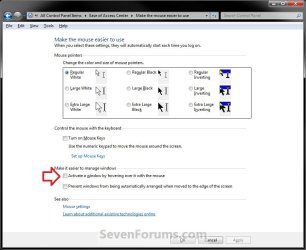
EAC.jpg
OPTION #2
For a true X-mouse experience, you could use this third party software TXMouse:
True X-Mouse Gizmo for Windows
if you are familiar with Linux x-mouse behaviour, you might appreciate its other functions.


OPTION #3
If you don't need those extra functions, you can make a couple swift changes in the registry and achieve the same effect:
[Thanks to original commenter unpaidbill for this particular option]
Step #1:
Open regedit, go to HKEY_CURRENT_USER\Control Panel\Desktop
Edit UserPreferenceMask value to be 9F 3E 07 80 12 00 00 00
[You should only have to modify the first pair]
NOTE: Default value is 98 12 07 80 12 00 00 00.

Step #2:
Also in HKEY_CURRENT_USER\Control Panel\Desktop
Edit ActiveWndTrkTimeout, change 'Base' to Decimal and put in 150 as the 'Value Data'
NOTE: Default value is 500.

[this value is time in milliseconds that it takes for the focus to change.
to avoid some issues with the taskbar I recommended using a value like 150 or so,
but if you'd like to have a different delay before the window loses focus, set it to whatever you like.]

Step #3:
Log off and log back in
   Information
(Added by John Galt)

Here is the registry key to do that if you don't want to edit the registry yourself. View attachment Hover window select.reg

Here is the registry key to restore the default values. View attachment Default Windows hover.reg


This results in windows being active (but not being raised) when you hover over them.


Last edited by a moderator:
Option #1 seems the simplest, why would people even bother with Option #3?

Thanks for the tutorial, just tried it out and now I know what you mean about "hovering makes window active".
 

My Computer

Computer Manufacturer/Model Number
eMachines W3503
OS
7 Pro Build 7600.16385x64 [2.0 WEI]
CPU
Intel(R) Celeron(R) D CPU 3.33GHz
Memory
2.00 GB RAM (1.87 GB usable)
Graphics Card(s)
ATI Radeon™ X300 based integrated graphics
Sound Card
6-channel (5.1) ATI High Definition Audio
Monitor(s) Displays
eMachines® 17" LCD Flat Panel Monitor (17F3)
Screen Resolution
1024 x 768 @ 85Hz
Hard Drives
160GB HDD (7200rpm, 2MB cache)
Option #1 seems the simplest, why would people even bother with Option #3?

so that you can type and scroll in a window that is not in the foreground.
option 1 brings the windows forward, while option 3 does not.
its convenient that way, but you have to be aware of where your mouse is on the screen.


option 3 rocks

great job

thanks skzap.
I wanted to make a .reg file so that you didn't have to edit the registry if you didn't want to, but i don't know how lol.

can anyone help me to that end?
then there can be an Undo .reg file as well

[which reminds me, I didn't make a backup of those registry values lol. can someone provide the original values?]
 

My Computer

OS
Win7x64
CPU
Intel Core 2 Duo E6300
Motherboard
Infinity 975X
Memory
5120 MB
Graphics Card(s)
GeForce GTS 250
Screen Resolution
1440x900
Here you go, they are both in Reg files. By the way I really like option 3, it now works just how I always thought it should, good job. :D

View attachment Hover window select.reg

View attachment Default Windows hover.reg

I edited the files to include only the changes from gabeforprez's initial post, and they are exactly as he mentions.

The default restores the default values to those 2 keys as they normally appear in Windows, and the Hover changes the values of those two keys only to the values suggested by gabe. -johnlgalt
 
Last edited by a moderator:

My Computer

Computer Manufacturer/Model Number
Home Brew
OS
Windows 7 Ultimate Vista Ultimate x64
CPU
Core 2 Duo E8500 3.16Ghz @ 3.8Ghz
Motherboard
eVGA 750i FTW
Memory
2x2Gigs Patriot PC2-6400 LL
Graphics Card(s)
Inno3D GeForce GTX260 216 SP
Monitor(s) Displays
ASUS VW222U 22" 2ms Response time
Screen Resolution
1680x1050
Hard Drives
SATA 150GB
SATA II 250GB
USB IDE 750GB Ext.
PSU
HYTEC 600W & Thermaltake 650W Toughpower Power Exp
Case
Thermaltake Armor LCS (Liquid Cooling System)
Cooling
Liquid Cooling System
Keyboard
Logitech G15 Gaming Keyboard
Mouse
Logitech G9 Gaming Mouse
in regedit you have an export option, then open the created file with notepad and remove the useless lines.

I don't have the original either.

The delay time is in millisec? I need to change it, 0 millisecs causes some minor annoyances here
 

My Computer

OS
Win Seven OBV
The delay time is in millisec? I need to change it, 0 millisecs causes some minor annoyances here

actually a slight delay would be nice.
knowing that the option is there is nice too.
:D
 

My Computer

OS
Win7x64
CPU
Intel Core 2 Duo E6300
Motherboard
Infinity 975X
Memory
5120 MB
Graphics Card(s)
GeForce GTS 250
Screen Resolution
1440x900
Step #2:
Also in HKEY_CURRENT_USER\Control Panel\Desktop
Edit ActiveWndTrkTimeout, change 'Base' to Decimal and put in 0 as the 'Value Data'
When I change the Base to Decimal, it reverts back to hex when I close the window out. I tried the .reg file that grim has provided but it also did not work, yes I did log off.

Edit: Is it supposed to deselect the last open window and when you move the cursor it goes back? I was hoping it would open the window you hover over. Also, why did my wallpaper disappear when I logged back in?

Edit 2: Oohhh I understand now. Sorry, my head wasn't working.
 

My Computer

Computer Manufacturer/Model Number
Started out as an AST180
OS
Windows 7 Ultimate x64 | Windows XP Pro x86 | Windows Vista Ultimate x86
CPU
AMD Athlon 64 X2 Dual Core 5200 2.7 GHz
Motherboard
Acer EM61SM/EM61PM
Memory
3G RAM
Graphics Card(s)
ATI HD Radeon 4670
Screen Resolution
1280x1024
Hard Drives
Western Digital Caviar Black WD1001FALS 1TB 7200 RPM 32MB Cache, 160 GB Seagate
PSU
Corsair 450VX 450W
Keyboard
Microsoft Media Pro 3000
Mouse
Logitech MX310
When I change the Base to Decimal, it reverts back to hex when I close the window out. I tried the .reg file that grim has provided but it also did not work, yes I did log off.


Yeah my value was already set to 0 for some reason, but as far as it changing back, that's what it is meant to do, you are just changing it to decimal to set the value. What was your original value for the delay gabeforprez?
 

My Computer

Computer Manufacturer/Model Number
Home Brew
OS
Windows 7 Ultimate Vista Ultimate x64
CPU
Core 2 Duo E8500 3.16Ghz @ 3.8Ghz
Motherboard
eVGA 750i FTW
Memory
2x2Gigs Patriot PC2-6400 LL
Graphics Card(s)
Inno3D GeForce GTX260 216 SP
Monitor(s) Displays
ASUS VW222U 22" 2ms Response time
Screen Resolution
1680x1050
Hard Drives
SATA 150GB
SATA II 250GB
USB IDE 750GB Ext.
PSU
HYTEC 600W & Thermaltake 650W Toughpower Power Exp
Case
Thermaltake Armor LCS (Liquid Cooling System)
Cooling
Liquid Cooling System
Keyboard
Logitech G15 Gaming Keyboard
Mouse
Logitech G9 Gaming Mouse
When I change the Base to Decimal, it reverts back to hex when I close the window out. I tried the .reg file that grim has provided but it also did not work, yes I did log off.

Edit: Is it supposed to deselect the last open window and when you move the cursor it goes back? I was hoping it would open the window you hover over. Also, why did my wallpaper disappear when I logged back in?

i would take a wild guess and say that hexadecimal value of 0 and decimal value of 0 are interchangeable.
as to why we have to change it then, i dunno.

if you want to open the window you hover over, try option 1.
and, as to why your wallpaper disappeared, i haven't the slightest idea


Yeah my value was already set to 0 for some reason, but as far as it changing back, that's what it is meant to do, you are just changing it to decimal to set the value. What was your original value for the delay gabeforprez?

mine was 0 already as well, actually.
 

My Computer

OS
Win7x64
CPU
Intel Core 2 Duo E6300
Motherboard
Infinity 975X
Memory
5120 MB
Graphics Card(s)
GeForce GTS 250
Screen Resolution
1440x900
You can still use MS Tweak UI in Win7 to set X-Mouse settings. Grab the .exe from a XP install and use XP SP2 compatability mode. Works for me.
 

My Computer

Computer type
PC/Desktop
Computer Manufacturer/Model Number
Made by Dixon Butz
OS
Win7 Win 10, Win 8.1
CPU
AMD FX-8350, Corsair H100i
Motherboard
ASUS Crosshair V Formula-Z
Memory
16GB G.SKILL Ripjaws DDR3
Graphics Card(s)
EVGA GTX 980, EVGA GTX 860
Sound Card
Denon x4200 Dolby AMOS!
Monitor(s) Displays
65" Samsung 4K, +3 27inch
Screen Resolution
4K, 1080x3
Hard Drives
2TB Samsung hd204ui

1X Samsung 850 SSD
PSU
1000w EVGA, 2000VA UPS, 1000VA UPS and many others
Case
Lian Li
Cooling
Corsair H100i
Keyboard
Logitech K800
Mouse
Logitech Couch Mouse
Internet Speed
Gigabit!
Antivirus
Defender
Browser
Slimjet Chrome
You can still use MS Tweak UI in Win7 to set X-Mouse settings. Grab the .exe from a XP install and use XP SP2 compatability mode. Works for me.


oooo neato.
do any of the other tweaks work?
 

My Computer

OS
Win7x64
CPU
Intel Core 2 Duo E6300
Motherboard
Infinity 975X
Memory
5120 MB
Graphics Card(s)
GeForce GTS 250
Screen Resolution
1440x900
Not tested them. Some probably do.
 

My Computer

Computer type
PC/Desktop
Computer Manufacturer/Model Number
Made by Dixon Butz
OS
Win7 Win 10, Win 8.1
CPU
AMD FX-8350, Corsair H100i
Motherboard
ASUS Crosshair V Formula-Z
Memory
16GB G.SKILL Ripjaws DDR3
Graphics Card(s)
EVGA GTX 980, EVGA GTX 860
Sound Card
Denon x4200 Dolby AMOS!
Monitor(s) Displays
65" Samsung 4K, +3 27inch
Screen Resolution
4K, 1080x3
Hard Drives
2TB Samsung hd204ui

1X Samsung 850 SSD
PSU
1000w EVGA, 2000VA UPS, 1000VA UPS and many others
Case
Lian Li
Cooling
Corsair H100i
Keyboard
Logitech K800
Mouse
Logitech Couch Mouse
Internet Speed
Gigabit!
Antivirus
Defender
Browser
Slimjet Chrome
Found a bit of a problem with option 3, when you click on volume or the customise button in the system tray, the window vanishes every time you try to move to it, so if anyone know a fix for that it would be much appreciated.
 

My Computer

Computer Manufacturer/Model Number
Home Brew
OS
Windows 7 Ultimate Vista Ultimate x64
CPU
Core 2 Duo E8500 3.16Ghz @ 3.8Ghz
Motherboard
eVGA 750i FTW
Memory
2x2Gigs Patriot PC2-6400 LL
Graphics Card(s)
Inno3D GeForce GTX260 216 SP
Monitor(s) Displays
ASUS VW222U 22" 2ms Response time
Screen Resolution
1680x1050
Hard Drives
SATA 150GB
SATA II 250GB
USB IDE 750GB Ext.
PSU
HYTEC 600W & Thermaltake 650W Toughpower Power Exp
Case
Thermaltake Armor LCS (Liquid Cooling System)
Cooling
Liquid Cooling System
Keyboard
Logitech G15 Gaming Keyboard
Mouse
Logitech G9 Gaming Mouse
Found a bit of a problem with option 3, when you click on volume or the customise button in the system tray, the window vanishes every time you try to move to it, so if anyone know a fix for that it would be much appreciated.


yes, i noticed that as well with the right-click menu on the pinned programs on the taskbar.

If you set ActiveWndTrkTimeout to decimal 150 or so, it sets a delay that allows enough time to reach past that little gap.
 

My Computer

OS
Win7x64
CPU
Intel Core 2 Duo E6300
Motherboard
Infinity 975X
Memory
5120 MB
Graphics Card(s)
GeForce GTS 250
Screen Resolution
1440x900
yes, i noticed that as well with the right-click menu on the pinned programs on the taskbar.

If you set ActiveWndTrkTimeout to decimal 150 or so, it sets a delay that allows enough time to reach past that little gap.

Yeah I tried a whole heap of different values but it didn't make a difference. :(
 

My Computer

Computer Manufacturer/Model Number
Home Brew
OS
Windows 7 Ultimate Vista Ultimate x64
CPU
Core 2 Duo E8500 3.16Ghz @ 3.8Ghz
Motherboard
eVGA 750i FTW
Memory
2x2Gigs Patriot PC2-6400 LL
Graphics Card(s)
Inno3D GeForce GTX260 216 SP
Monitor(s) Displays
ASUS VW222U 22" 2ms Response time
Screen Resolution
1680x1050
Hard Drives
SATA 150GB
SATA II 250GB
USB IDE 750GB Ext.
PSU
HYTEC 600W & Thermaltake 650W Toughpower Power Exp
Case
Thermaltake Armor LCS (Liquid Cooling System)
Cooling
Liquid Cooling System
Keyboard
Logitech G15 Gaming Keyboard
Mouse
Logitech G9 Gaming Mouse
Yeah I tried a whole heap of different values but it didn't make a difference. :(

remember to log off to apply the new values
 

My Computer

OS
Win7x64
CPU
Intel Core 2 Duo E6300
Motherboard
Infinity 975X
Memory
5120 MB
Graphics Card(s)
GeForce GTS 250
Screen Resolution
1440x900
Yeah I did that and even Rebooted a couple of time but still didn't make a difference for me.
 

My Computer

Computer Manufacturer/Model Number
Home Brew
OS
Windows 7 Ultimate Vista Ultimate x64
CPU
Core 2 Duo E8500 3.16Ghz @ 3.8Ghz
Motherboard
eVGA 750i FTW
Memory
2x2Gigs Patriot PC2-6400 LL
Graphics Card(s)
Inno3D GeForce GTX260 216 SP
Monitor(s) Displays
ASUS VW222U 22" 2ms Response time
Screen Resolution
1680x1050
Hard Drives
SATA 150GB
SATA II 250GB
USB IDE 750GB Ext.
PSU
HYTEC 600W & Thermaltake 650W Toughpower Power Exp
Case
Thermaltake Armor LCS (Liquid Cooling System)
Cooling
Liquid Cooling System
Keyboard
Logitech G15 Gaming Keyboard
Mouse
Logitech G9 Gaming Mouse
Yeah I did that and even Rebooted a couple of time but still didn't make a difference for me.

ohnoes, i broke your system.

:shock:
 

My Computer

OS
Win7x64
CPU
Intel Core 2 Duo E6300
Motherboard
Infinity 975X
Memory
5120 MB
Graphics Card(s)
GeForce GTS 250
Screen Resolution
1440x900
Back
Top