Internet Explorer 8 freezes

Terrym

New member
Member
Local time
6:53 PM
Messages
29
Location
Atlanta, GA
Installed Win 7 on May 5. Seemed to work well. Started having problems with IE8 freezing when it opens. Sometimes I can ctl, alt, del and close it out, but more often I have to reboot. I also have firefox and it seems to work fine.:(

Has anyone else seen this problem?

Any ideas on how to troubleshoot?

Thanks for any help or comments.
 

My Computer

Computer Manufacturer/Model Number
System Built by me
OS
Winows 7 Pro, 64 bit
CPU
Intel i7 920
Motherboard
ASUS P6T
Memory
12 GB
Graphics Card(s)
Nividia GeForce 9800 GT
Sound Card
Mother board
Monitor(s) Displays
HP vf 17
Hard Drives
1- 300 GB Western Digital raptor 10,000 rpm
2- 640 GB WD
1- 500 GB WD
Internet Speed
12 MB Cable
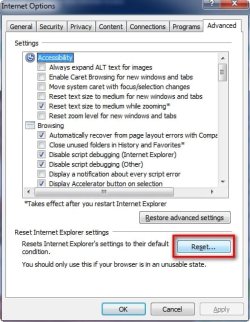
Try resetting IE to default, that should fix it, go to the advanced internet options and select Reset.

2009-05-13_121855.jpg
 

My Computer

Computer Manufacturer/Model Number
Home Brew
OS
Windows 7 Ultimate Vista Ultimate x64
CPU
Core 2 Duo E8500 3.16Ghz @ 3.8Ghz
Motherboard
eVGA 750i FTW
Memory
2x2Gigs Patriot PC2-6400 LL
Graphics Card(s)
Inno3D GeForce GTX260 216 SP
Monitor(s) Displays
ASUS VW222U 22" 2ms Response time
Screen Resolution
1680x1050
Hard Drives
SATA 150GB
SATA II 250GB
USB IDE 750GB Ext.
PSU
HYTEC 600W & Thermaltake 650W Toughpower Power Exp
Case
Thermaltake Armor LCS (Liquid Cooling System)
Cooling
Liquid Cooling System
Keyboard
Logitech G15 Gaming Keyboard
Mouse
Logitech G9 Gaming Mouse
Try resetting IE to default, that should fix it, go to the advanced internet options and select Reset.

View attachment 10596

I did that and it worked for a minute. Seems very unstable. Firefox works but when I start using IE hangs up and then I have to reboot.

Is it possible to repair IE from the install disk? I tried to download IE8 from microsoft, but it says I have a special IE8 for Win 7 and will not download.
 

My Computer

Computer Manufacturer/Model Number
System Built by me
OS
Winows 7 Pro, 64 bit
CPU
Intel i7 920
Motherboard
ASUS P6T
Memory
12 GB
Graphics Card(s)
Nividia GeForce 9800 GT
Sound Card
Mother board
Monitor(s) Displays
HP vf 17
Hard Drives
1- 300 GB Western Digital raptor 10,000 rpm
2- 640 GB WD
1- 500 GB WD
Internet Speed
12 MB Cable
Installed Win 7 on May 5. Seemed to work well. Started having problems with IE8 freezing when it opens. Sometimes I can ctl, alt, del and close it out, but more often I have to reboot. I also have firefox and it seems to work fine.:(

Has anyone else seen this problem?

Any ideas on how to troubleshoot?

Thanks for any help or comments.

Try this and see whether it fixes your problem,
Tools-> manage add-ons-> enable or disable add-ons
Under enabled section, look for "SSVHelper Class", highlight it and click disable radio button. Restart your IE. I do hope this work for you.
 

My Computer

Computer Manufacturer/Model Number
Acer Aspire 5750
OS
Windows 7 Home Premium 64bit
CPU
Intel Core i3-2310M
Motherboard
Acer OEM
Memory
8GB
Graphics Card(s)
Intel HD3000
Screen Resolution
1366x768
Hard Drives
320GB Toshiba
Watch out for Webroot

I found the problem. The bad guy is Webroot Software. Their Spy Sweeper anti spyware program was causing IE to hang up. Lucky for me I made periodic image backups with Acronis as I was installing programs, so I only had to back not too far to find a working copy. Then started installing the same programs until the problem developed.
 
Last edited:

My Computer

Computer Manufacturer/Model Number
System Built by me
OS
Winows 7 Pro, 64 bit
CPU
Intel i7 920
Motherboard
ASUS P6T
Memory
12 GB
Graphics Card(s)
Nividia GeForce 9800 GT
Sound Card
Mother board
Monitor(s) Displays
HP vf 17
Hard Drives
1- 300 GB Western Digital raptor 10,000 rpm
2- 640 GB WD
1- 500 GB WD
Internet Speed
12 MB Cable
add-on's are definitely the problem for new IE

I had the same problem and then I looked over the list of add-on's that were in my IE8; removed all the add-on's except for Microsoft's. I have not seen the browser freezing problem for 2 weeks since I removed all the other non-Microsoft add-on's.
Here's the reason why; those company's who created those add-on's were meant for older versions of IE. I heard skype has updated its add-on since IE7 came out but they have not since IE8 came out. So for some reason it worked for IE7 and not for IE8.
So folks, either you have to wait for them to upgrade their add-on's to be compatible with IE8 or keep using the older versions of IE until they do so.
 

My Computer

OS
windows 7
CPU
Intel Core2 Quad
Memory
4GB
my computer has started freezing up of late, ctrl-alt-del wasn't working and so i would have to reboot. when i started ie8 it asked to restore my last session and when it did my pc froze again, after a google on 'internet explorer 8 keeps freezing on windows 7' it confirmed it for me. now i dont use spyware sweeper so don't know what the cause might be but am gonna disable that ssvhelper and check any other add-ons, if anyone has anymore suggestions please tell.

good old firefox (currently 3.6) is apparently running stable
 

My Computer

OS
Windows 7 Ultimate 64Bit
CPU
AMD Athlon x4 650 3Ghz
Motherboard
ASUS
Memory
4gb
Graphics Card(s)
ATI Radeon 3000 series Onboard
I also went to Firefox.
 

My Computer

Computer Manufacturer/Model Number
System Built by me
OS
Winows 7 Pro, 64 bit
CPU
Intel i7 920
Motherboard
ASUS P6T
Memory
12 GB
Graphics Card(s)
Nividia GeForce 9800 GT
Sound Card
Mother board
Monitor(s) Displays
HP vf 17
Hard Drives
1- 300 GB Western Digital raptor 10,000 rpm
2- 640 GB WD
1- 500 GB WD
Internet Speed
12 MB Cable
There is no other solution.. I switched to firefox and google chrome.. Windows 7 has basically killed Microsoft's favourite application IE>>>>> NO MORE! RIP
 

My Computer

Computer Manufacturer/Model Number
HP
OS
Windows 7
CPU
Intel(R) Core(TM)2 Quad CPU Q6600 2.40GHz
Memory
4GB
Win 7 and IE8 freezing

Removing Spy Sweeper from Webroot solved my problems. ( IE8 in Windows 7 freezing up randomly)
 

My Computer

OS
windows 7 64 bits
CPU
intel i 920
Motherboard
asus P6T
Memory
6 GB
Graphics Card(s)
NVIDIA GT 240
Sound Card
Realtek ALC 1200
Monitor(s) Displays
HP LP2465
Repair IE

Installed Win 7 on May 5. Seemed to work well. Started having problems with IE8 freezing when it opens. Sometimes I can ctl, alt, del and close it out, but more often I have to reboot. I also have firefox and it seems to work fine.:(

Has anyone else seen this problem?

Any ideas on how to troubleshoot?

Thanks for any help or comments.

If you find that your IE8 is freezing frequently in Windows, here are some trouble-shooting steps you may try:
1. Run your anti-virus and an anti-spyware, to check for malware infections. Microsoft Security Essentials is a good freeware AV from Microsoft.
2. Clear Cache. Or else run your Junk Cleaner or CCleaner. In IE 7 or 8, click Tools > Internet options > Security > Reset all Zones to Default level
3. If still you find your IE giving problems, close it and run IE (No Add-ons). This opens up the browser without loading any add-ons, toolbars or plug-ins.
4. Run sfc /sc¬annow and at the end reboot if asked for. This will replace corrupted system files if any.
If you find it running OK, then the problem is most probably caused by an addon. In that case you have two options :
- Use the manage Add-ons tool, and disable each one after the other to find out which one is causing the problem.
- In Internet Options, go to Advanced Tab and click on Reset tab. Restart IE. This step deletes all temp files, disables any add-ons, plug-ins, toolbars and also resets all changed settings to default. Although this is a quick-fix, you will have to re-install the add-ons.

I hope this helps!

Cheers,
Bryn
IE Outreach Team
 

My Computer

OS
Windows 7
Hi

The problem I had was an add on I inadvertently installed which is

PriceGong BHO, some sort of price searching thing.

Disabled this and it now works fine.

I think it got installed when I was installing the Gimp!!!

Thanks
Stareagle :mad:
 

My Computer

Computer Manufacturer/Model Number
HP
OS
Win 7 Pro
CPU
Intel
Motherboard
?
Memory
4Gb
Graphics Card(s)
NVidia ?
Sound Card
Onboard
Monitor(s) Displays
Dual HP LA1905s
Hard Drives
320 GB
PSU
?
Case
?
Cooling
?
Back
Top