| Windows 7: Need to make backup |
13 Aug 2010
|
#1 | | |
Need to make backup So I just got my new SSD installed with Windows 7 Pro x64. I now want to make an image of the disk and save as an iso on my external hard drive. When I start it up, it attemps to load and I get this "No DEFAULT or UI configuration directive found!" \n "boot: "
I can boot this disc on my laptop and I can boot an Ubuntu 10.04 live disc no problems. Anyone seen this?
Muffiin | My System Specs |
| System Manufacturer/Model Number Custom Build OS Windows 7 x64 CPU AMD Phenom II x6 1055T Motherboard Gigabyte GA-890GPA-UD3H Memory 16GB Kingston HyperX DDR3 1600 Graphics Card Gigabyte NVidia GTX470 Sound Card Dolby Digital - chipset Monitor(s) Displays HP w2338h Screen Resolution 1920x1080 Keyboard Verbatim Mouse Verbatim PSU Coolmax Green Power 950W Case Thermaltake Element G Cooling Thermaltake Frio heatsink and fans/Stock case fans Hard Drives Lots Internet Speed fast enough |
14 Aug 2010
|
#2 | | Windows 7 Ultimate x64, XP Mode, W8 RP VM, Linux Mint Debian 2nd OS HD- 7 Pro x64 second case New England |
Working with the Windows Backup & Restore as well as Acronis the system images created by both are not in ISO form. That's not how the backup feature works with either.
With Acronis however you can mount the disk image created as a second C drive listed in Computer or any explorer window and even opt to add more files to it. That allows incremental backup for individual items rather then replacing one image with a newer one.
Your description however seems to point to a drive detection problem as if the boot sector or necessary system files were missing from the drive following the first install. Generally any full system images even for smaller drives are spread over multiple dvds not compressed small enough for just one live disk.
Ubuntu on the other hand starts as a live version of that distro being much smaller in size to start with. The only portable method found for any version of Windows was during the beta to RC time frame for use of the Portable Virtual Box to see 7 on a usb flash drive. How To Install Windows 7 On USB Flash Drive
Note that allows for a temp install seeing the flash drive made bootable. Ubuntu x86 on the other hand only takes upto about 2 1/3gb of space when custom installed directly onto a flash drive making that the better option for portable there. For you the best first idea would be trying the startup repair tool when booting from the 7 dvd or may require an upgrade to repair or simply second clean install if the first was bad from the start. | My System Specs | | OS Windows 7 Ultimate x64, XP Mode, W8 RP VM, Linux Mint Debian 2nd OS HD- 7 Pro x64 second case CPU AMD Phenom II X4 975 Deneb 3.6ghz - 965 on new mini tower Motherboard Gigabyte GA-790XTA-UD4 Memory Kingston Hyper X DDR3 1600 1.5v 16gb - Mushkin on 2nd build Graphics Card MSI HD Radeon 5750 1gb - MSI HD Radeon 6450 on mini tower Sound Card Creative Labs X-Fi XtremeGamer - Realtek onooard 2nd case Monitor(s) Displays 2 x Acer P191W 19" widesscreen - HP 20" widescreen mini towe Screen Resolution 1440x900 native - 1600x1024 on 7 Pro x64 build Keyboard Microsoft Recusa Razor - MS Comfort 3000 on second build Mouse MS Trackball Explorer - A4TECH dual scroll wheel trackball PSU Corsair 750TX - primary / Corsair CX600 - second Case Antec 900-2 - SSD compatible / NZXT Vulcan mini tower Cooling Zalman CNPS9900A Hard Drives Primary Ultimate x64 build-
WD Black Edition 1tb Sata 6.0 = 2
WD Black Edition 1tb Sata 3.0 = 2 (OS drives)
WD 1tb Green Power sata = 2 1 external
usb flash drives = 18
Second 7 Pro x64 mini tower-
WD Caviar SE 500gb sata II single drive presen Internet Speed 30mbps upgrade - primary hard wired - mini tower usb WiFi |
14 Aug 2010
|
#3 | | MS Windows 7 Ultimate SP1 64-bit Austin, Texas |

Quote: Originally Posted by muffiin So I just got my new SSD installed with Windows 7 Pro x64. I now want to make an image of the disk and save as an iso on my external hard drive. When I start it up, it attemps to load and I get this "No DEFAULT or UI configuration directive found!" \n "boot: "
I can boot this disc on my laptop and I can boot an Ubuntu 10.04 live disc no problems. Anyone seen this?
Muffiin
Win 7 Backup & Restore creates a VHD file.
Win 7 Backup & Restore does not create a .ISO file. Backup Complete Computer - Create an Image Backup | My System Specs | | System Manufacturer/Model Number Toshiba Satellite S875D-S7239 laptop OS MS Windows 7 Ultimate SP1 64-bit CPU AMD A10-4600M Motherboard AMD Pumori (Socket FT1) Memory 6.00 GB Dual-Channel DDR3 @ 798MHz (11-11-12-28) Graphics Card AMD Radeon HD 7660G Sound Card High Definition Audio Device Monitor(s) Displays Generic PnP Monitor (1600x900@60Hz) Screen Resolution 1600x900@60Hz Keyboard Standard PS/2 Keyboard Mouse HP Wireless Optical Mobile Mouse Model FHA-3410 Hard Drives SSD 119GB Corsair CSSD-V128GB2 ATA Device Internet Speed What the local pub, local coffee shop offers. Other Info Optical Drive:MATSHITA BD-CMB UJ160B ATA Device
Also have an Asus ha1002xp netbook with Win 7 Ultimate installed. |
14 Aug 2010
|
#4 | | |
I guess I should have put what I was using in there. I am trying to use Clonezilla, not Windows Backup and Restore. I don't want to have 4 discs laying around, thats why I didn't use Win Backup and Restore. I should have been more specific.
I'll take a look at Acronis when I get backin a few days, if no one knows about my problem.
Thanks!
Edit: I can boot into Windows, I cannot boot into the Clonezilla disc
Last edited by muffiin; 14 Aug 2010 at 09:56 AM..
| My System Specs | | System Manufacturer/Model Number Custom Build OS Windows 7 x64 CPU AMD Phenom II x6 1055T Motherboard Gigabyte GA-890GPA-UD3H Memory 16GB Kingston HyperX DDR3 1600 Graphics Card Gigabyte NVidia GTX470 Sound Card Dolby Digital - chipset Monitor(s) Displays HP w2338h Screen Resolution 1920x1080 Keyboard Verbatim Mouse Verbatim PSU Coolmax Green Power 950W Case Thermaltake Element G Cooling Thermaltake Frio heatsink and fans/Stock case fans Hard Drives Lots Internet Speed fast enough |
14 Aug 2010
|
#5 | | Windows 7 Ultimate x64, XP Mode, W8 RP VM, Linux Mint Debian 2nd OS HD- 7 Pro x64 second case New England |
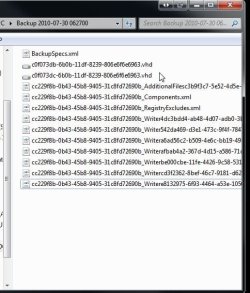
Huh? Have a look at the attached image of how a system image looks in the WindowsImageBackup folder. A vhd is something totally different there. The download and installer for the XP Mode will set up that VHD. Otherwise for manually creating a new one you would look at a guide for that. Virtual Hard Disk - Create and Attach VHD
Now Acronis True Image and likely other imaging softwares will be about to mount thier own form of image where it can look as if you have two C drives with a slight color change however when seen in an explorer window to tell them apart. That allows you to edit an image for incrementally adding more or even removing something. | My System Specs | | OS Windows 7 Ultimate x64, XP Mode, W8 RP VM, Linux Mint Debian 2nd OS HD- 7 Pro x64 second case CPU AMD Phenom II X4 975 Deneb 3.6ghz - 965 on new mini tower Motherboard Gigabyte GA-790XTA-UD4 Memory Kingston Hyper X DDR3 1600 1.5v 16gb - Mushkin on 2nd build Graphics Card MSI HD Radeon 5750 1gb - MSI HD Radeon 6450 on mini tower Sound Card Creative Labs X-Fi XtremeGamer - Realtek onooard 2nd case Monitor(s) Displays 2 x Acer P191W 19" widesscreen - HP 20" widescreen mini towe Screen Resolution 1440x900 native - 1600x1024 on 7 Pro x64 build Keyboard Microsoft Recusa Razor - MS Comfort 3000 on second build Mouse MS Trackball Explorer - A4TECH dual scroll wheel trackball PSU Corsair 750TX - primary / Corsair CX600 - second Case Antec 900-2 - SSD compatible / NZXT Vulcan mini tower Cooling Zalman CNPS9900A Hard Drives Primary Ultimate x64 build-
WD Black Edition 1tb Sata 6.0 = 2
WD Black Edition 1tb Sata 3.0 = 2 (OS drives)
WD 1tb Green Power sata = 2 1 external
usb flash drives = 18
Second 7 Pro x64 mini tower-
WD Caviar SE 500gb sata II single drive presen Internet Speed 30mbps upgrade - primary hard wired - mini tower usb WiFi |
14 Aug 2010
|
#6 | | |
So, Clonezilla? Know what my problem may be? Windows boots fine, Ubuntu boots fine. I dont know why Clonezilla won't, it is a Linux distro after all. | My System Specs | | System Manufacturer/Model Number Custom Build OS Windows 7 x64 CPU AMD Phenom II x6 1055T Motherboard Gigabyte GA-890GPA-UD3H Memory 16GB Kingston HyperX DDR3 1600 Graphics Card Gigabyte NVidia GTX470 Sound Card Dolby Digital - chipset Monitor(s) Displays HP w2338h Screen Resolution 1920x1080 Keyboard Verbatim Mouse Verbatim PSU Coolmax Green Power 950W Case Thermaltake Element G Cooling Thermaltake Frio heatsink and fans/Stock case fans Hard Drives Lots Internet Speed fast enough |
14 Aug 2010
|
#7 | | Windows 7 Ultimate x64, XP Mode, W8 RP VM, Linux Mint Debian 2nd OS HD- 7 Pro x64 second case New England |
It depends on what you are using for a main boot loader. If you are using EasyBCD for adding into the 7 loader you will need to add a new entry in to see NeoGrub pointed at the root for that one. | My System Specs | | OS Windows 7 Ultimate x64, XP Mode, W8 RP VM, Linux Mint Debian 2nd OS HD- 7 Pro x64 second case CPU AMD Phenom II X4 975 Deneb 3.6ghz - 965 on new mini tower Motherboard Gigabyte GA-790XTA-UD4 Memory Kingston Hyper X DDR3 1600 1.5v 16gb - Mushkin on 2nd build Graphics Card MSI HD Radeon 5750 1gb - MSI HD Radeon 6450 on mini tower Sound Card Creative Labs X-Fi XtremeGamer - Realtek onooard 2nd case Monitor(s) Displays 2 x Acer P191W 19" widesscreen - HP 20" widescreen mini towe Screen Resolution 1440x900 native - 1600x1024 on 7 Pro x64 build Keyboard Microsoft Recusa Razor - MS Comfort 3000 on second build Mouse MS Trackball Explorer - A4TECH dual scroll wheel trackball PSU Corsair 750TX - primary / Corsair CX600 - second Case Antec 900-2 - SSD compatible / NZXT Vulcan mini tower Cooling Zalman CNPS9900A Hard Drives Primary Ultimate x64 build-
WD Black Edition 1tb Sata 6.0 = 2
WD Black Edition 1tb Sata 3.0 = 2 (OS drives)
WD 1tb Green Power sata = 2 1 external
usb flash drives = 18
Second 7 Pro x64 mini tower-
WD Caviar SE 500gb sata II single drive presen Internet Speed 30mbps upgrade - primary hard wired - mini tower usb WiFi |
15 Aug 2010
|
#8 | | MS Windows 7 Ultimate SP1 64-bit Austin, Texas |

Quote: Originally Posted by Night Hawk Huh? Have a look at the attached image of how a system image looks in the WindowsImageBackup folder.
You are nearly looking in the correct place. Let's see if I've got a snapshot showing you where, although Brink' tutorial Backup Complete Computer - Create an Image Backup
also points out the location.
You can also simply search for VHD files. | My System Specs | | System Manufacturer/Model Number Toshiba Satellite S875D-S7239 laptop OS MS Windows 7 Ultimate SP1 64-bit CPU AMD A10-4600M Motherboard AMD Pumori (Socket FT1) Memory 6.00 GB Dual-Channel DDR3 @ 798MHz (11-11-12-28) Graphics Card AMD Radeon HD 7660G Sound Card High Definition Audio Device Monitor(s) Displays Generic PnP Monitor (1600x900@60Hz) Screen Resolution 1600x900@60Hz Keyboard Standard PS/2 Keyboard Mouse HP Wireless Optical Mobile Mouse Model FHA-3410 Hard Drives SSD 119GB Corsair CSSD-V128GB2 ATA Device Internet Speed What the local pub, local coffee shop offers. Other Info Optical Drive:MATSHITA BD-CMB UJ160B ATA Device
Also have an Asus ha1002xp netbook with Win 7 Ultimate installed. |
15 Aug 2010
|
#9 | | Windows 7 Ultimate x64, XP Mode, W8 RP VM, Linux Mint Debian 2nd OS HD- 7 Pro x64 second case New England |
??? One VHD file? When you look at the screen you posted there you will note that the sub folder contains numerous files not one vhd file by itself. That's only a portion of the entire image. When looking at the image below note that two VHD files with the same name are seen not one for the images of the host drive here. That's a good one!
Essentially a full system image starts off with a new folder(WindowsImageBackup) and then moves ooto one main sub folder(user account named) wth a few more sub folders under that seeing one dated or "time stamped" where the recovery option will then use the time stamp to indicate which is the recommend image.
Sometimes restoring an image can also see boot problems as well as any you happen to be running into with the main installation when going to restore them. For seeing the second drive's image of the Vista install restored it blue screens in a quick flash and ends up in a full restart.
I'll have to unplug the host drive to perform a repair or try again to see the second restoration goes 100%. But that also indicates problems can appear in images at times where alternate backup methods should accompany them. | My System Specs | | OS Windows 7 Ultimate x64, XP Mode, W8 RP VM, Linux Mint Debian 2nd OS HD- 7 Pro x64 second case CPU AMD Phenom II X4 975 Deneb 3.6ghz - 965 on new mini tower Motherboard Gigabyte GA-790XTA-UD4 Memory Kingston Hyper X DDR3 1600 1.5v 16gb - Mushkin on 2nd build Graphics Card MSI HD Radeon 5750 1gb - MSI HD Radeon 6450 on mini tower Sound Card Creative Labs X-Fi XtremeGamer - Realtek onooard 2nd case Monitor(s) Displays 2 x Acer P191W 19" widesscreen - HP 20" widescreen mini towe Screen Resolution 1440x900 native - 1600x1024 on 7 Pro x64 build Keyboard Microsoft Recusa Razor - MS Comfort 3000 on second build Mouse MS Trackball Explorer - A4TECH dual scroll wheel trackball PSU Corsair 750TX - primary / Corsair CX600 - second Case Antec 900-2 - SSD compatible / NZXT Vulcan mini tower Cooling Zalman CNPS9900A Hard Drives Primary Ultimate x64 build-
WD Black Edition 1tb Sata 6.0 = 2
WD Black Edition 1tb Sata 3.0 = 2 (OS drives)
WD 1tb Green Power sata = 2 1 external
usb flash drives = 18
Second 7 Pro x64 mini tower-
WD Caviar SE 500gb sata II single drive presen Internet Speed 30mbps upgrade - primary hard wired - mini tower usb WiFi |
15 Aug 2010
|
#10 | | MS Windows 7 Ultimate SP1 64-bit Austin, Texas |
| My System Specs | | System Manufacturer/Model Number Toshiba Satellite S875D-S7239 laptop OS MS Windows 7 Ultimate SP1 64-bit CPU AMD A10-4600M Motherboard AMD Pumori (Socket FT1) Memory 6.00 GB Dual-Channel DDR3 @ 798MHz (11-11-12-28) Graphics Card AMD Radeon HD 7660G Sound Card High Definition Audio Device Monitor(s) Displays Generic PnP Monitor (1600x900@60Hz) Screen Resolution 1600x900@60Hz Keyboard Standard PS/2 Keyboard Mouse HP Wireless Optical Mobile Mouse Model FHA-3410 Hard Drives SSD 119GB Corsair CSSD-V128GB2 ATA Device Internet Speed What the local pub, local coffee shop offers. Other Info Optical Drive:MATSHITA BD-CMB UJ160B ATA Device
Also have an Asus ha1002xp netbook with Win 7 Ultimate installed. Need to make backup problems? All times are GMT -5. The time now is 08:54 AM. | |