Windows 7 Forums


Windows 7: system image backup - how does windows pick the drives to backup?

07 Sep 2010   #1

windows 7 built 7100
 
 
system image backup - how does windows pick the drives to backup?

Hi

From times to times I load my disk image backup from Windows 7 system and install the new programs/drivers i was using and save a new backup.

I usually to do this by backing up my C: drive, but this turn to my surprise, windows for some reason wants to backup C and D, is it possible to pick a drive for it to make a system image?

I'm mean, this is probably my 8th updagrade to the backup. I've always backed up from C: -> D:, which are on the same hdd, and now it suddenly needs to backup C and D to create a system image .

My System SpecsSystem Spec

07 Sep 2010   #2

W 7 64-bit Ultimate
The Lowcountry


Hello vbkun.


Will you please post a snip/screen-shot of the entire disk management drive map so we can see what you have going on.

In the Windows start menu right click computer and click manage, in the left pane of the "Computer Management" window that opens click disk management and post a snip of that.

How to Post a Screenshot in Seven Forums
My System SpecsSystem Spec
07 Sep 2010   #3

Win7 x 6 PC's
California, Florida, Boston


Post screenshot of your full Disk Management drive map and listings using Snipping Tool in Start Menu.

It should only require you to back up Windows 7 partition, and System Active if it is on a separate partition which can sometimes happen accidentally.
My System SpecsSystem Spec
.


08 Sep 2010   #4

windows 7 built 7100


I've attached the jpg image of the disk manager, as you may notice the D: is pointed just as Primary, neither active boot or system =(.
Attached Thumbnails
system image backup - how does windows pick the drives to backup?-capture.jpg  
My System SpecsSystem Spec
08 Sep 2010   #5

W 7 64-bit Ultimate
The Lowcountry


Hello again.


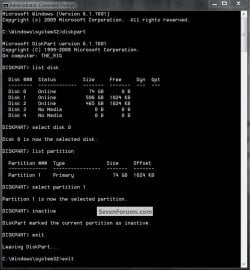
What has happened is that somehow the "Disk 1" has become marked as "Active" and that is confusing the backup program, to it the "Active" means that it has to be backed-up as well; have a look at the snip below to see how to mark the "Disk 1" as inactive and doing that should solve the issue.

Usually "Active" means there are boot files there that have to be backed-up as well.

Be sure to post back with an update.
click to enlarge
system image backup - how does windows pick the drives to backup?-inactive2.jpg
My System SpecsSystem Spec
08 Sep 2010   #6

64-bit Windows 7 Ultimate SP1 & Windows 8 Enterprise
Texas


Hello Vbkun,

The Warning box at the top of the tutorial below can help explain a bit more on what drives Windows 7 will include in the system image automatically, and what drives can be backed up or have the system image saved to.

Backup Complete Computer - Create an Image Backup

Hope this helps some,
Shawn
My System SpecsSystem Spec
08 Sep 2010   #7

Win7 x 6 PC's
California, Florida, Boston


Since System Active is C itself, it should not want to back up D which is neither. Try again.

You really should back up to a second HD since you have one to protect you in case of HD failure. Creating a Primary partition for the image makes it easier to autodetect from booted Windows 7 DVD Repair console or Repair CD.

As Barefoot says, F should not be marked Active so take I'd care of that as well.
My System SpecsSystem Spec
09 Sep 2010   #8

windows 7 built 7100


ow guys there was a small confusion here
it doesn't tries to backup F:
it tries to backup C: + D: (and D: is not marked as active or anything, just healthy).
I think I already did around 13/14 images for this system, in this same disk settings, only of C: never C:+D: -.-

I think i should have let more clear wich partition it was trying to unnecessarily backup .
My System SpecsSystem Spec
09 Sep 2010   #9

Win7 x 6 PC's
California, Florida, Boston


Right, but whether or not it wants to back up F, it should not be marked Active.

Why it wants to backup D is a mystery to me. I would try again.
My System SpecsSystem Spec
Reply

 system image backup - how does windows pick the drives to backup? problems?


Thread Tools


Similar help and support threads for: system image backup - how does windows pick the drives to backup?
Thread Forum
Solved windows system image backup query Backup and Restore
Solved Can Windows Backup create image for all drives? Backup and Restore
Restoring windows, System image backup? Backup and Restore
Is this a general backup or system IMAGE & BACKUP Backup and Restore
Backup and Restore multiple system image drives Backup and Restore


All times are GMT -5. The time now is 07:31 PM.


Seven Forums Android App Seven Forums IOS App Follow us on Facebook

Windows 7 Forums is an independent web site and has not been authorized,
sponsored, or otherwise approved by Microsoft Corporation.
"Windows 7" and related materials are trademarks of Microsoft Corp.
© Designer Media Ltd
  

1 2 3 4 5 6 7 8 9 10 11 12 13 14 15 16 17 18 19 20 21 22 23 24 25 26 27 28 29 30 31 32