How to restore registry after deleting them with Revo uninstaller?

ThumperSD

New member
Ive been having some computer problems since this happened. I know Revo backs up your registry before uninstalling. How can I restore this?? I dont see the option in Revo

I am using Revo pro by the way
 

My Computer

Computer Manufacturer/Model Number
Self-built
OS
Windows 7
CPU
i7 920 @ 3.8ghz
Motherboard
MSI X58 Pro-E
Memory
6GB Corsair Dominator
Graphics Card(s)
ATI Radeon HD5850
Sound Card
Musiland Monitor 02 US
Monitor(s) Displays
Dell 24"
Screen Resolution
1920x1200
Hard Drives
Intel X25-M 80GB SSD & Samsung Spinpoint F3 1TB
PSU
Antec EA650
Case
Antec 900
Cooling
Corsair H50
Keyboard
Logitech G11
Mouse
Logitech G9x
Internet Speed
23 mb/s
Hello,

Go to Tools > Backup Manager > there you'll see the your backup just right click on it and Click on Restore.


Hope this helps,
Captain
 

My Computer

Computer Manufacturer/Model Number
Samsung NP550P5C-S02IN
OS
Windows 7 Ultimate - 64-bit | Windows 8 Pro - 64-bit
CPU
Intel® Core™ i7 Processor 3,610QM (2.30Hz, 6MB L3 Cach
Memory
8 GB
Graphics Card(s)
NVIDIA® GeForce® GT 650M 2GB Graphics, Optimus™ techno
Sound Card
SoundAlive™ JBL 3 Speakers (With sub-Woofer)
Monitor(s) Displays
39.62cm (15.6) SuperBright 300nit HD+ LED Display
Screen Resolution
1,600 x 900, Anti-Reflective
Hard Drives
1TB S-ATA II Hard Drive (5,400RPM)
Thanks for the quick reply

Capture-5.jpg


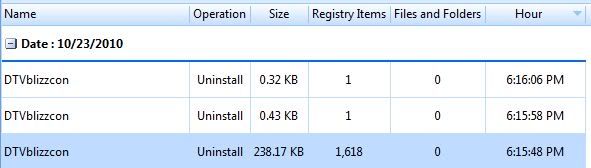
I am unsure which one of these to select. I am assuming that I would select the last option since it has the most registry files yet if I select it, will I be able to restore the other two?

As you can see, there were a TON of registry files for such a small program... ugh
 

My Computer

Computer Manufacturer/Model Number
Self-built
OS
Windows 7
CPU
i7 920 @ 3.8ghz
Motherboard
MSI X58 Pro-E
Memory
6GB Corsair Dominator
Graphics Card(s)
ATI Radeon HD5850
Sound Card
Musiland Monitor 02 US
Monitor(s) Displays
Dell 24"
Screen Resolution
1920x1200
Hard Drives
Intel X25-M 80GB SSD & Samsung Spinpoint F3 1TB
PSU
Antec EA650
Case
Antec 900
Cooling
Corsair H50
Keyboard
Logitech G11
Mouse
Logitech G9x
Internet Speed
23 mb/s
Update:
I restored each of the three entries in the screen shot. It fixed many problems I was having including no sound, Microsoft Office invalid product key etc..

Now I have a questions:

Now I still have all of these messy residual registries after restoring the computer. Is there any way to clean these up without messing up my computer again?
 

My Computer

Computer Manufacturer/Model Number
Self-built
OS
Windows 7
CPU
i7 920 @ 3.8ghz
Motherboard
MSI X58 Pro-E
Memory
6GB Corsair Dominator
Graphics Card(s)
ATI Radeon HD5850
Sound Card
Musiland Monitor 02 US
Monitor(s) Displays
Dell 24"
Screen Resolution
1920x1200
Hard Drives
Intel X25-M 80GB SSD & Samsung Spinpoint F3 1TB
PSU
Antec EA650
Case
Antec 900
Cooling
Corsair H50
Keyboard
Logitech G11
Mouse
Logitech G9x
Internet Speed
23 mb/s
Update:
I restored each of the three entries in the screen shot. It fixed many problems I was having including no sound, Microsoft Office invalid product key etc..

Now I have a questions:

Now I still have all of these messy residual registries after restoring the computer. Is there any way to clean these up without messing up my computer again?

To be honest i won't recommend to clean them because it won't harm your System or affect the performance because there isn't any trusted program that will clean the Registry without endangering the PC. Lets it be there you'll be better off without removing them.

Hope this helps,
Captain
 

My Computer

Computer Manufacturer/Model Number
Samsung NP550P5C-S02IN
OS
Windows 7 Ultimate - 64-bit | Windows 8 Pro - 64-bit
CPU
Intel® Core™ i7 Processor 3,610QM (2.30Hz, 6MB L3 Cach
Memory
8 GB
Graphics Card(s)
NVIDIA® GeForce® GT 650M 2GB Graphics, Optimus™ techno
Sound Card
SoundAlive™ JBL 3 Speakers (With sub-Woofer)
Monitor(s) Displays
39.62cm (15.6) SuperBright 300nit HD+ LED Display
Screen Resolution
1,600 x 900, Anti-Reflective
Hard Drives
1TB S-ATA II Hard Drive (5,400RPM)
Now I still have all of these messy residual registries after restoring the computer. Is there any way to clean these up without messing up my computer again?

I ran into a similar situation with Revo Pro when uninstalling some of the crapware that came with my HP computer and as Jack recommended I just left them in in certain situations because some of the programs had over 5,000 Registry values and x64 programs are a lot more difficult to remove than x86 programs are. I made sure that I got Norton 2011 completely out though, but then it only left 1,400+ Registry values which was a cake walk compared to some of the programs I mentioned above.

~Maxx~
.
da59fa57.png
 

My Computer

Computer Manufacturer/Model Number
HP HPE 270f
OS
Windows 7 x64 Home Premium
CPU
Intel Core i7 930 @ 2.8 Ghz Socket 1366 LGA
Motherboard
Pegatron Truckee v1.04E41
Memory
8 GB 1366 Mhz DDR3 (PC3-10700) RAM
Graphics Card(s)
ATI Radeon 5770 1 GB DDR5 RAM
Sound Card
Realtech High Definition
Monitor(s) Displays
32" Sony Bravia
Screen Resolution
1366 X 768
Hard Drives
Intel 25nm 120 GB Series 320 SSD HD Tune- 265 MBps Read/ 130 MBps Write

LaCie 1TB + 1TB RAID 0 eSATA Drive HD Tune- 160 MBps Read/ 90 MBps Write
Keyboard
Logitech Illuminated
Mouse
Logitech MX Revolution
Internet Speed
36.4 Mbps Maximum on a 37 Mbps Motorola SB501 Modem
Back
Top