Windows 7 Forums


Windows 7: System Restore failed

16 Jan 2013   #31

windows 7 home premium 64 bit


Hey.
I have a Netbook so i can not use any CD or so.
I followed the steps in the second option till "RegBack"
Now i have a problem do do theses steps:
ren default default.bak
ren sam sam.bak
ren security security.bak
ren software software.bak
ren system system.bak
copy RegBack\*.*

I tried to run the commands but it simply won't work.I get " 'system.bak' is not recogmized as an internal or external command, operable programm or batch files."
How do i exactly type in the above commandy after C:\Windows\System32\config>

It would make my life so much easier right now if i could get this fixed. Thank you very very much for your help! =)


Quote   Quote: Originally Posted by jbaileyn View Post
Sure, GTXND. Forgive me if I oversimplify but I'll include each step in case you're not familiar with navigating command lines (I was a tech support guy in college 20 years ago; old habits die hard). Also, changing registry files can be VERY DANGEROUS... I would only do it as a last resort before reinstalling Windows 7.

I first booted from the Windows 7 install disc to get to the system recovery console. I then selected Command Line. From there, I had to change from the X: drive to the C: drive by typing "C:". I then typed "cd \windows\system32\config" to get to the registry file directory. By typing "dir" I could see that two of the five hive files (default, sam, security,software, and system) had recent copies with an "rmbak" extension: default.rmbak and software.rmbak. I then executed the following commands:

ren software software.bak
copy software.rmbak software

ren default default.bak
copy default.rmbak default

I would suggest you execute the "ren" then "copy" commands as above for any other hives that have "rmbak" backups with the same date/time stamp. This ensures your registry remains in sync. You can now reboot and see if your computer comes up.

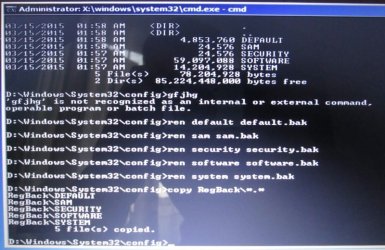
Here is an alternative suggestion if you don't have these "rmbak" files (if the above worked, don't do these steps; these would be a last-last resort before reinstalling Windows 7). From where we left off above type "dir RegBack". See what the time/date stamp is on the hive files there. If recent (use your judgment; mine is a couple days old so I would have probably used it had I not had the rmbak files, as I hadn't installed much in that time), you could do the following to restore that backup registry:

ren default default.bak
ren sam sam.bak
ren security security.bak
ren software software.bak
ren system system.bak
copy RegBack\*.*

Reboot and see what happens. If this worked, you may have to reinstall any software that was installed after the time/date stamps of the files in the RegBack directory.

One final note: I did try to restore to an earlier restore point once I made the above fixes. It kept coming up with an error. Therefore, I suggest creating a new restore point once the computer recovers, just so you have a clean one.

My System SpecsSystem Spec

09 Mar 2013   #32

Windows 7 64 Bit
 
 
Wowwwwwwwww

I still can't believe that worked. Some of the commands said "Command not found". But I typed in exactly what was said. Pressed Restart. Chose boot normally.BAM, there was my logon. Best feeling ever. thank you!!!!!!!!!!!!!!
My System SpecsSystem Spec
22 Apr 2013   #33

Windows 8


Quote   Quote: Originally Posted by jbaileyn View Post
Here is an alternative suggestion if you don't have these "rmbak" files (if the above worked, don't do these steps; these would be a last-last resort before reinstalling Windows 7). From where we left off above type "dir RegBack". See what the time/date stamp is on the hive files there. If recent (use your judgment; mine is a couple days old so I would have probably used it had I not had the rmbak files, as I hadn't installed much in that time), you could do the following to restore that backup registry:

ren default default.bak
ren sam sam.bak
ren security security.bak
ren software software.bak
ren system system.bak
copy RegBack\*.*

Reboot and see what happens. If this worked, you may have to reinstall any software that was installed after the time/date stamps of the files in the RegBack directory.

One final note: I did try to restore to an earlier restore point once I made the above fixes. It kept coming up with an error. Therefore, I suggest creating a new restore point once the computer recovers, just so you have a clean one.
This worked like a charm for me on Windows 8. I was really stuck, can't believe that the MS tools can't perform such a simple fix automatically, what the &*^*%( is the automatic fix trying to do if it doesn't try this?
My System SpecsSystem Spec
.


26 Apr 2013   #34

Win7 Premium 32bit
 
 
System restore

Hello Doug,

You can try doing the following.. I hope you will be able to recover from it..
Run System Restore in Safe Mode

Start Windows in safe mode. To run Windows in safe mode, turn on or restart your computer. When the splash screen from the PC’s manufacturer is displayed, hold down the F8 key. You will see a text based screen with several options appear that will look a lot like Figure 1 below. Using the up and down arrow keys, select the option “Safe Mode”, then hit the enter key on your keyboard. The computer will start Windows in safe mode which is Windows with a limited set of files and drivers. If Windows loads normally, try repeating the instructions above.
Next start System Restore. You can access System Restore from the System Tools menu in the Accessories group. Select the restore point that you want and follow the onscreen instructions. Your computer will restart, Windows will load and present a dialog box telling you whether or not System Restore was successful. If System Restore was not successful, try the next approach.

Run System Restore in a Clean Boot Environment
Start Windows by performing a clean boot. Below, there are links to instructions for different versions of
Next start System Restore. You can access System Restore from the System Tools menu in the Accessories group. Select the restore point that you want and follow the onscreen instructions. Your computer will restart, Windows will load and present a dialog box telling you whether or not System Restore was successful.
My System SpecsSystem Spec
Reply

 System Restore failed problems?


Thread Tools


Similar help and support threads for: System Restore failed
Thread Forum
System Restore Failed. Backup and Restore
System Restore Failed Backup and Restore
system image restore failed Backup and Restore
System Restore Failed Backup and Restore
Failed System Restore Backup and Restore


All times are GMT -5. The time now is 05:36 AM.


Windows 7 Forums is an independent web site and has not been authorized,
sponsored, or otherwise approved by Microsoft Corporation.
"Windows 7" and related materials are trademarks of Microsoft Corp.
© Designer Media Ltd