| Windows 7: Restore to new size hard drive |
06 Nov 2010
|
#1 | | |
Restore to new size hard drive Dear All,
I run windows 7 on Bootcamp on Mac. I wanted to re-size the Mac partition and give windows larger space. So I backed up windows which generated several files (among which is a .vhd file). Now I have increased the windows partition from 32G to 100G, then I restored from the .vhd (that lives on an external hard drive) using Windows 7 install DVD. However, the restored windows shows a hard disk drive of only 32G.
So how can I force the restore to skip the original size of the hard drive?
Thanks,
Mags | My System Specs |
| |
07 Nov 2010
|
#2 | | Windows 7 x64 Ultimate A Finnish immigrant in Leipzig, Germany |
Hi Mags, welcome to the Seven Forums.
To start, double posting is against our rules. Your post here is exactly the same, so I have asked mods to remove it. This is a backup issue, not virtualization issue.
Back to the topic. After restoring to bigger partition, start Windows and type diskmgmt.msc to Start menu's search field and hit Enter. This opens Windows 7 Disk Management Utility.
Enlarge the Disk Management window big enough to show all information without need to scroll. Take a screenshot and post it here. Instructions on posting screenshots: Screenshots and Files - Upload and Post in Seven Forums
Kari | My System Specs | | Computer type Laptop System Manufacturer/Model Number HP ENVY 17-1150eg OS Windows 7 x64 Ultimate CPU 1.6 GHz Intel Core i7-720QM Processor Memory 6 GB Graphics Card ATI Mobility Radeon HD 5850 Graphics Sound Card Beats sound system with integrated subwoofer Monitor(s) Displays 17" laptop display, 22" LCD and 32" Full HD TV through HDMI Screen Resolution 1600*900, 1680*1050 and 1920*1080 Keyboard Logitech diNovo Media Desktop Laser (bluetooth) Mouse Logitech MX1000 Laser (Bluetooth) Hard Drives Internal: 2 x 500 GB SATA Hard Disk Drive 7200 rpm
External: 2TB for backups, 3TB USB3 network drive for media Internet Speed 50/10 Mbps VDSL Antivirus MSE, Windows Defender Browser Maxthon 3.5.2. Other Info Windows 7 Ultimate Retail Full in English, additional Guest-user accounts in Finnish, German and Swedish (Working languages English & Swedish, Family language German, my own language, mother tongue, Finnish. I really need Ultimate to get to use Language Packs!) |
07 Nov 2010
|
#3 | | Windows 7x64 Home Premium SP1 x 2 Australia |
Windows images are restored to the partition size they were made from, in this case 32 GB by the sounds of it. You probably have a chunk of unallocated space which is easy to allocate.
Send the screen shot Kari requested to be sure. | My System Specs | | System Manufacturer/Model Number Own build (+ Recased Acer Aspire x1800) OS Windows 7x64 Home Premium SP1 x 2 CPU Intel i7 2600k Motherboard ASUS P8Z68 Deluxe Memory G.Skill Ripjaws (DDR3-1600) 2x4GB Graphics Card Nvidia GeForce GTS 450; Intel HD Graphics 3000(GT2+) Monitor(s) Displays Dell Ultrasharp IPS panel U2311H, Samsung SyncMaster P2350 Screen Resolution 1920x1080 Keyboard Logitech MK520 (wireless) Mouse Logitech MK520 PSU Seasonic M12II 520W Case Lian Li Lancool PC-K60 Cooling Case: 1x120mm, 3x140mm CPU: Hyper 212+ Hard Drives Crucial M4 128GB (000F), Seagates 1TB Barracuda ST31000528AS + Internet Speed 6-7 Mbps Antivirus Norton NIS, Malwarebytes on 2 (MSE on 3rd PC) Browser FireFox Other Info Audio: Logitech Z523 2.1 |
09 Nov 2010
|
#4 | | |
I really have a strange situation. As I explained My windows lives on a Bootcamp partition on Mac.
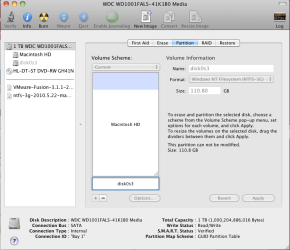
Image1 shows the disk as viewed inside the Mac, which shows a full 100.8 GB
I have used VMware Fusion to restore my old windows, Image 2, shows the progress of this.
After I restored my windows, I started the restored Bootcamp Windows inside the VMare and when I run the "Disk Management", I get Image3. It shows only my original windows size 31.32GB not my new size of 110GB, as well as a 128MB unallocated, but the difference between 110 & 32 is not there!!!
Thanks,
Mags | My System Specs | | |
10 Nov 2010
|
#5 | | Windows 7x64 Home Premium SP1 x 2 Australia |
With your additional information, I don't think I can help here. I see it as a Mac/VMware/Bootcamp issue and therefore a virtualization issue. I understand your dilemma in where to post the thread.
If this was simply a Windows environment then you could adjust your partitions easily enough. Someone else may be able to help out. | My System Specs | | System Manufacturer/Model Number Own build (+ Recased Acer Aspire x1800) OS Windows 7x64 Home Premium SP1 x 2 CPU Intel i7 2600k Motherboard ASUS P8Z68 Deluxe Memory G.Skill Ripjaws (DDR3-1600) 2x4GB Graphics Card Nvidia GeForce GTS 450; Intel HD Graphics 3000(GT2+) Monitor(s) Displays Dell Ultrasharp IPS panel U2311H, Samsung SyncMaster P2350 Screen Resolution 1920x1080 Keyboard Logitech MK520 (wireless) Mouse Logitech MK520 PSU Seasonic M12II 520W Case Lian Li Lancool PC-K60 Cooling Case: 1x120mm, 3x140mm CPU: Hyper 212+ Hard Drives Crucial M4 128GB (000F), Seagates 1TB Barracuda ST31000528AS + Internet Speed 6-7 Mbps Antivirus Norton NIS, Malwarebytes on 2 (MSE on 3rd PC) Browser FireFox Other Info Audio: Logitech Z523 2.1 |
10 Nov 2010
|
#6 | | Windows 7 x64 Ultimate A Finnish immigrant in Leipzig, Germany |
This would be a question to Mac Forums, but let's not give up yet.
I do not know how Bootcamp / VMware works on Mac. But if you created a 11o gig HD, the rest of it should be there. If you right click the Windows disk in Disk Management, is the Extend volume visible and available, or is it grayed out? | My System Specs | | Computer type Laptop System Manufacturer/Model Number HP ENVY 17-1150eg OS Windows 7 x64 Ultimate CPU 1.6 GHz Intel Core i7-720QM Processor Memory 6 GB Graphics Card ATI Mobility Radeon HD 5850 Graphics Sound Card Beats sound system with integrated subwoofer Monitor(s) Displays 17" laptop display, 22" LCD and 32" Full HD TV through HDMI Screen Resolution 1600*900, 1680*1050 and 1920*1080 Keyboard Logitech diNovo Media Desktop Laser (bluetooth) Mouse Logitech MX1000 Laser (Bluetooth) Hard Drives Internal: 2 x 500 GB SATA Hard Disk Drive 7200 rpm
External: 2TB for backups, 3TB USB3 network drive for media Internet Speed 50/10 Mbps VDSL Antivirus MSE, Windows Defender Browser Maxthon 3.5.2. Other Info Windows 7 Ultimate Retail Full in English, additional Guest-user accounts in Finnish, German and Swedish (Working languages English & Swedish, Family language German, my own language, mother tongue, Finnish. I really need Ultimate to get to use Language Packs!) Restore to new size hard drive problems? All times are GMT -5. The time now is 03:37 PM. | |