Hello, thanks for looking,
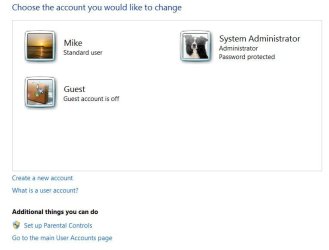
I have a Windows 7 Home Premium 64 laptop with a single user on it. This user recently got changed to a guest account type from admin account type and I can't fix it.
I have read all the guides to "enable hidden administrator account" using "net user administrator /active:yes" but it doesn't work from regular command prompt (ie not run as administrator, can't get past UAC), safe mode command prompt, or system recovery command prompt.
I have also tried to disable UAC via system recovery command prompt by running regedit and doing the equivalent of this: "C:\Windows\System32\cmd.exe /k %windir%\System32\reg.exe ADD HKLM\SOFTWARE\Microsoft\Windows\CurrentVersion\Policies\System /v EnableLUA /t REG_DWORD /d 0 /f" Obviously I can't change this from a safe mode command prompt because my user doesn't have the privileges. When I boot into safe mode, it automatically logs me into the user, there is no option for anything else.
I should also mention that Ive tried this as well: http://www.sevenforums.com/tutorials/102552-built-administrator-enable-winre.html
Method 1, after typing enableadmin <enter> I got the error "The subsystem needed to support the image type is not present".
Method 2, the load hive option was greyed out.
I am certain that tutorial is ALMOST what I need but they didn't work. Any thoughts?
Unfortunately nothing will work that requires an administrator account or adminstrator console. I believe my user problem can only be fixed from system recover command prompt. Does anyone know how to add a new administrator user, or change the account type on my existing user?
Please please please please help.
CB
I have a Windows 7 Home Premium 64 laptop with a single user on it. This user recently got changed to a guest account type from admin account type and I can't fix it.
I have read all the guides to "enable hidden administrator account" using "net user administrator /active:yes" but it doesn't work from regular command prompt (ie not run as administrator, can't get past UAC), safe mode command prompt, or system recovery command prompt.
I have also tried to disable UAC via system recovery command prompt by running regedit and doing the equivalent of this: "C:\Windows\System32\cmd.exe /k %windir%\System32\reg.exe ADD HKLM\SOFTWARE\Microsoft\Windows\CurrentVersion\Policies\System /v EnableLUA /t REG_DWORD /d 0 /f" Obviously I can't change this from a safe mode command prompt because my user doesn't have the privileges. When I boot into safe mode, it automatically logs me into the user, there is no option for anything else.
I should also mention that Ive tried this as well: http://www.sevenforums.com/tutorials/102552-built-administrator-enable-winre.html
Method 1, after typing enableadmin <enter> I got the error "The subsystem needed to support the image type is not present".
Method 2, the load hive option was greyed out.
I am certain that tutorial is ALMOST what I need but they didn't work. Any thoughts?
Unfortunately nothing will work that requires an administrator account or adminstrator console. I believe my user problem can only be fixed from system recover command prompt. Does anyone know how to add a new administrator user, or change the account type on my existing user?
Please please please please help.
CB
My Computer
At a glance
Win 7 Home Premium 64
- OS
- Win 7 Home Premium 64